


VINCHIN ONLINE DEMO

Get Hands-on with Better Backup

Try Vinchin Backup & Recovery in your browser.
Explore the management console, backup jobs,
and recovery workflows.

  • No installation
  • Real product interface
  • Key workflows
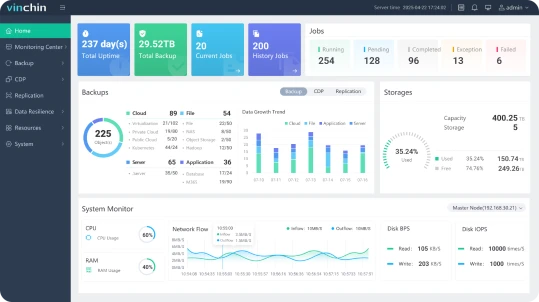
Vinchin Backup & Recovery management console

Illustrative interface. Actual screens and available resources may vary.

TRY IT YOURSELF

Request Demo Access

Tell us a little about yourself to receive demo access instructions.

What would you like to explore? (select any)

Please do not include passwords, credentials, or other sensitive information.

By submitting this form, you agree to our Privacy Policy.

Get Started with Vinchin Online Demo in 3 Simple Steps

1

Submit Your Details

Complete your basic information online.

2

Get Your Account

We'll email you the trial URL and login details.

3

Experience Online Demo

Open the trial system and log in to start exploring.

EXPLORE THE EXPERIENCE

Explore the Overview. Discover the Details

Get familiar with everyday data protection workflows and see how Vinchin fits the way your team works.

01 / OVERVIEW

Navigate the Console

Browse the main feature pages, find key controls, and see how information is organized for everyday management.

Dashboard · Navigation

02 / WORKLOADS

View Preset Workloads

Check the workloads already added to the demo and see where to find resource details and management options.

Preset Workloads · Resource Details

03 / BACKUP

Set Up Backup Jobs

Review the available job creation and policy settings to see how backup jobs are configured and managed.

Job Setup · Backup Policies

04 / RECOVERY

Walk Through Recovery

Find available recovery options, job statuses, and activity records to follow the full workflow from backup to recovery.

Recovery Options · Job Monitoring

A Demo Environment Built for Quick Exploration

Most web console operations are available. Due to resource and security constraints, some workload types are not included, and changes to certain core system settings are restricted. The demo does not reflect the full range of supported platforms. Available actions depend on the current environment.

QUESTIONS & ANSWERS

A Few Things
Before You Start

Find answers about access, available operations, and evaluating your use case.

Have a Specific Use Case? Tell Us

Q1: How does the online demo differ from a local trial?

A: The online demo runs in a preconfigured environment so you can quickly explore the interface and key workflows. A local trial lets you evaluate compatibility, backup and recovery results, and performance using your own infrastructure and business requirements.

Q2: Do I need to install software or prepare an environment?

A: No backup system deployment is needed. Once you receive access, sign in through your browser and explore the resources already configured in the demo.

Q3: What can I do in the online demo?

A: You can browse the main feature pages and try most available web console operations. The settings, jobs, and recovery actions you can use depend on the resources and permissions provided in the current demo environment.

Q4: Why is the workload I want to test missing?

A: Resource limits mean the demo does not include every workload type. A workload missing from the demo does not mean it is unsupported by the product. Tell us your platform, version, and requirements in the form so we can help confirm support and evaluation options.

Q5: Why are some system settings locked?

A: Changes to certain core system settings are restricted to keep the demo environment secure and stable. You can still explore the main product workflows through the available pages and operations.

Q6: Can I use the demo to benchmark backup and recovery performance?

A: The demo is designed to introduce the interface and workflows. Its resources, network conditions, and configuration differ from your own environment, so results should not be used as production performance benchmarks. For performance validation, arrange a test tailored to your actual use case.

Q7: Can I add my own devices or upload business data?

A: Please use the workloads and data provided in the demo. Do not upload production data, sensitive information, or real access credentials. If you need to connect your own environment, describe your requirements in the form so a dedicated evaluation can be arranged.

Q8: What if I need help or want to evaluate more features?

A: Use the request form to describe the workloads, features, or use cases you want to evaluate. Once this prototype is connected to the request system, our team can follow up using your contact details and help arrange a further demo or trial.