What's New in Proxmox Backup Server 4.2
Based on Debian 13.4 "Trixie," the new release brings Linux kernel 7.0, ZFS 2.4, official S3-compatible object storage support, improved sync security, and enhanced backup management capabilities. Keep reading to know more.
1. Official S3-Compatible Object Storage Support
This is one of the biggest highlight. Administrators can now use S3 storage for backup repositories and offsite retention strategies.
With native S3 compatibility, PBS becomes more flexible for cloud-integrated backup deployments.
PBS 4.2 also introduces datastore traffic statics and request counters for S3-backed storage, helping administrators monitor usage and detect abnormal traffic patterns early.
2. Parallel Sync Jobs for Fast Replication
Another major improvement is concurrent group processing for sync jobs using the new worker-threads functionality.
This improves:
3. Server-Side Encryption and Decryption for Sync Jobs
Security enhancements are another strong focus of PBS 4.2.
Push sync jobs can now encrypt snapshots during transfer before sending them to remote backup servers.
Pull sync jobs can also decrypt snapshots automatically.
4. Backup Group and Namespace Relocation
Administrators can now move backup groups and namespaces within the same datastore.
Previously, reorganizing backup structures often required more manual effort.
5. Updated Core Platform Stack
PBS 4.2 upgrades several foundational technologies:
Debian - 13.4 "Trixie"
Linux Kernel - 7.0
ZFS - 2.4
How to do Proxmox Backup Server Update
Recommended Precautions:
Create verified backups
Snapshot PBS virtual machines
Verify datastore health
Confirm network interface persistence
Test remote sync jobs
Validate restore procedures
Proxmox officially supports seamless upgrades using standard APT package management.
Basic Upgrade Commands
1. Update package lists
apt update
2. Run the distribution upgrade
apt dist-upgrade
3. Verify the version
proxmox-backup-manager versions
4. After upgrading
Reboot
Administrators should also verify repository configuration, especially when using the no-subscription repository.
Extending Proxmox Protection with Vinchin Backup & Recovery
Although Proxmox Backup Server is powerful for Proxmox VE environments, many enterprise operate mixed virtualization infrastructures. In the case, third-party enterprise backup platforms can provide additional value.
Vinchin Backup & Recovery is enterprise-grade backup and disaster recovery capabilities for virtualized and hybrid IT environments.
For organizations using Proxmox VE alongside other hypervisors, Vinchin helps centralize backup operations through a single management platform.
With Vinchin, you can enjoy:
Centralized Backup Management: As virtualization environments continue expanding, many enterprise are no longer operating a single hypervisor platform. Vinchin manages all backup jobs through a single interface.
Cross-platform protection: Vinchin supports heterogeneous infrastructures, including VMware, Hyper-V, Proxmox VE, XenServer, RHV, and Nutanix AHV. If you are in a mixed infrastructure, Vinchin provides easy management and migration.
Flexible Recovery Options: Vinchin offers instant VM recovery, granular file recovery, cross-platform restore, offsite replication, and immutable backup protection. All these help to reduce downtime.
Ransomware Resilience: Cybersecurity threats become more and more difficult to catch. Vinchin prevents ransomware by using storage protection and WORM protection.
Simple steps to configure Proxmox backup:
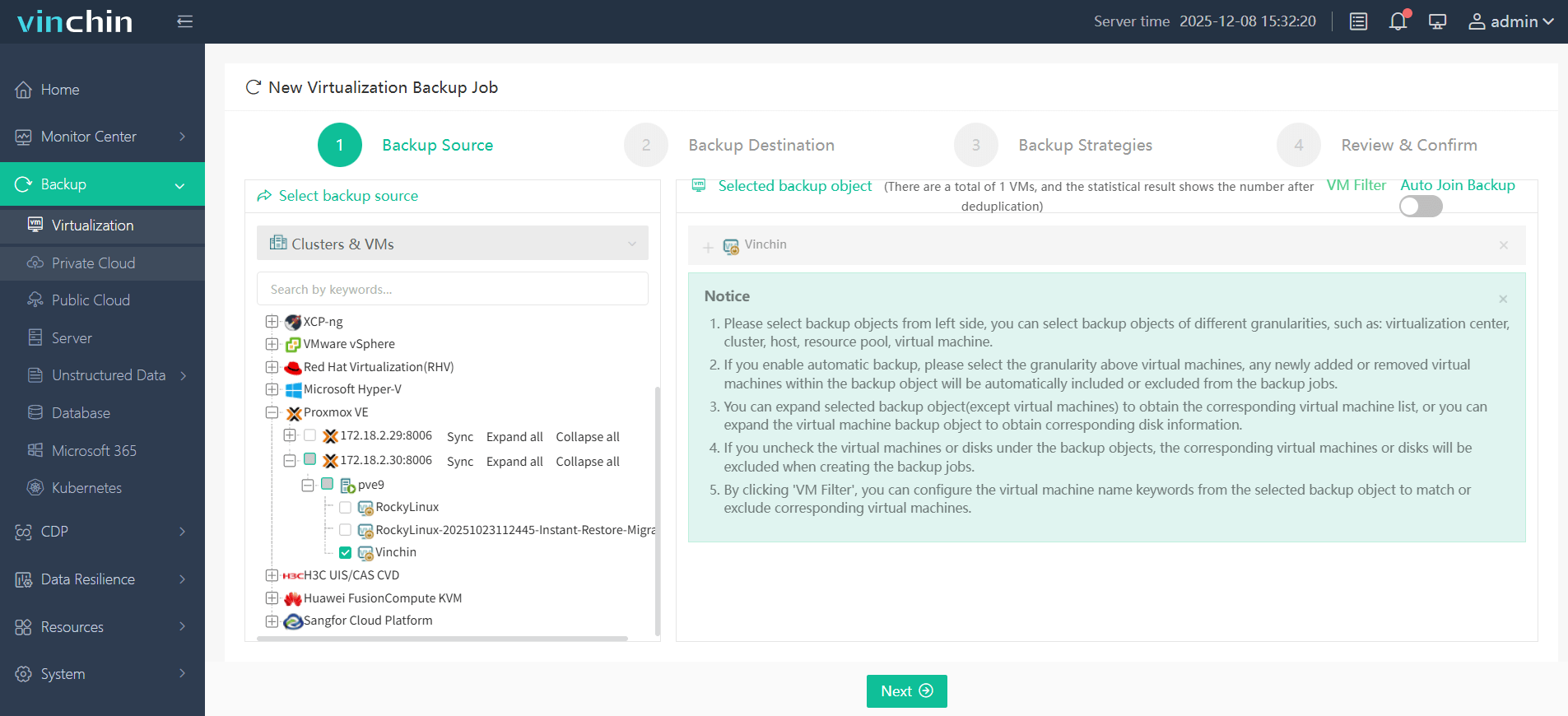
Step 1. In the left panel, go to Backup > Virtualization to choose the VM need to backup
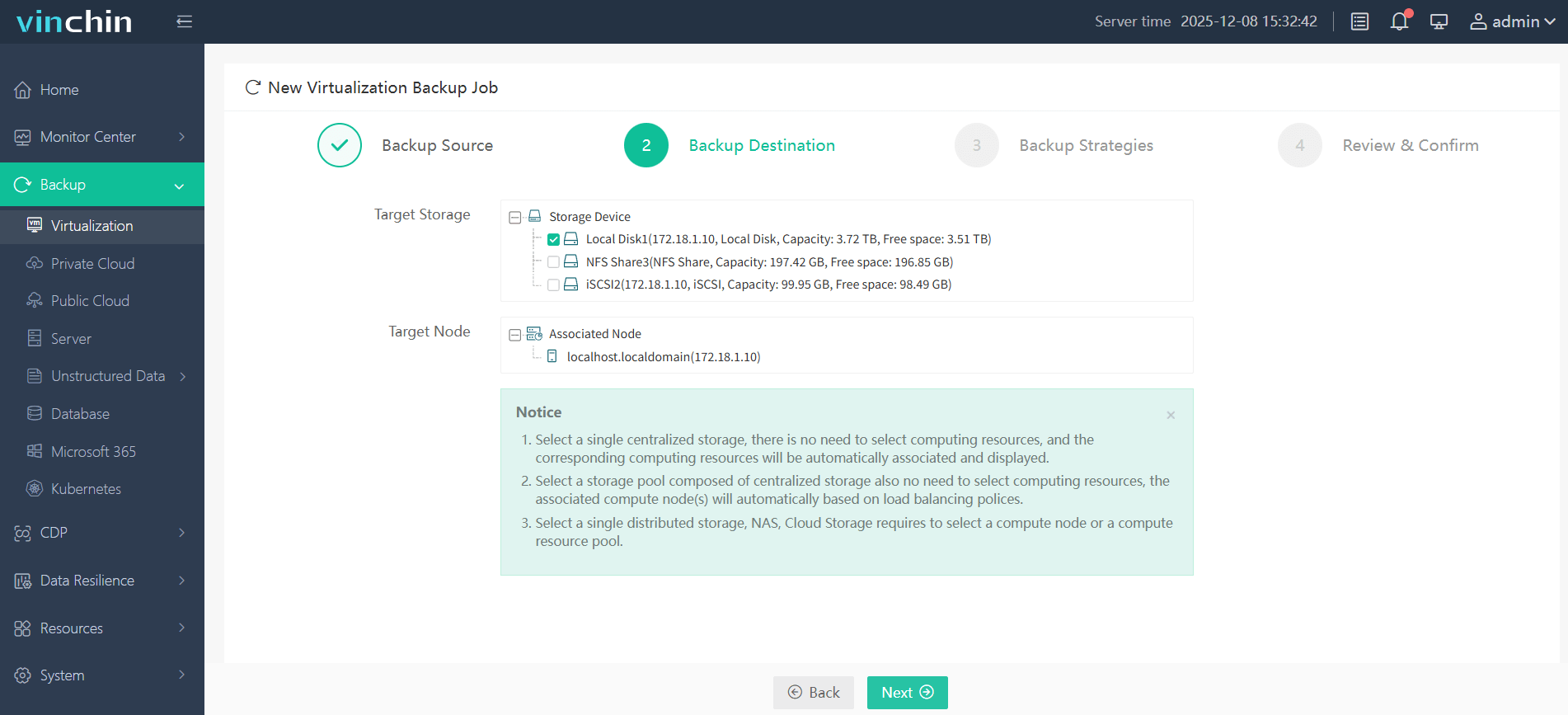
Step 2. Then choose your backup destination
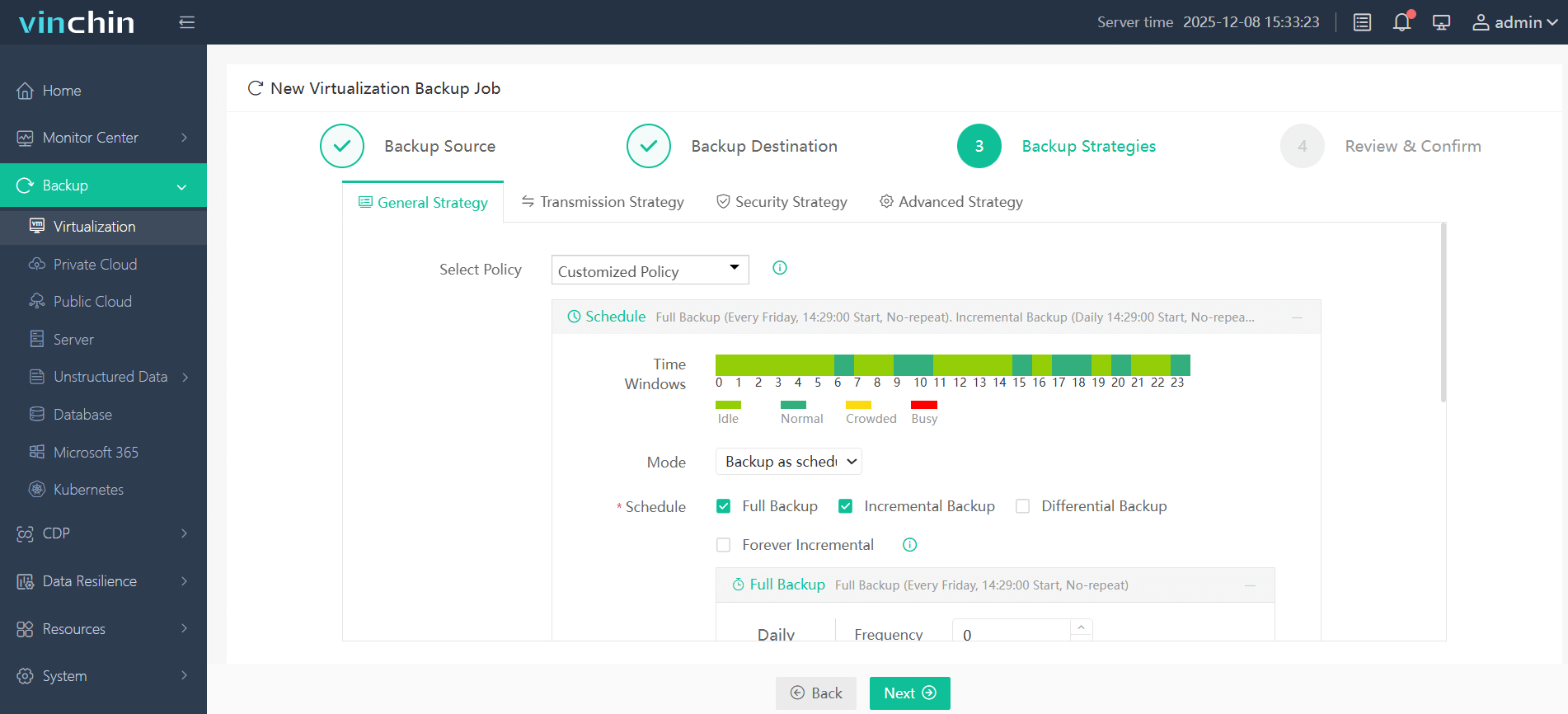
Step 3. Configure backup strategies as your desire
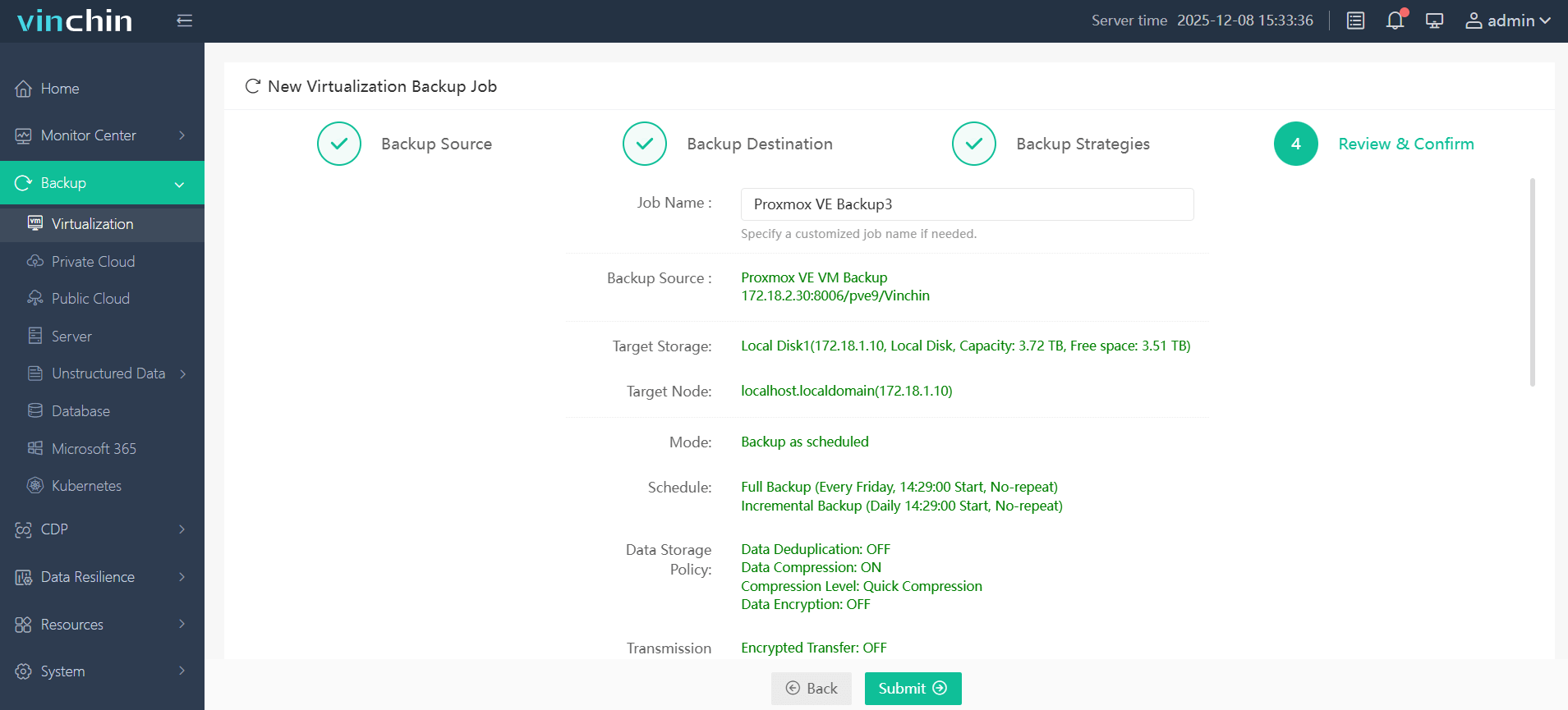
Step 4. Confirm all your settings, and click Submit to start backup process
Try Vinchin Backup & Recovery yourself with a fully featured 60-day free trial by clicking the download button below!
Proxmox Backup Server Update FAQs
Q1: Is it safe to upgrade directly to PBS 4.2?
Generally yes, but administrators should verify network interface persistence and create backups before rebooting due to potential interface renaming changes introduced with kernel 7.0.
Q2: Does PBS 4.2 requires a subscription license?
No, Proxmox Backup Server remains open-source and can be used without a subscription.
Q3: Can Proxmox Backup Server back up containers (LXC)?
Yes, Proxmox Backup Server supports backup and restore for both KVM virtual machines and LXC containers running on Proxmox VE.
Q4: How does this integrate into Proxmox Virtual Environment?
Just add a Proxmox Backup Server datastore as a new storage target in your Proxmox VE. Make sure that you run the latest Proxmox VE 9.x.
Q5: Is there any recommended server hardware for the Proxmox Backup Server?
It is recommended to use enterprise-grade server hardware components, with fast local SSD/NVMe storage. Access and response times rotating drives will slow down all backup server operations.
Conclusion
Proxmox Backup Server with official S3 support, improved sync performance, stronger encryption controls, and modernized infrastructure components, PBS continues maturing into a highly capable open-source backup platform.
For Proxmox-focused environments, PBS remains one of cost-effective and tightly integrated backup solutions available. But if organizations operating multi-hypervisor infrastructure, Vinchin Backup & Recovery is a better option.














