Choosing an XCP-ng VM backup software that ensures secure offsite replication for compliance means selecting a solution with strong encryption, automated workflows, and auditable controls. Auditable controls include immutable logs that track every backup event—essential for passing regulatory checks. Secure offsite replication is not just a technical checkbox; it is vital for business continuity. Regulations like GDPR or HIPAA require organizations to protect sensitive data from loss or unauthorized access. Automated encrypted transfers to remote locations help meet these mandates while reducing manual errors. The right backup solution also provides fast recovery options so you can restore operations quickly after disasters.
Why Secure Offsite Replication Matters in Enterprise Environments
Secure offsite replication plays a critical role in enterprise IT strategies by protecting against threats both natural and man-made. Enterprises face strict regulations and high expectations for uptime.
● Disaster Recovery Readiness
A robust offsite replication strategy ensures your business can recover from catastrophic events such as fires, floods, or ransomware attacks. For example, if ransomware encrypts your primary site’s data—as seen in many recent high-profile breaches—having an untouched copy at a remote location allows you to restore systems without paying ransoms or suffering prolonged downtime.
● Regulatory Compliance
Many industries must comply with laws like GDPR in Europe or HIPAA in healthcare. These frameworks demand secure storage of personal information—even during backups—and require proof that data remains confidential during transfer and at rest. Failure to comply can result in heavy fines; British Airways was fined £20 million after a breach exposed customer data due to inadequate safeguards.
● Business Continuity Assurance
Offsite copies ensure operations continue even if your main datacenter fails. This reduces downtime risk—a key metric tracked by IT teams—and helps maintain customer trust when outages occur.
● Auditability & Transparency
Auditors often request evidence of regular backups and secure handling of sensitive information. Immutable audit logs generated by modern backup solutions provide this transparency by recording who performed each action and when it occurred.
● Reduced Human Error
Automated scheduling minimizes mistakes common with manual processes—such as missed backups or incorrect configurations—which could otherwise leave gaps in protection.
How To Choose The Best XCP-ng Backup Solution for Secure Offsite Replication?
Selecting an effective XCP-ng backup solution requires careful evaluation of security features, automation capabilities, scalability options, and compliance support. A well-chosen tool should adapt as your organization grows while keeping data safe across all environments.
● End-to-End Encryption Using Industry Standards
Look for solutions that use strong encryption protocols like AES-256 both during transfer (in transit) and when stored remotely (at rest). This prevents unauthorized access even if someone intercepts your backup traffic.
● Automated Scheduling With Granular Controls
Automation reduces manual workload while ensuring consistency. Solutions should allow you to set custom schedules based on Recovery Point Objectives (RPOs) so critical VMs are protected more frequently than less important ones. Flexible retention policies let you keep daily backups for recent weeks but only monthly snapshots long-term—saving space without sacrificing recoverability.
● Comprehensive Audit Logging
Detailed logs record every backup job initiation, completion status, restore operation, user login attempt, or policy change within the system. These records are essential during audits because they prove adherence to internal policies and external regulations.
● Scalability Across Large Environments
As businesses grow or merge infrastructure across sites/clouds, their backup needs expand too. The best solutions handle hundreds—or thousands—of VMs without slowing down performance or complicating management tasks through centralized dashboards.
● Flexible Storage Target Support
Support for diverse storage targets—including local disks, NAS/SAN devices over NFS/iSCSI/CIFS protocols, public/private clouds via S3-compatible APIs—is crucial for adapting disaster recovery plans over time without vendor lock-in concerns.
By focusing on these criteria—encryption strength, automation flexibility (including RPO/retention settings), audit logging detail level, scalability potential across hybrid environments, and broad storage compatibility—you ensure both immediate protection needs are met while future-proofing against evolving risks or regulatory changes.
Vinchin Backup & Recovery: Enterprise-Grade Protection for XCP-ng
For organizations seeking reliable XCP-ng VM protection alongside other virtualization platforms such as VMware, Hyper-V, Proxmox VE, oVirt/RHV/OLVM, XenServer/XCP-ng itself, OpenStack, ZStack and more (15+ total), Vinchin Backup & Recovery delivers comprehensive enterprise-level coverage within one unified solution. It supports agentless backups on XCP-ng VMs with features designed specifically for large-scale virtualized environments: instant recovery enables rapid restoration; CBT accelerates incremental jobs; LAN-free backup optimizes network usage; deduplication and compression saves storage space; granular restore streamlines file-level recovery—all contributing to operational efficiency and compliance readiness.
Using the intuitive web console of Vinchin Backup & Recovery makes safeguarding XCP-ng workloads straightforward:
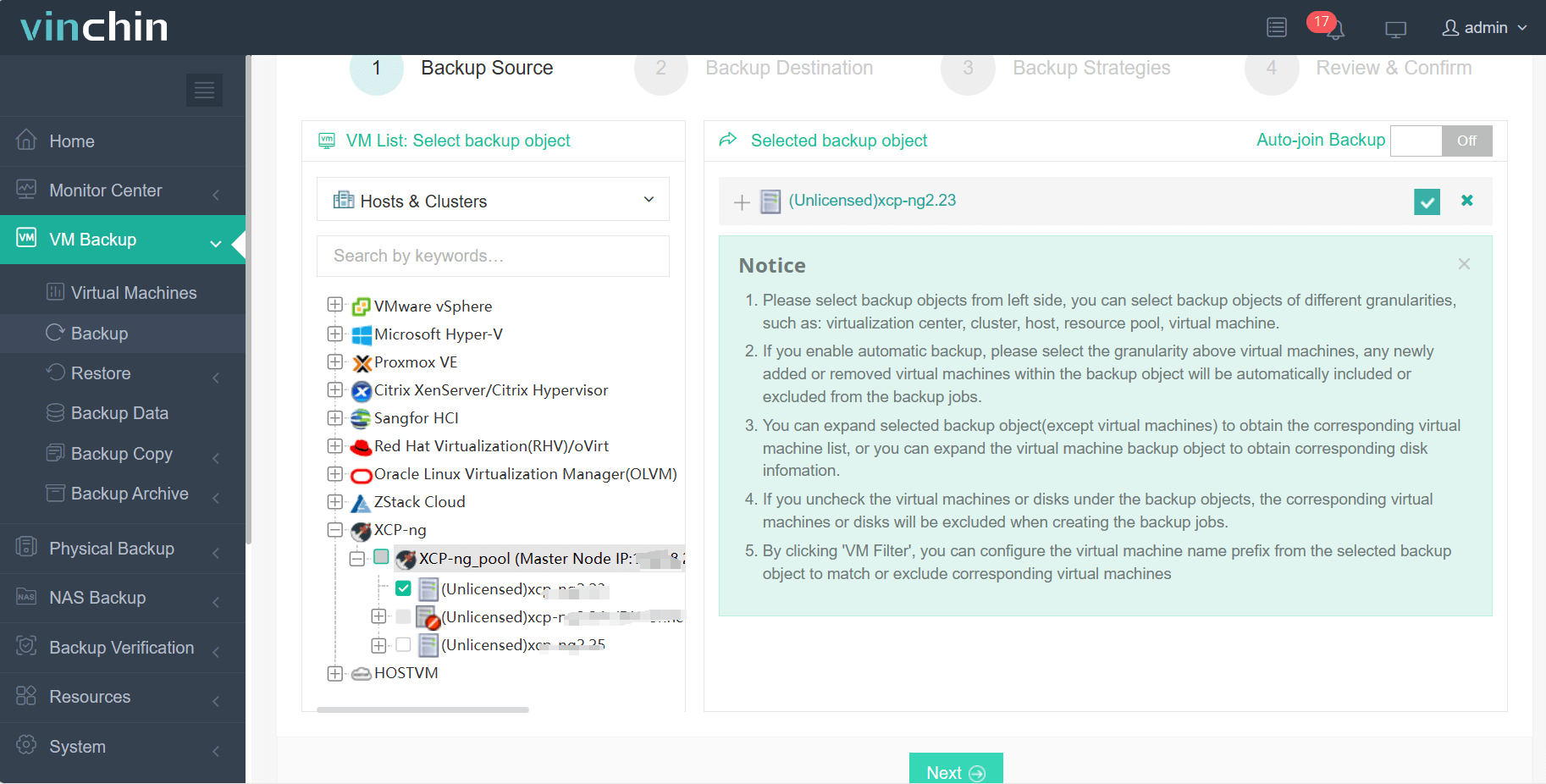
Step 1: Select the XCP‑ng VM to back up;
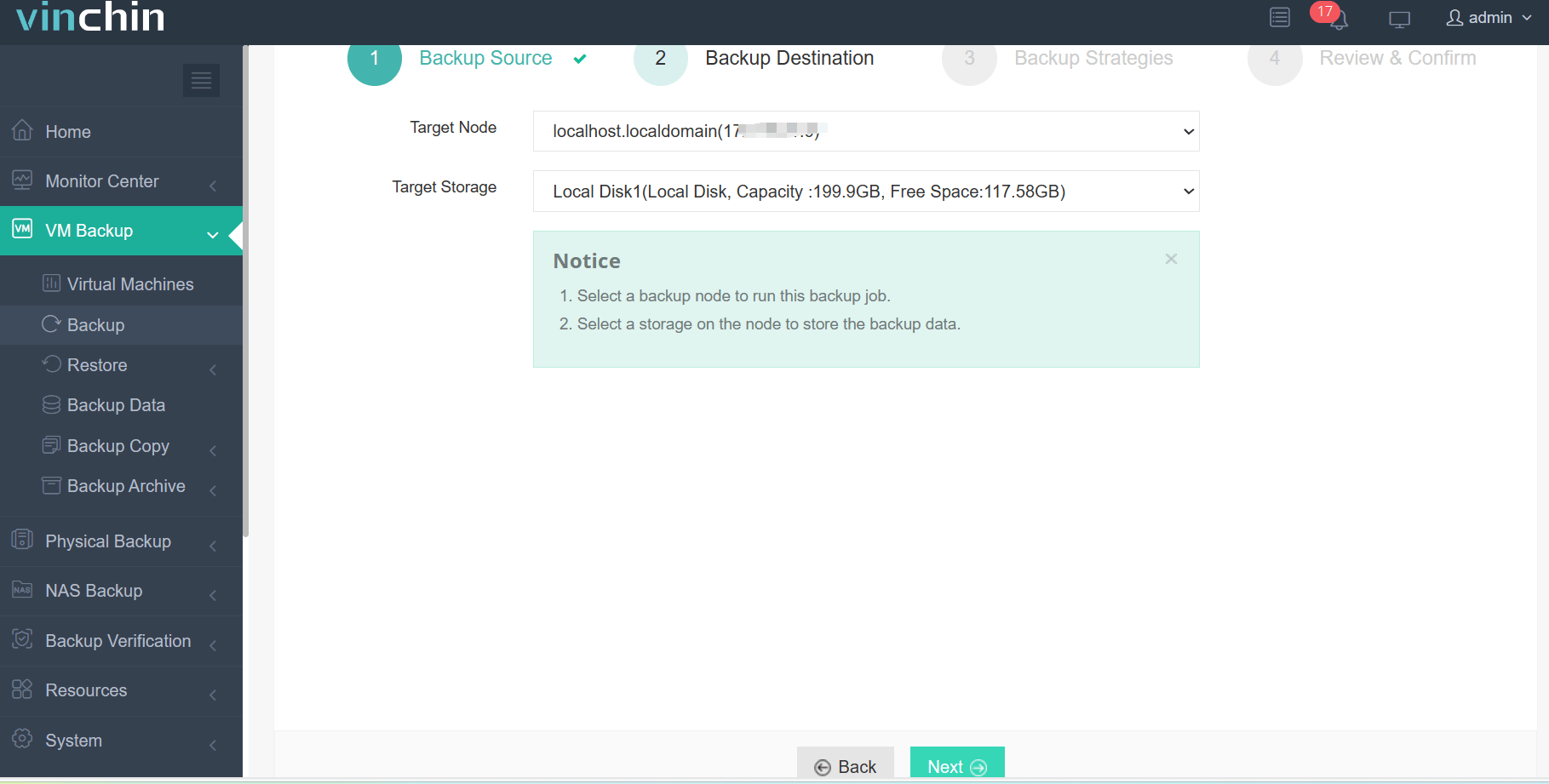
Step 2: Choose the backup storage;
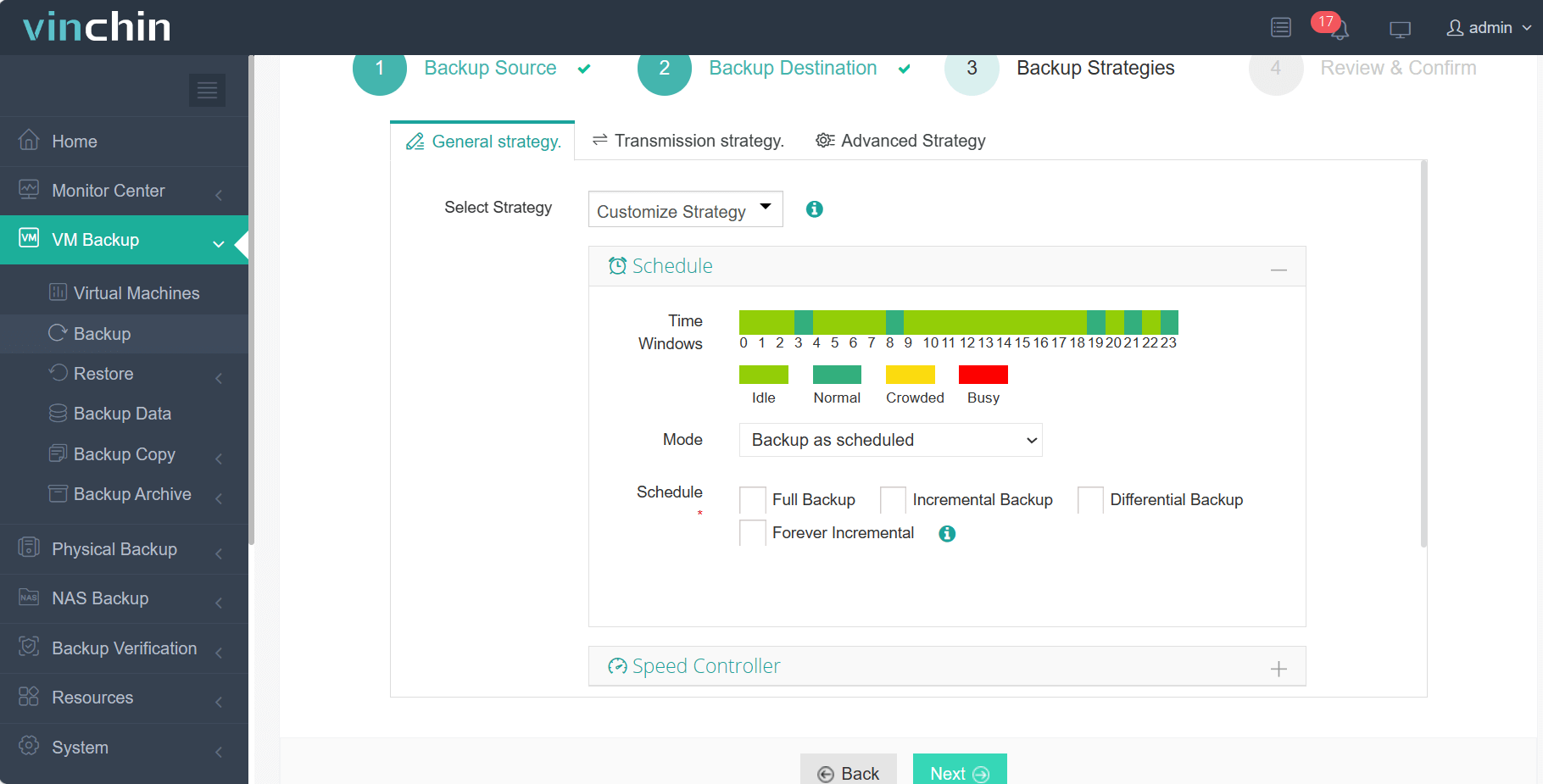
Step 3: Configure the backup strategy;
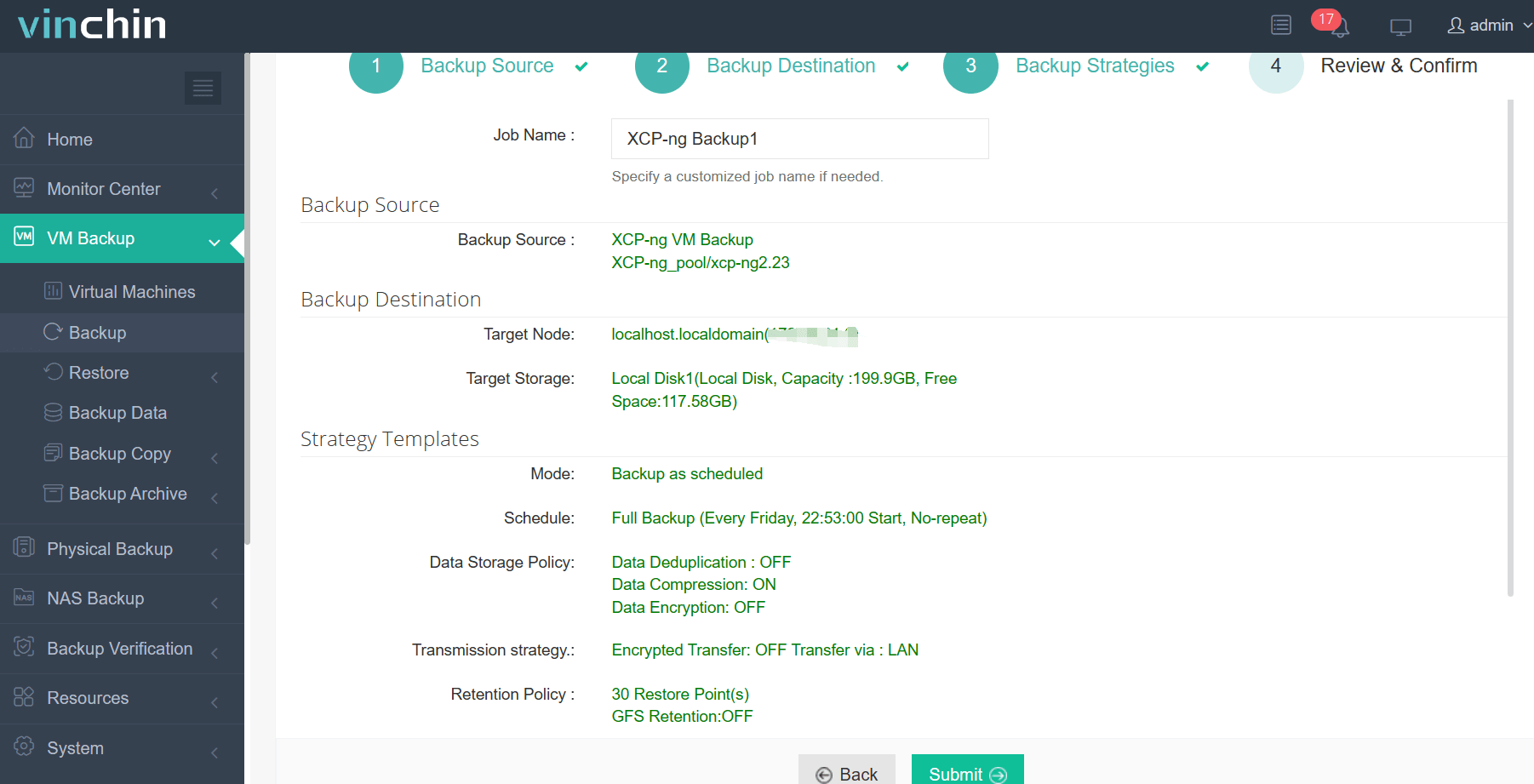
Step 4: Submit the job.
Trusted worldwide by enterprises across industries—with top ratings from global customers—Vinchin Backup & Recovery offers a full-featured 60-day free trial so you can experience its advanced capabilities firsthand.
Best XCP-ng Backup Software FAQs
Q1: Does this type of solution support encrypted offsite replication?
Yes; leading solutions encrypt all data using standards like AES-256 both during transmission over networks (“in transit”) as well as when stored remotely (“at rest”). This approach meets most regulatory requirements worldwide—including GDPR/HIPAA mandates—for protecting sensitive information outside primary datacenters.
Q2: How does audit logging help us pass compliance audits?
Comprehensive logs capture every action taken within the system—from scheduled jobs running successfully/failing unexpectedly through restores initiated by specific users—to create an immutable record auditors can review later if needed; this traceability proves adherence to internal/external rulesets alike!
Q3: Can these tools scale alongside our growing virtual environment?
Enterprise-grade products are built specifically with growth in mind—they centralize management across multiple clusters/sites/cloud regions so adding new workloads never slows down performance nor increases administrative overhead unnecessarily!
Q4: What happens if we need multi-location support?
Top-tier solutions offer flexible target selection—you may replicate any given VM’s snapshot(s) simultaneously toward several different remote sites/cloud buckets depending upon DR strategy requirements—all managed centrally via one console interface!
Conclusion
The right XCP-ng VM backup software delivers secure offsite replication that meets strict compliance demands while supporting rapid recovery when disaster strikes—ensuring business resilience at every turn!









