Manually checking backup logs across many XCP-ng clusters is inefficient and error-prone. Enterprises running large virtual environments need a better way to keep track of backup jobs. Centralized monitoring brings all backup activity into one place. This approach reduces manual work, improves visibility, and helps teams respond faster to problems.
Centralized monitoring gives IT teams a single dashboard for oversight. It ensures every cluster is protected under unified policies. This method supports compliance efforts by making reporting easier and more accurate. Organizations can manage risk better when they see everything at once.
Why Centralized Monitoring Matters in Enterprise Environments?
Centralized monitoring is vital for organizations that operate multiple XCP-ng clusters across different sites or business units. It streamlines management tasks while reducing the chance of missed backups or delayed responses.
● Consistent Policy Enforcement keeps all clusters aligned with company standards. When policies are set centrally, you avoid gaps caused by manual configuration on each cluster.
● Rapid Issue Detection allows IT staff to spot failed backups or errors right away. A central dashboard highlights problems as soon as they occur so teams can act before data loss happens.
● Simplified Reporting makes audits less stressful. With centralized tools, generating reports for compliance or executive review takes minutes instead of hours spent gathering logs from separate locations.
● Reduced Operational Complexity means fewer mistakes during routine tasks like scheduling backups or restoring data after an incident. Teams save time because they do not repeat steps on every cluster.
A real-world example: An enterprise with ten XCP-ng clusters spread over three continents used manual log checks before switching to centralized monitoring source. After adopting a unified solution, their average response time to backup failures dropped from several hours to under fifteen minutes—a significant improvement in data protection posture.
How To Choose The Best XCP-ng Backup Solution for Centralized Monitoring?
Selecting an effective backup solution requires careful evaluation of features that support both current needs and future growth. The right choice should make daily operations smoother while preparing your environment for expansion.
● Unified Dashboard with Real-Time Status provides instant visibility into all clusters’ health from one screen. This feature lets administrators quickly identify which jobs succeeded or failed without logging into each system separately.
● Scalability Across Many Clusters ensures that as your infrastructure grows—from five clusters today to fifty tomorrow—the solution continues working smoothly without slowing down or becoming hard to manage reference.
● Integration with Alerting Systems connects backup events directly to your existing workflows—such as email alerts, Slack messages, or ticket creation in ServiceNow—so no failure goes unnoticed even outside regular office hours.
● Role-Based Access Controls (RBAC) help enforce security best practices by limiting who can change settings or access sensitive data within the backup platform NIST RBAC Guide. This control supports audit requirements and prevents unauthorized actions that could put data at risk.
● Comprehensive Reporting Capabilities allow you to generate consolidated reports covering all managed environments at once—essential for passing audits and providing transparency during executive reviews.
Vinchin Backup & Recovery: Enterprise-Grade Protection for XCP-ng
To address the challenges of managing backups across multiple virtualization platforms—including XCP-ng—Vinchin Backup & Recovery offers professional, enterprise-level VM protection supporting 15+ mainstream hypervisors such as VMware, Hyper-V, Proxmox, oVirt, OLVM, RHV, XenServer/Citrix Hypervisor, OpenStack, ZStack, and more—with dedicated support for XCP-ng environments highlighted here first due to relevance. Key features include LAN-free backup for fast transfers between storage nodes; CBT technology enabling efficient incremental backups; instant recovery capabilities; granular restore options; and advanced deduplication/compression for optimized storage use—all designed to streamline multi-cluster management while maximizing reliability and efficiency.
The intuitive Vinchin Backup & Recovery web console simplifies operations:
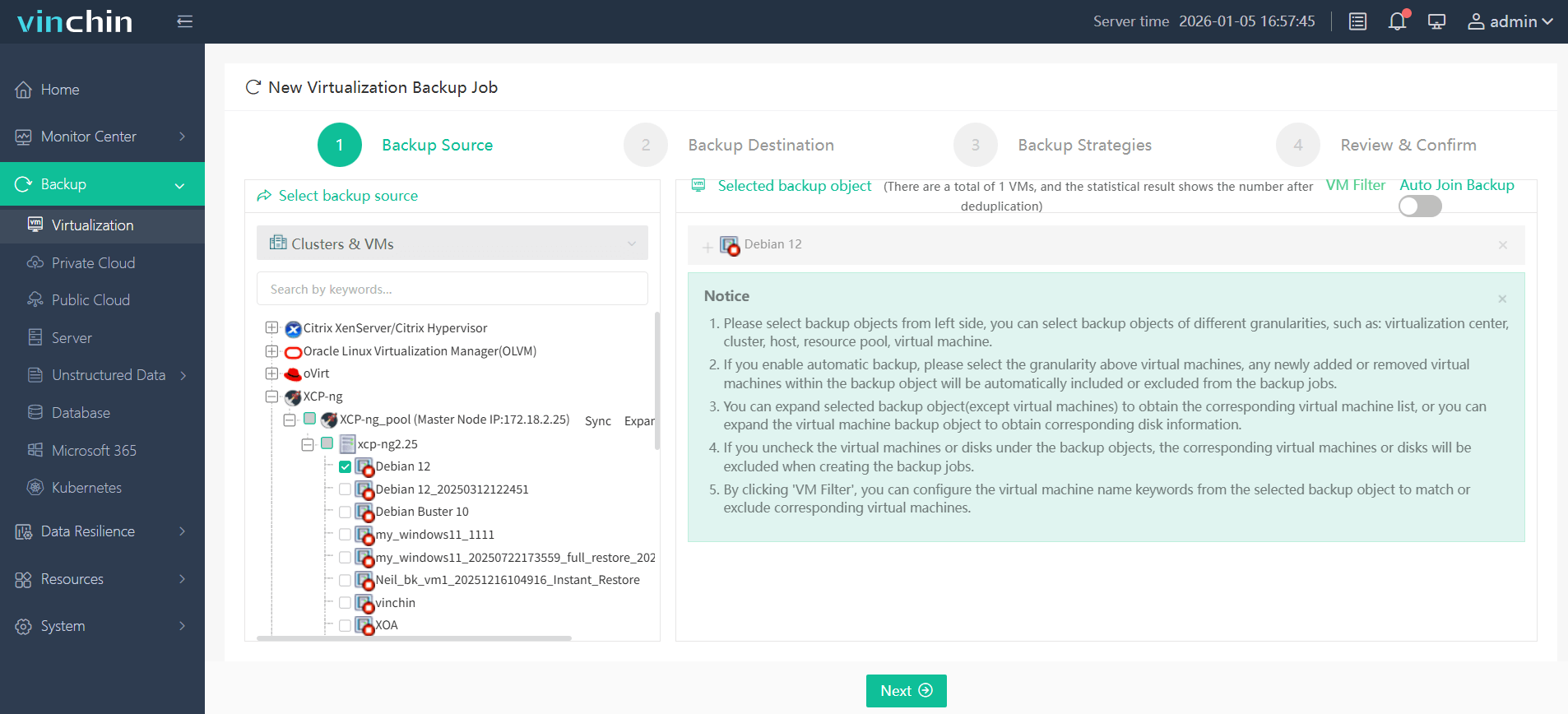
Step 1: Select the XCP-ng VM to back up;
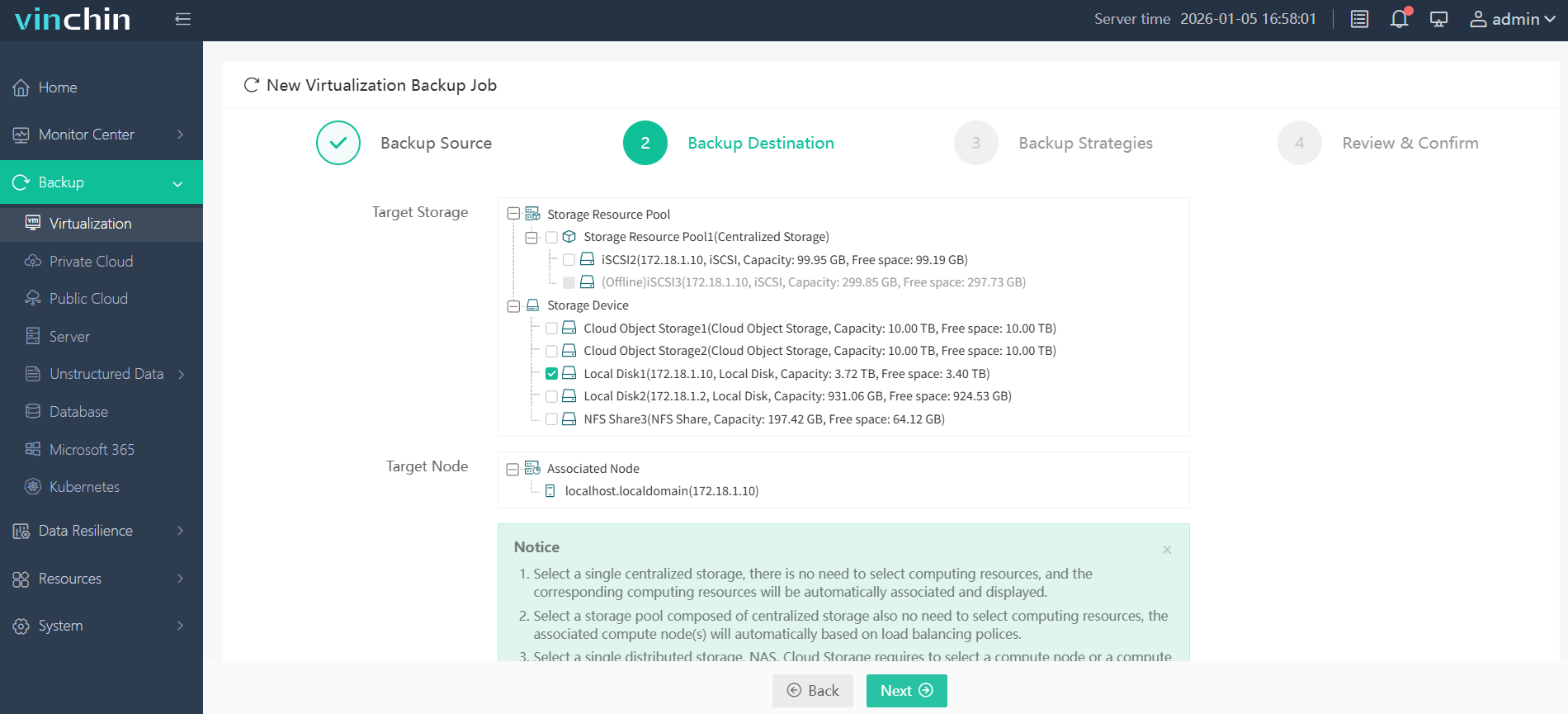
Step 2: Choose the target storage;
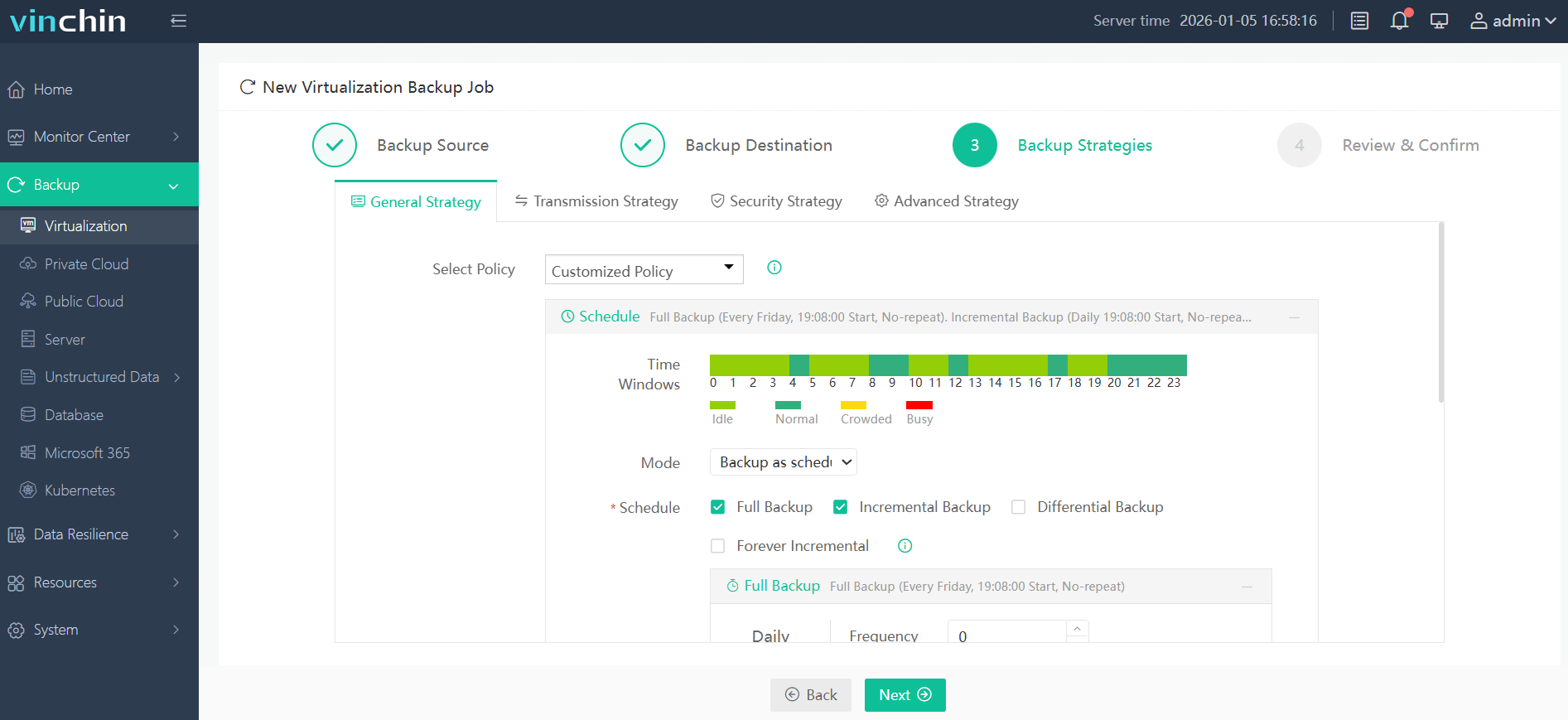
Step 3: Configure a flexible strategy;
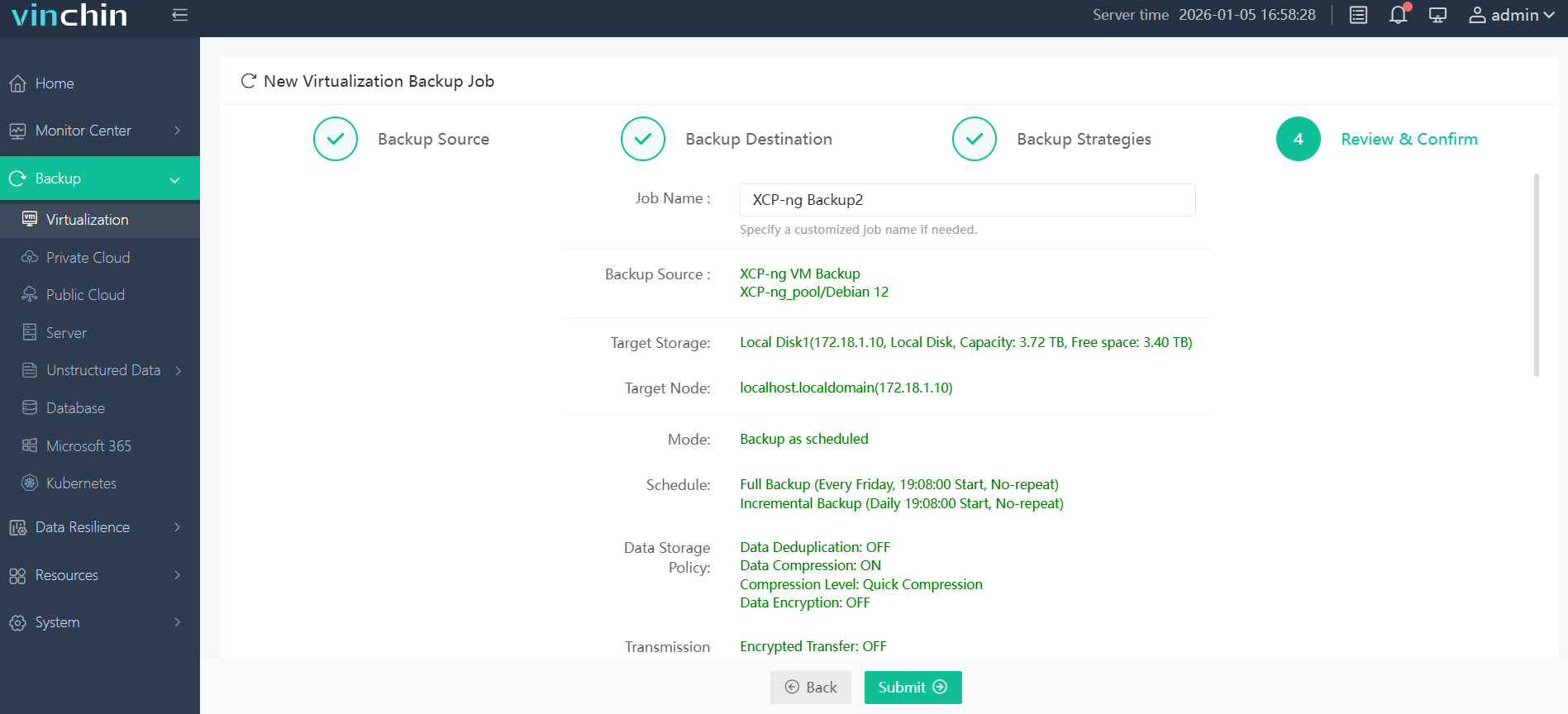
Step 4: Submit the job.
Trusted worldwide by enterprises of all sizes—and consistently rated highly by users—Vinchin Backup & Recovery offers a 60-day full-featured free trial so you can experience its power firsthand; click below to get started.
Best XCP-ng Backup Software FAQs
Q1: Why is centralized monitoring important for multi-cluster XCP-ng environments?
Centralized monitoring streamlines oversight by consolidating status checks
and alerts from all clusters into one interface—reducing errors
and improving response times.
Q2: Does centralized monitoring impact scalability?
Yes; effective solutions must scale seamlessly as you add more clusters without degrading performance
or increasing administrative burden.
Conclusion
Centralized monitoring simplifies multi-cluster XCP-ng management by unifying control, improving operational efficiency, and supporting compliance—key benefits for enterprise-scale environments.