Managing backups in Red Hat Virtualization environments can be complex. When your infrastructure includes multiple clusters across sites or data centers, oversight becomes even harder. Centralized monitoring offers a single point of control for backup operations. This approach improves efficiency, reduces risk, and supports compliance efforts. With one dashboard for all clusters, you gain a clear view of your virtual environment’s health and backup status. The right solution makes management simple—even at scale.
Why Centralized Monitoring Matters in Enterprise Environments?
Centralized monitoring is essential for large organizations running many clusters. It brings together information from every site into one place so teams can act fast.
● Fragmented oversight increases risk
When managing backups cluster by cluster, gaps appear in visibility. Teams may miss failed jobs or outdated policies because they must check each system separately.
● Delayed incident detection leads to longer downtimes
Without centralized alerts or dashboards, issues like missed backups or storage failures go unnoticed until it’s too late. This delay can cause extended outages or data loss.
● Inconsistent policy enforcement causes compliance headaches
If backup rules differ between clusters due to manual setup, audits become difficult. Regulators expect consistent protection everywhere.
● Manual processes waste time
Switching between interfaces slows down troubleshooting and reporting tasks. Centralized monitoring streamlines these workflows so IT staff focus on higher-value work.
Centralized monitoring solves these problems by providing real-time visibility across all clusters from a single interface. This unified view helps organizations meet uptime goals while keeping data safe.
How To Choose The Best Red Hat Virtualization Backup Solution for Centralized Monitoring?
Selecting a backup solution that supports centralized monitoring requires careful evaluation of several features critical for enterprise environments.
● Multi-cluster support ensures scalability
The solution should manage many clusters—across different versions or hybrid setups—from one console as your environment grows. Some platforms offer architectural flexibility to handle both legacy Red Hat Virtualization deployments and modern OpenShift-based clusters.
● Real-time alerting and reporting improve response times
Look for instant notifications about job failures or anomalies via email or integrations with tools like Slack or ServiceNow. Detailed reports help track VM backup success rates, job durations, storage usage trends, and other key metrics important for operational insight.
● Integration with IT workflows boosts productivity
A good solution fits into existing processes using APIs or connectors for ITSM platforms such as ServiceNow or PagerDuty. This minimizes disruption during adoption while supporting automated ticketing or escalation procedures when issues arise.
● Role-based access controls protect sensitive operations
Assign permissions based on user roles—such as administrator versus auditor—and maintain detailed audit trails to support regulatory requirements without exposing critical functions unnecessarily.
● Automation reduces human error
Automate routine backup scheduling, retention management, verification checks, and restore testing so manual intervention is rare—lowering risk while saving time.
If your current tool lacks any of these capabilities—including robust multi-cluster support—it may be time to consider an upgrade that better aligns with enterprise needs.
Red Hat Advanced Cluster Management for Virtualization: Centralized Monitoring in Action
Red Hat Advanced Cluster Management for Virtualization (ACM for Virtualization) helps enterprises manage VMs at scale across multiple OpenShift Virtualization Engine clusters through a centralized platform.
A single console provides full visibility and control over all VMs and clusters, reducing tool switching and improving efficiency. Built-in multicluster observability offers real-time health dashboards and centralized alerts, enabling faster issue detection and response.
Features like dynamic search allow instant VM location across clusters, while automated policy enforcement ensures consistent governance and compliance. Administrators can also perform VM lifecycle actions directly from the console, eliminating operational delays.
Overall, ACM simplifies large-scale VM management, reduces risk, and enables teams to focus on strategic tasks instead of routine operations.
How Centralized Monitoring Works in Practice?
Centralized monitoring streamlines virtual infrastructure management by automating discovery and unifying control across all clusters.
Cluster discovery is automatic, allowing new environments to be added without manual setup. Policies such as backup schedules, retention, encryption, and replication can be defined once and applied consistently everywhere.
Real-time monitoring provides live insights into backup performance, job success rates, and storage usage through centralized dashboards. When issues occur, instant alerts via email or tools like Slack or Teams enable rapid response and troubleshooting within the same interface.
At the same time, centralized audit logs track all activities, simplifying compliance and reporting.
Overall, this approach saves time, reduces human error, and minimizes risks associated with missed backups or inconsistent policies.
Vinchin Backup & Recovery: Enterprise-Grade Protection for Red Hat Virtualization
To complement centralized monitoring solutions like ACM, Vinchin Backup & Recovery stands out as an enterprise-level virtual machine backup solution supporting Red Hat Virtualization alongside 15+ mainstream virtualization platforms including VMware, Hyper-V, Proxmox, oVirt, OLVM, RHV, XCP-ng, XenServer, OpenStack, ZStack and more. Vinchin Backup & Recovery delivers comprehensive protection tailored specifically for diverse infrastructures found in large organizations using Red Hat technologies at scale.
Key features include LAN-free backup for efficient data transfer within supported environments; CBT technology enabling fast incremental backups; granular restore options allowing precise file-level recovery; advanced scheduling with GFS retention policies; and robust data deduplication plus compression that optimize storage use while maintaining high-speed performance.
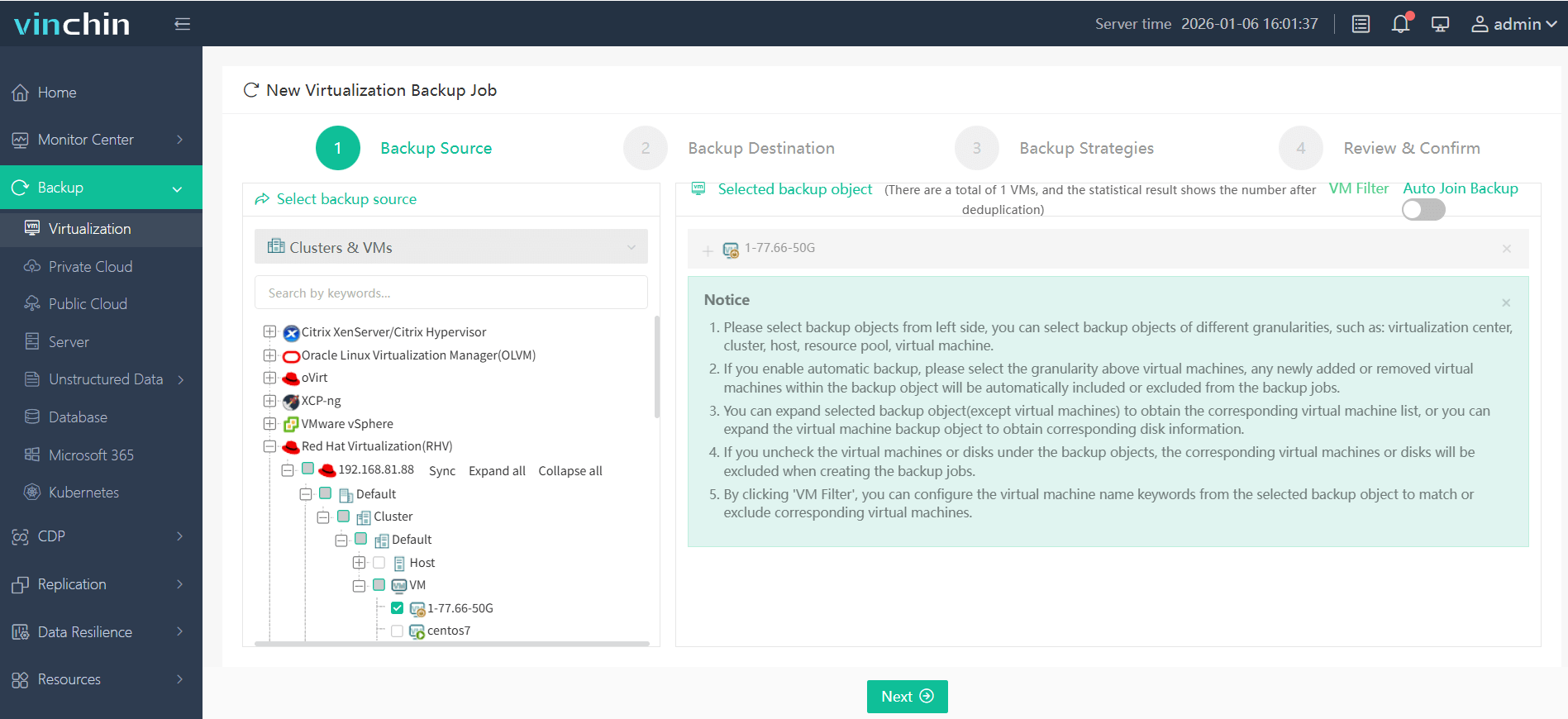
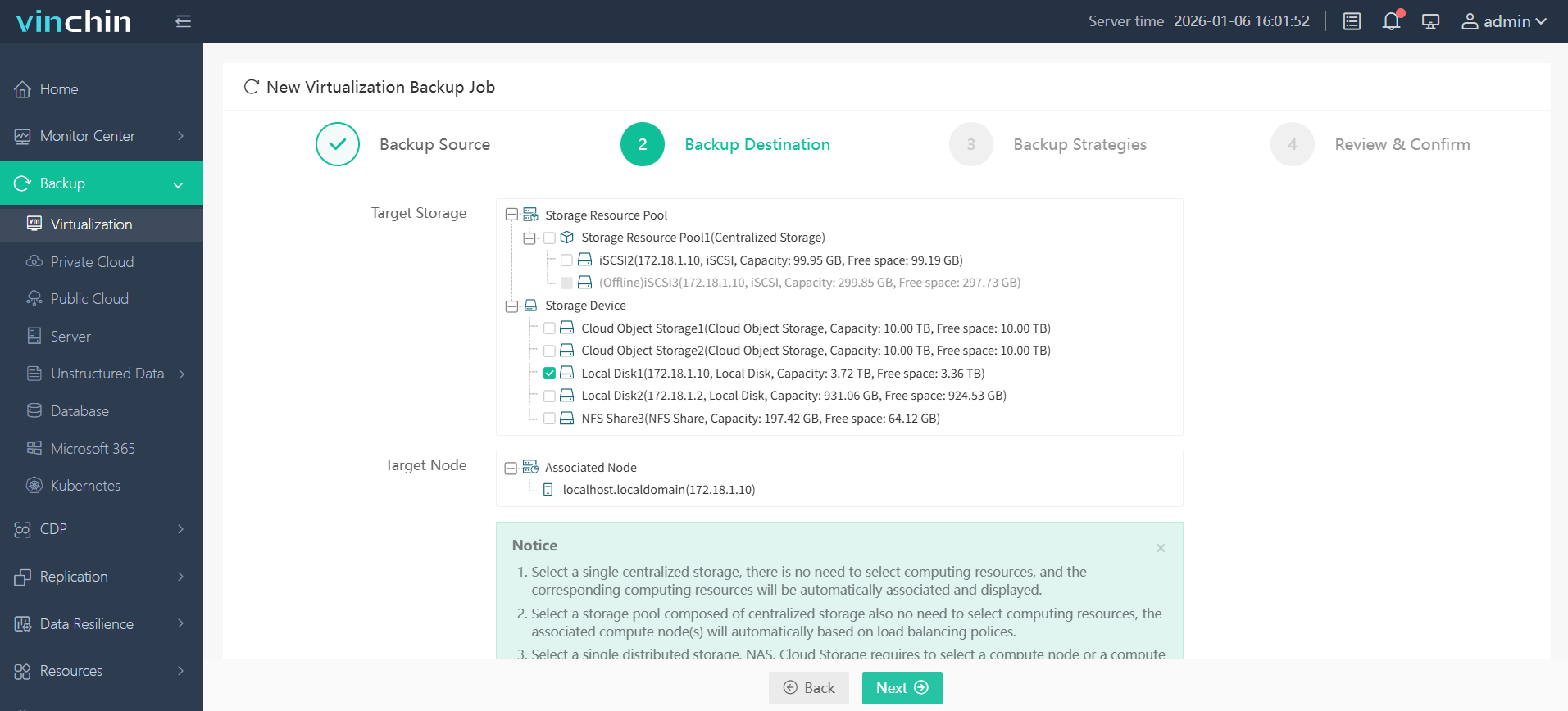
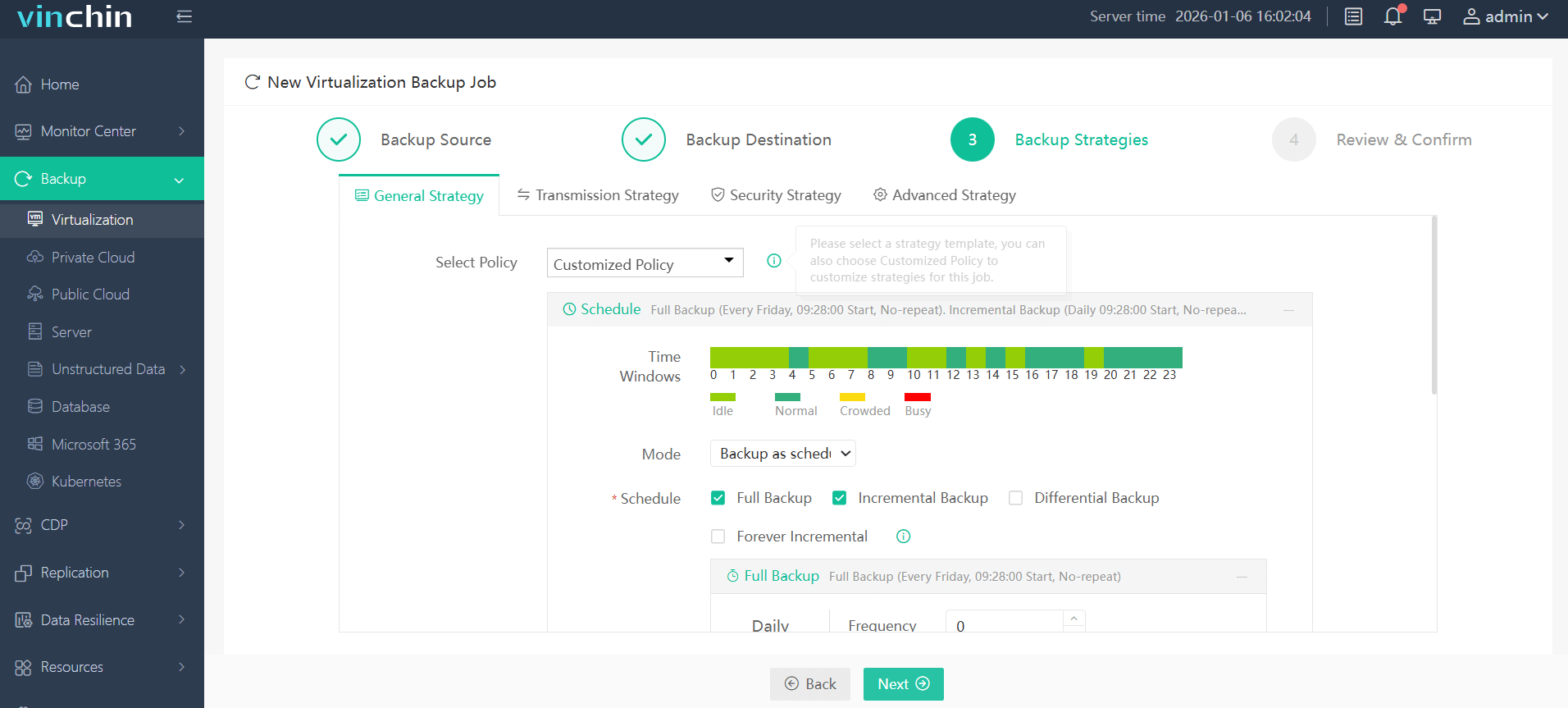
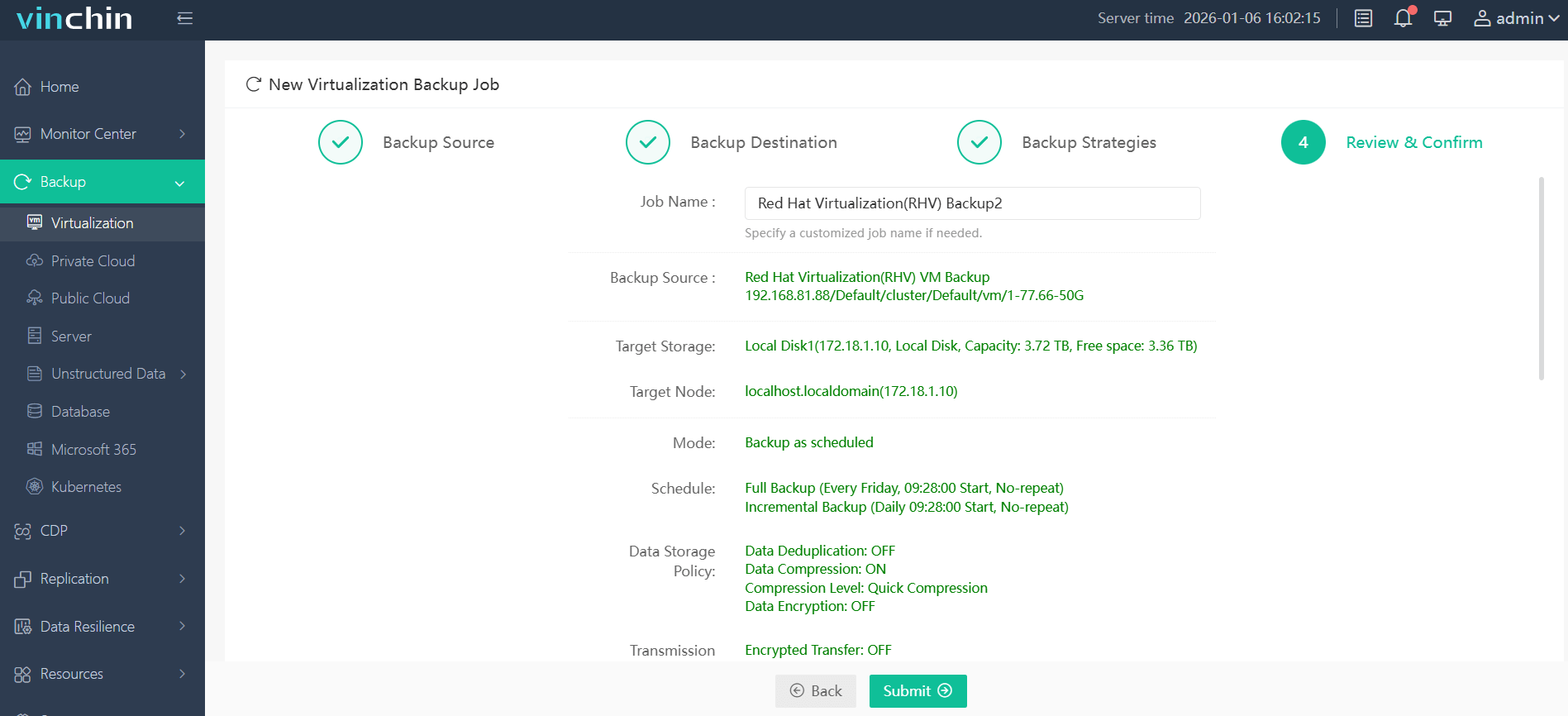
With its intuitive web console interface, backing up a Red Hat Virtualization VM takes just four steps:
Step 1: Select the oVirt/RHV VM(s) you want to back up
Step 2: Choose your preferred backup storage
Step 3: Configure policies such as schedule type or retention rules
Step 4: Submit the job
Recognized globally with top ratings from thousands of enterprise users worldwide—try Vinchin Backup & Recovery free with a 60-day full-featured trial today!
Best Red Hat Virtualization Backup Software FAQs
1. What is the biggest challenge in managing Red Hat Virtualization backups at scale?
The main challenge is maintaining visibility across multiple clusters and sites. Without centralized monitoring, backup status, failures, and policy compliance can easily be overlooked, increasing the risk of data loss and downtime.
2. Why is centralized monitoring important for backup management?
Centralized monitoring provides a single interface to oversee all clusters, enabling real-time alerts, consistent policy enforcement, and faster troubleshooting. It helps reduce operational complexity and ensures higher reliability in enterprise environments.
3. What features should I look for in a Red Hat Virtualization backup solution?
Key features include multi-cluster support, real-time alerting, automated backup scheduling, role-based access control, integration with IT workflows, and detailed reporting. These capabilities ensure scalability, security, and efficiency.
Conclusion
Choose solutions offering true centralized multi-cluster oversight—this drives agility while reducing downtime risks across complex infrastructures at scale.