Secure offsite replication is vital for modern enterprises using oVirt. The right backup software must protect data during transfer and storage while meeting strict compliance standards. Automated processes reduce manual errors and help organizations recover quickly from disasters. Regulatory frameworks like GDPR or HIPAA demand strong safeguards for sensitive information. Choosing robust backup tools ensures business continuity even when unexpected events strike.
Organizations face growing threats from cyberattacks, hardware failures, and natural disasters. A single incident can disrupt operations or cause permanent data loss. Offsite replication acts as an insurance policy—keeping critical workloads available no matter what happens at your primary site. This approach also supports audit readiness by proving that you follow best practices for data protection.
Why Secure Offsite Replication Matters in Enterprise Environments
Secure offsite replication forms the backbone of resilient IT strategies in regulated industries. Enterprises must ensure their virtual machines remain recoverable even if local infrastructure fails or becomes compromised. Without secure offsite copies, businesses risk extended downtime and regulatory penalties.
● Regulatory Compliance Requirements
Many regulations require organizations to keep encrypted backups at remote locations. For example, GDPR Article 32 mandates measures like encryption and regular testing of disaster recovery procedures. HIPAA’s Security Rule also requires covered entities to safeguard electronic protected health information (ePHI) through secure backup solutions. Failing to meet these requirements can result in hefty fines or legal action.
● Protection Against Localized Disasters
Natural disasters such as fires, floods, or earthquakes can destroy on-premises infrastructure without warning. Cyber incidents like ransomware attacks may lock down entire environments within minutes. By replicating VM backups securely to an offsite location—whether another datacenter or cloud storage—you ensure rapid recovery options are always available.
● Business Continuity Assurance
Downtime costs escalate quickly when mission-critical applications go offline. According to Gartner research, average IT downtime costs $5,600 per minute for large enterprises. Secure offsite replication minimizes this risk by enabling fast failover processes so teams can restore services without delay.
● Audit Readiness and Transparency
Auditors often request evidence that organizations maintain compliant backup routines—including proof of encrypted transfers and retention policies. Detailed logs from secure replication workflows make it easier to demonstrate adherence during audits or investigations.
● Reduced Human Error
Manual backup tasks are prone to mistakes—missed schedules or misconfigured settings can leave gaps in protection. Automated secure replication reduces reliance on staff intervention while ensuring consistent execution across multiple sites.
How To Choose The Best oVirt Backup Solution for Secure Offsite Replication
Selecting an oVirt backup solution involves more than just ticking boxes on a feature list—it means finding software that aligns with your security goals and operational needs. Look for tools that combine automation with robust controls so you can scale confidently while staying compliant.
● End-to-End Encryption
Strong encryption protects sensitive data both during transfer (in transit) and once stored (at rest). Industry-standard algorithms like AES-256 are widely recommended by NIST. This prevents unauthorized access—even if someone intercepts network traffic or gains physical access to storage devices.
● Automation and Scheduling
Automated job scheduling ensures backups occur regularly without manual oversight—a key factor in reducing human error rates. Look for solutions that let you set daily or hourly intervals based on workload criticality so nothing gets missed due to forgetfulness or resource constraints.
● Granular Policy Management
Detailed policy controls allow administrators to define retention periods based on regulatory requirements—for example, keeping financial records seven years per SOX guidelines—or restrict access only to authorized personnel using role-based permissions. This level of control supports compliance audits by showing exactly how data is handled over time.
● Scalability and Performance
As environments grow—from dozens of VMs today to hundreds tomorrow—the chosen solution must handle increased load without bottlenecks. Features like Changed Block Tracking (CBT) optimize performance by backing up only modified data blocks since the last job rather than full images every time. Data deduplication further reduces storage needs by eliminating duplicate content across backups—a cost-saving measure especially valuable at scale.
● Centralized Management Console
Managing multiple clusters across different sites becomes much simpler with a unified web interface where admins monitor jobs, configure policies, view alerts, and generate reports—all from one place. Centralization streamlines operations while improving visibility into system health across distributed infrastructures.
● Comprehensive Reporting Capabilities
Detailed reporting helps track job status, identify failed tasks early, document successful replications for auditors—and troubleshoot issues before they impact recovery objectives. Look for customizable dashboards that provide real-time insights into both historical trends and current activity levels.
Vinchin Backup & Recovery: Enterprise-Level oVirt VM Protection
For enterprise users seeking advanced protection for oVirt environments, Vinchin Backup & Recovery stands out as a professional virtual machine backup solution supporting over 15 mainstream virtualization platforms—including oVirt as well as VMware, Hyper-V, Proxmox, OLVM, RHV, XCP-ng, XenServer, OpenStack, ZStack and more. Its broad compatibility makes it ideal for mixed-infrastructure datacenters requiring unified management across diverse hypervisors.
Vinchin Backup & Recovery delivers features such as agentless incremental backup via Changed Block Tracking (CBT), LAN-free backup options between sites/datacenters using SAN/NFS/iSCSI storage paths; instant recovery capabilities; granular restore; plus powerful scheduling with GFS retention policy support—all designed around efficiency and compliance needs typical in enterprise settings. These features together enable fast restores after outages while minimizing storage use and simplifying long-term retention management under regulatory frameworks.
The intuitive Vinchin web console streamlines the process:
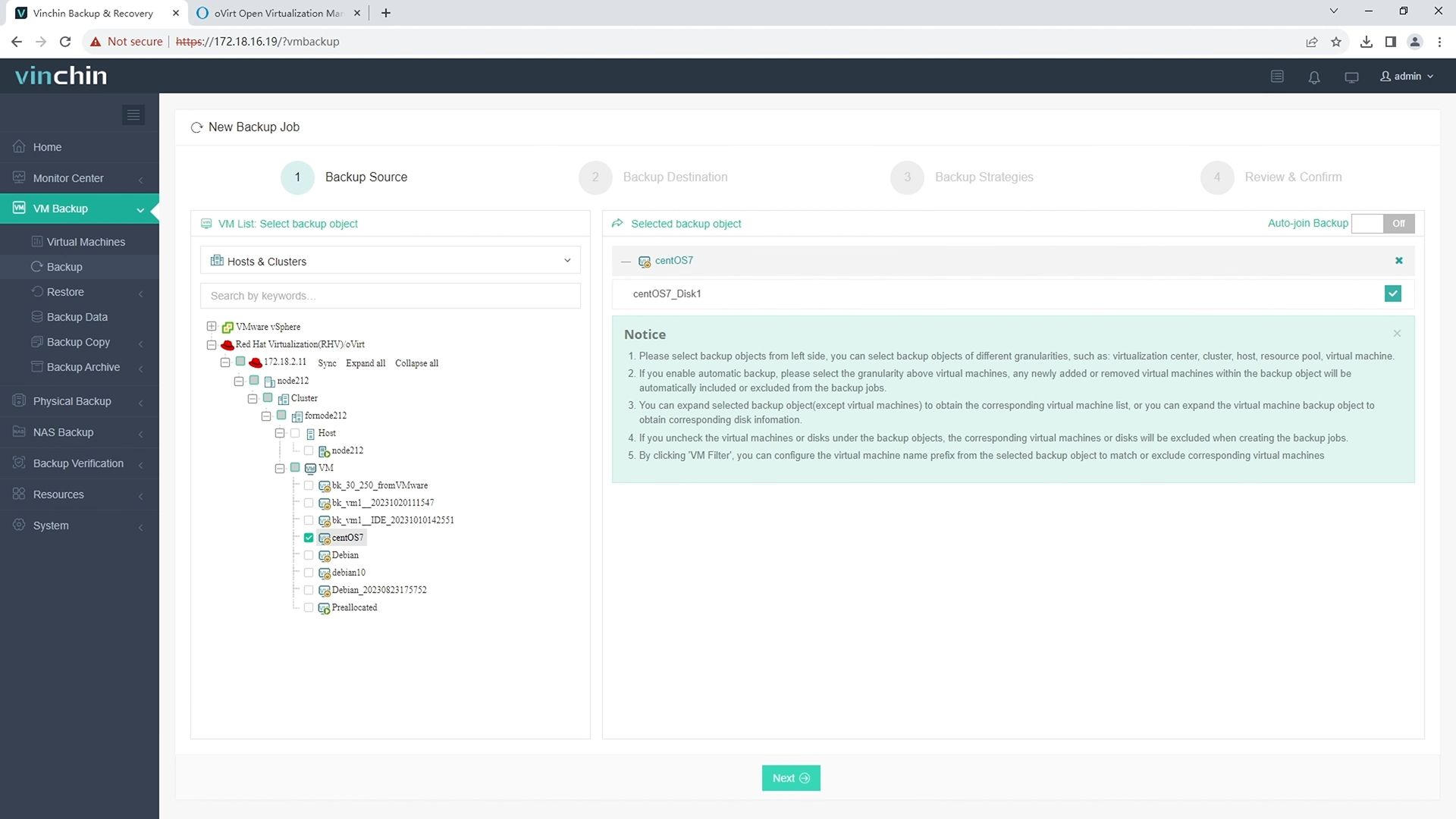
Step 1: Select the oVirt VM(s) you wish to back up.
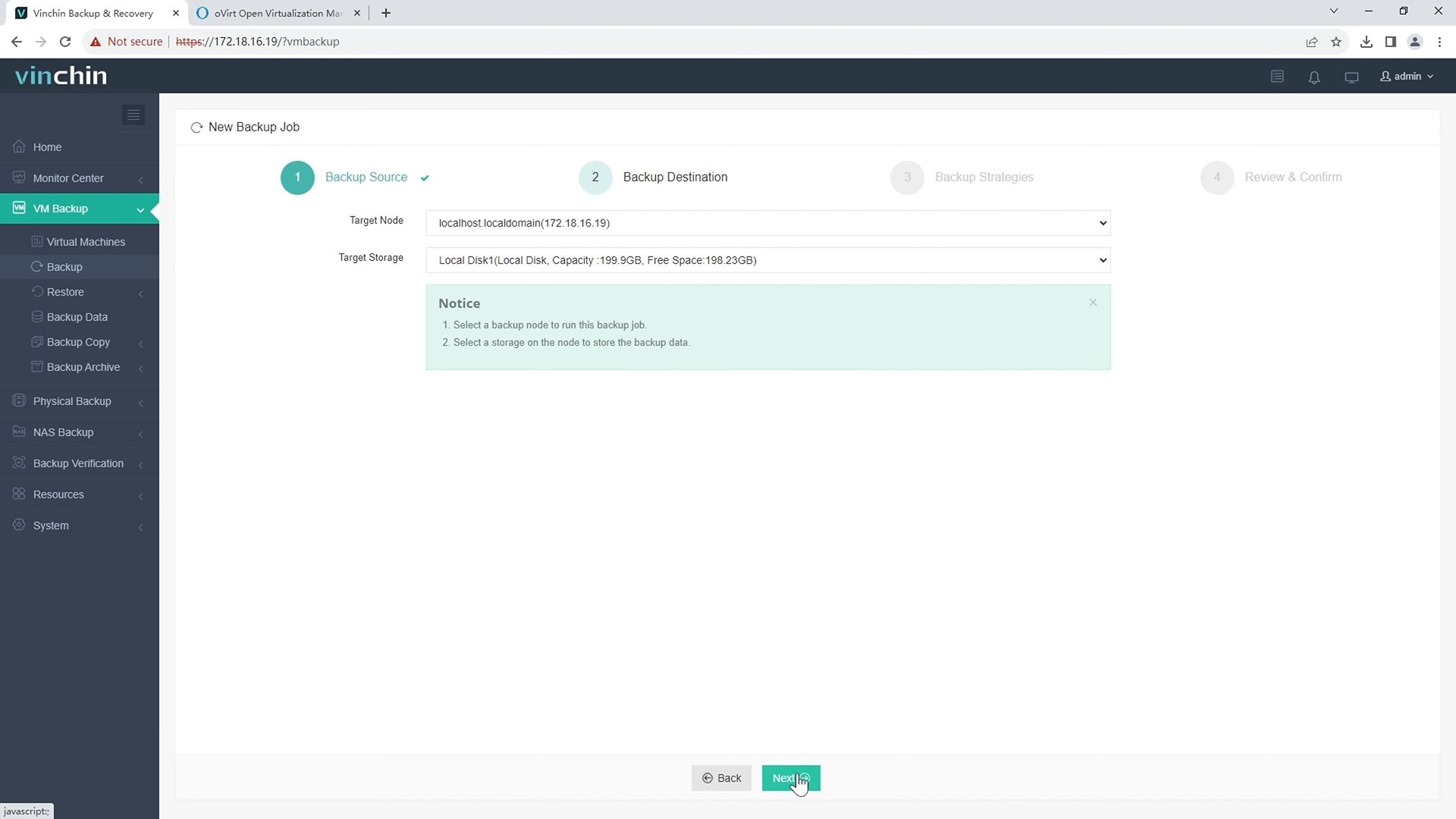
Step 2: Choose the appropriate backup storage destination.
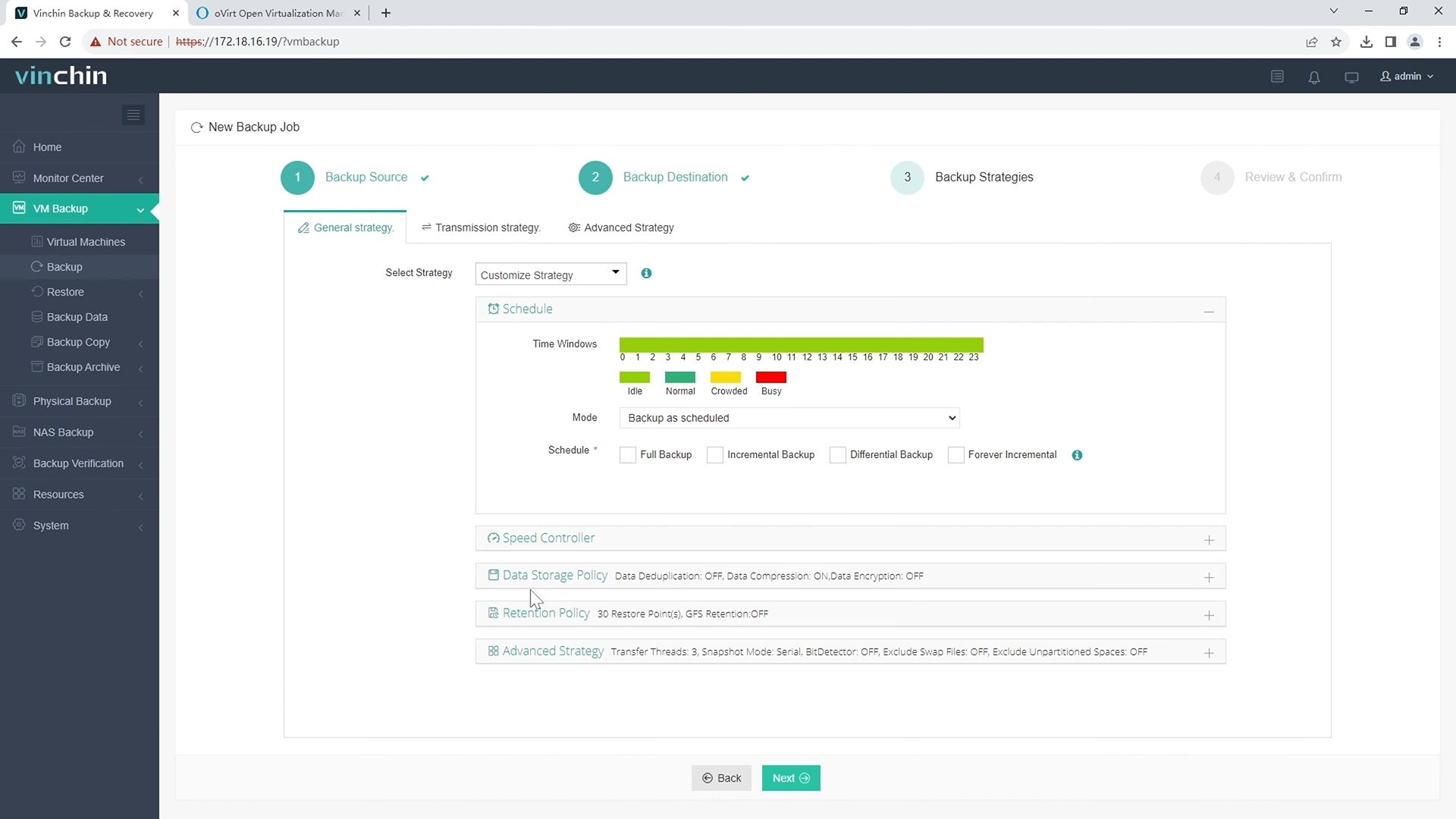
Step 3: Configure your desired backup strategy—including frequency, scheduling, encryption, and retention settings.
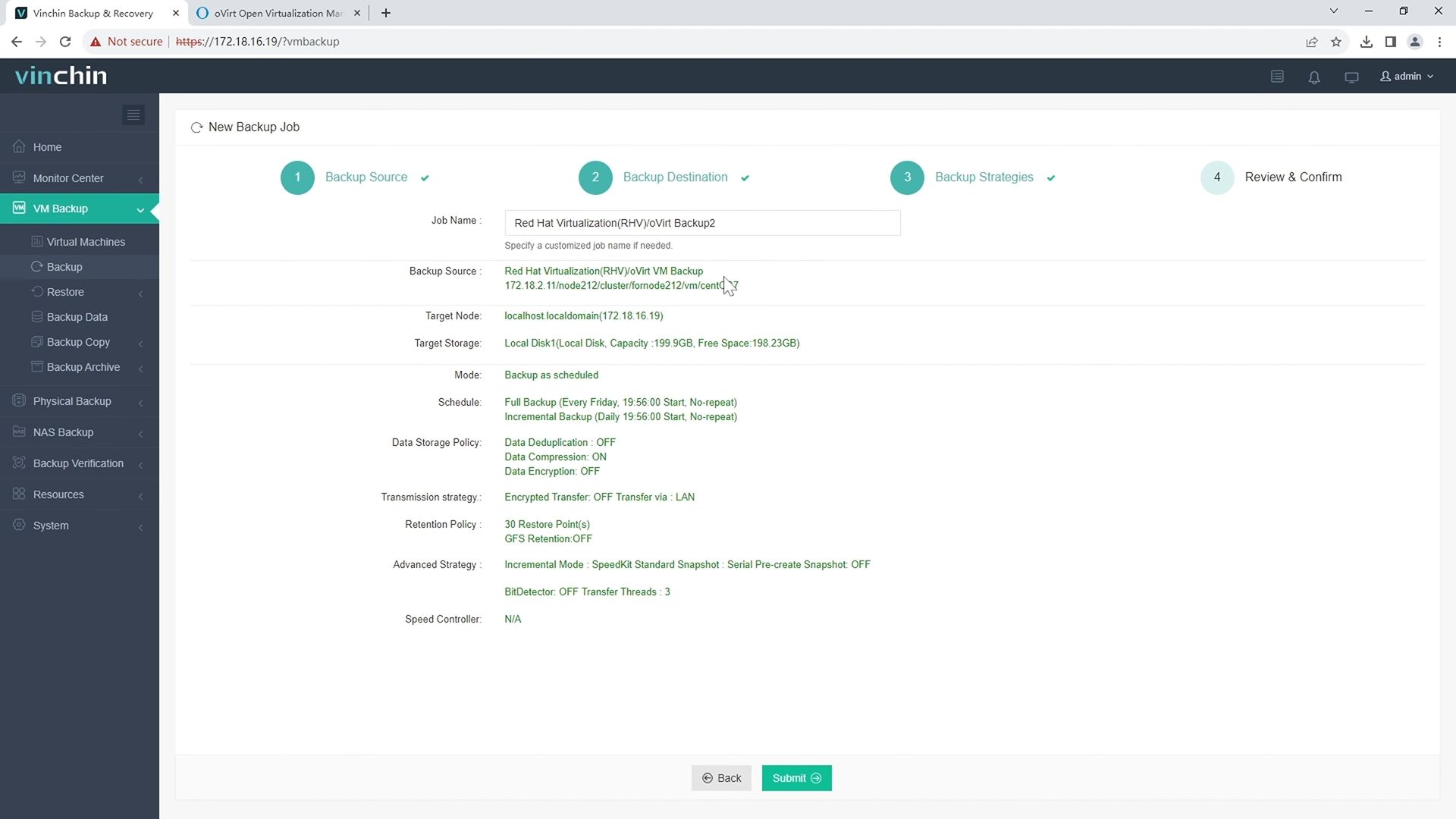
Step 4: Submit the job—the system automates execution, reports progress transparently, and notifies staff if intervention is required.
Recognized worldwide among enterprise customers for reliability and ease of use,Vinchin Backup & Recovery offers a fully featured 60-day free trial—click below to experience top-rated VM protection trusted globally.
Best oVirt Backup Software FAQs
Q1: Does secure offsite replication guarantee regulatory compliance?
No solution alone guarantees full compliance; it must be implemented alongside proper internal policies aligned with frameworks such as GDPR Article 32 or HIPAA Security Rule requirements.
Q2: How does encryption impact backup performance?
Modern solutions use optimized algorithms like AES-256 combined with hardware acceleration technologies so performance overhead remains minimal compared with legacy methods; most users see little impact during routine operations according to industry benchmarks.
Q3: Can I manage multiple sites from a single console?
Yes—enterprise-grade platforms offer centralized management consoles allowing seamless administration across all protected locations regardless of geography.
Q4: What happens if the primary site fails?
Offsite replicas enable rapid failover procedures so you can restore services quickly from secondary locations without waiting hours—or days—for new hardware deployment.
Conclusion
Robust oVirt VM backup software with secure offsite replication strengthens resilience against outages while supporting regulatory demands—helping enterprises stay online when it matters most.









