Centralized monitoring is a critical feature for any Oracle OLVM backup solution. Enterprises often manage many virtual clusters spread across different locations. Without unified oversight, IT teams face challenges in maintaining data protection standards and responding quickly to incidents. Centralized monitoring brings all backup activities under one roof. This approach streamlines management, reduces operational complexity, and helps organizations meet compliance requirements. By consolidating alerts and job statuses from multiple clusters into a single dashboard, administrators can act faster when issues arise. The right solution also supports scalability as environments grow and integrates with existing security frameworks to ensure safe operations. Understanding which Oracle OLVM backup solution provides centralized monitoring for multiple clusters is essential for making informed decisions that protect business continuity.
Why Centralized Monitoring Matters in Enterprise Environments?
Centralized monitoring plays a vital role in modern enterprise IT environments where virtualization is widespread. It enables IT teams to maintain visibility over all Oracle OLVM clusters through one interface rather than juggling separate consoles.
● Reduced Oversight Fragmentation
Fragmented oversight leads to missed alerts or failed backups going unnoticed until it's too late. For example, if an organization manages ten OLVM clusters independently, an administrator may overlook a failed backup on one cluster while focusing on another. This increases the risk of data loss during outages or ransomware attacks.
● Faster Incident Response
Centralized dashboards allow administrators to spot problems early by displaying real-time status updates from every cluster at once. If a scheduled backup fails due to storage issues or network errors, IT staff can respond immediately instead of discovering the problem hours later during routine checks.
● Improved Compliance Management
Many industries must comply with regulations such as GDPR or HIPAA that require consistent data protection practices across all systems. Centralized monitoring ensures uniform policy enforcement and simplifies audit preparation by aggregating logs and reports from every cluster.
● Minimized Downtime Risk
When all backup jobs are visible in one place, administrators can quickly identify gaps in coverage before they lead to downtime or lost productivity. For instance, if certain VMs are not included in regular backups due to misconfiguration on one cluster, centralized tools make these omissions obvious so they can be fixed proactively.
Organizations benefit from increased efficiency because teams spend less time switching between interfaces or reconciling conflicting information from different sources. This unified approach also supports better collaboration among team members responsible for various parts of the infrastructure.
How To Choose The Best Oracle OLVM Backup Solution for Centralized Monitoring?
Selecting an effective Oracle OLVM backup solution requires careful evaluation of several key factors that impact both day-to-day operations and long-term scalability.
A robust platform should offer more than just basic backup functionality—it must provide comprehensive oversight capabilities that scale alongside your environment’s growth while integrating seamlessly with your security policies.
● Unified Dashboards
A single dashboard aggregates status information and alerts from all connected OLVM clusters. This makes it easier to monitor job progress across hundreds of VMs without missing critical events like failed backups or incomplete restores. Look for solutions that display color-coded health indicators so you can prioritize urgent issues at a glance.
● Scalability
As businesses expand their virtual infrastructure—sometimes adding dozens of new VMs per month—the chosen solution must handle increased workload without performance degradation. Evaluate whether the software supports horizontal scaling (adding more nodes) or vertical scaling (increasing resources per node). Check if there are published benchmarks showing support for large-scale deployments involving thousands of VMs across multiple sites.
● Security Integration
Backup platforms should integrate tightly with existing authentication systems such as LDAP or Active Directory using secure protocols like SAML. This ensures only authorized personnel access sensitive configuration settings or restore functions—reducing insider threats and supporting regulatory compliance efforts like ISO 27001 certification audits.
● Reporting and Audit Support
Comprehensive reporting tools help organizations track historical trends in backup success rates, storage utilization patterns, and user activity logs—all necessary for passing external audits (e.g., SOC 2 Type II). The ability to export detailed reports in common formats (PDF/CSV) allows easy sharing with auditors or executive stakeholders who need proof of ongoing compliance efforts.
Choosing a solution that meets these criteria empowers IT departments to maintain control over complex infrastructures while reducing manual effort spent on routine tasks like log aggregation or incident triage.
Vinchin Backup & Recovery: Enterprise-Level Protection for Oracle OLVM
For enterprises seeking reliable multi-cluster protection on Oracle OLVM environments, Vinchin Backup & Recovery stands out as an advanced enterprise-level VM backup solution supporting over 15 mainstream virtualization platforms—including VMware, Hyper-V, Proxmox, oVirt/OLVM, RHV, XCP-ng/XenServer, OpenStack, ZStack and more—with deep integration for Oracle OLVM scenarios specifically highlighted here.
Vinchin Backup & Recovery offers features such as CBT-based incremental backups (for efficient data transfer), LAN-free backup (for fast local transfers), granular restore options (to recover files/folders precisely), scheduled automated backups (to reduce manual intervention), and robust data deduplication/compression (to optimize storage usage). Together these capabilities deliver high-performance protection while minimizing resource consumption.
The intuitive web console makes managing VM backups straightforward:
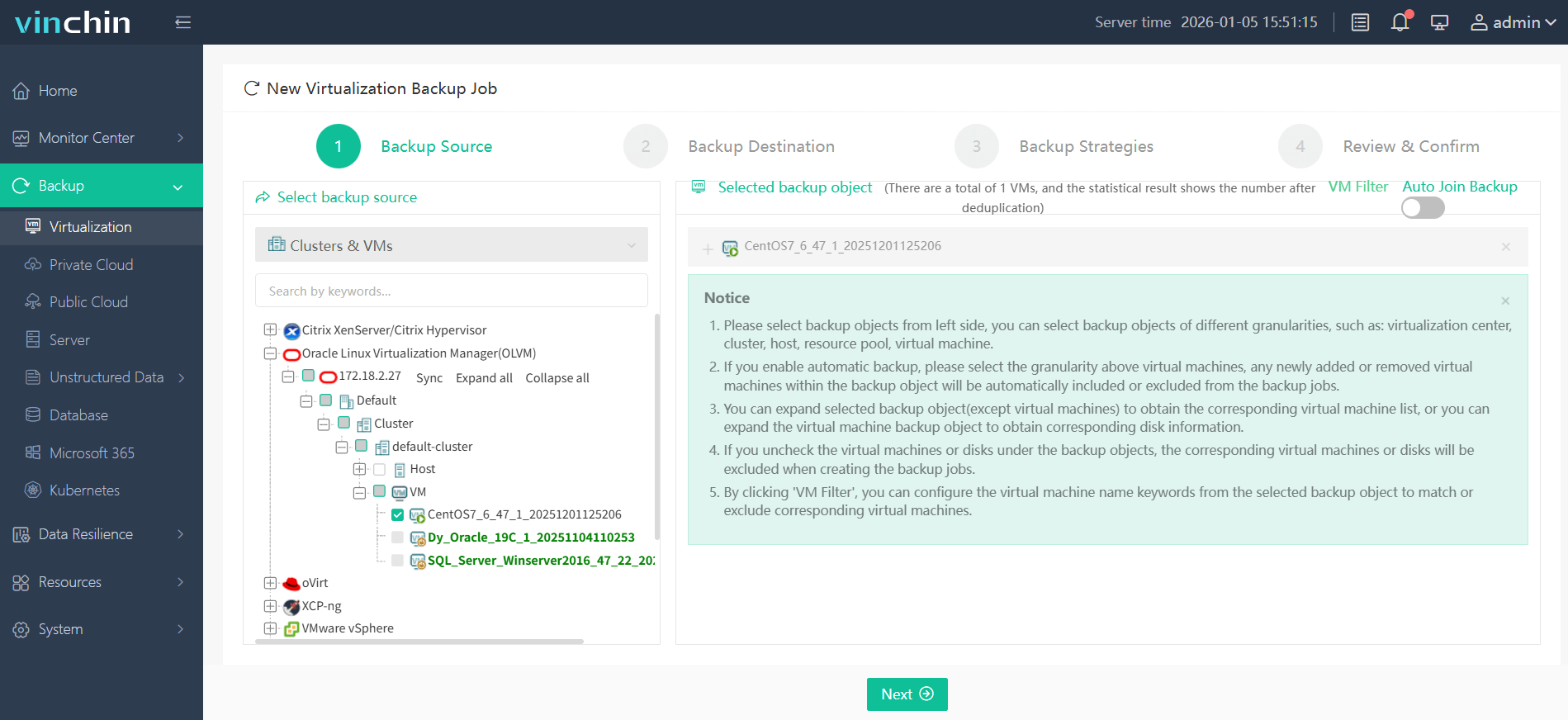
Step 1: Select the Oracle OLVM VM you wish to back up.
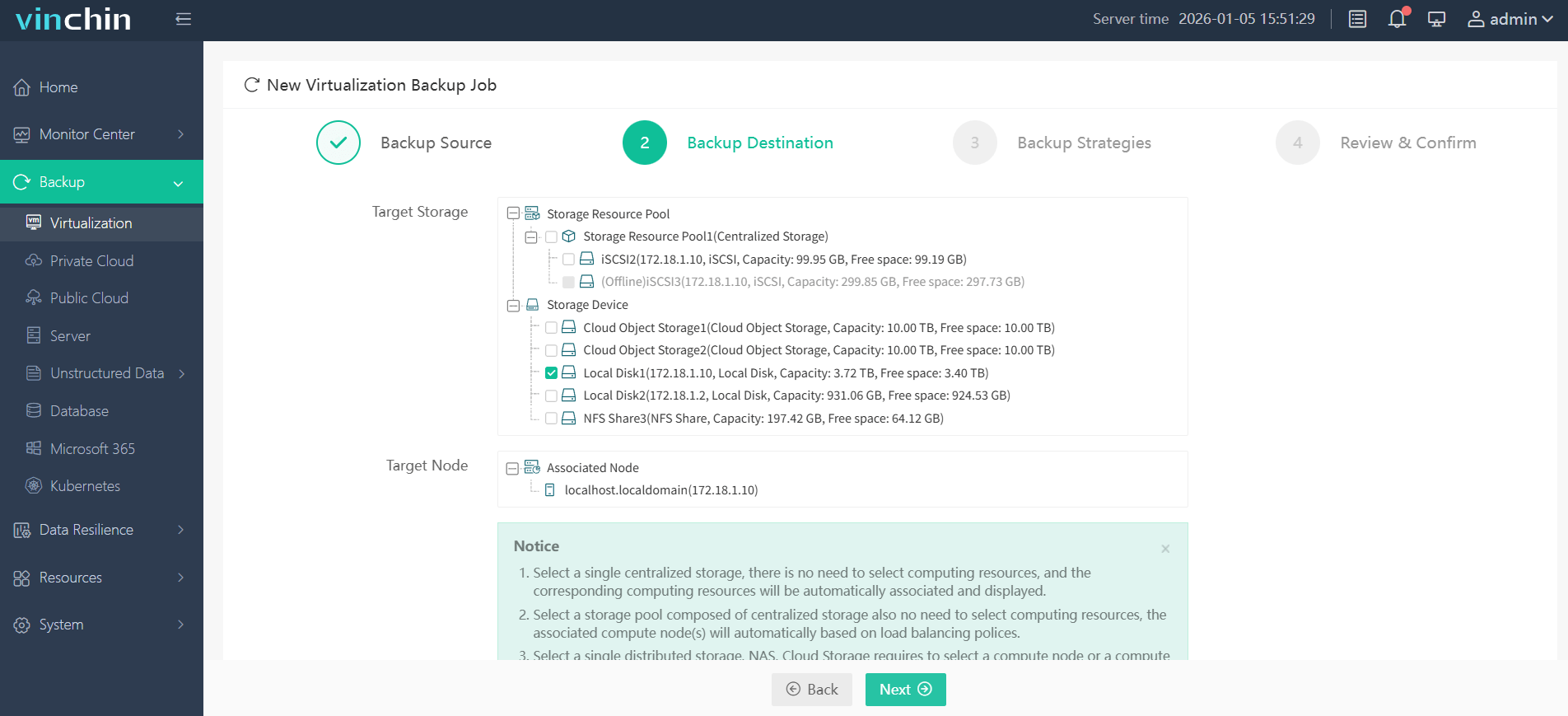
Step 2: Choose your preferred backup storage target.
Step 3: Configure a custom strategy including schedule type (full/incremental/differential), retention policy and encryption if needed.

Step 4: Submit the job—it runs automatically per your defined parameters.

Recognized globally by thousands of enterprise users with top industry ratings—Vinchin Backup & Recovery offers a full-featured 60-day free trial; click below to experience its powerful centralized management firsthand.
Best Oracle OLVM Backup Software FAQs
Q1: Does centralized monitoring increase administrative efficiency?
Yes; by consolidating oversight tasks into one interface through real-time dashboards covering every cluster’s status at once—teams detect failures faster than when managing separate consoles—saving hours each week otherwise spent checking individual systems manually.
Q2: Is multi-cluster support scalable as environments grow?
Leading solutions scale seamlessly alongside expanding infrastructures by supporting additional clusters without impacting performance; this includes handling thousands of VMs distributed globally thanks to efficient resource allocation algorithms validated by industry benchmarks.
Q3: How does centralized monitoring help with compliance?
It enforces consistent policy application across all protected environments while generating comprehensive audit trails needed during reviews against standards such as ISO 27001; aggregated logs simplify evidence collection when demonstrating adherence during external assessments.
Conclusion
Robust centralized monitoring transforms multi-cluster Oracle OLVM management by reducing risks while boosting operational efficiency—a unified approach prevents blind spots so enterprises stay resilient even as complexity grows.