Modern enterprises run hundreds or thousands of virtual machines across many Hyper-V clusters. Managing data protection at this scale is complex. According to IDC, over 70% of large organizations operate multi-cluster environments that demand unified oversight for compliance and operational efficiency. Centralized monitoring in backup solutions addresses these challenges by providing real-time visibility into every backup job across all clusters from one place.
This approach reduces manual effort, speeds up incident response, and helps meet regulatory requirements. Enterprises need tools that not only protect data but also simplify management in distributed environments. Choosing a solution with centralized monitoring is now essential for IT teams responsible for business continuity.
Why Centralized Monitoring Matters in Enterprise Environments
Centralized monitoring brings together all backup operations into a single interface. This unified view is critical when managing multiple Hyper-V clusters spread across different locations or departments. It ensures IT teams can act quickly if issues arise and maintain consistent policies everywhere.
● Unified Oversight Reduces Human Error
When administrators must check each cluster separately, mistakes happen—missed alerts, overlooked failures, or inconsistent policy enforcement. A centralized dashboard displays every backup job’s status at once so nothing slips through the cracks.
● Faster Incident Response
Centralized systems provide instant notifications about failed jobs or risks across all clusters. This enables IT staff to respond before small problems escalate into outages or data loss events.
● Simplified Compliance Audits
Auditors often require proof of regular backups and quick recovery capabilities. With centralized reporting, organizations can easily generate logs showing compliance across every cluster—saving time during audits.
● Lower Administrative Overhead
Managing backups on dozens of separate consoles wastes time and resources. Centralized monitoring streamlines daily tasks like scheduling jobs, reviewing logs, and troubleshooting errors—freeing up staff for higher-value work.
● Consistent Policy Enforcement
A single interface makes it easier to apply uniform retention schedules, encryption settings, and access controls throughout the environment—reducing risk from misconfiguration.
These benefits make centralized monitoring indispensable for any organization running Hyper-V at scale.
How To Choose The Best Hyper-V Backup Solution for Centralized Monitoring?
Selecting an enterprise-grade backup solution requires careful evaluation of several core features that support both scalability and ease of management. Solutions should integrate smoothly with existing infrastructure while delivering robust oversight capabilities.
● Multi-Cluster Visibility
Look for platforms offering a true single-pane-of-glass experience where you can monitor all backup jobs from one dashboard—even as your environment grows to include more clusters or sites.
● Scalability Without Performance Loss
The right solution handles increasing numbers of VMs and clusters without slowing down operations or becoming unreliable.
● Integration With Alerting Systems
Choose software that connects with your current notification tools (like email or SMS) so you receive proactive alerts about failures or risks wherever you are working.
● Granular Reporting Capabilities
Detailed reports help prove compliance during audits and give insight into trends over time. You should be able to drill down by job type, cluster location, user activity—or export logs as needed for external review.
● Security And Compliance Alignment
Ensure the platform supports role-based access control (RBAC), strong encryption standards (such as AES 256-bit), audit logging, and other security best practices recommended by industry leaders .
API integration options are also valuable if you plan to connect your backup system with third-party automation platforms like ServiceNow or custom scripts used in large-scale IT operations. These integrations streamline workflows even further by automating routine tasks based on real-time events detected through centralized monitoring tools.
Vinchin Backup & Recovery: Enterprise-Grade Protection for Hyper-V
For organizations seeking reliable protection across Microsoft Hyper-V environments—and beyond—Vinchin Backup & Recovery stands out as an enterprise-level virtual machine backup solution supporting 15+ mainstream virtualization platforms including VMware, Proxmox VE, oVirt, OLVM, RHV, XCP-ng, XenServer, OpenStack, ZStack and others. Its robust feature set includes full/incremental/differential, granular restore capabilities, LAN-free backup on supported platforms such as Hyper-V and Proxmox VE; advanced data deduplication/compression; V2V migration plus scheduled automation—all designed to optimize performance while reducing storage costs and administrative burden.
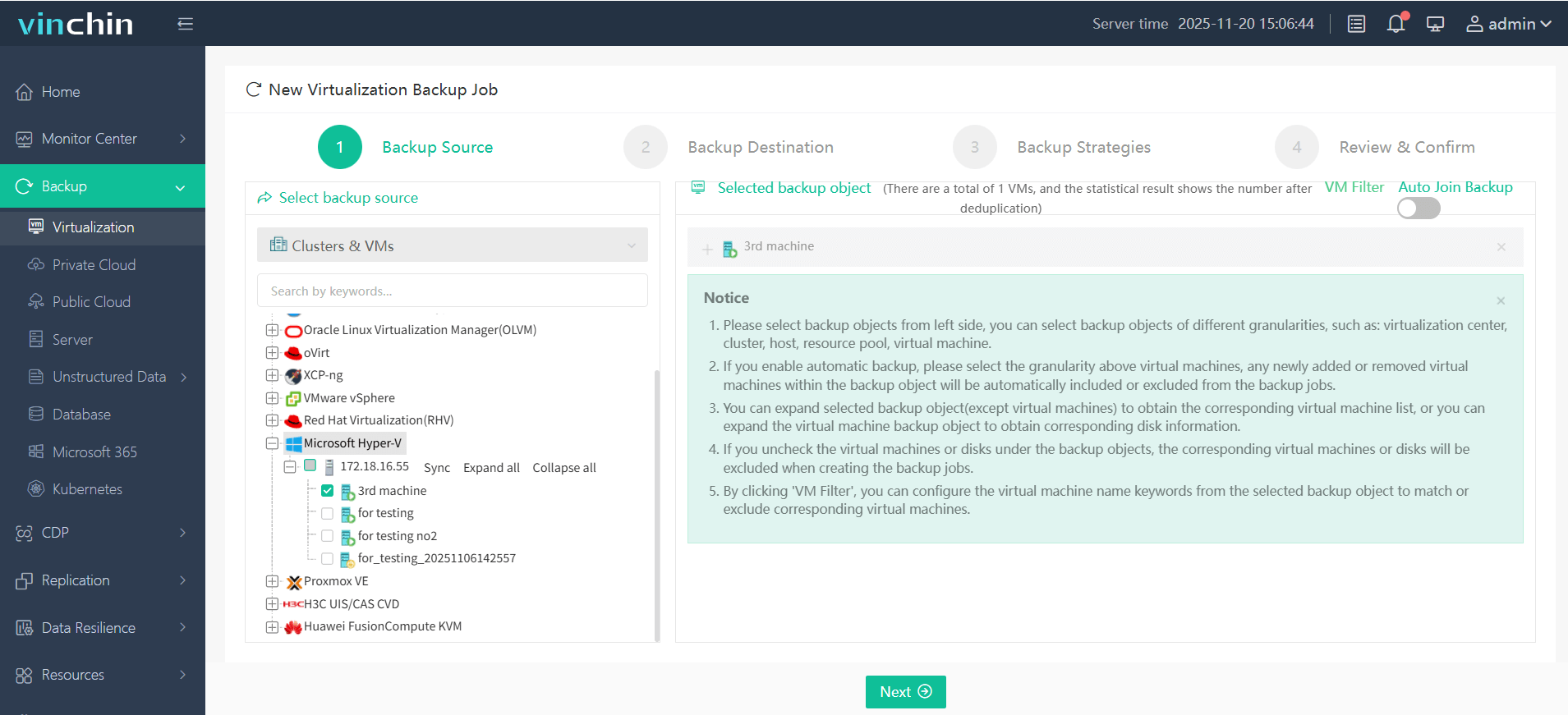
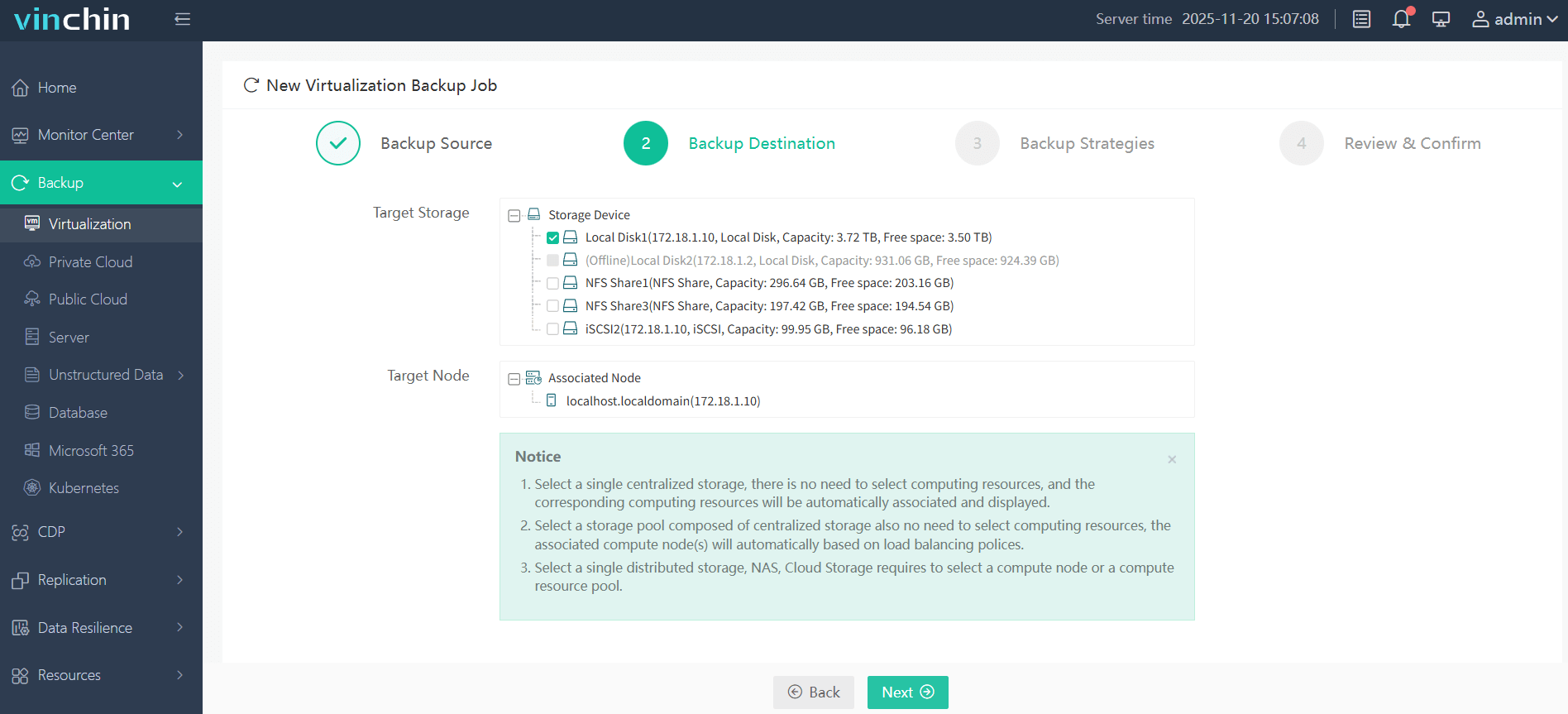
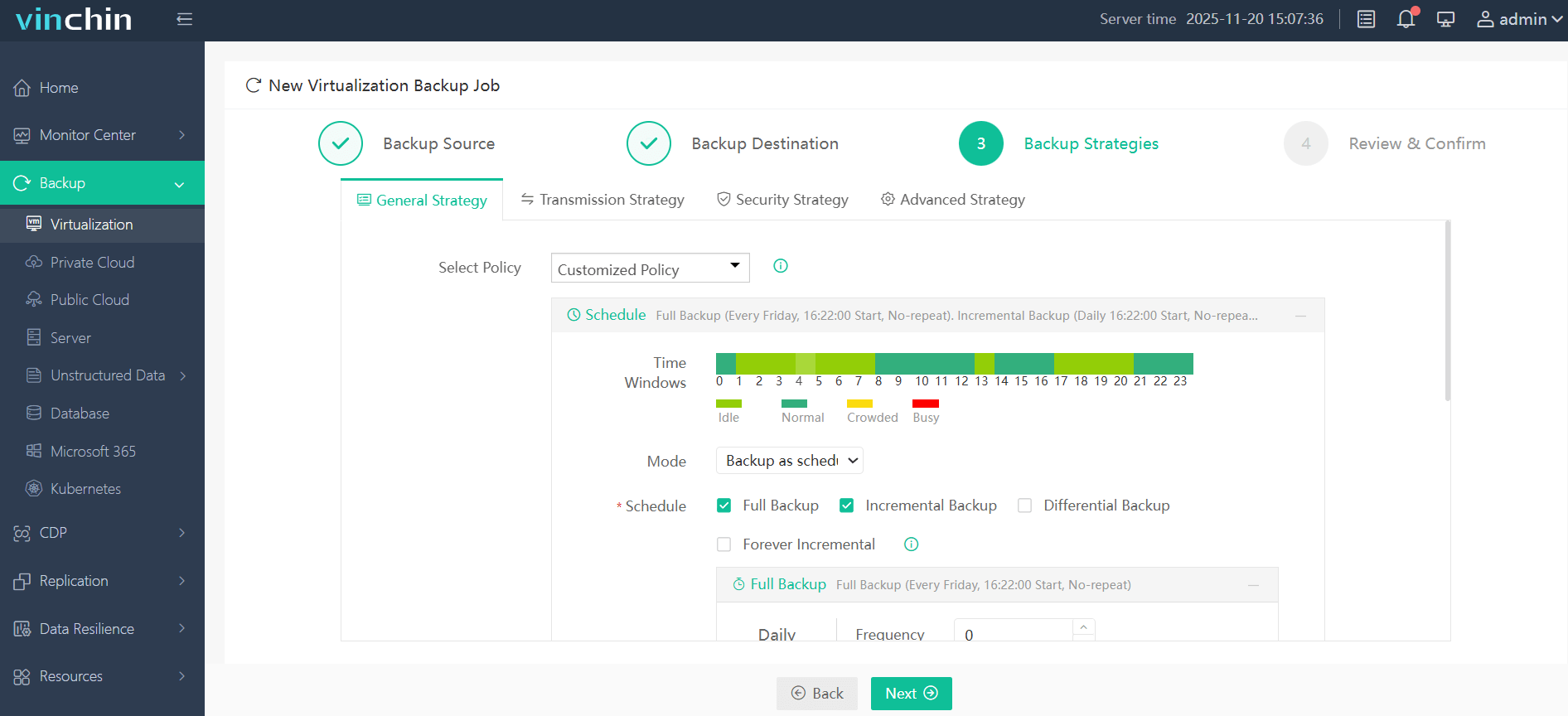
With Vinchin Backup & Recovery’s intuitive web console you can back up any VM in just four steps:
Step 1: Select the Hyper‑V VM you wish to back up;
Step 2: Choose target storage;
Step 3: Configure strategy settings such as schedule/frequency/retention;
Step 4: Submit the job—all managed centrally via a clean interface.
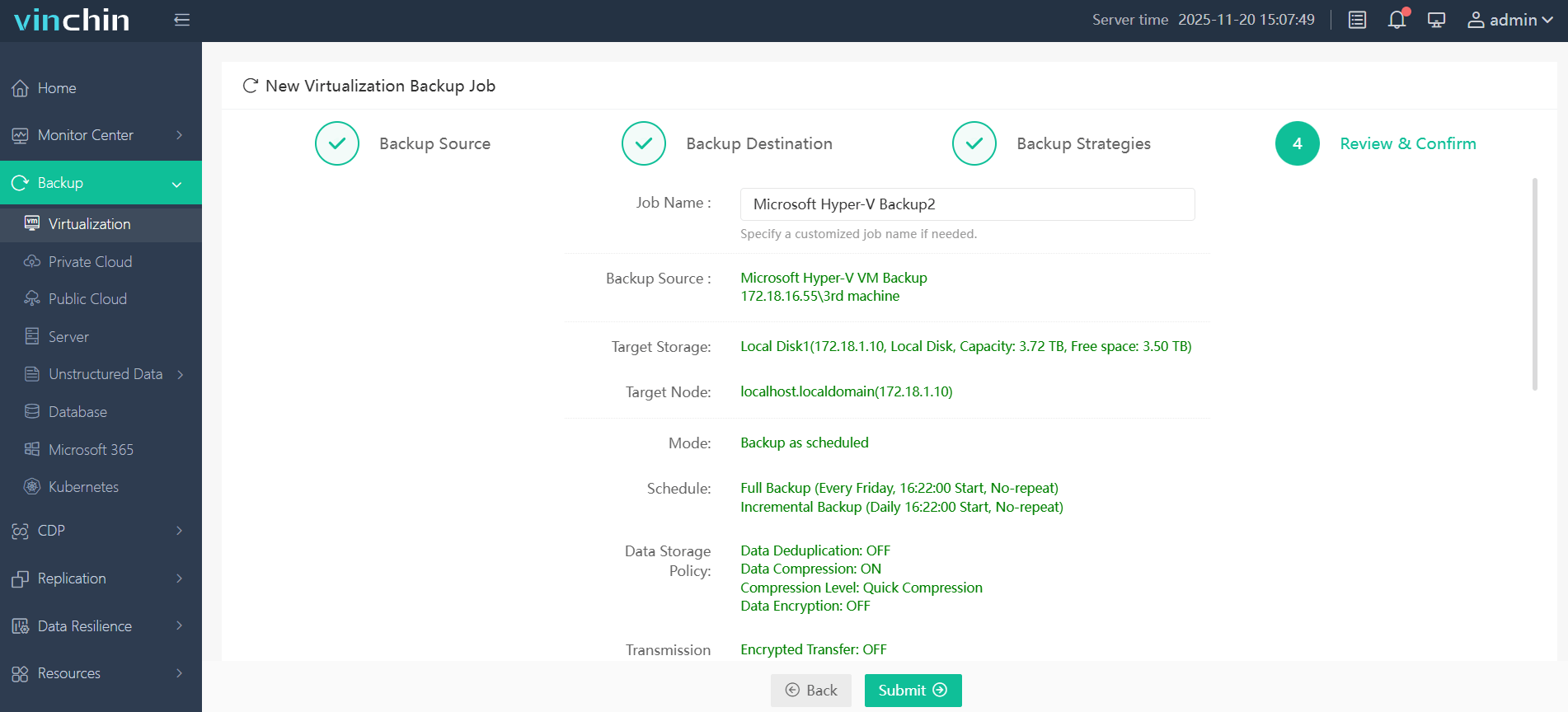
Recognized globally with top ratings from thousands of customers worldwide—Vinchin Backup & Recovery offers a 60-day full-featured free trial so you can experience its enterprise-class protection firsthand.
Best Hyper-V Backup Software FAQs
Q1: Does centralized monitoring increase security risks?
No—when implemented with proper access controls and encryption standards it actually reduces risk by improving oversight throughout your environment.
Q2: Can centralized platforms handle large-scale cluster environments?
Yes—enterprise-grade solutions are designed to scale horizontally using distributed architectures that maintain performance even as new nodes are added over time.
Q3: How does centralized monitoring support compliance?
It streamlines audit preparation by consolidating logs; generating detailed reports; enabling rapid retrieval of historical records—all from one location regardless of how many clusters exist in your infrastructure.
Q4: Is there an impact on backup job speed when using centralization?
Modern solutions use proxy servers; load balancing; parallel processing—and optimized network paths—to ensure central management does not create bottlenecks so each job runs efficiently even at scale.
Conclusion
Robust centralized monitoring transforms efficiency while reducing risk in complex environments. Vinchin empowers enterprises to protect growing Hyper-V deployments confidently while meeting compliance needs.