




Product: Vinchin Backup & Recovery
Version: V7.2, V9.0, V8.0, V8.1
KB Number: 200221
Last Modified: 2026-09-29 23:20:18
Discovered Version: V7.2
Question
Windows Server 2008 backup failed with [Error #86 failed to open file]
Answer
Root cause
Insufficient remaining disk space to save temporary snapshot.
Problem Details
-
When backing up the entire server, each disk has a fixed snapshot storage path.
-
If CBT or speedkit functions are not enabled, the snapshots generated during backup are temporary and will be automatically deleted after the job is completed.
-
CBT or Speedkit will always keep a snapshot in production storage.
Solution
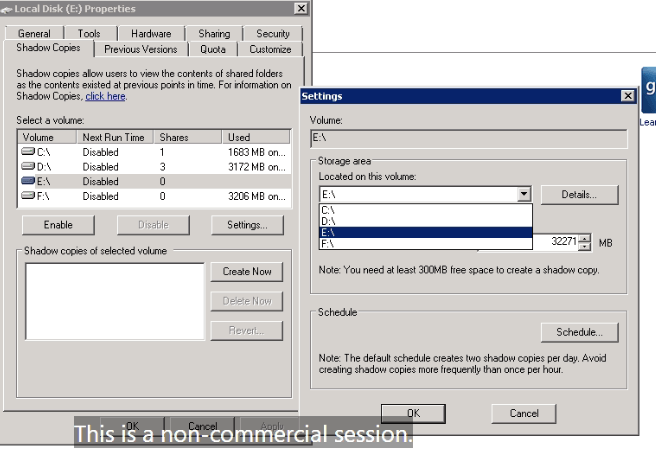
Modify the snapshot storage path through the following path.
Right click on disk information - Properties - Shadow Copies - Settings - Storage area.
The following is for your reference.
Notes
-
If the remaining disk space is less than 10%, it is recommended to switch the snapshot storage path of the disk.
60-DAY FULL-FEATURED FREE TRIAL
- No credit card required
- Get started in 10 minutes