


Product: Vinchin Backup & Recovery
Version: V8.1, V9.0
KB Number: 200239
Last Modified: 2026-09-28 23:25:47
Discovered Version:v8.1.0,v9.0.0
Question
Customer xxx reported that the Vinchin web consoles on hostname xxx (IP:xxx) is showing a “Not secure” warning when accessed via HTTPS. Do we have a record for ssl cert. dates?
Answer
Issue Description
Because the target server uses a self-signed or untrusted SSL certificate and is accessed directly via its IP address, the browser cannot verify its identity, thereby triggering the certificate trust warning.
Resolution
Replace with new certificates
- Generate a trusted SSL certificate,please be sure that your SSL certificate files is correct with the DNS information
- Upload it to Vinchin backend
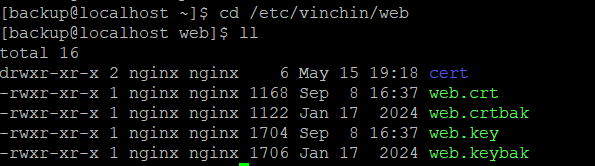
- Go to the directory: /etc/vinchin/web
- Backup the 2 original certificate files: web.crt and web.key with another names(eg.mv web.crt web.bak)
- Copy your SSL files to the current path, no need to change the config, use the 'web.crt' and 'web.key' as a name for your corresponding certificate files
- Authorize the new certificate to ensure its permissions are consistent with those of the original certificate.
- Restart the service nginx with command: systemctl restart nginx
Access Vinchin via domain name
"Not secure" will no longer be displayed in the URL bar.
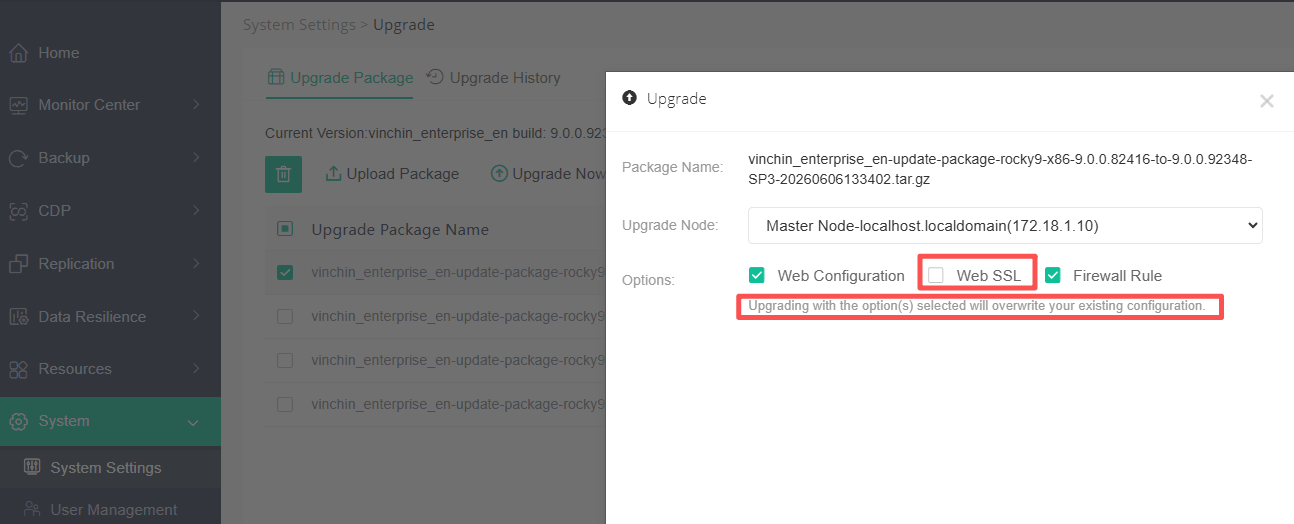
Overwrite the certificate during the upgrade
If you have replaced the SSL certificate, please do not select "Web SSL" during the upgrade, otherwise the replaced certificate will be overwritten.
60-DAY FULL-FEATURED FREE TRIAL
No credit card required
Get started in 10 minutes