Disaster recovery is vital for organizations using H3C CAS (Cloud Automation System) or UIS (Unified Infrastructure System). These platforms power critical workloads in many enterprises. When disaster strikes—whether from hardware failure, cyberattack, or human error—reliable backup software makes the difference between quick recovery and prolonged downtime. Every minute offline can cost revenue and damage reputation. Reliable disaster recovery ensures data integrity and keeps business running smoothly. The right backup solution offers enterprise-grade protection, fast restores, automation, and peace of mind.
Reliable disaster recovery also helps meet compliance requirements. Enterprises must prove they can recover data quickly after disruptions. This builds trust with customers and regulators alike. Choosing backup software for H3C CAS/UIS is not just about ticking boxes—it’s about safeguarding your business future.
Why Disaster Recovery Matters in Enterprise Environments
Disaster recovery protects more than just data; it safeguards operations, compliance status, and customer trust. In today’s digital world, even brief outages can have far-reaching effects on business continuity.
● Protecting Uptime
Downtime disrupts services that customers rely on every day. Even a few minutes offline can lead to lost sales or missed opportunities. According to Gartner research, the average cost of IT downtime is $5,600 per minute. Reliable disaster recovery ensures systems are restored quickly so operations continue without major interruptions.
● Meeting Regulatory Compliance
Many industries face strict rules about data retention and recoverability. Regulations like GDPR or HIPAA require organizations to demonstrate their ability to restore access to personal data promptly after an incident. Without dependable DR processes in place, companies risk fines or legal action if they cannot recover essential records.
● Maintaining Customer Trust
Customers expect constant availability from service providers. A single outage can erode confidence built over years. Reliable DR reassures clients that their information remains safe—even during unexpected events—helping preserve long-term relationships.
● Reducing Financial Risk
Unplanned outages often result in direct financial losses—from lost transactions to regulatory penalties—and indirect costs such as reputational harm or increased insurance premiums. Effective DR strategies minimize these risks by enabling rapid restoration of normal operations.
A strong disaster recovery plan is not optional; it is essential for any organization aiming for resilience in a competitive market.
How To Choose The Best H3C CAS/UIS Backup Solution for Disaster Recovery?
Selecting backup software for H3C CAS/UIS requires careful evaluation across several dimensions—not just basic functionality but also performance under pressure and adaptability as needs grow.
● Predictable RTOs/RPOs
Recovery Time Objective (RTO) defines how quickly you need systems back online; Recovery Point Objective (RPO) sets how much recent data loss you can tolerate. The best solutions let you set clear targets for both metrics—and consistently meet them through automated workflows.
● Automation of Failover Processes
Manual intervention slows down disaster response. Look for solutions that automate failover steps: triggering restores based on policies rather than waiting for human input reduces errors and speeds up recovery when time matters most.
● Granular vs Full-System Restores
Sometimes you need only a single file; other times an entire virtual machine must be restored at once. Flexible solutions support both granular file-level restores and full-system rollbacks—giving you options depending on the situation’s urgency.
● Scalability With Data Growth
As businesses expand digitally, backup volumes increase rapidly. Scalable solutions handle growing datasets without slowing down backups or complicating management tasks—a key factor as environments evolve over time.
Comprehensive reporting tools help maintain audit readiness by tracking all activities related to backups and restores—a necessity during compliance reviews or internal audits.
Strong encryption protects sensitive information at rest and in transit while flexible retention policies ensure old backups are kept only as long as needed—balancing storage costs against regulatory demands.
Support for offsite replication—including cloud destinations—adds another layer of resilience by keeping copies safe from local disasters like fires or floods.
Choosing wisely means balancing these factors according to your organization’s unique risk profile—and ensuring your chosen tool integrates seamlessly with existing infrastructure without introducing new vulnerabilities or bottlenecks.
Vinchin Backup & Recovery: Enterprise-Grade Protection for H3C CAS/UIS
Beyond native capabilities, many enterprises turn to professional third-party solutions like Vinchin Backup & Recovery for enhanced protection of their H3C CAS and UIS environments alongside other mainstream virtualization platforms such as VMware, Hyper-V, Proxmox, oVirt, OLVM, RHV, XCP-ng, XenServer, OpenStack, ZStack (15+ total). Vinchin Backup & Recovery delivers agentless VM backup with robust support specifically tailored for H3C CAS and UIS users seeking reliable enterprise-level features across diverse infrastructures.
Key highlights include LAN-free backup optimized for high-speed transfers within large-scale deployments; SpeedKit acceleration technology boosting efficiency; instant VM restore minimizing downtime after incidents; flexible incremental/differential scheduling reducing resource usage while maintaining frequent restore points; plus comprehensive deduplication/compression saving valuable storage space—all designed to streamline daily operations while maximizing security.
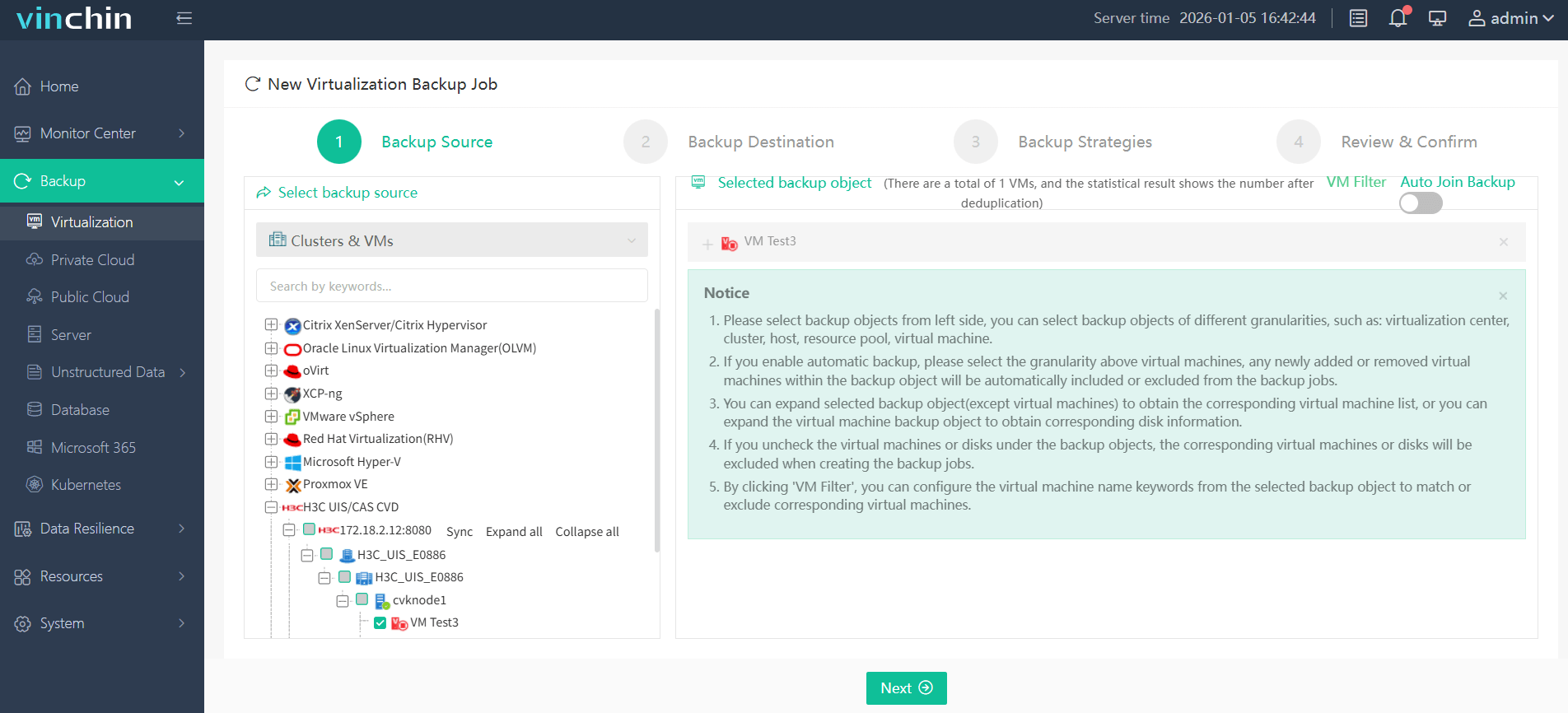
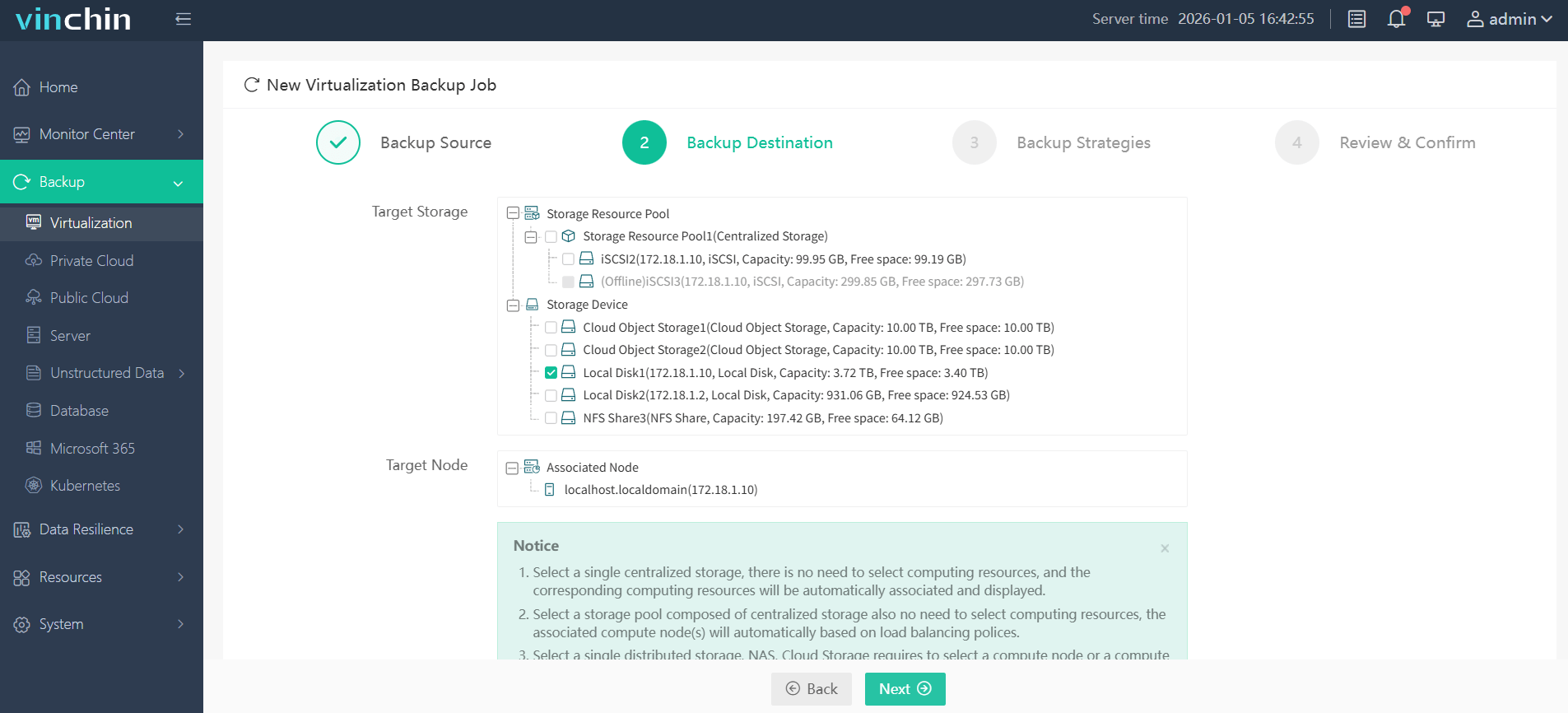
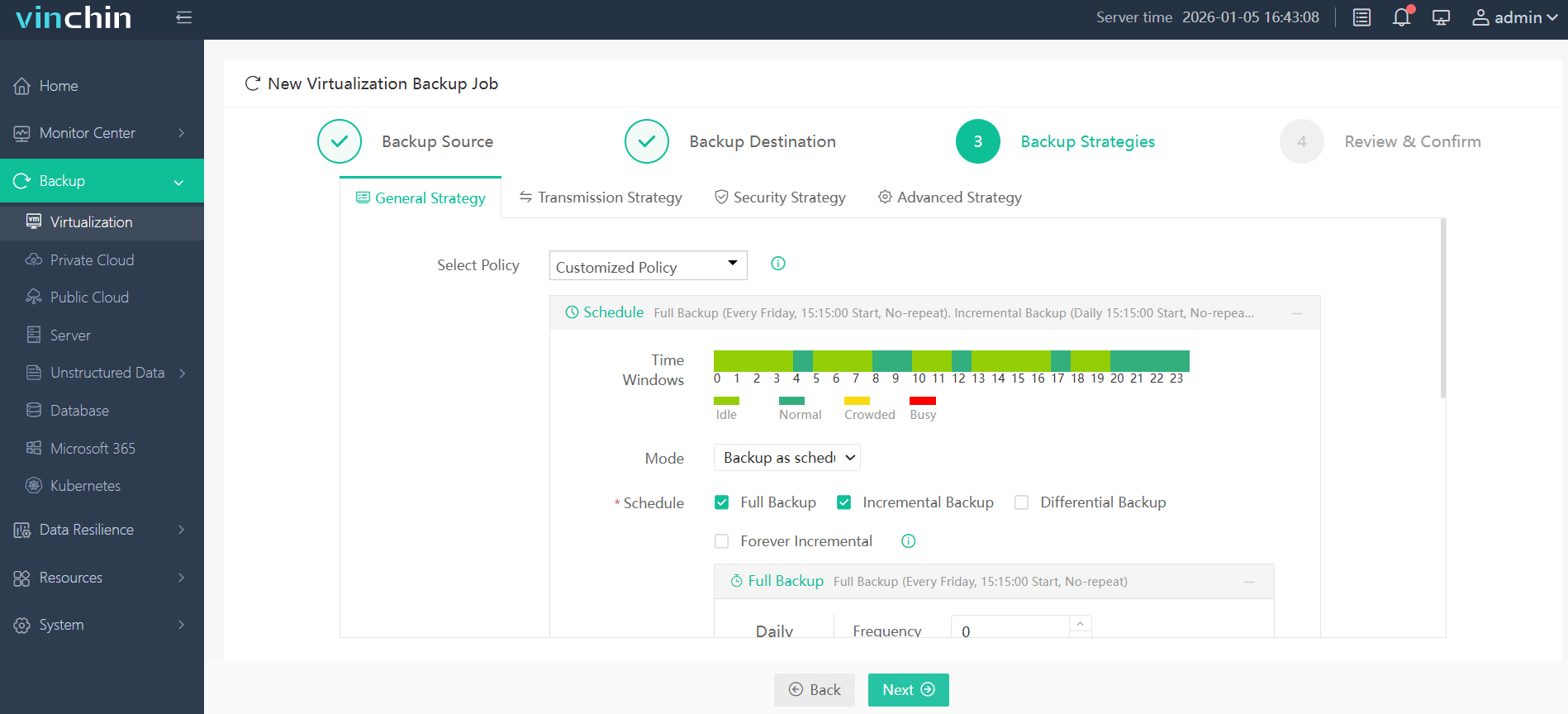
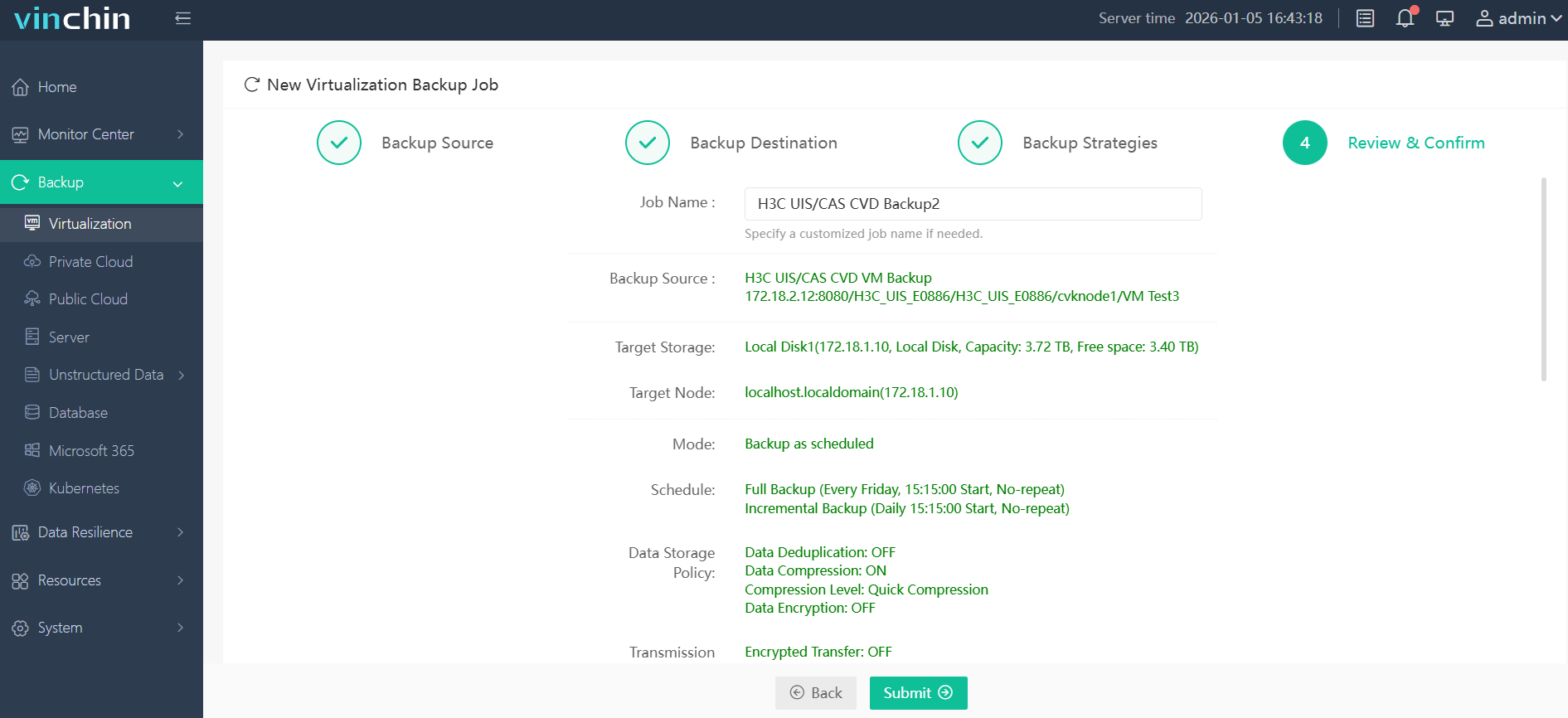
With its intuitive web console interface backing up an H3C CAS VM takes just four steps:
Step 1: Select the H3C CAS VM to back up.
Step 2: Choose the backup storage.
Step 3: Configure the backup strategy.
Step 4: Submit the job.
Recognized worldwide with top ratings among enterprise users across industries,Vinchin Backup & Recovery offers a 60-day full-featured free trial—click below to experience trusted global protection firsthand!
Best H3C CAS/UIS Backup Software FAQs
Q1: What makes a backup solution reliable for disaster recovery?
A1: Reliability comes from consistent backup success rates above industry benchmarks (often exceeding 99%), fast restores meeting defined RTOs such as under 15 minutes per VM where possible, automation of DR workflows through policy-driven actions instead of manual steps—and robust integrity checks verifying every copy matches source data exactly before completion reports are issued.
Q2: How does scalability affect disaster recovery?
A2: Scalable solutions adapt smoothly as organizations add more servers/VMS without degrading performance—for example by leveraging global deduplication engines that reduce redundant copies across large datasets—or tiered storage architectures that move older backups onto lower-cost media automatically while keeping recent snapshots instantly available when needed.
Q3: Is compliance supported by leading backup software?
A3: Yes—top-tier products include detailed reporting modules mapping activity logs directly against regulations such as GDPR Article 32 (“Security of processing”) which mandates timely restoration capabilities after incidents occur. Audit trails track who accessed what information when while customizable retention settings align precisely with legal requirements around recordkeeping duration.
Q4: Can advanced threats like ransomware impact DR reliability?
A4: Absolutely—which is why immutable storage technologies prevent attackers from altering/deleting stored backups even if production systems become compromised during an attack window. Strong encryption further shields sensitive content both at rest/in transit while regular integrity scans flag suspicious changes early so teams intervene before damage spreads beyond initial infection points.
Conclusion
Choosing reliable backup software determines whether disaster recovery runs smoothly—or exposes your business to unnecessary risk later on down the line! Vinchin Backup & Recovery delivers robust protection specifically designed around H3C CAS/UIs needs so you minimize downtime while maximizing operational continuity every step along your journey.










