Large-scale Huawei FusionCompute environments demand fast and reliable backup solutions. Backup windows must be short to avoid disrupting business operations. As data volumes grow, slow backups can threaten compliance and increase risk. Enterprises need tools that keep pace without slowing down systems or risking availability.
Minimizing backup windows is essential for business continuity. Shorter windows reduce operational risk and help organizations meet strict compliance requirements. Efficient protection of virtual infrastructures keeps businesses running smoothly as they expand.
Why Reducing the Backup Window Matters in Enterprise Environments?
A brief overview: Large enterprises handle vast amounts of data daily. The time needed to complete backups—the backup window—directly affects system performance and business operations. Keeping this window short helps maintain productivity and reduces exposure to risk.
● Reduced Disruption to Production Systems
Short backup windows mean less interference with active workloads. When backups run quickly outside peak hours, applications stay responsive and users experience fewer slowdowns.
● Improved Recovery Point Objectives (RPOs) and Recovery Time Objectives (RTOs)
Shorter backup cycles allow you to capture data more frequently (lower RPO), so less information is lost if disaster strikes. Faster restores (lower RTO) get systems back online sooner after an incident.
● Lower Risk of Downtime
Extended backup processes can overlap with production hours, causing bottlenecks or failures that impact critical services. This increases downtime risk—a major concern for large enterprises where every minute counts.
● Compliance Assurance
Many industries require proof of regular backups within specific timeframes for regulatory compliance. Slow or failed backups may result in violations during audits or reviews.
● Cost Control
Long-running backups consume more resources—CPU cycles, network bandwidth, storage—which drives up operational costs over time. Efficient solutions help control these expenses as environments grow larger.
How To Choose The Best Huawei FusionCompute Backup Solution for Reducing the Backup Window
A quick summary: Selecting a backup tool involves balancing speed, scalability, efficiency features, automation capabilities, and ease of management—all crucial for large-scale deployments where minimizing downtime is vital.
● Scalability and High Throughput
Backup solutions must scale alongside growing infrastructure without losing performance. Look for tools that support distributed architectures or node expansion so they can handle increasing VM counts seamlessly.
● Efficiency Features Like Incremental Forever Backups
Incremental forever backup process only changed blocks since the last job—often leveraging APIs like Changed Block Tracking (CBT)—to minimize data transfer times. Deduplication removes duplicate data before storing it; compression shrinks what remains for faster transmission across networks.
● Parallel Processing Capabilities
Modern enterprise-grade tools use parallel processing engines that split jobs across multiple threads or nodes simultaneously. This approach dramatically reduces total backup duration compared to serial workflows.
● Automation & Centralized Management
Centralized dashboards let administrators schedule jobs automatically based on policies—daily fulls at midnight; hourly incrementals during workdays—and monitor progress from one interface. Automation reduces manual errors while ensuring consistent protection across hundreds of VMs.
● Flexible Restore Options
The ability to restore entire VMs instantly—or recover individual files when needed—adds agility during incidents without requiring lengthy full restores every time something goes wrong.
Choosing a solution with these attributes ensures your organization stays protected while keeping systems available around the clock—even as demands increase year over year.
Vinchin Backup & Recovery: Enterprise-Grade Protection for Huawei FusionCompute
For organizations seeking robust protection in Huawei FusionCompute environments, Vinchin Backup & Recovery offers an enterprise-level virtual machine backup solution supporting over 15 mainstream virtualization platforms—including VMware, Hyper-V, Proxmox, oVirt, OLVM, RHV, XCP-ng, XenServer, OpenStack, ZStack—and especially optimized for Huawei FusionCompute scenarios both large and small.
Key features such as LAN-free backup, CBT integration, instant recovery capability (except on Hyper-V), deduplication and compression technology, and granular restore are particularly relevant here; together they ensure rapid data transfer speeds while minimizing storage needs and enabling fast recovery from any failure scenario—all crucial in demanding enterprise settings where downtime isn’t an option.
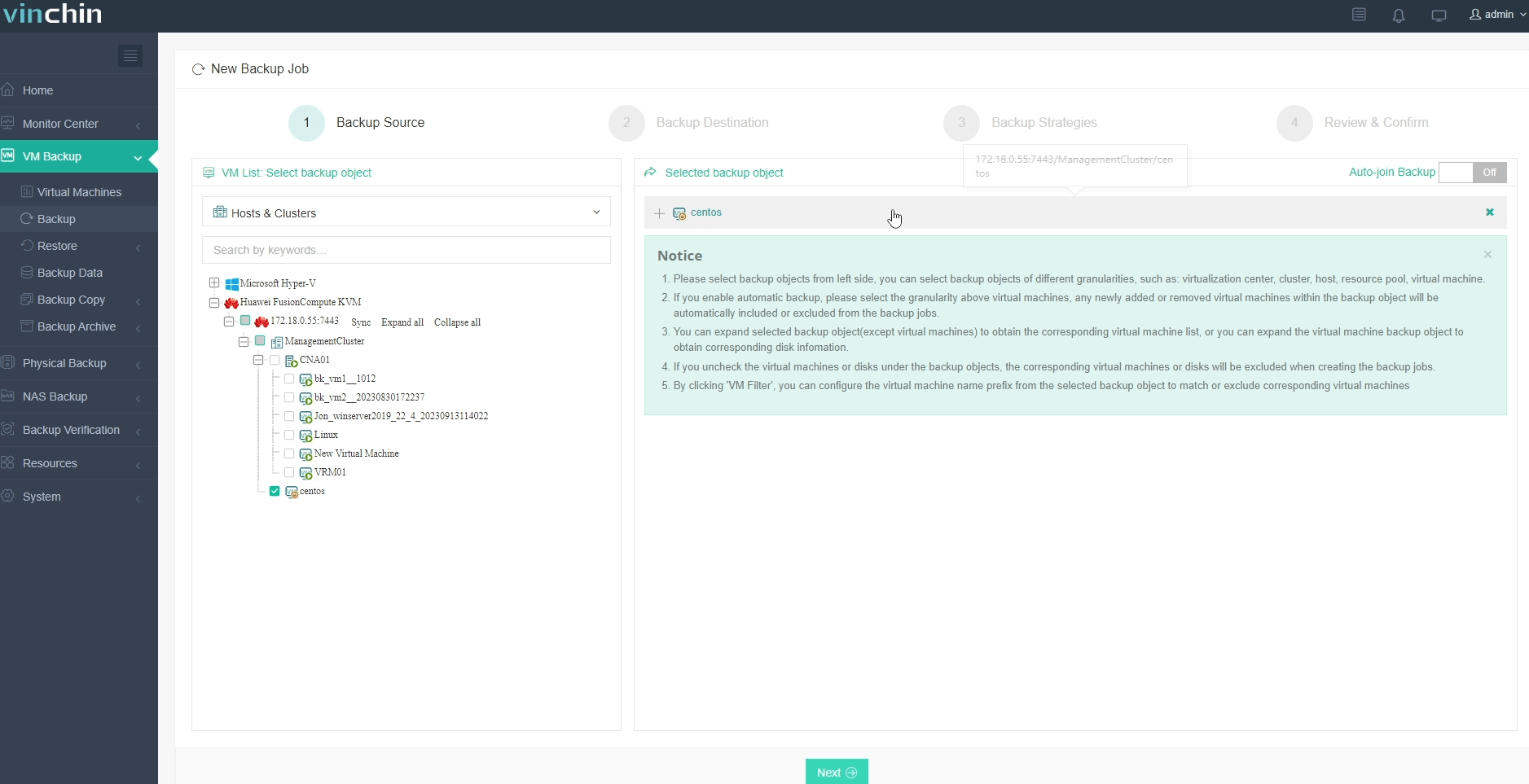
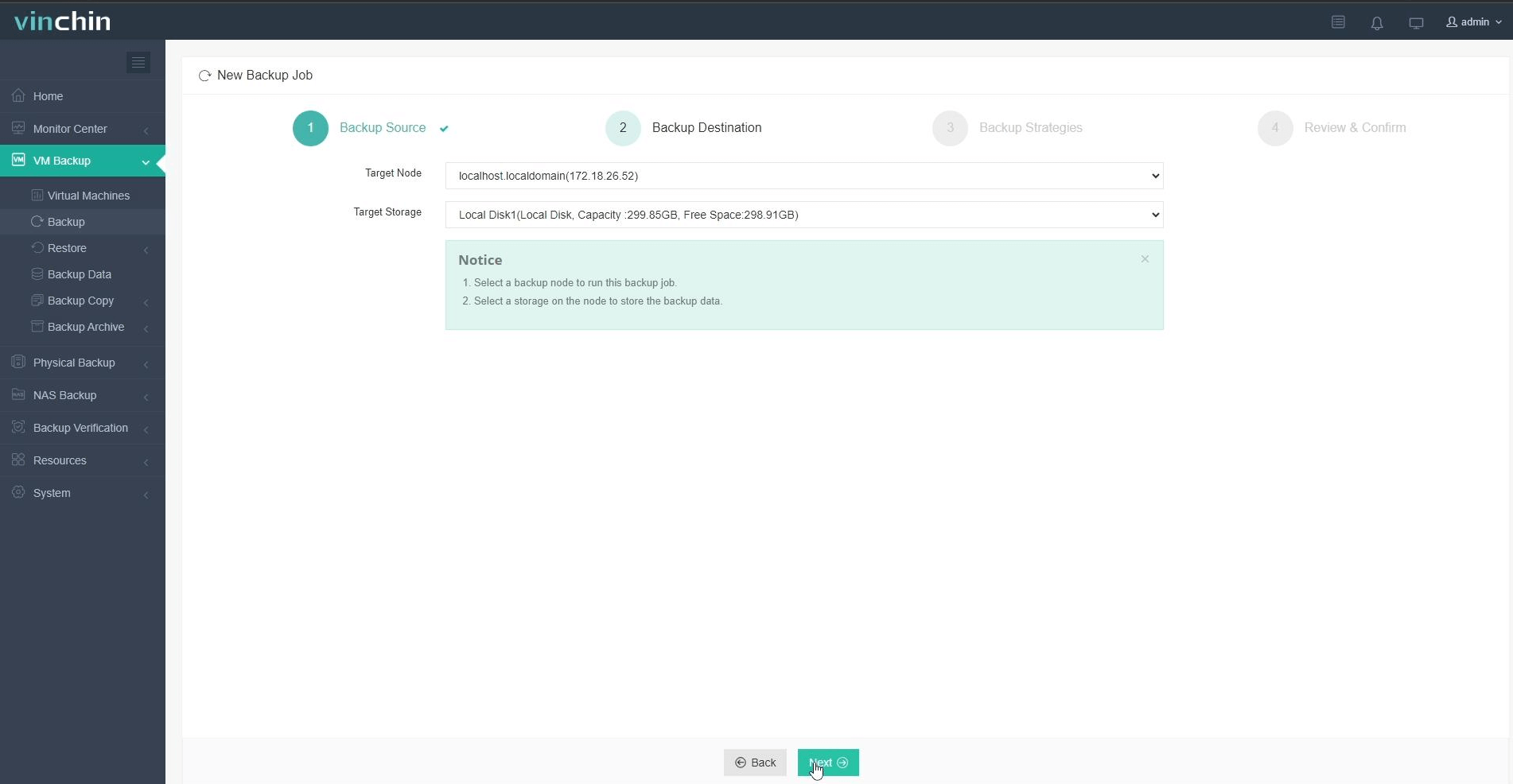
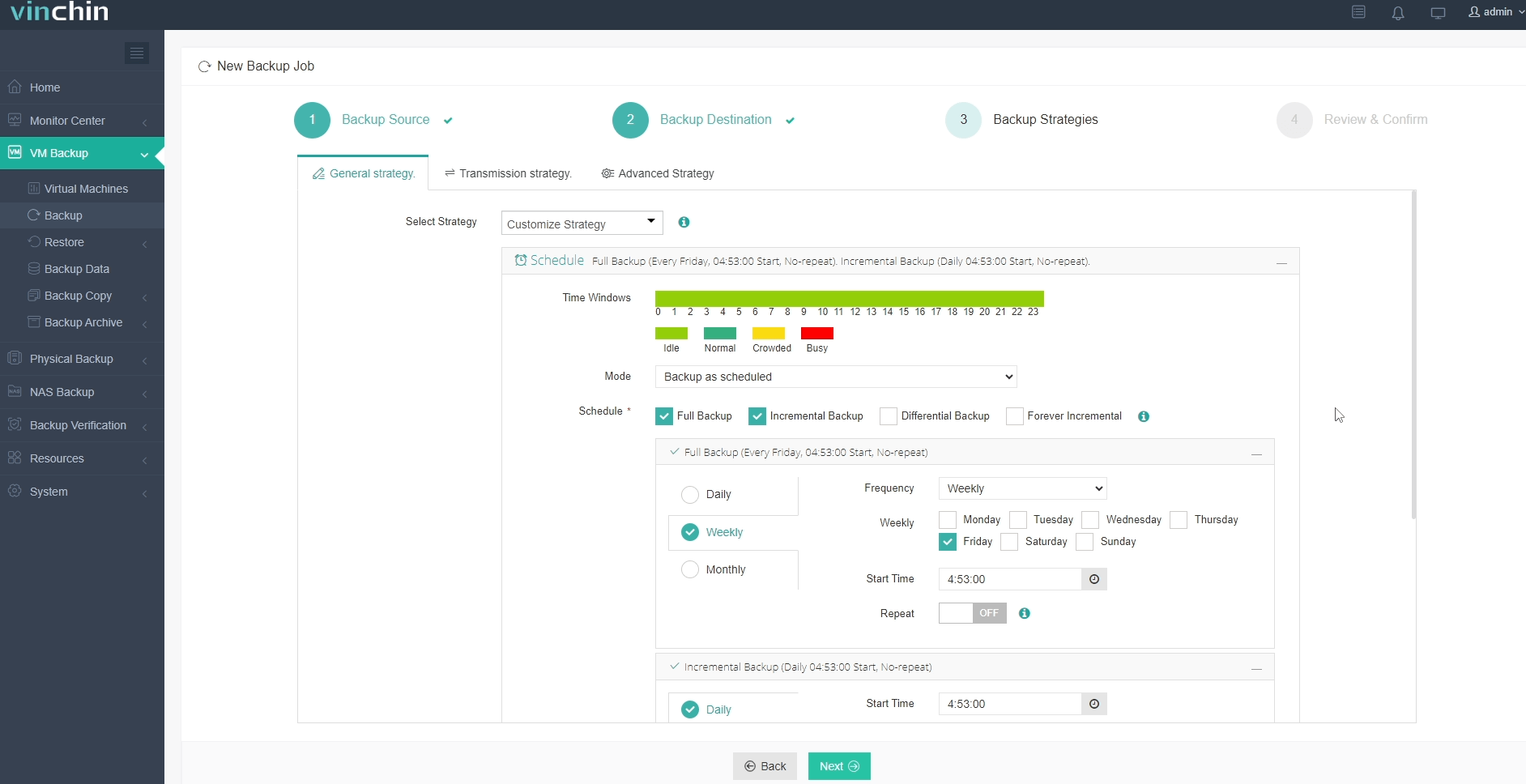
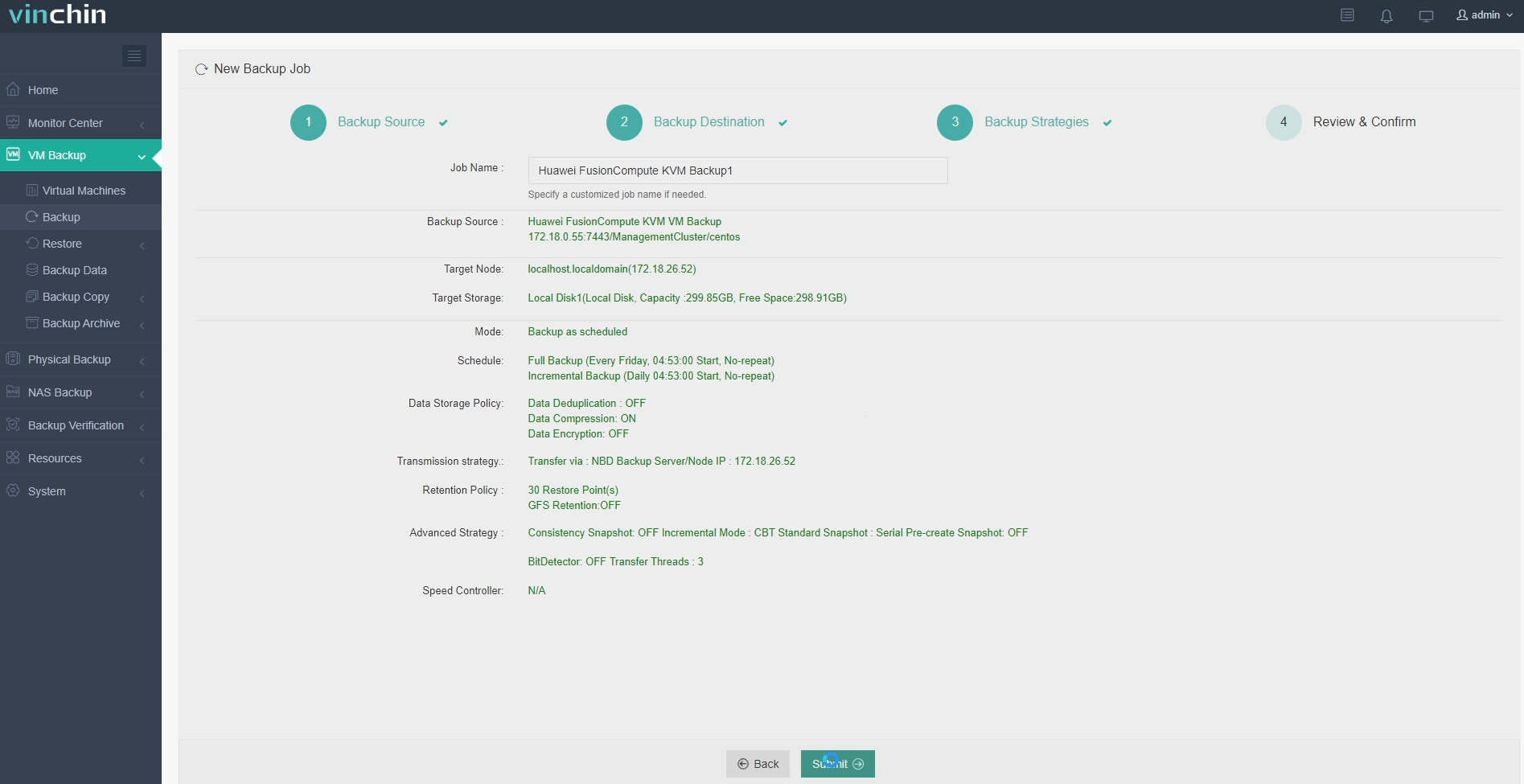
Using Vinchin Backup & Recovery’s intuitive web console makes protecting your environment straightforward:
Step 1: Select the Huawei FusionCompute VM to back up.
Step 2: Choose backup storage.
Step 3: Configure the backup strategy.
Step 4: Submit the job.
Trusted worldwide by thousands of customers with top industry ratings,Vinchin Backup & Recovery offers a 60-day full-featured free trial—click below to start safeguarding your critical workloads today.
Best Huawei FusionCompute Backup Software FAQs
Q1: What does reducing the backup window do for enterprise operations?
A1: Reducing the backup window minimizes the impact on production workloads by limiting resource contention during peak business hours. It allows organizations to create recovery points more frequently (lower RPO), achieve faster recovery times (lower RTO), and meet strict SLA requirements across regulated industries. This approach also helps maintain continuous operations as data volumes grow.
Q2: What risks arise if my organization’s backups take too long?
A2: Excessively long backup processes increase the risk of data loss because recent changes remain unprotected for extended periods. They can also cause performance degradation or system instability during peak usage and may lead to compliance issues if backups fail to complete within mandated timeframes. In addition, failed or delayed jobs leave critical data unprotected until the next successful backup run.
Conclusion
Selecting an optimized solution strengthens resilience against downtime while supporting growth.Vinchin delivers efficient protection,reducing operational risk as enterprises scale their Huawei FusionCompute environments.