Compliance in data protection means following laws and industry rules that require organizations to keep sensitive information safe, private, and recoverable. Secure offsite replication is a core part of this. Without it, businesses risk failing audits, losing customer trust, facing fines, or suffering long downtime after disasters. Many companies rely on Sangfor HCI for critical workloads. But even advanced systems can fail due to ransomware attacks, hardware faults, human mistakes, or natural events. A strong backup solution must ensure encrypted copies are sent offsite automatically—keeping data safe from local threats while meeting strict regulatory demands.
Why Secure Offsite Replication Matters in Enterprise Environments
Secure offsite replication protects business operations from unexpected threats that could wipe out both production systems and local backups. It also helps organizations meet legal requirements for data safety.
● Protection Against Site-Level Disasters: When disaster strikes—be it fire, flood, cyberattack or power failure—local backups may be lost along with primary systems. Offsite replication creates a separate copy at a remote location or cloud site so you can restore operations quickly even if your main site is down.
● Regulatory Compliance Requirements: Many regulations such as GDPR (General Data Protection Regulation), HIPAA (Health Insurance Portability and Accountability Act), and SOX (Sarbanes-Oxley Act) require organizations to protect sensitive data against loss or unauthorized access. These frameworks often mandate secure storage of backup copies outside the primary facility.
● Business Continuity Assurance: The National Institute of Standards and Technology (NIST) highlights offsite backup as essential for disaster recovery planning. By keeping recent copies away from your main infrastructure—and encrypting them—you reduce risks of permanent data loss.
● Audit Readiness: Regulators demand proof that your organization can recover critical records after an incident. With secure offsite replication in place—and detailed logs showing when backups were made—you can demonstrate compliance during audits without scrambling for evidence.
● Reduced Downtime Costs: Every minute of downtime costs money through lost sales or productivity. Offsite replicated backups allow rapid restoration so you get back online fast after any event that disrupts your main site.
Without secure offsite replication built into your Sangfor HCI VM backup strategy, you expose your business to avoidable risks: failed audits; regulatory penalties; reputational harm; financial losses; even closure after catastrophic incidents.
How To Choose The Best Sangfor HCI Backup Solution for Secure Offsite Replication
Choosing backup software for Sangfor HCI involves more than checking boxes—it requires careful evaluation of security controls, automation capabilities, scalability options, audit support features, and integration depth.
● End-to-End Encryption Using Strong Standards: Look for solutions that use robust encryption algorithms such as AES-256 both during transmission (“in transit”) and when stored remotely (“at rest”). This ensures only authorized users can access backed-up data—even if someone intercepts network traffic or gains physical access at the remote site.
● Automated Policy-Based Replication: Manual processes are error-prone and easy to forget under pressure. Reliable software lets you set up schedules—daily or hourly—and define retention policies so backups happen consistently without manual intervention. Automated job monitoring should alert you immediately if something fails so issues are fixed before they become disasters.
● Comprehensive Audit Logging: Detailed logs record every action taken: who started a backup job; when it ran; whether it succeeded; where copies were sent; what errors occurred. These records make compliance reporting simple during external audits—and help IT teams investigate problems quickly if something goes wrong.
● Scalability Across Growing Environments: As your business adds more VMs or expands into new sites/clouds over time, your backup solution must handle increased workload without slowing down restores or requiring complex reconfiguration. Scalable platforms support thousands of VMs across multiple clusters while maintaining high performance—even as storage needs grow into petabytes—or as concurrent jobs increase during peak times.
● Seamless Integration With Existing Infrastructure: The best tools work natively with Sangfor HCI APIs so setup is quick—no need for custom scripts or risky workarounds. Unified management consoles let admins control all backup jobs across sites from one dashboard instead of juggling multiple interfaces—a big win for efficiency in busy IT teams.
A compliant solution combines these elements: strong encryption using proven standards like AES-256; automated scheduling/policy enforcement; rich audit trails; elastic scaling capacity; tight integration with Sangfor HCI’s native controls—all delivered through an intuitive interface designed for enterprise reliability.
Vinchin Backup & Recovery: Enterprise-Grade Protection for Sangfor HCI
For enterprises running virtual environments on Sangfor HCI alongside other mainstream platforms—including VMware, Hyper-V, Proxmox, oVirt, OLVM, RHV, XCP-ng, XenServer, OpenStack and more—Vinchin Backup & Recovery delivers comprehensive VM protection across 15+ virtualization solutions. Designed specifically for demanding business needs in diverse infrastructures like yours, Vinchin Backup & Recovery supports full/incremental/differential backups with deduplication and compression to optimize storage usage while ensuring efficient recovery options such as granular restore and V2V migration are always available.
Key features most relevant to enterprise compliance include end-to-end encryption (protecting data at rest/in transit), automated scheduled backups with policy enforcement to eliminate manual errors, Centralized dashboards supporting multi-site deployments seamlessly integrated with native APIs like those in Sangfor HCI environments,and detailed audit logging that simplifies regulatory reporting—all working together to minimize risk while maximizing operational resilience.
The intuitive web console makes protecting VMs straightforward:
Step 1: Select the Sangfor HCI VM you wish to back up

Step 2: Choose your desired backup storage
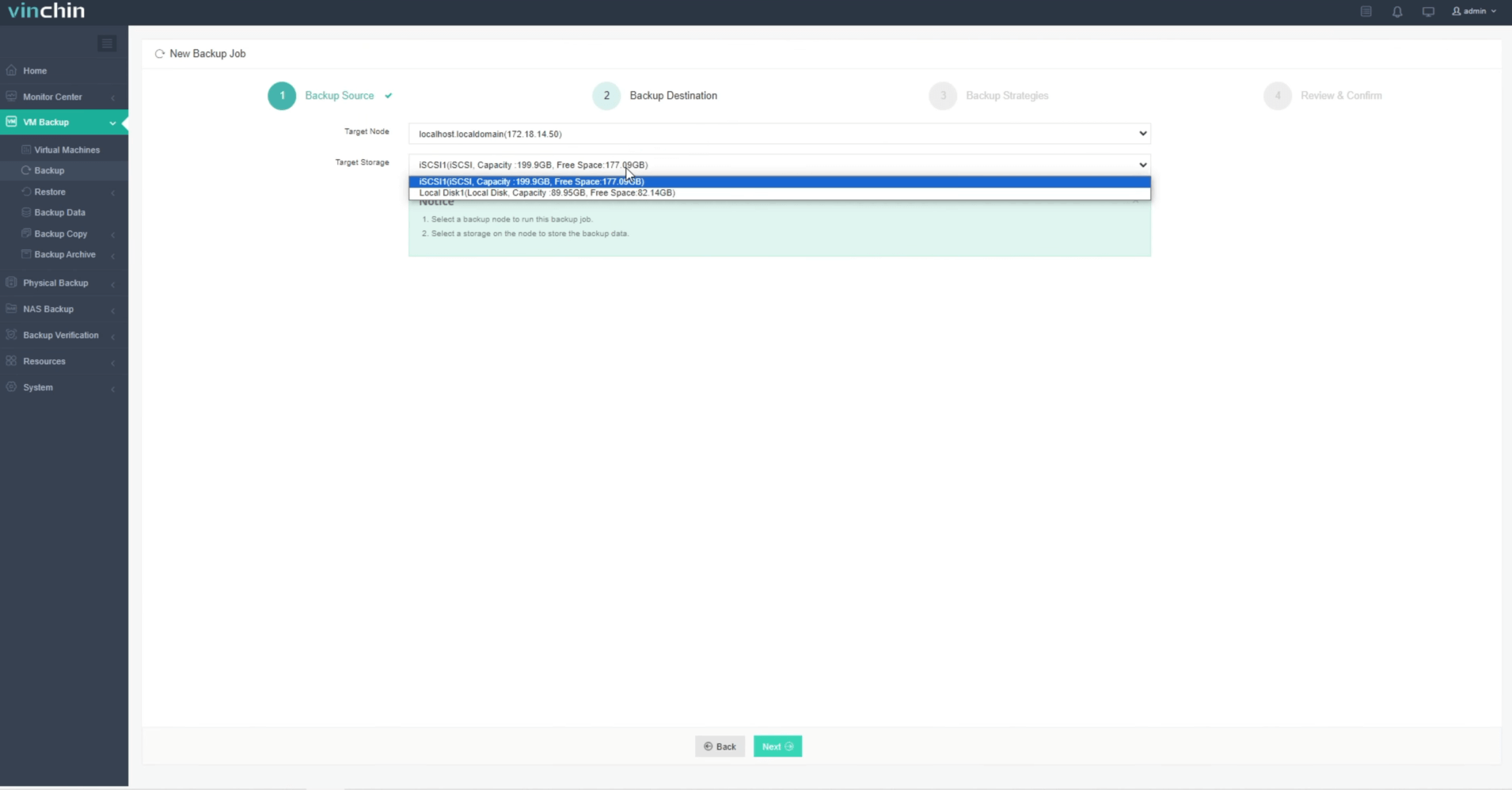
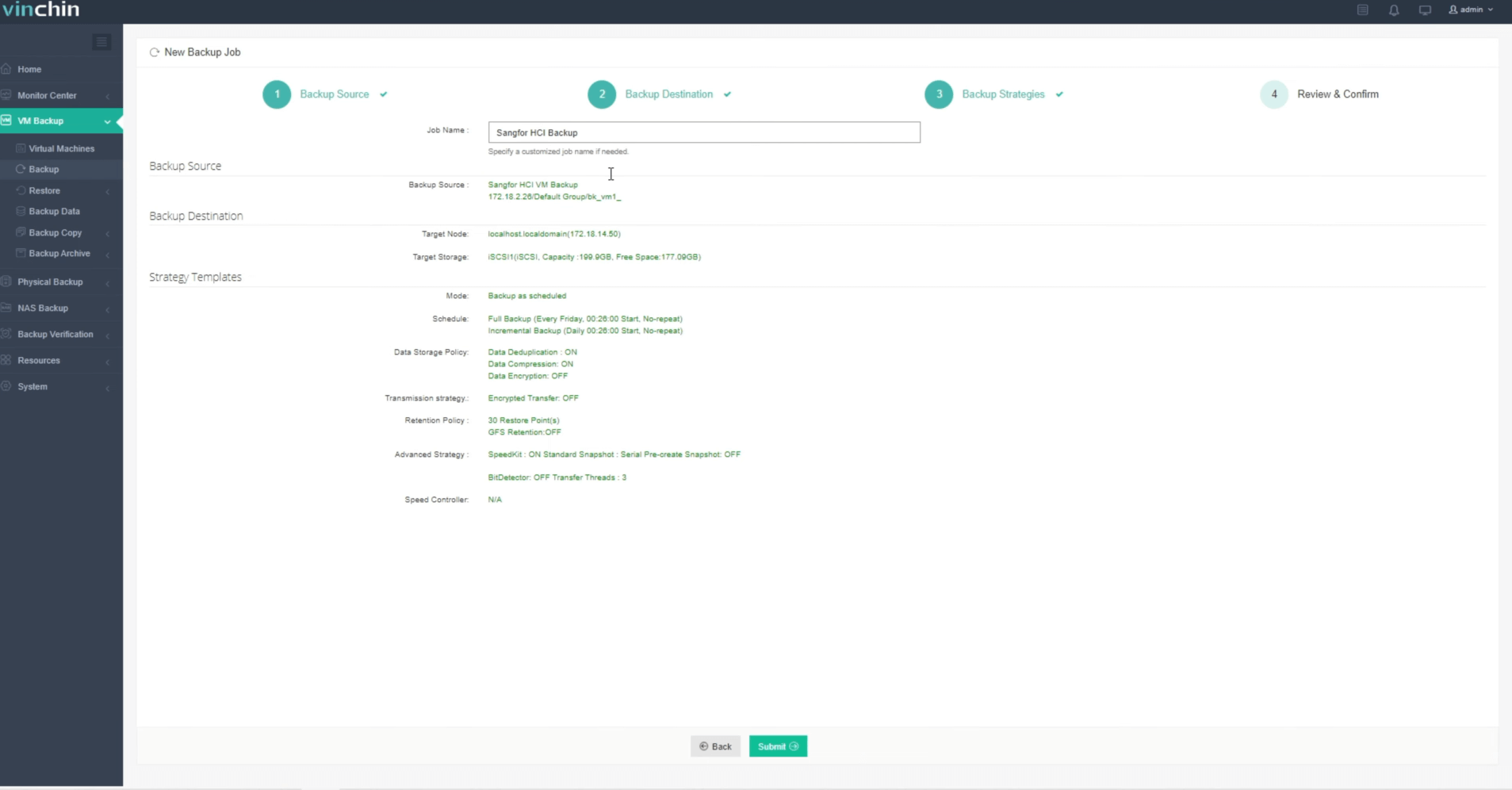
Step 3: Configure your preferred backup strategy

Step 4: Submit the job
Recognized globally by thousands of customers with top ratings,Vinchin Backup & Recovery offers a 60-day full-featured free trial—click below to experience enterprise-grade protection trusted worldwide.
Best Sangfor HCI Backup Software FAQs
Q1: Does enterprise-grade software support encrypted offsite replication?
Yes—a robust enterprise solution should provide end-to-end encryption using standards such as AES-256 during transfer (“in transit”) as well as when stored remotely (“at rest”). This prevents unauthorized access even if network traffic is intercepted or remote storage is compromised. Vinchin delivers this level of security by default in its platform.
Q2: How does leading software ensure regulatory compliance?
Industry-standard solutions offer detailed audit logging plus customizable retention policies aligned with major regulations like GDPR or HIPAA so organizations can prove they meet legal requirements during audits without extra effort on IT staff’s part.Vinchin includes comprehensive logs/reporting tools specifically designed around these needs.
Q3: Can modern platforms scale alongside growing virtual environments?
Absolutely—the best solutions are architected to handle rising numbers of VMs,data volumes,and concurrent tasks across many sites/clouds without performance drops.Vinchin supports seamless scaling whether protecting dozens/hundreds/thousands+of workloads.
Q4: Is centralized management available across multiple locations/sites?
Yes—enterprise-class products provide unified dashboards enabling admins full visibility/control over all protected assets regardless where they reside.This reduces complexity,saves time,and improves operational consistency.
Conclusion
The right choice ensures fast recovery while meeting strict compliance rules. Vinchin combines secure offsite replication with powerful enterprise features—helping businesses stay resilient against threats,fines,and costly downtime.









