Protecting your Proxmox environment means balancing storage efficiency with fast recovery. Incremental forever backup has become a must-have feature for modern backup tools. After one full backup, each new job saves only changed data. This approach cuts storage use, reduces network traffic, and speeds up both backups and restores.
For IT teams managing virtualized infrastructure at scale, incremental forever backup is essential. It helps control costs and ensures you can meet strict retention policies without running out of space. The right tool makes daily operations smoother while reducing risk from data loss or downtime.
Why Incremental Forever Backup Matters in Enterprise Environments
Incremental forever backup brings clear benefits to enterprise IT environments that handle large volumes of data every day. By storing only what changes after the first full backup, organizations avoid unnecessary duplication and wasted resources.
● Storage Savings
Storing every backup as a full copy quickly fills up disks or tapes. Incremental forever backup keeps storage needs low by saving just the changed blocks or files each time. For example, if only 5% of your VM’s data changes daily, you save 95% of space compared to daily full backups.
● Faster Backups
Backing up less data means jobs finish faster. This reduces impact on production systems during busy hours. Shorter windows also make it easier to schedule frequent backups for better protection.
● Quick Restores
With optimized metadata tracking all changes across backups, restoring a VM or file does not require processing each incremental one-by-one. Modern solutions reconstruct full images rapidly from any restore point using efficient algorithms.
● Lower Costs
Less storage used means lower hardware expenses and reduced cloud bills if you store offsite copies. Efficient backups also cut down on bandwidth usage between sites or datacenters.
● Compliance Support
Many regulations require keeping multiple restore points over months or years. Incremental forever strategies let you retain more versions without ballooning storage needs—helpful for audits or legal holds.
By adopting incremental forever backup in Proxmox environments, enterprises gain operational flexibility while meeting business continuity goals.
How To Choose The Best Proxmox Backup Solution for Incremental Forever Backup
Selecting an effective Proxmox backup solution requires careful evaluation of several key factors that impact both performance and manageability in real-world deployments.
● Data Reduction Methods
Look for built-in deduplication and compression features that shrink your stored backups even further beyond basic incrementals. Chunk-based deduplication identifies repeated blocks across VMs so they are saved once—saving significant space when many VMs share similar OS images.
● Reliable Metadata Management
Accurate metadata ensures quick restores from any point in time without manual intervention. Good solutions track block-level changes efficiently so you can recover entire VMs or single files instantly—even from long chains of incrementals.
● Granular Recovery Options
The ability to restore individual files instead of whole VMs minimizes downtime after accidental deletions or ransomware attacks. Some tools offer file-level search within backups directly through their web interface—a major productivity boost during urgent recoveries.
● Automation & Policy Enforcement
Policy-driven automation lets admins set schedules, retention rules (like keep-last N copies), encryption settings, and access controls centrally—reducing manual work while ensuring compliance across all workloads.
● User Interface & Integration with Proxmox VE
A good UI should provide agentless VM discovery (no software needed inside guests), easy job scheduling via calendar views or templates, clear reporting dashboards showing status/errors/history at a glance—all tightly integrated into your existing Proxmox workflow for minimal learning curve.
Choosing wisely ensures your team spends less time firefighting backups—and more time delivering value to users and stakeholders.
Proxmox Backup Server: Native Incremental Forever Backup
Proxmox Backup Server (PBS) is the official backup solution for Proxmox Virtual Environment (VE), built to deliver efficient and reliable VM and container protection. It uses Incremental Forever backups combined with advanced chunk-based deduplication, storing each unique block only once—even if it appears in multiple VMs or snapshots—maximizing storage efficiency.
Setup is straightforward. Administrators can create a datastore through the Add Datastore button in the PBS web interface—no command-line required. Once the datastore is linked to your Proxmox VE nodes via the Storage settings dropdowns, scheduled backup jobs start automatically. Each job begins with a full backup, followed by incremental backups capturing only changes since the last run, minimizing backup time and network load.
Behind the scenes, chunk-based deduplication breaks VM disk images into small blocks (“chunks”) and compares them to existing data. Duplicate chunks are skipped, so identical OS or application files across multiple VMs don’t waste space. Chunks are also compressed before storage, further increasing usable capacity and helping your backup storage scale as datasets grow.
Security is robust. PBS offers built-in encryption that can be enabled via Datacenter > Storage > Proxmox Backup > Encryption, protecting data both at rest (on local disks, NAS, or SAN) and in transit between nodes or datacenters using TLS. Even if physical media is lost or stolen, data remains unreadable without the proper encryption keys, helping meet compliance standards such as GDPR, HIPAA, or FISMA.
Retention policies are flexible and visual. Administrators can configure rules like keep-last, keep-daily, or custom intervals directly in the job setup. Built-in pruning simulators show exactly how much space will be freed before older backups are removed, making capacity planning simple. Dashboard graphs and reports update live after every run, with alerts via email, SMS, or webhooks for failures due to hardware or network issues.
Restores are fast and easy. PBS maintains optimized metadata catalogs mapping chunks to snapshots, so administrators can quickly select a snapshot or individual files for restore. Entire VMs or containers can be restored with a single click, and file-level restores are equally simple, all without manually reassembling incremental chains—a critical advantage during disaster recovery when speed matters most.
As open-source software licensed under AGPLv3, PBS is free to use and actively supported by a vibrant community. Frequent updates and extensive documentation make it a cost-effective, high-performance solution for modern virtualization stacks like KVM/QEMU and LXC, centrally managed through a unified GUI or API.
Vinchin Backup & Recovery: Enterprise-Grade Protection for Proxmox
When advanced features and broad compatibility are required beyond native tools, Vinchin Backup & Recovery stands out as an enterprise-grade solution supporting over 15 mainstream virtualization platforms—including seamless integration with Proxmox VE at the forefront alongside VMware, Hyper-V, oVirt, OLVM, RHV, XCP-ng, XenServer, OpenStack, ZStack and more diverse environments found in today’s datacenters.
Vinchin Backup & Recovery delivers robust capabilities such as incremental forever backup tailored for large-scale virtual infrastructures; global deduplication and compression maximize storage efficiency; agentless operation streamlines deployment; granular restore enables precise recovery at file level; instant recovery minimizes downtime after incidents—all managed centrally through an intuitive web console.
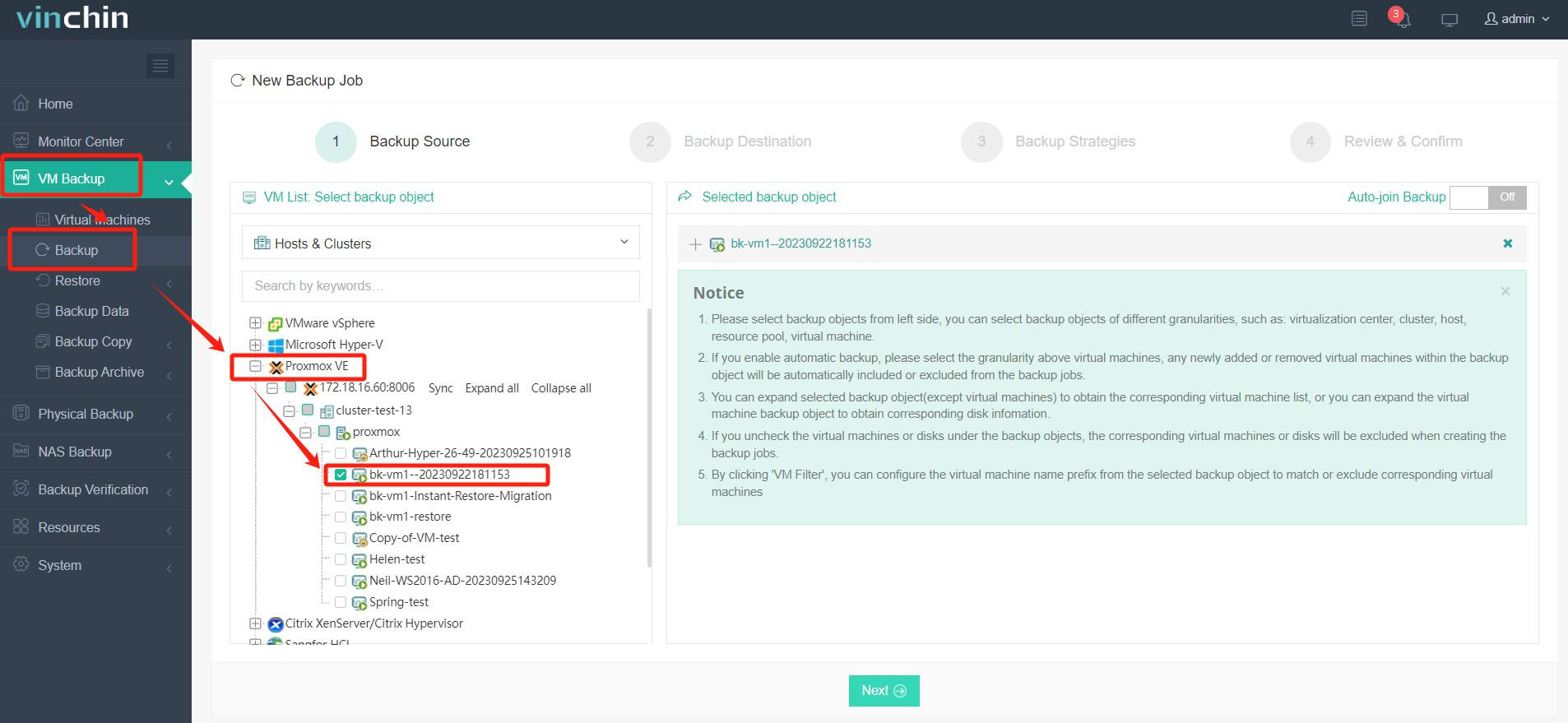
To back up a Proxmox VM with Vinchin Backup & Recovery is straightforward:
Step 1: Select the Proxmox VM you wish to back up.
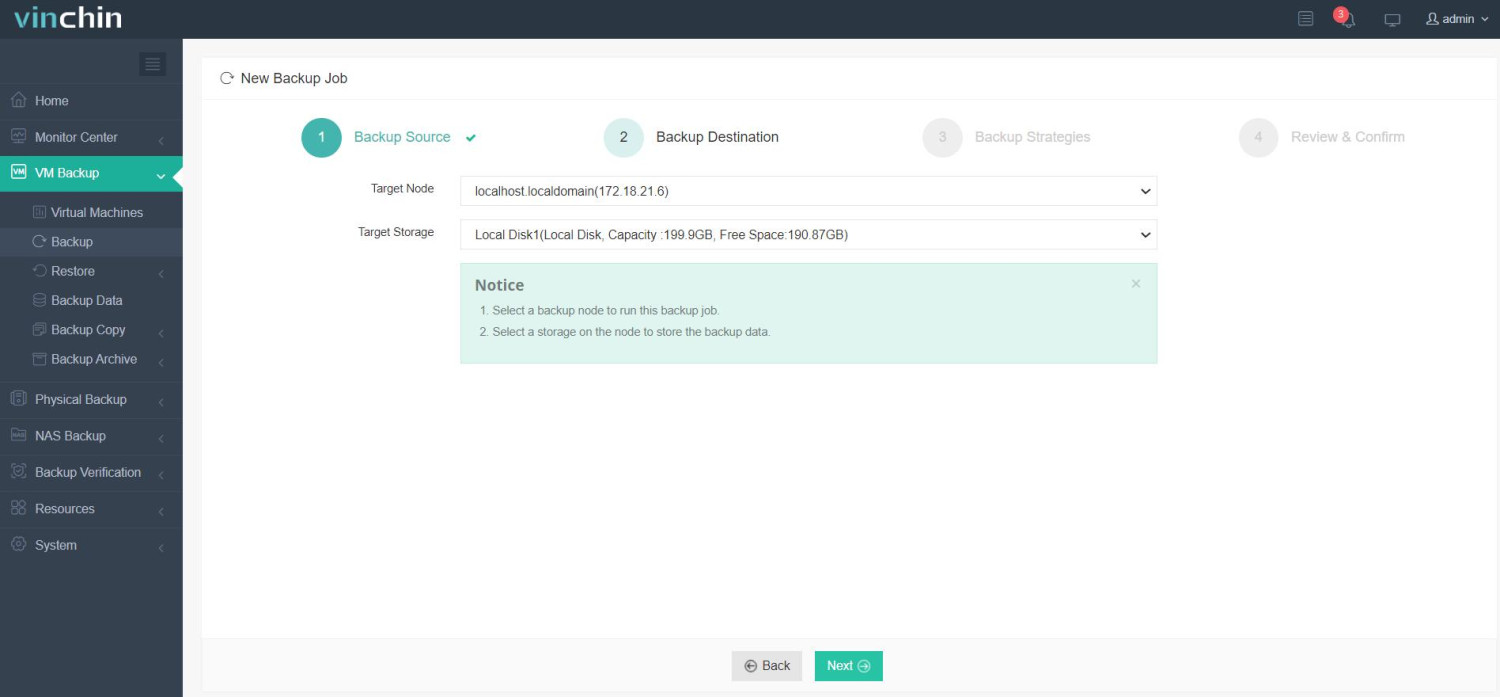
Step 2: Choose your preferred backup storage destination.
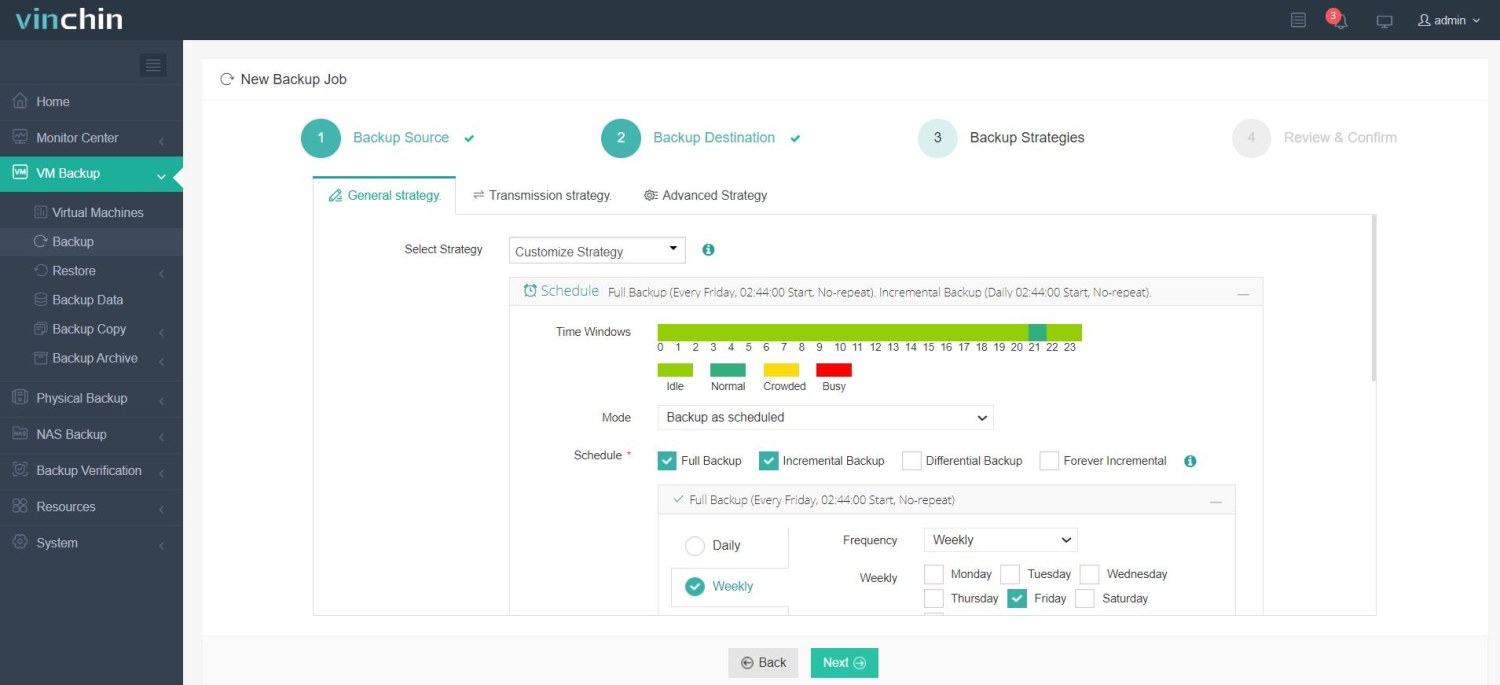
Step 3: Configure an appropriate backup strategy tailored to operational needs.
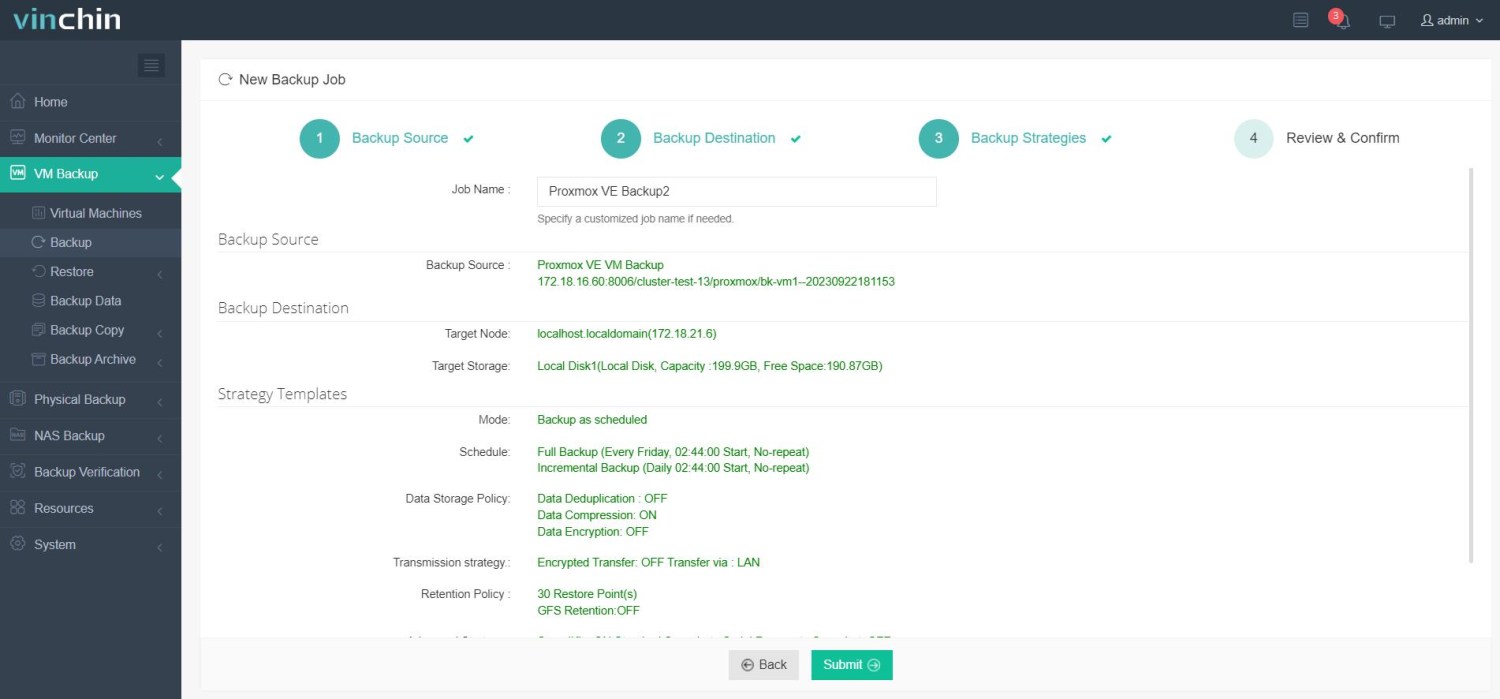
Step 4: Submit the job—the process is streamlined from start to finish.
Trusted worldwide by thousands of enterprises—with top ratings for reliability—Vinchin Backup & Recovery offers a 60-day fully featured free trial so you can experience comprehensive protection firsthand; click below to get started today!
Best Proxmox Backup Software FAQs
Q1: Does incremental forever backup impact restore speed?
No. Modern solutions like Proxmox Backup Server use optimized metadata indexes to reconstruct complete images, rather than replaying each incremental individually. This allows fast restores, even if there are dozens or hundreds of increments between the original full backup and the version needed, making recovery efficient for both onsite and offsite scenarios.
Q2: Is deduplication compatible with incremental forever strategies?
Yes. Deduplication works hand-in-hand with incremental forever backups. Repeated blocks across multiple VMs or snapshots are stored only once, regardless of how often they appear. For example, two Windows servers applying the same update will consume almost no additional storage after the initial upload. This is achieved through continuous chunk matching running in the background, ensuring storage efficiency across disk, tape, or cloud targets without impacting backup operations.
Q3: How does this approach affect compliance audits?
Incremental forever backups with deduplication support compliance. PBS maintains complete, immutable catalogs with detailed metadata, including timestamps, retention rules, and encryption status. Auditors can verify that data is retained, versioned, and protected according to regulatory standards. Coupled with encryption and access controls, this method helps organizations meet requirements like GDPR, HIPAA, and FISMA, ensuring both transparency and security.
Conclusion
Incremental forever backup streamlines storage use while ensuring fast recovery in any size environment—choose native integration with Proxmox Backup Server or advanced enterprise-grade protection from Vinchin according to organizational needs.













