As enterprises continue adopting hybrid cloud and AI-oriented infrastructure, managing large VMware environments has become increasingly complex. VMware Cloud Foundation (VCF) helps organizations build a more unified private cloud architecture by integrating computing, storage, and networking capabilities.
In VMware Cloud Foundation 9.1, VMware further enhanced automation and performance optimization capabilities. This article provides a brief overview of its core changes and analyzes the considerations to be aware of during the upgrade process.
Overview of VMware Cloud Foundation 9.1
Released on May 5, 2026, VMware Cloud Foundation (VCF) 9.1 is designed to help enterprises build a more unified and cloud-like private infrastructure by integrating compute, storage, networking, and cloud management into a single platform. Compared with previous versions, VCF 9.1 places greater emphasis on simplifying operations, improving lifecycle management, and delivering a more consistent hybrid cloud experience.
Another key focus of this new version is preparing enterprise infrastructure for modern workloads, especially AI-ready private cloud deployments. VMware also continues to strengthen platform security, automation, and operational efficiency, enabling organizations to reduce management complexity while improving scalability and infrastructure resilience.
Key Features and Enhancements
VCF 9.1 focuses on four major aspects: infrastructure efficiency optimization, better support for modern applications and AI workloads, stronger security and cyber resilience, and expanded ecosystem and hardware integration. This core VMware update helps enterprises operate large-scale private cloud environments more efficiently, reduce operational complexity, and improve scalability for AI and cloud-native workloads.
Key enhancements in VCF 9.1 include:
Non-Volatile Memory Express (NVMe) Tiering
This unified memory system automatically transfers infrequently accessed data from Dynamic Random-Access Memory (DRAM) to NVMe storage. It allows enterprises to expand effective memory space and carry more workloads, avoiding heavy hardware upgrades and lowering infrastructure costs.
Virtual SAN (vSAN) Global Deduplication and Compression
These capabilities eliminate redundant data across clusters while maintaining consistent performance for encrypted data.
vSphere Elastic Provisioning
This newly added feature supports automatic host discovery and parallel deployment, which greatly simplifies lifecycle management and improves efficiency for large-scale infrastructure.
VMware vSphere Kubernetes Service
A single Supervisor node can now manage up to 500 Kubernetes clusters, improving scalability for containerized and AI workloads.
Native Object Storage
It allows applications to use S3-compatible object storage without external storage platforms.
Live Application Stack Blueprints
VCF 9.1 updates this to replicate complete application environments with identical compute, storage, and network settings, noticeably speeding up DevOps deployment procedures.
Security and Recovery Capabilities
The new vSAN for Recovery capability enhances disaster recovery and ransomware recovery through native snapshot replication and streamlined recovery workflows.
Advanced Cyber Compliance
It automatically detects and remediates configuration drift, keeping systems compliant with norms such as PCI DSS.
Live Patching
This function enables critical security updates to be implemented without interrupting running business, effectively cutting unnecessary downtime.
Expanded Ecosystem Connections
VCF 9.1 achieves broader compatibility via expanded ecosystem connections with Arista, Cisco, SONiC, and other mainstream network devices, bringing more flexible deployment choices.
AMD Instinct GPU Optimization
VMware Cloud Foundation also introduces virtualization optimization for AMD Instinct GPUs, supporting more stable and efficient running of AI workloads with guaranteed high availability.
What VMware Users Should Consider Before Upgrading?
The VCF 9.1 upgrade improves original functions while triggering changes across hardware adaptation, data protection, daily maintenance, security, and other considerations. Users need to evaluate potential influences in advance and make proper adjustments, thus ensuring smooth and stable platform operation after updating. Below, we list the key factors users should consider:
The newly upgraded performance and AI-related tools in VCF 9.1 rely heavily on modern hardware support, and older infrastructure cannot unlock the full value of these new capabilities. Users must evaluate their current hardware specifications and plan hardware upgrades before migrating to the latest version.
Flexible host deployment and parallel maintenance modes effectively reduce manual workload. Larger support scope for container clusters also raises demands on cloud service management. Traditional virtual operation skills and workflows fail to keep pace with updated operating modes. Staff need to renew working standards and learn relevant new technical skills to adapt to platform changes.
Automatic configuration error detection, regular risk fixing, and uninterrupted security updates form a more complete protection system. Enterprises should revise internal compliance regulations, safety reference standards, and patch updating arrangements to conform to the latest management requirements.
Product development leans more toward artificial intelligence and large-scale cloud service operation. The entire product line gradually evolves into private cloud platforms suited for AI tasks. Businesses mainly operating traditional virtual services also need to adjust long-term construction plans to keep up with the overall development trend.
Impact on Backup, Recovery, and Compatibility
For most enterprises, VMware environments host critical business workloads, making backup and recovery essential for maintaining business continuity and minimizing service downtime. Therefore, organizations should carefully evaluate backup, recovery, and compatibility changes before upgrading to VCF 9.1.
Backup and Recovery Considerations
With VMware Cloud Foundation 9.1 introducing stronger Kubernetes, object storage, and ransomware recovery capabilities, enterprises should first verify whether their existing backup solutions fully support modern workloads and the latest VMware APIs.
Organizations should mainly pay attention to:
Kubernetes and container workload backup support
Compatibility with vSAN snapshot and recovery features
Recovery performance in deduplicated and compressed environments
Ransomware recovery and long-term retention requirements
Compatibility Considerations
Many features in VMware Cloud Foundation 9.1 rely on newer hardware and updated ecosystem integrations. Existing VMware users should carefully validate compatibility before upgrading production environments.
Key areas to check include:
CPU, NVMe, GPU, and network hardware support
Backup and disaster recovery software compatibility
vSphere, vSAN, and VKS interoperability
Kubernetes and AI workload support
Third-party monitoring and security tool integration
For enterprises running large VMware environments, full compatibility testing is critical to avoid upgrade risks and operational disruption.
Is It Worth Updating?
VCF 9.1 is worth updating for organizations looking to improve infrastructure efficiency, strengthen security, and better support cloud-native and AI workloads. The update introduces noticeable improvements in automation, resource utilization, and recovery capabilities, helping reduce operational overhead and improve overall platform resilience.
That said, upgrading should still be approached carefully. Before deployment, enterprises should verify their hardware compatibility, backup and recovery support, third-party integrations, and internal operational readiness. Running compatibility checks and testing in advance can help avoid unexpected issues and ensure a smoother transition to the new version.
Protect VMware Environments with a Reliable Enterprise Backup Solution
Although VMware Cloud Foundation 9.1 introduces enhanced native recovery capabilities, most enterprises will still rely on third-party backup platforms for broader data protection needs, including cross-platform management, flexible recovery options, and stronger compatibility across system updates.
As an enterprise solution for hybrid cloud environments, Vinchin Backup & Recovery supports VMware and other 15+ virtualization platforms. It provides agentless data protection for virtual machines, cloud instances, and Kubernetes. Equipped with second-level CDP and real-time disaster recovery, it minimizes downtime and ensures reliable data migration and system upgrades on a VMware environment.
Below is a step-by-step guide of backing up a VMware VM in Vinchin:
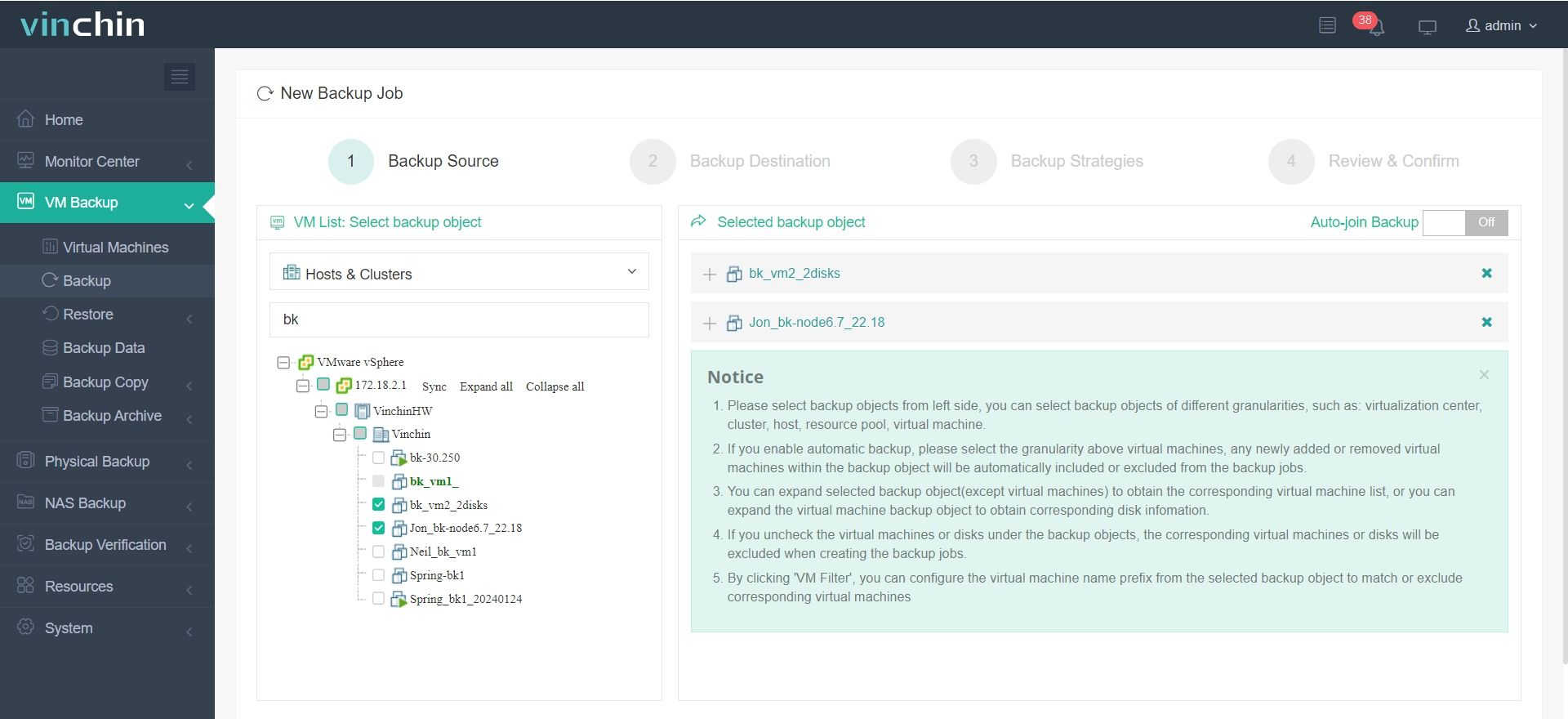
1. Go to VM Backup>Backup on the left-side panel, then select the ESXi VMs from the expanded tree.
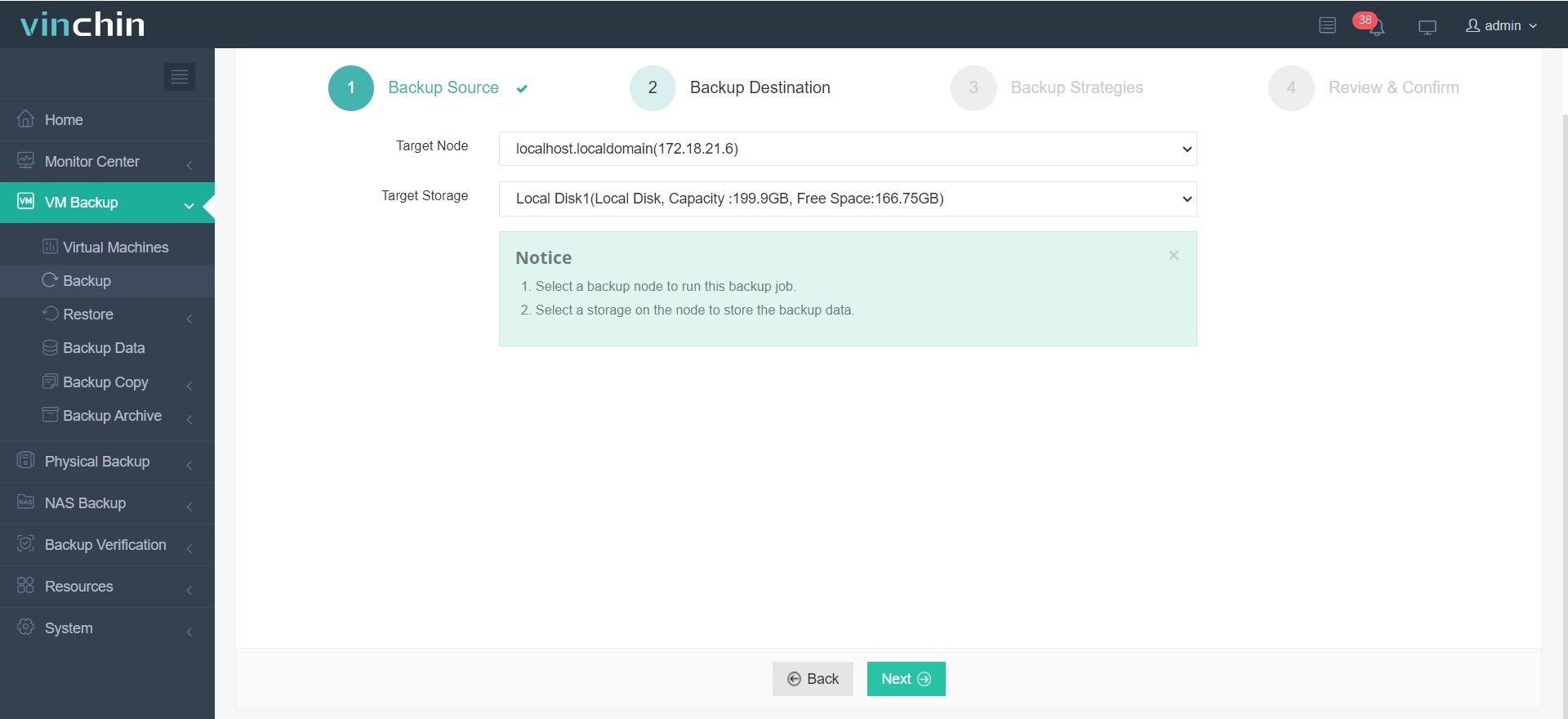
2. Then select the backup destination by configuring the target node and storage device.
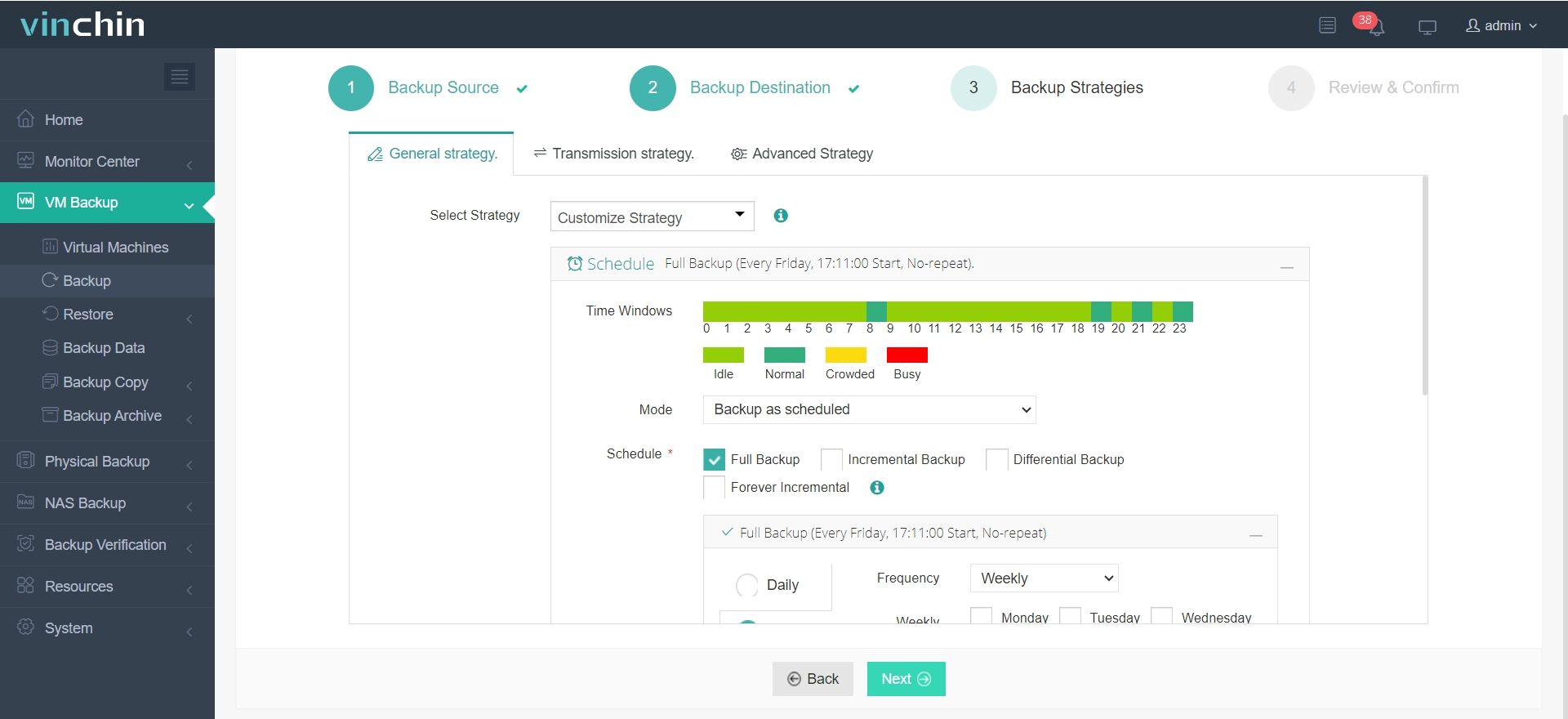
3. Choose either to schedule the task or start it immediately. Customize flexible backup strategies (daily/weekly/monthly full, incremental, or differential backup).
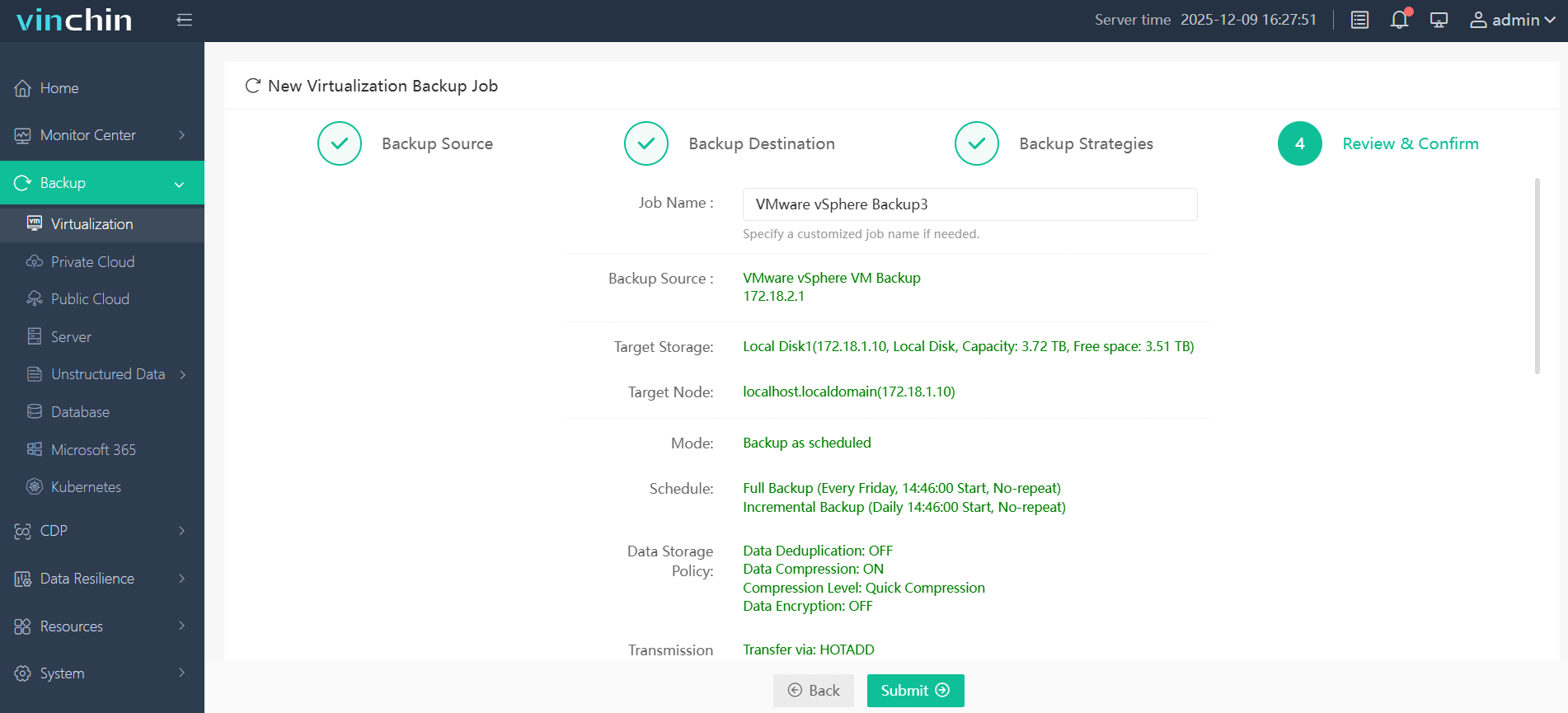
4. Finally, review all the backup details and submit the job once you confirm it’s okay.
Vinchin allows you to simultaneously monitor and centralize the VM backup in a unified web console, and it helps thousands of enterprises protect their VMware environments. Vinchin Backup & Recovery offers a 60-day fully-featured free trial; click the Download button below to access its premium features.
FAQs Related to VMware Cloud Foundation 9.1
Q1: Will existing VMware backup solutions still work with VCF 9.1?
Most mainstream VMware backup platforms should continue to work, but enterprises should verify compatibility with Kubernetes workloads, vSAN recovery features, object storage, and updated VMware APIs before upgrading.
Q2: Is VCF 9.1 mainly designed for AI workloads?
Not entirely. VMware positions VCF 9.1 as a unified private cloud platform for traditional virtual machines, modern applications, Kubernetes, and AI workloads. However, AI infrastructure support is clearly one of the major strategic directions of this release.
Q3: What should enterprises verify before upgrading to VCF 9.1?
Before upgrading, enterprises should mainly verify:
Hardware compatibility
Backup and disaster recovery support
Kubernetes ecosystem compatibility
Third-party monitoring and security integration
Licensing and resource requirements
Upgrade path support for existing VMware environments
Conclusion
VMware Cloud Foundation 9.1 has enhanced infrastructure efficiency and is better compatible with modern hardware and AI workloads, making it better suited for large-scale private cloud and AI-oriented environments. Before upgrading to its new version, keep the considerations above in mind.
Enterprises planning VMware upgrades can also consider third-party backup solutions such as Vinchin Backup & Recovery to improve data protection and recovery flexibility.