VMware Consolidated Backup (VCB) was VMware’s early centralized backup solution for virtual environments. It was eventually phased out due to its reliance on dedicated proxy servers, cumbersome architecture, and poor scalability, making it unsuitable for large-scale virtualization deployments.
It was later replaced by a new backup architecture built on vSphere Storage APIs for Data Protection (VADP), which enables agentless backups and has become the mainstream approach in VMware environments. In this article, we will explain the limitations of VCB and how modern VMware backup solutions help enterprises improve performance, scalability, and cyber resilience.
What Is VMware Consolidated Backup?
VMware Consolidated Backup is an early backup framework introduced with VMware ESX 3.0. It was designed to improve how virtual machines were protected in the early stages of virtualization adoption.
Before VCB, most environments used in-guest backup methods, which required installing a backup agent inside every virtual machine. While this approach worked in physical environments, it became harder to manage as the number of VMs increased. It also added extra CPU and disk load on production systems.
VCB changed this situation by moving backup processing outside the virtual machines. Instead of running backup jobs inside each guest OS, VCB used a separate proxy server to handle backup operations. The proxy would access virtual disk data through VMware snapshot mechanisms and perform backup tasks externally.
VCB reduced the impact on production workloads and simplified backup management. At the time, it was considered a more efficient way to protect virtual machines, especially in environments where VM density was growing quickly.
Core Features of VCB
Reduce ESX Host Workload: Migrate backup tasks outside virtual machines to lower CPU, memory, and I/O pressure on production VMs.
Enable LAN-Free Backup: Support SAN data transmission, so backup traffic bypasses the production local area network and runs directly over storage networks, eliminating network bottlenecks.
Centralize Backup Management: Administrators no longer need to maintain backup agents on numerous VMs, with all backup activities managed via a unified proxy architecture.
Improve Backup Performance: Directly access VM disk files from shared storage to deliver faster backups than traditional in-guest methods.
Why Was VCB Phased Out?
VCB was gradually retired because its inherent architecture created multiple operational and scalability limitations that could not adapt to modern virtualization demands. Its main drawbacks are listed below:
VCB required dedicated backup proxies to mount and process virtual disks. This added extra infrastructure costs and created a single point of failure, raising overall management complexity.
The entire backup workflow involved multiple components and manual configuration steps, making deployment and daily maintenance far more complicated than modern API-based solutions.
When virtual environments grew in size, the centralized proxy model became a major performance bottleneck, and VCB could not scale efficiently for large enterprise deployments.
VCB had limited integration with VMware’s native snapshot mechanism, resulting in lower backup efficiency and weaker data consistency compared with snapshot-driven backup solutions.
VCB mainly operated via command lines and scripts, without a unified graphical management console. As the environment expanded, management became fragmented, and operational failures occurred more frequently.
Without Changed Block Tracking (CBT), VCB had to scan entire virtual disks during incremental backups. This generated heavy I/O loads, prolonged backup windows, consumed massive system resources, and degraded VM performance.
Introducing the Successor of VCB: VADP
VMware introduced vSphere Storage APIs for Data Protection (VADP) as the successor to VCB. Unlike VCB, which depended heavily on a proxy-based architecture, VADP integrates directly with VMware vSphere through standard APIs. This allows backup tools to communicate with the hypervisor in a more direct and consistent way.
One of the key improvements in VADP is support for VMware snapshots combined with CBT. Instead of scanning entire virtual disks during every incremental backup, VADP only processes changed data blocks. This significantly reduces backup time and storage overhead in larger environments.
Another important change is the shift toward agentless backup. Backup software no longer needs to rely on dedicated proxy-heavy workflows like VCB. This simplifies deployment and makes it easier to scale the backup operations across large VMware environments.
Because of these improvements, VADP has become the standard foundation for most modern VMware backup solutions.
VCB vs. VADP: The Key Differences
VCB and VADP represent two generations of VMware backup architecture. VCB uses a proxy-offloaded model, while VADP adopts a modern API and snapshot-driven design. This evolution greatly improves backup efficiency, scalability, and vSphere integration.
| Aspect | VMware Consolidated Backup (VCB) | vSphere Storage APIs Data Protection (VADP) |
| Architecture | Proxy-based backup model | API-driven backup architecture |
| Backup method | Mounts virtual disk via proxy server | Uses VMware snapshots and APIs |
| ESXi impact | Offloads workload but still requires proxy processing | Minimal impact on ESXi hosts |
| Scalability | Limited in large-scale environments | Highly scalable for enterprise environments |
| Data access | Indirect disk access via proxy | Direct access via VMware storage APIs |
| Changing block tracking | High (requires dedicated proxy setup) | Lower (simplified integration via APIs) |
| Performance | Slower in large environments | Faster and more efficient backups |
| Ecosystem support | Limited third-party integration | Widely adopted by modern backup vendors |
Challenges in Modern VMware Environments
Although modern VMware backup solutions based on VADP are much more advanced than VCB, they still face practical challenges in real-world environments.
In many enterprises, virtual machines are no longer the only workload type. Today’s infrastructure often includes Kubernetes clusters, cloud workloads, and physical servers. As a result, backup operations are more distributed and harder to manage under a single system.
When multiple backup jobs run at the same time, they can create resource contention on storage and network layers. Even agentless backups may still generate noticeable I/O load during peak backup windows, especially in large environments.
Another challenge is tool fragmentation. Many organizations use different backup solutions for different platforms. For example, one tool for VMware, another for cloud workloads, and another for databases. This leads to inconsistent backup policies and more operational overhead for IT teams.
Ransomware has also changed backup requirements. Attackers often target backup repositories first. If backup data is encrypted or damaged, recovery becomes difficult even if backups exist. This makes isolation, immutability, and recovery testing more important than ever.
Finally, modern enterprises now expect stricter recovery objectives, such as lower RPO and RTO. Meeting these requirements often requires additional configuration, integration work, or external tools, which increases complexity.
All-in-One Backup Solution for VMware: Vinchin Backup & Recovery
Vinchin Backup & Recovery is a versatile data protection solution designed to address the challenges head-on. It supports a wide range of ecosystems and is compatible with diverse mainstream virtualization platforms, such as VMware, Proxmox, Hyper-V, etc. Built with server-free and LAN-free backup technologies, it minimizes resource consumption on production servers while maintaining high backup performance and reliability.
For VMware environments, Vinchin adopts an agentless backup architecture that eliminates complicated deployment and reduces management overhead. By integrating with VMware APIs and leveraging near real-time CBT technology, Vinchin can quickly identify changed data blocks and perform efficient incremental backups while ensuring strong data consistency with the source system.
Its centralized management console unifies protection for all heterogeneous workloads on a single interface, simplifying daily operations and enhancing overall scalability and business continuity.
Step-by-Step VMware VM Backup Guide:
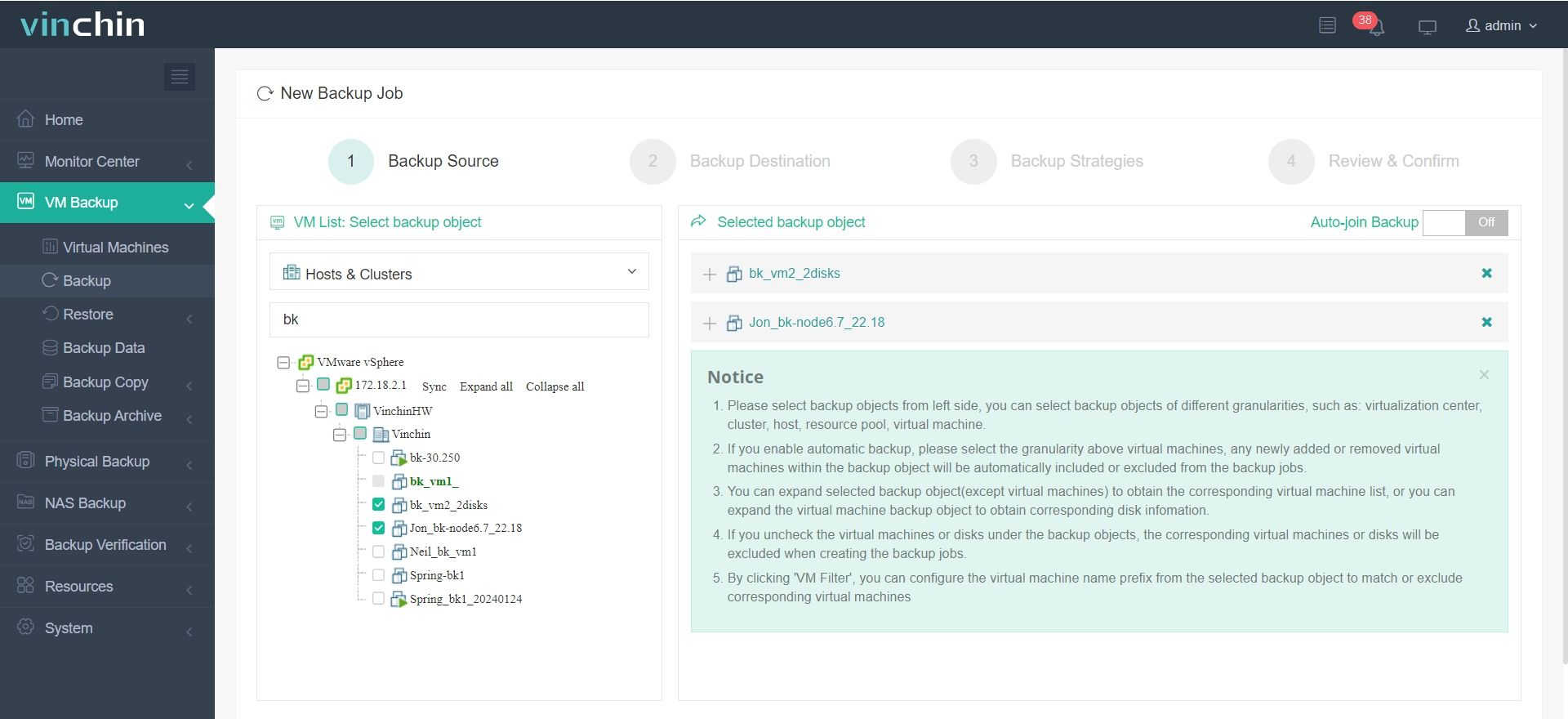
Step 1: In Vinchin Backup & Recovery, expand VM Backup on the left-side panel > select Backup > select the ESXi VM > click Next.
Step 2. Select Target Node > select Target Storage > click Next.
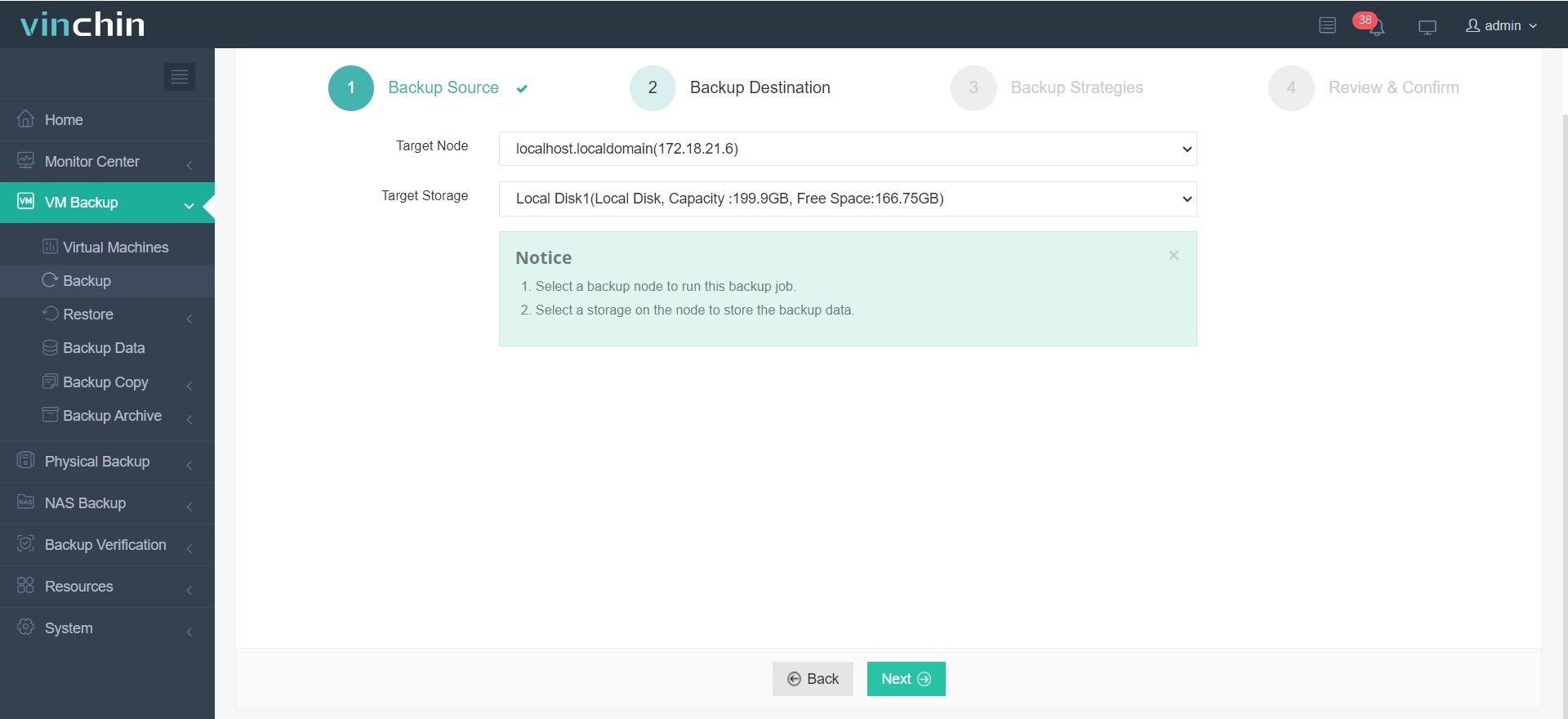
Note: You can use many kinds of storage to store VM backup data, including local disks and directories, iSCSI storage, FC (Fibre Channel) SAN storage, NFS shares, CIFS/SMB shares, and LVM logical volumes.
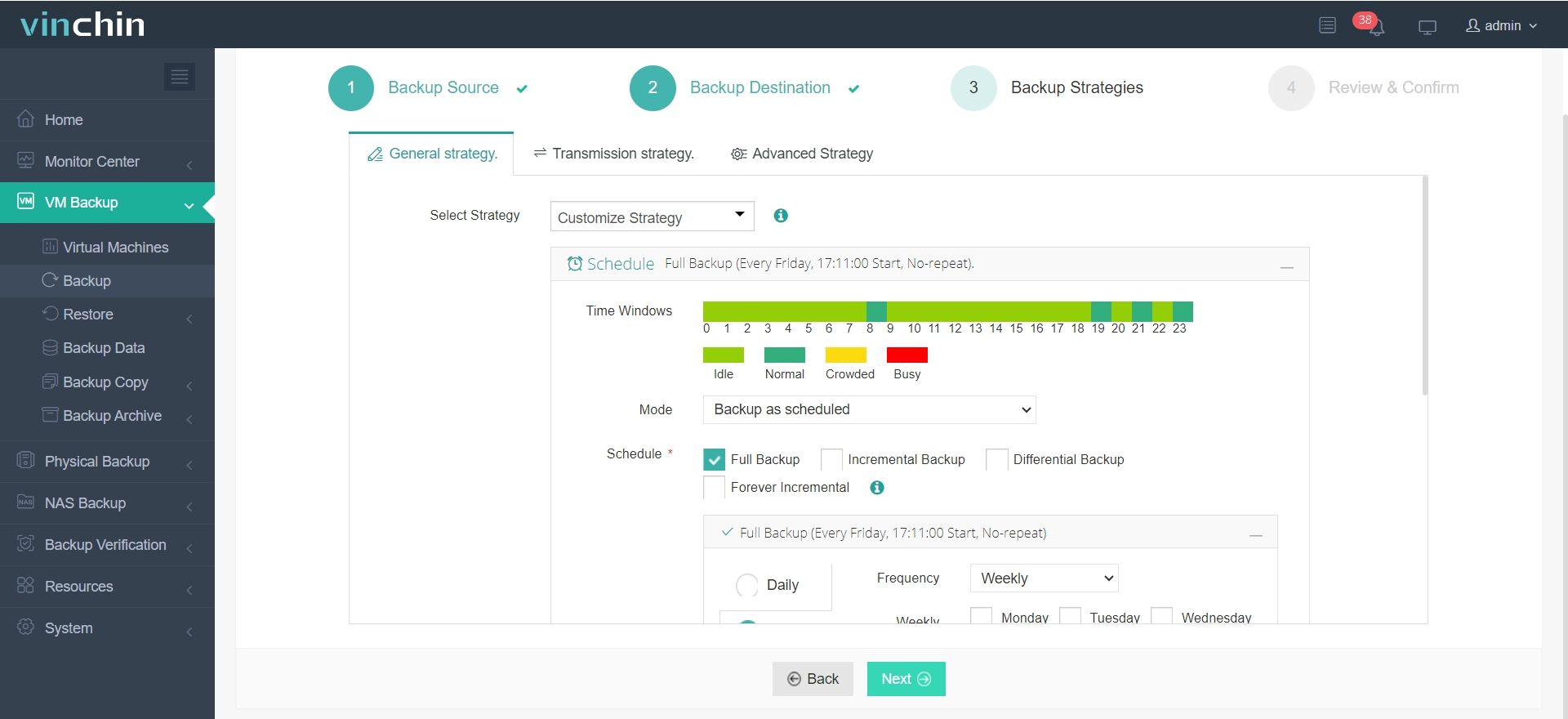
Step 3. Now it’s time to configure backup strategies. Either immediately start the backup or schedule it daily/weekly/monthly with a proper backup plan.
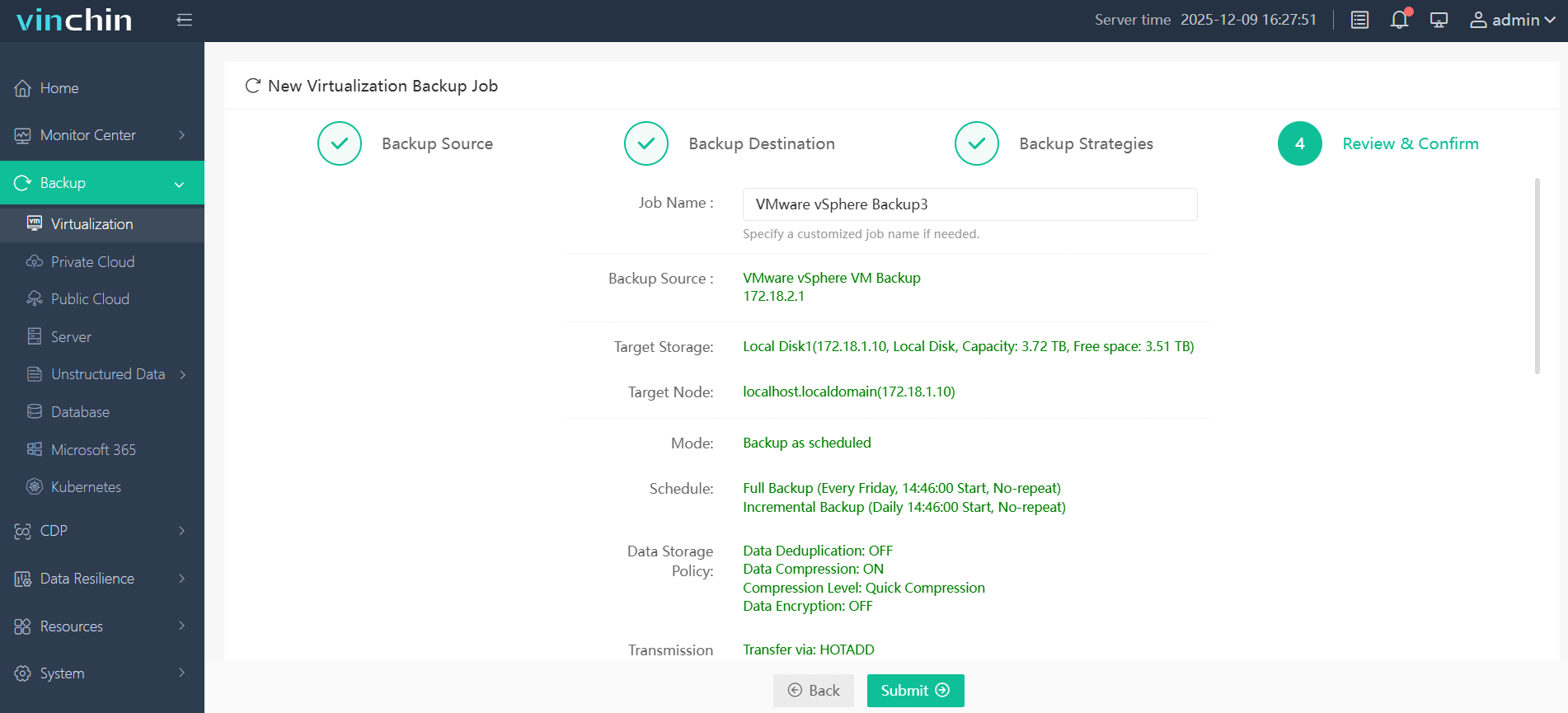
Step 4. Confirm the backup details and click Submit to initiate the backup task.
Designed for businesses of all sizes, Vinchin Backup & Recovery reliably secures critical virtual workloads. A 60-day full-featured free trial is available; click the download button to get the installation package.
VMware Consolidated Backup FAQs
Q1: Is VMware VCB still supported?
No. VMware discontinued VCB after vSphere 4.1, and it has been fully replaced by VADP.
Q2: Does VADP require backup agents inside virtual machines?
No. VADP supports agentless backup in most implementations. This means backup operations are handled through VMware APIs rather than installing software inside each virtual machine.
Q3: Can legacy VCB backups still be restored using modern tools?
In some cases, yes. Many modern VADP-based backup solutions provide limited support for restoring older VCB backup data. However, compatibility depends on the specific backup vendor and product version. It’s recommended to test restoration before performing any migration in production environments.
Final Thoughts
VMware Consolidated Backup was a milestone solution for early virtual machine backup, yet its proxy-dependent design, complex deployment, and scalability limits made it unable to keep pace with evolving IT demands. It was eventually replaced by VADP, a more flexible, efficient, and scalable API-based backup framework.
As a professional all-in-one backup platform, Vinchin Backup & Recovery fully integrates VADP and CBT technologies. Its server-free and LAN-free backup capabilities reduce workload on production systems, while improving backup performance, scalability, and operational efficiency for modern hybrid virtual environments.