Managing Proxmox Virtual Environment (Proxmox VE) clusters across several sites or departments is now common for enterprises. As these environments expand, tracking backup health and job status becomes more complex. Centralized monitoring is vital for large-scale Proxmox deployments because it gives IT teams unified oversight and streamlines management. This approach reduces operational complexity and improves response times. It also supports compliance efforts by ensuring all clusters are visible and protected through one interface. Centralized monitoring helps minimize risks from missed backups or configuration drift, which can lead to data loss or downtime.
Why Centralized Monitoring Matters in Enterprise Environments?
Centralized monitoring forms the backbone of modern IT operations in multi-cluster environments. When organizations manage many Proxmox clusters, having a single view of backup health, job status, and alerts is essential for maintaining control.
● Reduces Downtime Risk: Centralized monitoring allows administrators to detect failed backups or system issues quickly. Without this capability, teams must log into each cluster separately—a process that increases the chance of missing critical problems and prolongs recovery times.
● Ensures Consistent Protection: By overseeing all clusters from one dashboard, IT teams can enforce uniform backup policies across locations. This consistency prevents gaps in protection that might occur if different sites use separate schedules or configurations.
● Simplifies Compliance Audits: Regulatory standards like ISO 27001 require organizations to demonstrate effective data protection measures. Centralized logs make it easier to prepare audit reports by consolidating activity records from every cluster into one place.
● Improves Operational Efficiency: A unified interface reduces manual effort spent switching between systems. Teams can focus on proactive management rather than repetitive checks—freeing up time for higher-value tasks.
● Supports Scalability: As businesses grow their infrastructure, centralized tools scale more easily than isolated solutions. Adding new clusters does not increase administrative overhead when everything is managed together.
How To Choose The Best Proxmox Backup Solution for Centralized Monitoring?
Selecting a backup solution with strong centralized monitoring requires careful evaluation of several factors important for enterprise IT operations.
A good solution should offer an intuitive dashboard that aggregates real-time status and historical data from all connected clusters. This dashboard must display which clusters are healthy and highlight those needing attention at a glance.
● Unified Dashboard Aggregation: Look for solutions that provide a single pane of glass showing live metrics such as backup success rates, storage usage trends, and alert statuses across every cluster you manage.
● Scalability Across Sites: The platform should handle growth without performance drops as you add more nodes or clusters. Check vendor documentation for supported maximums—some tools support hundreds of nodes per deployment while others may have lower limits.
● Granular Alerting Controls: Effective alerting means actionable notifications—not constant noise from false positives. Ensure your solution lets you fine-tune thresholds so only real issues trigger alerts.
● Role-Based Access Control (RBAC): Security best practices demand strict delegation of permissions. RBAC ensures users see only what they need while keeping sensitive operations restricted to authorized personnel.
● Integration With Existing Tools: Consider whether the solution integrates with your current ticketing systems or SIEM platforms via APIs or webhooks—this streamlines incident response workflows across your organization.
Evaluating these criteria helps ensure your chosen platform meets both current needs and future growth plans while supporting compliance frameworks like COBIT or ITIL.
Proxmox Datacenter Manager: The Official Centralized Monitoring Solution
Proxmox Datacenter Manager is the official centralized monitoring and management tool for Proxmox environments, developed by the creators of Proxmox VE and Proxmox Backup Server. It provides a unified dashboard that aggregates metrics such as CPU, memory, storage, network activity, and backup status across multiple sites, giving administrators instant visibility into infrastructure health.
With features like customizable dashboards, role-based access control, multi-cluster management, centralized updates, SDN configuration, and unified shell access, administrators can efficiently manage large-scale Proxmox deployments from a single interface while maintaining strong security and auditability.
Vinchin Backup & Recovery: Enterprise-Level VM Protection for Proxmox VE
To further enhance centralized data protection in large-scale virtual infrastructures, Vinchin Backup & Recovery offers professional-grade VM backup tailored for enterprise needs across over 15 mainstream virtualization platforms—including full support for Proxmox VE environments alongside VMware, Hyper-V, oVirt, OLVM, RHV, XCP-ng, XenServer, OpenStack, ZStack and more. For organizations running extensive Proxmox deployments alongside other hypervisors, this broad compatibility simplifies unified protection strategies within hybrid datacenters.
Key features relevant to enterprise users include agentless VM backup/restoration on Proxmox VE hosts; forever-incremental backup modes; granular restore options; LAN-free backup capabilities; robust scheduling automation; plus advanced deduplication/compression technologies—all designed to maximize efficiency while minimizing storage costs and operational overhead.
Using Vinchin Backup & Recovery’s intuitive web console makes protecting your environment straightforward:
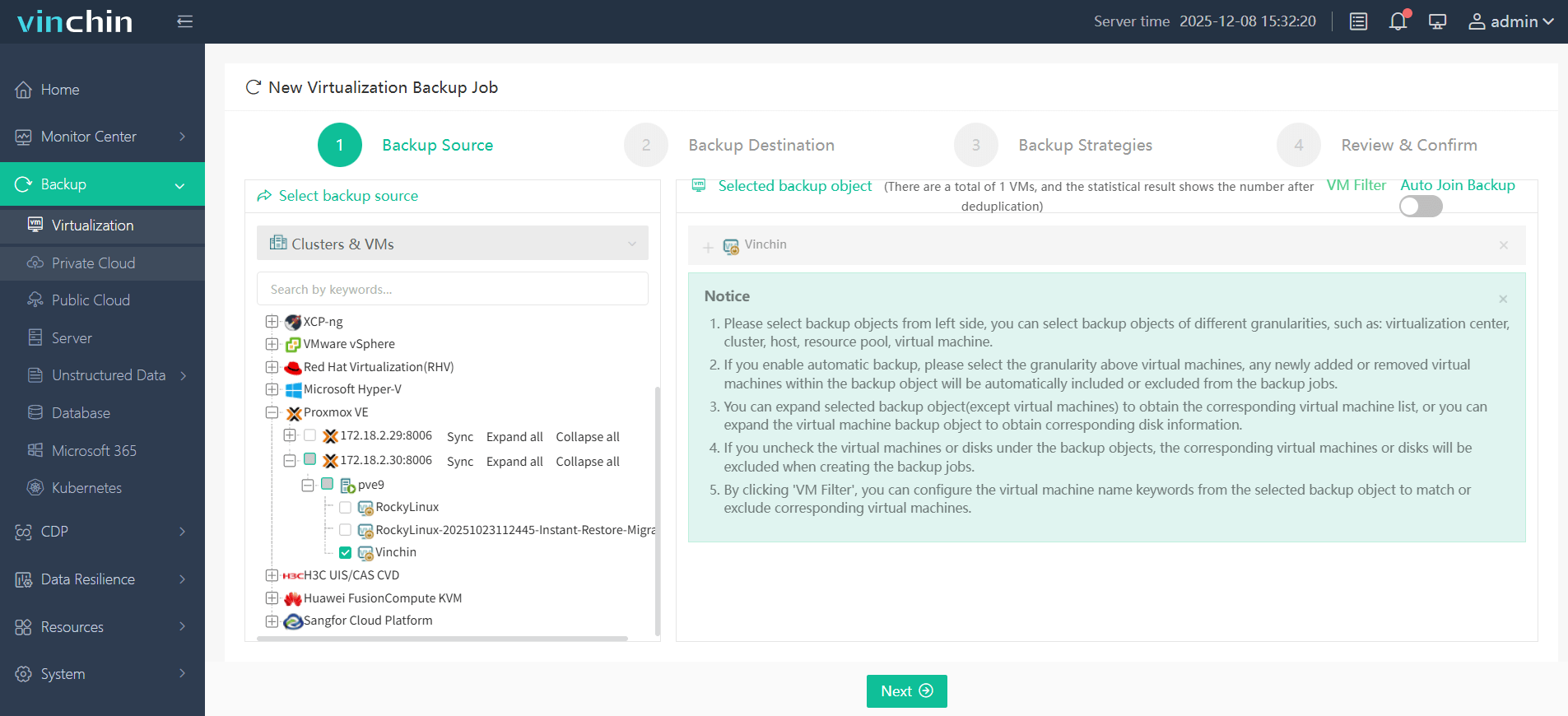
Step 1: Select the Proxmox VM to back up;
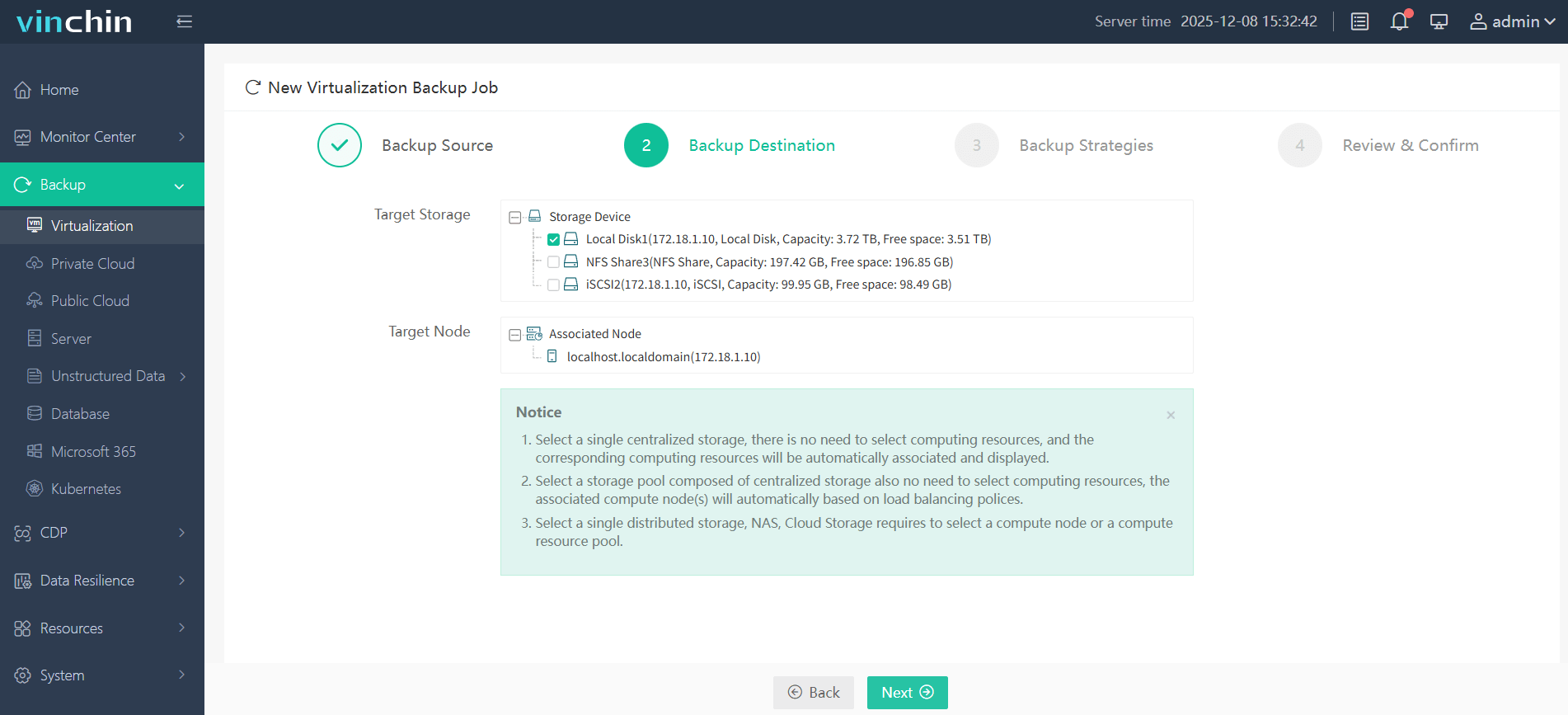
Step 2: Choose target backup storage;
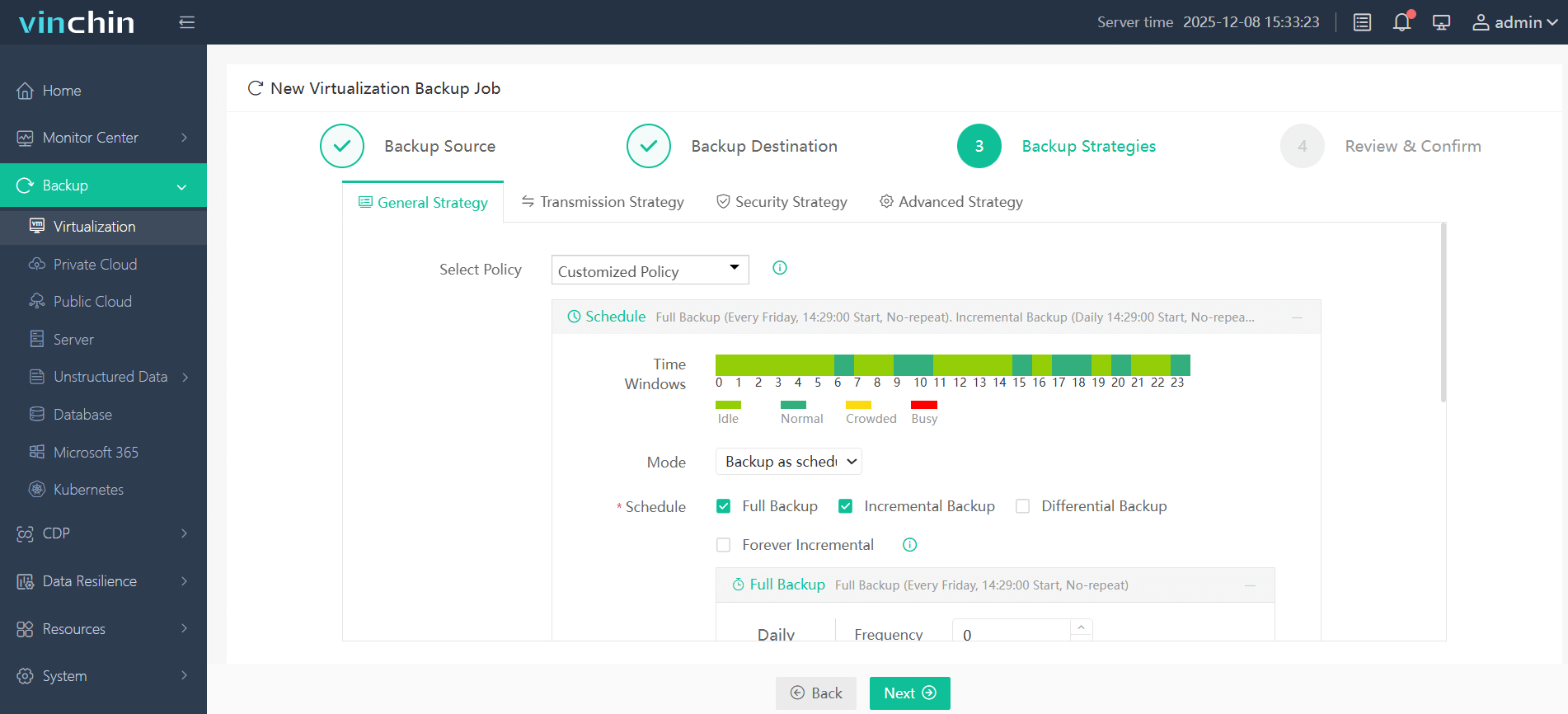
Step 3: Configure retention policies and schedules;
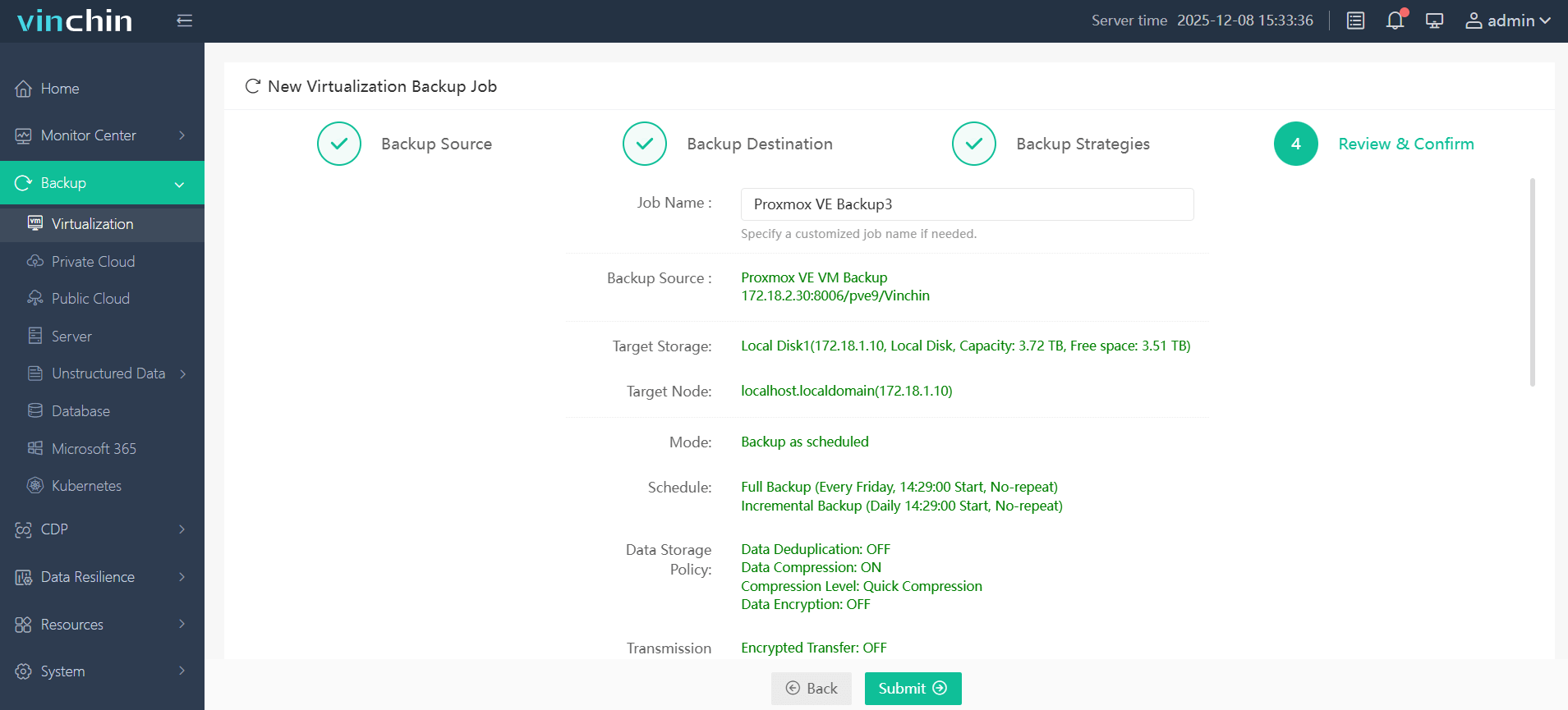
Step 4: Submit the job.
Recognized globally with top ratings among enterprise customers worldwide,Vinchin Backup & Recovery offers a fully featured 60-day free trial—click below to experience industry-leading VM protection firsthand.
Best Proxmox Backup Software FAQs
Q1: Why is centralized monitoring critical for multi-cluster environments?
It ensures consistent policy enforcement plus rapid issue detection across all sites reducing risk of unprotected workloads/unnoticed failures.
Q2: Does centralized monitoring impact scalability?
Yes solutions must efficiently aggregate data without degrading performance as more clusters are added according to industry best practices outlined by NIST SP 800‑53 Section SI‑4.
Q3: How does this capability affect compliance?
It streamlines audit preparation by consolidating logs/reports from every cluster into one location supporting standards like GDPR HIPAA SOX .
Conclusion
Centralized monitoring strengthens uptime security compliance in multi-cluster Proxmox setups—choose official tools like Datacenter Manager plus advanced solutions such as Vinchin Backup & Recovery for resilient scalable oversight.