Large-scale enterprise environments depend on reliable backups. The backup window—the time needed to complete all backup jobs—can affect business operations. If this window grows too long, it can disrupt daily work, slow down systems, and increase risk. Enterprises need a Hyper-V backup tool that finishes jobs quickly while protecting data.
Fast backups help organizations meet recovery objectives and compliance needs. They also reduce strain on IT infrastructure. Shorter backup windows mean less interference with production workloads. According to Microsoft’s official guidance on Hyper-V backup strategies, efficient scheduling and resource management are key factors in large environments.
Why Reducing Backup Window Matters in Enterprise Environments
Backup windows matter because they directly impact business continuity. When backups run during working hours or overlap with critical processes, performance drops and risks rise. Enterprises must keep these windows short to avoid operational headaches.
● Business Operations Stay Smooth
Long backup windows can slow down applications users rely on every day. When backups compete for resources with production workloads, response times suffer. This can frustrate employees and customers alike.
● Reduced Risk of Data Loss
Shorter backup windows mean more frequent protection for your data. If something goes wrong—a hardware failure or ransomware attack—you lose less information because recent changes are already backed up.
● Compliance Requirements Are Easier To Meet
Many industries require regular backups within set timeframes. Long-running jobs may cause missed service level agreements (SLAs) or regulatory penalties if you cannot prove timely protection of sensitive data.
● Lower Infrastructure Strain
When backups finish quickly, servers return to normal duties faster. This reduces bottlenecks in storage networks and keeps other IT projects on track.
A typical scenario highlights these issues: Imagine an enterprise running hundreds of VMs across several hosts. If nightly backups take eight hours instead of two due to inefficient tools, staff face delays every morning as systems catch up from overnight strain.
How To Choose The Best Hyper-V Backup Solution for Reducing Backup Window
Choosing a Hyper-V backup solution requires careful attention to features that cut down job duration while scaling easily across many virtual machines (VMs). Each capability below plays a direct role in reducing total backup time.
Agentless architecture is essential for efficiency at scale. By backing up VMs directly from the hypervisor layer rather than installing software inside each VM, agentless solutions save CPU cycles and memory resources across your environment. This also simplifies deployment since there’s no need to maintain agents on every guest OS.
Built-in deduplication and compression speed up transfers by shrinking the amount of data sent over your network or stored on disk. Deduplication ensures only unique blocks get saved; compression further reduces file sizes before writing them out. For example, modern deduplication can cut storage needs by up to 90%, so a 1TB dataset might only require 100GB after processing—directly reducing transfer times during each job.
Parallel processing enables multiple VMs to be protected at once instead of one after another (sequential processing). With parallelism enabled—and enough underlying storage bandwidth—backup tasks complete much faster even as VM counts grow into the hundreds or thousands. For instance, if you have four concurrent streams instead of one sequential stream per host, you could see job completion times drop by 75% given sufficient I/O capacity.
Scalability matters because enterprise environments rarely stay static; new VMs appear regularly as departments expand or projects launch new services. A scalable solution handles growth without slowing down existing jobs or requiring major reconfiguration efforts.
Flexible scheduling lets administrators stagger jobs outside peak usage periods—or prioritize mission-critical workloads first—to avoid resource contention between backups and live applications.
Each feature above should be present in any tool designed for large-scale Hyper-V deployments aiming for minimal disruption during routine protection tasks.
Vinchin Backup & Recovery: Enterprise-Grade Protection for Hyper-V
For enterprises seeking robust Hyper-V protection alongside support for diverse virtualization platforms—including VMware, Proxmox VE, oVirt, OLVM, RHV, XCP-ng, XenServer, OpenStack, ZStack and more—Vinchin Backup & Recovery stands out as an advanced enterprise-level VM backup solution covering over 15 mainstream environments. Its agentless architecture minimizes host impact while delivering high-speed performance through features like LAN-free backup (supported on Hyper‑V), SpeedKit acceleration technology (supported on Hyper‑V), incremental and forever-incremental backups with CBT tracking where available, instant recovery (not supported on Hyper‑V), plus comprehensive deduplication/compression capabilities across all platforms it supports.
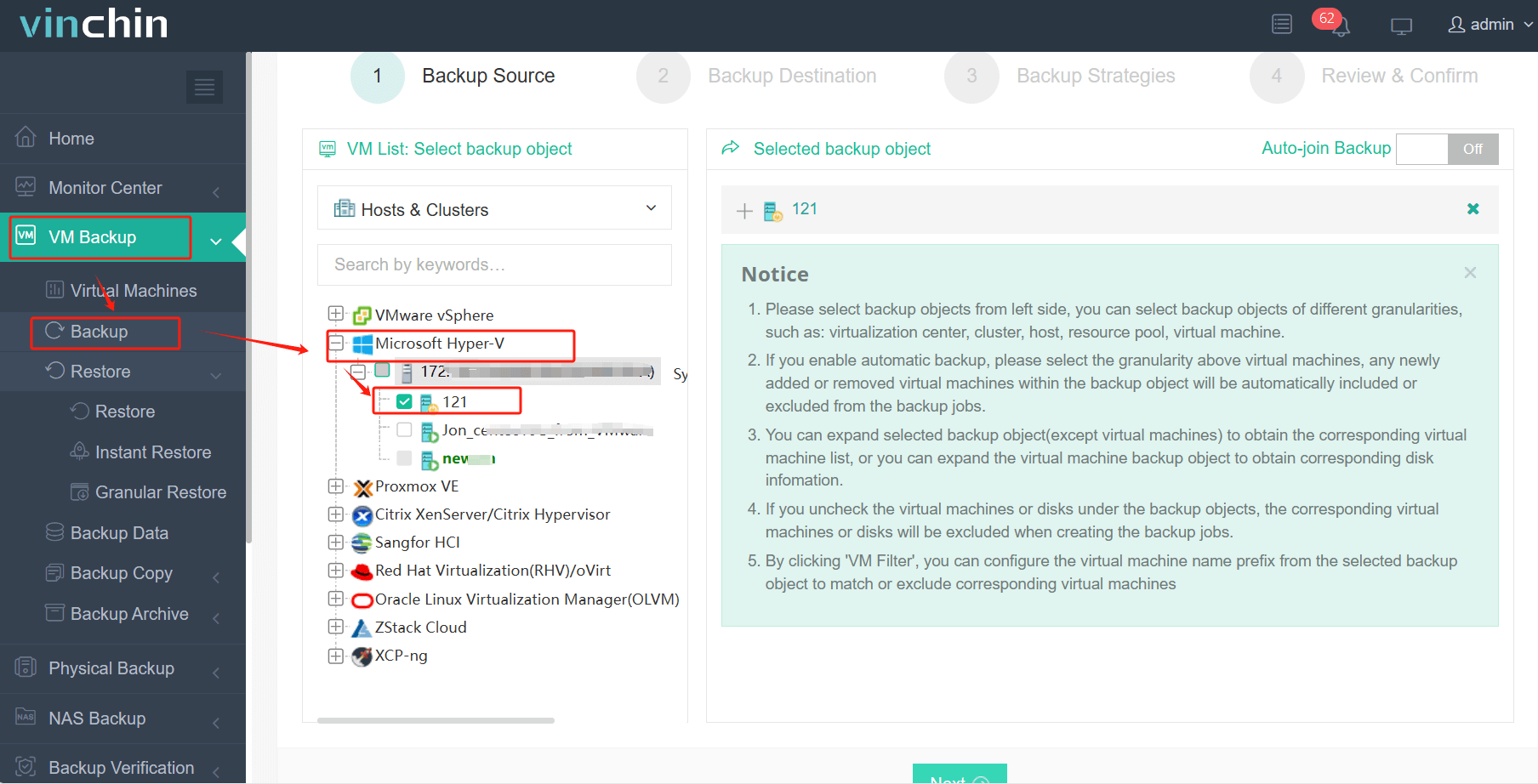
With Vinchin Backup & Recovery’s intuitive web console interface:
Step 1: Select the Hyper-V VM to back up.
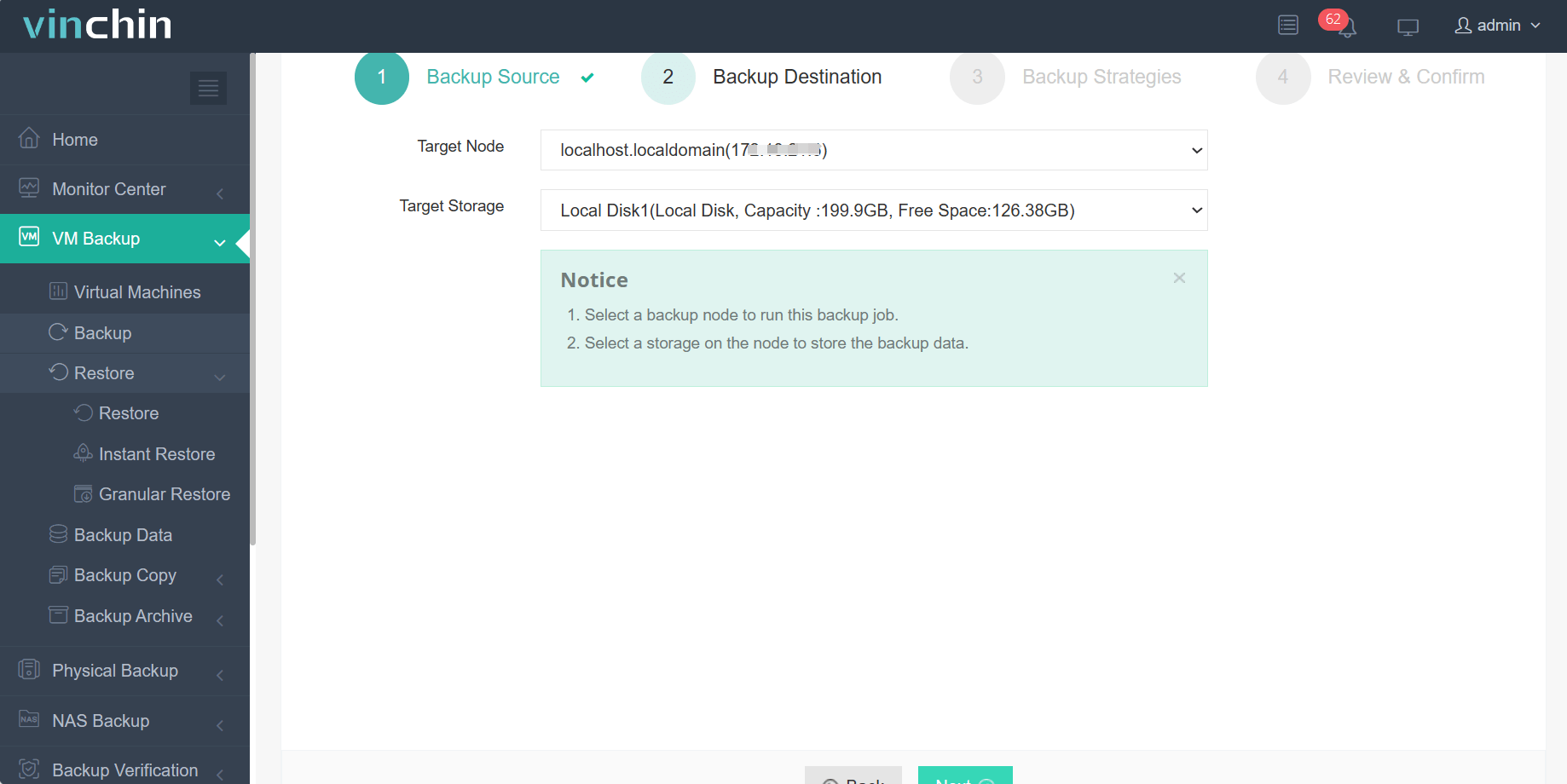
Step 2: Choose the backup storage.
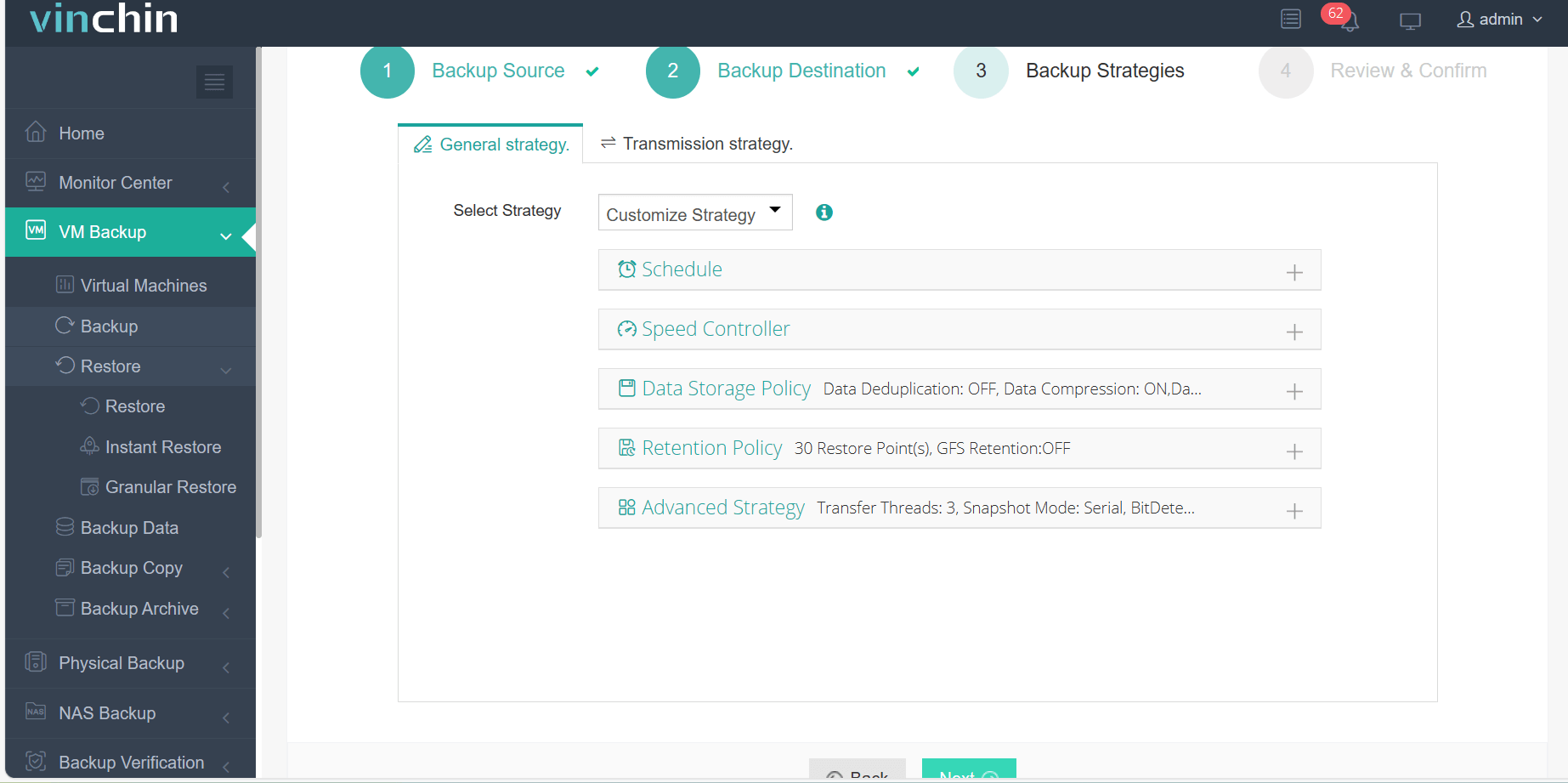
Step 3: Configure the backup strategy.
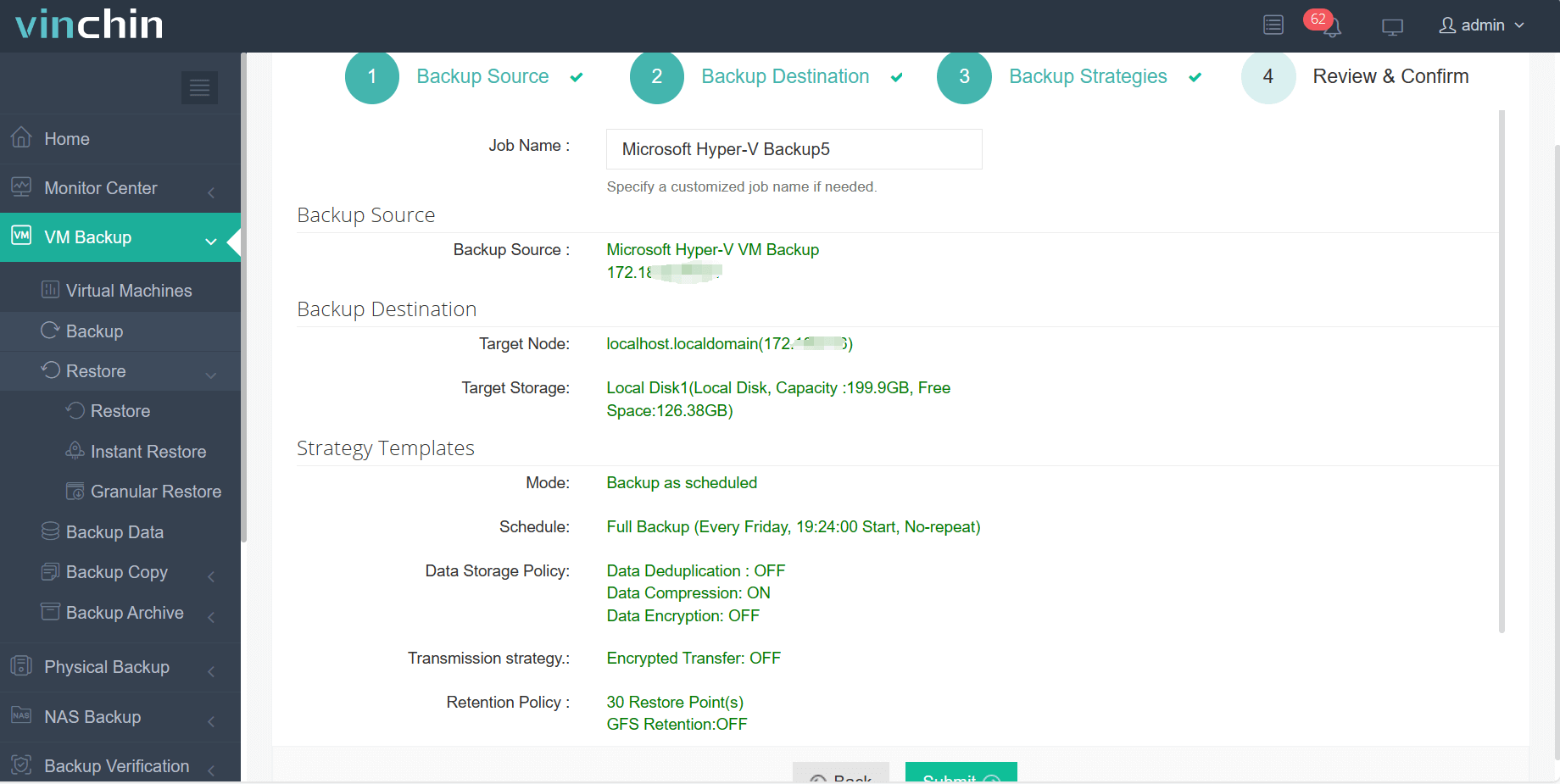
Step 4: Submit the job.
Recognized globally by thousands of organizations for reliability and innovation—with top ratings from industry analysts—Vinchin Backup & Recovery offers a full-featured 60-day free trial so you can experience its power firsthand; click below to download now.
Best Hyper-V Backup Software FAQs
Q1: How does reducing the backup window improve business resilience?
Shorter backup windows protect data more often with less exposure between snapshots or increments taken throughout the day or night cycle. This limits potential loss from failures like ransomware attacks since recent changes are always included in completed jobs before disaster strikes—helping maintain continuous operations even under stress conditions common in large enterprises.
Q2: What features most affect speed in large-scale environments?
Agentless operation removes overhead from guest operating systems so hosts focus resources where needed most; parallel processing allows simultaneous handling of multiple VMs which slashes overall job duration; advanced deduplication/compression algorithms shrink transferred/stored volumes—for example by up to 90%—cutting both network load/time-to-completion dramatically; changed block tracking ensures only modified portions move during incrementals rather than entire disks; integration APIs streamline communication between storage arrays/hypervisors speeding access further still.
Q3: Can efficient tools help with compliance requirements?
Yes—they make it easier to schedule regular automated jobs aligned precisely with retention policies required by regulations such as GDPR/HIPAA/SOX etc., providing audit trails showing when/how often protected copies were created/restored if ever challenged during external reviews/audits conducted periodically by authorities.
Q4: Is scalability important even if current VM count is moderate?
Absolutely—a scalable solution adapts seamlessly whether managing dozens today or hundreds tomorrow without needing disruptive upgrades/replacements midstream which could otherwise jeopardize ongoing coverage/performance levels expected by stakeholders relying upon uninterrupted service delivery.
Conclusion
Selecting an efficient Hyper-V backup solution minimizes downtime risks while keeping vital business data safe around-the-clock—even at scale—with no compromise on speed or reliability thanks to streamlined technologies like those found in Vinchin Backup & Recovery.









