Protecting H3C CAS/UIS environments demands both storage efficiency and fast recovery. Incremental forever backup offers a significant operational advantage by tracking only changed data blocks after an initial full backup. This approach uses block-level change detection—often through snapshot or Change Block Tracking (CBT) technology—to ensure that only new or modified information is captured in subsequent backups. As a result, organizations can control costs while maintaining robust data protection.
Incremental forever backup reduces redundant data storage and accelerates recovery processes. By storing only what has changed since the last backup, it minimizes both storage consumption and network load. This method also supports compliance requirements by enabling frequent restore points without excessive overhead.
Why Incremental Forever Backup Matters in Enterprise Environments
Enterprises need reliable backups that do not overwhelm their infrastructure or budgets. Incremental forever backup addresses these needs by optimizing how data is stored and restored.
● Storage Efficiency
Incremental forever backup eliminates repeated storage of unchanged data blocks. For example, if you have 500 VMs running similar workloads, traditional full backups would repeatedly store identical system files across each VM image. With incremental forever methods, only unique changes are saved after the first full copy—drastically reducing total storage requirements.
● Faster Backups
By capturing just new or altered blocks instead of entire datasets every time, incremental jobs finish much faster than full backups. This means less strain on production systems during backup windows—a critical factor when managing hundreds of virtual machines that must remain available for business operations.
● Improved Recovery Objectives (RTO/RPO)
Shorter backup times enable more frequent restore points (lower RPO), while streamlined restore processes help meet tight Recovery Time Objectives (RTO). If ransomware strikes at noon but your last incremental ran at 11:55 AM, you can recover almost all recent work without waiting hours for a bulky restore process.
● Cost Control
Reducing storage footprint directly lowers hardware investment and ongoing maintenance costs. Enterprises avoid ballooning expenses tied to scaling up disk arrays or cloud repositories just to keep pace with growing datasets.
● Regulatory Compliance Support
Many industries require long-term retention of historical data snapshots for audit purposes. Incremental forever makes it feasible to maintain many restore points without overwhelming your infrastructure—helping you stay compliant with regulations like GDPR or HIPAA.
Without this approach, organizations risk missed recovery objectives due to slow restores or insufficient retention capacity—potentially leading to regulatory penalties or business disruption.
How To Choose The Best H3C CAS/UIS Backup Solution for Incremental Forever Backup
Selecting an effective H3C CAS/UIS backup solution requires careful evaluation of features that impact scalability, automation, integrity, policy flexibility, and integration depth. Each factor plays a direct role in meeting enterprise performance targets and compliance mandates.
● Proven Scalability
A scalable solution handles growing datasets without degrading performance as your environment expands from dozens to thousands of VMs. Look for evidence of successful large-scale deployments; this ensures your chosen tool won’t become a bottleneck as business needs evolve.
● Automation Features
Automated scheduling streamlines routine tasks such as initiating backups or enforcing retention policies. Solutions offering built-in automation reduce manual intervention—freeing IT staff for higher-value projects while minimizing human error risks during critical operations.
● Data Integrity Checks
Automatic validation routines confirm that every backup is complete and restorable before being committed to storage. These checks often use checksum algorithms or metadata catalogs to detect corruption early—ensuring reliable disaster recovery when needed most.
● Flexible Policy Controls
Customizable retention rules let you align backup schedules with internal governance standards or external regulatory requirements—for instance, keeping daily incrementals for two weeks but monthly snapshots for seven years based on legal mandates in your sector.
● Deep Integration With Virtualization Stack
Native support for H3C CAS/UIS APIs allows seamless management from within your existing workflows using unified consoles like web-based dashboards or centralized management portals. Deep integration reduces complexity by eliminating extra steps between hypervisor events and protection actions.
The right solution will deliver all these capabilities through an intuitive interface so administrators can manage complex environments efficiently—and respond quickly when incidents occur.
Vinchin Backup & Recovery: Enterprise-Grade Protection for H3C CAS/UIS
For enterprises seeking comprehensive protection across diverse virtualization platforms—including H3C CAS/UIS—Vinchin Backup & Recovery stands out as a professional-grade VM backup solution supporting over 15 mainstream environments such as VMware, Hyper-V, Proxmox, oVirt, OLVM, RHV, XCP-ng, XenServer, OpenStack, ZStack and more—with native compatibility tailored specifically for H3C CAS/UIS infrastructures.
Key features include agentless operation for simplified deployment; LAN-free backup capability ensuring high-speed transfers within local networks; advanced deduplication and compression technologies; granular file-level restore options; robust V2V migration functionality; plus flexible GFS retention policies—all designed to maximize efficiency while safeguarding critical workloads.
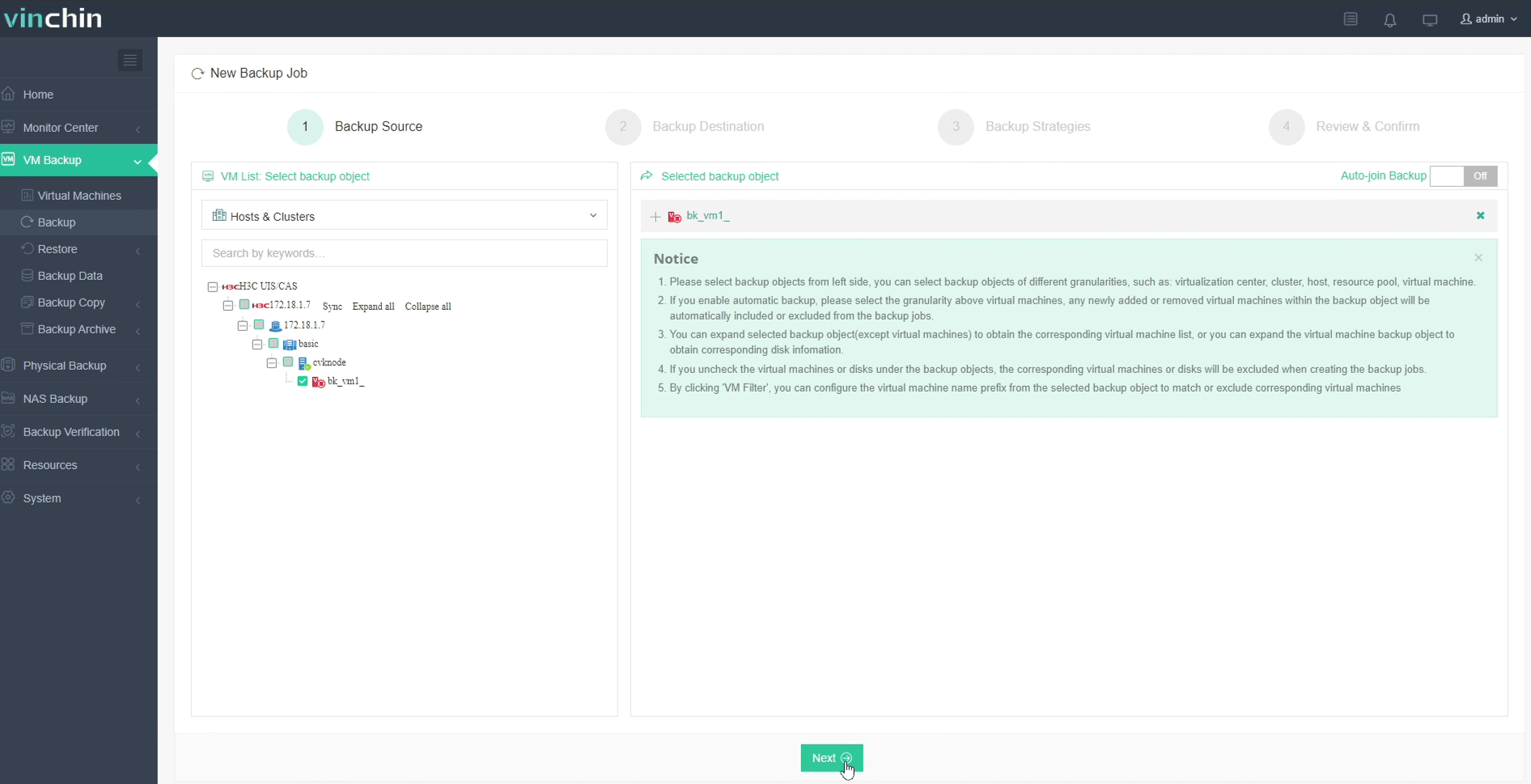
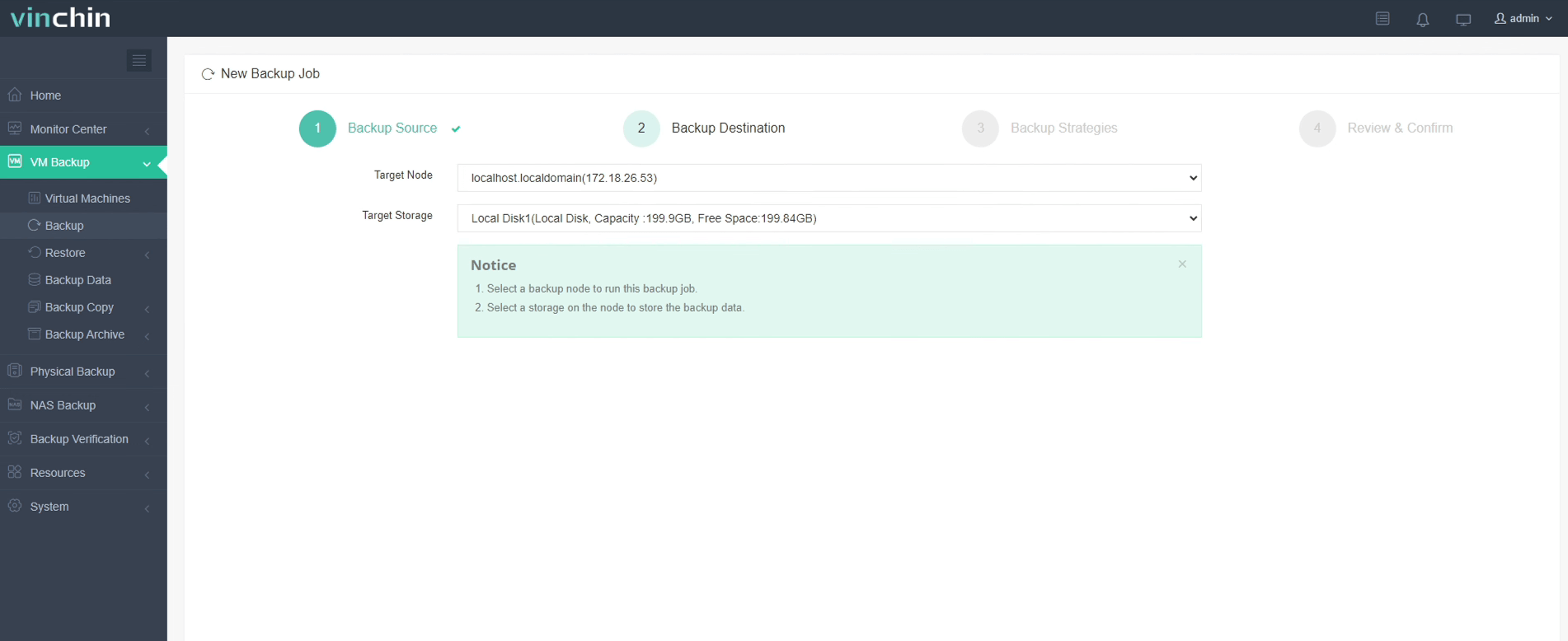
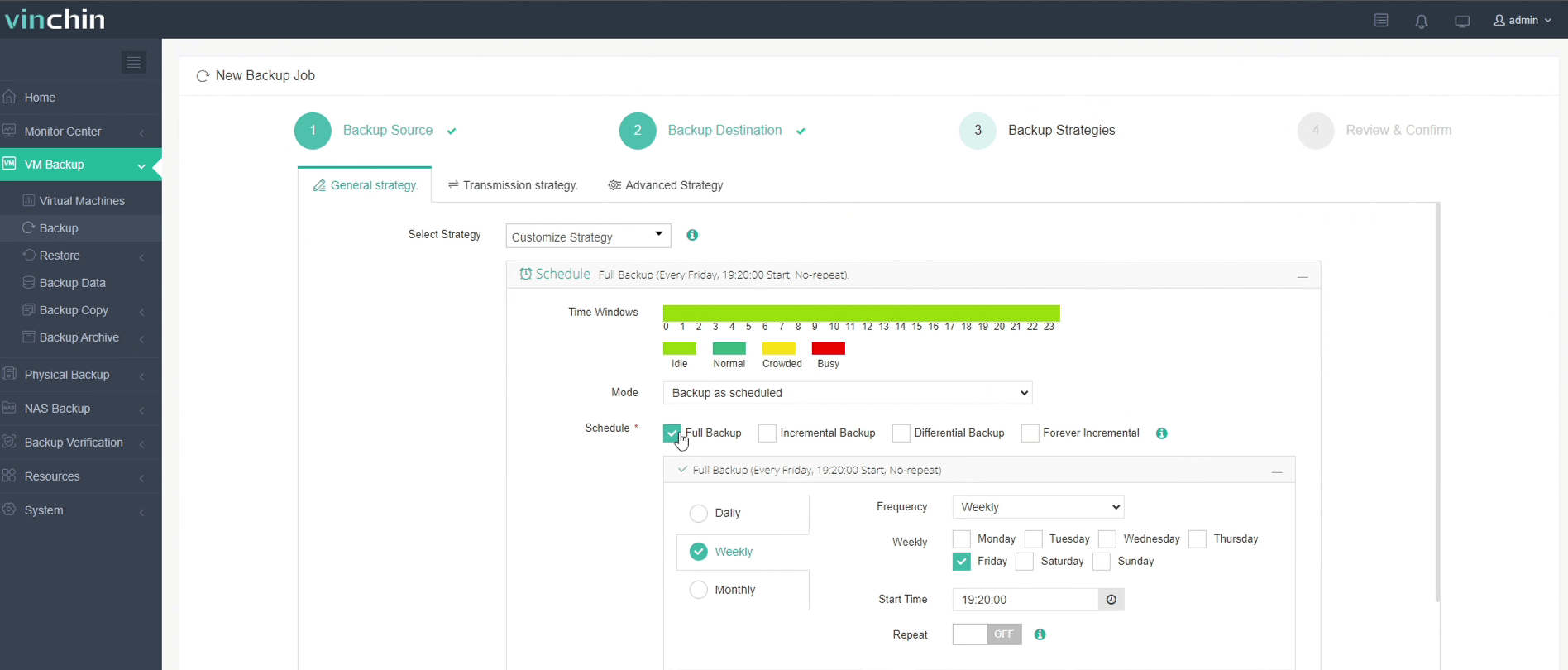
With Vinchin Backup & Recovery’s intuitive web console interface backing up an H3C CAS/UIS VM takes just four steps:
Step 1: Select the H3C CAS/UIS VM to back up
Step 2: Choose the backup storage
Step 3: Configure the backup strategy
Step 4: Submit the job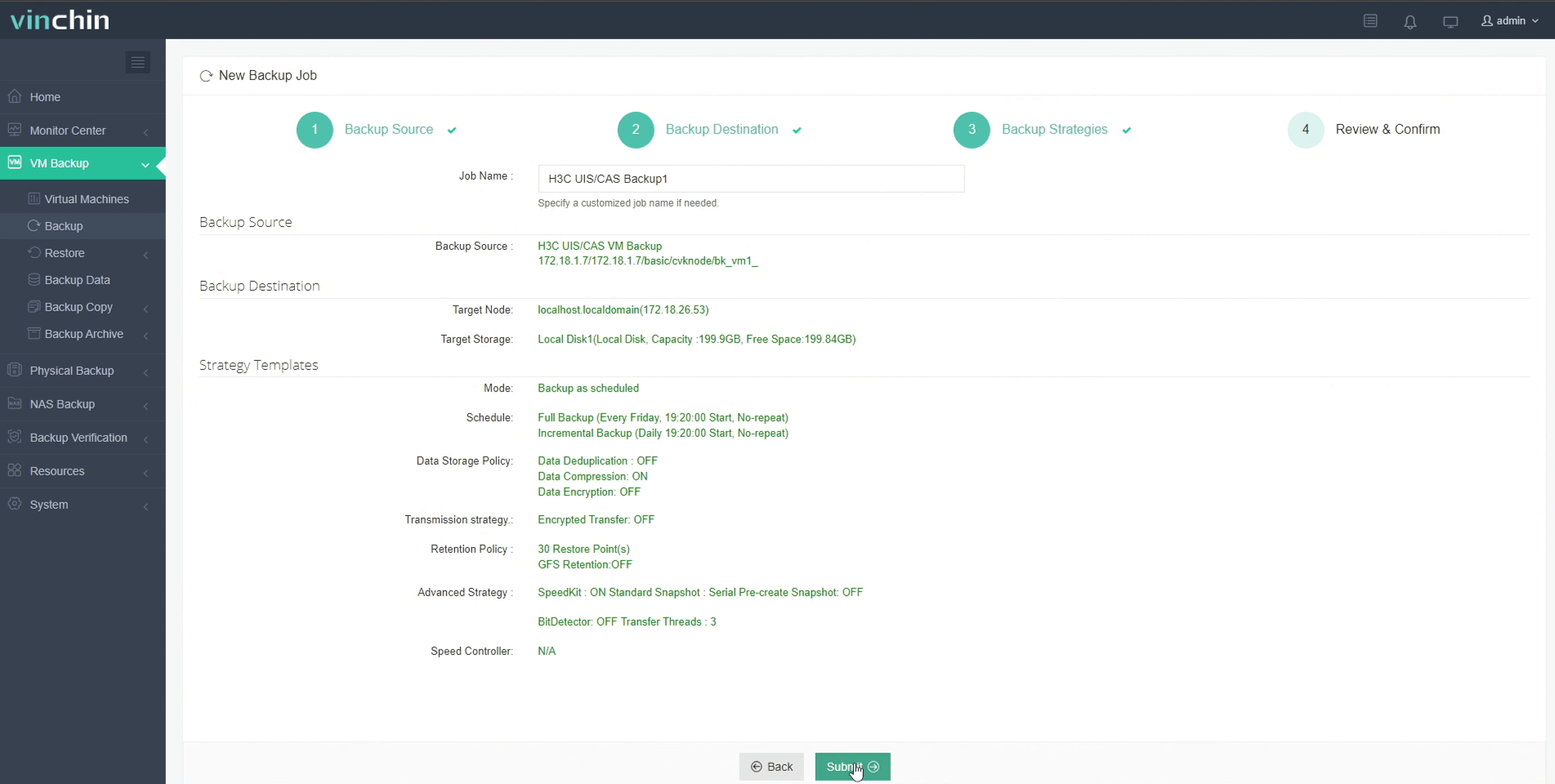
Recognized globally with strong customer adoption and top ratings among enterprise users worldwide—Vinchin Backup & Recovery offers a fully featured 60-day free trial so you can experience its powerful capabilities firsthand.
Best H3C CAS/UIS Backup Software FAQs
Q1: Does incremental forever increase restore times?
No; Vinchin uses smart indexing along with synthetic full techniques where necessary so restores remain quick—even if there are many incrementals in sequence—and leverages metadata catalogs that map out dependencies efficiently during restoration processes.
Q2: Can I set custom retention periods?
Yes; flexible policy controls allow you to define unique retention schedules per workload or compliance requirement using intuitive settings within Vinchin’s centralized console—so different departments can follow their own rules without conflict.
Q3: Is deduplication supported alongside incremental backups?
Yes; advanced deduplication runs transparently alongside incrementals by identifying duplicate blocks across all protected VMs before writing them into repository space—which further shrinks overall usage without impacting job speed thanks to optimized algorithms designed specifically for virtual environments’ high churn rates.
Conclusion
Efficient incremental forever backup safeguards enterprise workloads while saving space—and cost—for H3C CAS/UIS users who demand reliability at scale.









