Automated retention policies are vital for managing Hyper-V VM backups in today's enterprise IT environments. These policies let you define exactly how long to keep backup data before it is deleted or archived. With automation in place, your team avoids manual cleanup tasks and reduces human error. This means you can focus on business priorities while your backup solution enforces data lifecycle rules behind the scenes.
Backup data grows quickly—especially when hundreds of virtual machines generate daily restore points. Without automated retention controls, storage costs rise fast as old backups pile up. Manual deletion is risky: someone might remove important records too soon or forget to clear out expired files. Automated retention ensures every backup follows consistent rules set by your organization.
Regulatory requirements like GDPR or HIPAA often demand strict control over how long personal or sensitive data is stored. Failing to comply can result in fines or legal trouble. Automated retention helps enforce these requirements by deleting outdated backups on schedule—no guesswork needed.
In large-scale environments with many VMs across multiple hosts or clusters, automation brings order to chaos. You get predictable storage usage and peace of mind knowing that compliance needs are met without constant oversight.
Why Automated Retention Policies Matter in Enterprise Environments
Automated retention policies play a crucial role in enterprise IT operations by providing consistency and reducing risk across complex infrastructures.
● Consistent Data Lifecycle Management
Automated retention ensures every backup copy follows pre-defined rules about when it should be kept or deleted. This removes guesswork from administrators’ daily routines and guarantees that no critical data is lost due to accidental deletion—or kept longer than necessary.
● Reduced Storage Costs
By automatically removing outdated backups according to policy schedules (such as “keep daily copies for 30 days”), organizations prevent unnecessary accumulation of redundant data. This keeps storage consumption predictable and budgets under control—even as VM counts grow into the hundreds or thousands.
● Improved Compliance Posture
Many industries require proof that sensitive information is not retained beyond its legal limit. Automated enforcement of these limits makes audits easier because logs show exactly when each backup was created and deleted according to policy.
● Operational Efficiency
Manual oversight of hundreds of VM backups leads to mistakes—missed deletions here; premature removals there. Automation eliminates these headaches by applying uniform rules everywhere at once so staff can focus on higher-value projects instead of routine maintenance tasks.
● Disaster Recovery Readiness
When disaster strikes—a ransomware attack hits your datacenter—you need confidence that recent backups exist and are compliant with both business continuity plans and regulatory demands. Automated retention keeps only what you need so restores happen fast without sifting through years-old files cluttering your repository.
How To Choose The Best Hyper-V Backup Solution for Automated Retention Policies
Selecting a Hyper-V backup solution with strong automated retention capabilities requires careful evaluation of several key features designed for scalability, flexibility, security, and ease-of-use.
Policy Flexibility:
The ability to assign different retention rules per VM or group lets you match business needs precisely—for instance, keeping financial system backups longer than test workloads. Look for solutions where you can easily adjust these settings from a central interface without scripting.
Centralized Management:
A single dashboard should allow creation, monitoring, editing, and reporting on all retention policies across your environment—whether you manage ten VMs or thousands spread over multiple clusters. Centralization reduces configuration drift between sites while saving time during audits.
Auditability and Reporting:
Detailed logs must show which backups were deleted (and why), who made changes to policies, plus timestamps for every action taken by the system—all accessible via reports exportable for compliance review.
Scalability:
As organizations grow their virtual infrastructure—from small branch offices up through global datacenters—the chosen solution must handle increased workload seamlessly without requiring extra manual steps just because more VMs have been added over time.
Minimal Administrative Overhead:
Once configured (“set-and-forget”), automated enforcement should run quietly in the background—cleaning up expired restore points based on policy schedules—and alerting admins only if something goes wrong (like failed deletions due to permissions).
Integration with Hyper-V Features:
Native support for technologies like Resilient Change Tracking (RCT) allows efficient incremental backups by tracking only changed blocks since last snapshot, while Cluster Shared Volumes (CSV) compatibility ensures reliable operation even within highly available clustered environments common in enterprises.
Vinchin Backup & Recovery: Enterprise-Level Protection Across Virtual Platforms
For organizations seeking robust protection for Hyper-V environments alongside other mainstream virtualization platforms—including VMware, Proxmox, oVirt, OLVM, RHV, XCP-ng, XenServer, OpenStack, ZStack and more—Vinchin Backup & Recovery delivers comprehensive enterprise-grade VM backup capabilities supporting 15+ platforms. It empowers businesses with advanced features such as scheduled backup strategies tailored per workload type; forever-incremental backup; granular restore; cloud/tape archive; multi-thread transmission; GFS retention policy; throttling policy; V2V migration; encryption; deduplication/compression; instant recovery (except on Hyper‑V); SpeedKit acceleration (on select platforms); CBT integration where supported; LAN-free transfer options depending on hypervisor compatibility—and much more.
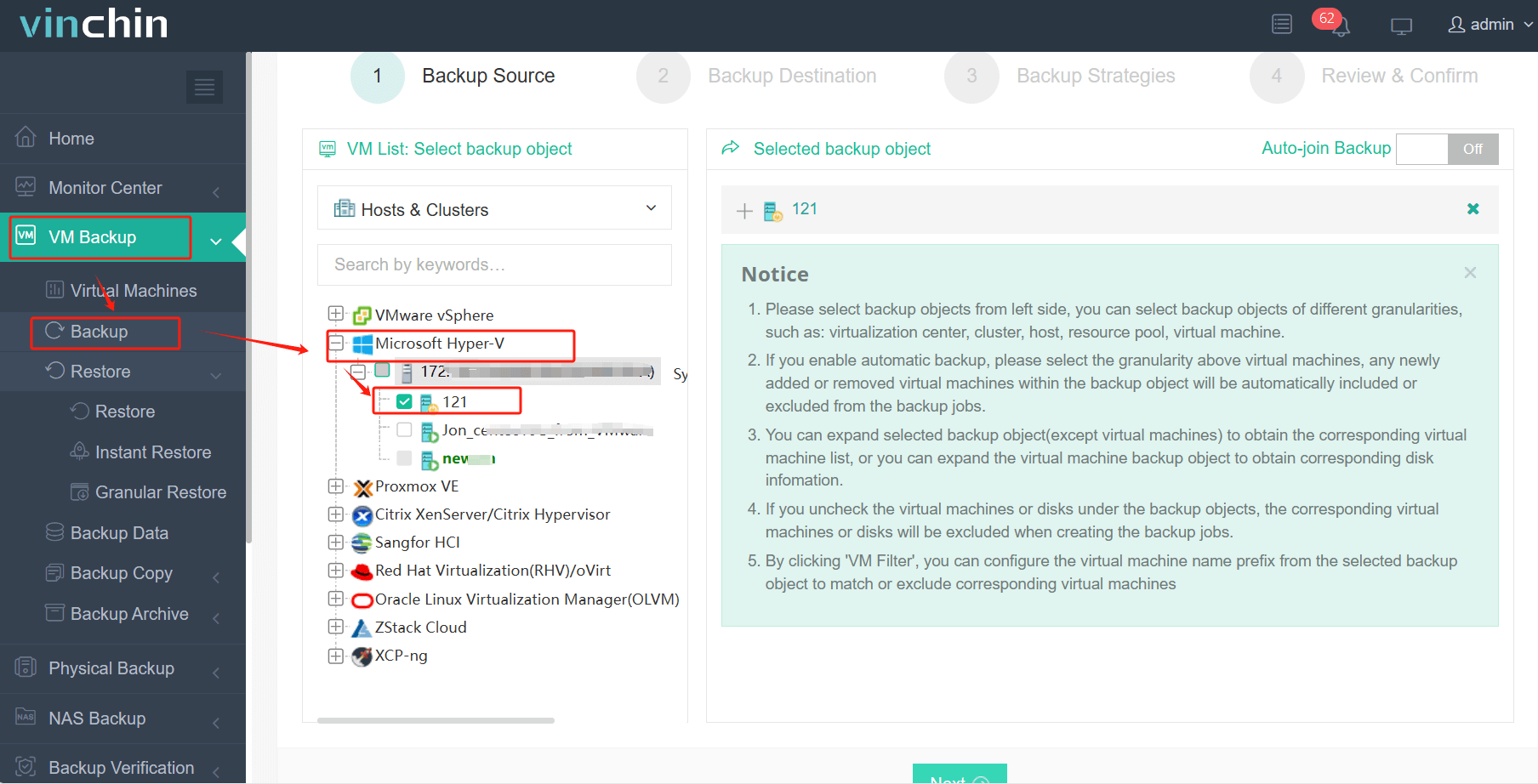
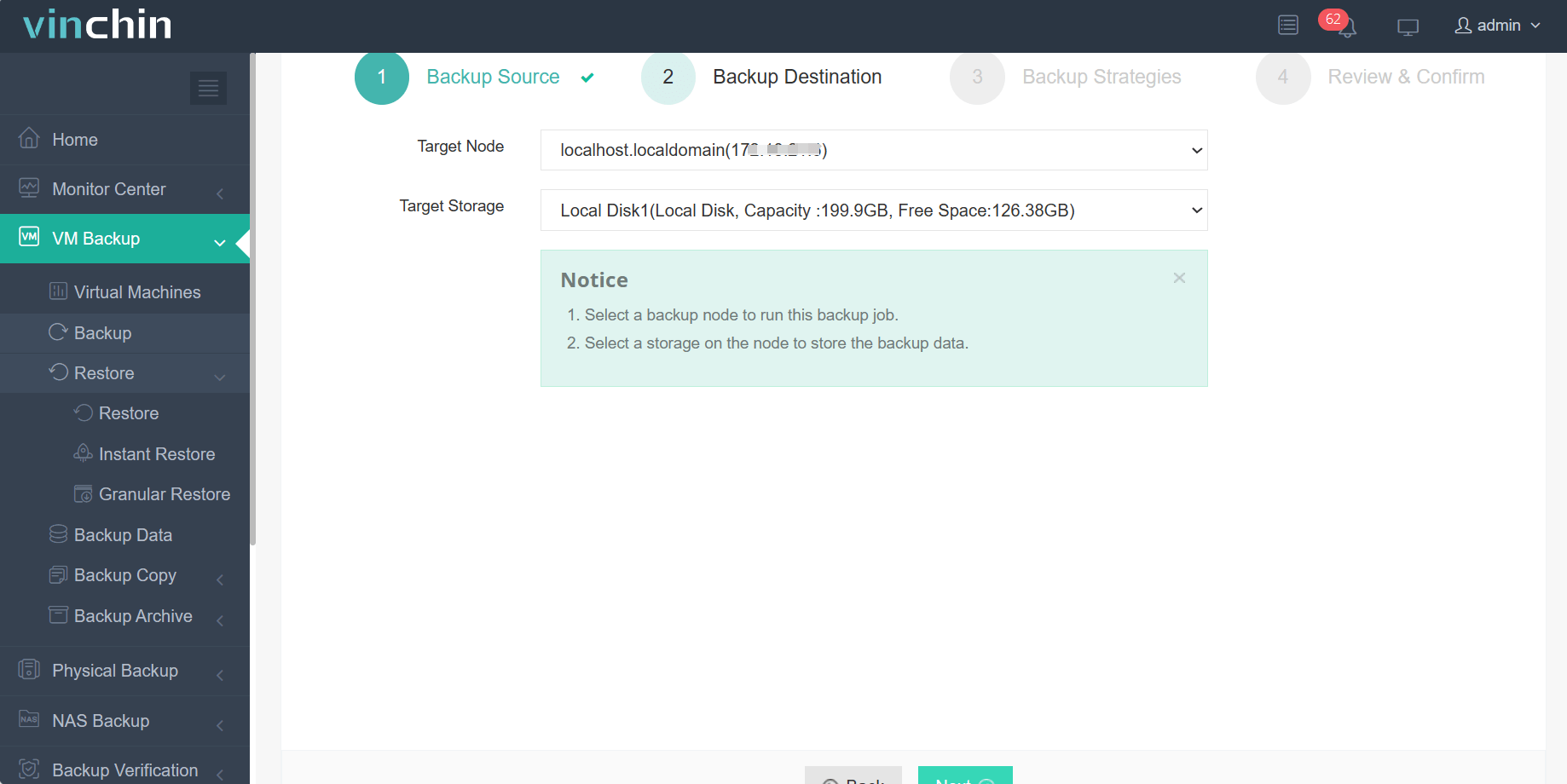
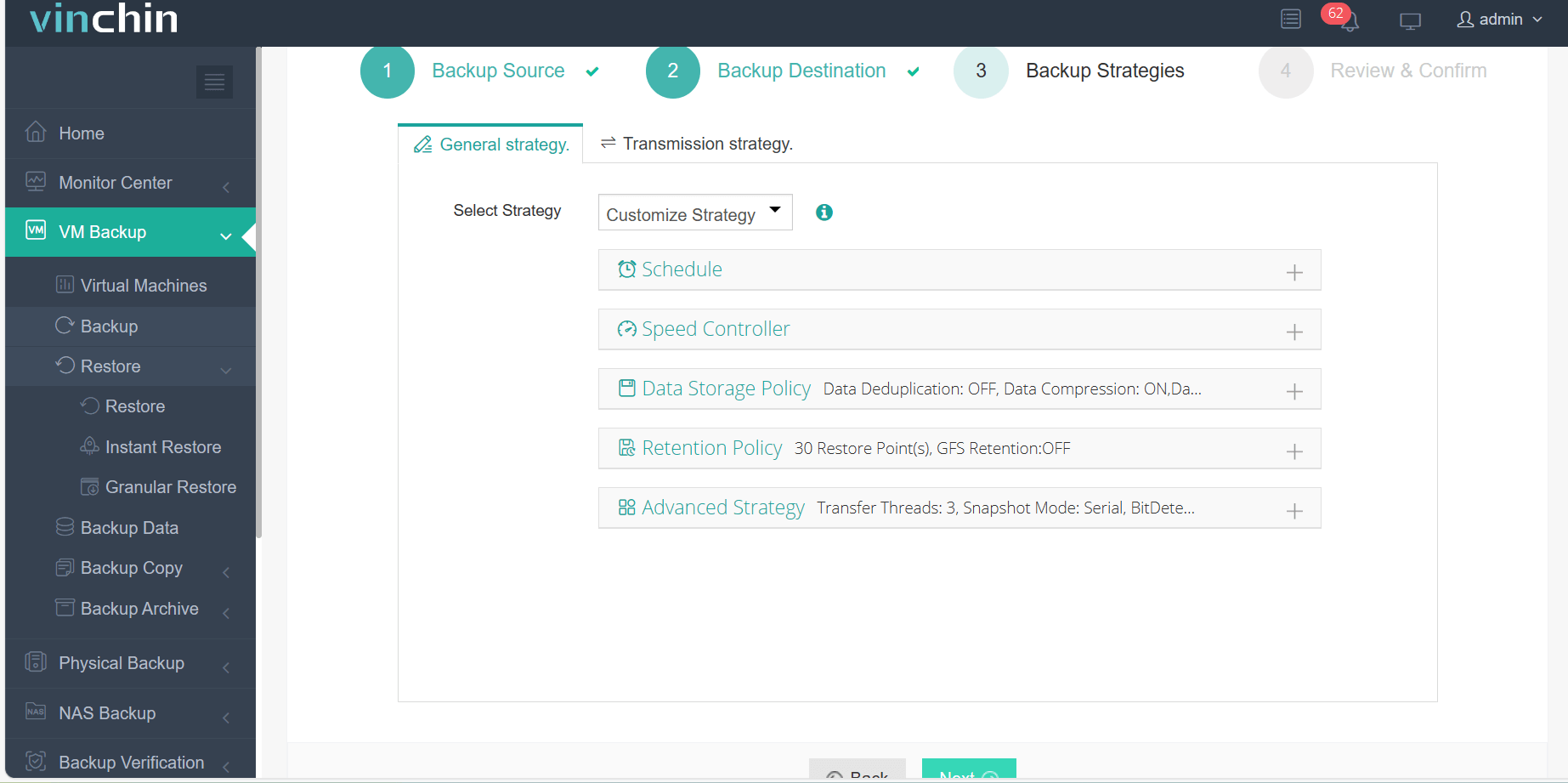
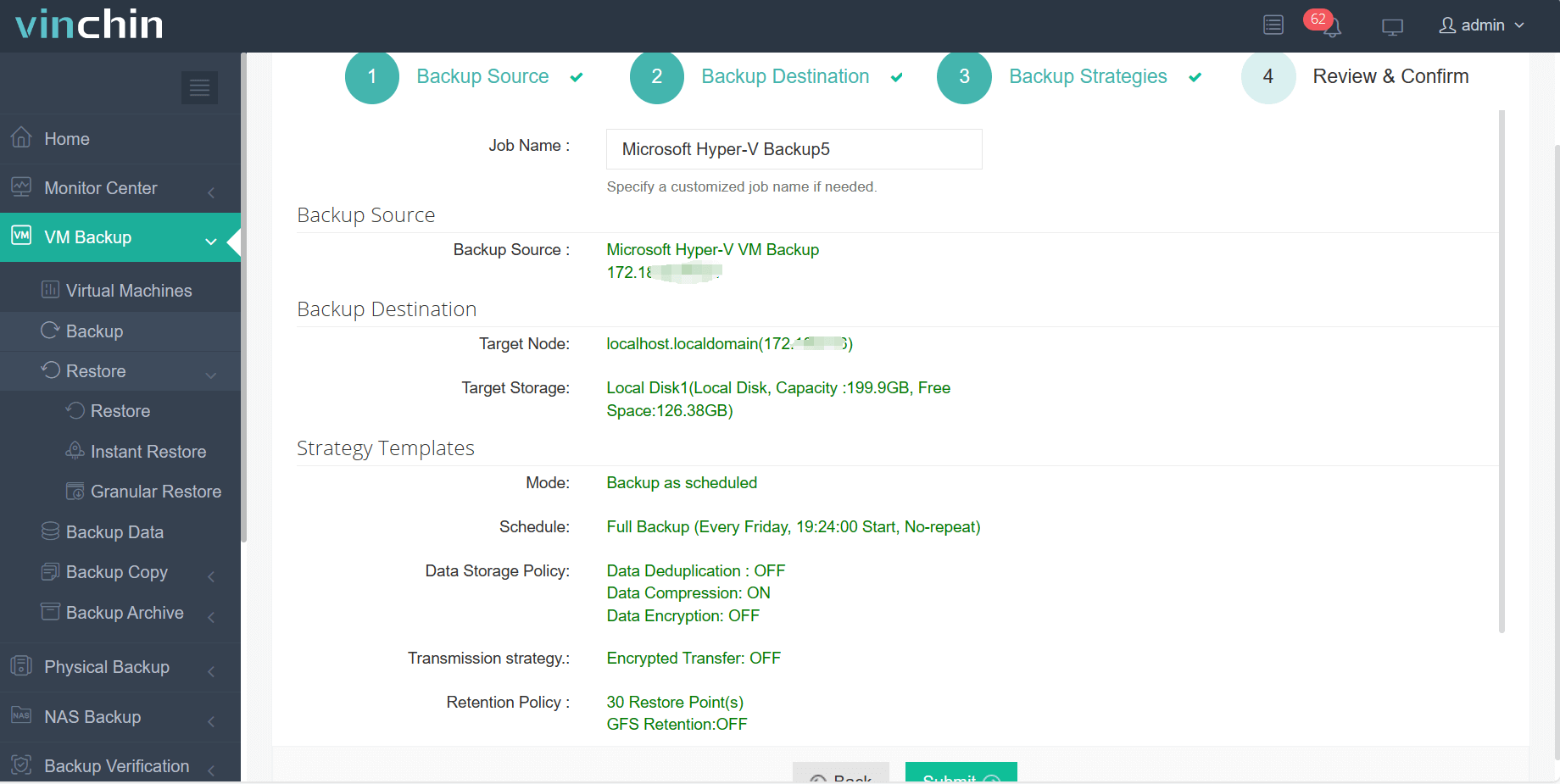
The intuitive web console makes operation straightforward:
Step 1: Select the Hyper-V VM to back up.
Step 2: Choose the backup storage.
Step 3: Configure the backup strategy.
Step 4: Submit the job.
Recognized globally among enterprise customers—with top industry ratings—Vinchin Backup & Recovery offers a fully functional 60-day free trial so you can experience its power firsthand before making any commitment.
Best Hyper-V Backup Software FAQs
Q1: Can automated retention policies be customized per VM or group?
Yes. Leading solutions—including Vinchin—allow assignment of unique retention rules per VM or group so businesses can tailor protection levels based on workload type or regulatory need without affecting unrelated systems elsewhere within their environment.
Q2: How does automation reduce compliance risks?
Automation applies lifecycle controls consistently across all protected workloads according to predefined schedules set by IT teams; this minimizes human error such as forgetting required deletions—which could otherwise lead either to non-compliance fines if sensitive records linger too long—or accidental loss if removed prematurely.
Q3: Will automated retention impact backup performance?
Properly implemented solutions schedule cleanup tasks during off-hours when production loads are low; this prevents interference with normal operations while ensuring timely removal of obsolete restore points from repositories.
Q4: Is reporting available on policy enforcement?
Yes. Enterprise-grade tools provide detailed logs showing which restore points were purged under which rule along with timestamps; this audit trail supports internal reviews plus external regulatory audits whenever proof-of-compliance is requested.
Conclusion
Automated retention protects budgets while reducing risk exposure from non-compliance—all without extra work from busy IT teams thanks to seamless integration inside modern Hyper-V environments using solutions like Vinchin Backup & Recovery.









