Automated retention policies are essential for protecting virtual machines (VMs) in enterprise environments running on Huawei FusionCompute. These policies help organizations manage backup lifecycles efficiently while reducing manual effort and risk. Vinchin Backup & Recovery supports automated retention policies for Huawei FusionCompute VMs, making it easier to enforce consistent data protection across your infrastructure.
Huawei FusionCompute is built around a distributed architecture using components such as Virtual Resource Management (VRM) servers and Compute Node Agents (CNA). Backups must interact closely with these layers to ensure that VM snapshots are captured reliably without disrupting production workloads. Automated retention works by integrating policy enforcement into this workflow—after each scheduled backup job completes, expired restore points are deleted according to predefined rules set by administrators.
This integration reduces human error and ensures that only necessary backups remain stored. As VM environments grow larger or more complex, automation becomes even more critical. Enterprises can avoid storage bloat, maintain regulatory compliance, and streamline audits—all through policy-driven controls embedded within their backup solution.
Why Automated Retention Policies Matter in Enterprise Environments
Automated retention policies play a vital role in modern enterprise IT operations. They do much more than save time—they help organizations stay compliant with regulations, control costs, and reduce operational risks associated with manual processes.
● Regulatory Compliance
Many industries must follow strict data retention laws such as the General Data Protection Regulation (GDPR) or sector-specific mandates like HIPAA for healthcare or SOX for finance. These rules dictate how long certain types of data should be kept before deletion. Manual enforcement is unreliable at scale; automated retention ensures every backup follows company policy without exception.
● Cost Control
Storage costs can escalate quickly if old backups accumulate unchecked. Without automated deletion of expired restore points, enterprises may pay for unnecessary disk space or cloud storage fees month after month. Automated policies remove outdated backups promptly based on business-defined schedules—helping IT teams keep budgets under control while ensuring enough recovery points remain available.
● Error Reduction
Manual tasks introduce risk—especially when managing hundreds or thousands of VMs across multiple clusters or sites. Forgetting to delete an old backup could mean non-compliance; deleting the wrong one could cause data loss during recovery scenarios. Automation applies consistent logic every time so nothing gets missed or mishandled.
● Audit Readiness
Auditors often require proof that sensitive information is retained—and deleted—in line with internal standards or external regulations. Automated systems generate logs showing exactly when each backup was created and removed according to policy settings. This transparency makes it easy to demonstrate compliance during reviews or investigations.
Automated retention transforms what used to be a tedious chore into a reliable process that scales as your organization grows.
How To Choose The Best Huawei FusionCompute Backup Solution for Automated Retention Policies
Selecting a robust backup solution goes beyond checking basic feature lists—it requires careful evaluation of how well each product fits your environment’s needs around automation, scalability, flexibility, and reporting.
A good solution should offer granular controls over which VMs get backed up and how long those backups are kept before deletion takes place automatically.
You need clear options to define different retention periods per VM or group so you can meet both business requirements and legal obligations without compromise.
Scalability matters too: as your number of VMs increases—or as you expand into new clusters—the system must handle higher volumes smoothly without slowing down operations or requiring excessive manual oversight.
Automation should extend beyond just scheduling jobs; look for solutions that automatically discover new VMs added in VRM/CNA pools so they’re protected from day one using default policies set by administrators.
Auditability cannot be overlooked either: detailed logs showing every action taken—from creation through expiration—are crucial during compliance checks or incident response investigations.
In summary:
● Granular Customizable Retention Policies
The ability to assign unique schedules per workload means you never keep unnecessary backups longer than needed nor delete them too soon—a balance required by most regulatory frameworks today.
● Scalability Across Large Environments
As infrastructure grows organically over time—with new compute nodes joining existing clusters—the right tool adapts seamlessly rather than becoming harder to manage at scale.
● Deep Automation Reducing Manual Work And Errors
By automating not just job execution but also resource discovery and policy application across all managed objects—including newly provisioned CNAs—you minimize operational risk while freeing staff from repetitive chores.
● Transparent Reporting For Audits And Compliance
Comprehensive dashboards plus exportable logs make it simple to prove adherence during external reviews—or simply track internal performance metrics over time—for peace of mind throughout the year.
Vinchin Backup & Recovery: Enterprise-Grade Protection for Huawei FusionCompute
For organizations seeking advanced protection tailored specifically for Huawei FusionCompute environments, Vinchin Backup & Recovery stands out as an enterprise-level virtual machine backup solution supporting over 15 mainstream virtualization platforms—including VMware, Hyper-V, Proxmox, oVirt, OLVM, RHV, XCP-ng, XenServer, OpenStack, ZStack—and notably Huawei FusionCompute itself. Its comprehensive feature set empowers businesses with robust automated retention management designed for large-scale infrastructures where reliability is paramount.
Key features include agentless VM backup technology (eliminating the need for software installation inside each VM), LAN-free backup capabilities optimized for high-speed data transfer within FusionCompute clusters, CBT support enabling efficient incremental backups by tracking changed blocks only, flexible GFS retention strategies allowing precise control over restore point lifecycles per workload group or cluster node pool, and instant recovery functionality minimizing downtime after failures occur—all integrated within a unified web console interface that simplifies administration at scale while maintaining audit-ready transparency across all operations performed by Vinchin Backup & Recovery’s engine.
Using Vinchin Backup & Recovery’s intuitive web console makes protecting your environment straightforward:
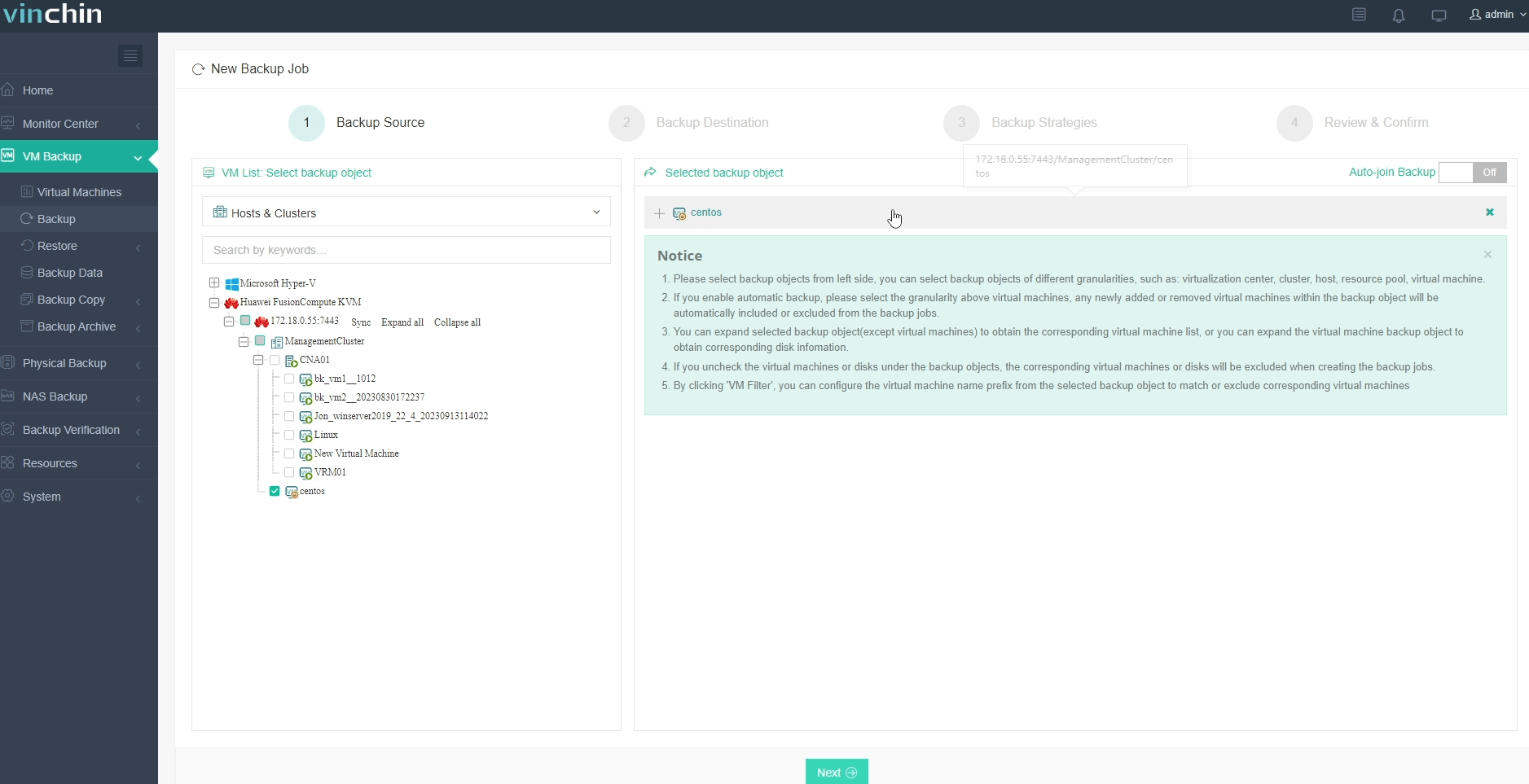
Step 1: Select the Huawei FusionCompute VM to back up.
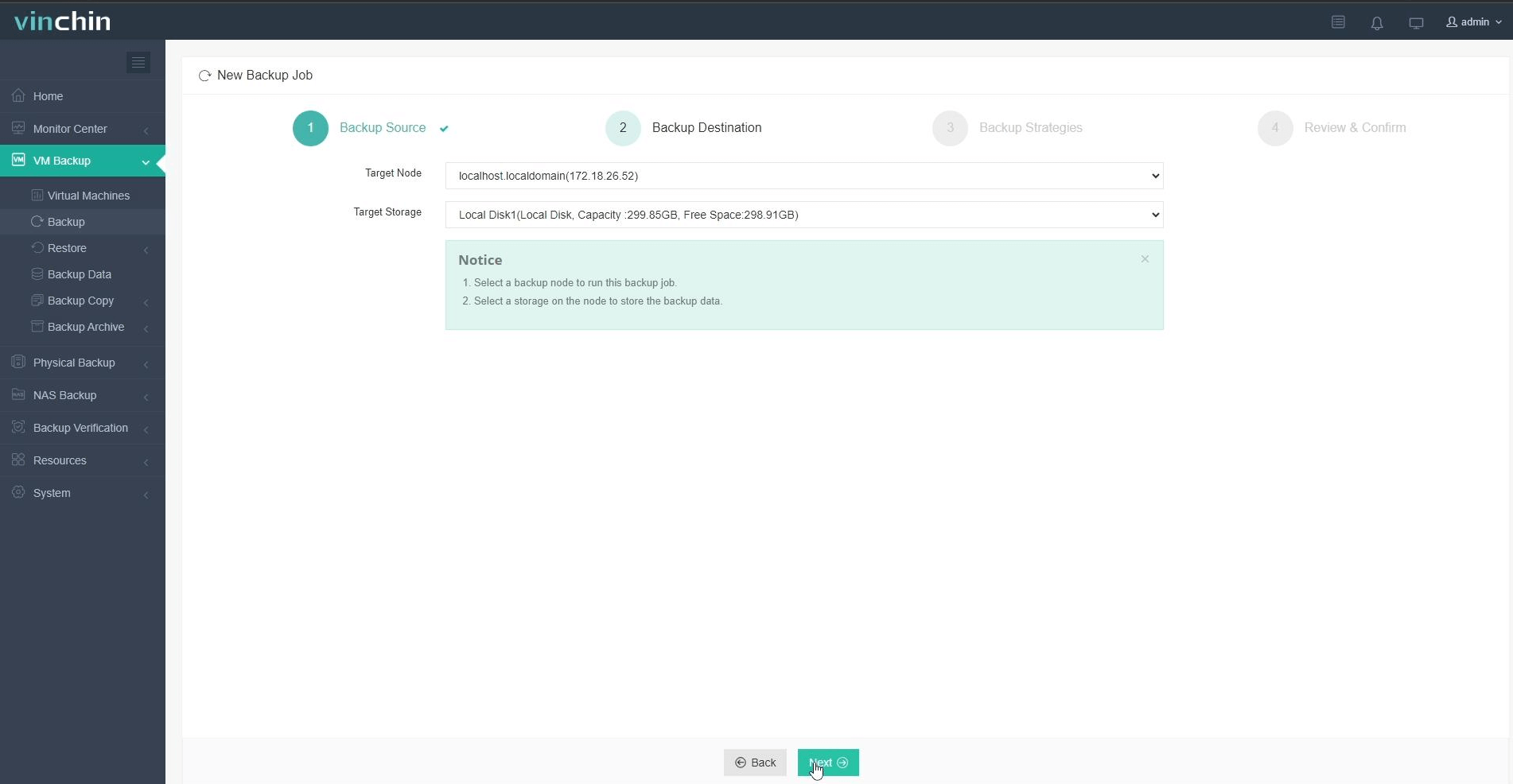
Step 2: Choose backup storage.
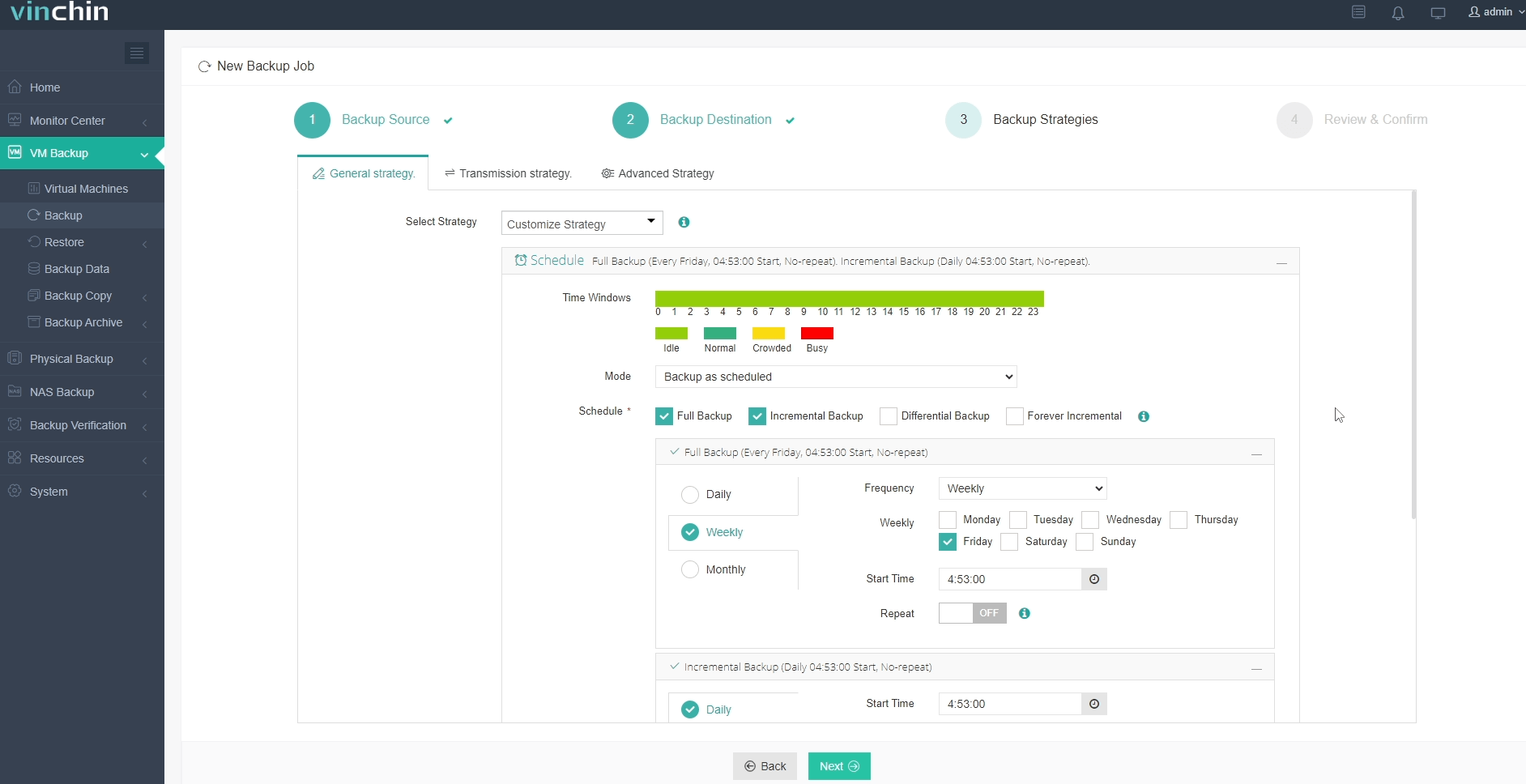
Step 3: Configure the backup strategy.
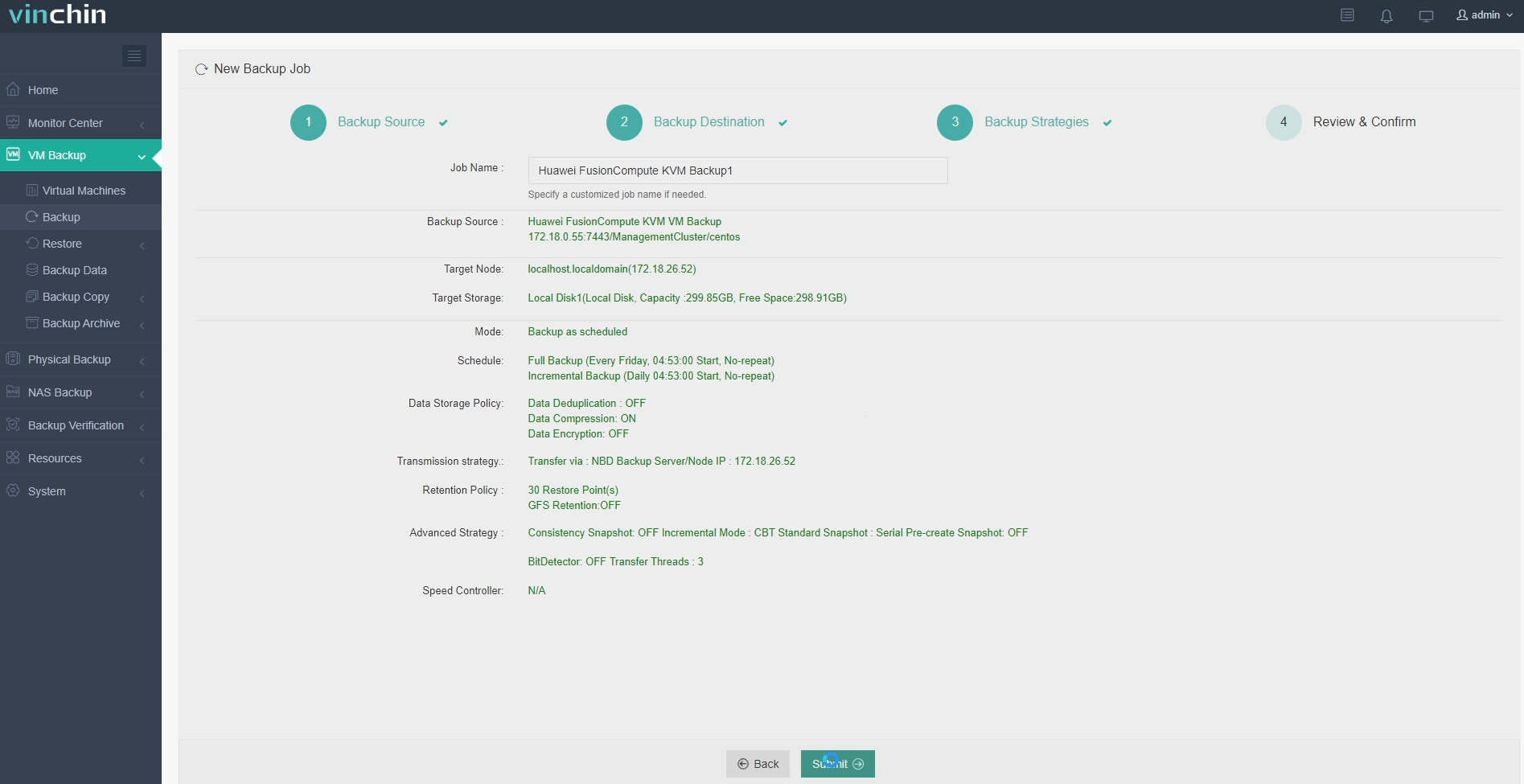
Step 4: Submit the job.
With global recognition among enterprise users and top industry ratings worldwide,Vinchin Backup & Recovery offers a 60-day full-featured free trial—click below to experience trusted protection firsthand.
Best Huawei FusionCompute Backup Software FAQs
Q1: Does the solution support fully automated backup lifecycle management?
Yes. Automated policies control both creation and deletion of backups based on defined schedules plus custom rules set by administrators; once configured these processes run end-to-end without ongoing manual input required from IT staff members.
Q2: Can we customize retention periods per VM or group?
Yes. Granular settings allow different schedules or durations per individual VM—or groups thereof—to match diverse business needs alongside any relevant regulatory mandates.
Q3: How does automation reduce compliance risk?
Automation enforces uniform handling across all protected workloads; removing manual steps lowers chances of mistakes leading either toward non-compliance issues—or accidental loss of critical restore points.
Q4: Is reporting available for audit purposes?
Yes. Detailed activity logs plus comprehensive reports cover every aspect—from initial creation through final expiration—making it straightforward both proving compliance externally during audits as well tracking status internally over time.
Conclusion
Automated retention ensures efficient resource use while supporting regulatory alignment across growing infrastructures—reducing operational risk along the way.Vinchin Backup & Recovery delivers reliable automation tailored specifically for enterprise-grade protection within Huawei FusionCompute environments.










