Backing up your Oracle database is not just about running commands. The way you name and store those backup files can make or break your recovery process. The right Oracle RMAN backup format helps you avoid confusion, speeds up restores, and prevents costly mistakes. But what does “backup format” really mean in RMAN? How do you pick one that fits both daily operations and disaster recovery? Let’s walk through these questions step by step—from basics to advanced strategies.
What Is Oracle RMAN Backup Format?
Oracle Recovery Manager (RMAN) uses backup formats to define how it names and stores backup files. By default, RMAN creates unique file names using internal variables. However, you can customize these names using the FORMAT clause in your backup commands.
The FORMAT string supports several substitution variables:
%d inserts your database name
%T adds the date (YYYYMMDD)
%u gives an 8-character unique identifier
%s is the backup set number
%p is the piece number within a set
For example:
A format like /backup/%d_%T_%u might produce ORCL_20240610_3g7k2j8s. If you do not specify a format, RMAN defaults to %U, which combines uniqueness elements (%u_%p_%c) so no two backups ever overwrite each other.
You can set FORMAT at different levels:
1. Directly in your BACKUP command—this always takes priority
2. In channel configuration (CONFIGURE CHANNEL DEVICE TYPE DISK FORMAT ...)—applies unless overridden above
3. As a device type default (CONFIGURE DEVICE TYPE DISK PARALLELISM ... BACKUP TYPE TO ... FORMAT ...)—lowest priority
Core Principles for Effective Naming Conventions
Before diving into specific methods, let’s cover some universal best practices for naming your backups.
First: Always include something unique in every file name—such as %U, or combinations like %u, %s, or %t (timestamp). This ensures parallel jobs never overwrite each other.
Second: Make file names meaningful at a glance. Including both database name (%d) and date (%T) lets you quickly spot which file belongs where—and when it was created.
Third: Follow any organizational rules about storage paths or allowed characters. For example, avoid spaces or special symbols if backups may move between systems with different operating systems.
Fourth: For control file autobackups—a critical part of disaster recovery—use %F, which includes DBID, date/time stamp, and sequence number all in one string.
Finally: If integrating with external media managers or third-party tools later on, check their documentation for any restrictions on path length or character sets before finalizing your naming pattern.
Method 1: Using BACKUP AS BACKUPSET in RMAN
Most administrators rely on BACKUP AS BACKUPSET for regular backups because it offers flexibility and efficiency. A backup set groups data blocks together; it supports compression and encryption natively within RMAN.
To create a custom-named backup set:
BACKUP AS BACKUPSET FORMAT '/u01/app/oracle/backup/%d_%T_%u' DATABASE;
-- %d = database name; %T = date; %u = unique ID
Want even more detail? Try adding set/piece numbers:
BACKUP AS BACKUPSET FORMAT '/u01/app/oracle/backup/%d_%T_%s_%p' DATABASE;
-- %s = set number; %p = piece number (handy for large databases)
Archivelog backups benefit from timestamps:
BACKUP AS BACKUPSET FORMAT '/u01/app/oracle/arch/%d_al_%s_%p_%t' ARCHIVELOG ALL;
-- %t = timestamp; helps track log creation time
To make this pattern persistent across all disk-based jobs:
CONFIGURE CHANNEL DEVICE TYPE DISK FORMAT '/u01/app/oracle/backup/%d_%T_%u';
-- All future disk backups use this unless overridden above
Quick Comparison Table: Backup Set vs Image Copy
| Feature | Backup Set | Image Copy |
|---|
| Compression | Yes | No |
| Encryption | Yes | No |
| Restore Speed | Fast (with multiplexing) | Fastest (direct copy) |
| Storage Efficiency | High | Lower |
| Usable with SWITCH | No | Yes |
Backup sets are ideal when storage space matters most or when using advanced features like block-level incremental backups.
Method 2: Using BACKUP AS COPY in RMAN
Sometimes you need an exact replica of data files—byte-for-byte identical to production files—for fast switch-over during outages. That’s where image copies shine.
To create an image copy with custom naming:
BACKUP AS COPY FORMAT '/u01/app/oracle/copy/%d_df_%T_%u' DATAFILE 1;
-- df = datafile indicator; good for tracking individual files
Or back up everything at once:
BACKUP AS COPY FORMAT '/u01/app/oracle/copy/%d_db_%T_%u' DATABASE;
-- db = full database indicator
Archive logs too:
BACKUP AS COPY FORMAT '/u01/app/oracle/arch/%d_al_%T_%u' ARCHIVELOG ALL;
-- al = archive log marker; easy sorting later
If no format is given here—or anywhere else—RMAN falls back to its built-in %U pattern (for image copies this looks like data-D-dbname_id-nnn_TS-tablespace_FNO-fno_uniqueid). This guarantees uniqueness but may be less readable than custom patterns tailored to your needs.
Image copies are best used when restore speed trumps storage savings—for example during planned migrations or rapid failover scenarios.
How Naming Patterns Help During Recovery?
Imagine needing yesterday’s full database backup after accidental data loss. With clear naming conventions—including date (%T) and database name (%d)—you can quickly locate relevant files:
Run this command inside RMAN:
LIST BACKUP OF DATABASE COMPLETED BETWEEN '2024-06-09' AND '2024-06-10';
-- Shows only those matching your chosen dates/patterns
If all files follow /backup/ORCL_20240609_*, there’s no guesswork involved—you know exactly which ones belong together! This saves precious minutes during high-pressure recoveries when every second counts.
How to Choose an RMAN Backup Format?
Choosing wisely means balancing operational needs against technical constraints:
First: Always guarantee uniqueness by including at least one variable such as %U, which combines multiple identifiers automatically—or mix-and-match others like %s, %p, or even timestamps (%t) if needed for extra safety during parallel runs.
Second: Use descriptive patterns so anyone reviewing old backups knows what they’re looking at instantly—not just random strings but context-rich names showing source system (%d) plus creation date/time (%T).
Third: Match directory structure with business requirements—for instance placing archivelogs separately from full database dumps makes retention management easier down the line.
Fourth: For control file autobackups—a must-have after structural changes—configure them using %F so they’re always easy to find:
CONFIGURE CONTROLFILE AUTOBACKUP FORMAT FOR DEVICE TYPE DISK TO '/backup/cf_autobackup.%F';
-- Ensures DBID/date/sequencing info is embedded automatically
Fifth: If working across platforms (say Linux today but Solaris tomorrow), stick with simple alphanumeric characters only—no spaces or OS-specific symbols—to maximize portability of your archives between environments.
Sixth: When integrating with external media managers later on (like tape libraries), check their cataloging requirements early—they may require certain fields such as copy numbers (%c) be present in every filename!
While managing these formats manually works well enough at small scale, many organizations prefer centralized solutions that automate policy enforcement across dozens—or hundreds—of databases simultaneously. Why risk human error if automation can help?
How to Back Up Oracle Databases with Vinchin?
For organizations seeking streamlined protection beyond manual scripting, Vinchin Backup & Recovery delivers enterprise-grade Oracle database backup capabilities alongside support for MySQL, SQL Server, MariaDB, PostgreSQL, PostgresPro, and TiDB environments. With features such as advanced source-side compression, incremental backup options tailored for Oracle workloads, batch processing of multiple databases at once, multi-level data compression strategies, and flexible retention policies including GFS cycles—all designed to optimize storage usage while ensuring compliance—the platform simplifies complex tasks into efficient routines that reduce risk across diverse infrastructures.
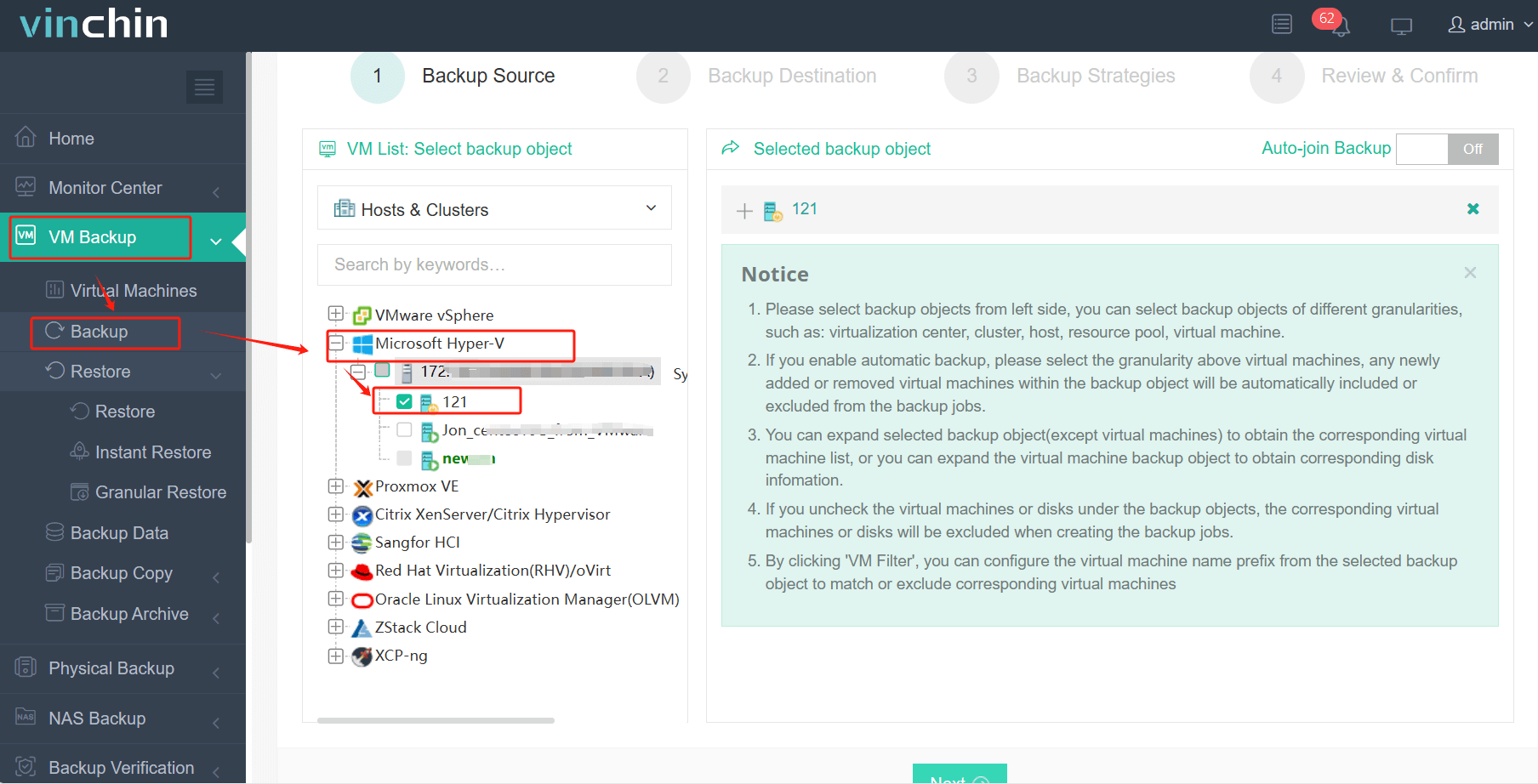
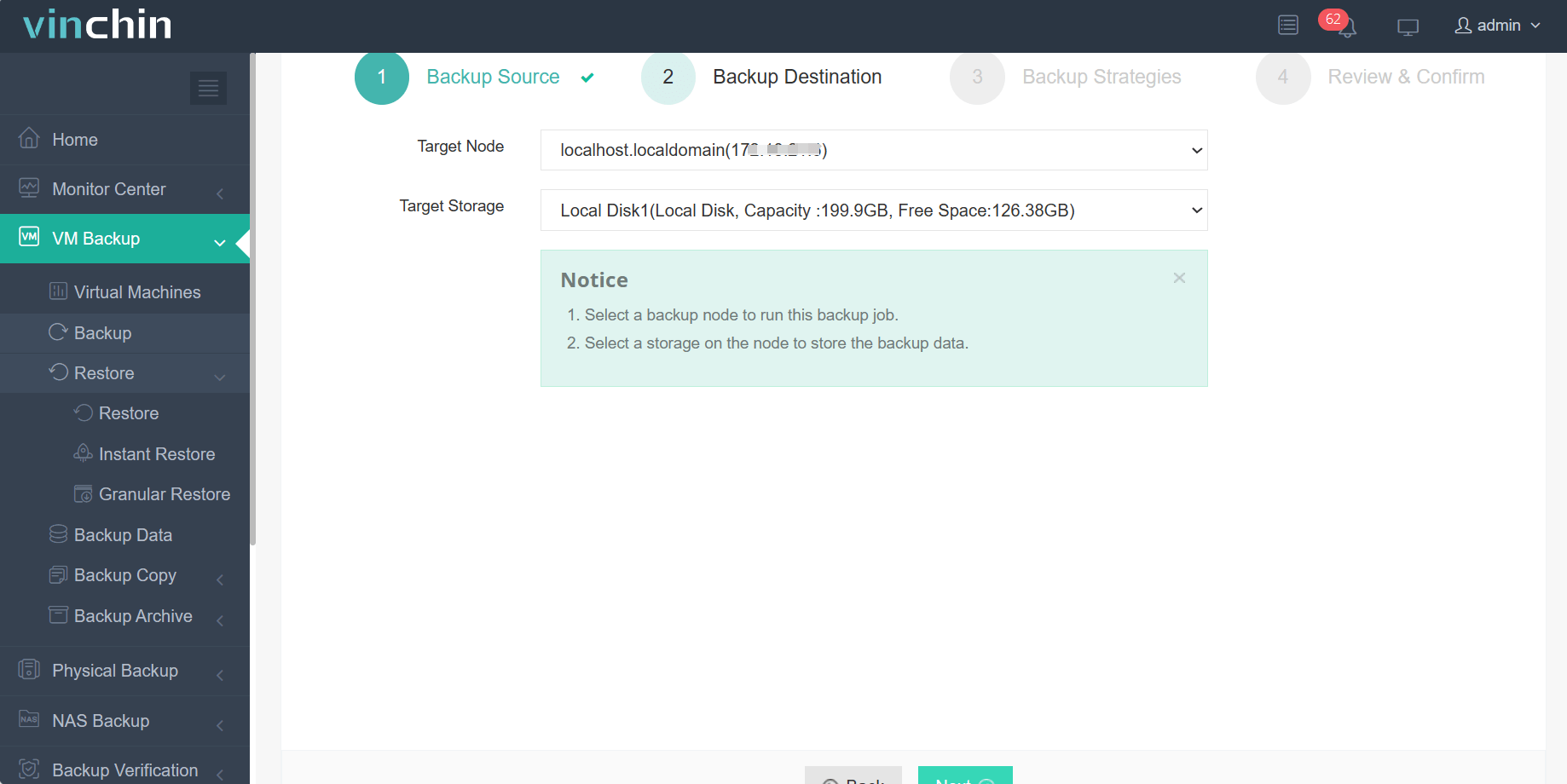
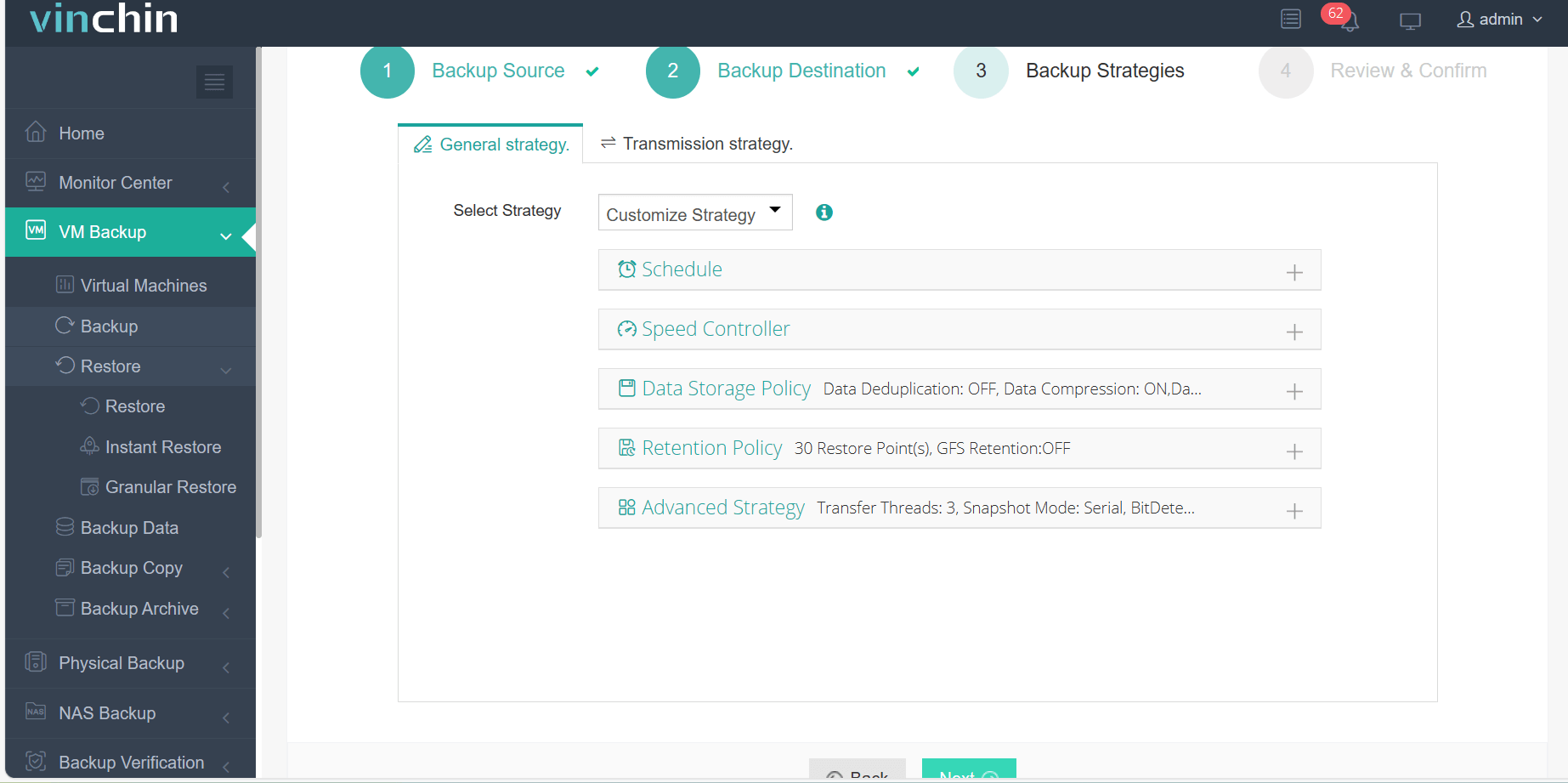
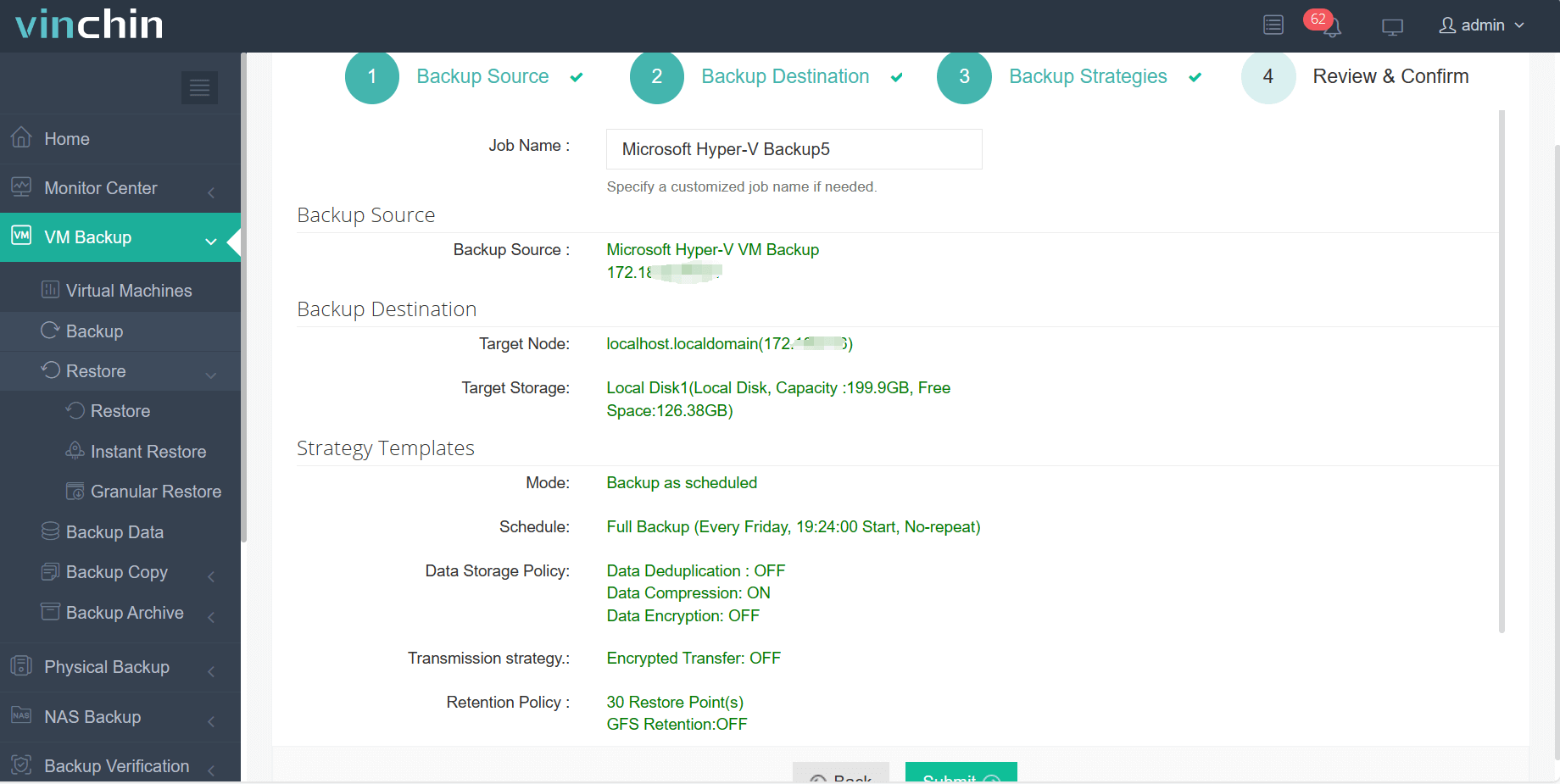
The intuitive web console makes safeguarding your Oracle environment straightforward through four guided steps:
Step 1: Select the Hyper-V VM to back up.
Step 2: Choose the backup storage.
Step 3: Configure the backup strategy.
Step 4: Submit the job.
Vinchin Backup & Recovery enjoys global recognition among enterprises thanks to its reliability and top customer ratings worldwide. Experience every feature free for 60 days by clicking the download button below!
Oracle RMAN Backup Format FAQs
Q1: Can I change my existing backup file names without affecting restore operations?
No; renaming existing RMAN-managed files outside of RMAN breaks catalog references—always use RMAN commands instead.
Q2: What should I do if my scheduled job fails due to "ORA-19504" errors?
Check directory existence > verify write permissions > confirm sufficient free space > ensure path/file length limits aren’t exceeded > test manual creation via OS shell > review ulimit settings if needed.
Q3: Does including too many variables in my FORMAT string slow down performance?
No; adding variables affects only file naming—not actual read/write speed—but overly complex patterns may cause confusion during restores.
Conclusion
Choosing an effective Oracle RMAN backup format keeps operations smooth while making restores faster when disaster strikes. For streamlined protection across all major databases—including automated policy enforcement—consider trying Vinchin’s enterprise-grade solution free today!







