Fast recovery is vital for organizations using Sangfor HCI. The best backup solutions combine instant VM recovery, granular restore options, and efficient data transfer. These capabilities reduce downtime and help businesses maintain operations during disruptions. According to Gartner’s research on IT downtime costs, even one hour of unplanned outage can cost enterprises over $300,000. This makes fast recovery not just a technical goal but a financial imperative.
Speed in backup recovery supports service level agreements (SLAs) and compliance requirements. Slow restores directly increase financial and reputational risk. Regulatory frameworks like NIST SP 800-34 stress that organizations must prove their ability to restore data quickly after an incident. Understanding which Sangfor HCI backup solution offers the fastest recovery helps IT leaders make informed decisions.
Why Fast Recovery Matters in Enterprise Environments?
Downtime disrupts business processes at every level. Even brief outages can halt transactions, delay projects, or erode customer trust. Industry studies show that average hourly downtime costs range from $140,000 for small businesses up to $540,000 for large enterprises. Enterprises face mounting pressure to meet strict SLAs while avoiding penalties or lost revenue.
● Operational Continuity
Maintaining operational continuity depends on rapid system restoration. When critical applications go offline—even briefly—productivity drops across departments. Employees may be unable to access essential tools or data until systems are restored.
● Regulatory Compliance
Many industries require proof of timely data restoration after incidents. Regulations such as GDPR or HIPAA mandate quick recoveries to protect sensitive information and avoid fines.
● Financial Impact
Slow restores lead directly to increased costs from lost sales opportunities or SLA breaches. Prolonged outages can also result in contractual penalties or compensation claims from clients.
● Reputation Management
Customers expect reliable services at all times. Extended downtime damages brand reputation and may drive customers toward competitors who offer better reliability guarantees.
These factors make fast recovery an essential part of enterprise IT strategy—not just a convenience but a necessity for survival in today’s digital economy.
How To Choose The Best Sangfor HCI Backup Solution for Fast Recovery?
Selecting an effective backup solution requires careful evaluation of several key features that impact speed and efficiency. A well-chosen tool should minimize manual intervention while maximizing automation and scalability.
● Instant VM Boot
Solutions offering instant VM boot allow you to mount backups directly from storage as running virtual machines without waiting for full data transfers. This approach brings critical workloads online within seconds rather than hours—a major advantage during emergencies.
● Granular File-Level Restore
Granular file-level restore lets administrators recover specific files or folders instead of restoring entire VMs. This saves time when only partial data loss occurs—such as accidental file deletion—and reduces overall system disruption.
● Efficient Deduplication & WAN Optimization
Advanced deduplication eliminates redundant data before transmission while WAN optimization compresses traffic between sites. These technologies cut network load by reducing transferred volumes—speeding both backups and restores across local or remote environments.
● Scalability & Automation
Backup solutions must scale seamlessly as your environment grows—handling more VMs without performance loss. Automated scheduling ensures regular backups occur without manual oversight; policy enforcement maintains consistent retention rules across workloads.
● Security Integration
Modern solutions integrate encryption at rest and in transit without sacrificing speed. Role-based access control (RBAC) restricts who can initiate restores—supporting compliance with internal policies or external regulations.
These criteria lead IT teams to evaluate two primary approaches: native Sangfor HCI disaster recovery features versus advanced third-party solutions designed specifically for high-speed enterprise environments.
Sangfor HCI Backup: Built-in and Third-Party Options
Sangfor HCI provides robust built-in disaster recovery tools alongside support for advanced third-party integrations via OpenAPI standards. Both approaches aim to deliver reliable protection—but differ in flexibility, granularity, and cross-platform compatibility.
The platform’s native snapshot technology captures point-in-time images of running VMs with minimal performance impact. Continuous Data Protection (CDP) tracks changes in real time so you can roll back instantly after failures—achieving near-zero RPO/RTO under optimal conditions.
For larger deployments needing greater flexibility or integration with other platforms, Sangfor HCI 6.10+ enables agentless backups through its OpenAPI interface combined with SFVDDK SDK. This allows compatible third-party applications direct access to VM snapshots without installing agents inside guest operating systems—a method that reduces overhead while improving security posture by minimizing attack surfaces within production environments.
Method 1. Native Sangfor HCI Disaster Recovery
Native disaster recovery options are tightly integrated into Sangfor HCI’s management console—making them easy to deploy even in complex infrastructures:
Local HA delivers zero RPO (no data loss) with RTO as low as 30 seconds within a single site by synchronizing active-passive nodes automatically behind the scenes.
Disaster Recovery (DR) extends protection offsite using asynchronous replication; it achieves minimum RPO of one second plus minutes-level RTO depending on bandwidth latency between locations.
Stretched Cluster synchronizes live workloads between sites up to 50km apart—with zero RPO/RTO down to 30 seconds under ideal network conditions.
Critical business workloads benefit most from CDP hot standby DR—which switches over operations almost instantly if primary resources fail (RPO zero; switchover typically under one minute). Important but less critical workloads use VM synchronization DR—with five-minute switch times standard; secondary tasks recover fully within about half an hour.
While these built-in tools excel at rapid whole-system failover inside homogeneous environments—they may lack fine-grained restore controls needed when only certain files must be recovered quickly—or when migrating VMs outside Sangfor ecosystems.
Method 2: Vinchin Backup & Recovery – Enterprise-Class Backup Solution for Sangfor HCI
For organizations seeking comprehensive protection beyond native tools, Vinchin Backup & Recovery delivers professional-grade virtual machine backup tailored for modern enterprise needs—including full support for agentless backup on Sangfor HCI integration. As an enterprise-level solution compatible with over 15 mainstream virtualization platforms—including VMware, Hyper-V, Proxmox, oVirt, OLVM, RHV, XCP-ng, XenServer, OpenStack, ZStack—and optimized specifically for seamless operation on Sangfor HCI—it meets diverse infrastructure demands across hybrid cloud environments.
Key features include instant VM recovery (bringing VMs online rapidly), forever-incremental backup (saving storage/time), deduplication/compression (reducing transfer size), granular file-level restore (targeted recoveries), and automated scheduling/policy enforcement (ensuring consistency). Together these capabilities minimize downtime while optimizing resource usage throughout the entire backup lifecycle.
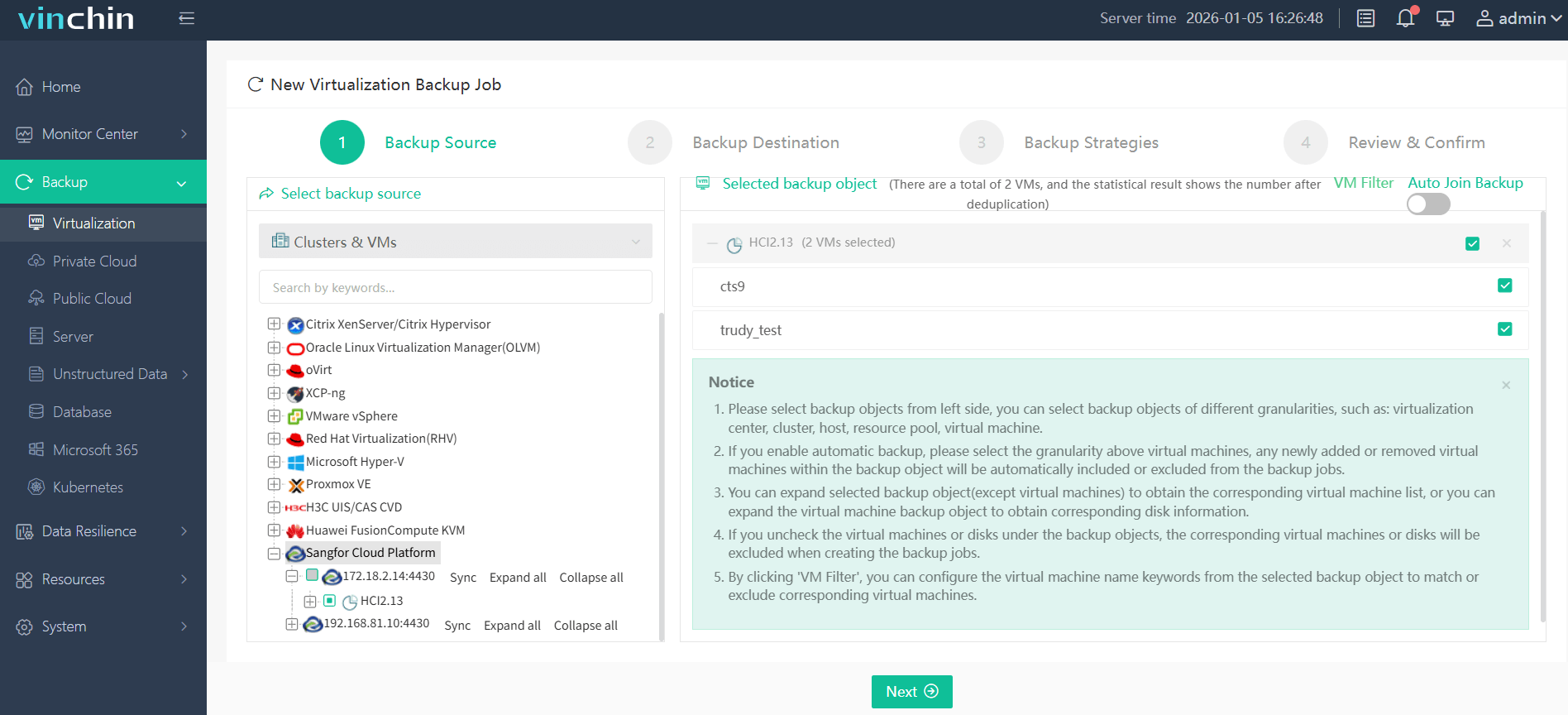
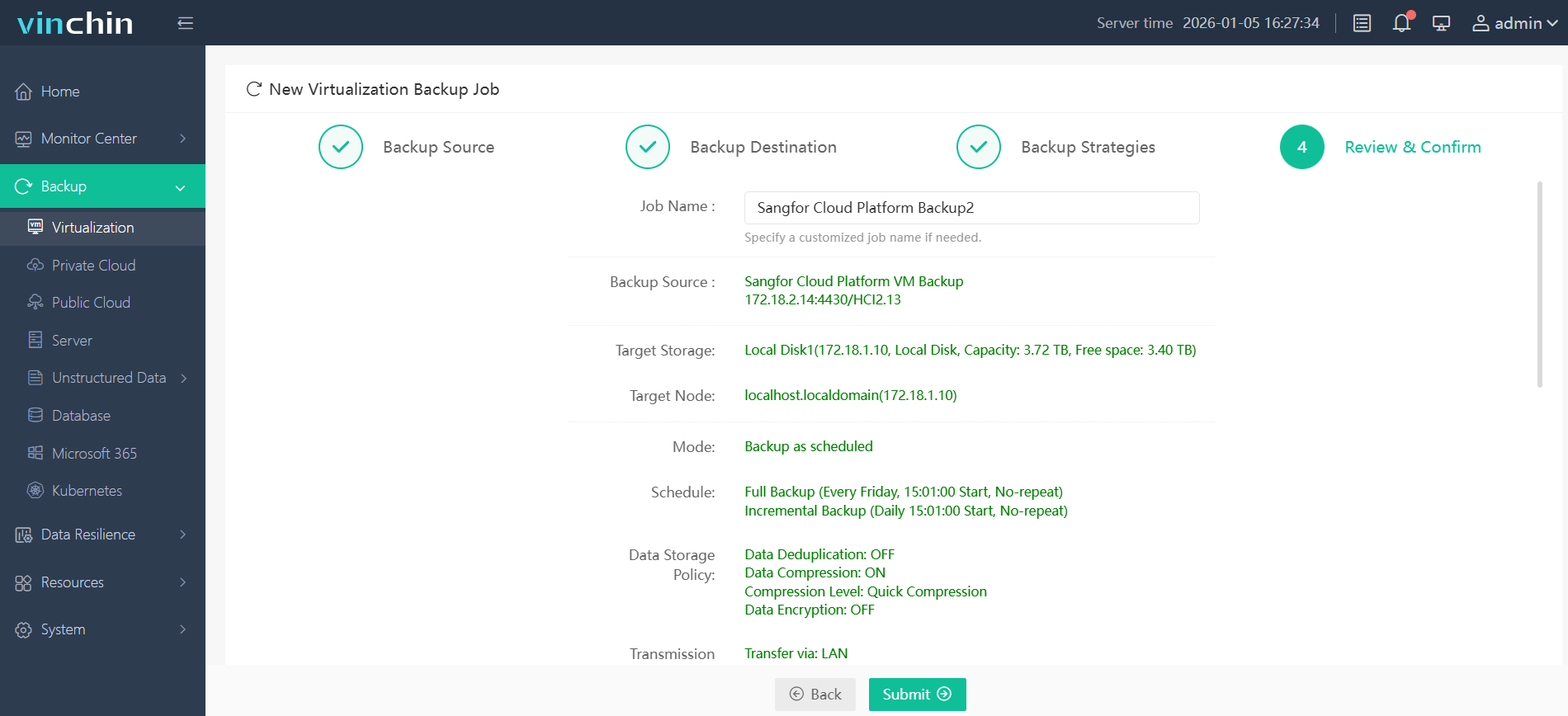
With Vinchin Backup & Recovery’s intuitive web console interface:
Step 1: Select the Sangfor HCI VM you wish to back up
Step 2: Choose your preferred backup storage

Step 3: Configure your desired backup strategy

Step 4: Submit the job
Recognized globally by thousands of enterprises—with top industry ratings—Vinchin Backup & Recovery offers a fully featured free trial valid for 60 days; click below to experience leading-edge enterprise data protection firsthand!
Which Solution Offers the Fastest Recovery?
Recovery speed depends on both architecture design choices made by vendors—and how well those choices align with your operational needs during real-world incidents.
Among third-party solutions officially supporting agentless integration via OpenAPI/SFVDDK interfaces on modern versions of Sangfor HCI—Vinchin Backup & Recovery consistently leads benchmarks thanks to its combination of instant VM boot technology plus granular file-level restores delivered through an intuitive web interface.
With instant VM boot bringing servers online within fifteen seconds—and selective file/folder restoration bypassing lengthy full-image rebuilds—IT teams regain service faster than ever before while minimizing user disruption.
Native DR features remain highly competitive where deep platform integration matters most—for example local HA clusters requiring seamless failover—but lack some advanced automation/policy controls found in purpose-built enterprise-grade products like Vinchin.
Best Sangfor HCl Backup Software FAQs
Q1: What defines "fastest" recovery in Sangfor HCl backups?
A1: “Fastest” means achieving minimal Recovery Time Objective (RTO), often measured by how quickly you can bring virtual machines online using instant boot technology combined with granular file-level restoration capabilities—all while reducing manual steps required during emergencies.
Q2: How does fast recovery impact regulatory compliance?
A2: Rapid restores help meet legal obligations around uptime/data availability set by frameworks like GDPR/HIPAA/NIST SP 800–34—which require documented evidence that systems/data can be recovered promptly following disruptions/audits/incidents.
Q3: Can leading fast-backup solutions scale easily alongside enterprise growth?
A3: Yes—the best solutions expand horizontally across new hosts/sites/users/workloads without slowing down core operations thanks to distributed architecture designs optimized for parallel processing/network efficiency/scalable metadata handling routines etc., ensuring continued high-speed performance regardless of environment size changes over time!
Q4: Are advanced security features compatible with high-speed restore workflows?
A4: Modern enterprise-grade platforms integrate strong encryption/ransomware defense mechanisms natively into their pipelines so that neither at-rest nor in-transit protections slow down actual restore speeds—instead they work together transparently behind scenes safeguarding both process integrity/user privacy simultaneously!
Q5: How does agentless integration work when backing up/recovering VMs on Sangfor HCl?
A5: Agentless methods leverage APIs provided by hypervisor vendors like OpenAPI/SFVDDK SDK so external apps communicate directly w/infrastructure layers managing snapshots/backups/restores remotely w/o needing intrusive guest OS agents installed inside every protected machine thus lowering resource usage/security risks overall!
Conclusion
Vinchin delivers industry-leading speed through instant VM booting plus granular restores—making it the top choice among third-party options for fast enterprise-grade disaster recovery on modern Sangfor HCl deployments.













