Downtime can cripple business operations in seconds. For organizations running Red Hat Virtualization (RHV), choosing backup software is more than an IT task; it’s vital for survival. Fast recovery times (RTO) and minimal data loss (RPO) are essential metrics when evaluating solutions. Reliable backup ensures applications stay available even during failures or disasters.
Why Maximizing Uptime Matters in Enterprise Environments
Keeping systems running is crucial for every modern enterprise. Even brief outages can lead to lost revenue, compliance issues, or damaged reputation, especially in sectors like finance or healthcare.
● Downtime Directly Impacts Revenue
Every minute of unplanned downtime means lost sales opportunities and productivity drops across departments. For customer-facing services or e-commerce platforms hosted on RHV environments, outages can result in immediate financial losses that ripple through the organization.
● Compliance Risks Increase During Outages
Many industries must meet strict regulatory requirements such as GDPR or HIPAA. Extended downtime may cause missed reporting deadlines or data integrity issues that trigger audits or fines from regulators.
● Customer Trust Erodes Quickly
Clients expect uninterrupted access to digital services. If critical applications go offline—even briefly—customers may lose confidence in your brand’s reliability and switch to competitors who offer better availability guarantees.
● Incomplete Recovery Leads to Data Loss
Inadequate backup solutions often fail to restore all necessary data after an incident. This not only disrupts operations but also risks permanent loss of sensitive information if backups are outdated or incomplete.
Recovery Time Objectives (RTO) define how quickly you need systems restored; Recovery Point Objectives (RPO) set how much recent data you can afford to lose. Effective backup strategies target low RTOs/RPOs so businesses bounce back fast after disruptions.
How To Choose The Best Red Hat Virtualization Backup Solution for Maximizing Uptime
Selecting a backup solution for RHV should focus on minimizing disruption while ensuring rapid recoveries at scale. Look beyond basic features; evaluate how each function supports uptime goals under real-world conditions.
● Rapid Recovery Capabilities Reduce Downtime
Solutions offering instant VM restore and granular file-level recovery allow administrators to bring critical workloads back online within minutes rather than hours. Technologies like changed block tracking further speed up both backups and restores by processing only modified data blocks instead of entire virtual machines.
● Automation Minimizes Human Error
Automated scheduling, verification routines, and reporting ensure backups run consistently without manual intervention, reducing mistakes that could delay recoveries during emergencies.
● Scalability Prevents Performance Bottlenecks
As your environment grows, adding more VMs or storag, the backup system must handle increased load without slowing down jobs or extending recovery windows. Scalable designs support concurrent restores so multiple applications can come back online simultaneously during disaster events.
● Strong Security Defends Against Modern Threats
Features such as end-to-end encryption protect sensitive data at rest and in transit; ransomware detection helps prevent malicious attacks from corrupting both production systems and stored backups; audit trails support compliance needs by recording all activity related to protected assets.
● Seamless Integration Simplifies Management
Backup tools should work smoothly with existing infrastructure components like SAN/NAS storage arrays, cloud object storage targets (e.g., Amazon S3), monitoring platforms (like Prometheus), authentication systems (LDAP/AD), and orchestration tools already used by IT teams managing RHV clusters.
A well-chosen solution aligns with your operational workflows while supporting future growth, helping maintain high availability no matter how complex your virtualization landscape becomes.
Vinchin Backup & Recovery: Enterprise-Grade Protection for Red Hat Virtualization
For organizations seeking robust protection for Red Hat Virtualization environments, Vinchin Backup & Recovery delivers professional, enterprise-level VM backup across over 15 mainstream virtualization platforms, including RHV/oVirt, VMware, Hyper-V, Proxmox, XCP-ng, XenServer, OpenStack, ZStack, OLVM, and others.
With Vinchin Backup & Recovery you get a unified platform combining incremental/differential backups with instant VM/file recovery options; these features collectively ensure rapid RTO/RPO achievement while optimizing storage use and reducing administrative burden.
The intuitive web console makes protecting RHV VMs straightforward:
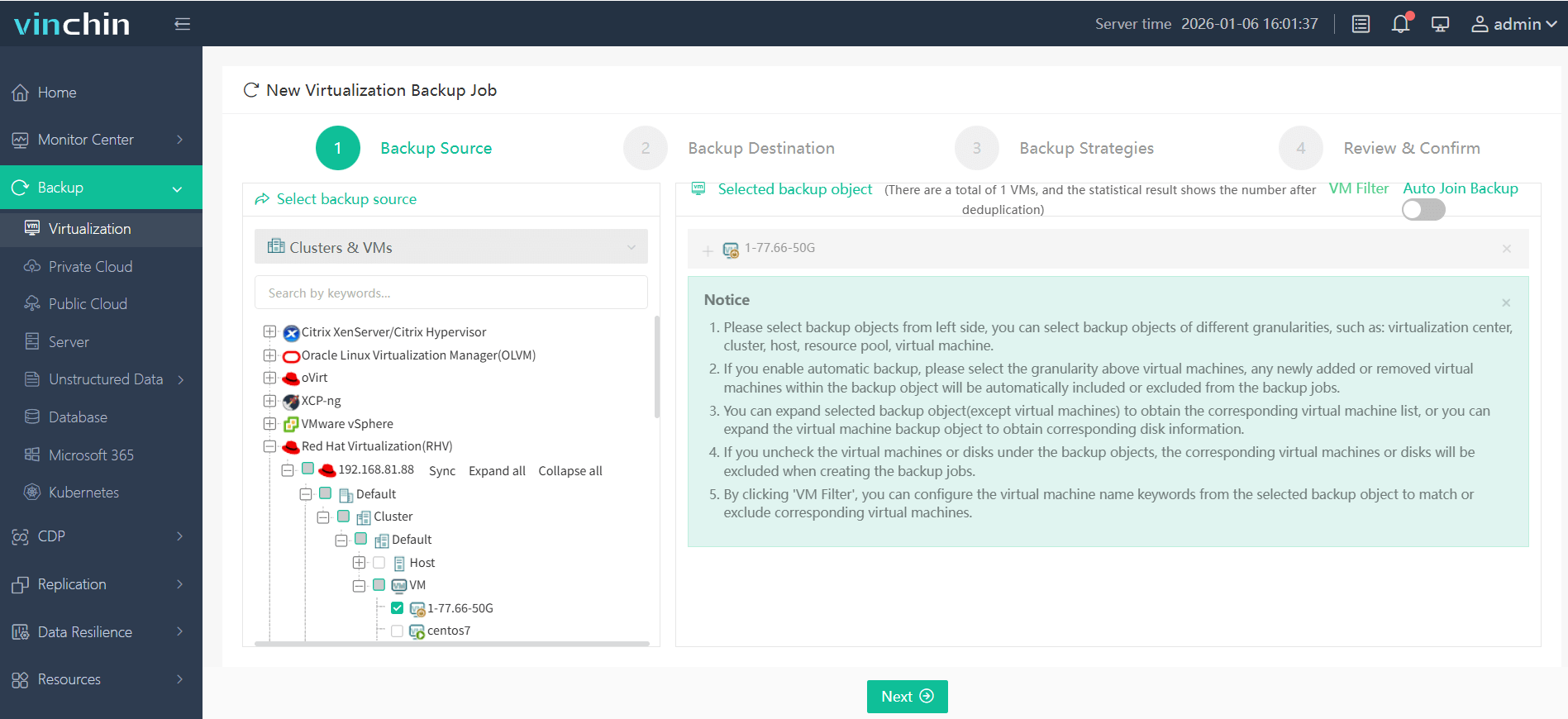
Step 1: Select the Red Hat Virtualization VM(s) you want backed up
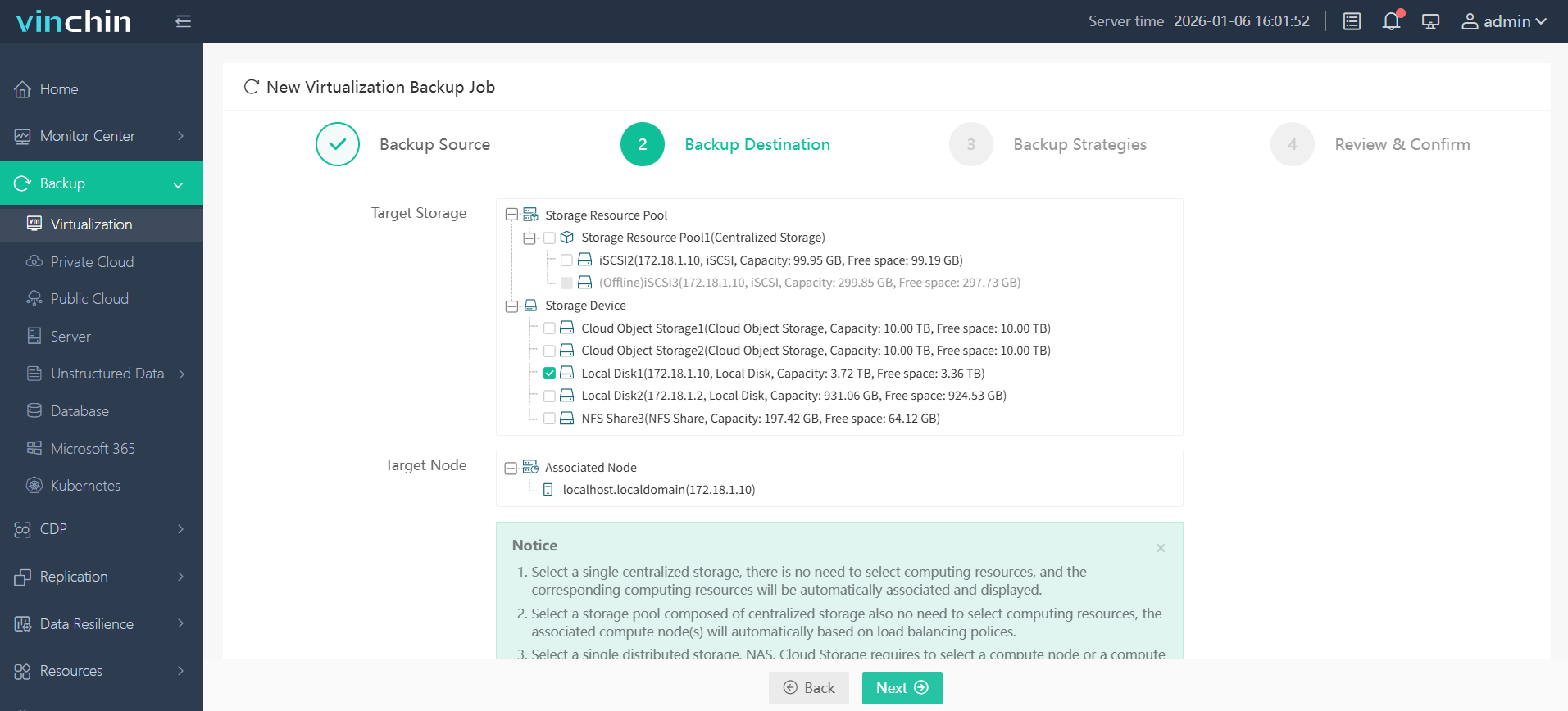
Step 2: Choose the desired backup storage location
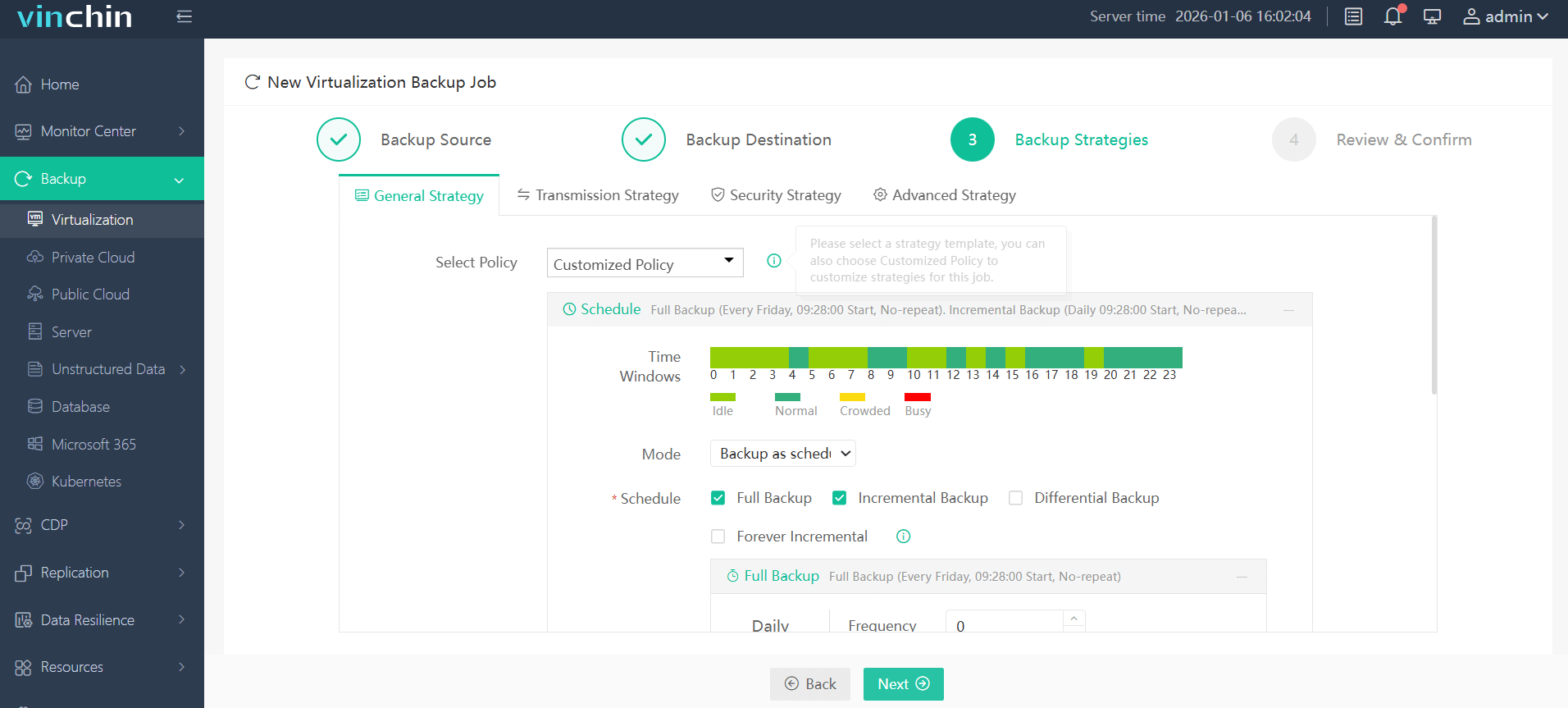
Step 3: Configure policies including schedule frequency and retention settings
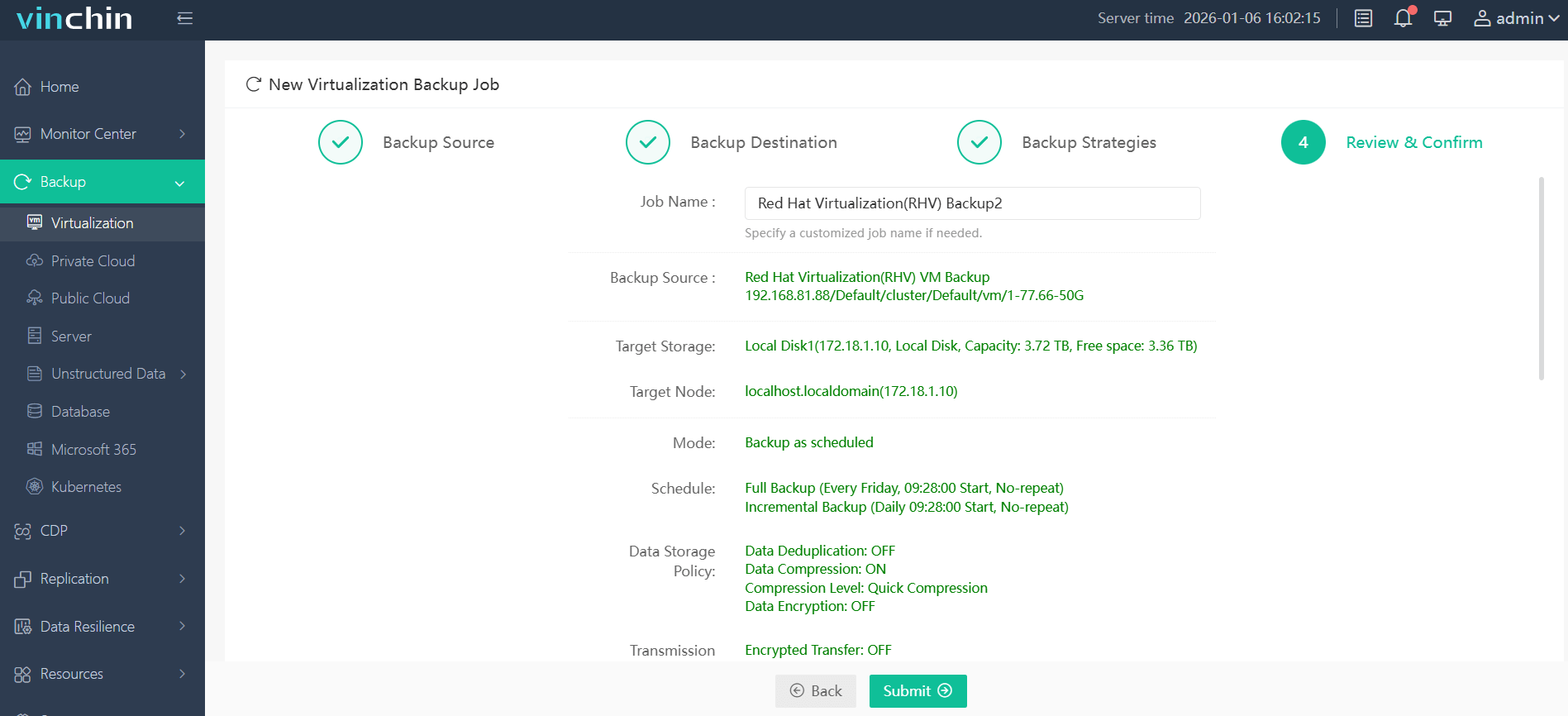
Step 4: Submit the job—and let automation handle the rest
Trusted worldwide by thousands of enterprises with top ratings for reliability, Vinchin Backup & Recovery offers a 60-day full-featured free trial so you can experience its power risk-free.
Best Red Hat Virtualization Backup Software FAQs
Q1: What features ensure maximum uptime in a backup solution?
Fast restores enable quick resumption of service after incidents; instant VM recovery brings full systems online rapidly; automation reduces human error by ensuring scheduled tasks complete reliably; ransomware protection keeps both live systems and backups safe from attack; reliable verification processes confirm every copy is usable before disaster strikes, all working together to minimize downtime risk.
Q2: How does scalability affect uptime?
A scalable solution maintains consistent performance even as workloads grow larger or more complex. For example, by handling many simultaneous restore jobs during widespread outages without delays that could extend overall downtime across departments relying on RHV-hosted apps.
Q3: Is agentless backup important?
Yes; it avoids problems common with agent-based approaches such as OS compatibility conflicts or extra maintenance overhead when updating guest operating systems inside VMs managed by RHV clusters; this leads to simpler administration plus higher reliability throughout both routine operations and urgent restores after failures occur.
Q4: How does compliance factor into choosing a solution?
Compliance-ready products help organizations avoid legal penalties tied to regulations like GDPR or HIPAA by providing encrypted storage options plus detailed audit logs showing who accessed what data and when, across every stage of the backup lifecycle from creation through restoration activities later on if needed for investigations.
Conclusion
Choosing robust Red Hat Virtualization backup tool safeguards business continuity by enabling rapid recoveries while meeting compliance demands and protecting critical applications against costly interruptions every day.













