Disaster recovery is more than just restoring data after an outage—it is about ensuring business continuity when every second counts. Enterprises running Microsoft Hyper-V must protect their virtual machines against hardware failures, ransomware attacks, human error, or natural disasters. Key metrics like Recovery Time Objective (RTO) and Recovery Point Objective (RPO) define how quickly systems can be restored and how much data loss is acceptable after an incident. Reliable backup software automates these processes to meet strict service-level agreements while minimizing risk.
Why Disaster Recovery Matters in Enterprise Environments?
A robust disaster recovery strategy safeguards operations from unexpected disruptions that threaten revenue, compliance, and reputation. Enterprises depend on fast restoration of services to avoid costly downtime or regulatory penalties.
● Business Continuity
Enterprises rely on continuous access to applications and data to serve customers and partners. When systems go down due to hardware failure or cyberattack, reliable disaster recovery ensures that critical workloads are restored quickly so business operations can resume without major interruption.
● Regulatory Compliance
Many industries face strict regulations around data protection—such as GDPR in Europe or HIPAA in healthcare—that require organizations to maintain recoverable backups. Failure to restore data within mandated timeframes can result in fines or legal action.
● Minimized Data Loss
Strong backup solutions reduce the risk of losing recent transactions or sensitive information during incidents by capturing frequent restore points (low RPO). This helps organizations recover not just entire virtual machines but also individual files or application records.
● Reduced Downtime Costs
Every minute of downtime translates into lost productivity, missed revenue opportunities, and potential reputational damage. By enabling rapid restores (low RTO), effective disaster recovery tools help enterprises control costs associated with outages.
● Protection Against Evolving Threats
Modern threats like ransomware target backup repositories as well as production systems. Advanced backup software includes features such as immutable storage and anomaly detection to defend against these attacks before they impact recoverability.
How To Choose The Best Hyper-V Backup Solution for Disaster Recovery?
Selecting a reliable Hyper-V backup solution requires careful evaluation of features that directly impact your ability to recover from disasters quickly and completely. It’s important not only to look at what’s offered but also how those features perform under real-world conditions.
● Automated Scheduling
Backup automation ensures consistent coverage across all virtual machines without manual intervention. Solutions should support policy-driven schedules that align with business needs—nightly full backups combined with frequent incremental jobs minimize gaps between restore points.
● Granular Restore Options
The ability to restore individual files, folders, emails, or application objects—such as Active Directory users or SQL Server databases—saves time compared to recovering entire VMs. Application-aware backups further ensure transactional consistency for mission-critical workloads.
● Secure Offsite Replication
Storing copies of backups offsite protects against site-wide disasters like fire or flood. Look for encrypted replication over secure channels (e.g., VPN/TLS) so data remains protected both in transit and at rest while meeting compliance requirements for geographic redundancy.
● Scalability
As virtualization environments grow from dozens to hundreds—or thousands—of VMs, backup infrastructure must scale seamlessly without bottlenecks. Solutions should offer centralized management consoles capable of handling large deployments efficiently while maintaining performance standards.
● Centralized Management
Unified dashboards simplify administration by providing visibility into job status, resource usage, alerts, and compliance reports from one place rather than juggling multiple interfaces across sites or clusters.
● Recovery Testing Capabilities
Regular testing of backup integrity and automated failover workflows verifies that restores work when needed—not just that backups complete successfully. Some solutions provide sandbox environments where you can test VM restores without impacting production systems.
Each criterion above affects your organization’s resilience during crises—and ultimately determines whether you meet business goals for uptime and compliance while controlling operational risks.
Vinchin Backup & Recovery: Enterprise-Grade Protection for Hyper-V
For organizations seeking comprehensive protection for Microsoft Hyper-V environments alongside other mainstream platforms such as VMware vSphere, Proxmox VE, oVirt, OLVM, RHV, XCP-ng, XenServer, OpenStack, ZStack and more (15+ total), Vinchin Backup & Recovery stands out as a professional enterprise-level VM backup solution. Its broad compatibility enables unified management across diverse infrastructures while delivering advanced capabilities tailored for modern IT demands.
Among its many features are LAN-free backup for high-speed transfers on supported platforms; SpeedKit technology optimizing performance; CBT-based incremental backups; granular restore; cloud/tape archive; instant recovery; scheduled policies; deduplication/compression; V2V migration; GFS retention policy; encryption; multi-thread transmission; throttling policy; VM backup verification—and more. For Hyper-V users specifically: LAN-free transfer accelerates local network jobs while SpeedKit boosts efficiency even at scale.
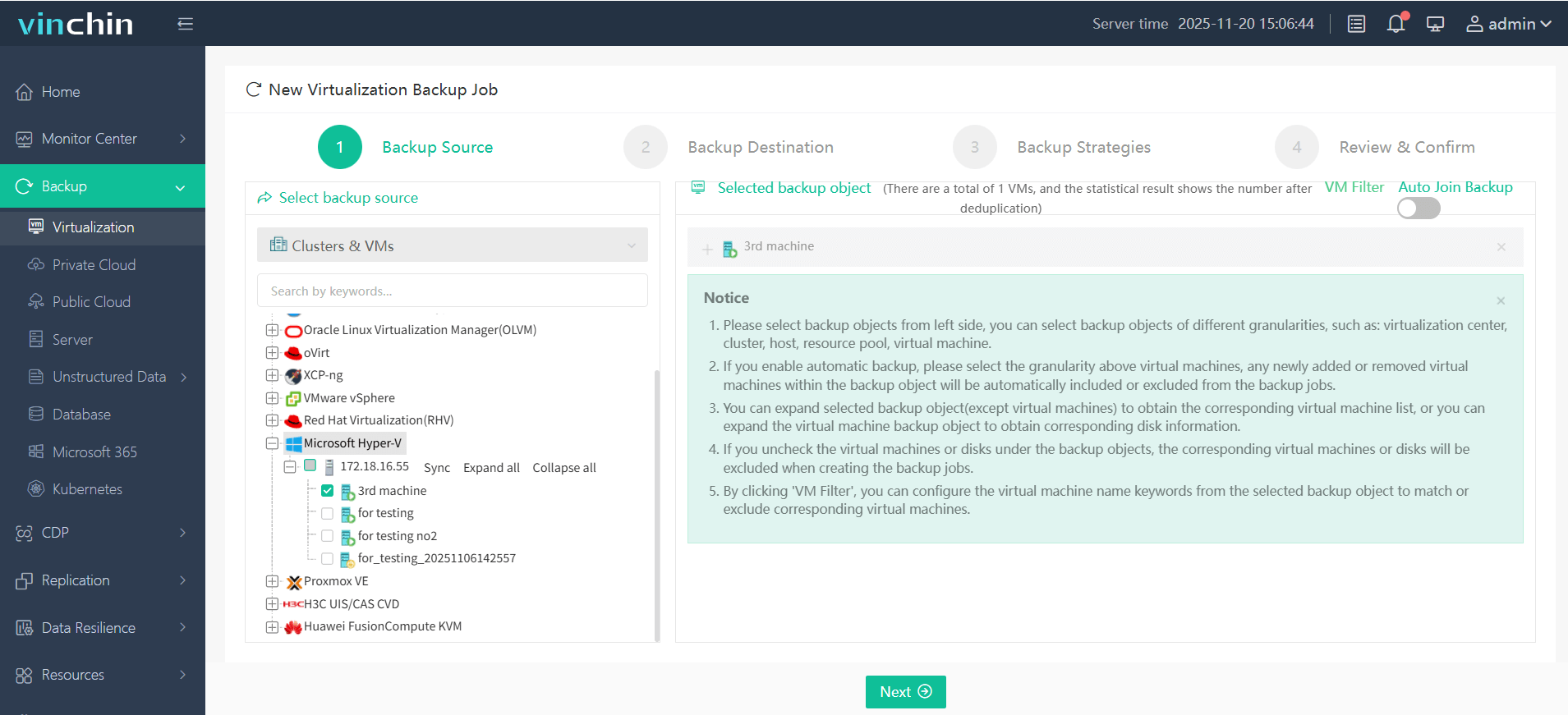
With Vinchin Backup & Recovery’s intuitive web console interface backing up a Hyper-V VM takes four steps: Step 1: Select the Hyper‑V VM(s) you wish to back up.
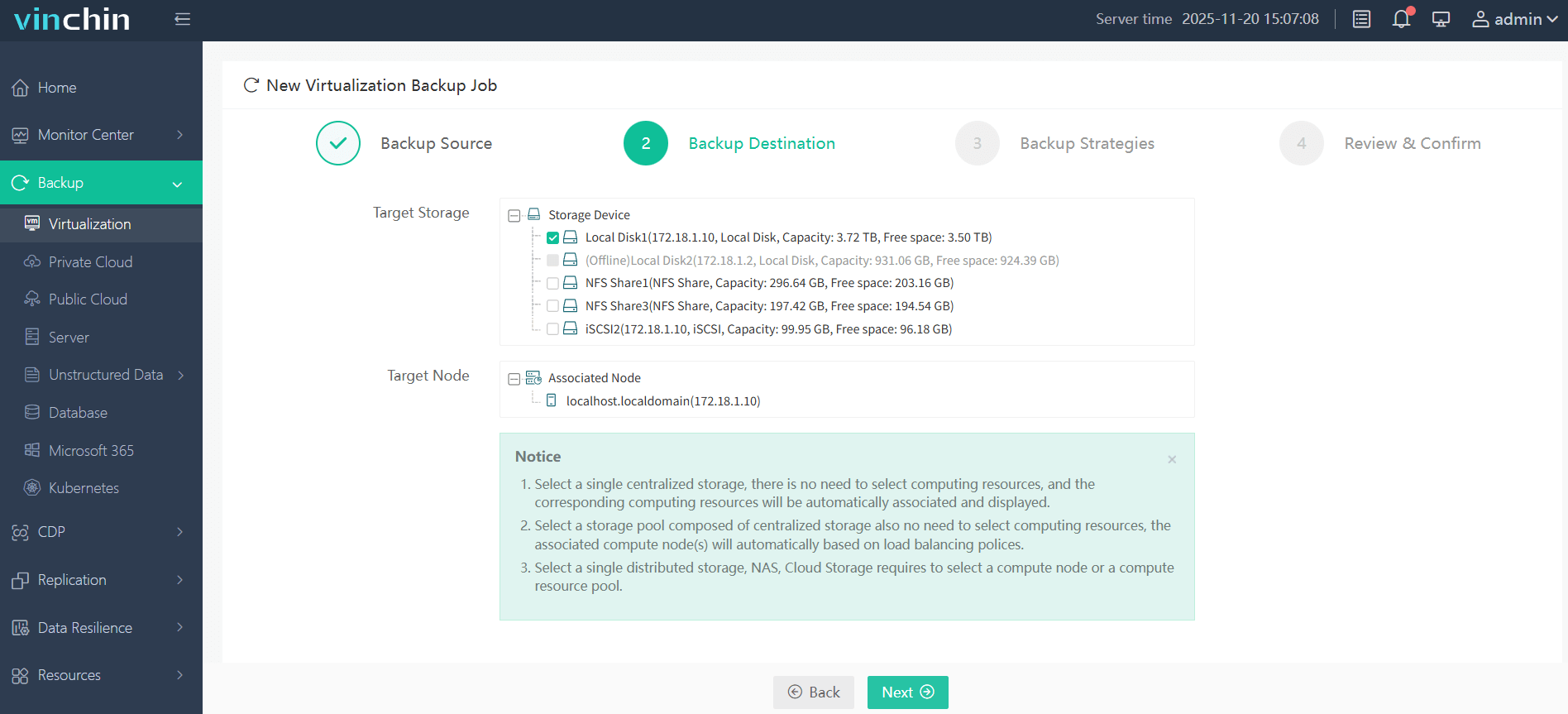
Step 2: Choose your preferred backup storage location.
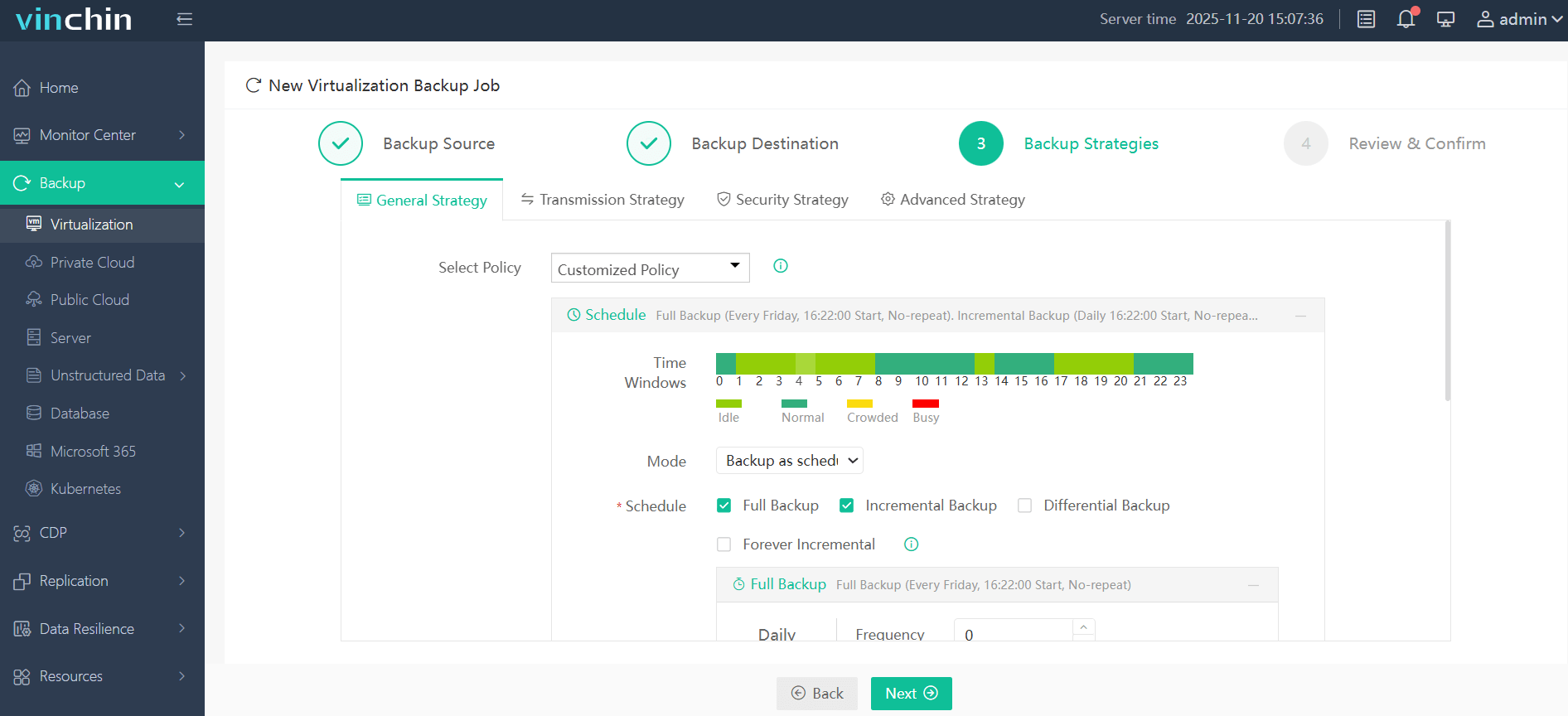
Step 3: Configure scheduling plus any desired retention/encryption settings.
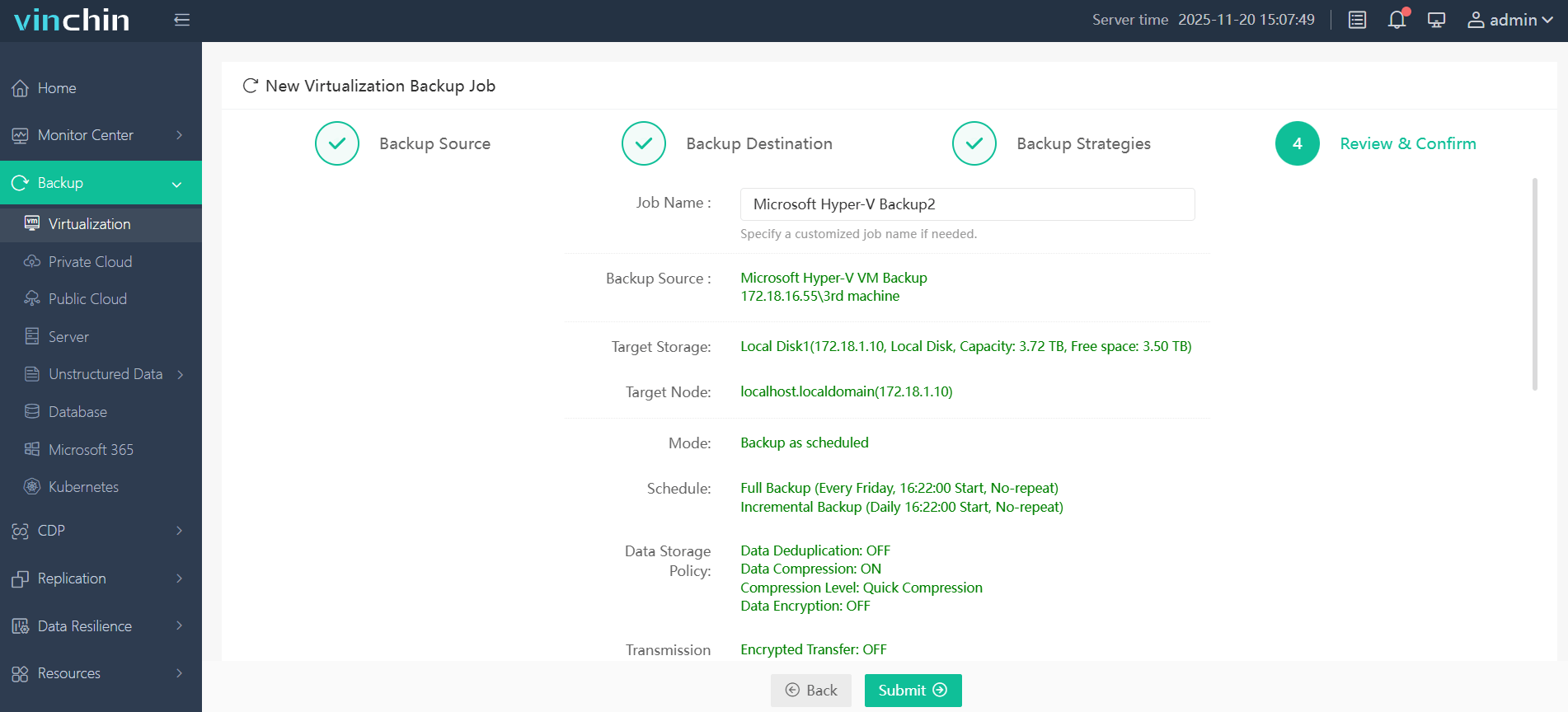
Step 4: Submit the job—the system handles the rest automatically.
Recognized globally with top ratings among enterprise customers worldwide,Vinchin Backup & Recovery offers a 60-day full-featured free trial—click below now to experience leading-edge protection firsthand.
Best Hyper-V Backup Software FAQs
Q1: What makes disaster recovery “reliable” in a Hyper-V environment?
A1: Reliability means consistent backup success rates along with fast restores that meet defined RTOs (Recovery Time Objectives) and RPOs (Recovery Point Objectives), even under stress scenarios such as hardware failure or cyberattack events.
Q2: How does backup software reduce compliance risks?
A2: Automated retention policies enforce required data lifecycles while detailed audit logs support industry regulations such as GDPR or HIPAA by proving timely recoverability during audits.
Q3: Can these solutions scale as our virtualization footprint grows?
A3: Yes—enterprise-grade tools are engineered for large-scale deployments using centralized management consoles that handle hundreds or thousands of VMs efficiently without degrading performance over time.
Q4: Is ransomware protection included?
A4: Leading solutions integrate anti-ransomware measures by default—including immutable storage options that prevent tampering plus anomaly detection algorithms designed to spot suspicious activity before it spreads.
Conclusion
Reliable disaster recovery keeps businesses resilient through any crisis by reducing downtime risk while supporting growth goals long-term—with proven performance at scale from trusted solutions like Vinchin Backup & Recovery.










