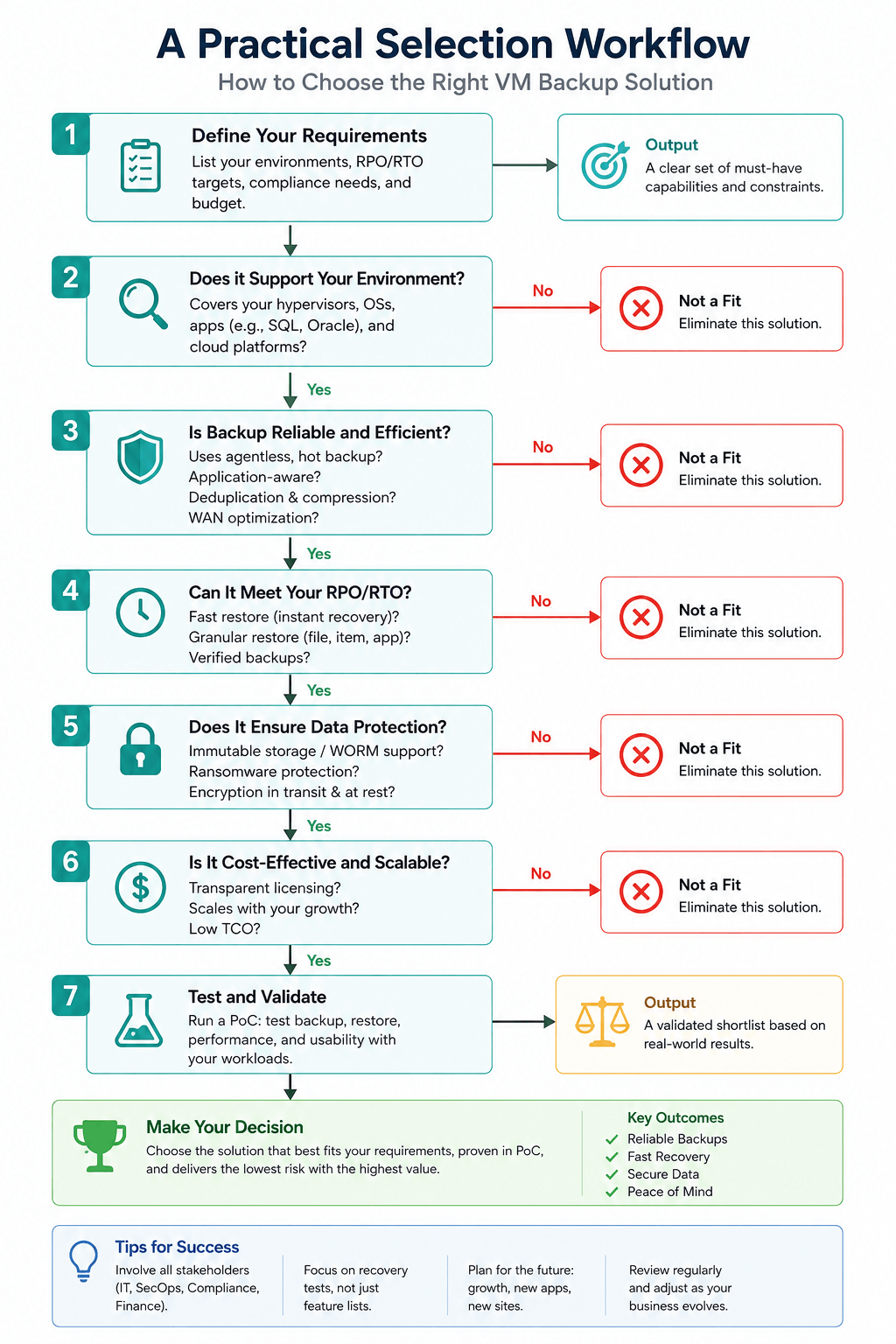
Choose a VM backup solution by first defining recovery objectives per VM tier, not for the whole environment at once, then evaluating candidates against nine criteria that actually predict outcomes, recovery-objective fit, backup architecture, ransomware resilience, storage efficiency, hypervisor coverage, production performance impact, licensing/TCO, compliance fit, and vendor viability, and confirming the shortlist with a proof-of-concept that includes a full restore test under realistic load, not just a backup-completion check.
Key Takeaways
Define recovery objectives (RTO/RPO) per VM tier before comparing vendors - a flat, one-size policy across the whole estate is the most common source of post-purchase regret.
Agentless, image-level backup with application-aware processing is the practical baseline architecture for most production VM estates.
Once ransomware is in scope, immutability and credential isolation for the backup repository matter more than raw backup speed.
Vendor-published deduplication ratios rarely hold on real data - test storage efficiency on your own VMs before signing.
The licensing model (per-VM, per-socket, per-capacity) can significantly affect three-year TCO, depending on VM density and growth rate.
A proof-of-concept only tells you something useful if it includes a full-VM restore under realistic, concurrent load, not just a “backup completed” log line.
Multi-hypervisor support matters even for single-platform shops, since platform consolidation or migration inside a three-to-five-year window is common.
Vendor viability - support response time, release cadence, and how long older hypervisor versions stay supported - is as decisive as any feature checkbox.
What a VM Backup Solution Actually Has to Do
A VM backup solution creates an independent, retained copy of a virtual machine’s disks and configuration, separate from the production storage the VM runs on, so the VM can be restored after data loss, corruption, accidental deletion, or an attack. That’s a narrower job than it sounds, it is easy to confuse with three adjacent capabilities that a buying process often conflates:
Snapshots are a hypervisor-native, point-in-time reference to a VM’s disk state. They typically share the same underlying storage as the VM, have no independent retention policy, and are not designed to survive storage failure or ransomware, they are a rollback mechanism, not a backup.
Replication keeps a near-real-time copy of a VM running (or ready to start) on different infrastructure, usually for fast failover. It protects against downtime more than against data corruption, since a corrupted or encrypted write can replicate too.
Disaster recovery (DR) is the broader plan - of which backup and replication are components - for resuming business operations at another site or in another order of priority after a major disruption.
The core job of a VM backup solution, stated plainly:
Capture a consistent copy of each protected VM on a schedule
Move it to independent, ideally offline or immutable, storage
Retain it per policy
Restore it - at the file, application, or full-VM level - within the time and data-loss window the business needs
Every section below is really just a different angle on whether a candidate solution can do that reliably, efficiently, and safely at your scale.
The Nine Criteria That Actually Differentiate VM Backup Solutions
Most VM backup platforms on the market can perform a basic scheduled backup and restore. What separates a solution that works from one that fails at the moment you need it comes down to nine criteria, each one answerable on its own if that’s the specific question you came here with.
Recovery-objective fit (RTO/RPO), evaluated per VM tier
RPO - how much data loss, measured in time, is acceptable.
RTO - how long the business can tolerate a system being unavailable.
Both are formally defined in NIST SP 800-34, the U.S. federal contingency-planning standard, and the guide is explicit that RTO and RPO should be derived per system from a business impact analysis, not set once for the whole environment.
In practice, before comparing vendors:
Group VMs into a small number of recovery tiers, e.g., near-continuous protection, a few hours of tolerable loss, or nightly backup is genuinely fine
Let the tiering, not the vendor list, decide whether you need continuous data protection (CDP), frequent incremental-forever snapshots, or a standard nightly job
Most buying guides treat “define your RTO/RPO” as a single step and move on. What that skips:
Real VM estates rarely have one recovery profile; a small number of VMs (an order-processing database, an authentication service) genuinely need near-continuous protection, while a much larger tail could tolerate daily or even weekly backup with no material business impact.
Most organizations still evaluate and license a VM backup solution as if the whole estate shares one profile.
The mismatch surfaces after the contract is signed, in one of two ways: overpaying to apply a high-frequency, high-retention policy uniformly, or under-protecting the small set of VMs that actually needed better RPO.
The fix isn’t a feature line item, it’s deciding which VMs sit in which tier before shortlisting vendors, then checking whether a candidate can apply meaningfully different frequency, retention, and verification policies across tiers in one deployment, without a large licensing or complexity penalty.
Backup architecture: agentless vs. Agent-based, image-level vs. file-level
Agentless, image-level backup is the practical default for production VM estates, the backup software talks to the hypervisor’s own APIs to snapshot and read VM disks, instead of installing an agent inside every guest OS, which removes per-VM software to patch and reduces the in-guest attack surface.
VMware's own vSphere Storage APIs – Data Protection (VADP) framework is the reference example: it lets backup products perform centralized, off-host backup without agents inside each VM, and its Changed Block Tracking (CBT) feature identifies only the disk blocks that changed since the last backup, which is what makes fast, low-impact incremental backups possible in the first place.
Ransomware resilience: immutability, air-gapping, and credential isolation
Ransomware operators now treat the backup environment as a primary target, not an afterthought.
Look past the word “immutable” on a datasheet and check three specifics:
Is immutability enforced at the storage layer, so even a compromised backup-admin account can’t shorten a retention lock?
Is the air-gapped or offline copy genuinely disconnected, rather than just logically separate?
Are backup-server credentials isolated from the production domain? A shared identity plane is one of the most common ways attackers reach backups in the first place.
Storage efficiency: deduplication, compression, and incremental-forever design
Deduplication and compression ratios advertised by vendors are almost always measured on favorable, low-entropy. What actually matters for your budget: effective daily change rate across your own VMs, multiplied by your retention window, not the headline ratio on a spec sheet.
Incremental-forever design (one full backup, then indefinite incrementals synthesized into restore points) generally beats repeated full backups on long-run storage economics.
The honest comparison: run two candidates against a representative slice of your own workloads for one to two weeks and measure actual consumed storage.
Multi-hypervisor and heterogeneous-environment coverage
Worth checking even for single-hypervisor shops - platform consolidation, a licensing-driven migration, or an acquisition bringing in a second hypervisor are all common within a three-to-five-year horizon.
A solution that only ever learns one platform’s API deeply becomes a re-platforming project the moment that assumption breaks.
Performance impact on production during backup windows
A backup job that saturates storage I/O or network bandwidth during business hours is a self-inflicted outage. Look for granular throttling controls (by job, by time window, by target datastore), and ask specifically how the solution behaves when a backup job and a production I/O spike compete for the same array, not just whether a throttle setting exists in the UI.
Licensing model and total cost of ownership
Per-VM, per-socket, per-CPU-core, and per-capacity models each reward a different kind of environment.
Per-socket - tends to favor high VM density on fewer, larger hosts
Per-VM - tends to punish that same environment as VM count grows
Per-capacity - shifts variable cost onto data growth instead of VM count
Model TCO over three years against your actual or planned VM count and data growth curve, not today’s snapshot, and include the operational cost of licensing across any hypervisors you expect to add.
Compliance and data-government fit
Regulated workloads need more than "can it back up and restore": encryption at rest and in transit, granular audit logs of who accessed or restored what, and retention policies provable to an auditor.
NIST SP 800-209, the federal storage-security guidance, treats "compromised data resilience and protection" as its own risk category, precisely because backup infrastructure is often held to a lower security bar than production, despite holding equally sensitive data.
If your environment is subject to a specific framework (healthcare, financial services, government), confirm the platform's logging and retention model maps directly onto that framework's requirements before shortlisting it.
Vendor viability and support responsiveness
A feature list means little if a Sev-1 restore failure sits in a support queue for two days. Ask for a documented support SLA for critical severity issues specifically, not general support hours, and ask how long the vendor has supported your current hypervisor version — including its policy for legacy versions once a hypervisor vendor deprecates them.
Decision Matrix: Questions to Ask, Red Flags to Watch for
Criterion | Ask the Vendor | Red Flag |
Recovery-objective fit | What’s the minimum achievable RPO/RTO for our platform, and under what load conditions? | RPO figures are only quoted for ideal, unloaded conditions |
Backup architecture | Is backup agentless with application-aware processing, or does it need in-guest agents for basic VM backup? | Requires an agent inside every VM just for file-level image backup |
Ransomware resilience | Can backup-repository credentials be fully isolated from our production directory service? | Backup server must join the production domain to function |
Storage efficiency | What’s the real dedup/compression ratio on data like ours, can we test it, not just see a datasheet number? | Vendor won’t run a proof-of-concept on your own data |
Multi-hypervisor coverage | Which hypervisors and versions are natively supported today, and what’s committed on the roadmap? | Support for your platform was recently downgraded to “community” or “legacy” tier |
Performance impact | How is backup I/O throttled during business hours, per job and per datastore? | No throttling controls; vendor’s answer is “just schedule backups off-hours” |
Licensing/TCO | Is licensing per-VM, per-socket, or per-capacity, and how does the price scale as we grow? | Licensing model doesn’t map to how the environment is actually expected to grow |
Compliance fit | Does it provide granular, exportable audit logs of every backup and restore action? | No per-action access logging on backup or restore |
Vendor viability | What’s the documented SLA for a Sev-1 restore-failure ticket? | No committed response-time SLA for critical incidents |
Running a Proof-of-Concept That Actually Predicts Outcomes
A POC that only measures backup speed and dedup ratio tells you almost nothing about how a solution will behave during a real incident. A POC worth the time it takes should include, at minimum:
Backup throughput and window on a representative sample of your actual VMs, including at least one large, high-change-rate VM (a database, not just a static file server).
Full-VM restore time measures from initiation to a usable, booted VM, not just “data copied.”
Concurrent restore under load: restore three to five VMs simultaneously and measure whether restore time degrades linearly or falls off a cliff. This is the single most commonly skipped test, and the one most correlated with real incident outcomes, since a real ransomware recovery rarely means restoring just one VM.
Granular (file- or item-level) restore, since many real-world recovery requests are for one file or one mailbox, not a full VM.
Production impact during backup, measured with your normal monitoring tools running, not just the backup vendor’s own dashboard.
Actual storage consumption after one to two weeks of real incremental backups against your own data.
NIST SP 800-34 recommends that contingency plans be tested at least annually, more often for high-impact systems. The same logic applies at the procurement stage: a solution that has never been tested under realistic restore load is an unverified assumption, not a validated capability.
A Recurring Field Pattern Worth Knowing Before You Buy
A pattern that recurs across ransomware post-incident reviews: backup existed, and the daily job logs showed them completing successfully, yet recovery still failed or took far longer than planned.
In these cases, the backup software typically worked exactly as designed; the failure was upstream of the software. Common causes include backup credentials that were also valid on the production domain, a single administrator account able to both deploy ransomware and delete backup jobs, or the simple fact that a full-environment restore at realistic scale had never actually been rehearsed. The Uptime Institute’s 2025 outage analysis found that nearly 40% of organizations suffered a major outage caused by human error over three years, and that 85% of those human-error incidents traced back to stuff not following procedure, not to a technology failure. Applied to backup: the software passing its daily job log is not the same evidence as a tested, working recovery procedure.
Platform-Specific Considerations
The mechanics of “how” a backup solution talks to the hypervisor differ enough across platforms that they change what’s worth checking during evaluation.
VMware vSphere
Check native support for vSphere Storage APIs - Data Protection (VADP) and Changed Block Tracking, since these determine whether incrementals are fast and low-impact. Confirm version support against Broadcom’s current vSphere release matrix, given the post-acquisition licensing changes many teams are reassessing.
Microsoft Hyper-V
Hyper-V's equivalent to CBT is the Resilient Change Tracking (RCT) API, introduced in Windows Server 2016, confirm a candidate solution uses RCT natively rather than falling back to slower, full-disk-scan incrementals on older hosts.
Proxmox VE
Proxmox’s native incremental mechanism relies on QEMU dirty bitmaps tracked against Proxmox Backup Server, which is described in Proxmox’s own technical documentation. Confirm a candidate solution integrates with this mechanism directly rather than relying only on the older, always-full vzdump behavior, see our breakdown of vzdump’s features and limits for more detail.
XenServer/XCP-ng
Backup integration here typically goes through the XAPI management stack and Storage Motion-related snapshot mechanisms. Confirm changed-block-style incremental support specifically, since not every XCP-ng-compatible tool implements it at the same depth as it does for VMware.
KVM (Standalone/LIBVIRT)
Standalone KVM environments without a management layer like Proxmox depend on libvirt and QEMU's external snapshot and block-commit capabilities. Confirm how the candidate solution handles consistency for guest agents on non-Proxmox KVM builds, since tooling maturity here varies more than on the major commercial platforms.
Red Hat Virtualization (RHV)
RHV's native transport for efficient backup is the ImageIO API, available from RHV 4.4.7 onward; earlier versions typically require a backup-proxy plugin. Confirm which transport a candidate solution actually uses against your specific RHV version.
Oracle Linux Virtualization Manager (OLVM)
OLVM shares its KVM/ImageIO lineage with RHV, so the same version-dependent transport question applies, confirm native ImageIO support versus a legacy backup-plugin dependency for your specific OLVM build.
Some vendors, Vinchin Backup & Recovery among them, offer per-socket licensing with native support across all seven of these platforms from a single console, which is worth factoring in specifically if your environment already spans, or is likely to span, more than one hypervisor.
FAQs
Q1: Is a hypervisor’s built-in snapshot feature enough, or do I need dedicated backup software?
A snapshot is not a backup. It usually lives on the same storage as the production VM, has no independent retention policy, and is normally a delete-ideally immutable-copy on separate storage, which is what actually protects against storage failure, accidental deletion, or ransomware.
Q2: How long does migrating from one VM backup vendor to another usually take?
Plan for a parallel-run period rather than a single cutover: run the incumbent and the new solution side by side for one to three full backup-and-retention cycles, validate that restores from the new platform meet the same RTO/RPO, then decommission the old jobs tier by tier, starting with the least critical VMs.
Q3: Does a VM backup solution replace disaster recovery (DR) planning?
No. Backup protects data; DR protects the business's ability to keep operating. Many VM backup platforms include replication or orchestrated-failover features that support DR, but the runbook, failover testing, and site strategy remain a separate planning exercise layered on top of backup.
Q4: What happens if my backup vendor stops supporting my hypervisor version?
This is a genuine lifecycle risk, especially on less common or fast-moving platforms. Check a vendor's version-support history before a multi-year contract, and favor vendors that maintain native support across a broad set of hypervisors and versions from one console, such as solutions built to cover VMware, Hyper-V, Proxmox, and XenServer alike, which reduces the odds of an unplanned re-platforming project.
Q5: Is a free or open-source VM backup tool ever a reasonable choice for production?
For a small lab or a handful of non-critical VMs, yes. For workloads that matter to the business, weigh what’s given up: purpose-built ransomware-resilience features (see the guide to immutable backup storage), a vendor SLA on support response, consistent behavior across mixed hypervisors, and someone accountable when a restore fails at 2 a.m. A free tool shifts that entire risk onto the internal team.
Conclusion
Choosing a VM backup solution is less about finding the vendor with the longest feature list and more about matching recovery-tier requirements, ransomware resilience, and platform coverage to how your environment actually behaves under real failure conditions. A structured evaluation, verified through a POC that tests restore under load rather than backup completion, will surface the differences that matter long before a real incident forces the question.