Before signing, ask the vendor to prove, in a proof of concept and then in the contract, that it can restore your specific hypervisor versions within your RTO and RPO. Also ask whether its backups survive a compromised admin account, whether you can leave with your data, and whether licensing and support hold up if your platform changes. A feature list cannot answer any of these.
Key Takeaways
Define RTO and RPO per workload tier first. NIST SP 800-34 frames both as targets that drive the recovery strategy, so a vendor’s speed claims mean little without your targets.
“Support platform X” does not mean the same backup window or RPO on every platform. Incremental efficiency depends on each hypervisor’s change-tracking mechanism.
The backup system itself is an attack target. Ask how it behaves when an administrator credential is stolen.
Test restores, not backup jobs. A completed job proves little about how long a usable service takes to come back.
Turn accepted answer into contract exhibits: the supported-platform matrix, PoC acceptance criteria, support terms and exit assistance.
Which Questions Matter Most, and What Does a Good Answer Look Like?
Area
| Question to ask
| Good answer looks like
| Red flag
|
Recovery | What RTO/RPO can you demonstrate on my workloads? | Measured in my PoC, from restore decision to usable service | Lab number or “up to” figures |
Platform fit | Which exact hypervisor versions and change-tracking method do you use? | A version support matrix, with fallback-to-full conditions | “We support all major platforms” |
Ransomware | What can an attacker with backup-admin or domain-admin rights delete or alter? | A clear answer covering isolation, offline or immutable copies, and admin separation | Backups reachable from the production domain |
Exit | Can I restore or export my data if I leave? | Documented procedure, tested in PoC | Restore requires the vendor’s live environment with no alternative |
Licensing | What is the unit (socket, VM, and what happens if I change hypervisor? | Written portability and renewal terms | Terms that reset on platform change |
Support | What are severity definitions, response times, and lifecycle commitments? | Contractual, tied to my platform’s lifecycle | Best-effort language only |
Operations and cost | How much storage will I need, can jobs be throttled, and what audit, access control, reporting, and API capabilities are available? | Sizing based on measured change rate, documented controls, each capability shown in the PoC | Sizing built on a headline reduction ratio |
How Should You Set Recovery Expectations?
Ask the vendor to demonstrate recovery against your targets, not to quote its own.
NIST SP 800-34 defines RTO as the maximum time a system can stay unavailable before the impact becomes unacceptable. It defines RPO as the point in time, before a disruption, to which data can be recovered from the most recent backup. Both are business decisions made before selecting a tool.
Practical implications:
Ask for the timing of the whole restore path: locate the backup, restore, boot, and verify the application. Job duration alone leaves out most of it.
If the vendor advertises instant or boot-from-backup recovery, ask which conditions apply. These include which platforms and versions, where the VM runs while recovering, and what happens to performance and to the later move back to production storage. This depends on platform, version, and configuration.
Ask what RPO is realistic for your largest, most change-heavy VMs, because that is where backup windows break.
Does Supported Platform Mean the Same Thing Everywhere?
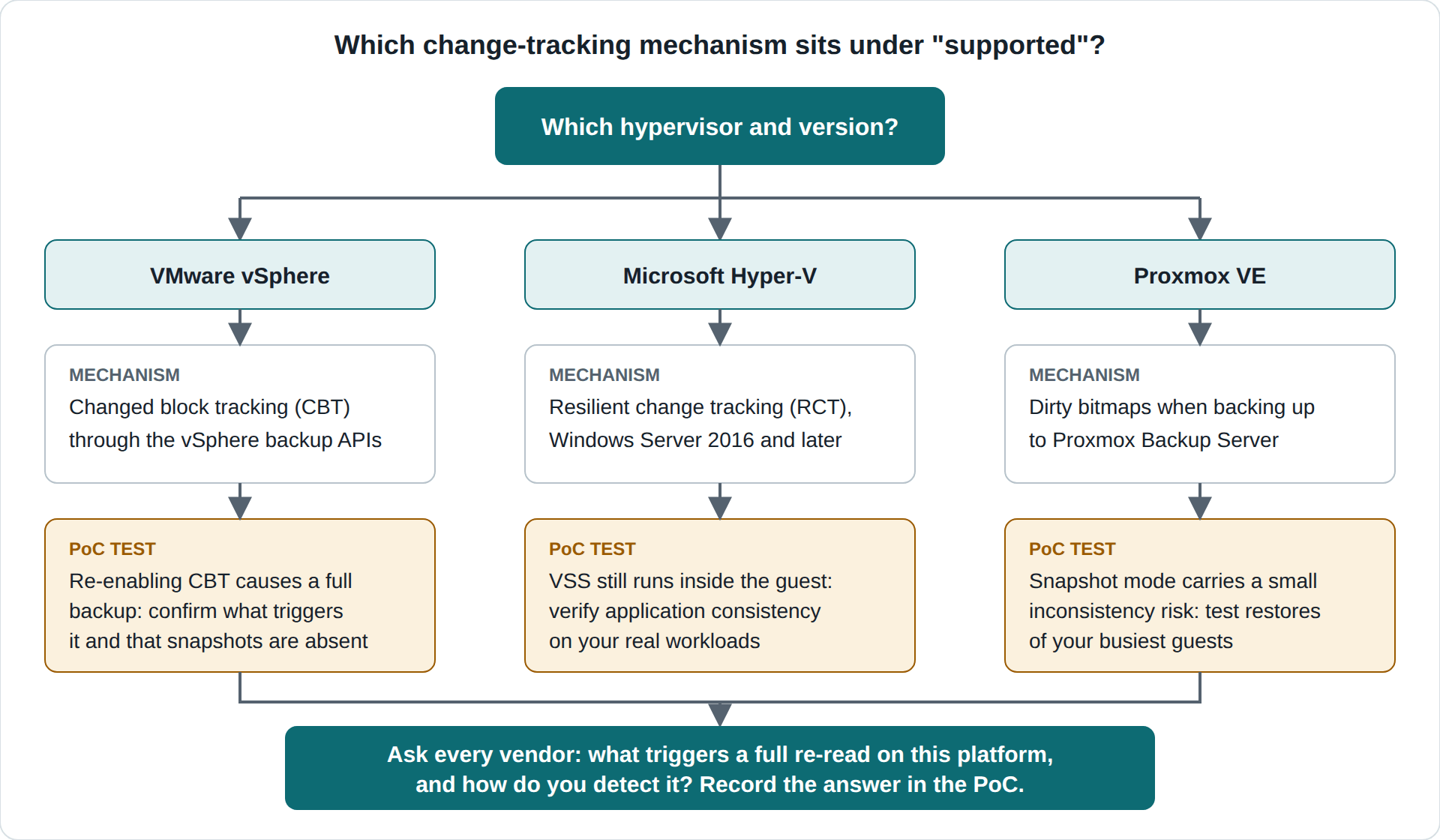
No. It usually hides different change-tracking mechanisms with different conditions.
A “supported” checkmark inherits the limits of the hypervisor primitive underneath it. Incremental backup speed, and therefore achievable RPO, come mostly from how each platform tracks changes, not from the backup vendor alone. Documented examples:
Platform
| Change-tracking basis
| Conditions documented by the platform vendor
|
VMware vSphere | CBT through the vSphere backup APIs | A Broadcom knowledge base article notes that disabling and re-enabling CBT results in a full backup, and that snapshots should not exist when CBT is enabled. |
Microsoft Hyper-V | Resilient change tracking (RCT) via the WMI-based backup approach | Per Microsoft’s Hyper-V backup documentation, it is available on Windows Server 2016 and later. VSS is still used inside the guest. |
Proxmox VE | Dirty bitmaps when backing up to Proxmox Backup Server | Per Proxmox VE documentation, backups are always full backups in content. Snapshot mode gives the least downtime at the cost of a small inconsistency risk. The Proxmox Backup Server overview describes dirty bitmaps as an optimization. |
Why this matters: two vendors can both list VMware and Proxmox, yet behave differently when tracking state is lost, when the hypervisor version changes, or when a cluster is in a mixed state. Broadcom’s VDDK 9.1 release notes add a related point. They describe new support for backups with hardware storage snapshots, and they warn backup developers against relying on internal APIs whose compatibility is not guaranteed. A vendor’s roadmap follows these upstream changes.
Decision implication:
1. Ask for the versioned support matrix, not a logo wall.
2. For each platform, ask which mechanism is used, what triggers a full re-read, and how the vendor detects it.
3. Run your PoC on your hardest platform and version, not the easiest.
Vinchin’s Help Center is an example of what to request. It lists supported environments with version numbers per platform and describes VM backup as agentless and image-based, taken at the hypervisor level. Verify any such list against your exact versions before relying on it.
Will Your Backups Survive a Ransomware Attack on the Backup System Itself?
Only if the backup system is designed for that failure. Ask it as a vendor question, not only as a deployment question.
CISA’s #StopRansomware Guide recommends maintaining offline, encrypted backups of critical data and regularly testing their availability and integrity. It explains that attackers try to find and delete or encrypt accessible backups. It also states that actors often collect credentials from the compromised environment to access backup solutions, and use public exploits against unpatched ones.
The backup product’s own security posture is part of your attack surface, so vendor due diligence should include a compromised-admin test. Most checklists ask whether the product offers immutability or offline copies. CISA’s description of attacker behavior suggests a sharper question: what can someone holding valid backup-console or domain credentials do? Three sub-questions follow from it:
Can one account delete backup data, change retention, or disable the offline or immutable copy? If so, the protection depends on that account staying safe.
Is the backup console tied to the production directory? Shared credentials shorten the attacker’s path.
How are vulnerabilities in the backup product disclosed and patched, and for how long is each release supported? An unpatched backup server is a documented target.
Note the wording: CISA recommends offline, encrypted backups. Immutability is a related but distinct control, so ask the vendor which one it actually provides and how it is verified.
How Do You Run a Proof of Concept that Produces Contract Evidence?
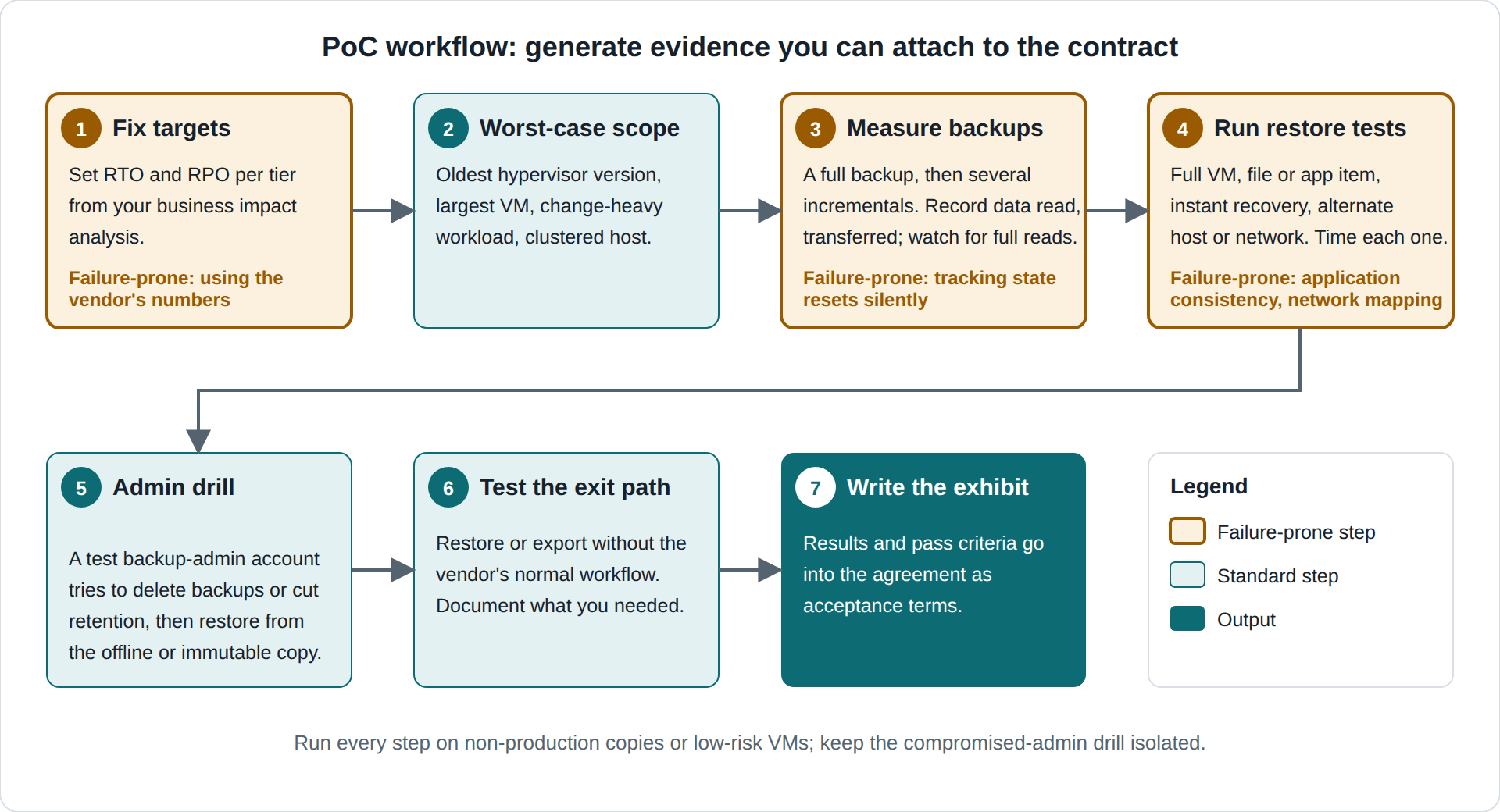
Use the PoC to generate measurements you can attach to the agreement.
1. Fix targets. Take RTO and RPO per tier from your business impact analysis. Common failure: using the vendor’s numbers.
2. Choose worst-case scope. Include the oldest supported hypervisor version you run, the largest VM, a change-heavy workload, and a clustered host.
3. Measure backup behavior. Run a full backup plus several incremental. Record data read, data transferred, and duration. Confirm no unexpected fallback to full reads. Failure-prone: tracking state resets silently.
4. Run restore tests. Test full VM, single file or application item, instant recovery if claimed, and restore to an alternate host or network. Time from decision to usable service. Failure-prone: application consistency and network mapping.
5. Run a compromised-admin drill. With a test account holding backup-admin rights, attempt to delete backups or shorten retention. Then restore from the offline or immutable copy. Do this in isolation.
6. Test the exit path. Restore or export without depending on the vendor’s normal workflow, and document what you needed. Proxmox’s documentation shows this pattern exists in some ecosystems. It describes recovering files from a snapshot without a running backup server, given intact index and chunk files.
7. Write results into an exhibit that defines pass criteria for acceptance.
 PoC Results Template
Record every test as a target, a measured result, and a pass or fail, with evidence attached. Take each target from your own RTO and RPO, not from the vendor.
Illustrative example only. The values in this table are invented to show the format. They are not measurements from any product, vendor, or customer. Replace every value with your own measured results.
Test item
| Target
| Measured result
| Pass/fail
| Evidence to attach
|
Full VM restore (largest VM) | 2 hours | 1 h 35 min | Pass | Restore job log with start and end timestamps |
File-level restore | 30 min | 18 min | Pass | Job log and checksum of the restored file |
Incremental backup window | 1 hour | 42 min | Pass | Job history showing data read and transferred |
Application-consistent restore of a database VM | Application starts and passes your check | Started, check passed | Pass | Application log or query result |
Alert for a deliberately skipped backup | Alert within your RPO threshold | No alert generated | Fail | Alert settings and the vendor ticket |
Backup-admin deletion attempt | Should fail | Failed to delete immutable copy | Pass | Audit log entry for the denied action |
Application latency during throttled backup | Within your service target | Within target | Pass | Monitoring graph covering the backup window |
Export after vendor exit | Documented path | Completed | Pass | Written steps and a check of the restored data |
A fail is a finding, not a verdict. Ask the vendor for a fix or a documented workaround, retest, and record the outcome. If a failure is still open at signing, turn it into an explicit contract term or a scored weakness in the decision matrix.
How Should You Run a Vendor Trial or Demo?
Treat the trial as an acceptance test with written criteria, not as a product tour.
1. Confirm before starting that the trial license includes every feature you plan to buy, and that its length covers a full cycle of backups, restores, and the security drill.
2. Agree the success criteria and the results template with the vendor in writing before installation.
3. Use your own workloads or realistic copies, including the hardest platform and version, not the vendor's demo environment.
4. Capture evidence with timestamps as you go: job logs, console screens, and audit entries.
5. Log every support request and how quickly and how well it was answered. Trial support is the best preview of contract support.
6. Hold a debrief with the vendor, score the results in the decision matrix, and write open failures into the agreement.
What about Lifecycle, Licensing and Support?
Support and lifecycle. Your platform’s own lifecycle can end inside your contract term. Red Hat’s Virtualization 4.4 documentation lists the Maintenance Phase ending August 31, 2024. It lists the Extended Life Phase, with no more software fixes, running through August 31, 2026. That date has now passed, so anyone still running that platform should check its current support position. Ask the vendor:
What happens to your support entitlement when a protected platform version reaches end of life?
Which of its own releases are still supported, and for how long?
What are severity definitions, response targets and escalation paths, written into the agreement?
Licensing. The unit (socket, VM, capacity or something else) varies by vendor, so ask directly:
What counts toward the license, and what happens when workloads move between hypervisors?
What are the renewal price protections, and how is growth measured?
Which costs sit outside the license: backup storage, cloud copies, restore-test capacity?
Operational and Cost Questions to Ask VM Backup Vendors
After recovery and security, the questions that decide daily cost and effort are how much storage the product will consume, how it affects production, how you will monitor and audit it, and whether it scales across your sites. Ask for a measured result or a documented capability for each one, and verify it during the PoC.
Topic
| Ask for
| Verify in the PoC by
|
Deduplication, compression, retention | Scope of reduction, retention models, space reclamation | Storage consumed after several restore points and one expiry cycle |
Storage sizing | Sizing worksheet with stated inputs | Comparing its output with measured change rate |
Throttling | Limit levels, schedules, restore behavior | Application latency during backups under load |
Reporting and alerting | RPO-miss alerts, channels, exportable reports | Deliberately skipping a job and checking the alert |
Audit logs and RBAC | Role model, log coverage, external forwarding | Attempting actions with a limited role and reviewing the log |
Compliance | Written control mapping, evidence, attestation scope | Producing the evidence your auditor requests |
Multi-site scale | Documented limits, management model, WAN behavior | Largest cluster or a remote site with the link cut |
API and automation | API scope, scoped tokens, deprecation policy | One real automation built end to end |
Which Contract Terms Turn Answers into Obligations?
Verbal assurances do not survive procurement. Ask legal counsel to review the following (this is not legal advice):
The versioned supported-platform matrix as an exhibit.
PoC acceptance criteria, with a remedy if production results differ.
Support terms, and security commitments covering patching and vulnerability disclosure.
Data ownership, and exit assistance including export or restore procedures.
License portability across hypervisors, and renewal terms.
How Do you Compare Vendors Fairly?
Decision matrix (example weights, adjust to your risk profile). Score each vendor from 0 to 5 per row, then multiply by weight.
Criterion
| Weight
| Evidence to score against
|
Recovery proven in PoC vs. RTO/RPO | 25 | Timed restore results |
Ransomware and vendor security | 20 | Compromised-admin drill, patch and disclosure practice |
Platform and version fit | 15 | Versioned matrix plus PoC on hardest platform |
Operations and cost fit | 15 | Measured storage use, throttling, audit logs, RBAC, reporting, scale, API |
Support and lifecycle | 10 | Contract language, platform EOL handling |
Exit and portability | 10 | Tested export or restore path |
Licensing clarity | 5 | Written unit definition and renewal terms |
What Mistakes Do Buyers Make Most Often?
Mistake
| Why it hurts
| Fix
|
Comparing feature checklists | Hides per-platform behavior | Demand a versioned matrix and test it |
Measuring backup speed only | Recovery is what the business needs | Time the full restore path |
Testing on the easiest platform | Production has edge cases | PoC on the oldest version and largest VM |
Treating immutability as the whole answer | Console compromise remains possible | Run the compromised-admin drill |
Skipping exit testing | Lock-in appears later | Test export or restore before signing |
FAQs
Q1: Does agentless backup guarantee application-consistent backups?
Not automatically. Microsoft's documentation states that Hyper-V's WMI-based backup still uses VSS inside the virtual machine. Proxmox documents a small inconsistency risk in snapshot mode. Ask how consistency is achieved per platform and workload.
Q2: Is a vendor’s published RTO a number I can rely on?
Treat it as a hypothesis. NIST defines RTO against business impact, so only a restore measured on your own workloads and infrastructure is evidence.
Q3: Does CISA say backups must be immutable?
CISA’s guide recommends offline, encrypted backups with regular testing. Immutability is a separate control, so confirm which the vendor provides and how you verify it.
Q4: What if we plan to change hypervisors during the contract?
Ask for the support matrix for both source and target, and for license terms that survive the move. Vinchin's Help Center lists V2V migration among its restore options. Confirm that your specific source-to-target pair is covered.
Q5: What extra costs should we budget for beyond the license?
Storage capacity for retention, any offsite or cloud copies, and infrastructure for regular restore tests. Amounts depend on your data volume and retention policy.
Q6: Can I restore if the vendor relationship ends?
It depends on the format and architecture. Ask for the documented procedure and prove it in the PoC. Do not assume it exists.
Q7: How long should the PoC run?
Long enough to complete a full cycle: initial full backup, several incrementals, every restore test, and the security drill. Confirm the trial license covers all features you will buy.
Conclusion
A backup contract is a promise about the worst day, not the average one. Judge vendors by what they can prove on your platforms, under a compromised-admin scenario, and after you leave them. Treat every "supported" checkmark as a claim to test, and put the answers you accept into the agreement, because verbal assurances expire when the deal closes.