XCP-ng is an open-source virtualization platform built on the foundation of Citrix Hypervisor. It gives enterprises a flexible way to run virtual machines without licensing fees or vendor lock-in. As more organizations adopt XCP-ng for critical workloads, reliable backup becomes essential. Modern backup tools now offer incremental forever backup—a method that saves storage space while keeping data protection strong. With this approach, only the first backup is a full copy; all future backups capture just what has changed since then. This avoids storing duplicate data, reduces costs, and speeds up both backup and restore operations.
Incremental forever backup is vital for businesses aiming to control storage growth, shrink backup windows, and meet strict retention rules. Efficient backups are about more than saving space—they help you recover quickly from outages or ransomware attacks while staying compliant with regulations like GDPR or HIPAA. Choosing the right solution means understanding how these technologies work together to protect your environment.
Why Incremental Forever Backup Matters in Enterprise Environments?
Enterprises face rapid data growth across virtual environments. Traditional full backups can strain resources as datasets expand. Incremental forever backup addresses these challenges by capturing only new or changed data after an initial full copy.
● Storage Efficiency
Incremental forever backup minimizes redundant data storage by saving only changes after the first full backup. This approach keeps storage needs predictable even as your VM fleet grows.
● Faster Backups
By transferring just changed blocks instead of entire VMs every time, incremental forever methods reduce network load and shorten backup windows—critical for 24/7 operations.
● Cost Control
Lower storage consumption translates directly into reduced hardware investments or cloud expenses over time. Organizations can keep longer retention periods without ballooning costs.
● Improved Recovery Options
With many restore points available from efficient incremental chains, you gain flexibility in disaster recovery scenarios—restoring from any point without sifting through massive archives.
● Compliance Readiness
Meeting regulatory demands often requires long-term retention of historical data states. Incremental forever strategies make it feasible to store months or years of backups within reasonable budgets.
Without incremental forever technology, organizations risk slow recoveries due to bloated archives, rising infrastructure bills from duplicated data sets, and potential compliance gaps if they cannot retain enough history for audits or legal holds.
How To Choose The Best XCP-ng Backup Solution for Incremental Forever Backup?
Selecting a robust XCP-ng backup tool involves weighing several technical factors beyond basic compatibility. The right solution should automate complex tasks while scaling with your environment’s needs.
Look for solutions that support true incremental forever architecture—meaning they manage all backup chains automatically so you never need manual merges or periodic extra fulls. Many modern tools use block-level tracking (such as Changed Block Tracking—CBT) to identify exactly which parts of a disk have changed between snapshots; verify that both XCP-ng itself and your chosen software support CBT integration for maximum efficiency.
Synthetic full backups are another key feature: rather than running new physical fulls periodically (which consume bandwidth/storage), synthetic fulls reconstruct a complete VM image from previous incrementals when needed—delivering fast restores without extra overhead.
A unified web console streamlines management across large deployments: look for intuitive dashboards where you can monitor jobs at-a-glance or drill down into logs when troubleshooting issues arises.
Granular restore options matter too: recovering single files/folders instead of whole VMs saves time during minor incidents or user errors—and automated verification routines ensure every restore point remains usable over time so there are no surprises during emergencies.
Retention policies automation is crucial for compliance-heavy industries; choose tools that let you set detailed rules based on age/number/type of backups retained per VM/application so you always meet audit requirements without manual cleanup chores piling up in busy IT teams’ queues.
Finally consider scalability: does the solution handle hundreds (or thousands) of VMs? Can it schedule jobs flexibly around production workloads? Does it integrate smoothly with existing authentication systems (like LDAP/AD)? These factors determine whether your investment stays effective as your organization grows—or becomes a bottleneck down the line.
Vinchin Backup & Recovery: Enterprise-Grade Protection for XCP-ng
To address advanced enterprise requirements on XCP-ng and other leading virtualization platforms—including VMware, Hyper-V, Proxmox, oVirt, OLVM, RHV, XenServer, OpenStack, ZStack and more—Vinchin Backup & Recovery offers comprehensive virtual machine protection across 15+ environments. For XCP-ng users specifically, Vinchin Backup & Recovery delivers robust features such as incremental forever backup using efficient block-level change detection mechanisms; LAN-free transfer options; instant recovery capabilities; granular file-level restores; and powerful deduplication and compression technologies—all managed through an intuitive web interface designed for ease-of-use at scale.
Among its most relevant features are incremental forever backup chains optimized by deduplication/compression to minimize storage use; LAN-free transfer modes that speed up large-scale VM protection; instant recovery enabling near-zero downtime restores; granular restore functions allowing selective file retrieval; and automated GFS retention policies ensuring compliance-ready archiving—all working together to maximize efficiency while reducing operational risk.
Backing up an XCP-ng VM with Vinchin Backup & Recovery is straightforward via its streamlined web console:
Step 1. Select Restore Point
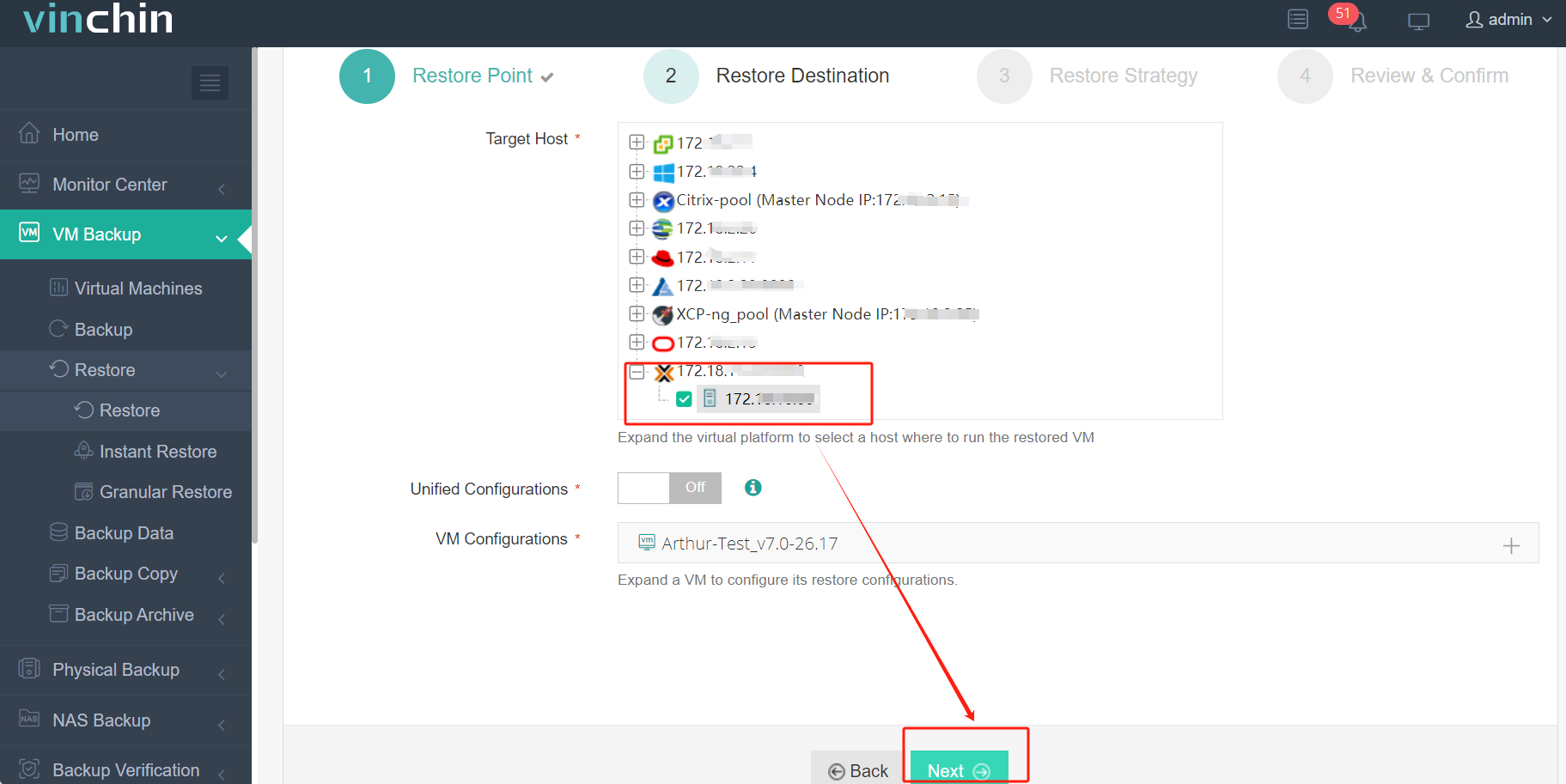
Step 2. Select Restore Destination
Step 3. Select Restore Strategies
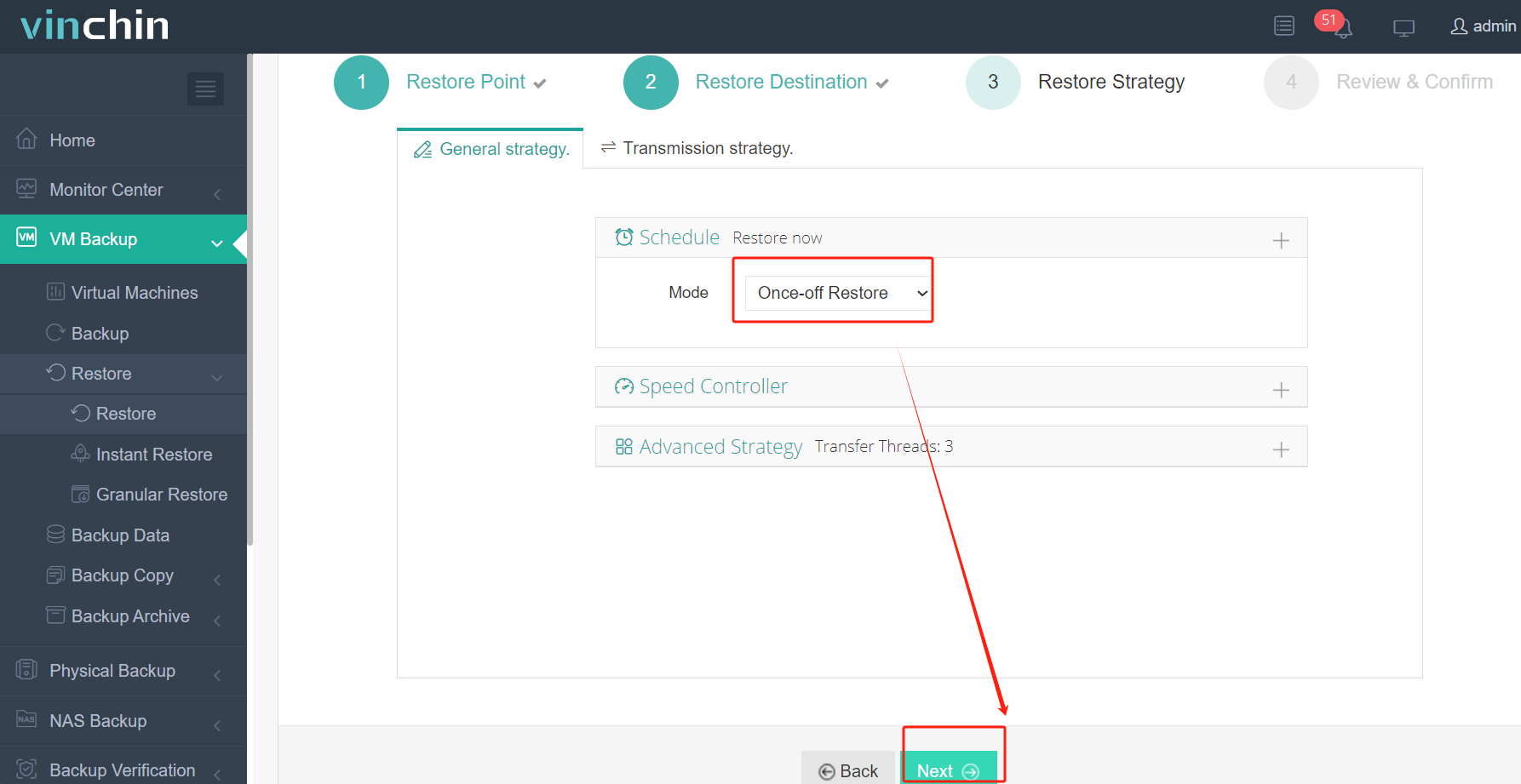
After configuring all recovery policies, click Next.
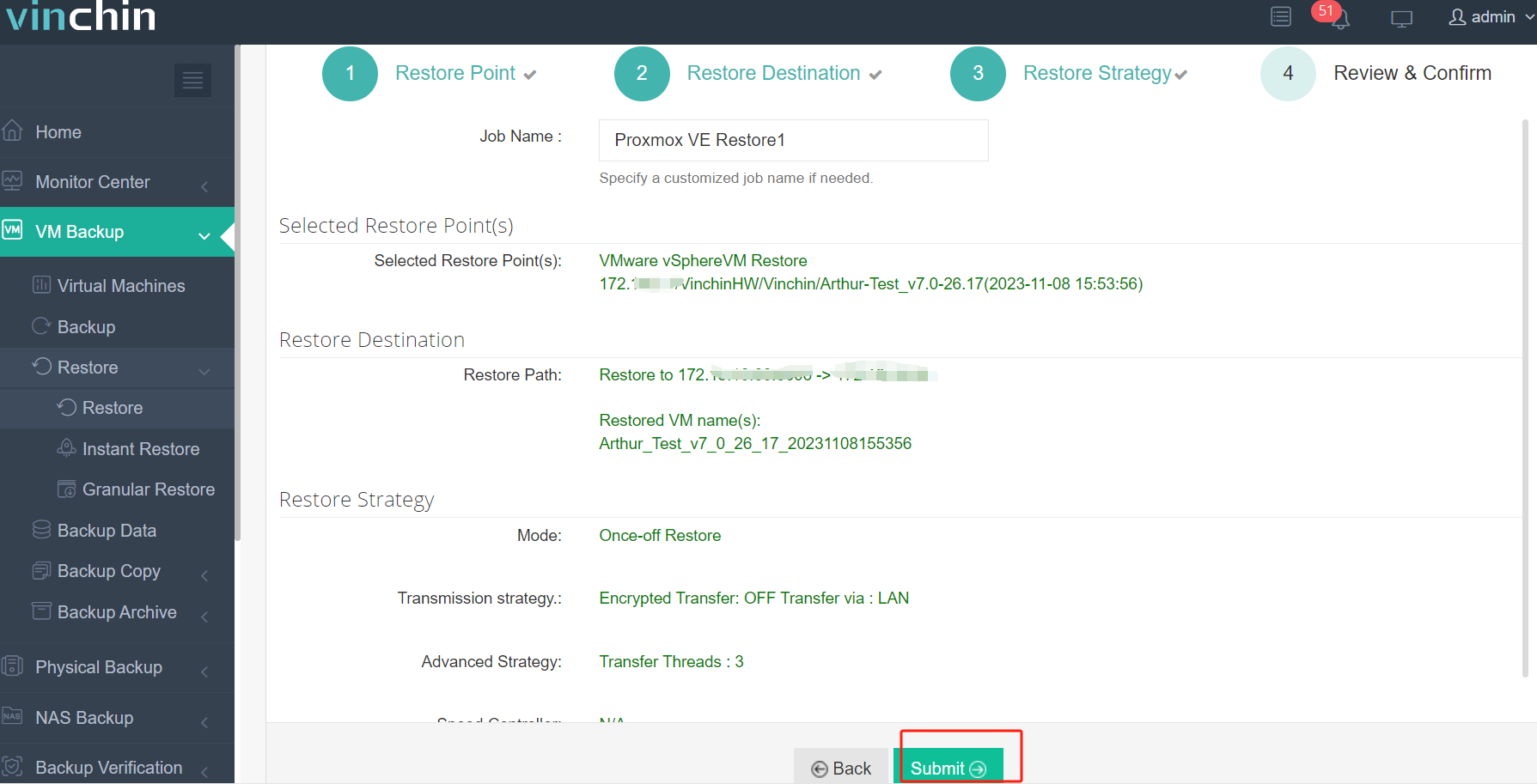
Step 4. Review and submit the job
Trusted worldwide by thousands of enterprises with top-rated customer satisfaction scores,Vinchin Backup & Recovery offers a fully functional 60-day free trial—click below to experience industry-leading protection firsthand.
Best XCP-ng Backup Software FAQs
Q1: How does an incremental forever strategy impact Recovery Time Objectives (RTO) compared to periodic full backups?
Incremental forever strategies maintain fast RTOs by using synthetic full restores assembled from incrementals plus one base image; leading solutions optimize chain management so recovery speed matches traditional periodic-full approaches even after many cycles.
Q2: Is Changed Block Tracking (CBT) required for efficient incremental backups on XCP-ng?
While not strictly required by all products implementing incrementals on XCP-ng via snapshot APIs, CBT support greatly improves efficiency by tracking disk changes at block level—reducing scan times during each job cycle especially on large VMs/disks.
Q3: Can deduplication be used alongside incremental forever methods?
Yes; combining deduplication with incrementals maximizes space savings because repeated patterns across multiple VMs/backups are stored once—even if those patterns occur weeks apart within different chains.
Q4: What role do automated retention policies play in regulatory compliance?
Automated retention ensures expired restore points are deleted per policy schedules—helping organizations comply with laws requiring specific minimum/maximal retention periods while reducing risk/cost associated with manual oversigh.
Conclusion
Implementing an incremental forever strategy builds cost-effective resilience into any virtualized environment—supporting scalable disaster recovery plans while controlling storage growth over time.









