Protecting virtual machines (VMs) in a Sangfor HCI environment demands more than just regular backups—it requires a solution that keeps your business running without disruption during backup windows. The key lies in using technologies like agentless architecture, incremental forever backups, and application-aware processing. Each of these methods works together to ensure that backup operations run smoothly while production workloads remain unaffected.
Agentless backup means there’s no need to install extra software inside every VM—a design choice that avoids unnecessary CPU or memory usage within your critical systems. Incremental forever technology copies only changed data since the last backup job instead of duplicating everything each time; this reduces network traffic and shortens backup windows. Application-aware processing ensures that even complex databases or email servers get consistent snapshots without stopping services or risking data corruption.
In modern enterprise IT environments, even minor slowdowns can impact service availability or break SLAs. Efficient backup processes help reduce downtime risk while supporting compliance with strict data protection mandates such as GDPR or HIPAA. Choosing a minimal-impact solution is essential for both operational stability and regulatory peace of mind.
Why Minimal-Impact Backup Matters in Enterprise Environments?
Minimal-impact backup has become an essential requirement for businesses relying on virtualized infrastructure like Sangfor HCI. When backups interfere with production workloads, organizations face increased latency and potential outages—problems that can ripple across departments and customer-facing services.
● Downtime Costs Are High: According to Gartner’s 2024 report on IT downtime costs, average losses reach $5,600 per minute when systems go offline unexpectedly. This figure highlights how even brief interruptions during peak hours can result in significant financial damage.
● Service Availability Is Critical: Maintaining uninterrupted access to applications is vital for sectors such as finance or healthcare where delays may disrupt transactions or patient care workflows. A poorly designed backup process could introduce bottlenecks at crucial moments—undermining trust among users who expect seamless performance.
● Compliance Demands Are Growing: Regulatory frameworks now require organizations to demonstrate robust disaster recovery plans alongside routine data protection measures. Backups must occur regularly but cannot compromise system integrity or violate uptime commitments set by internal policies or external regulations.
● Operational Risk Must Be Minimized: Every time a resource-intensive task runs against live VMs—such as full-image backups—the risk of resource contention increases. This can lead to slower response times for end-users and complicate troubleshooting efforts if issues arise during business-critical periods.
A minimal-impact approach helps organizations avoid these pitfalls by ensuring that protective measures do not come at the expense of daily productivity or compliance standing.
How To Choose The Best Sangfor HCI Backup Solution for Minimal-Impact Backups?
Selecting an effective Sangfor HCI backup solution involves understanding which technical features actually minimize impact on production workloads while delivering reliable protection at scale. Here’s what matters most:
Start by considering solutions built around agentless architecture—a method where no software agents are installed inside guest VMs themselves but instead interact directly with the hypervisor layer. This eliminates extra CPU/memory overhead within each VM and prevents conflicts with running applications.
Incremental forever backups further reduce load by transferring only blocks of data changed since the last successful job rather than copying entire disks repeatedly. Many modern solutions use synthetic full backups periodically constructed from incremental chains—offering fast restores without lengthy full-copy operations every cycle.
Application awareness ensures transactional consistency for mission-critical platforms like Microsoft SQL Server or Exchange—even when those systems are under heavy use. By coordinating snapshot timing with application states (using VSS writers in Windows environments), you avoid corrupting open files during capture.
Scalability becomes crucial as your organization grows; your chosen platform should handle increasing numbers of VMs and expanding storage needs without introducing new performance bottlenecks along the way.
Flexible scheduling tools let you align jobs outside peak business hours—or throttle bandwidth consumption—to prevent resource contention between protection tasks and user activity.
In summary, look for these core capabilities:
Agentless architecture removes resource drain from protected VMs entirely by operating through hypervisor APIs rather than guest OS installations—a proven way to keep production systems responsive throughout routine maintenance cycles.
Incremental forever technology minimizes both network traffic and storage requirements by capturing only what has changed since previous jobs; synthetic fulls allow rapid restores without repeated large-scale transfers.
Application awareness guarantees consistent snapshots even under high transaction loads—critical when protecting databases subject to frequent updates throughout the workday.
Scalable design ensures continued efficiency as you add more virtual machines or expand storage pools over time; robust platforms adapt seamlessly rather than slowing down under pressure from growth spurts or seasonal demand spikes.
Flexible scheduling/throttling options empower administrators to fine-tune job timing based on real-world usage patterns—helping maintain compliance while avoiding unnecessary strain on shared resources during busy periods.
Vinchin Backup & Recovery: Enterprise-Grade Protection for Sangfor HCI
For enterprises seeking minimal-impact VM protection in Sangfor HCI environments, Vinchin Backup & Recovery stands out as a professional, enterprise-level virtual machine backup solution supporting over 15 mainstream virtualization platforms—including VMware, Hyper-V, Proxmox, oVirt, OLVM, RHV, XCP-ng, XenServer, OpenStack, ZStack, and more. With comprehensive support for diverse infrastructures like Sangfor HCI alongside others listed above, it delivers unified management across hybrid environments with ease.
Key features such as agentless architecture, incremental backup strategies (including forever-incremental), advanced data deduplication/compression capabilities, granular restore options, and flexible scheduling ensure efficient operation with minimal disruption to production workloads. These combined benefits enable fast recovery times while optimizing storage utilization and maintaining strong security standards across all supported platforms.
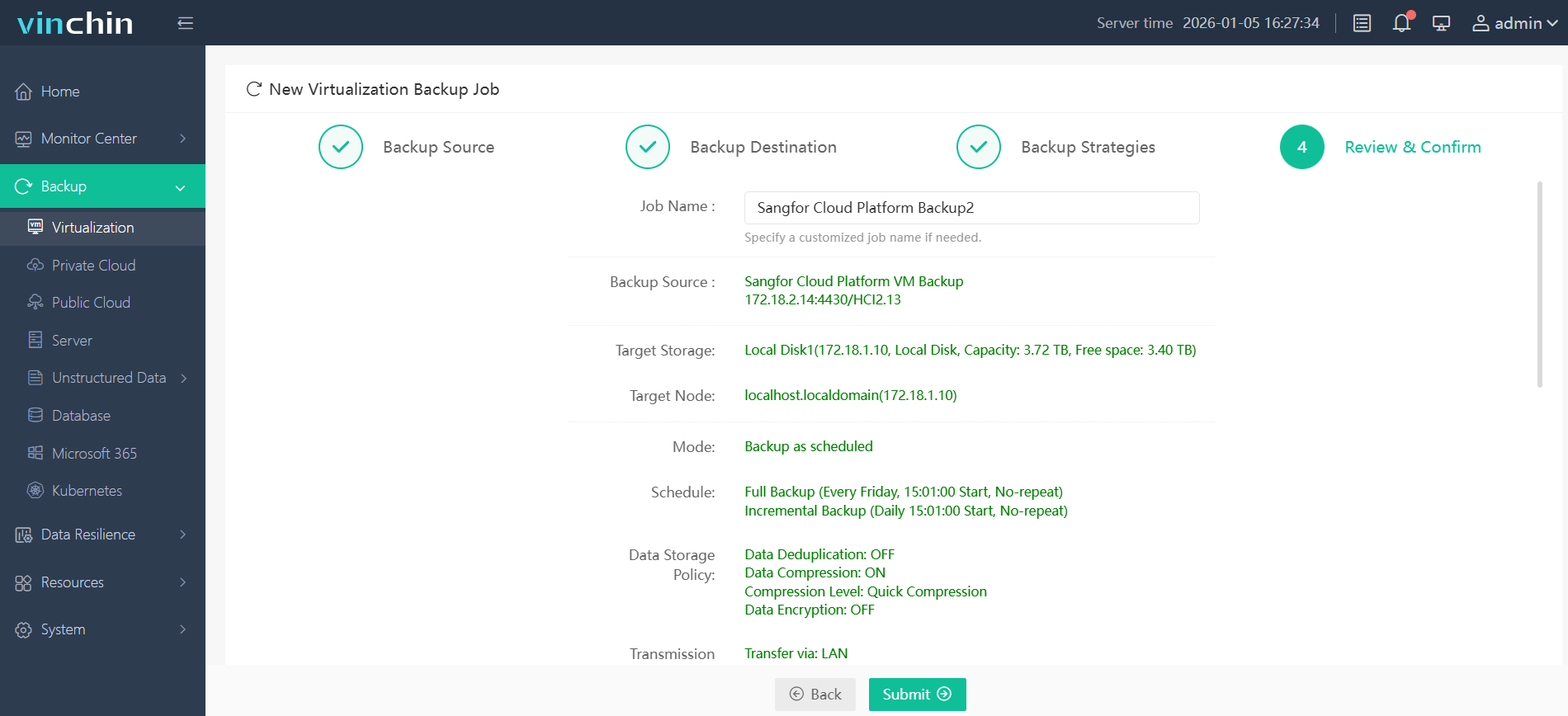
The intuitive Vinchin Backup & Recovery web console streamlines administration into four simple steps:
Step 1: Select the Sangfor HCI VM you wish to back up.
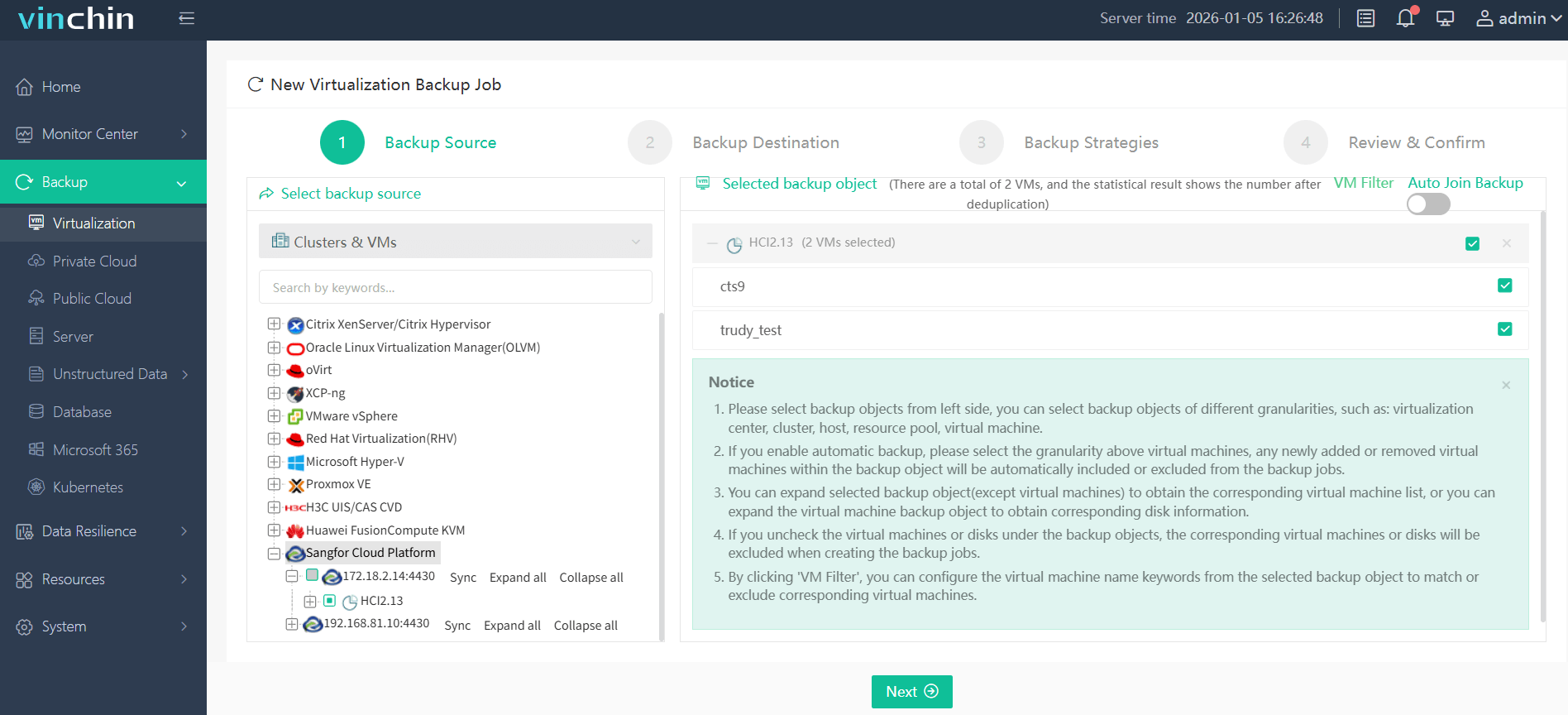
Step 2: Choose the appropriate backup storage destination.

Step 3: Configure your preferred backup strategy including schedule and retention settings.

Step 4: Submit the job for automated execution.
Recognized globally for reliability and top customer ratings—with thousands of satisfied users worldwide—Vinchin Backup & Recovery offers a 60-day free trial so you can experience its full feature set firsthand; click below to download now.
Best Sangfor HCI Backup Software FAQs
Q1: How does agentless backup reduce impact on production VMs?
It reduces impact by eliminating software installation inside each VM so there is no extra consumption of CPU/memory resources within protected systems nor any interference with running applications’ processes during normal operation cycles.
Q2: Why are incremental forever backups important for performance?
They copy only changed blocks since previous jobs instead of re-transferring entire disk images every cycle—which lowers network traffic volume dramatically while shortening overall window duration needed per job execution.
Q3: Can minimal-impact solutions still provide fast restores?
Yes—they combine low-impact capture methods like incrementals/synthetic fulls with instant recovery tools so administrators can restore whole VMs (or individual files) quickly after incidents without waiting through lengthy rebuild processes from scratch images alone.
Conclusion
Minimal-impact Sangfor HCI backup protects business continuity by combining agentless operation with efficient incrementals—delivering reliable results at scale while keeping production workloads responsive.













