Enterprises that run VMware virtual machines (VMs) depend on backup solutions that deliver both speed and reliability. Fast incremental backup performance is not just a technical advantage—it is essential for business continuity. In modern IT environments, data changes constantly. Incremental backups use change block tracking (CBT) to capture only what has changed since the last backup. This approach shrinks backup windows and reduces network load.
Fast incremental backups help organizations meet strict recovery point objectives (RPOs) and comply with industry regulations such as GDPR or HIPAA. According to research from the Ponemon Institute, even a single minute of downtime can cost thousands of dollars in lost productivity and revenue. By minimizing backup time, companies reduce their risk of extended outages or data loss.
Incremental backup speed also impacts how often you can protect your VMs without affecting production workloads. With efficient software, IT teams can schedule frequent backups—even during business hours—without slowing down applications or users. This flexibility supports agile operations in industries like finance or healthcare where every transaction matters.
Why Fast Incremental Backup Matters in Enterprise Environments
Fast Incremental backup are vital for large organizations managing many VMs across complex infrastructures. They ensure data protection processes do not interfere with daily business activities while supporting compliance needs.
● Reduced Downtime means less disruption when restoring services after an incident. When incremental backups finish quickly, IT teams can recover systems faster if disaster strikes. For example, a retail company processing online orders cannot afford long delays; fast restore points keep sales flowing even during unexpected failures.
● Improved RPO Compliance allows businesses to set tighter intervals between backups. Regulatory frameworks like SOX or PCI DSS often require frequent data protection cycles to minimize potential loss. Fast incremental performance lets organizations meet these standards without overloading infrastructure.
● Lower Resource Consumption results from backing up only changed blocks instead of full VM images every time. This efficiency reduces storage costs and network congestion—a key benefit for enterprises running hundreds or thousands of VMs across multiple sites.
● Scalable Protection ensures that as your environment grows, your backup solution keeps pace without bottlenecks. Enterprises expanding into hybrid cloud or multi-site deployments need tools that maintain high performance regardless of scale.
Incremental backups work by leveraging technologies like VMware’s Change Block Tracking (CBT). CBT identifies which disk sectors have changed since the last snapshot so only those blocks are copied. This process saves time compared to traditional full backups and enables more frequent restore points—critical for meeting modern business demands.
How To Choose The Best VMware Backup Solution for Fast Incremental Backups?
Selecting effective VMware VM backup software requires careful evaluation of several core features that impact speed and scalability in enterprise environments.
The most important factor is integration with VMware's native APIs for Change Block Tracking (CBT). CBT allows software to detect exactly which parts of a VM have changed since the last backup cycle. By transferring only new or modified blocks rather than entire disks, this method dramatically accelerates incremental jobs while reducing bandwidth usage.
Scalability should be assessed by looking at how well the solution handles concurrent operations across many VMs—especially during peak periods such as nightly batch processing or end-of-month reporting cycles. Solutions built on distributed architectures can run multiple jobs in parallel without creating bottlenecks as environments grow from dozens to thousands of VMs.
Storage efficiency plays a major role too. Advanced deduplication algorithms identify duplicate data segments within and across VMs so they are stored just once on disk. Compression further shrinks file sizes before transfer or storage, saving both space and network resources—key benefits when backing up large databases or file servers regularly.
Reliability under heavy load is crucial; enterprise-grade solutions must maintain consistent performance even during simultaneous full-system restores or mass recovery events triggered by ransomware attacks or hardware failures. Look for clear reporting dashboards that provide real-time status updates on job progress so administrators can troubleshoot issues quickly if needed.
Compatibility with current—and future—versions of VMware vSphere ensures ongoing protection as your virtualization platform evolves over time. Regular updates from your vendor help safeguard investments against obsolescence while keeping security patches current.
Vinchin Backup & Recovery: Enterprise-Grade Protection for VMware
For enterprises seeking robust protection for VMware environments, Vinchin Backup & Recovery stands out as an advanced virtual machine backup solution supporting over 15 mainstream platforms—including VMware, Hyper-V, Proxmox, oVirt, OLVM, RHV, XCP-ng, XenServer, OpenStack, ZStack and more. With deep integration into VMware’s ecosystem—including support for features such as quiesced snapshot creation, HotAdd transport mode, Change Block Tracking (CBT), LAN-free backup capabilities and instant recovery—Vinchin Backup & Recovery delivers rapid incremental backups tailored specifically for demanding enterprise workloads.
Key features include CBT-powered incremental backup for minimal data transfer times; advanced deduplication and compression to optimize storage usage; instant recovery options enabling near-zero downtime restoration; granular restore functionality allowing precise file-level recovery; and flexible scheduled policies ensuring automated protection aligned with business needs—all designed to maximize efficiency while safeguarding critical assets.
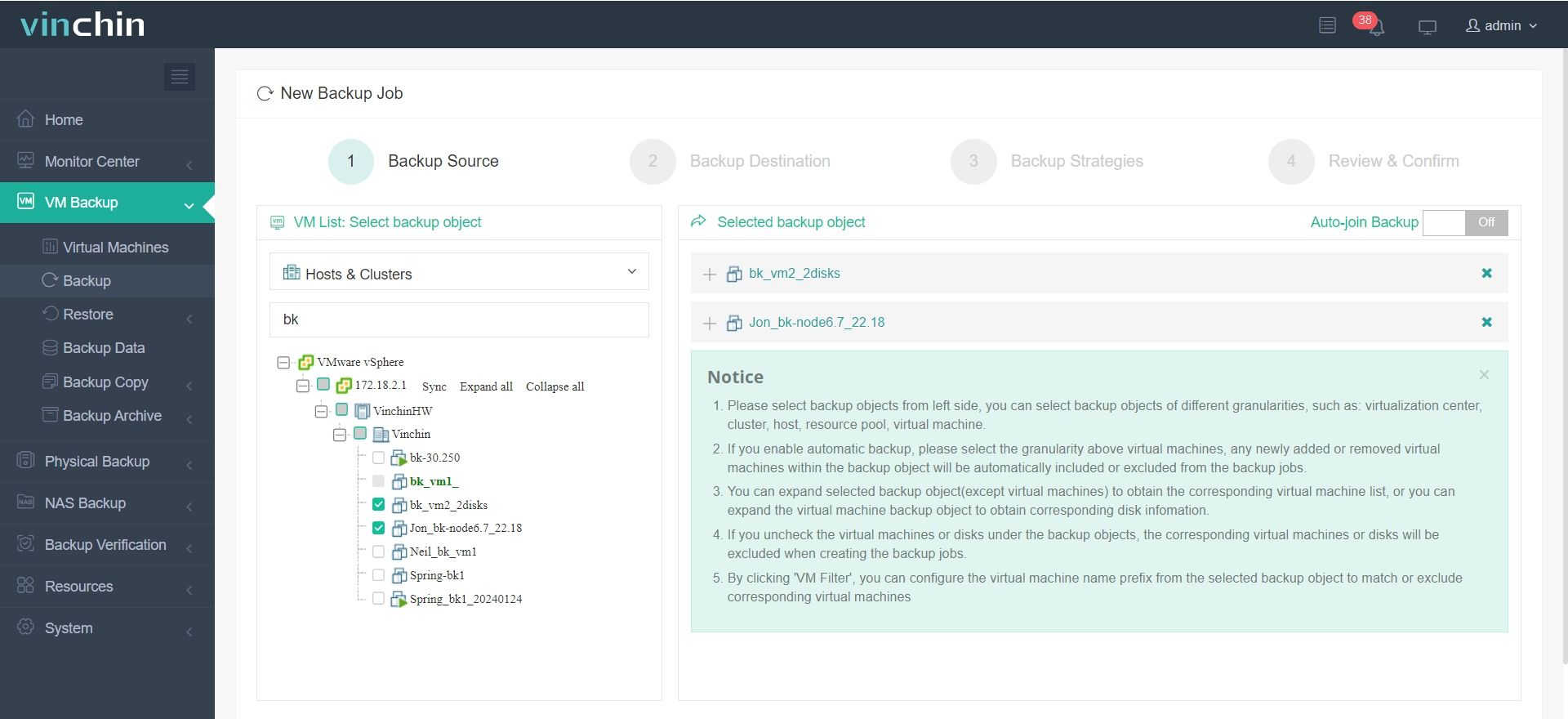
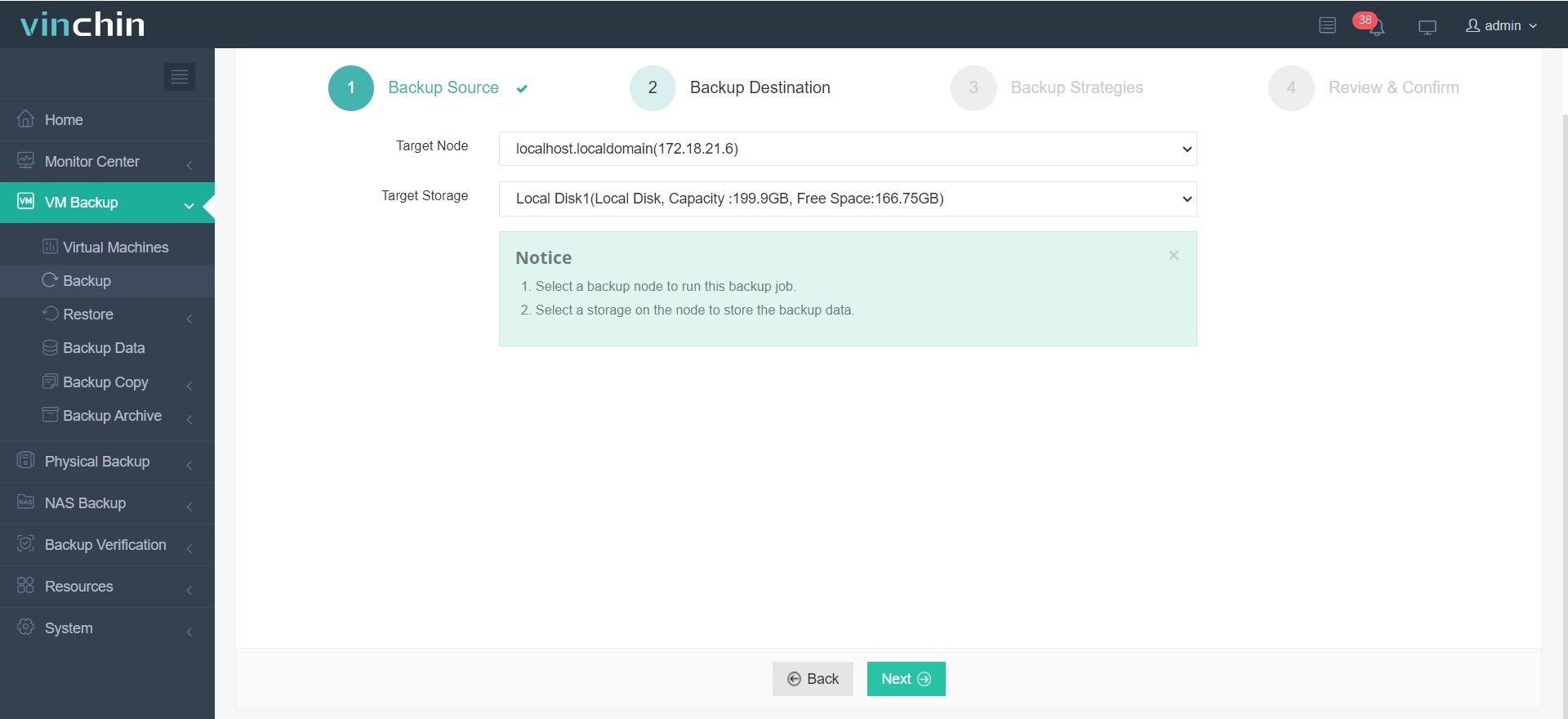
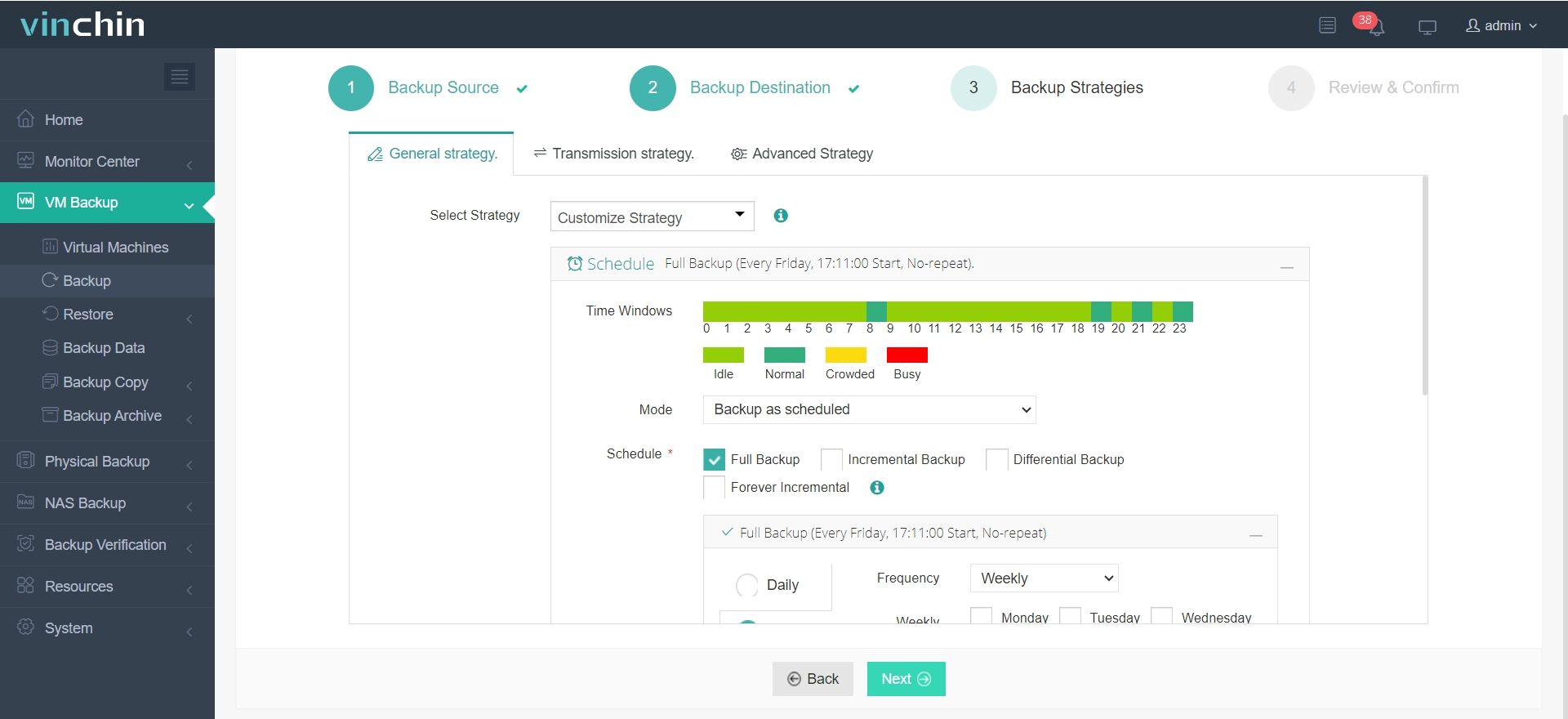
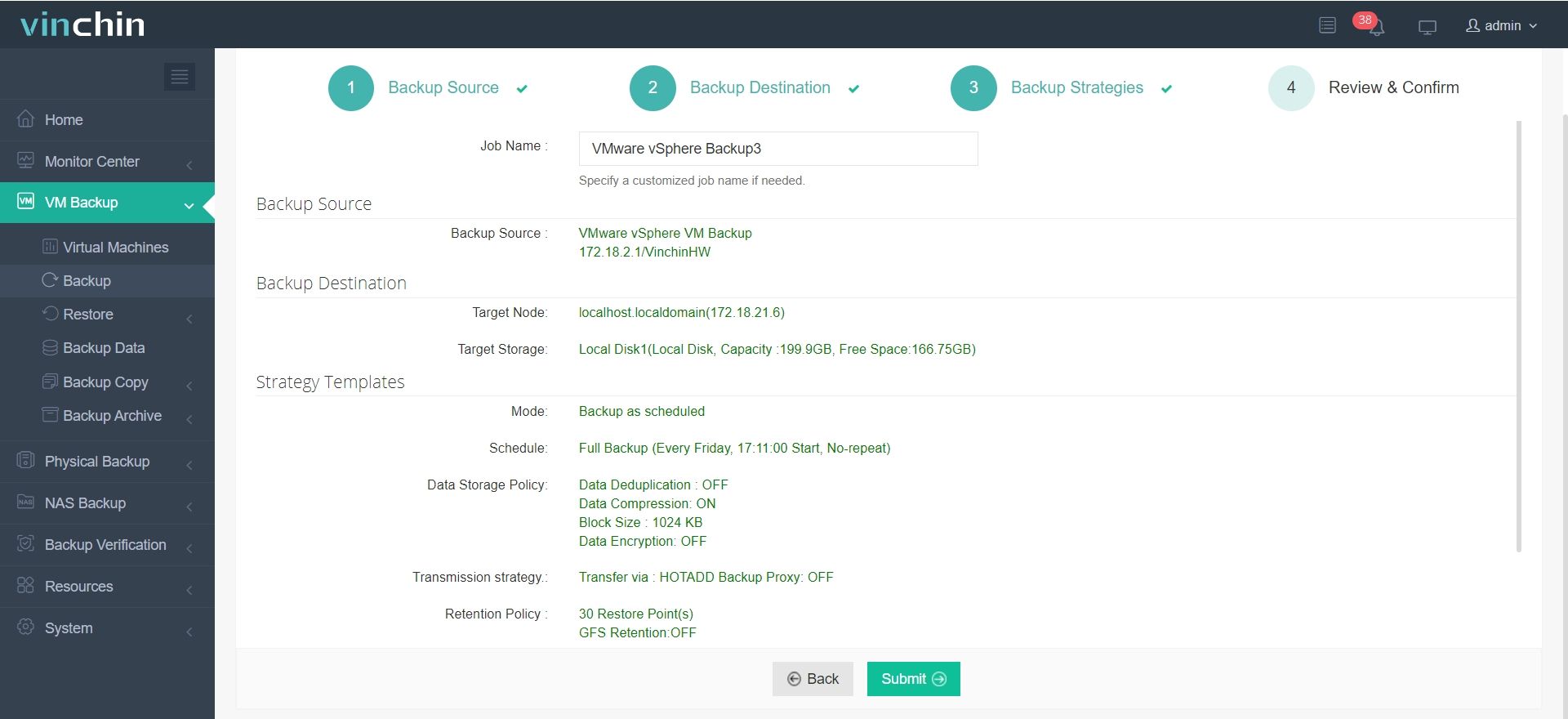
Using the intuitive web console makes protecting your environment straightforward:
Step 1. Select Backup Source
Step 2. Select Backup Destination
Step 3. Select Backup Strategies
Step 4. Review and submit the job
Trusted globally by thousands of organizations—with top ratings from industry analysts—Vinchin Backup & Recovery offers a fully featured 60-day free trial so you can experience its power firsthand.
Best VMware Backup Software FAQs
Q1: What makes a solution deliver fast incremental backups for VMware?
A1: Efficient use of Change Block Tracking (CBT) lets software back up only changed data blocks instead of entire disks each cycle. Optimized network utilization techniques such as WAN acceleration reduce transfer times further by compressing traffic before sending it between sites or datacenters.
Q2: How does fast incremental backup impact RPOs?
A2: Faster incrementals allow more frequent scheduling—sometimes hourly—which tightens recovery point objectives (RPOs). For example, financial institutions may run hourly incrementals so transactions are never more than 60 minutes out-of-date after restoration—a critical factor in reducing potential losses during outages.
Q3: Is agentless architecture important?
A3: Yes; agentless design eliminates extra software installations inside guest OSes which lowers administrative overhead while avoiding resource drain on protected VMs themselves—making deployment simpler at scale without impacting application performance.
Q4: Can these solutions scale as our environment grows?
A4: Leading enterprise solutions support horizontal scaling through distributed job engines capable of handling hundreds—or even thousands—of concurrent VM tasks without slowdowns as infrastructure expands.
Conclusion
Fast incremental VM backups strengthen resilience against downtime while supporting compliance goals at any scale—with minimal resource impact.









