Large-scale VMware environments often span hundreds or thousands of virtual machines (VMs) and manage petabytes of data across multiple clusters. In these settings, backup operations must complete quickly to avoid disrupting business processes. Reducing the backup window is key for meeting strict Recovery Point Objectives (RPO) and Recovery Time Objectives (RTO). Enterprises rely on fast backups not only for operational continuity but also for compliance with industry regulations. Efficient backup tools use advanced data processing methods to ensure that even massive environments can be protected without impacting production workloads.
Why Reducing Backup Window Matters in Enterprise Environments
Shortening the backup window is vital for enterprises that operate around-the-clock IT systems. Even brief overlaps between backup tasks and business hours can cause slowdowns or outages.
● Operational Continuity
Enterprises need uninterrupted access to applications and services. When backups run too long, they may overlap with peak usage periods. This can lead to resource contention between production workloads and backup jobs, causing performance drops or even downtime.
● Meeting Compliance Requirements
Many industries have strict rules about how often data must be backed up and how quickly it must be recoverable. If backups do not finish within set maintenance windows, organizations risk failing audits or facing regulatory penalties. For example, healthcare providers must comply with HIPAA’s data protection standards.
● Protecting Critical Data
A prolonged backup process increases the chance that some VMs or files are missed due to job failures or timeouts. This gap leaves critical business data vulnerable until the next successful cycle completes.
● Avoiding Resource Bottlenecks
Backup jobs consume CPU, memory, storage bandwidth, and network resources. If these jobs extend into normal operations, they compete directly with user activity—slowing down both backups and daily work.
● Ensuring Fast Recovery
Shorter backup windows mean more frequent restore points are available if disaster strikes. This helps IT teams meet aggressive RPOs by minimizing potential data loss after an incident.
Choosing a solution designed for speed ensures that large-scale environments remain protected without sacrificing performance or compliance goals.
How To Choose The Best VMware Backup Solution for Reducing Backup Window
Selecting an effective VMware backup tool means looking beyond basic features—it requires understanding how each capability impacts speed at scale. The right choice should handle thousands of VMs efficiently while keeping management simple as your environment grows.
● Agentless Architecture
Agentless solutions leverage VMware’s vStorage APIs for Data Protection (VADP) instead of installing software agents inside every VM. This reduces CPU overhead on hosts because there is no extra software running inside guest operating systems. It also simplifies deployment—especially important when managing hundreds of VMs across multiple clusters.
● Native Integration with VMware APIs
Deep API integration enables advanced features like Changed Block Tracking (CBT), which identifies only those disk blocks modified since the last backup. By transferring just changed blocks instead of full disks every time, incremental backups finish much faster—even in environments storing tens of terabytes per cluster.
● Advanced Deduplication and Compression
Built-in deduplication eliminates redundant copies of identical data across VMs before writing it to storage media. Compression further shrinks file sizes during transfer over LAN/WAN links or into cloud repositories. These techniques reduce both storage costs and network congestion while accelerating overall job completion times.
● Scalability and Parallelism
The best solutions support horizontal scaling—adding more nodes or proxies as your environment grows—and parallel processing so multiple jobs run at once without bottlenecks. Look for tools that let you define concurrent task limits per host or datastore; this ensures hundreds of simultaneous VM backups can proceed smoothly during tight maintenance windows.
● Flexible Scheduling and Policy Controls
Robust scheduling lets you align backups precisely with off-hours or low-load periods using calendar-based policies in the UI (“Schedule,” “Policy Management”). Automation ensures new VMs are discovered automatically (“Auto Discovery”) so nothing gets left unprotected as your infrastructure expands rapidly—a common scenario in cloud-driven enterprises.
● Compliance Support & Recovery Objectives Alignment
The tool should help you meet defined RTOs/RPOs by supporting frequent incremental snapshots without disrupting users (“Restore,” “Instant Recovery”). Built-in reporting tracks whether all SLAs are met after each cycle—a crucial feature when auditors require proof of timely protection.
When evaluating candidates, review case studies from similar-sized organizations if possible—look for evidence showing reduced average job durations as VM counts increase from dozens to thousands over time.
Vinchin Backup & Recovery: Enterprise-Level VMware Backup Solution
For organizations seeking robust protection in complex virtualized infrastructures, Vinchin Backup & Recovery stands out as a professional enterprise-level solution supporting VMware first—plus Hyper-V, Proxmox VE, oVirt, OLVM, RHV, XCP-ng, XenServer/Citrix Hypervisor, OpenStack, ZStack KVM/H3C CAS/KylinCloud HCI/Nutanix AHV/FusionCompute CloudOS KVM/UnionTech KVM/OpenEuler KVM—and many more (15+ platforms). With broad compatibility across mainstream virtualization technologies—including deep support for VMware-specific features—Vinchin Backup & Recovery addresses diverse enterprise needs at scale.
Among its most relevant capabilities are agentless VM protection via native API integration; instant recovery options; built-in deduplication/compression; flexible scheduling policies; granular restore; plus support for Changed Block Tracking (CBT), HotAdd transport mode where available, quiesced snapshot creation on VMware platforms only, LAN-free backup on select hypervisors including VMware itself—all combining to deliver rapid backups while minimizing impact on production workloads.
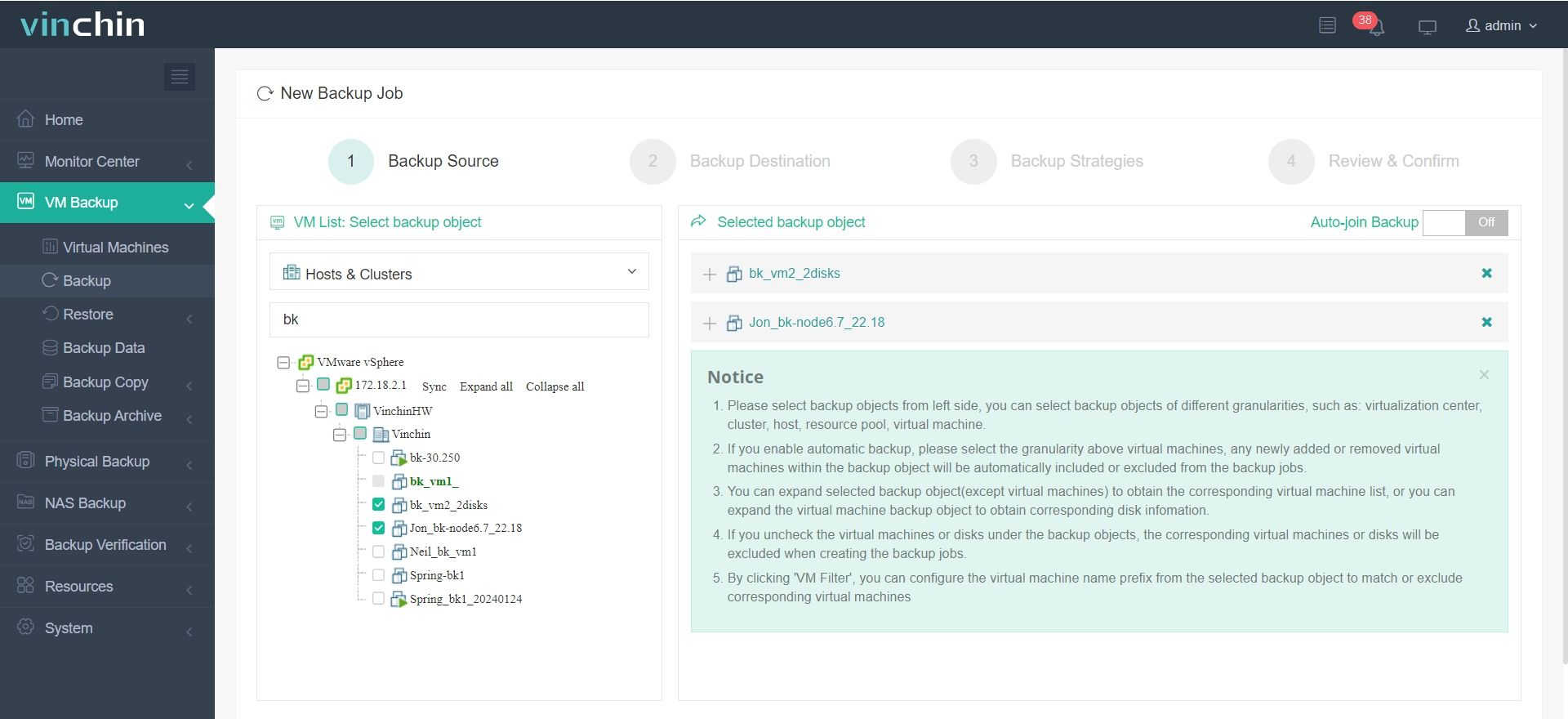
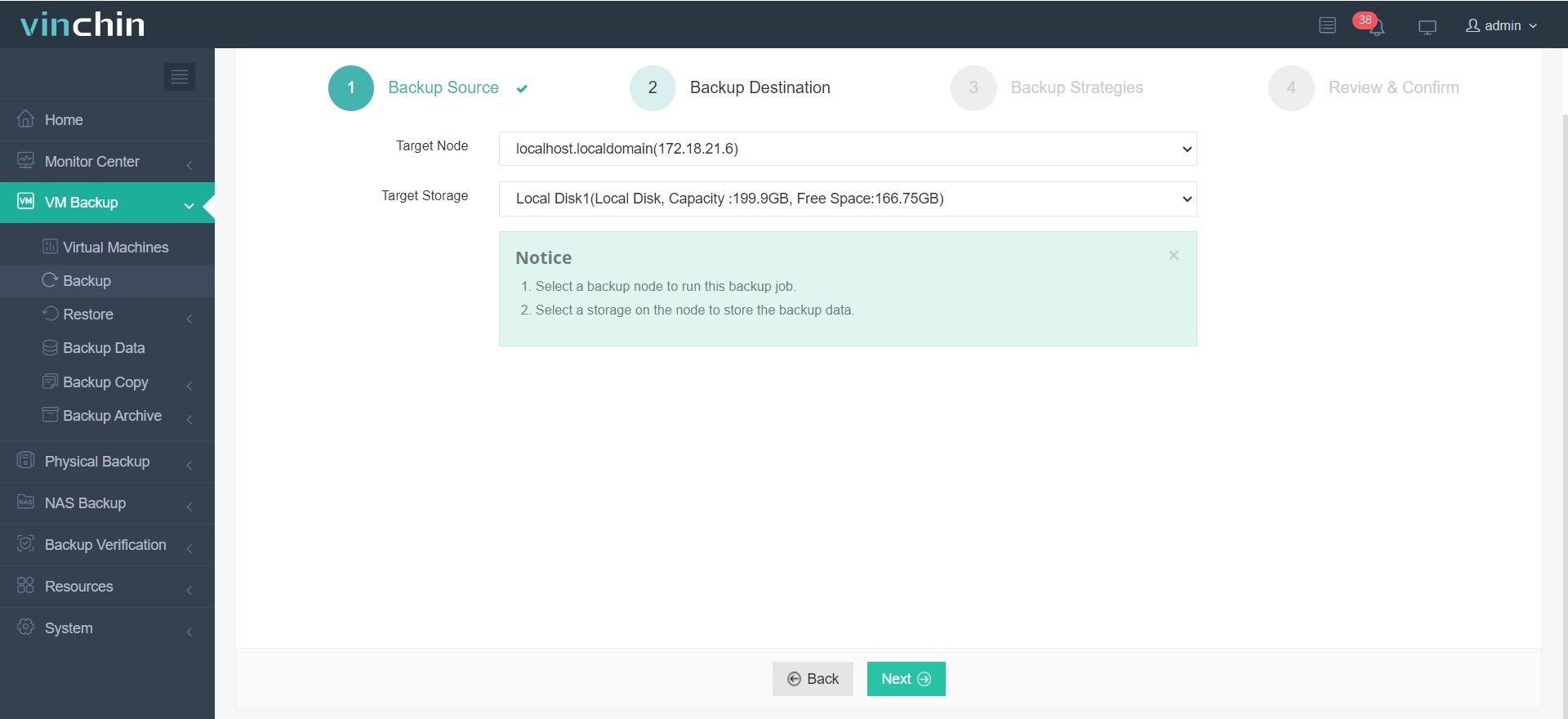
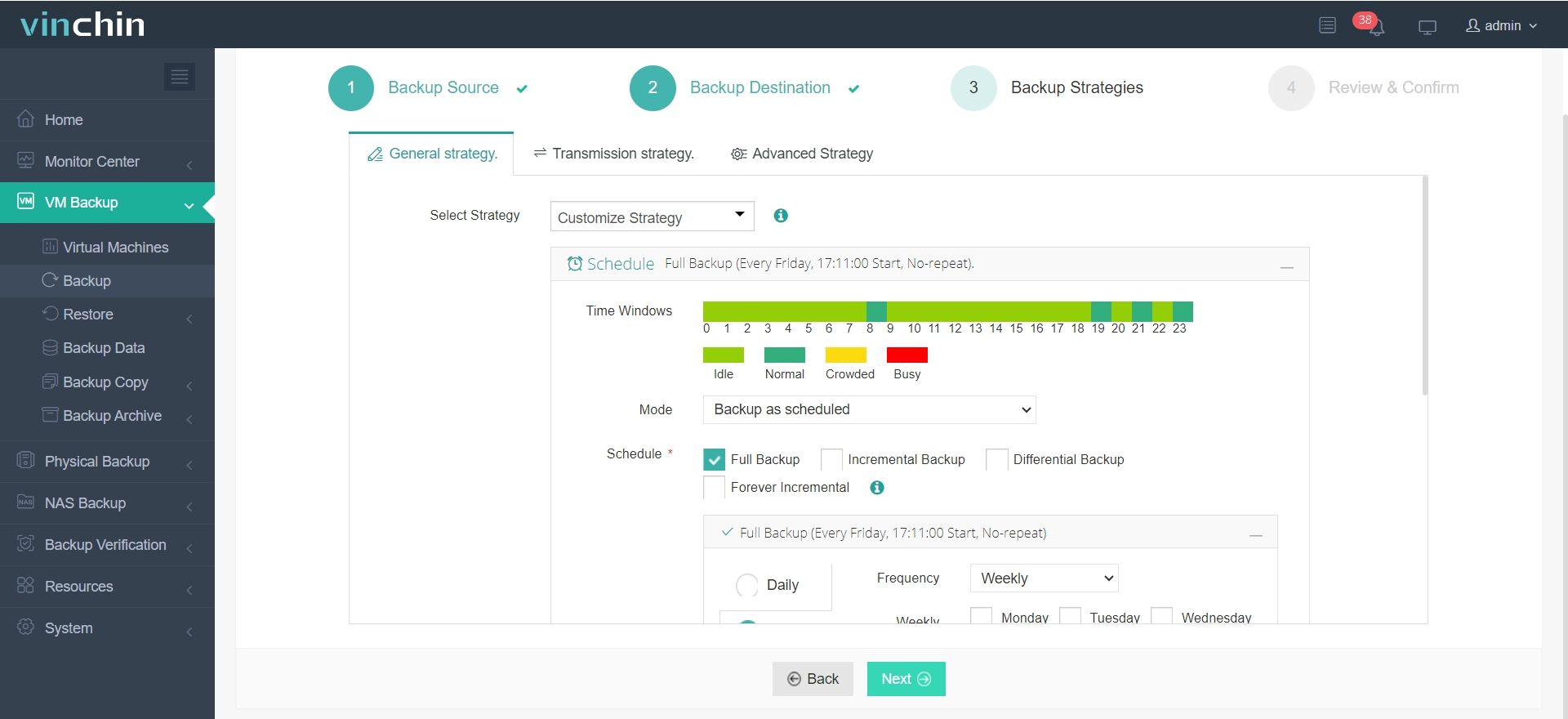
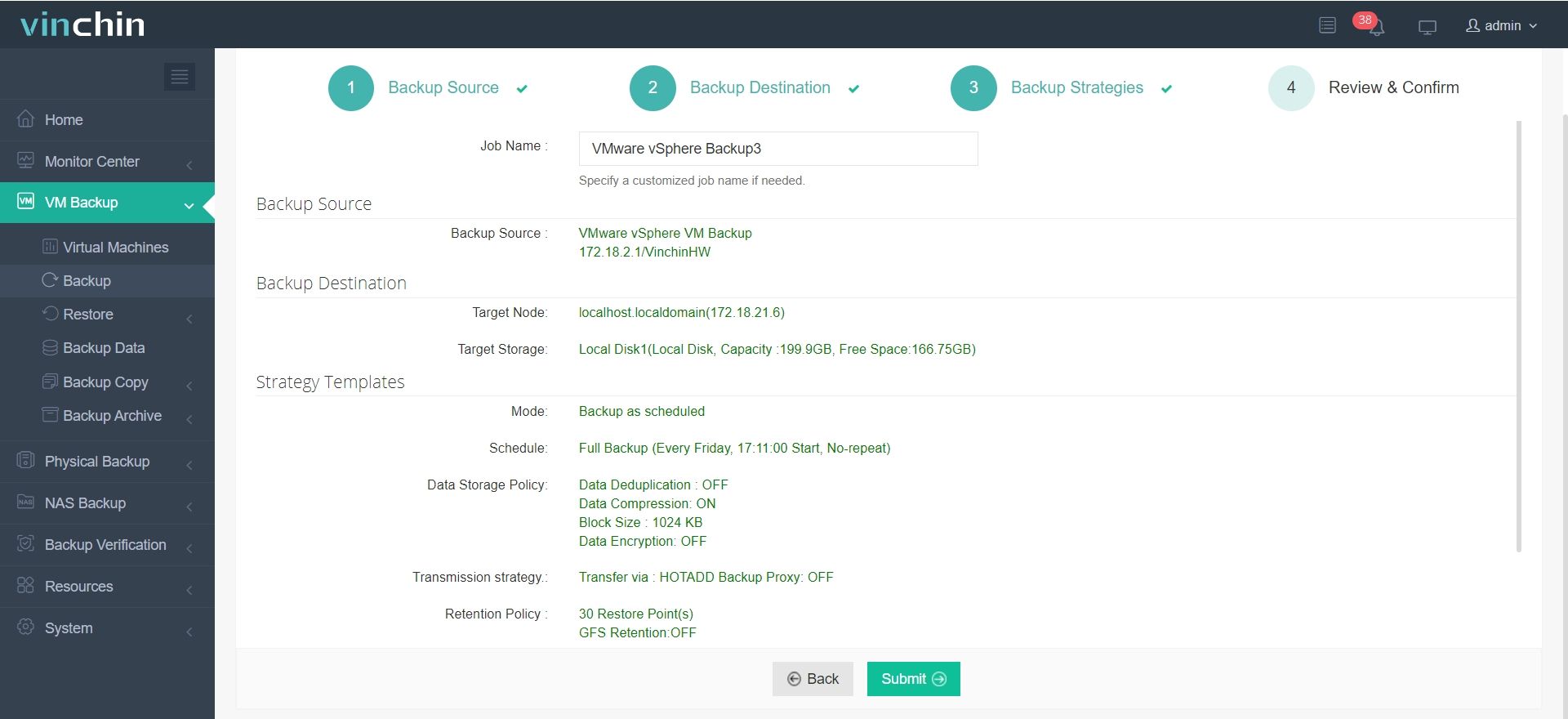
Using Vinchin Backup & Recovery’s intuitive web console makes safeguarding your environment straightforward:
Step 1. Select Backup Source
Step 2. Select Backup Destination
Step 3. Select Backup Strategies
Step 4. Review and submit the job
Trusted globally by enterprises large and small—and consistently top-rated—Vinchin Backup & Recovery offers a 60-day full-featured free trial so you can experience its power firsthand before making any commitment.
Best VMware Backup Software FAQs
Q: How does reducing the backup window benefit large-scale VMware deployments?
A: It minimizes disruption by ensuring all virtual machines are protected during short maintenance periods rather than overlapping with production hours.
Q: What technical features most impact backup speed?
A: Agentless operation using vStorage APIs reduces overhead; Changed Block Tracking enables fast incrementals; parallel processing allows many jobs at once; deduplication/compression cut down transfer times—all contribute significantly to shorter windows.
Q: Can scalable solutions adapt as our environment grows?
A: Yes; leading tools offer horizontal scaling plus centralized management so administrators can add capacity easily as virtual machine counts rise—with no loss in performance even at enterprise scale.
Q: Does reducing the window affect restore reliability?
A: No; optimized solutions maintain rapid completion while preserving reliable restores through built-in verification steps that check integrity after every job.
Conclusion
Accelerated backups keep large-scale environments compliant while protecting uptime—without trade-offs in reliability or coverage.









