Proxmox Virtual Environment (VE) is a popular open-source virtualization platform used by organizations worldwide for its flexibility and cost-effectiveness. While Proxmox offers built-in backup tools such as vzdump for local snapshots and restores, these native utilities often fall short when it comes to enterprise needs like secure offsite replication and strict compliance requirements.
Enterprises must protect virtual machines (VMs) not just from hardware failure or accidental deletion but also from disasters that can impact an entire site—such as fire, flood, or ransomware attacks. Regulatory frameworks like GDPR in Europe require organizations to store data securely across geographic boundaries. In healthcare environments governed by HIPAA in the United States, technical safeguards mandate encrypted backups stored offsite to ensure patient privacy. PCI-DSS demands similar controls for payment card data retention.
Basic backup solutions may lack encryption during transfer or at rest, granular access control, automated scheduling policies, or comprehensive audit trails—all of which are critical for passing audits and maintaining business continuity after a disaster strikes. For these reasons, many IT teams turn to specialized Proxmox VM backup software designed specifically to ensure secure offsite replication while meeting compliance mandates.
Why Secure Offsite Replication Matters in Enterprise Environments
Secure offsite replication forms the backbone of any robust disaster recovery strategy in modern enterprises. It ensures that even if your primary site fails due to natural disasters or cyberattacks, your business can recover quickly without violating regulatory obligations or risking sensitive data exposure.
● Protection Against Site-Level Disasters
A single-site backup cannot defend against catastrophic events like fires or floods that destroy all onsite infrastructure at once. By replicating VM backups securely to remote locations—whether another company branch or a trusted cloud provider—you guarantee access to critical systems even if your main datacenter becomes inaccessible.
● Defense Against Ransomware Attacks
Ransomware continues to threaten businesses globally by encrypting production data and demanding payment for decryption keys. Secure offsite copies remain isolated from compromised networks so you can restore clean VMs without negotiating with attackers—a key requirement highlighted by NIST’s recommendations on resilient backup strategies.
● Regulatory Compliance Requirements
Many regulations demand geographically separated backups secured through strong Encryption methods both during transit and at rest. Without compliant storage practices—including detailed logging of every access attempt—organizations risk heavy fines during audits if they cannot prove their data protection measures meet legal standards.
● Audit Readiness Through Detailed Reporting
Auditors expect clear evidence of regular testing of disaster recovery plans as well as proof that only authorized personnel have accessed sensitive information. Secure offsite replication solutions provide comprehensive logs showing who performed each action on every backup job—making it easy to demonstrate compliance when regulators request documentation.
● Operational Continuity With Minimal Downtime
When disaster strikes—or even during planned maintenance—businesses need fast recovery options that minimize downtime costs. Offsite replicas allow IT teams to spin up replacement VMs quickly at alternate locations so employees stay productive while repairs proceed at the primary site.
How To Choose The Best Proxmox Backup Solution for Secure Offsite Replication
Selecting effective Proxmox VM backup software means looking beyond basic functionality toward features that guarantee security, automation, scalability, efficiency—and above all—regulatory alignment across diverse industries.
● End-to-End Encryption During Transit And At Rest
Sensitive information must be protected not only while stored but also as it moves between sites over public networks. Look for solutions using strong encryption algorithms such as AES-256 both when transferring backups remotely and storing them long-term at the destination location.
● Policy-Based Automation For Consistent Scheduling
Manual processes introduce human error risks that can lead to missed backups or incomplete replications—a common cause of failed audits. Automated policy-driven scheduling ensures every VM is backed up according to pre-defined rules without daily intervention from administrators.
● Granular Access Controls And Role-Based Permissions
Compliance frameworks require limiting who can view or restore sensitive records within your organization. Seek out platforms offering role-based access control (RBAC), allowing you to assign permissions based on job function so only authorized staff handle critical operations.
● Scalability To Support Growing Workloads
As your virtual environment expands—with more VMs added each month—the chosen solution should scale horizontally without degrading performance or requiring disruptive upgrades.
● Comprehensive Reporting And Audit Trails
Detailed logs documenting every change made within the system help satisfy auditors’ requests quickly while supporting internal investigations into suspicious activity.
● Support For Incremental And Forever-Incremental Backups
Transferring full VM images over wide-area networks consumes excessive bandwidth and storage space—a challenge addressed by incremental approaches that send only changed blocks since the last successful job. This reduces network load while ensuring rapid synchronization between sites.
Organizations should evaluate their current solution against these criteria to identify potential gaps in security or compliance posture before an incident occurs.
Vinchin Backup & Recovery: Enterprise-Level Protection for Proxmox VE
For organizations seeking advanced protection beyond native tools, Vinchin Backup & Recovery stands out as a professional enterprise-level virtual machine backup solution supporting Proxmox VE alongside over 15 mainstream virtualization platforms including VMware, Hyper-V, oVirt, OLVM, RHV, XCP-ng, XenServer, OpenStack, ZStack and more. Designed with complex IT environments in mind, Vinchin Backup & Recovery delivers agentless operation plus robust compatibility across hybrid infrastructures.
Key features relevant for Proxmox users include LAN-free backup for efficient large-scale transfers; instant recovery enabling rapid service restoration; flexible full/incremental/differential and forever-incremental backups; granular restore capabilities; and powerful data deduplication/compression—all streamlining compliance efforts while reducing operational overhead. These functions together enhance reliability and speed up both routine protection tasks and urgent disaster recovery scenarios.
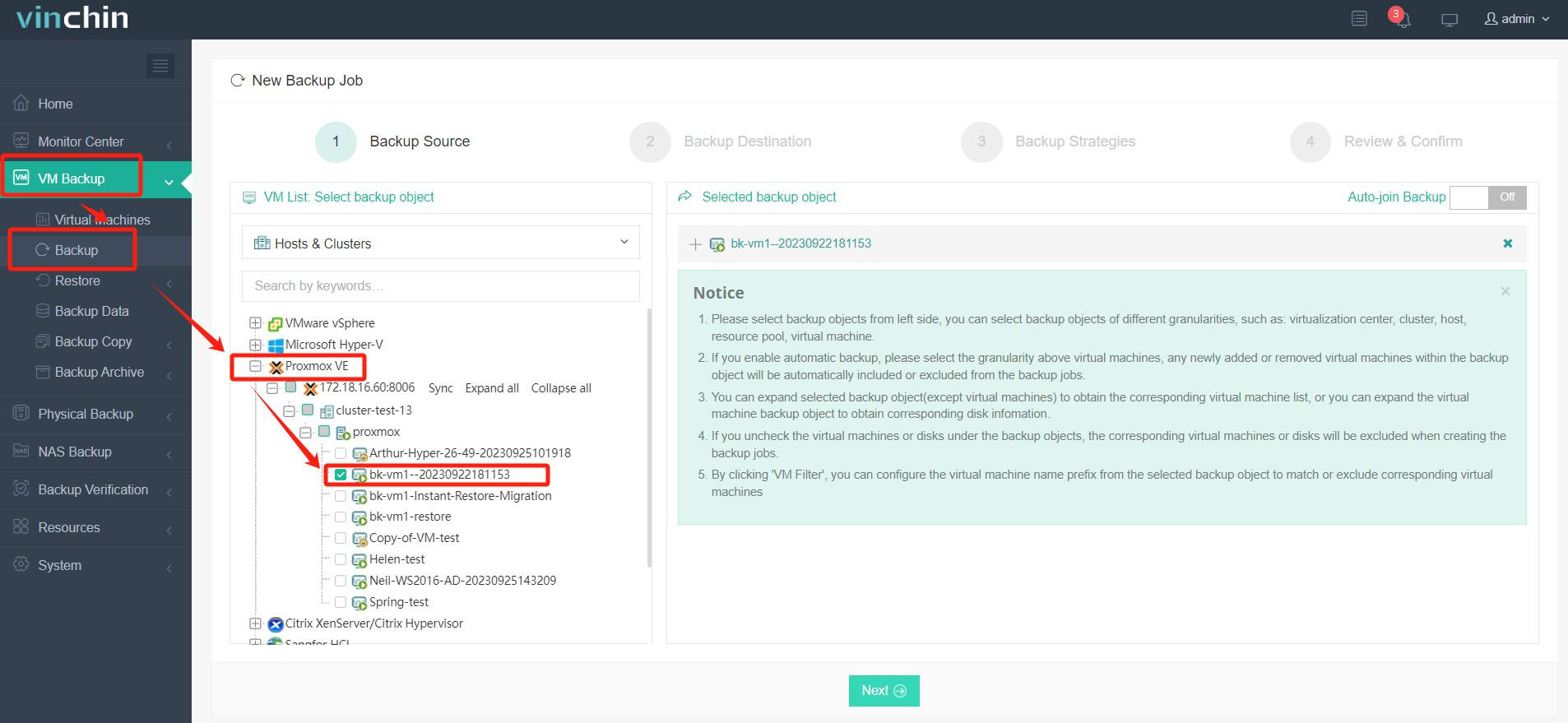
With its intuitive web console interface, backing up a Proxmox VM using Vinchin Backup & Recovery takes just four steps:
Step 1: Select the Proxmox VM you wish to back up.
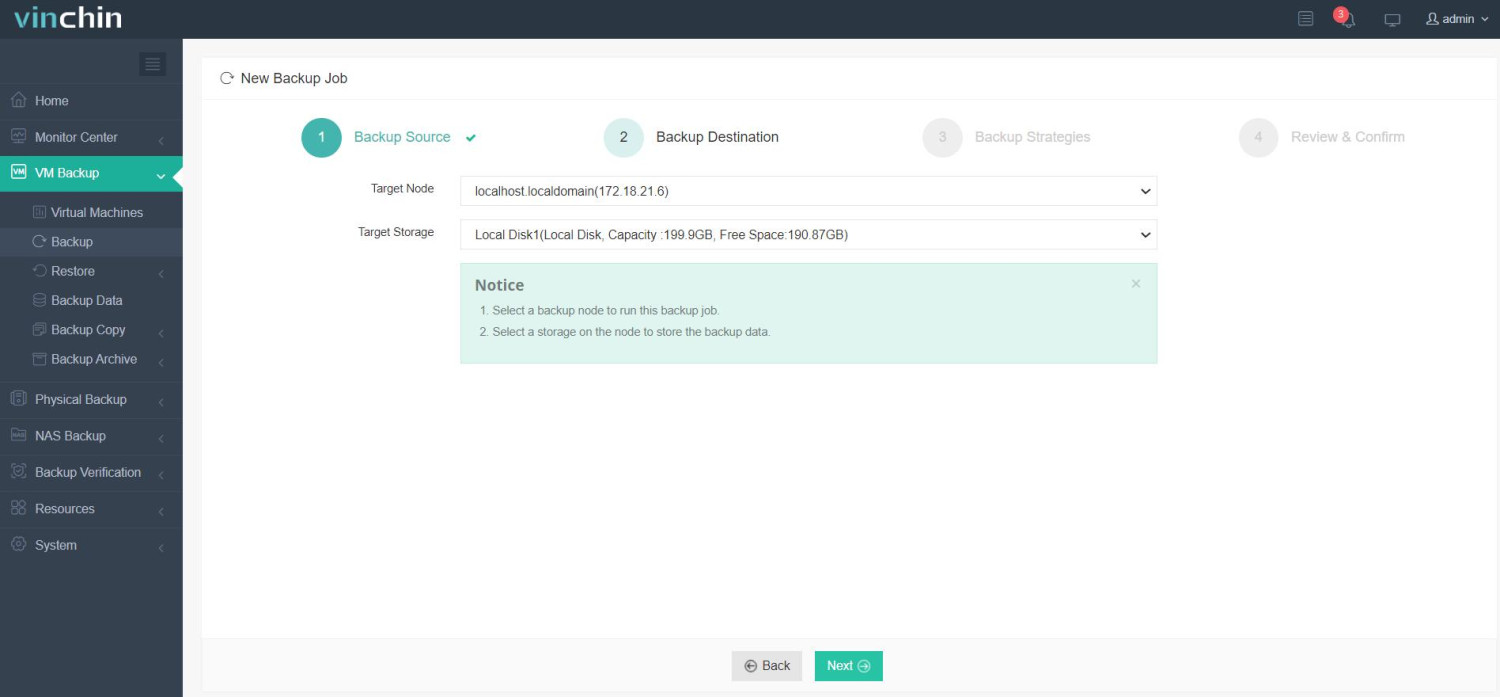
Step 2: Choose your preferred backup storage destination.
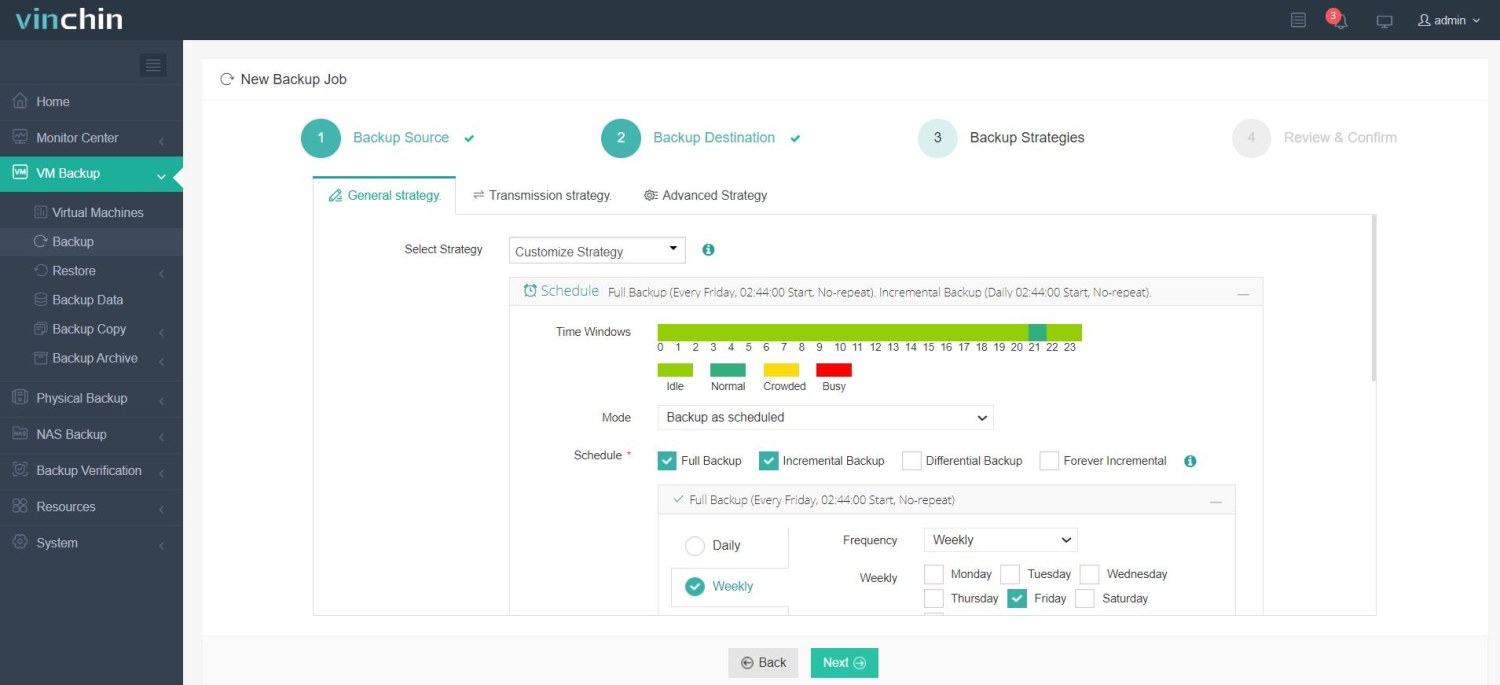
Step 3: Configure an appropriate backup strategy tailored to operational needs.
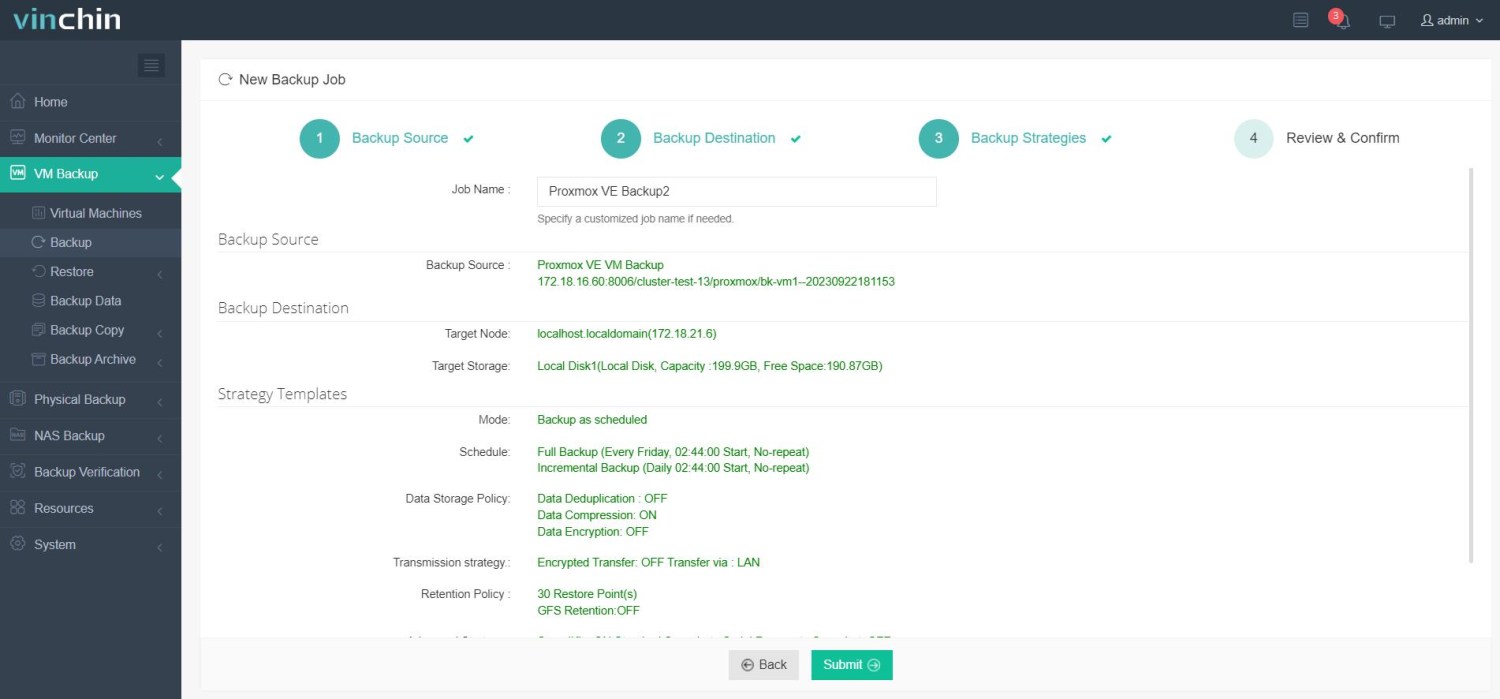
Step 4: Submit the job—the process is streamlined from start to finish.
Recognized globally with top ratings among enterprise customers,Vinchin Backup & Recovery offers a fully featured free trial valid for 60 days—click below to experience industry-leading data protection firsthand.
Best Proxmox Backup Software FAQs
Q1: Does this solution support encrypted offsite replication?
Yes; leading solutions encrypt all replicated data both during transit across networks using protocols like TLS/SSL—and at rest using robust ciphers such as AES—to prevent unauthorized access throughout its lifecycle.
Q2: How does this software help maintain regulatory compliance?
It provides audit-ready logs detailing every user action; supports granular permissions management through RBAC; enforces automated retention policies aligned with industry regulations; enables demonstration of secure handling practices required by frameworks like GDPR/HIPAA during formal assessments.
Q3: Can this platform scale effectively alongside increasing numbers of VMs?
Enterprise-grade architectures support horizontal scaling via distributed components so performance remains consistent—even as hundreds more virtual machines are added over time—with no disruption required during expansion phases.
Q4: How does this software handle network interruptions during an offsite replication job?
Robust platforms employ resumable transfers combined with integrity checks (such as checksums) after reconnection; some leverage blockchain-inspired verification techniques ensuring no corrupted blocks are accepted post-interruption so completed backups remain reliable regardless of transient connectivity issues.
Conclusion
Choosing proven Proxmox VM backup software shapes how fast you recover from disasters while meeting strict legal standards for secure offsite replication—ensuring operational resilience under pressure every day.









