A backup window is the time needed to complete a full data backup. In large-scale OpenStack environments, this window can stretch into hours if not managed well. Shortening it means less disruption to production workloads and faster recovery after incidents. The right tool makes all the difference.
Reducing backup windows is vital for enterprises running hundreds or thousands of virtual machines. A long backup process can slow down applications or even cause downtime. Efficient backups help maintain service levels and meet compliance needs. Choosing a solution designed for scale ensures business continuity.
Why Backup Window Reduction Matters in Enterprise Environments?
Shortening the backup window protects critical services from unnecessary risk. Enterprises depend on fast data protection to keep systems available around-the-clock.
● Operational Disruption Avoidance
Long-running backups often compete with production workloads for resources like CPU, memory, storage bandwidth, or network throughput. This competition can slow down applications or cause user complaints during peak hours.
● Service Level Agreement (SLA) Compliance
Meeting strict SLAs requires timely backups and restores. If your solution cannot finish within defined windows—often overnight—you may breach contracts or internal policies.
● Reduced Vulnerability Periods
The longer a system waits between backups—or spends in an incomplete state—the greater its exposure to data loss from hardware failure or cyberattacks.
● Regulatory Compliance Assurance
Many regulations require frequent data protection with verifiable results. Delayed or failed backups could result in audit failures or penalties.
In large OpenStack deployments where resources are shared across many tenants and projects, every minute saved during backup reduces operational risk and improves overall resilience.
How To Choose The Best OpenStack Backup Solution for Backup Window Reduction?
Selecting an effective OpenStack backup tool involves understanding which features most impact speed at scale. Each factor below plays a key role in shrinking your backup window while ensuring reliable recovery when needed.
● Agentless Deployment Simplifies Scaling
Agentless tools do not require software installation inside each VM. This approach reduces administrative overhead because you avoid managing agents across hundreds of instances—a common pain point as environments grow. Agentless solutions also lower security risks by minimizing attack surfaces inside guest operating systems.
● Incremental-Forever Technology Cuts Data Transfer
With forever-incremental backup, only changed blocks since the last backup are captured after an initial full copy. This significantly cuts both network traffic and storage requirements over time compared to repeated full backups. For example: backing up a 10TB environment daily might transfer just gigabytes instead of terabytes after day one.
● Built-in Deduplication & Compression Shrink Storage Needs
Deduplication eliminates duplicate data blocks before writing them to disk; compression further reduces file sizes. These techniques together minimize storage costs while speeding up transfers—especially important when protecting similar VMs or databases across clusters.
● Parallel Processing Accelerates Large Jobs
Running multiple jobs at once allows you to back up many VMs simultaneously rather than sequentially—a must-have for big clouds. Efficiency depends on your underlying storage/network architecture; high-throughput networks yield better results than oversubscribed links.
● Policy-driven Automation Reduces Human Error
Automated scheduling lets you set protection rules once then rely on consistent execution without manual intervention. Policy engines allocate resources efficiently based on workload type or priority—helping ensure nothing gets missed due to oversight during busy periods.
When evaluating solutions for OpenStack at scale, prioritize those that combine these features into a single platform with proven reliability in real-world deployments.
Vinchin Backup & Recovery: Enterprise-Grade Protection for OpenStack
For organizations seeking robust OpenStack VM protection, Vinchin Backup & Recovery stands out as an enterprise-level solution supporting more than 15 mainstream virtualization platforms—including VMware, Hyper-V, Proxmox, oVirt, OLVM, RHV, XCP-ng, XenServer, ZStack, and especially OpenStack itself. Designed specifically for complex IT infrastructures such as those found in large enterprises and service providers, Vinchin Backup & Recovery offers agentless deployment alongside advanced features tailored for demanding environments.
Key capabilities include forever-incremental backup strategies that minimize data transfer times; built-in deduplication and compression; parallel processing for simultaneous multi-VM operations; granular restore options; and policy-driven automation—all working together to reduce resource consumption while maximizing reliability.
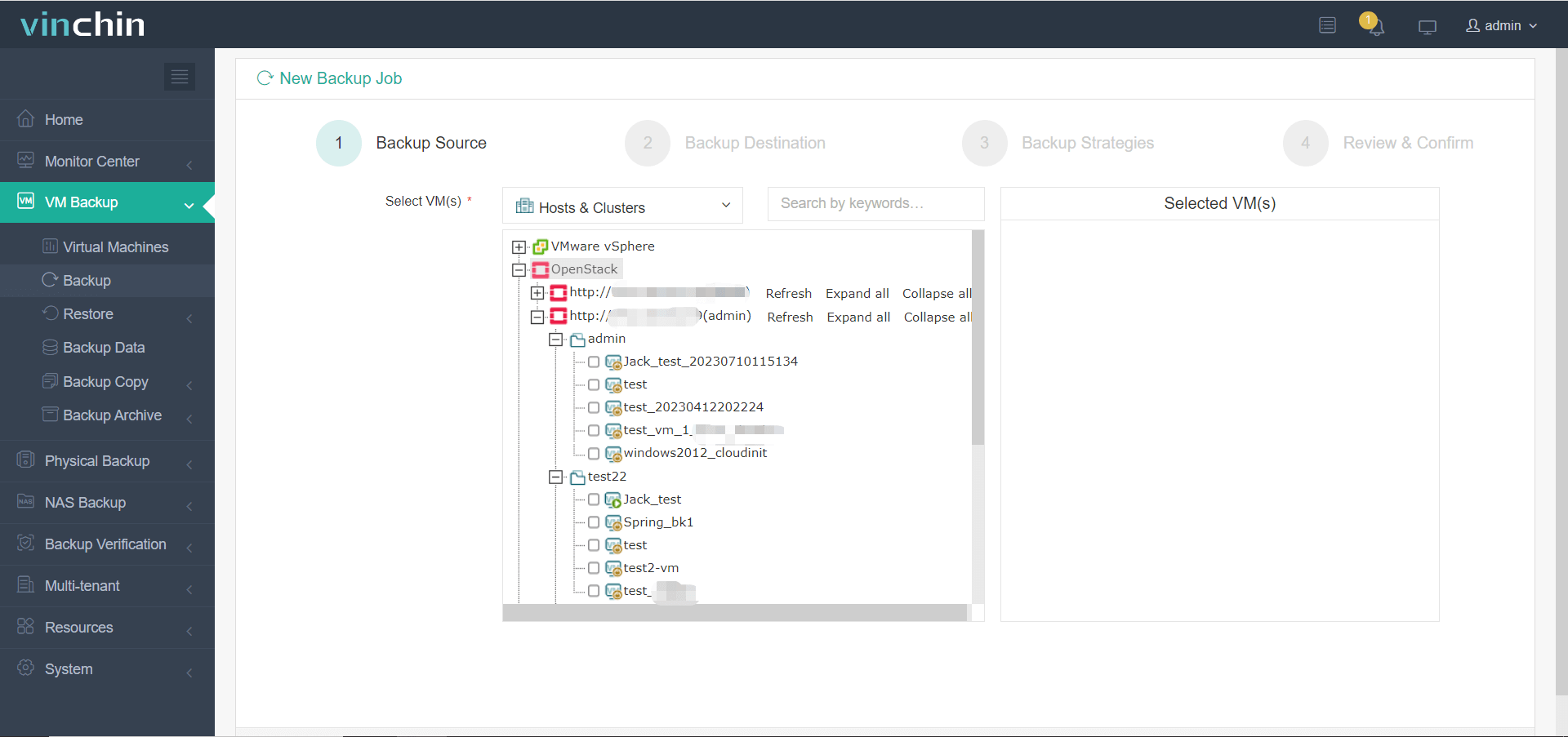
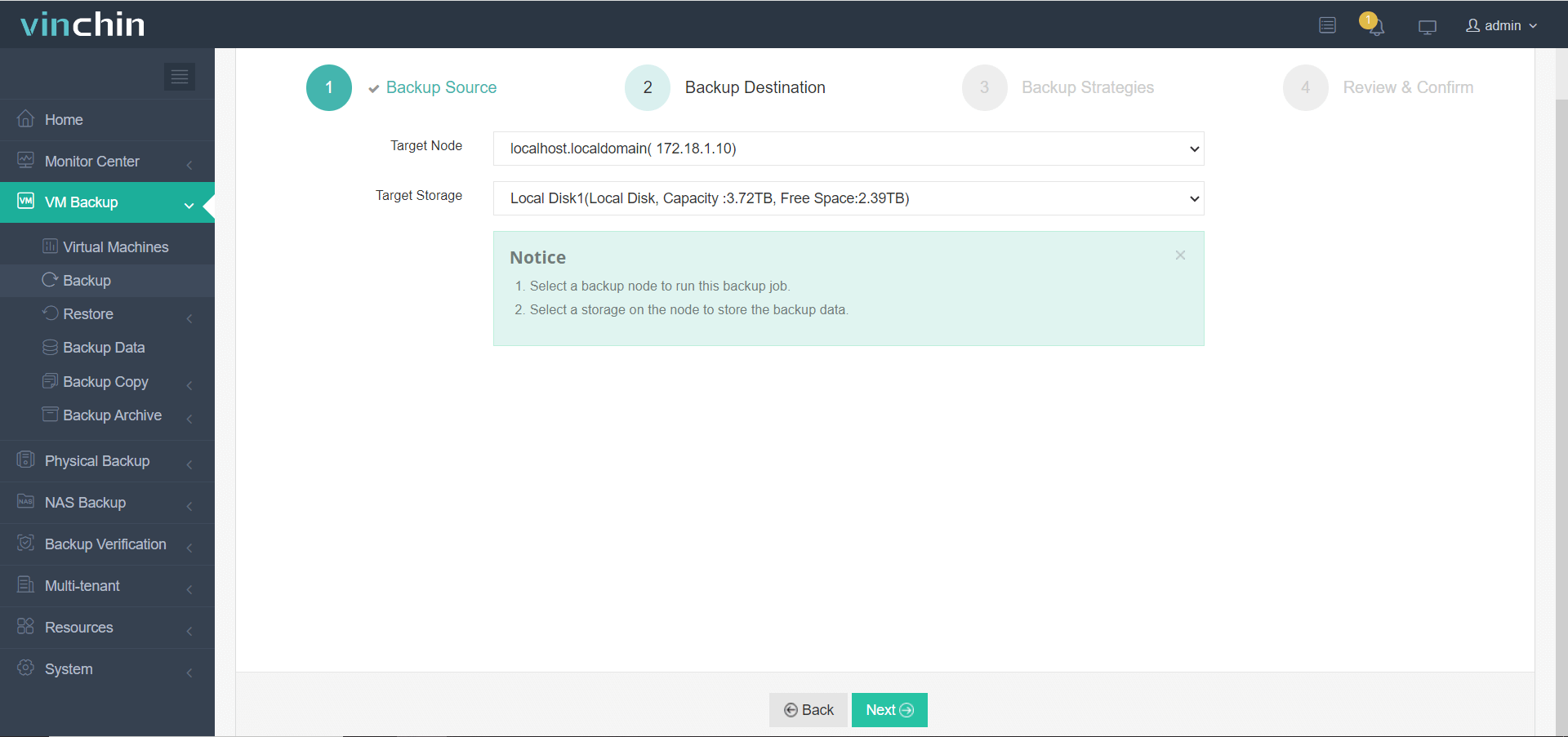
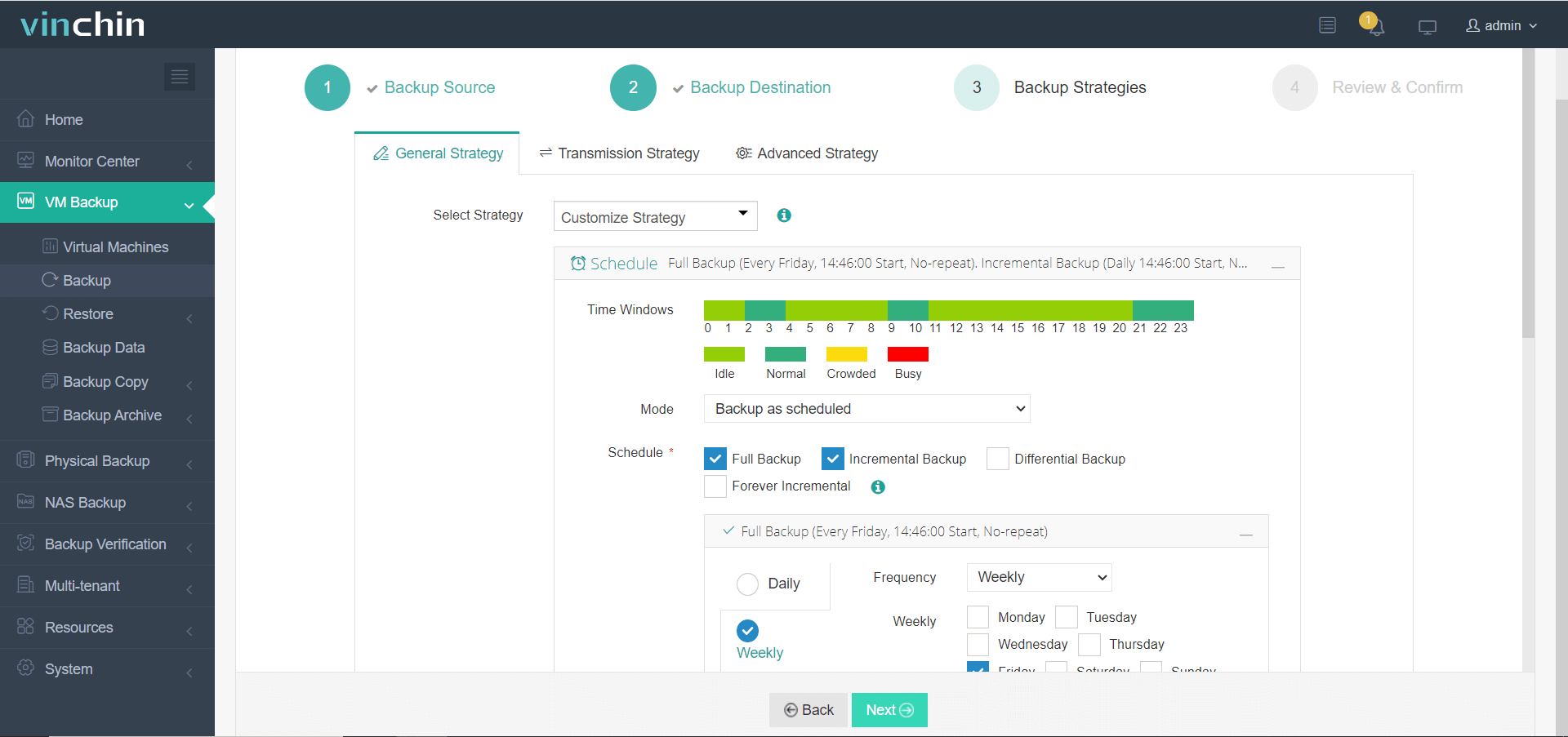
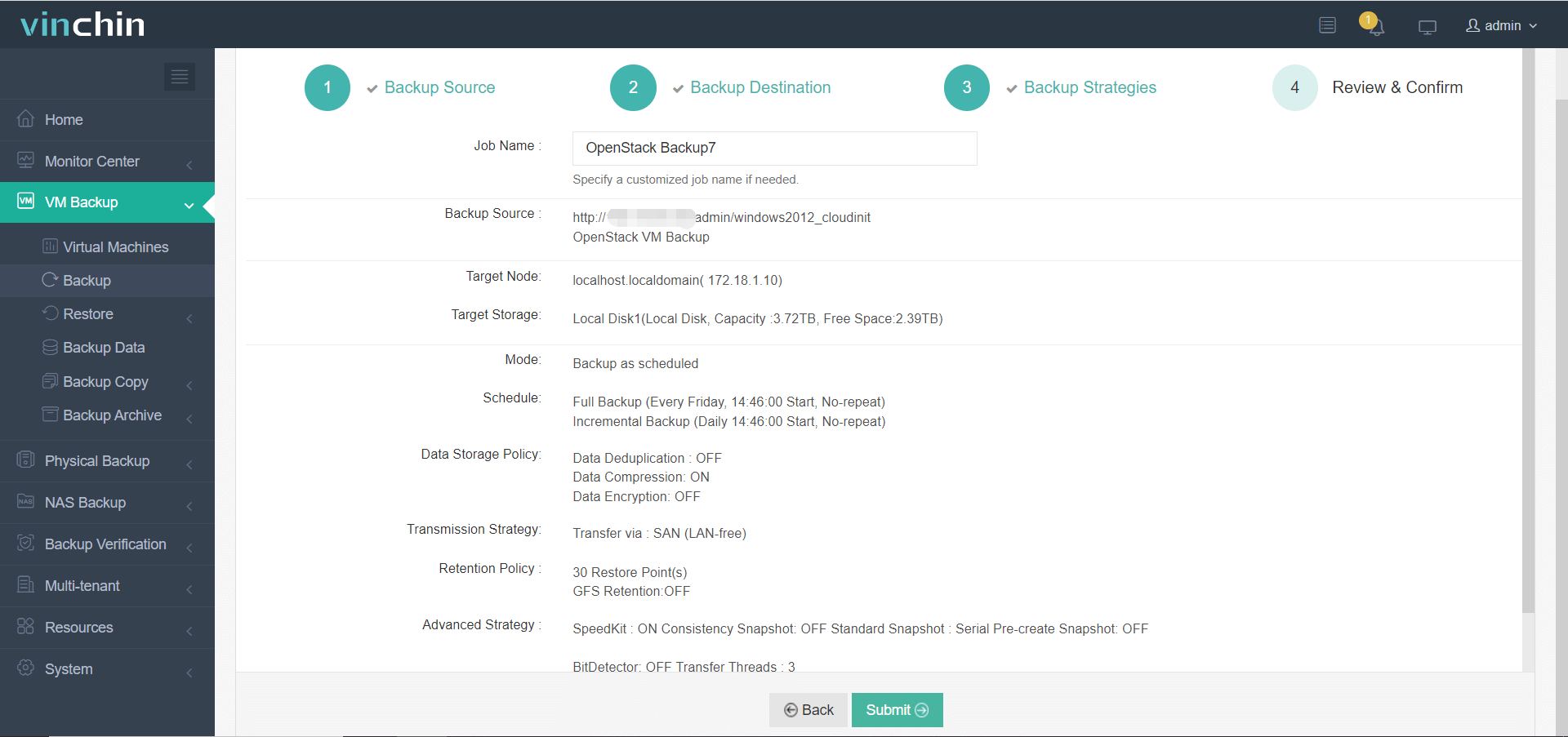
Using the intuitive web console of Vinchin Backup & Recovery makes safeguarding your OpenStack VMs straightforward:
Step 1: Select the OpenStack VM to back up
Step 2: Choose the backup storage
Step 3: Configure the backup strategy
Step 4: Submit the job
Recognized globally by thousands of customers with top ratings in enterprise data protection software reviews—try Vinchin Backup & Recovery free for 60 days by clicking below.
Best OpenStack Backup Software FAQs
Q1: How does reducing the backup window improve operations in large-scale OpenStack environments?
A shorter window means less interference with production workloads during backups. It helps maintain application performance while meeting tight recovery objectives demanded by modern enterprises.
Q2: What technical features should be prioritized when selecting an efficient OpenStack backup tool?
Key features include agentless operation (for easier scaling), incremental forever technology (to reduce transferred/stored data), built-in deduplication/compression (to save space), parallel processing (for speed), and automated policy-driven scheduling (to avoid errors).
Q3: Can minimizing my organization’s backup window support regulatory compliance efforts?
Yes; regular timely backups help prove adherence to industry standards requiring frequent recoverable copies of critical information—essential during audits or legal reviews.
Q4: Is scalability important when choosing an enterprise-grade OpenStack data protection solution?
Scalable solutions adapt seamlessly as cloud workloads expand without sacrificing speed/reliability—a necessity for organizations growing their infrastructure footprint over time.
Conclusion
Choosing purpose-built software shortens your OpenStack cloud’s backup window while boosting reliability at scale—delivering measurable gains in uptime resilience without extra complexity.









