OpenStack powers many enterprise clouds today. IT Operations Managers and Cloud Architects face growing challenges managing backups across sprawling virtual environments. Manual backup tasks increase operational overhead and risk compliance gaps. Integrated backup tools help centralize control, reduce errors, and ensure data protection policies are enforced everywhere. Vinchin Backup & Recovery stands out as an OpenStack backup tool that natively integrates with virtualization management consoles. This integration streamlines operations for IT teams who need efficiency, visibility, and reliability.
Integration matters because it reduces manual work while improving consistency across your environment. With unified monitoring from one console, you can enforce policies without juggling multiple tools or risking missed workloads.
Why Integration with Virtualization Management Consoles Matters in Enterprise Environments?
Direct integration between your backup solution and virtualization management consoles brings real-time coordination to your data protection strategy. This connection ensures every change—like new virtual machines (VMs), policy updates, or infrastructure modifications—is instantly reflected in your backup environment.
● Seamless Coordination
Integrated solutions keep your backup system aligned with changes in the virtual infrastructure. When a VM is added or removed through the console, the backup tool detects this automatically using native APIs like Nova or Cinder. This means no lag between production changes and their protection status.
● Reduced Human Error
Fragmented workflows force IT staff to manage backups separately from their main management console. This increases the chance of mistakes—missed VMs or outdated policies can slip through unnoticed. According to ESG’s “Data Protection Landscape” report, organizations relying on manual processes are more likely to experience failed recoveries due to configuration drift.
● Consistent Policy Enforcement
Integrated tools apply retention rules uniformly across all assets managed by the console. In regulated industries such as finance or healthcare, inconsistent protection can lead to compliance violations if some workloads are not backed up according to policy.
● Unified Monitoring for Compliance
Centralized dashboards give IT teams a single view of all protected assets. This makes it easier to generate audit reports for frameworks like ISO 27001 or SOC 2—both require consistent application of security controls.
● Faster Recovery Times
When disaster strikes or files go missing, integrated solutions enable quick restores directly from the familiar management interface. There’s no need to switch platforms or hunt for recovery options; everything is accessible from one place.
How To Choose The Best OpenStack Backup Solution for Integration with Virtualization Management Consoles?
Selecting an OpenStack backup solution goes beyond checking off features—it’s about how well it fits into fast-moving enterprise workflows where automation is key. Look for deep integration that keeps pace with dynamic cloud environments while reducing administrative burden.
● Native API-Level Integration
Choose solutions that connect directly via OpenStack’s APIs (Nova for compute resources; Cinder for block storage; Glance for images). Native integration ensures real-time synchronization of VM inventory and policies so every new workload is protected without delay.
● Centralized Management Capabilities
A unified web console lets administrators monitor backups alongside other infrastructure tasks. Centralized control simplifies reporting and policy enforcement while cutting down on training time since staff use familiar interfaces.
● Automated Discovery & Mapping of Workloads
Dynamic cloud environments mean VMs appear and disappear frequently—sometimes within minutes during scaling events or CI/CD pipeline runs. Automated discovery uses metadata from OpenStack services to track these changes instantly so nothing slips through unprotected—a challenge in ephemeral infrastructures where manual tracking fails quickly.
● Scalability Without Performance Loss
As enterprises grow their cloud footprint, their backup solution must scale too—without constant reconfiguration or slowdowns during peak activity periods. Look for architecture designed around distributed processing so performance stays high even as workloads multiply rapidly.
● Robust Audit Trails & Reporting Features
Comprehensive logging helps meet regulatory requirements by recording every action taken within the system—from policy changes to restore operations—and supports audits under standards like SOC 2 or ISO 27001 which demand traceable evidence of data protection activities.
Vinchin Backup & Recovery: Enterprise-Grade Protection for OpenStack
For organizations running OpenStack clouds, seamless data protection requires a robust solution built specifically for complex virtual environments. Vinchin Backup & Recovery is a professional enterprise-level virtual machine backup platform supporting over 15 mainstream virtualization systems—including full compatibility with OpenStack as well as VMware, Hyper-V, Proxmox VE, oVirt/OLVM/RHV, XCP-ng/XenServer, ZStack, among others—making it ideal for heterogeneous infrastructures found in modern enterprises.
Vinchin Backup & Recovery offers essential features such as incremental backup, forever-incremental backup, granular restore capabilities, LAN-free backup support on OpenStack VMs, and advanced scheduling strategies—all designed to maximize efficiency while minimizing resource consumption and operational risk in large-scale deployments.
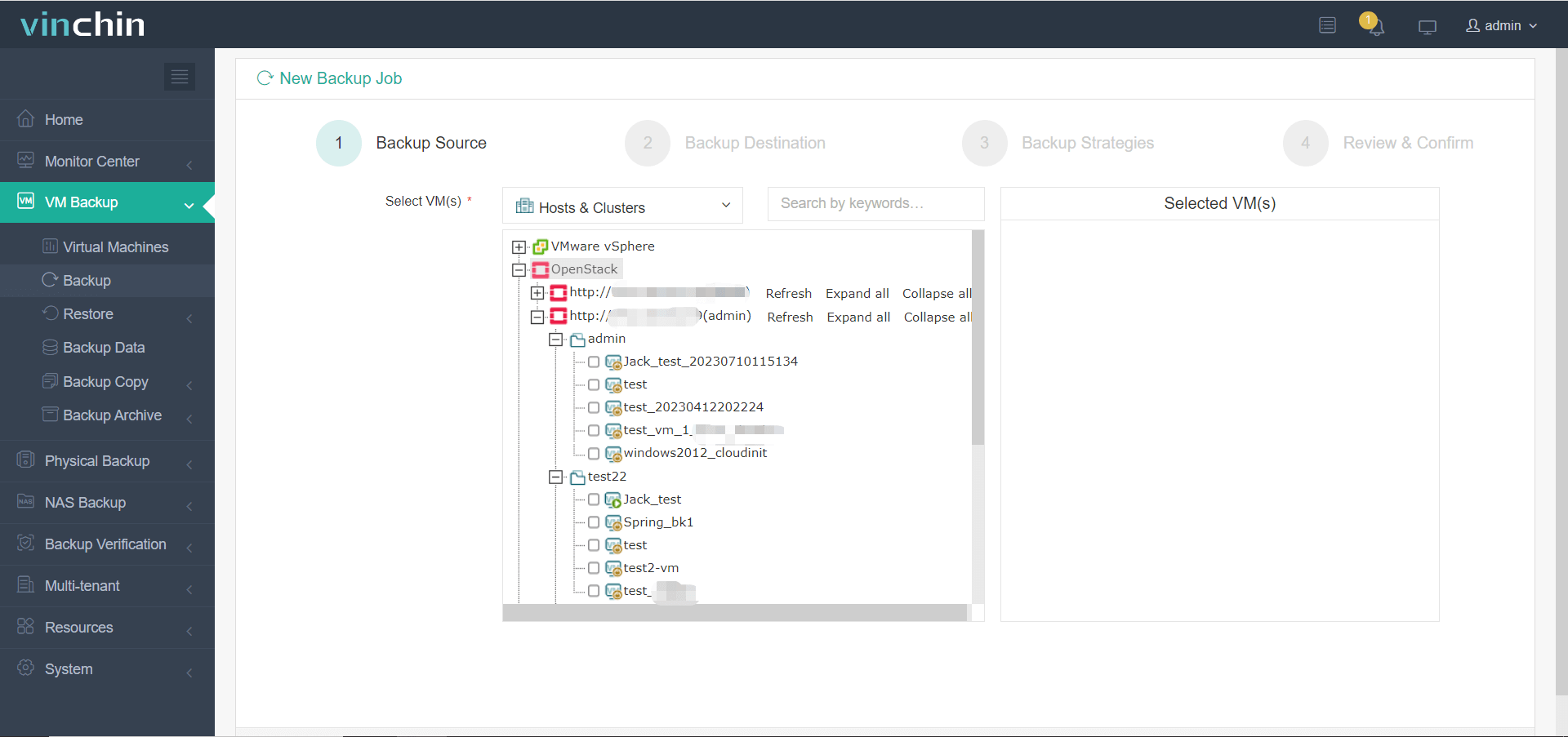
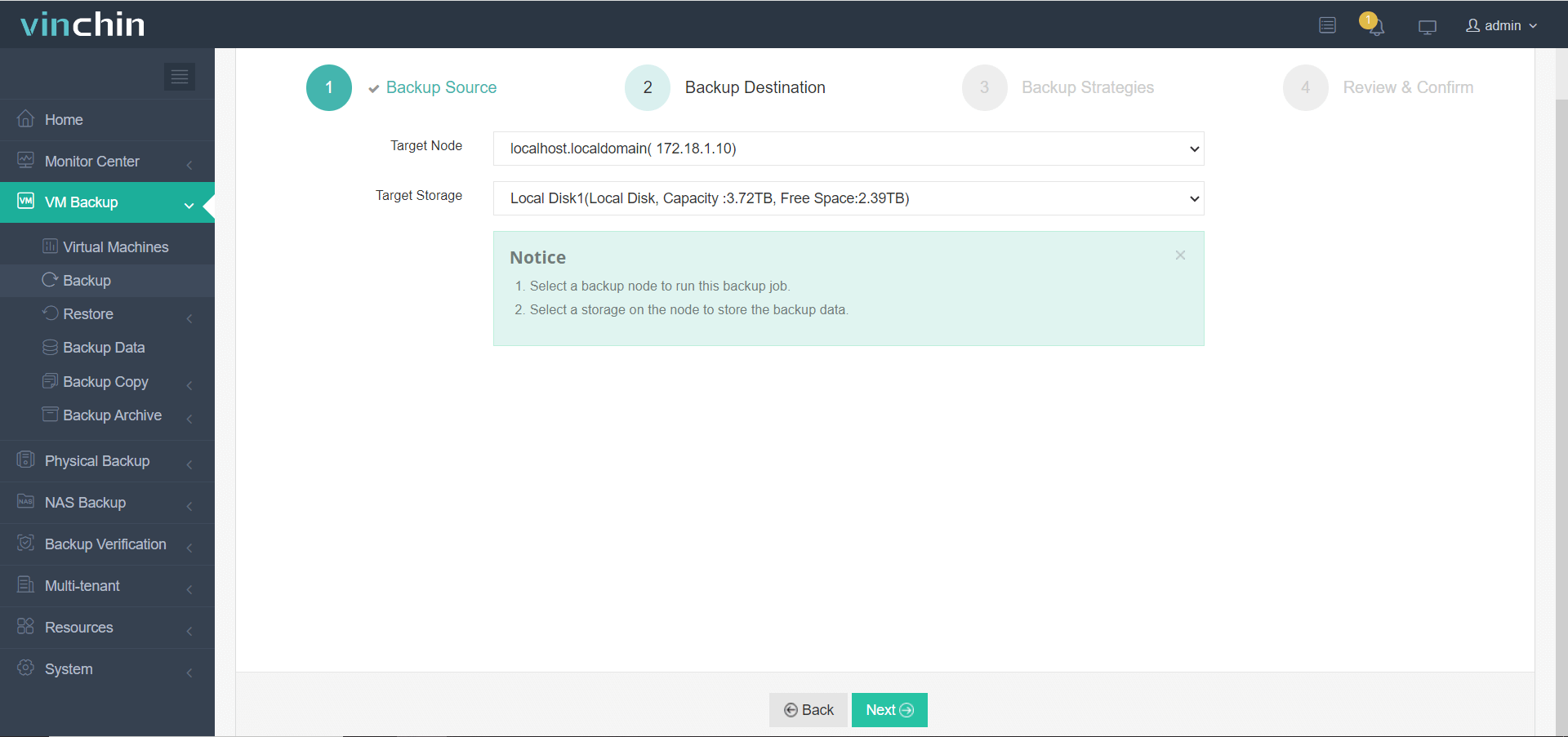
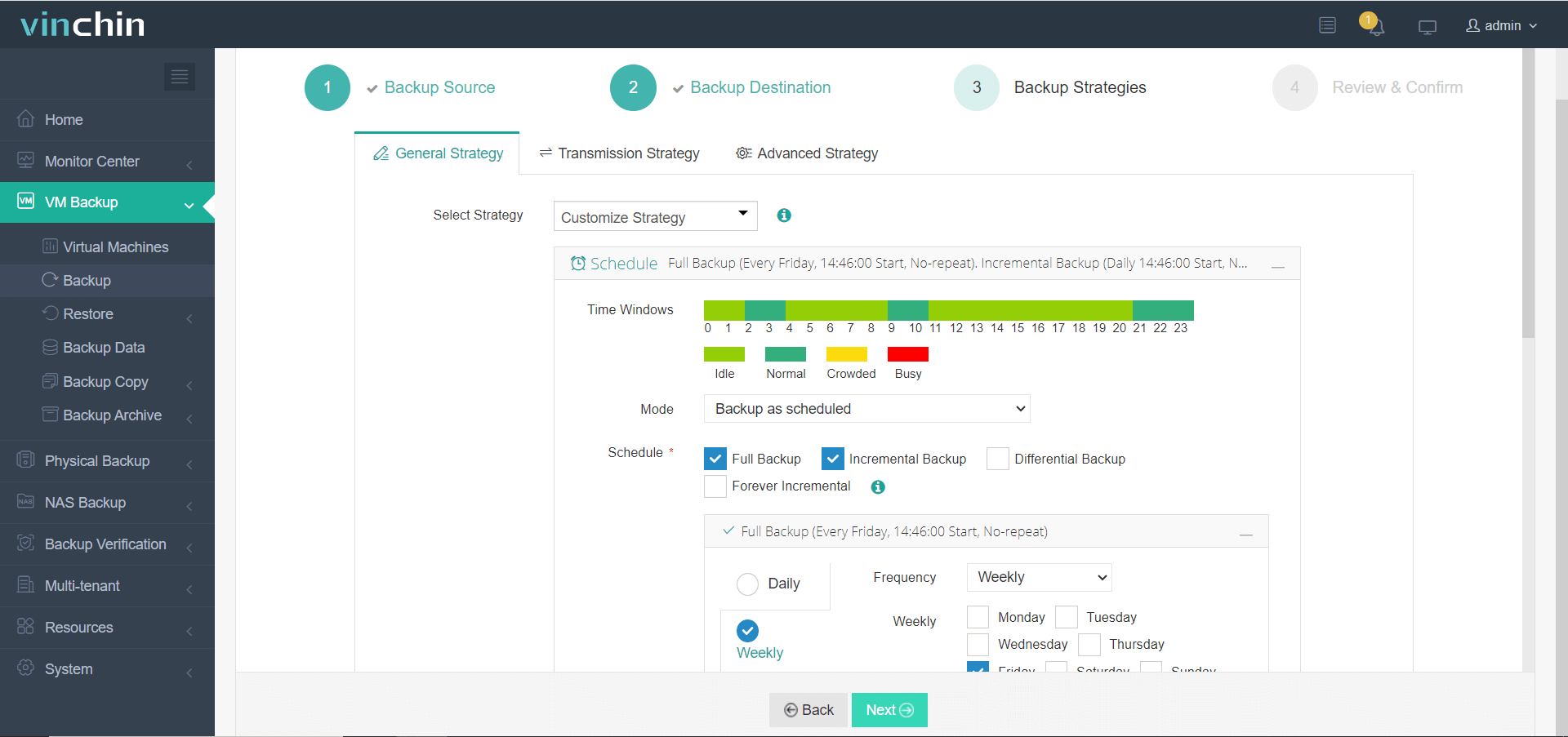
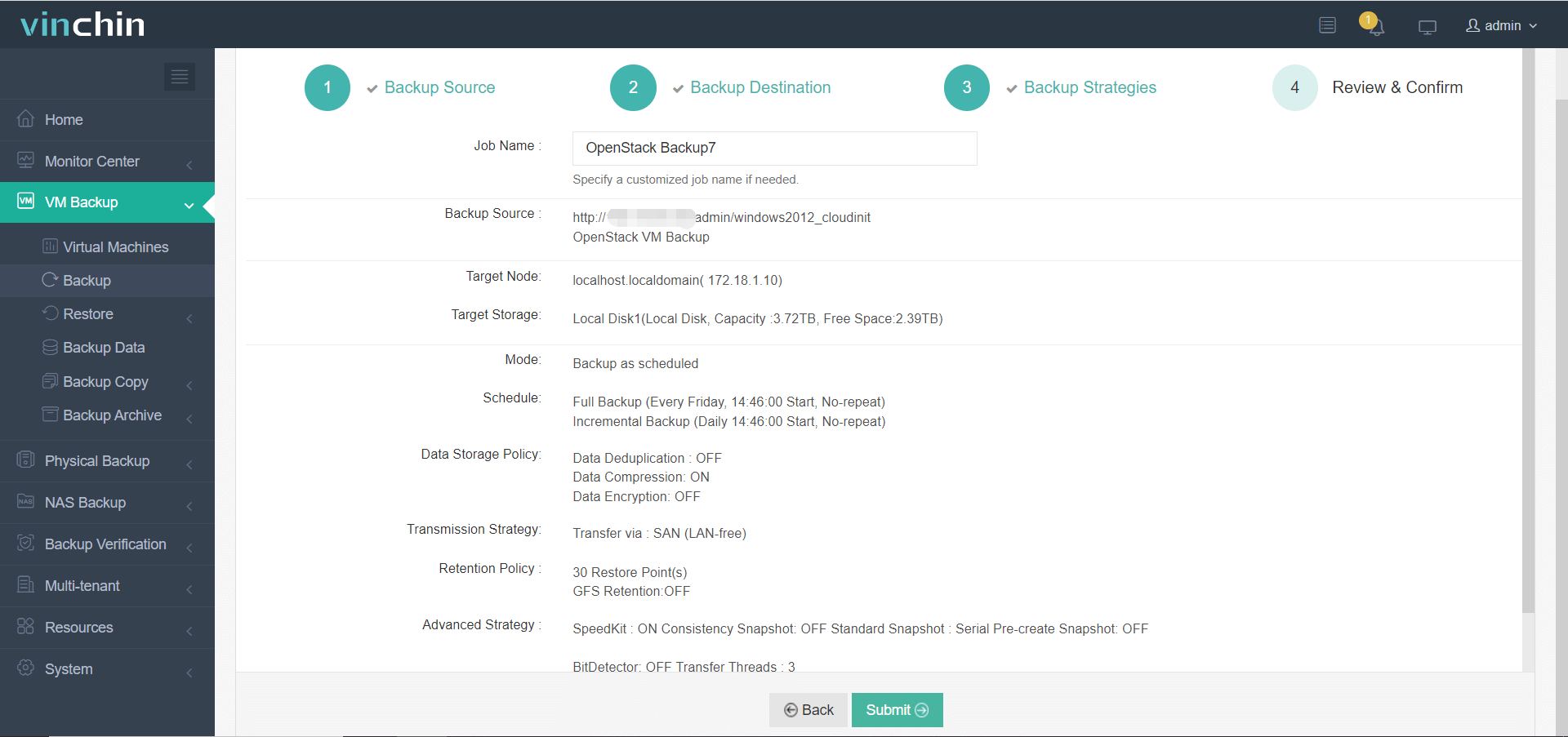
The intuitive web console makes protecting your environment straightforward:
Step 1: Select the OpenStack VM to back up
Step 2: Choose the backup storage
Step 3: Configure the backup strategy
Step 4: Submit the job
Recognized globally by thousands of customers with top industry ratings—try Vinchin Backup & Recovery free for 60 days now!
Best OpenStack Backup Software FAQs
Q1: Why is console integration important in OpenStack backup tools?
It enables centralized management aligned with rapid infrastructure changes—including those driven by infrastructure-as-code practices common in CI/CD pipelines—which reduces errors while improving efficiency throughout automated workflows.
Q2: Does native integration impact scalability?
Yes. Native integration allows seamless scaling as new workloads are automatically protected without manual configuration steps slowing down growth cycles typical in modern clouds.
Q3: How does console integration support compliance?
It ensures consistent application of retention policies across all assets while providing unified audit logs required by standards such as ISO 27001 or SOC 2—which demand traceable evidence of ongoing data protection activities throughout complex infrastructures.
Q4: Can integrated solutions reduce operational risk?
Absolutely. They minimize manual steps that often lead to missed backups or failed restores.
Conclusion
Deep virtualization console integration brings reliable enterprise data protection within reach—reducing risk while ensuring operational resilience across complex cloud environments.









