Backing up virtual machines (VMs) in H3C CAS or UIS environments is a critical task for any enterprise that values data protection without sacrificing system speed. The best backup software uses agentless technology, incremental backups powered by Change Block Tracking (CBT), and application-aware consistency. These features allow you to safeguard your workloads while keeping production systems responsive.
Agentless backups mean there is no need to install extra software inside every VM. This reduces CPU load and memory usage across your infrastructure. Incremental backups using CBT ensure only changed data blocks are transferred after the first full backup—saving time, bandwidth, and storage space. Application-aware backups capture consistent states of running databases or services without stopping them.
Efficient backup processes help organizations meet service level agreements (SLAs), avoid regulatory penalties from downtime or data loss, and keep users happy by maintaining fast response times during business hours. According to IDC research, unplanned downtime can cost enterprises thousands of dollars per minute. Choosing a solution that minimizes performance impact is essential for both IT stability and business continuity.
Why Minimal Impact Backup Matters in Enterprise Environments?
Minimal-impact backups protect vital business data while allowing daily operations to continue smoothly. Enterprises cannot afford slowdowns caused by inefficient backup processes.
● Business Continuity Risks: Poorly optimized backup solutions can cause noticeable VM lag or even outages during busy periods. This leads to lost productivity as employees wait for systems to respond.
● Financial Consequences: Missed transactions due to slow applications can result in direct revenue loss. A study by IDC found that just one hour of downtime costs large businesses over $100,000 on average.
● Compliance Exposure: Many industries require strict uptime guarantees for regulatory compliance. If backups disrupt operations or cause missed SLAs, organizations may face fines or legal action.
● User Experience: Customers expect fast service at all times. Even brief delays during peak hours can frustrate users enough to switch providers.
By focusing on minimal-impact solutions, enterprises reduce these risks while ensuring reliable recoveries when needed most.
How To Choose The Best H3C CAS/UIS Backup Solution for Minimal Impact on Production VM Performance?
Selecting an effective backup solution means prioritizing technologies that lower resource consumption during backup windows while still delivering reliable protection.
Agentless Architecture eliminates the need for installing agents inside each VM. This approach avoids extra CPU cycles and memory overhead within production workloads—keeping applications running at peak efficiency throughout the process.
Change Block Tracking (CBT) & Incremental Forever strategies ensure only modified data blocks are backed up after the initial full copy. This reduces network traffic between hosts and storage devices while minimizing disk I/O load on shared resources—a key factor in preventing bottlenecks during large-scale operations.
Application-Consistent Snapshots enable safe backups of live databases or transactional systems without pausing services. Consistency ensures quick restores with zero corruption risk—even under heavy load conditions common in enterprise environments.
Scalability allows your chosen solution to grow alongside your infrastructure—adding more VMs should not increase overhead disproportionately or degrade performance elsewhere in your environment.
Scheduling & Throttling Controls let administrators run jobs outside peak hours when possible; throttling limits how much bandwidth or disk I/O a job consumes so it never starves other workloads sharing those resources. Proper throttling prevents I/O contention on shared storage arrays—a frequent source of latency spikes during intensive operations.
By evaluating these features closely before deployment, you ensure smooth day-to-day operations even as your virtual environment expands over time.
H3C CAS/UIS Native Backup Capabilities and Their Impact
H3C's built-in module—often called "CAS Backup"—offers basic full, incremental, and differential VM protection managed through its main console. It uses agentless technology so you do not need additional software inside guest operating systems—a benefit for small deployments with fewer than three VMs or less than 1 TB total data volume.
For small setups like branch offices or test labs where demand is low, this native tool works efficiently with little impact on host resources such as CPU utilization or network throughput. However, as environments scale up—with dozens of VMs running mission-critical apps—the built-in module may struggle:
Resource contention becomes apparent when multiple jobs run simultaneously; disk queues lengthen as several VMs compete for access; network saturation occurs if many large incrementals transfer at once; job completion times increase noticeably compared to specialized solutions designed for high concurrency scenarios; advanced needs like deduplication/compression are missing; granular file-level restore options are limited; compliance reporting tools may be insufficient for regulated industries requiring detailed audit trails.
For larger deployments needing advanced controls—or integration into broader disaster recovery workflows—H3C UIS supports open APIs so third-party appliances can supplement native capabilities seamlessly within existing management frameworks.
How H3C CAS/UIS Backup Methods Affect Production VM Performance?
Backup methods directly influence how much strain is placed on production workloads during protection tasks. Each method offers distinct trade-offs between speed, reliability, hardware requirements—and overall impact on daily operations.
Method 1: Storage Replication-Based Disaster Recovery
This approach leverages synchronous or asynchronous replication between underlying storage arrays rather than relying solely on hypervisor-level snapshots or guest OS agents. Synchronous replication writes every change instantly across both primary and secondary sites—ensuring zero Recovery Point Objective (RPO) but potentially introducing write latency if network distances are significant due to round-trip acknowledgment requirements from both ends before committing transactions locally.
Minimal impact arises because replication happens entirely at the storage layer: no additional CPU cycles are consumed inside guest VMs themselves; memory usage remains stable regardless of workload intensity above the hypervisor stack; application servers see little difference except possibly increased write latency under synchronous modes if WAN links become congested.
Best suited for organizations with robust SAN/NAS infrastructure already supporting high-throughput connections—and where strict RPO/RTO targets must be met regardless of cost.
Method 2: Disk Backup-Based Disaster Recovery
Disk-based DR relies on lightweight clients installed within each protected server instance (physical or virtual). These agents monitor file system changes continuously then transmit deltas back toward centralized repositories according to defined schedules.
While modern clients minimize their footprint using efficient algorithms—and support incremental forever models—they still consume some local CPU/memory especially during initial seeding phases when entire disks must be scanned/copied out-of-band from normal IO flows.
With careful scheduling plus aggressive use of incremental/differential techniques post-seed phase however—even large environments can keep operational disruption low: jobs run overnight/off-hours wherever possible; bandwidth throttling ensures DR traffic never saturates uplinks needed by real-time applications.
This method excels where heterogeneous platforms coexist—or where direct array-to-array replication isn’t feasible due either to budget constraints or lack of compatible hardware endpoints.
Both approaches offer flexible scheduling options including manual triggers (for ad hoc testing), automated recurring plans (for compliance), plus non-disruptive failover/failback routines tested regularly without interrupting live user sessions.
Vinchin Backup & Recovery: Enterprise-Grade Protection for H3C CAS / UIS
For enterprises seeking comprehensive protection with minimal production impact in H3C CAS / UIS environments, Vinchin Backup & Recovery delivers robust results across more than 15 mainstream virtualization platforms—including prioritized support for H3C CAS / UIS itself alongside VMware, Hyper-V, Proxmox, oVirt, OLVM, RHV, XCP-ng, XenServer, OpenStack, ZStack and others. Vinchin Backup & Recovery provides agentless architecture tailored specifically for virtual machine environments like H3C CAS / UIS and integrates advanced features such as Change Block Tracking-based incrementals and LAN-free backup capability where supported. Among its extensive toolkit are application-consistent backups ensuring database integrity under heavy loads; LAN-free backup reducing network congestion; deduplication/compression optimizing storage use; granular restore enabling precise recovery down to file level; and scheduled/throttled jobs that prevent resource contention even at scale—all designed so routine protection never slows down core business processes.
The intuitive Vinchin web console makes operation straightforward:
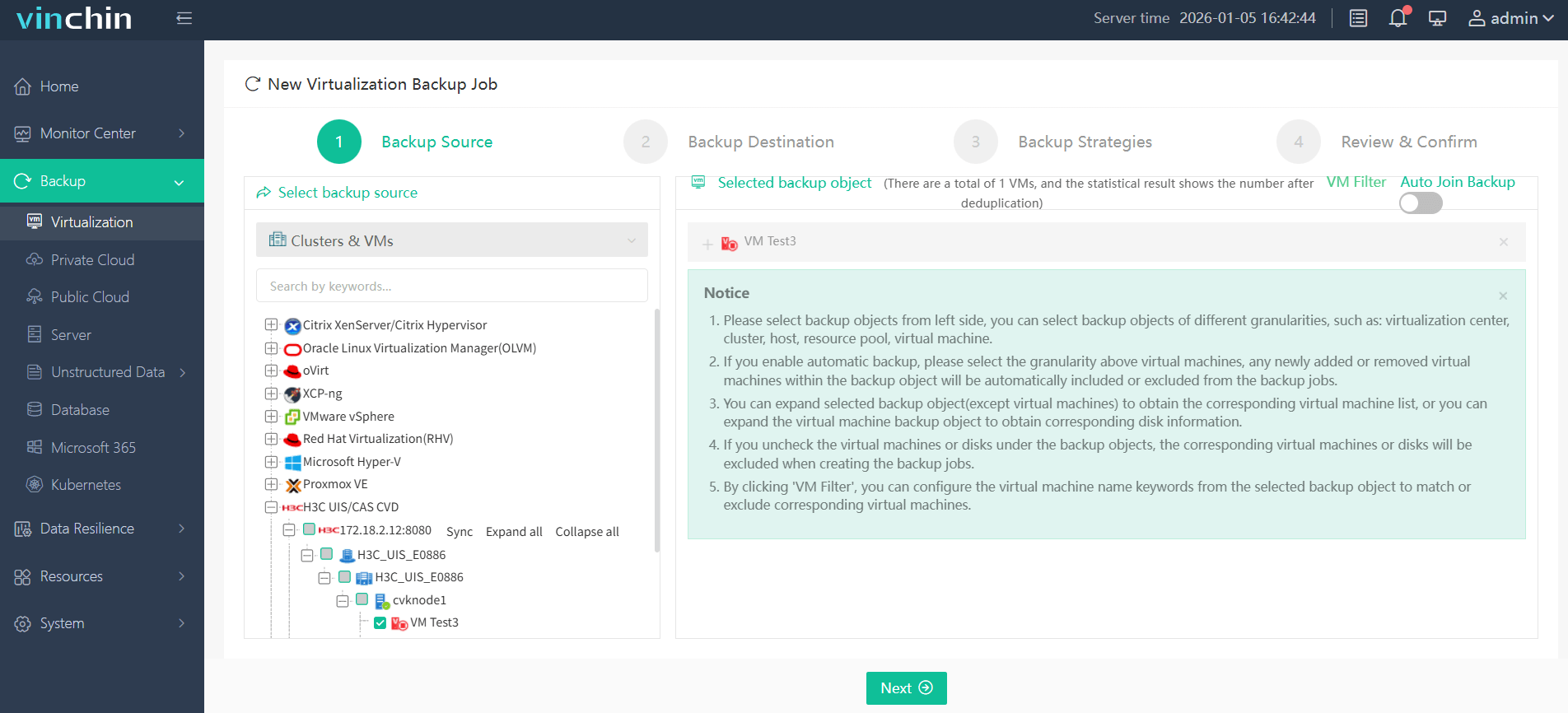
Step 1: Select the H3C CAS/UIS VM to back up;
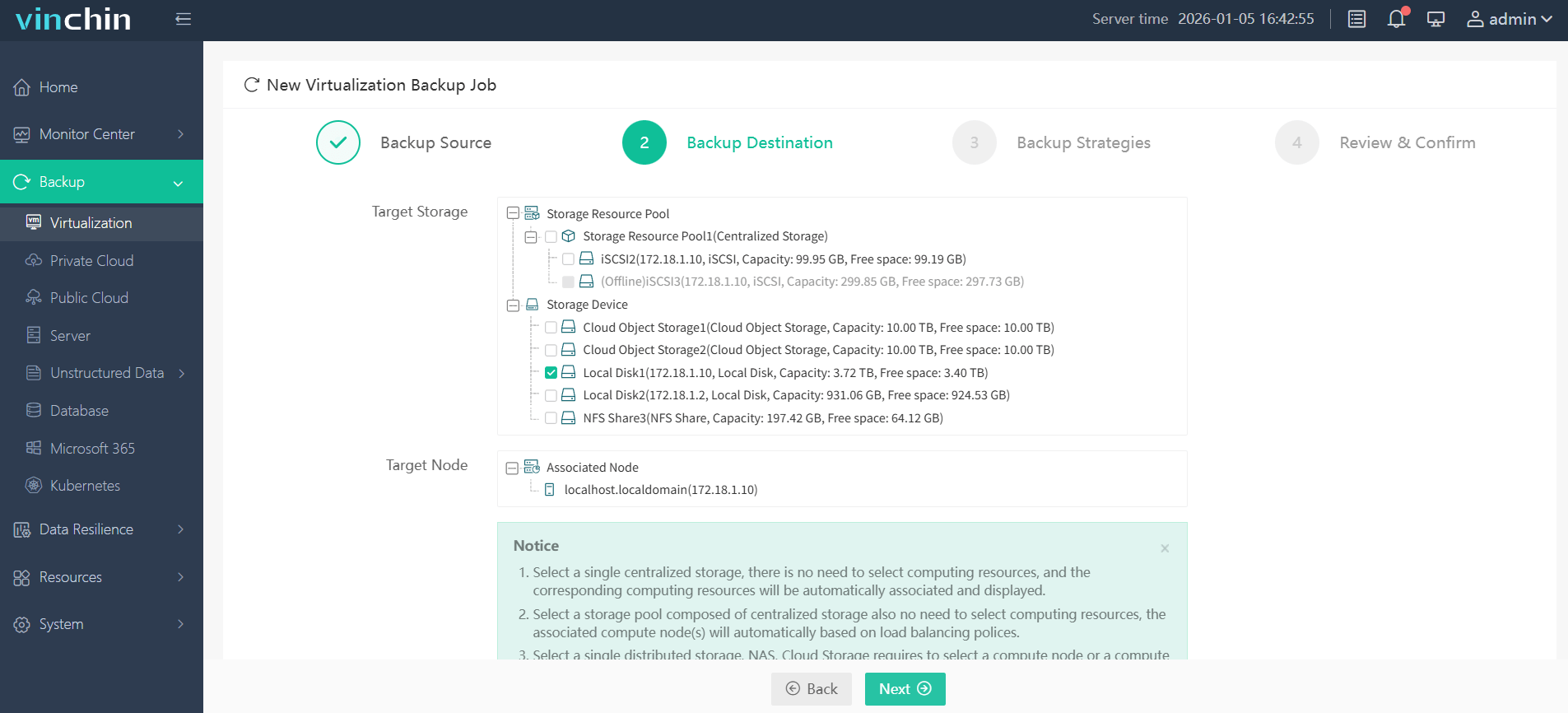
Step 2: Choose the target storage location;
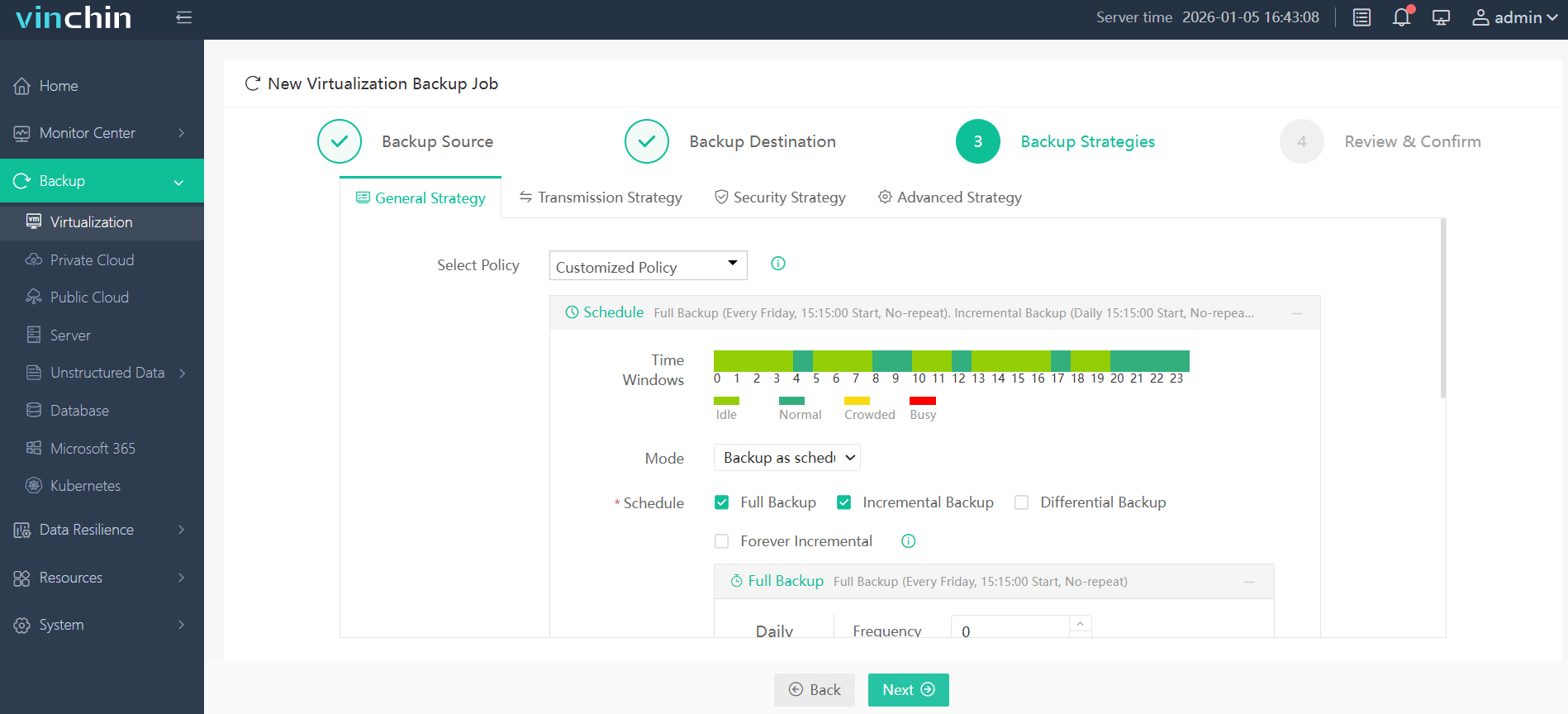
Step 3: Configure your preferred backup strategy (schedule/frequency/policies);
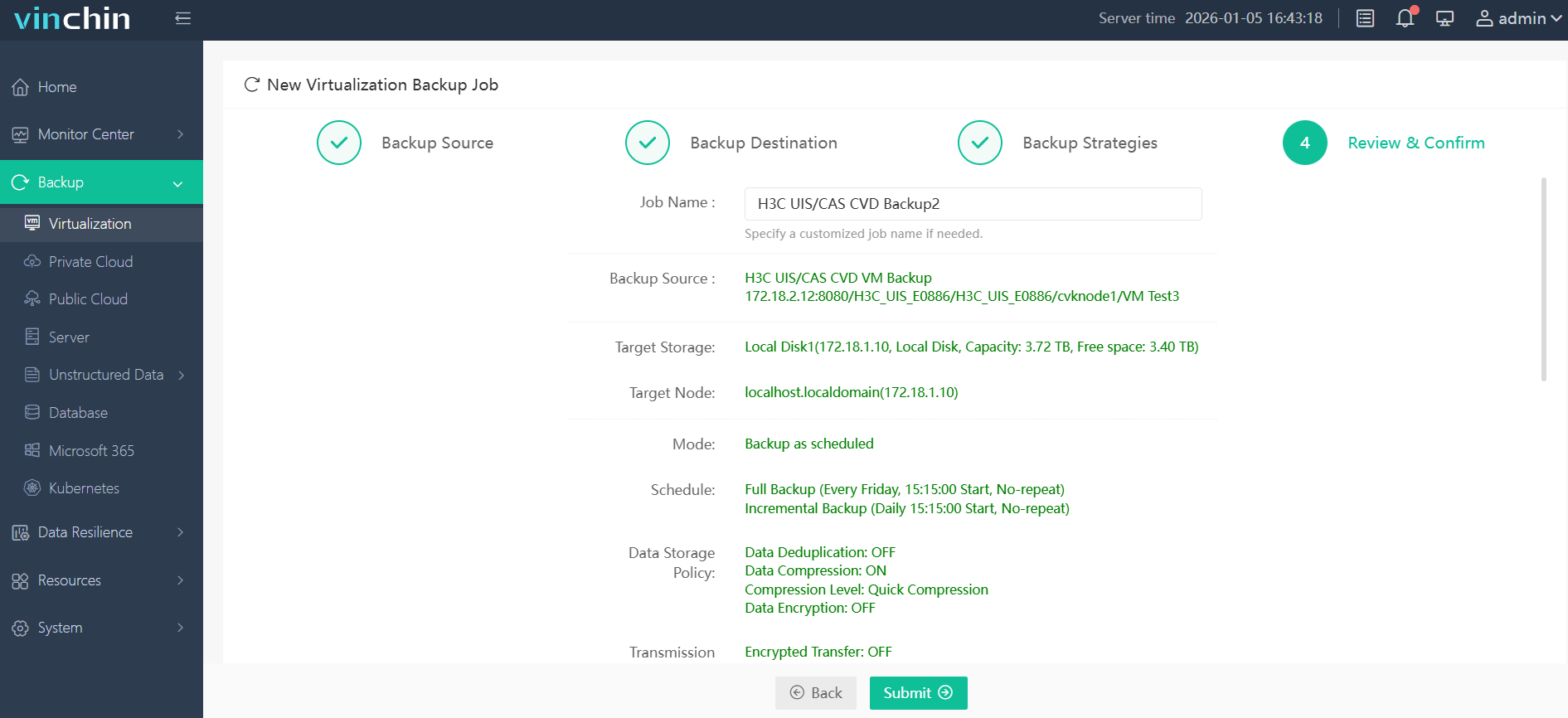
Step 4: Submit the job with a single click—ensuring consistent protection with minimal effort required from IT staff.
Recognized globally among enterprise customers with top industry ratings,Vinchin Backup & Recovery offers a fully featured 60-day free trial—click below to experience leading-edge virtual machine protection firsthand!
Best H3C CAS / UIS Backup Software FAQs
Q1: How does agentless backup reduce VM performance impact?
Agentless backup avoids installing software inside each virtual machine which keeps CPU/memory usage low throughout operation windows eliminating conflicts/disruption with active production apps/services.
Q2: Is application consistency supported without downtime?
Yes advanced solutions leverage snapshot technologies ensuring consistent state capture even while apps/databases remain online so there’s no need ever pause core services just before/during scheduled jobs.
Q3: Can the solution scale as our virtual environment grows?
Modern architectures support distributed components/load balancing allowing seamless expansion across clusters/sites maintaining low overhead regardless how many VMs get added over time.
Q4: What safeguards exist against failed/incomplete backups?
Common safeguards include checksum verification routines after every job automated integrity tests regular reporting immediate alerts upon failure—all helping catch/correct issues long before restore events occur.
Conclusion
Choosing agentless incremental technology ensures smooth operations even during heavy workloads—enterprise-grade tools like Vinchin deliver proven protection with minimal disruption every day.









