With the rapid development of virtualization technology, VMware ESXi has become the preferred virtualization platform for many enterprises and individual users due to its efficiency and powerful features.
For companies and individuals with limited budgets or those trying virtualization for the first time, VMware offers a free version—ESXi Free Version. While this version provides some basic ESXi functionalities, it also comes with certain limitations that suit users with different needs.
This article will introduce the concept, main features, and limitations of the ESXi Free Version, helping you decide whether it fits your use case.
What Is VMware ESXi Free Version?
ESXi Free Version is a basic virtualization platform released by VMware, allowing users to install and run it at no cost. Compared to the paid version, vSphere, ESXi Free Version offers limited functionality but still meets basic virtualization needs. It supports the creation and management of virtual machines, efficiently utilizes physical hardware resources for resource allocation, and is suitable for test environments, development environments, and production environments of small to medium-sized businesses.
Note: After Broadcom acquires VMware, the ESXi free version is removed from the official website so as long as you get the installation package and license somehow, you can’t get any official support. Many ESXi free users think Proxmox is a good alternative so you can also try it.
Limitations of ESXi Free Version
Although the ESXi Free Version excels in many aspects, it also has some limitations, particularly for enterprise users who may find it insufficient for high-level needs. The main limitations include:
1. Lack of Vcenter Server Support
ESXi Free Version cannot integrate with vCenter Server. vCenter Server is the core management tool for VMware, helping administrators centrally manage multiple ESXi hosts. Without vCenter support, users can only manage each ESXi host individually, without unified management and monitoring.
2. No Vmotion and Distributed Resource Scheduler (Drs) Support
vMotion allows the live migration of virtual machines to another host without disrupting business operations, and DRS can automatically balance virtual machine resources. ESXi Free Version does not support these features, which is a significant drawback for production environments that require high availability and load balancing.
3. Limited Technical Support
Users of ESXi Free Version can only rely on VMware community forums and online resources to resolve issues. Official technical support is only available for paid versions. For enterprises with higher technical support needs, ESXi Free Version may not be suitable.
4. No Advanced Storage Features
ESXi Free Version does not support VMware’s advanced storage features such as Storage vMotion and VMFS (VMware Virtual File System) shared storage. This can be a limitation for large enterprises that require efficient storage management.
5. Performance and Resource Limitations
While the ESXi Free Version supports running multiple virtual machines, it has certain hardware resource limitations for individual hosts. For example, the free version does not support virtual machines with more than 8 vCPUs, and the memory limit per host is relatively low. This can be a bottleneck for virtualization environments that require high performance.
6. No API Access / Limited Automation Support
ESXi Free Version disables most APIs (such as vSphere API access), which means it cannot be fully integrated with third-party backup tools, monitoring systems, or automation platforms. This is one of the biggest limitations in real production environments because many enterprise backup solutions rely on API access to perform agentless backups.
7. No Backup Integration for Enterprise Solutions
Due to API limitations, many professional backup software solutions cannot directly integrate with the free version of ESXi for automated backup or snapshot management. This means that enterprise users typically have to perform backups manually, which increases operational complexity and risk.
8. No High Availability (HA) Support
If a host fails, virtual machines will not automatically restart on another host. This is a significant drawback for environments that require business continuity.
9. No Fault Tolerance (FT)
Fault Tolerance is not available in the free version. FT provides real-time mirroring protection, ensuring zero-downtime operation in the event of a host failure, which is critical for financial and mission-critical systems.
10. No Centralized Monitoring & Advanced Logging
Since it is not possible to connect to vCenter, the full monitoring system cannot be utilized, resulting in:
Inability to perform centralized performance analysis
Inability to use advanced alerting mechanisms
Limited log management capabilities
This leads to lower efficiency for the operations team.
Overall, ESXi Free Version is suitable for learning, testing, and small-scale environments. However, it lacks essential enterprise features such as centralized management, high availability, automation support, and advanced storage capabilities, making it less ideal for production workloads.
How to backup ESXi with Vinchin?
For enterprise environments, basic platform features are not enough. Organizations need centralized backup management, automated protection policies, fast recovery capabilities, and reliable disaster recovery to minimize downtime and data loss risks. Considering all the needs above, it’s recommended to upgrade to a more professional backup and recovery solution.
Vinchin Backup & Recovery is a comprehensive, agentless data protection solution designed for modern virtualized infrastructures. It supports multiple platforms, including VMware, Hyper-V, Proxmox, and other mainstream virtualization environments.
Vinchin helps enterprises meet real-world IT requirements with features such as automated backup scheduling, centralized management, flexible recovery options (file-level and full VM restore), and disaster recovery capabilities. With streamlined operations and high reliability, it enables organizations to protect critical workloads efficiently while reducing management complexity and operational risk.
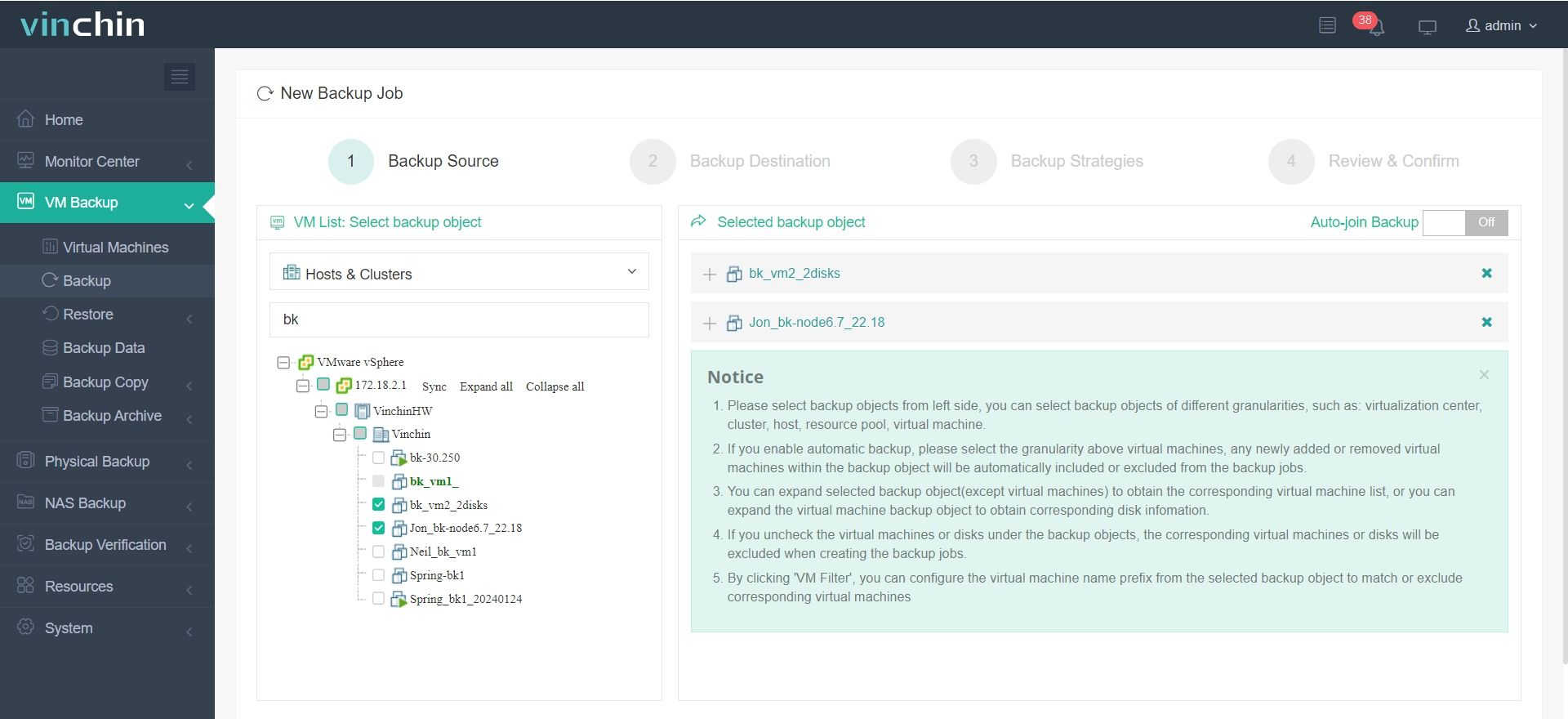
It is very simple to use and you just need 4 steps to create a backup job for VMs.
1. Navigate to VM Backup>Backup, select the ESXI VMs as the backup source from the expanded list.
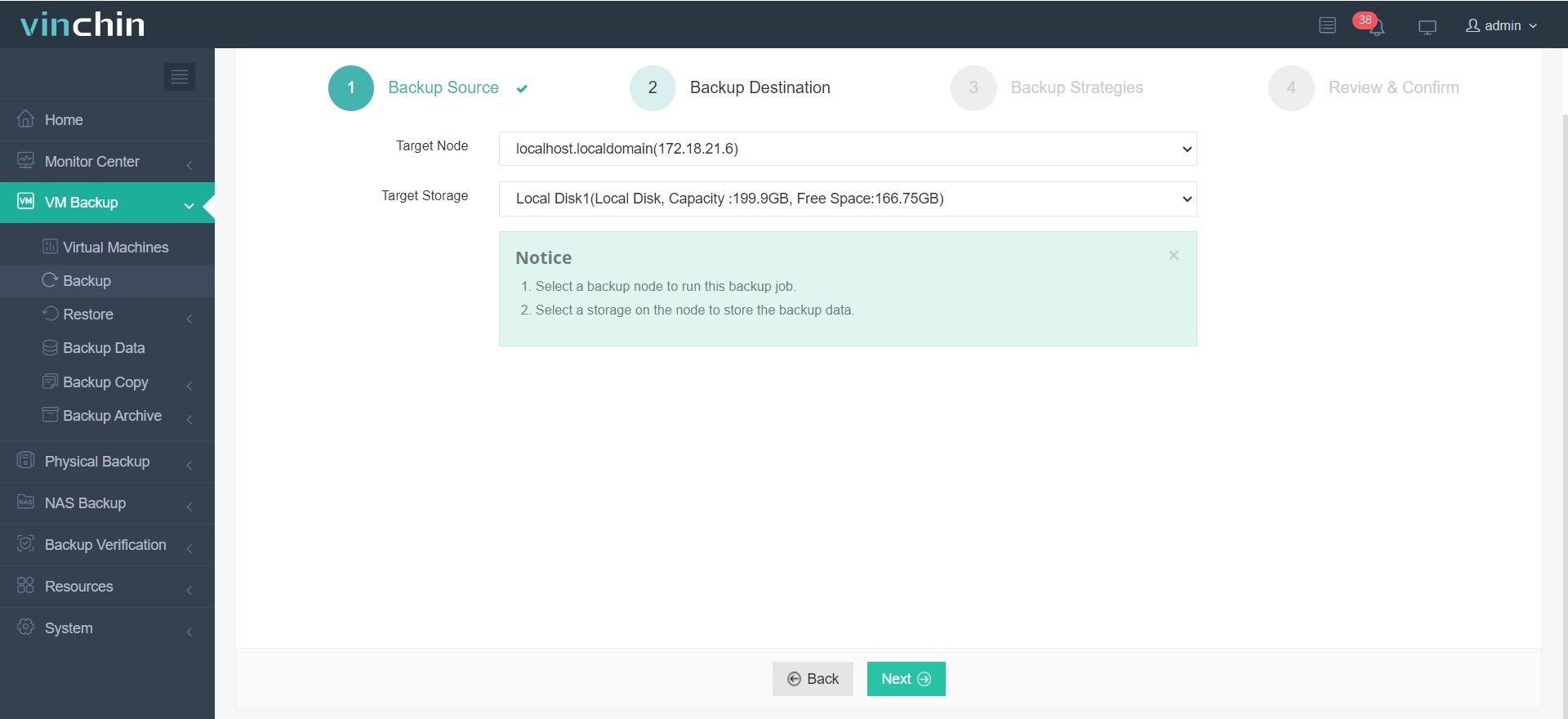
2. Then, select the backup destination you target at and configure the nodes.
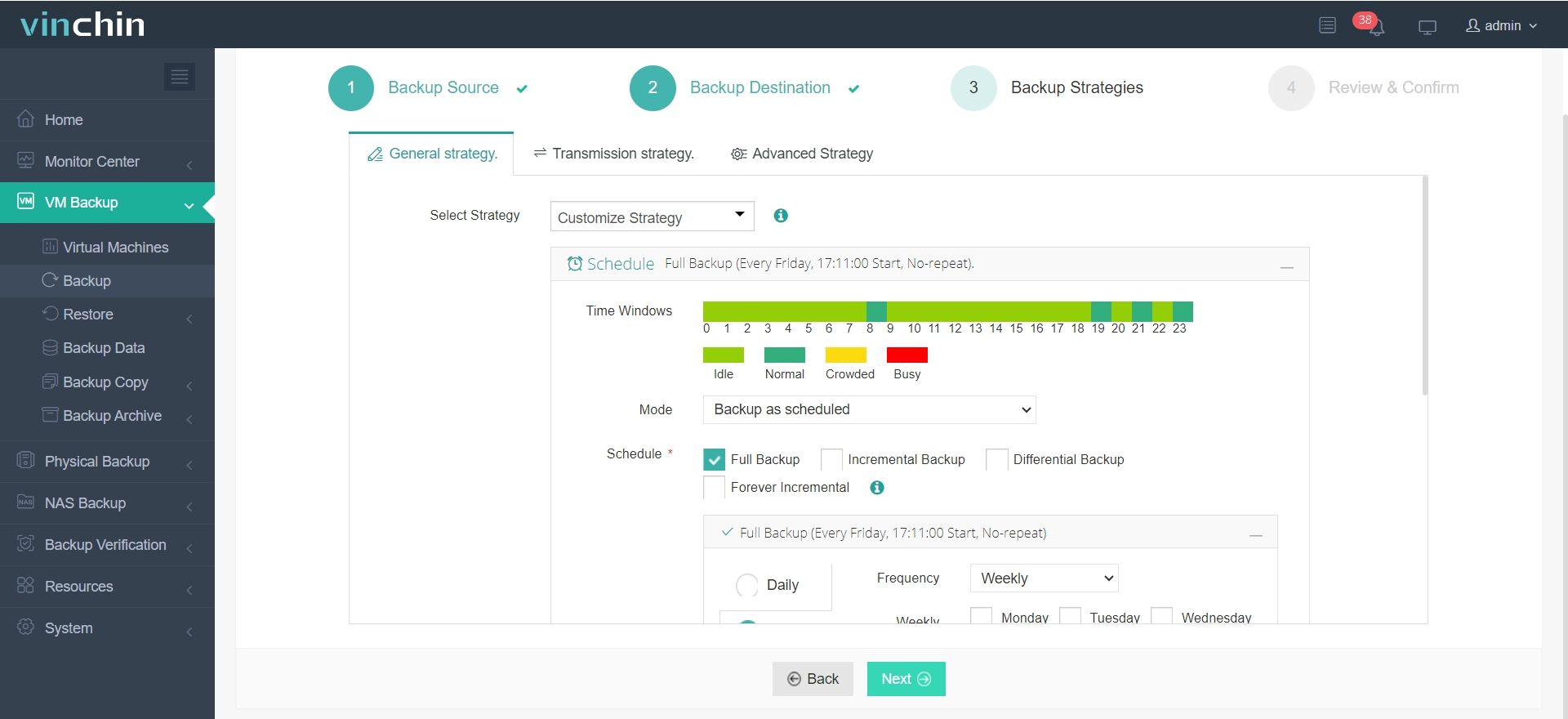
3. Customize the backup strategies, including time window, mode, schedule tailored to your needs.
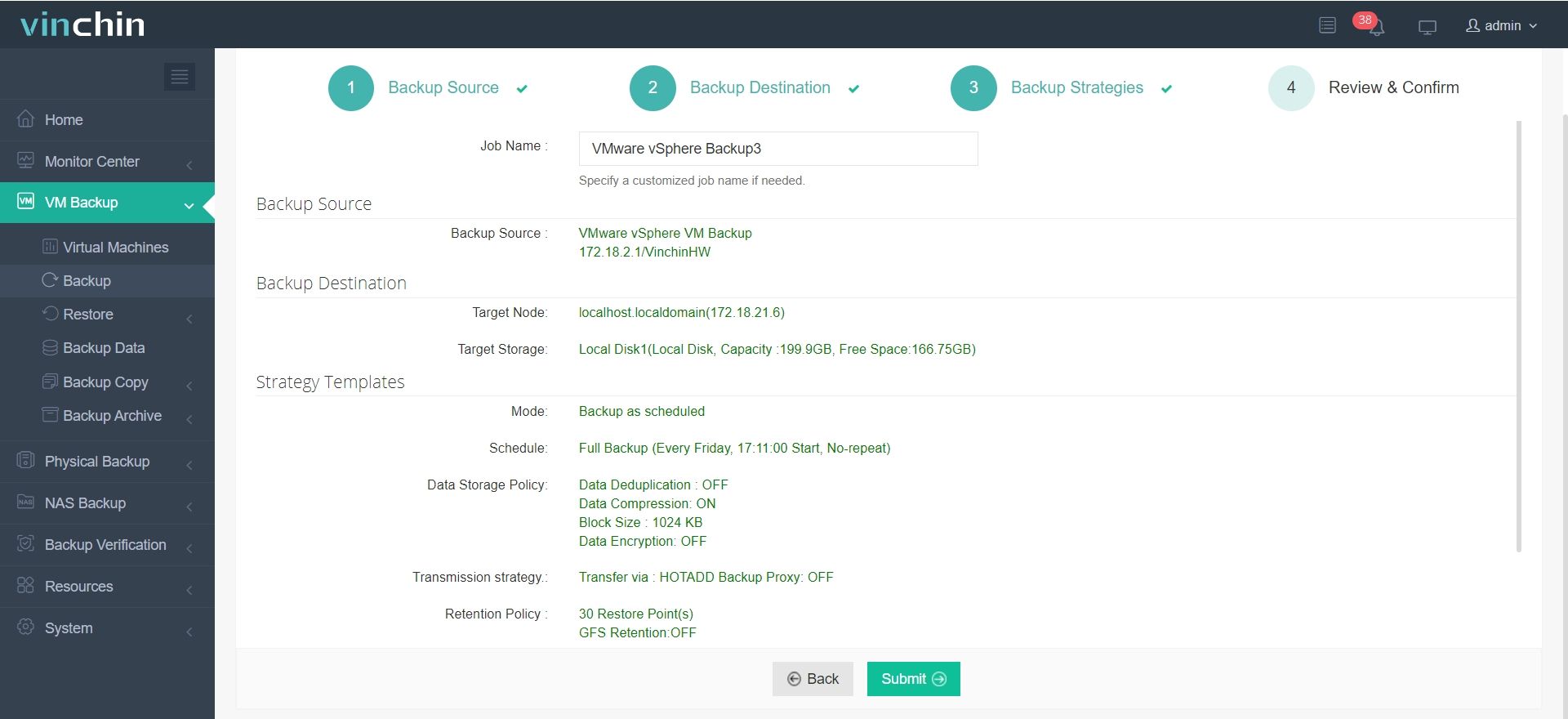
4. Finally, name the job and review all the details; click Submit once you confirmed the backup task.
Vinchin is chosen by thousands of companies to protect business data and you can also start a 60-day full-featured free trial to test it in you environment. Just click the button bellow to get the installation package.
ESXi free version FAQs
1. Can you use ESXi Free Version for a production environment?
ESXi Free Version is suitable for small-scale or non-critical production environments, such as development or test labs. For high-availability or enterprise-level production environments, the paid version (vSphere) is recommended.
2. Is ESXi Free Version suitable for virtualizing multiple hosts?
No, ESXi Free Version does not support vCenter Server, so managing multiple hosts in a centralized manner is not possible. You'll need to manage each host separately, making it challenging for large-scale environments.
3. Can you use ESXi Free Version for a home lab setup?
Yes, ESXi Free Version is ideal for home labs or personal projects where budget is a concern. It allows you to run virtual machines with basic functionality.
Conclusion
ESXi Free Version is an ideal entry-level virtualization solution for small businesses, developers, or individual users. It provides basic virtualization features that help users experience VMware’s technology without significant financial investment. However, due to issues such as lack of vCenter support, absence of advanced features, and resource limitations, the ESXi Free Version is not suitable for large enterprises or complex production environments that require high availability, load balancing, and comprehensive management. For users with higher demands, upgrading to the paid vSphere version will be a more appropriate choice.