Data growth in enterprise IT environments continues at an unprecedented pace. Virtualization platforms like Sangfor HCI drive efficiency but also create new challenges for data protection. According to Gartner’s 2023 Market Guide for Backup Solutions, organizations now demand backup strategies that minimize storage use while ensuring fast recovery. Incremental forever backup has become a best practice because it stores only changed data after an initial full backup. This method saves space and reduces costs without sacrificing reliability.
Sangfor HCI users need a solution that aligns with these trends. The right tool must deliver incremental forever backups natively—capturing every change while avoiding redundant data storage. Enterprises benefit from faster backups, lower infrastructure costs, and improved compliance readiness. Understanding which Sangfor HCI backup tool offers this capability is essential for IT leaders focused on operational excellence.
Why Incremental Forever Backup Matters in Enterprise Environments
Efficient data protection is vital for modern enterprises managing virtualized workloads at scale. Incremental forever backup addresses common pain points by reducing storage needs and streamlining recovery processes.
● Reduced Storage Consumption
Traditional full backup cycles quickly fill repositories with duplicate information. Incremental forever backup eliminates this waste by storing only new or changed blocks after the first full copy. For example, if you update just 5% of your VM’s data daily, only that small portion gets backed up each time. This approach keeps storage footprints manageable even as retention requirements grow.
● Faster Backup Windows
Backup operations can disrupt production systems if they run too long or consume excessive resources. With incremental forever methods, jobs complete much faster since they process far less data compared to repeated fulls. Enterprises can schedule frequent backups without impacting performance or extending maintenance windows—a key advantage when uptime matters most.
● Lower Total Cost of Ownership
Storage hardware remains one of the largest expenses in IT budgets. By minimizing redundant data through incremental backups and deduplication techniques, organizations delay costly capacity upgrades and reduce ongoing operational expenses related to power and cooling.
● Simplified Compliance Management
Many industries require long-term retention of business records or customer information for regulatory audits. Incremental forever backup enables organizations to keep more restore points over longer periods without ballooning storage needs—making it easier to meet legal mandates while maintaining efficient operations.
● Improved Recovery Reliability
Restoring from traditional tape-based or periodic full backups often means piecing together large datasets from multiple sources—a slow process prone to errors. With incremental forever chains managed by modern software solutions, every restore point is built logically from one initial full plus subsequent changes. This structure speeds up restores and increases confidence in successful recoveries during emergencies.
Incremental forever technology fits perfectly into large-scale virtual environments like Sangfor HCI where rapid change rates are common and downtime is unacceptable.
How To Choose The Best Sangfor HCI Backup Solution for Incremental Forever Backup
Selecting an effective Sangfor HCI backup solution requires careful evaluation against enterprise-grade criteria tailored for virtualized infrastructures.
Key selection criteria include:
● Native Support for Incremental Forever Backups
A robust solution must offer true incremental forever capabilities out-of-the-box—not just periodic incrementals mixed with scheduled fulls. Native support ensures all changes are tracked efficiently so you never store unnecessary duplicates or miss critical updates across your VMs.
● Reliable Point-in-Time Recovery
The ability to restore any VM state quickly—even from older restore points—is crucial when responding to incidents or meeting SLAs. Look for tools that reconstruct entire machines using optimized chains of incrementals plus one baseline image so you can recover confidently regardless of chain length or age.
● Scalable Architecture
Virtual environments expand rapidly as businesses grow or migrate workloads onto hyperconverged platforms like Sangfor HCI. Your chosen solution should scale seamlessly—adding nodes or increasing repository size without complex reconfiguration—to protect hundreds or thousands of VMs efficiently over time.
● Comprehensive Policy Management & Reporting
Enterprises need granular control over retention schedules, job frequency, encryption settings, and access permissions—all managed centrally through intuitive dashboards. Detailed reporting supports audit trails required by internal governance teams or external regulators so you always know what was protected when.
● Advanced Space-Saving Features
Deduplication compresses identical blocks across multiple VMs; compression further shrinks stored files; centralized management simplifies administration across distributed sites—all helping reduce network loads while maximizing available disk space within existing infrastructure investments.
Choosing wisely ensures your organization benefits from both immediate cost savings and long-term operational resilience as demands evolve.
Vinchin Backup & Recovery: Enterprise-Grade Protection for Sangfor HCI
For organizations seeking robust protection on Sangfor HCI, Vinchin Backup & Recovery delivers comprehensive enterprise-level VM backup across more than 15 mainstream virtualization platforms—including certified support for Sangfor HCI itself alongside VMware, Hyper-V, Proxmox, oVirt, OLVM, RHV, XCP-ng, XenServer, OpenStack, ZStack and others. On Sangfor HCI specifically, Vinchin Backup & Recovery provides powerful features such as incremental forever backup, advanced deduplication/compression technology, granular restore options down to file level within VMs, cloud/tape archiving capabilities for disaster recovery planning, and flexible scheduling policies—all designed to optimize both efficiency and security in demanding hybrid environments.
Backing up a Sangfor HCI VM with Vinchin Backup & Recovery is straightforward:
Step 1: Select the Sangfor HCI VM to back up

Step 2: Choose the backup storage
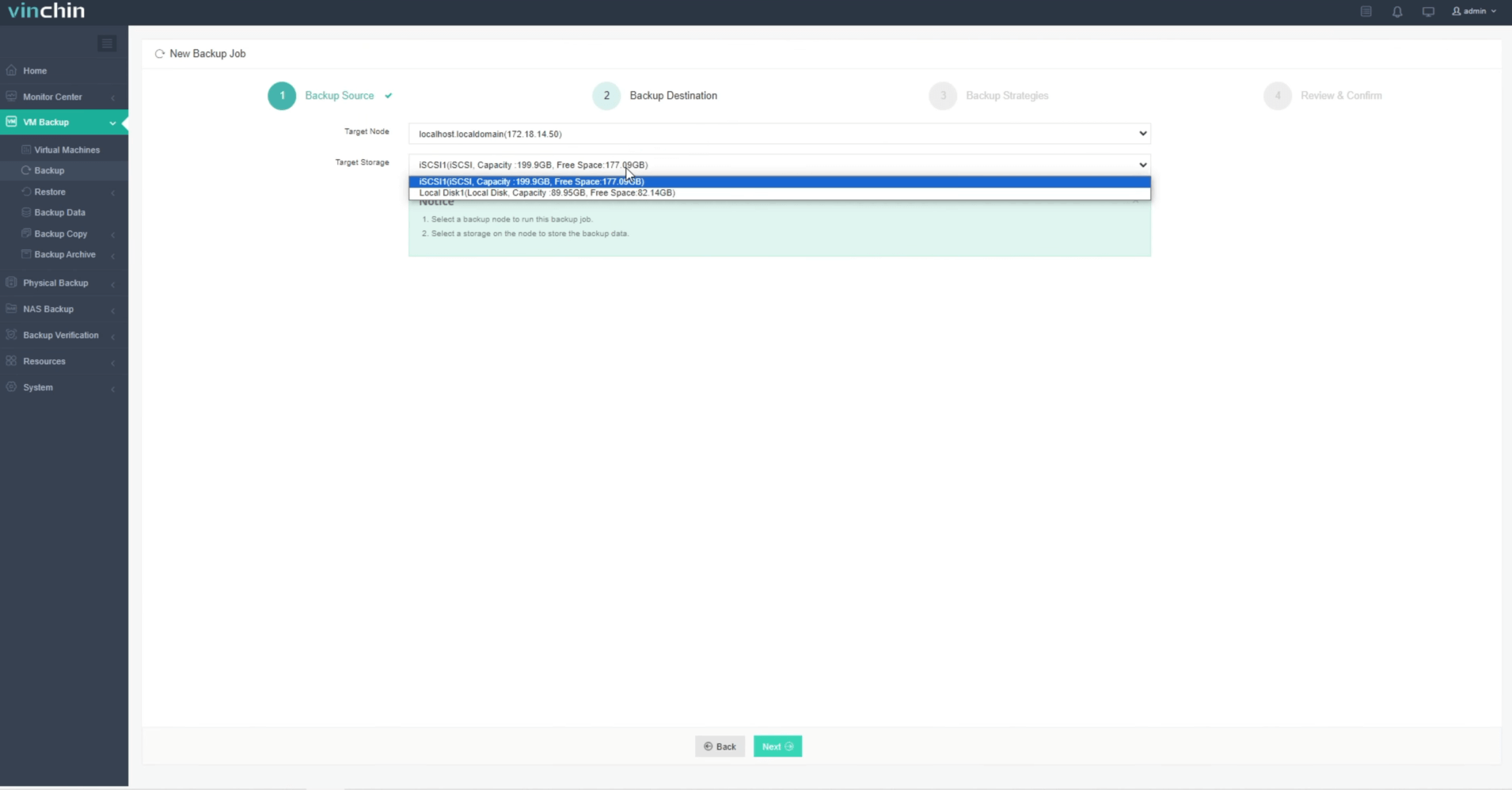
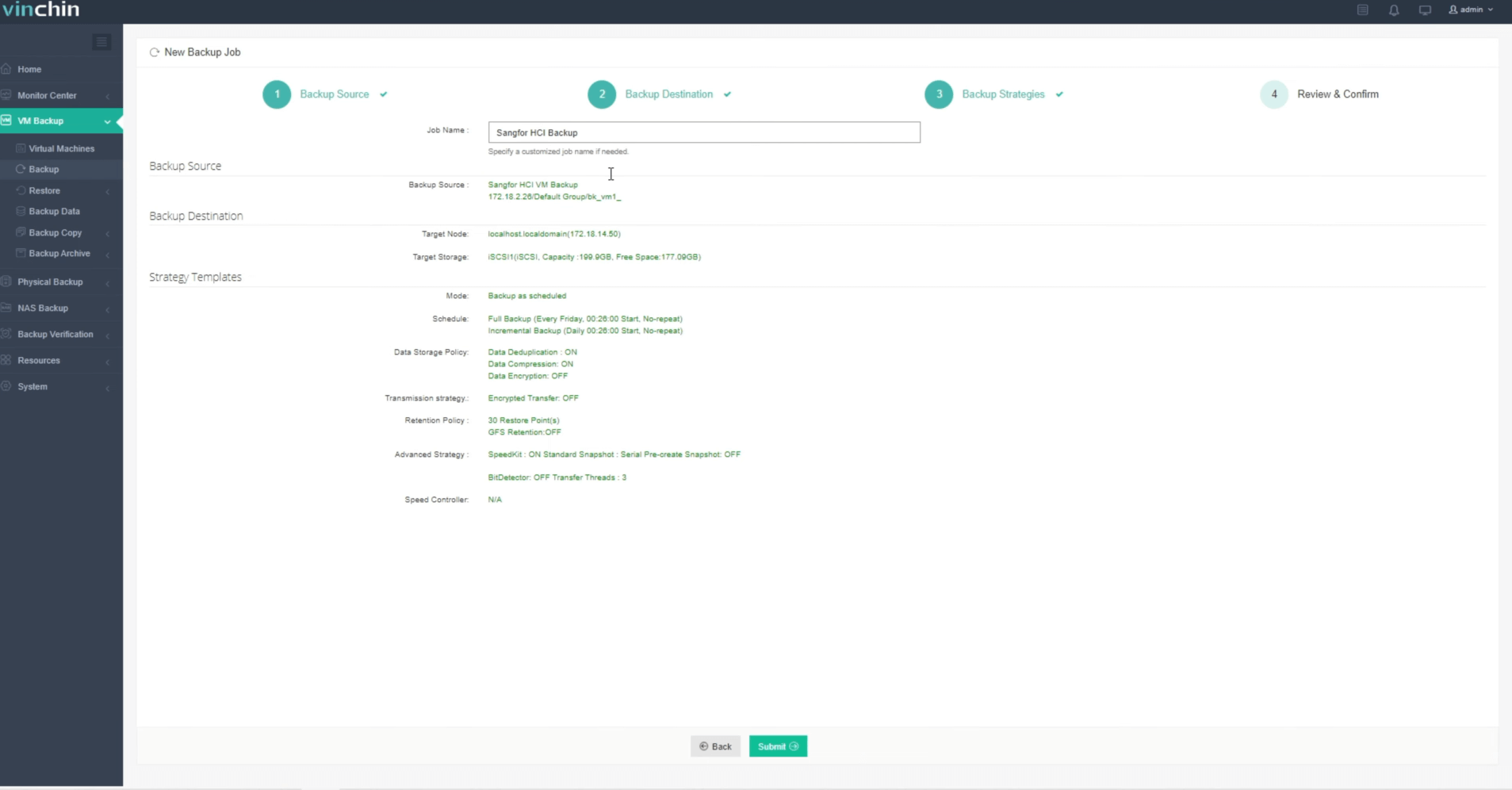
Step 3: Configure the backup strategy

Step 4: Submit the job
Recognized globally among enterprise customers with top industry ratings,Vinchin Backup & Recovery offers a fully featured 60-day free trial—click below to experience trusted data protection firsthand.
Best Sangfor HCI Backup Software FAQs
Q1: Does incremental forever backup impact restore speed?
No—enterprise solutions like Vinchin reconstruct restore points efficiently from incrementals without slowing down recovery times even when chains are long.
Q2: How does this method affect compliance?
Incremental forever enables long-term retention using less space while maintaining detailed audit trails through comprehensive reporting features built into leading solutions such as Vinchin's unified web console.
Q3: Is deduplication compatible with incremental forever backups?
Yes—deduplication works alongside incremental methods by removing redundant blocks across all increments which maximizes overall storage savings within your repository environment.
Q4: Can I scale protection as my environment grows?
Leading solutions allow seamless scaling via non-disruptive expansion such as adding new nodes without reconfiguring policies ensuring continuous protection during business growth.
Conclusion
An enterprise solution with true incremental forever capability improves operational efficiency while controlling costs—and boosts resilience against outages or loss events at scale.










