







Product: Vinchin Backup & Recovery
Version: V9.0, V8.1
KB Number: 200180
Last Modified: 2026-07-15 14:43:01
Discovered Version: V9.0
Question
Windows Server 2022 backup failed with [Error # 400093 Failed to stop CBT monitoring]
Answer
Root cause
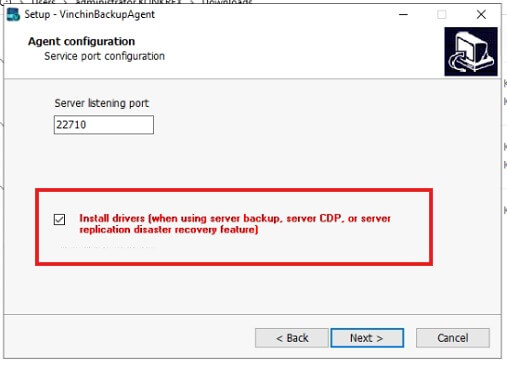
Didn't select install driver when installing Vinchin Agent.
Problem Details
When installing Vinchin Agent, the driver was not installed, resulting in:
-
CBT monitoring function not working properly.
-
Server backup failure (error # 400093).
-
Real-time backup function not available.
-
Inability to perform incremental backup operations.
-
Driver services winbdflt and winbdfltpanager are not installed.
Solution
Reinstall Agent and Download Drivers
Complete Agent reinstallation and driver installation process:
-
Verify driver installation status
-
Execute diagnostic commands again:
-
sc query winbdflt
-
sc query winbdfltproviderservice
-
Uninstall existing Agent
-
Uninstall Vinchin Agent.
-
If your server is Windows, you can do the uninstall by uninstalling the program.
-
If your server is Linux, please go to CLI and execute ./agent_uninstall to uninstall.
-
-
Reinstall Agent and install drivers
-
Download latest Vinchin Agent installation package.
-
Ensure "Install drivers" option is checked during installation.
-
-
-
Verify driver installation success
-
Execute diagnostic commands again:
-
sc query winbdflt
-
sc query winbdfltproviderservice
-
Test backup functionality
-
Run scheduled server backup test
-
Verify real-time backup functionality is normal
Notes
Driver installation importance
-
Must install drivers when installing Agent
-
Both scheduled server backup and real-time backup require drivers
-
Missing drivers will cause backup functionality to be unavailable
60-DAY FULL-FEATURED FREE TRIAL
- No credit card required
- Get started in 10 minutes