Are you searching for a reliable way to create an Oracle RMAN cold backup script? Many database administrators need a straightforward process to protect their Oracle databases—especially before upgrades or major changes. Cold backups, also called offline or consistent backups, offer a fundamental method for ensuring your data is safe and consistent at one point in time. In this article, we’ll explain what an Oracle RMAN cold backup is, walk through essential preparations, provide you with a practical script example, show how to automate it safely, and discuss how to test your backups for peace of mind.
Quick answer: An RMAN cold backup is a backup taken while the database is mounted but not open. The script shuts the database down with SHUTDOWN IMMEDIATE, starts it with STARTUP MOUNT, runs BACKUP AS COMPRESSED BACKUPSET DATABASE; and backs up the control file, then reopens the database with ALTER DATABASE OPEN;. Wrap it in a shell script that sets ORACLE_HOME and ORACLE_SID, checks that the database reopened, and schedule it with cron during a maintenance window.
What Is an Oracle RMAN Cold Backup?
A cold backup in Oracle means taking a snapshot when the database is not open for user access. The database must be shut down or started in the MOUNT state so that no changes occur during the backup process. This ensures all data files and control files are synchronized at the same System Change Number (SCN). After restoring from such a backup, you can open your database directly—no media recovery is needed unless you want to apply archived logs.
Why choose a cold backup? It’s often used when running in NOARCHIVELOG mode or before making significant changes like upgrades or migrations because it guarantees consistency without relying on archived redo logs. However, it does require downtime since users cannot connect while the operation runs.
| Cold (offline) backup | Hot (online) backup |
|
|---|
| Database state | Mounted, not open | Open |
| Downtime | Yes | No |
| Log mode | NOARCHIVELOG or ARCHIVELOG | ARCHIVELOG only |
| Consistency | Consistent; no recovery needed | Needs archived logs to recover |
| Typical use | NOARCHIVELOG databases, before upgrades or migrations | Production databases that must stay online |
Always use SHUTDOWN IMMEDIATE or SHUTDOWN NORMAL before a cold backup. After SHUTDOWN ABORT, the datafiles aren’t consistent, and RMAN refuses to back up a NOARCHIVELOG database in that state.
Prerequisites and Pre-Backup Checks
Before running any Oracle RMAN cold backup script, make sure your environment is ready for success.
First, check that there’s enough free space in your chosen backup directory—ideally more than the size of your entire database plus some room for logs and future growth. Next, check the database’s log mode with SELECT log_mode FROM v$database;. In NOARCHIVELOG mode, a cold backup is the only way to back up with RMAN; in ARCHIVELOG mode, you can also take online backups without downtime. Either way, plan the shutdown so applications disconnect cleanly.
Notify application owners about planned downtime well ahead of time so they can prepare accordingly—unexpected outages rarely go unnoticed! Review your RMAN configuration settings: set up retention policies using CONFIGURE RETENTION POLICY TO REDUNDANCY 2; if needed; enable control file autobackup (CONFIGURE CONTROLFILE AUTOBACKUP ON;) so you always have critical metadata available; consider configuring channels if backing up large databases across multiple disks.
Finally, verify that you have appropriate permissions on both source data files and target directories—the Oracle user should own these locations with read/write access granted as required.
Oracle RMAN Cold Backup Script Example
Let’s look at how to perform an effective cold backup using RMAN on Linux/Unix systems—a similar approach works on Windows too.
This sample shell script will:
1. Shut down the database safely using SHUTDOWN IMMEDIATE, which disconnects sessions quickly but rolls back uncommitted work.
2. Start up in MOUNT mode so only background processes run—no user connections allowed here.
3. Back up all data files along with current control files using compressed sets for storage efficiency.
4. Open up again for normal business operations once complete.
Here’s an improved version of such a script:
#!/bin/bash

export ORACLE_HOME=/u01/app/oracle/product/19.0.0/dbhome_1
export ORACLE_SID=ORCL
export PATH=$ORACLE_HOME/bin:$PATH

BACKUP_DIR=/u02/backup/orcl
LOG_FILE=$BACKUP_DIR/rman_cold_backup_$(date +%Y%m%d).log

mkdir -p $BACKUP_DIR

rman target / log=$LOG_FILE <<EOF
SHUTDOWN IMMEDIATE;
STARTUP MOUNT;
RUN {
  ALLOCATE CHANNEL c1 DEVICE TYPE DISK FORMAT '$BACKUP_DIR/%d_%U';
  BACKUP AS COMPRESSED BACKUPSET DATABASE;
  BACKUP CURRENT CONTROLFILE FORMAT '$BACKUP_DIR/cntrl_%d_%s_%p_%t';
  RELEASE CHANNEL c1;
}
ALTER DATABASE OPEN;
DELETE NOPROMPT OBSOLETE;
EXIT;
EOF
RC=$?

# Make sure the database is open even if the backup failed
STATUS=$(sqlplus -s / as sysdba <<EOF
set heading off feedback off
select open_mode from v\$database;
exit
EOF
)
if ! echo "$STATUS" | grep -q "READ WRITE"; then
  echo "Database not open after backup - opening it now at $(date)" | tee -a $LOG_FILE
  sqlplus -s / as sysdba <<EOF >> $LOG_FILE
alter database open;
exit
EOF
fi

if [ $RC -eq 0 ]; then
    echo "RMAN cold backup completed successfully at $(date)" >> $LOG_FILE
else
    echo "RMAN cold backup failed at $(date)" | tee -a $LOG_FILE
    # Optional: send alert email here using mailx or similar tool
fi

# Clean up old log files older than 30 days (optional)
find $BACKUP_DIR -name "rman_cold_backup_*.log" -mtime +30 -delete
exit $RC
What happens here? The script sets environment variables explicitly—a must when automating via cron jobs later—and defines clear paths for both backups and logs (including date stamps). It uses SHUTDOWN IMMEDIATE, which is generally safe but fast; if you prefer waiting until all sessions disconnect naturally (for less risk), swap this out for SHUTDOWN NORMAL instead.
If any RMAN command fails, for example because the backup disk is full, RMAN stops and the ALTER DATABASE OPEN line never runs. The check after the RMAN block catches this: it reads the database’s open mode and opens it if it’s still mounted, so a failed backup doesn’t turn into an outage. DELETE NOPROMPT OBSOLETE removes backups that your retention policy no longer needs.
The ALLOCATE CHANNEL command helps direct output neatly into timestamped files named after your SID (%d) plus unique identifiers (%U). Compressed sets save disk space without slowing restores much on modern hardware.
After completion—or failure—the script writes status messages into its log file so admins can review results easily later (or trigger alerts).
You may adjust naming conventions further by including hostnames or other details if managing many instances across servers—for example: FORMAT '$BACKUP_DIR/${HOSTNAME}_%d_%U'.
Always test scripts thoroughly outside production first!
How to Restore from an RMAN Cold Backup
Because the backup is consistent, restoring it doesn’t need archived logs:
RMAN> STARTUP FORCE NOMOUNT;
RMAN> RESTORE CONTROLFILE FROM AUTOBACKUP;
RMAN> ALTER DATABASE MOUNT;
RMAN> RESTORE DATABASE;
RMAN> RECOVER DATABASE NOREDO;
RMAN> ALTER DATABASE OPEN RESETLOGS;
If the current control files are intact, skip the control file restore and start with STARTUP FORCE MOUNT. All changes made after the backup are lost unless the database runs in ARCHIVELOG mode and you recover with the archived logs instead of NOREDO. For more detail, see how to back up and restore Oracle without ARCHIVELOG mode.
How to Automate Oracle RMAN Cold Backups?
Manual execution works fine occasionally—but most administrators want scheduled protection without late-night logins! Automation reduces human error while ensuring regular coverage even during holidays or busy periods.
On Linux/Unix systems use cron as follows:
First save your finished shell script somewhere secure (e.g., /home/oracle/rman_cold_backup.sh) then make it executable:
chmod +x /home/oracle/rman_cold_backup.sh
Next edit crontab under the correct user account by typing crontab -e. Add this line near others already present:
0 2 * * 0 /home/oracle/rman_cold_backup.sh
This schedules weekly Sunday morning runs at exactly 2:00 AM—a common maintenance window when fewest users are active.
Remember: cron jobs run with minimal environments! Always export necessary variables like ORACLE_HOME, ORACLE_SID, PATH, etc., inside every automated job—not just interactively—or else commands may fail silently due to missing context.
Let RMAN clean up old backups instead of deleting files with OS commands. The script above already runs DELETE NOPROMPT OBSOLETE;, which removes backups that are no longer needed under your retention policy (for example CONFIGURE RETENTION POLICY TO REDUNDANCY 2;) and keeps RMAN’s records accurate. Deleting backup files with find or rm leaves RMAN pointing at files that no longer exist.
If working under Windows instead use Task Scheduler: create a batch file wrapping similar logic then schedule according to local policy through its graphical interface (“Create Basic Task”).
Enterprise-Level Protection with Vinchin Backup & Recovery
Beyond manual scripting and native tools, organizations seeking robust enterprise protection should consider Vinchin Backup & Recovery—a professional solution designed specifically for comprehensive Oracle database protection alongside support for MySQL, SQL Server, MariaDB, PostgreSQL, PostgresPro, and TiDB environments. For Oracle workloads especially, Vinchin Backup & Recovery delivers advanced features such as incremental backup options and source-side compression alongside batch scheduling capabilities and flexible retention policies including GFS strategies—all helping streamline management while maximizing storage efficiency and compliance readiness.
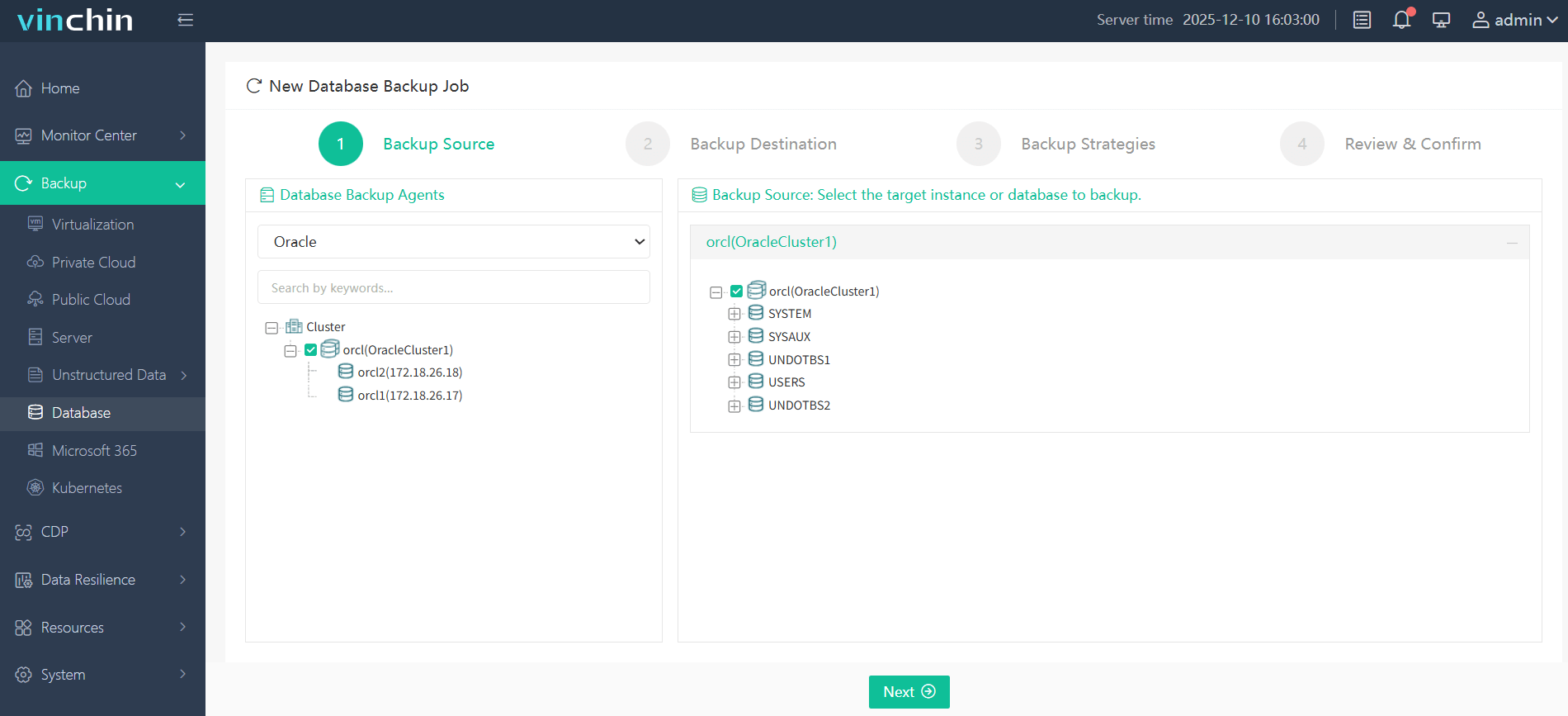
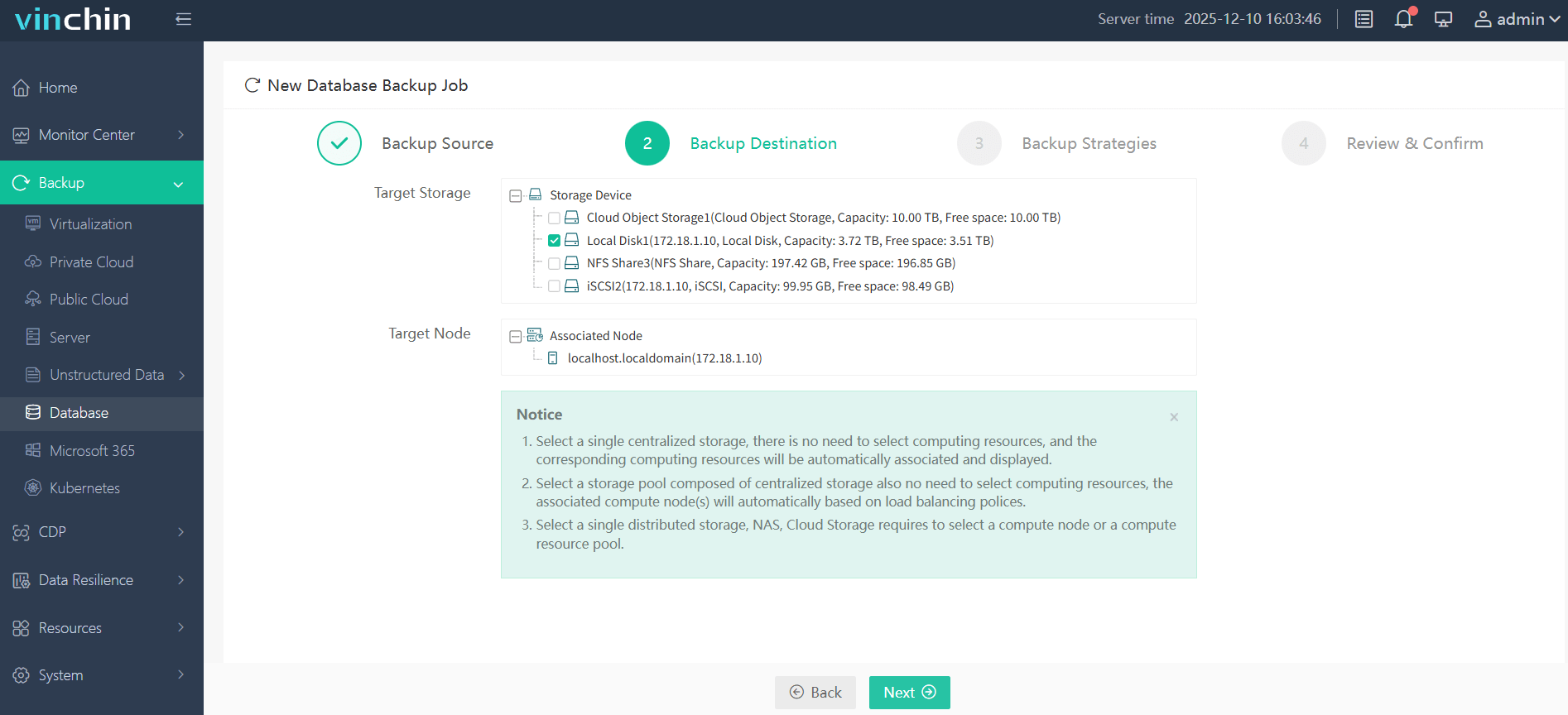
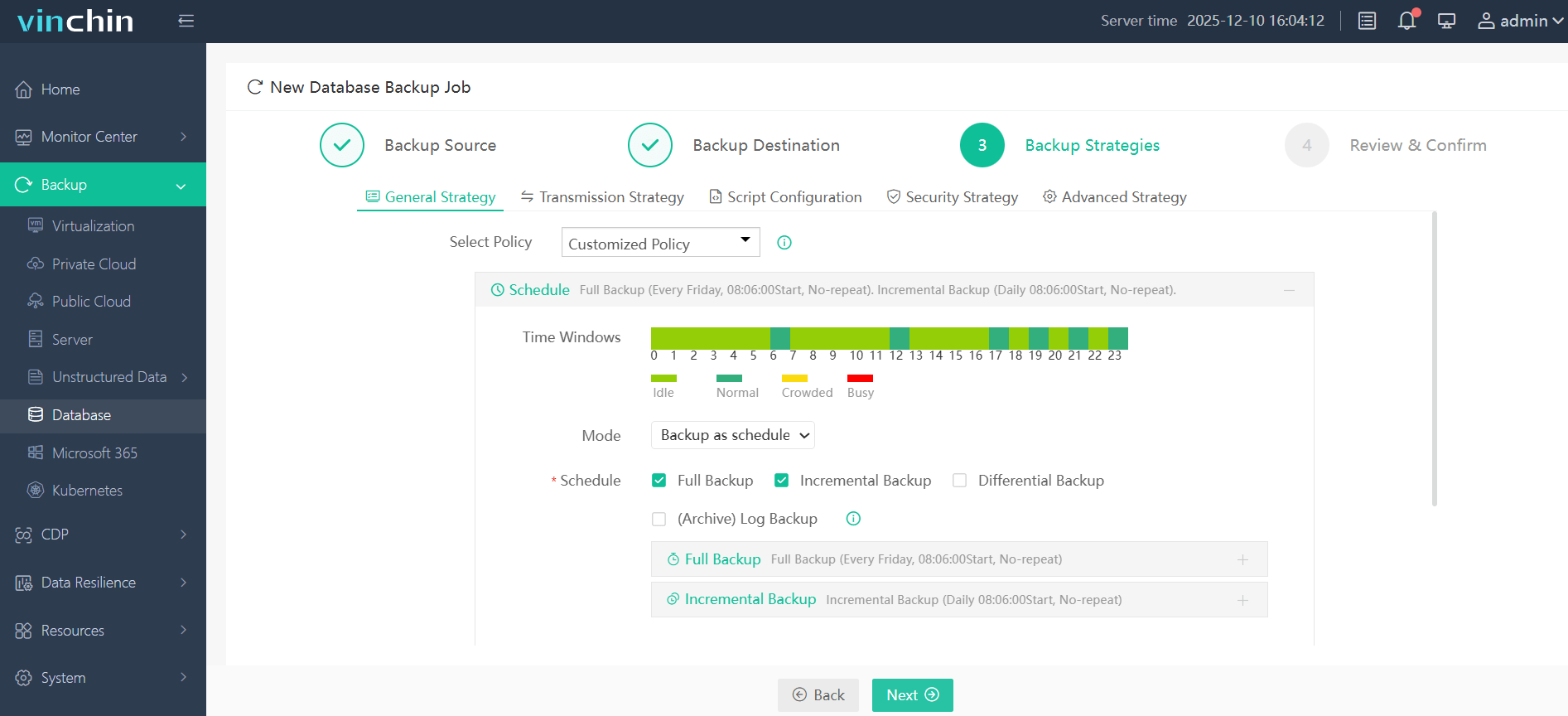
With Vinchin Backup & Recovery's intuitive web console interface, safeguarding your Oracle environment typically involves just four steps:
Step 1. Select the Oracle database to back up
Step 2. Choose the backup storage
Step 3. Define the backup strategy
Step 4. Submit the job
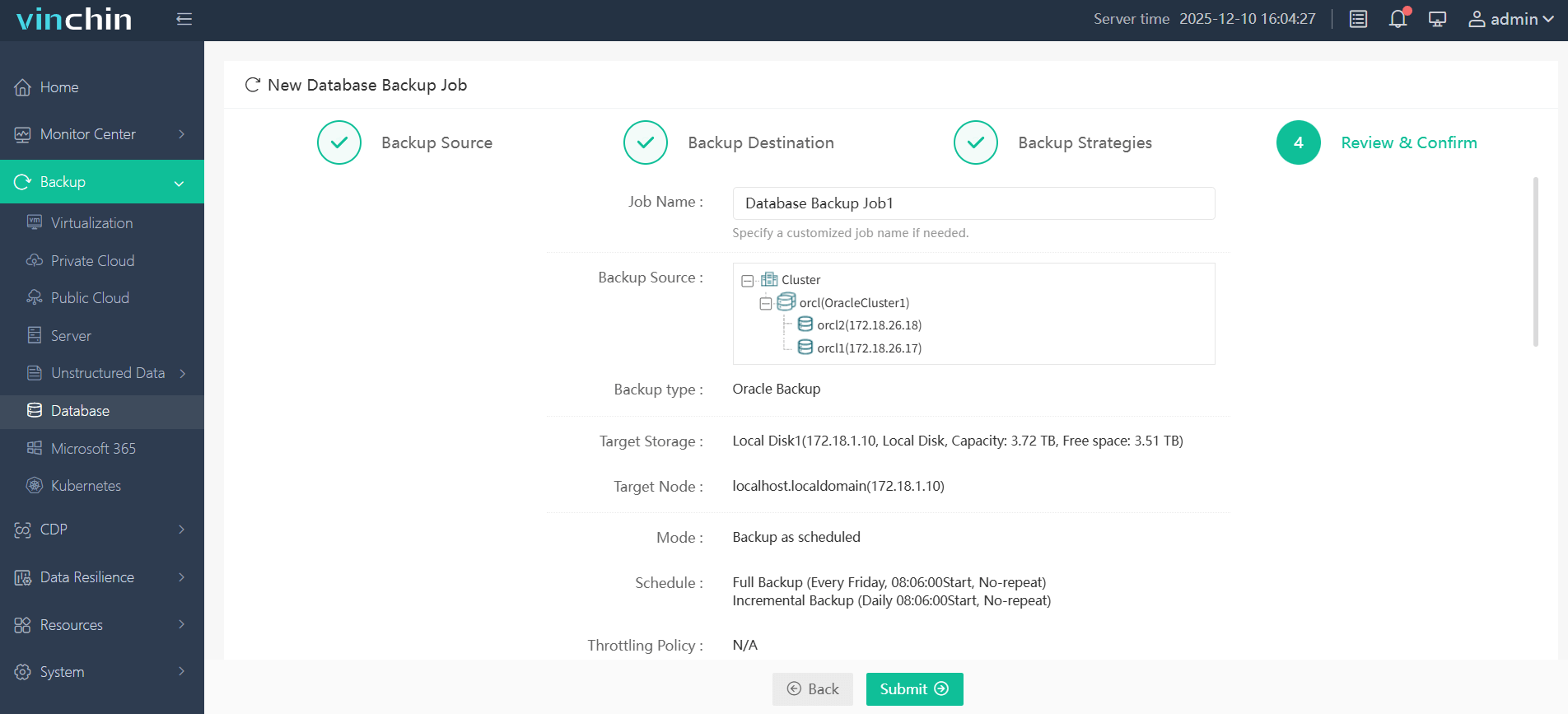
Recognized globally by enterprises across industries—with top ratings from IT professionals—you can experience all features free with a full-featured 60-day trial by clicking below to download today!
Oracle RMAN Cold Backup Script FAQs
Q1: Can I take an RMAN cold backup while users are still connected?
No—you must shut down user access first since consistency requires no active sessions during capture.
Q2: How do I validate my latest cold backup's integrity?
Run RESTORE DATABASE VALIDATE; in RMAN—it checks physical structure without changing live data files or requiring downtime again.
Q3: What should I do if my scheduled cron job fails silently?
Check that all required environment variables are exported within your shell script—not just interactively—and review output logs under $BACKUP_DIR.
Q4: Why does RMAN return ORA-19602 during a cold backup?
ORA-19602 means RMAN tried to back up a NOARCHIVELOG database that is open. Make sure the script shuts down the database and starts it in MOUNT mode before the backup.
Q5: How do I take a cold backup of an Oracle RAC database?
Stop all instances and start only one in MOUNT mode before the backup, for example srvctl stop database -d ORCL followed by srvctl start instance -d ORCL -i ORCL1 -o mount. After the backup, open the database with srvctl start database -d ORCL.
Q6: Should I use cold backups if my database is in ARCHIVELOG mode?
Usually not. In ARCHIVELOG mode, online RMAN backups protect the database without downtime and support point-in-time recovery. Cold backups are still useful before major upgrades, or when you need a fully consistent copy.
Conclusion
Cold backups using Oracle RMAN give strong protection against unexpected failures by capturing fully consistent snapshots—even before risky upgrades begin! Vinchin makes safeguarding enterprise databases easier through automation plus flexible storage options—all verified reliably every step along the way.