LAN-free backup moves backup data over a storage network (SAN) instead of the production LAN. Only small control and metadata messages stay on the LAN. The backup server, proxy or storage agent reads or writes data directly on shared storage, so large data streams no longer compete with application traffic.
Key Takeaways
-
LAN-free removes the data path from the LAN, not the control path. Coordination traffic still uses the LAN.
-
"SAN" here means a network built for block storage access. It is not limited to Fibre Channel.
-
In VMware, Direct SAN transport has hard limits. It does not apply to vSAN or vVols, and the backup proxy needs access to the VMFS LUNs.
-
LAN-free relieves the network but not the storage array. The array still serves the read I/O.
-
LAN-free is a performance architecture. It is not ransomware isolation and does not replace offline or immutable copies.
What Is LAN-Free Backup, and How Does It Reduce Production Network Load?
LAN-free backup is a backup architecture in which data travels between the protected storage and the backup target over a storage area network, not through the general-purpose LAN. SNIA defines a SAN by its purpose, which is moving data between computer systems and storage devices. The definition is not tied to Fibre Channel, so an Ethernet network dedicated to storage access also counts.
The pattern predates virtualization. In IBM Storage Protect, a storage agent lets clients read and write directly to SAN storage. According to an IBM Redbooks explanation, the agent still talks to the backup server over the LAN, but the bulk data goes straight to SAN-attached devices.
How it reduces load: it removes the largest traffic flow, the bulk backup data, from the LAN. Backup is usually the biggest sustained data flow in a data center, so moving it off the LAN frees bandwidth and reduces contention with applications.
How it works in VMware: backup software uses the vSphere Storage APIs for Data Protection (VADP) and the Virtual Disk Development Kit (VDDK). In SAN transport mode, the library gets the VMFS LUN layout from the ESXi host and reads virtual disk data straight from the LUN, so no data passes through the production ESXi host. Network block device (NBD) transport adds traffic to the LAN. AWS's VADP overview describes the same split between SAN, NBD/NBDSSL, and HotAdd.
|
Traffic type
|
LAN-based backup
|
LAN-free (Direct SAN)
|
|
Bulk VM/disk data
|
LAN
|
SAN
|
|
Job control, metadata
|
LAN
|
LAN
|
|
ESXi host involvement in the data read
|
Yes (NBD)
|
No
|
Exact behavior depends on platform, version, and configuration.
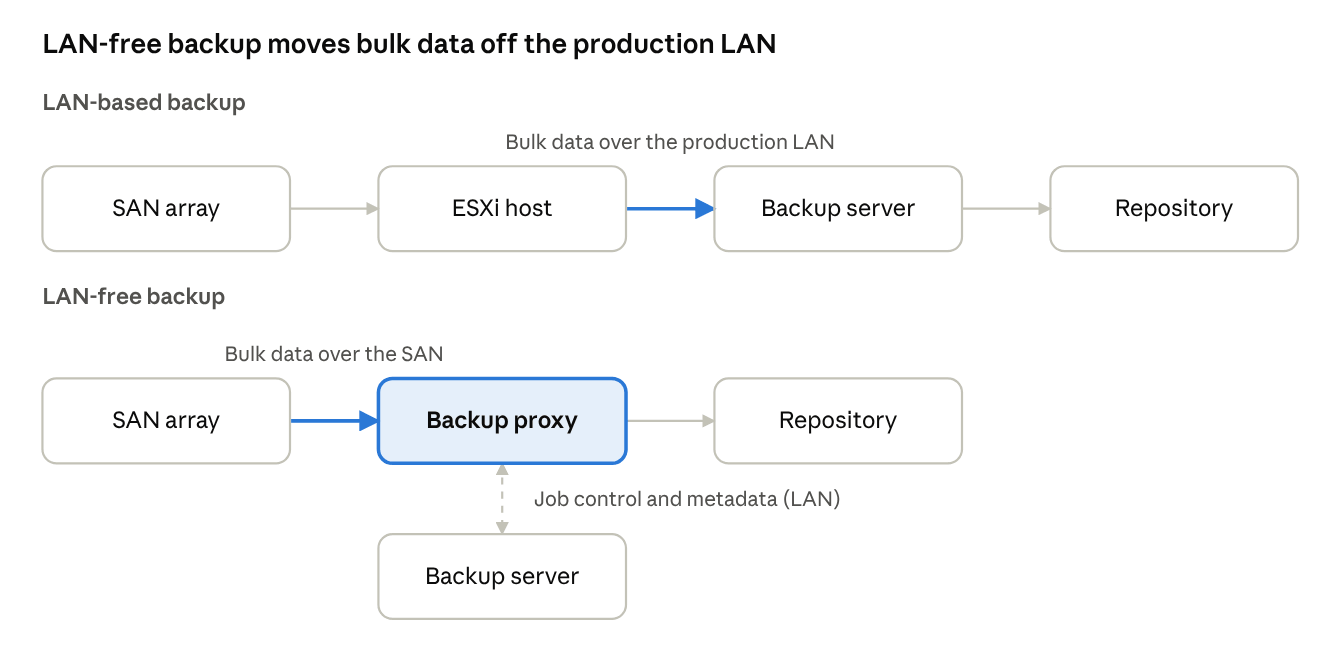
In the LAN-free design, bulk data flows from the SAN array to the backup proxy over the storage network. Only job control and metadata use the LAN.
LAN-Free Relocates the Bottleneck. It Does Not Remove It.
If the LAN is no longer the constraint, what is? Answer: the shared storage array and SAN fabric.
In SAN transport, per Broadcom's VDDK documentation, the backup proxy reads from the same LUN that production VMs use. The array's front-end ports, controllers, and cache therefore serve both production I/O and backup reads. A fast backup can make this contention worse: the array does more concurrent work even though the LAN is quiet.
Practical implications:
-
Before enabling LAN-free, check array port utilization and queue depth during the backup window, not only LAN utilization.
-
Schedule or throttle jobs against the array's busy periods.
-
Zone the proxy's HBAs deliberately, for example to dedicated array ports where possible.
This is analysis based on how the documented data path works. It is not a measured benchmark. Actual impact varies by array, fabric design, and workload.
Choosing a Transport: Decision Matrix
Direct SAN suits FC or iSCSI VMFS datastores; HotAdd or NBD cover everything else.
|
Criterion
|
Direct SAN (LAN-free)
|
HotAdd
|
NBD/NBDSSL (LAN)
|
|
Data path
|
SAN to proxy
|
Via proxy VM's virtual SCSI
|
ESXi host over LAN
|
|
Production LAN load
|
Minimal for data
|
Minimal for data
|
High
|
|
Needs SAN visibility to LUNs
|
Yes
|
No
|
No
|
|
Proxy type
|
Physical or virtual with LUN access
|
Must be a VM in the vSphere environment
|
Any
|
|
Works with vSAN
|
No
|
Yes
|
Yes
|
|
Works with vVol
|
No
|
Check version/vendor docs
|
Yes
|
|
Typical use
|
FC/iSCSI VMFS datastores
|
Local/NAS storage or no SAN access
|
Fallback, small environments
|
Broadcom VDDK transport documentation says SAN transport is not supported for vVol datastores, that vSAN disables SAN mode, that the HotAdd proxy must be a VM, and that NBD is always available as the fallback. Broadcom also notes that HotAdd puts more overhead on the physical ESXi host than SAN transport. HotAdd's behavior on vVols varies, so verify it in vendor documentation for your versions.
Scenario guidance:
-
FC or iSCSI VMFS datastores, large VM volumes, tight backup window: Direct SAN.
-
vSAN or vVol datastores: HotAdd or NBD. SAN transport is not an option.
-
Local or NAS-backed datastores: HotAdd or NBD.
-
Small environment with ample LAN capacity: NBD with a dedicated backup VLAN may be enough.
Platform Notes That Change the Design
-
VMware vSphere: SAN transport is available for FC/iSCSI/SAS block LUNs, with the vSAN and vVol exclusions above. VDDK documentation also notes that SAN is the default preferred transport when available. If you request SAN only and it is unavailable, the first disk open fails.
-
Microsoft Hyper-V: an equivalent off-host approach relies on hardware snapshots. According to Microsoft's virtualization backup guidance, this requires a vendor-supplied VSS hardware provider installed on the Hyper-V host. Cluster Shared Volume backup also has specific compatibility requirements; that page applies to Windows Server 2008 R2, so check current docs for your version.
-
Other hypervisors: support depends on the backup product and storage type. Check the vendor's compatibility list.
How Vinchin Implements It
Vinchin Backup & Recovery supports LAN-free paths over Fibre Channel, iSCSI, NFS and Ceph. Paths are configured under the LAN-free page in the console. FC needs the HBA WWPN, and IP SAN needs an extra NIC. The documentation specifically warns to add production LUNs only as LAN-free paths, never as a backup repository, because that could destroy production data. For VMware, Vinchin also documents HotAdd as an alternative when direct SAN access is not available. Platform support varies, so check the current compatibility list.
Performance, Common Mistakes and Troubleshooting
Performance considerations. No benchmark figures are included, because no verified, reproducible test data is available. IBM's LAN-free tuning guidance says only that LAN-free can improve performance by routing traffic over the SAN. The main variables are array port and controller headroom, HBA and fabric speed, concurrent jobs per proxy, repository write speed (often the next bottleneck), and disk provisioning and CBT behavior, which vary by platform and version. Theoretical SAN bandwidth does not equal real-world backup throughput.
Common mistakes:
-
Assuming LAN-free means no LAN traffic at all. Control traffic remains.
-
Not verifying the actual transport, so the job runs over NBD while the team believes it is LAN-free.
-
Forcing SAN-only transport where SAN is unavailable.
-
Exposing production LUNs to a proxy without masking or access controls.
-
Treating LAN-free as a ransomware control.
-
Enabling LAN-free alongside server-side deduplication (see the FAQ).
Troubleshooting:
|
Symptom
|
Likely cause
|
Check
|
|
Job runs but LAN is still busy
|
Silent fallback to NBD
|
Job log transport mode; proxy LUN visibility
|
|
Cannot open disk in SAN mode
|
LUN not visible, or SAN-only transport requested without SAN access
|
Zoning/masking, HBA status
|
|
SAN mode unavailable for some VMs
|
VM on vSAN or vVol
|
Datastore type
|
|
LAN quiet but production VMs slow during backup
|
Array contention
|
Array port/queue metrics
|
|
Hyper-V off-host snapshot fails
|
Missing or untested VSS hardware provider
|
Storage vendor provider, host logs
|
FAQs
Q1: Does LAN-free backup work with deduplication?
It depends on where deduplication happens. In IBM Storage Protect 8.1.13 documentation, LAN-free is not recommended with server-side deduplication, because the data cannot bypass the server. Check your product and version.
Q2: Does LAN-free require Fibre Channel?
No. Per SNIA's definition, a SAN is defined by purpose, so a dedicated iSCSI network can qualify. Dedicated NICs and switching are still advisable.
Q3: Is LAN-free the same as agentless backup?
No. Agentless refers to not installing software in the guest. LAN-free refers to the data path. A backup can be one without the other.
Q4: Is LAN-free the same as server-free?
No. The IBM Redbooks tip lists them as separate approaches. Terminology varies by vendor, so check definitions in the product documentation.
Q5: Does LAN-free cost more?
It can. It may require HBAs, switch ports, and zoning effort. Whether that pays off depends on your backup window and current LAN contention.
Q6: Does LAN-free replace offsite backup?
No. NIST SP 800-34 Rev. 1 covers contingency planning, including alternate storage, as a separate concern from backup transport.
Q7: Can Vinchin back up over LAN-free if my datastores are on vSAN?
VMware's SAN transport does not support vSAN, so use another transport such as HotAdd or NBD. Check Vinchin's current documentation for your version.
Conclusion
LAN-free backup protects production traffic by moving bulk data to the storage network. The trade is that array load, SAN access control, and fallback behavior now need attention. Choose the transport by datastore type, verify which path jobs actually use, and keep an isolated copy elsewhere.














