Introduction
A ransom note on a screen, locked files and a phone that will not stop ringing: this is how most teams discover a ransomware attack. What happens in the next few hours often decides whether the incident is a bad day or a lost month.
Most people ask the same question first: what to do after a ransomware attack? The honest answer is that the order of actions matters as much as the actions themselves. Restoring too early can bring the attacker back. Wiping machines too early can destroy the evidence you need to find out how they got in.
This guide walks through a practical ransomware response for the first 24 hours, from containment to recovery. It also shows why ransomware changes disaster recovery requirements and where your backups fit in.
The First 24 Hours After a Ransomware Attack at a Glance
There is no universal clock for ransomware response. Every incident differs in size, and the hour ranges below are a planning guide, not a deadline. What stays constant is the order: stop the spread, understand the damage, keep the evidence, and only then recover.
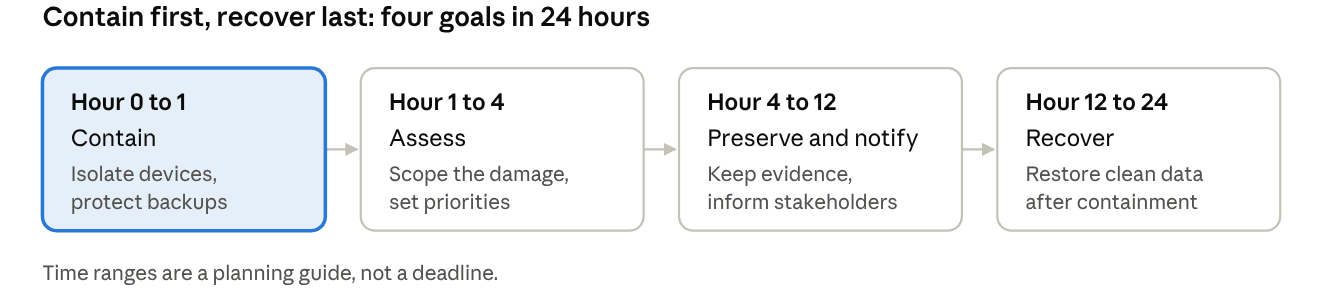
First 24 hours after ransomware · 4 stages
The sections below follow these four stages. If your organization already has an incident response plan, use this guide to check it against the plan. If you do not have one, treat this as a starting point to write it.
Hour 0 to 1: Contain the Ransomware Attack
The first goal is simple: stop it from spreading. Ransomware that is still running can keep encrypting shares, servers and backups while you read the ransom note.
Isolate affected systems. Disconnect infected devices from the network. CISA's ransomware response checklist advises taking the network offline at the switch level if several systems or subnets are affected, or unplugging devices and removing them from Wi-Fi if that is not possible.
Do not power machines off unless you have no other option. Shutting down destroys volatile evidence such as memory contents. Disconnecting is safer than switching off.
Protect your backups right away. Attackers often go after backups first. Check that backup servers and storage are reachable only from trusted systems, and disconnect any backup target that is still connected to infected machines. For more background, see how to protect backups from ransomware.
Start your incident response plan. Name an incident lead, a technical lead and a communications lead. Use phone calls or another channel outside the affected network to coordinate, because attackers may be watching email and chat.
Do not contact the attackers yet. Replying or negotiating before you understand the situation can complicate both investigation and recovery.
Resist the urge to reboot, clean up or delete anything. Those actions feel productive but often remove the traces that explain how the attackers got in.
Hour 1 to 4: Assess the Scope of the Attack
Once the spread is stopped, find out how bad it is. You cannot plan recovery without knowing what was hit. CISA suggests checking for signs of compromise such as new or escalated accounts, unusual VPN logins, tampering with backups or shadow copies and data exfiltration tools.
| Question | Why it matters | Where to look |
|---|
| Which systems and data are encrypted? | Sets recovery priority | Endpoint alerts, file server errors, user reports |
| Are your backups intact? | Decides whether you can restore without the attacker's help | Backup console, job logs, storage access logs |
| Which accounts were used? | Tells you which credentials to reset later | Directory logs, VPN and remote access logs |
| Was data copied out? | May trigger breach notification duties | Firewall and proxy logs, unusual outbound transfers |
| Is the attacker still inside? | Restoring before eviction invites a second attack | Security tools, new accounts, remote access software |
Two more points help. First, a ransomware event can be the second stage of an earlier compromise. CISA notes that precursor malware may have been on the network before the encryption began, so look back as well as at the present. Second, rank systems against a predefined list of critical assets. If you do not have one, ask business owners which services the company cannot run without, and list them in that order.
Hour 4 to 12: Preserve Evidence and Notify the Right People
With the spread contained and the scope roughly known, the next job is to keep what investigators will need and to tell the people who must know.
Preserve evidence
Take a system image and a memory capture of a sample of affected devices. CISA recommends this before systems are rebuilt.
Save ransom notes, encrypted file samples, malware samples and relevant logs.
Record what you did and when. A simple timeline kept by the incident lead is enough.
Notify
Inform senior management, legal counsel and your cyber insurer early. Policies often have notification deadlines and may require approved response vendors.
Report the attack to law enforcement. In the United States, the FBI asks victims to report ransomware to IC3, and CISA lists its own reporting channels. Elsewhere, contact your national cyber agency or police.
Ask law enforcement whether a decryptor exists for the strain you are facing before anyone considers other options.
If personal data may have been taken, check breach notification rules. They differ by country and industry, so involve legal counsel.
Keep internal messages consistent. Do not discuss the response on systems the attackers may still control.
Hour 12 to 24: Start Ransomware Recovery Safely
Recovery is the stage where teams feel the most pressure and make the most mistakes. Move fast, but only after you can answer yes to these questions:
Is the attacker's access closed? Disable compromised VPN and remote access, and identify the accounts involved.
Are clean systems protected from reinfection? CISA advises adding only verified clean systems to the recovery network.
Do you have a backup that predates the compromise, and is it known to be clean?
Restore in a safe order
Rebuild affected systems from known-good images rather than cleaning them in place.
Reset credentials for affected accounts once the environment is clean.
Restore critical services first, using the priority list from the assessment stage.
Verify each restored system before reconnecting it to production.
CISA recommends restoring from offline, encrypted backups where possible. If you restore from a backup that was already infected, you reintroduce the malware. Scan or verify backups before use.
What about paying the ransom? The FBI does not support paying, and notes that payment does not guarantee you will get data back. Payment can also encourage further attacks. Some organizations still face this decision, which is why it should be made with legal counsel, your insurer and law enforcement, not under time pressure.
What Not to Do After a Ransomware Attack
Do not restore before the intruder is out. Recovering into a compromised network can get you encrypted again.
Do not wipe or reimage everything immediately. You lose the evidence needed to find the entry point.
Do not reuse stolen credentials. Reset them after cleanup, not before.
Do not rely on one copy of your backups. Backups that sit on the same network as production can be encrypted or deleted with it. Following the 3-2-1 backup rule keeps at least one copy out of reach.
Do not assume a successful backup job means a clean backup. Verify before you restore.
Do not communicate over compromised channels. Use phone or a separate system.
Most of these mistakes happen because nobody has practiced. Backup best practices for ransomware are worth setting up before an incident, not during one.
How Vinchin Helps With Ransomware Backup and Recovery
Every stage above depends on one thing: a backup you can trust. Vinchin Backup & Recovery includes several features aimed at protecting backups before an attack and recovering from one afterwards.
Backup Storage Protection
Backup Storage Protection monitors write activity to backup data in real time and allows only I/O initiated by Vinchin, blocking other programs from changing backup files. If ransomware tries to modify backups, the action is rejected. It is enabled with one click and applies to direct-attached storage on the Vinchin backup server, such as local disks or local directories.
Malware Scan for Backups
Malware Scan checks backup data for malware automatically after backups finish or before recovery, using ClamAV and Kaspersky integrated through SDKs. It helps prevent contaminated backups from being restored to production, which addresses the reinfection risk discussed in the recovery stage.
AES-256 Encryption
Backup data can be protected with AES-256 encryption, both at rest and in transit, so a copied backup is not readable without the key.
3-2-1 Backups With an Offsite Copy
Vinchin supports the 3-2-1 approach: three copies on two kinds of storage, with one copy offsite, including cloud storage. An offsite copy gives you a restore point that is not on the same network as the attacked environment.
Recovery Verification in an Isolated Environment
Automated recovery verification runs test restores in an isolated environment, so you can confirm a backup is recoverable before you need it.
Don't wait for a ransomware attack to test your recovery strategy. Download Vinchin Backup & Recovery for a 60-day free trial to build air-gapped, tamper-proof backups and get ready to restore clean workloads fast when incidents strike.
FAQ
Q1: Should I turn off an infected computer after a ransomware attack?
A1: Disconnect it from the network first. CISA advises powering devices down only as a last resort, because shutting down removes volatile evidence such as memory contents.
Q2: What if my backups are encrypted too?
A2: Check for offsite or offline copies that the attacker could not reach, and ask law enforcement whether a decryptor exists for your strain. This is why backups should be protected and copied offsite before an
Q3: Is paying the ransom the fastest way to resume business operations?
A3: Paying does not guarantee data recovery and may fund further attacks. It should only be considered after legal and cybersecurity review.
Q4: What is the highest priority action within the first 24 hours of ransomware?
A4: Isolate infected systems to stop lateral movement and preserve forensic evidence for investigation. Avoid rebooting compromised machines unnecessarily.
Conclusion
The first 24 hours after a ransomware attack reward calm, ordered action: contain the spread, assess the damage, preserve evidence, notify the right people and recover only when the intruder is out. A clear ransomware response plan, written and practiced before an incident, shortens every one of those steps.
Protect your backups, keep an offsite copy and verify that you can restore, because ransomware recovery depends on those backups being clean and reachable.