Business-critical applications depend on XenServer for daily operations. Uptime is vital because even brief interruptions can halt workflows, cause financial loss, and erode trust. Reliable backup software ensures your data is safe and services recover fast. This keeps your business moving forward without costly delays.
Maximizing uptime connects technology with business value. Fast backups and instant recovery protect against unexpected outages. They help you avoid lost revenue, missed deadlines, and compliance issues. Choosing backup software that delivers these benefits is essential for any organization running mission-critical workloads on XenServer.
Why Maximizing Uptime Matters in Enterprise Environments
Keeping enterprise systems online means more than just preventing downtime—it safeguards productivity, revenue streams, and customer satisfaction. When backup or restore processes are slow or unreliable, disruptions can escalate quickly.
● Financial Impact of Downtime
Downtime costs add up fast in large organizations. According to Gartner research, IT downtime averages $5,600 per minute for enterprises. These losses come from halted transactions, idle staff time, delayed projects, and lost sales opportunities.
● Productivity Losses
When employees cannot access critical applications or data due to outages or slow restores, productivity drops sharply. Teams may miss deadlines or be forced to redo work if recent changes are lost.
● Compliance Risks
In regulated industries such as healthcare or finance, failing to restore data quickly can result in non-compliance penalties. Regulatory bodies often require proof of timely data recovery after incidents. Delays may trigger audits or legal action.
● Reputation Damage
Customers expect reliable service at all times. Extended outages can damage your brand’s reputation, sometimes permanently, if clients lose confidence in your ability to deliver consistent results.
These risks highlight why maximizing uptime through robust backup solutions is not just an IT concern but a core business priority.
How To Choose The Best XenServer Backup Solution for Maximizing Uptime
Selecting effective XenServer backup software requires careful evaluation of features that directly impact uptime. A well-chosen solution minimizes disruption during failures while supporting growth and compliance needs.
● Near-Zero Recovery Time Objectives (RTOs)
Fast recovery ensures services return online within minutes rather than hours after an incident. Solutions designed for low RTOs let you meet strict service-level agreements (SLAs) with minimal user impact.
● Agentless Architecture
Agentless backups interact directly with XenServer APIs instead of installing agents inside each VM guest OS. This reduces resource overhead on production servers and simplifies deployment since there’s no need to manage agent updates across many machines.
● Flexible Restore Options
The best solutions offer both full VM restores for major failures and granular file-level recovery when only specific items are needed back online. This flexibility lets you address small problems without rolling back entire systems, which is a key factor in reducing downtime duration.
● Scalability Without Performance Loss
Backup tools must scale seamlessly as your environment grows from dozens to hundreds or thousands of VMs without slowing down concurrent jobs or increasing restore times. Scalable architecture prevents bottlenecks that could threaten uptime during peak activity periods.
● Robust Automation Capabilities
Automated scheduling based on policies reduces manual intervention and human error in routine tasks like backups or retention management. Automation also ensures regular protection even when IT staff are unavailable due to holidays or emergencies.
● Proven Reliability Under Load
Look for high success rates in real-world deployments where heavy workloads stress-test performance consistency over time. Reliable solutions maintain steady operation regardless of system load spikes caused by batch processing or end-of-month reporting cycles.
● Strong Security Controls
Encryption protects sensitive data both during transfer (“in transit”) and storage (“at rest”). Immutable storage options defend against ransomware by preventing unauthorized changes to backup files. Audit trails further support regulatory compliance efforts by tracking access history.
Flexible restore choices also include application-aware processing—a feature ensuring transaction-consistent backups for databases like Microsoft SQL Server or Oracle Database (Microsoft Docs: Application-Aware Backups). This guarantees reliable recovery without risking database corruption after restoration events—a must-have for critical business apps handling live transactions around the clock.
Vinchin Backup & Recovery: Enterprise-Level Protection for XenServer
For organizations seeking robust protection of their XenServer environments, Vinchin Backup & Recovery offers a professional enterprise-grade virtual machine backup solution supporting over 15 mainstream virtualization platforms, including VMware, Hyper-V, Proxmox, oVirt, OLVM, RHV, XCP-ng, OpenStack and notably full-featured support for Citrix XenServer itself.
Key highlights include instant recovery for rapid VM availability after failure; LAN-free backup enabling high-speed transfers without burdening production networks; CBT-powered incremental jobs that reduce storage use; SpeedKit acceleration improving job throughput under load; plus built-in deduplication/compression saving space while maintaining performance.
With its intuitive web console interface:
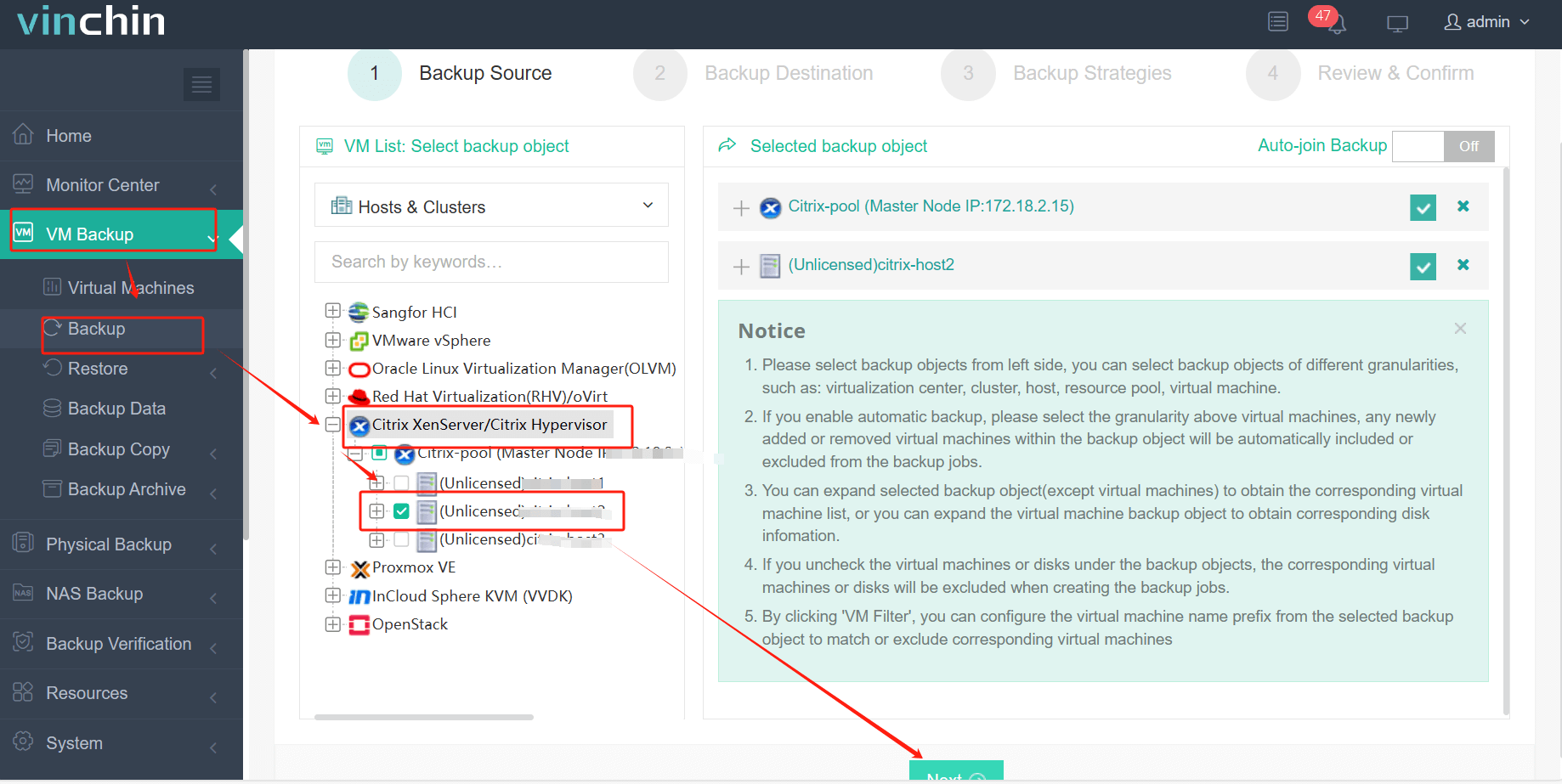
Step 1: Select the XenServer VM to back up
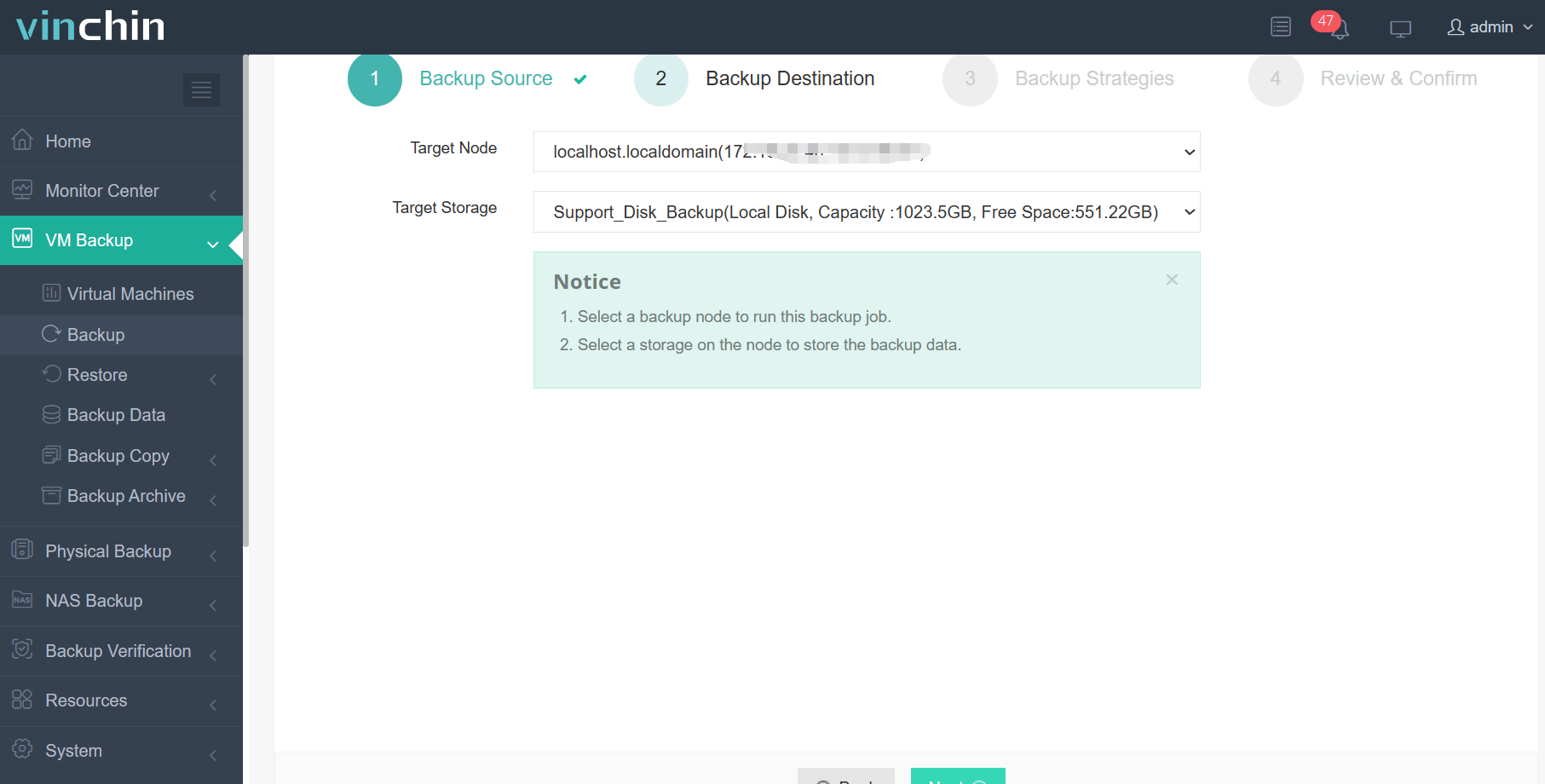
Step 2: Choose the target backup storage
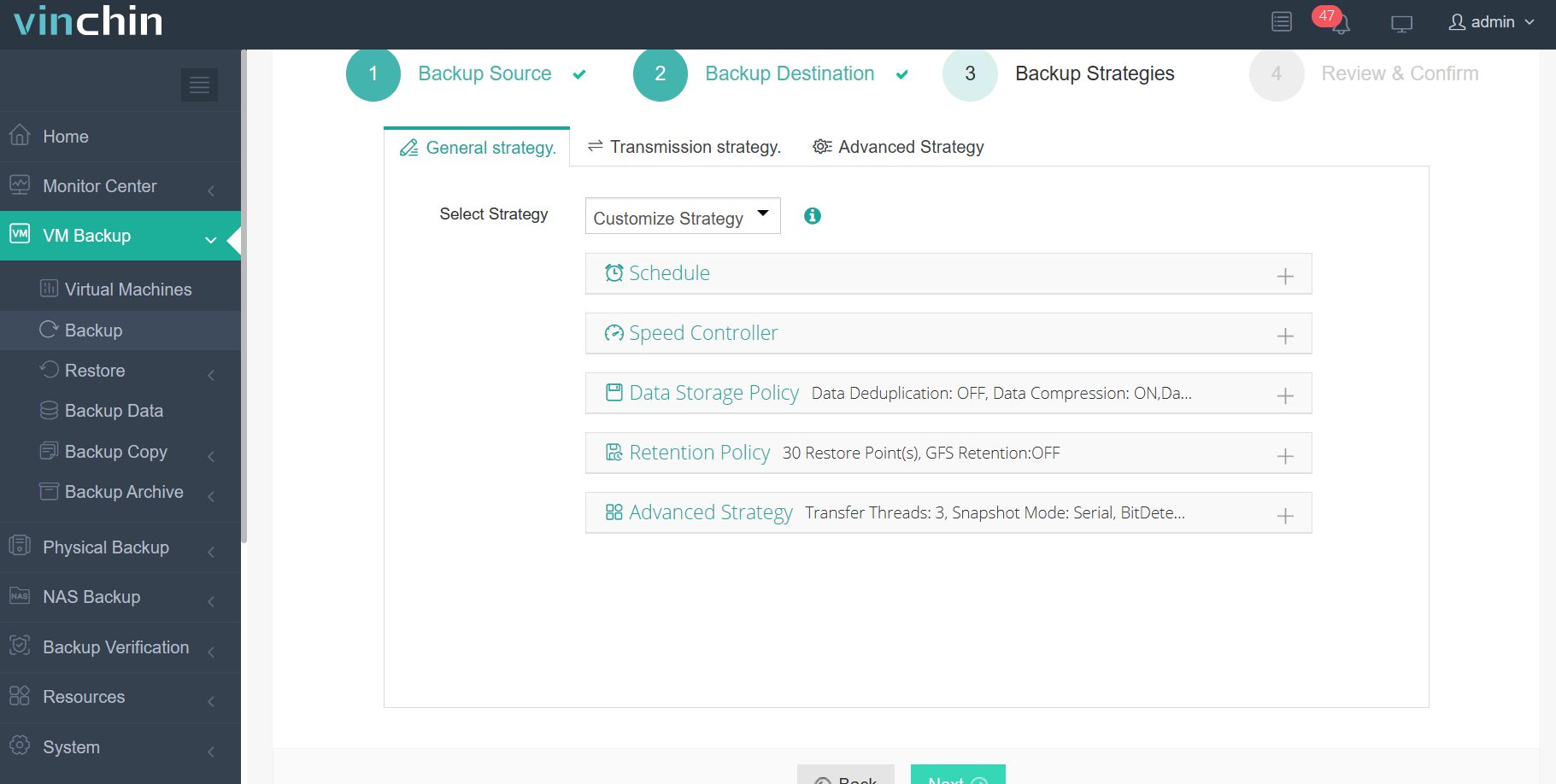
Step 3: Configure the desired backup strategy
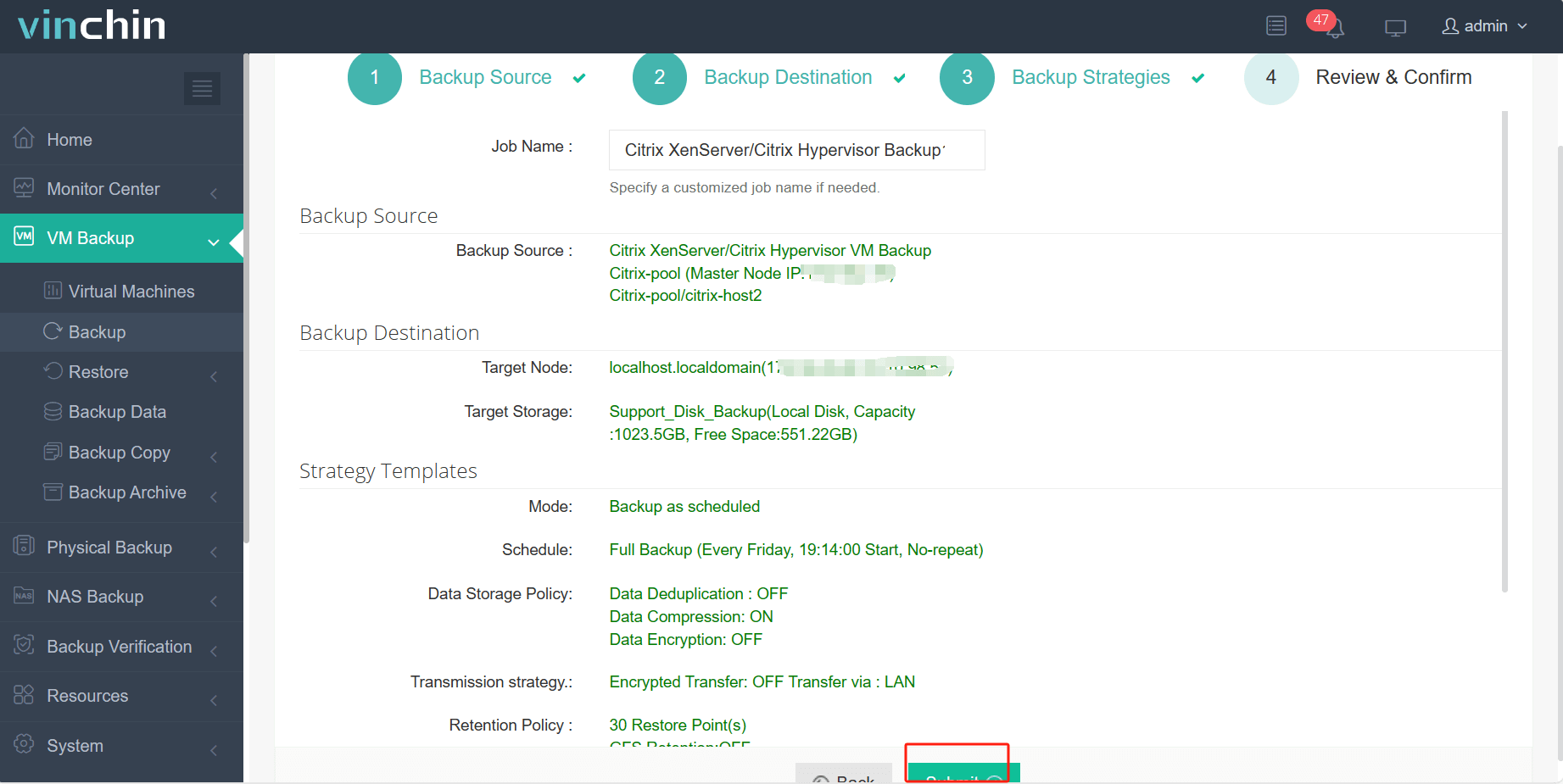
Step 4: Submit the job, ensuring streamlined protection setup in minutes
Recognized globally among enterprise users with top ratings and a strong customer base across industries worldwide, Vinchin Backup & Recovery offers a 60-day full-featured free trial so you can experience its reliability firsthand; click below to get started.
Best XenServer Backup Software FAQs
Q1: What features are essential in a XenServer backup solution for uptime?
Fast recovery times; agentless operation; automation capabilities; secure storage options; flexible restore choices. They all play crucial roles in keeping applications available when disruptions occur.
Q2: How does scalability impact long-term uptime assurance?
A scalable solution adapts as workloads grow without performance loss or increased downtime risk; this ensures protection extends smoothly across more VMs while maintaining efficiency throughout expansion phases.
Q3: Can the right backup software help meet compliance requirements?
Yes; solutions supporting encryption protocols; audit trails; retention policies assist organizations in meeting regulatory mandates while ensuring continuous data availability during audits or incidents involving sensitive information loss.
Q4: Is instant VM recovery necessary for all workloads?
Instant VM recovery proves vital where short outages have significant operational impacts, such as ERP systems but having this option provides operational flexibility across all tiers of infrastructure as part of comprehensive availability planning.
Conclusion
Choosing robust XenServer backup software shapes how well your organization withstands disruptions; Vinchin delivers proven protection so critical apps stay available when every second counts.













