In VMware environments, fast recovery is not just about speed—it is about restoring access to critical data and applications before business operations suffer. The fastest VMware backup solutions combine instant VM restore technology with granular file-level recovery and automated failback features. These capabilities help IT teams minimize downtime while ensuring data integrity.
Recovery time can make or break business continuity plans. According to Gartner research, the average cost of IT downtime can reach $5,600 per minute for large enterprises. This makes rapid restoration essential for protecting revenue streams and maintaining compliance standards. In practice, “fastest recovery” means achieving near-zero Recovery Time Objective (RTO) while keeping Recovery Point Objective (RPO) within acceptable limits. Solutions that deliver these results help organizations recover from outages quickly—often in minutes rather than hours.
Why Fast Recovery Matters in Enterprise Environments?
Fast recovery is vital because every second of downtime puts business operations at risk. Enterprises depend on uninterrupted access to digital systems for everything from customer service to financial transactions.
● Lost Revenue
Downtime leads directly to lost sales opportunities and delayed transactions. Industry studies show that even brief outages can cost thousands of dollars per minute.
● Reputational Damage
When services go offline unexpectedly, customers lose trust quickly. News of disruptions spreads fast through social media channels and industry forums.
● Regulatory Penalties
Many industries must meet strict uptime requirements set by regulators. Failure to restore systems promptly may result in fines or legal action.
● Operational Disruption
Extended outages disrupt workflows across departments—from HR payroll processing to supply chain management—causing cascading delays throughout the organization.
● Data Loss Risk
Slow recovery increases exposure to permanent data loss if backups are outdated or incomplete when disaster strikes.
For many businesses today, even a few minutes offline can trigger long-term consequences that ripple across partners and customers alike.
How To Choose The Best VMware Backup Solution for Fast Recovery?
Selecting a backup solution for VMware requires careful evaluation of features that enable both speed and reliability during restores. Understanding technical metrics like RTO (how quickly you can recover) and RPO (how much data you might lose) helps guide this decision process.
● Instant VM Restore Capability
Solutions offering instant VM restore let you boot virtual machines directly from backup storage without waiting for full data transfer back into production hosts. This reduces downtime dramatically—sometimes restoring access within seconds instead of hours.
● Granular File-Level Restore
The ability to recover individual files or application objects saves time when only part of your environment needs restoration. Instead of rolling back entire VMs—which could overwrite recent changes—you target only what was lost or corrupted.
● Application Consistency Support
Backups should capture application states so databases or email servers come back online ready-to-use—not just as raw files needing repair work before they function again
● Automation Features
Automated failover/failback workflows reduce manual steps during disaster events. With orchestration tools built into your backup platform, you switch workloads between primary sites and backups smoothly—with less risk of human error slowing things down.
● Scalability Across Large Environments
As your virtual infrastructure grows—potentially spanning hundreds or thousands of VMs—the backup solution must scale up without bottlenecks or degraded performance. Technologies like Changed Block Tracking (CBT) allow efficient incremental backups by copying only changed data blocks since the last snapshot.
● Strong Reporting & Compliance Tools
Detailed logs prove that backups run as scheduled—and help demonstrate regulatory compliance during audits by showing successful test restores over time.
Choosing wisely means balancing these factors against budget constraints while planning ahead for future growth in both workload size and complexity.
Vinchin Backup & Recovery: Enterprise-Grade Protection for VMware
For organizations seeking robust protection in VMware environments, Vinchin Backup & Recovery stands out as an enterprise-level virtual machine backup solution supporting over 15 mainstream virtualization platforms—including VMware, Hyper-V, Proxmox, oVirt, OLVM, RHV, XCP-ng, XenServer, OpenStack, ZStack, among others. It delivers agentless operation with advanced features tailored specifically for complex enterprise infrastructures requiring high reliability and efficiency across diverse hypervisors.
Key strengths include instant VM restore capability, granular recovery options, Changed Block Tracking (CBT), LAN-free backup support on VMware environments, and comprehensive encryption mechanisms—all designed to maximize uptime while minimizing resource usage and operational overheads. These features together ensure rapid restores with minimal impact on production workloads while safeguarding sensitive information throughout the process.
Using the intuitive Vinchin web console makes protecting your environment straightforward:
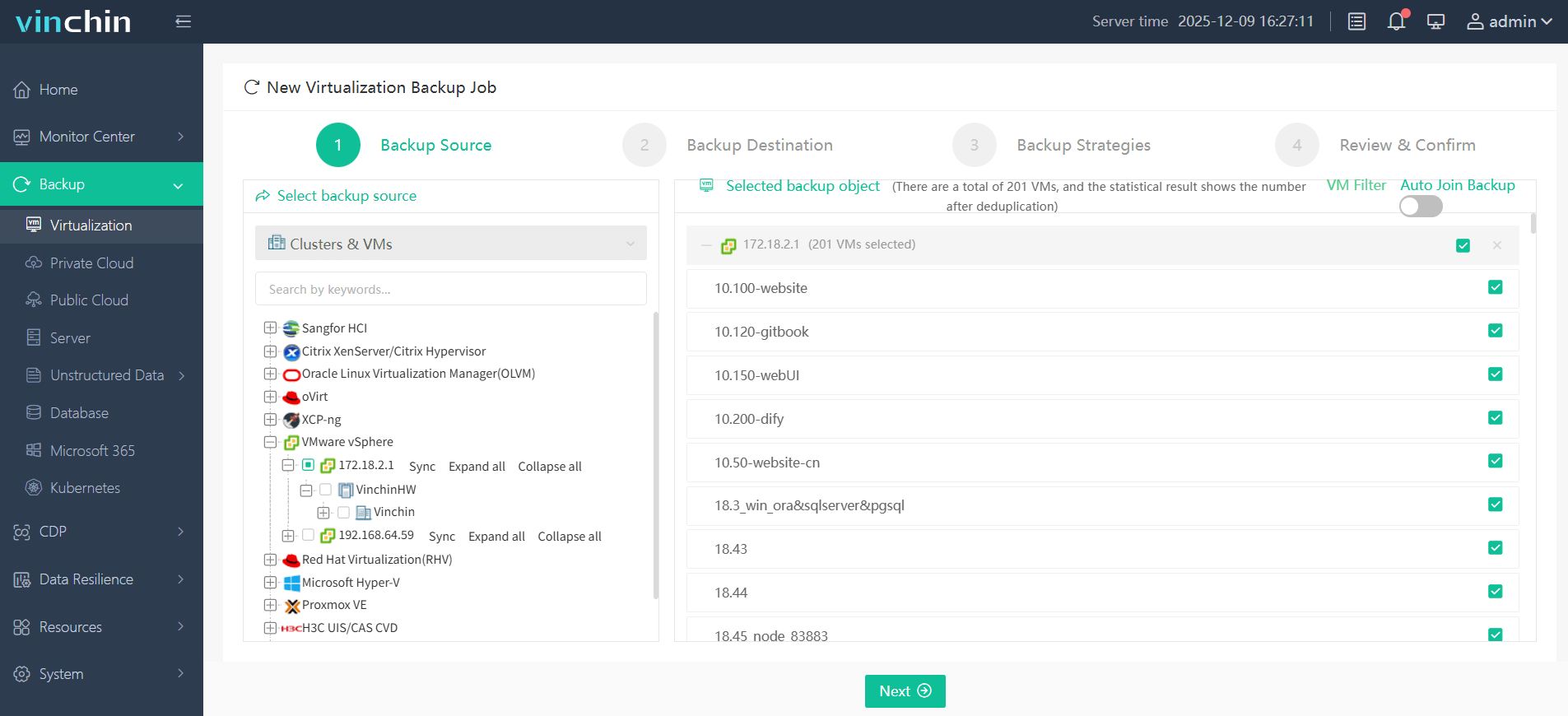
Step 1: Select the VMware VM to back up.
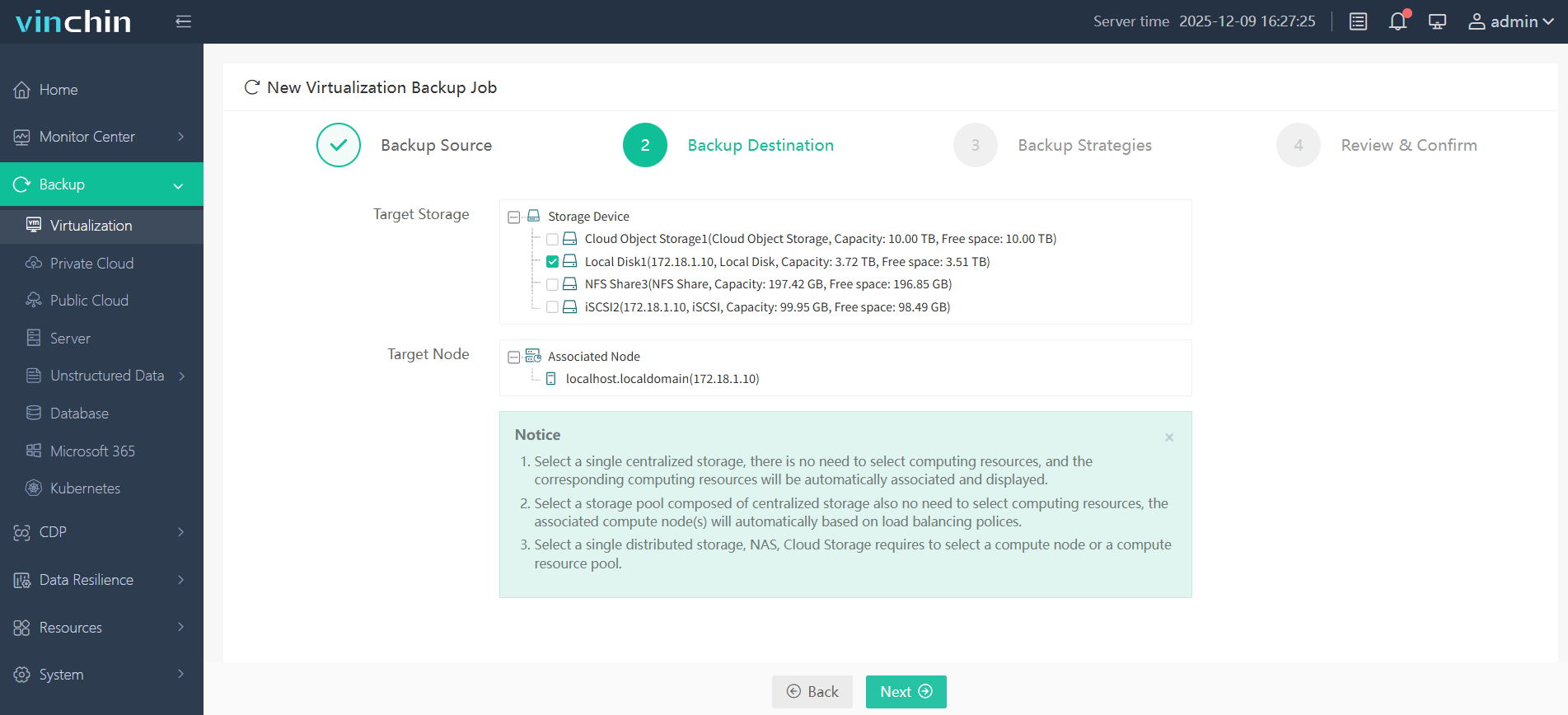
Step 2: Choose the backup storage.
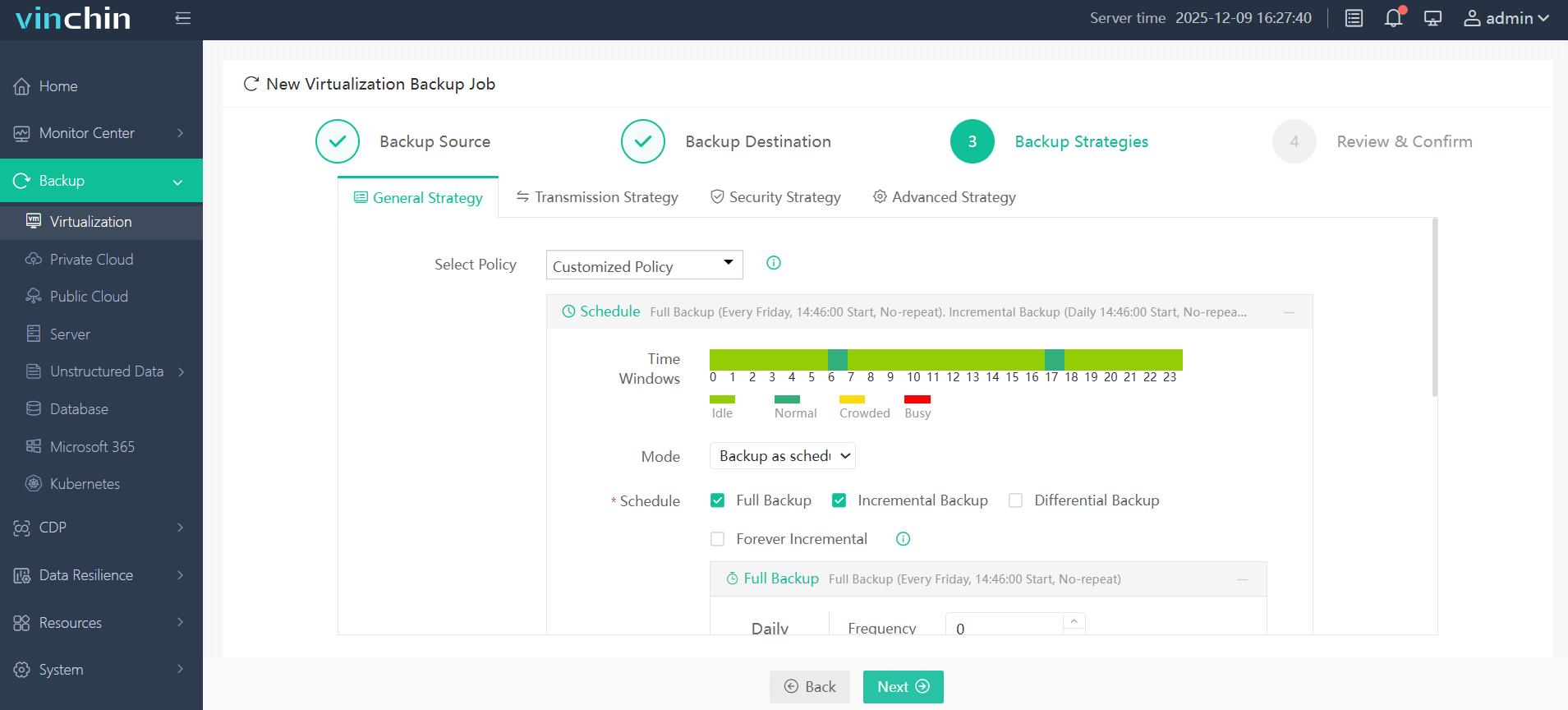
Step 3: Configure the backup strategy.
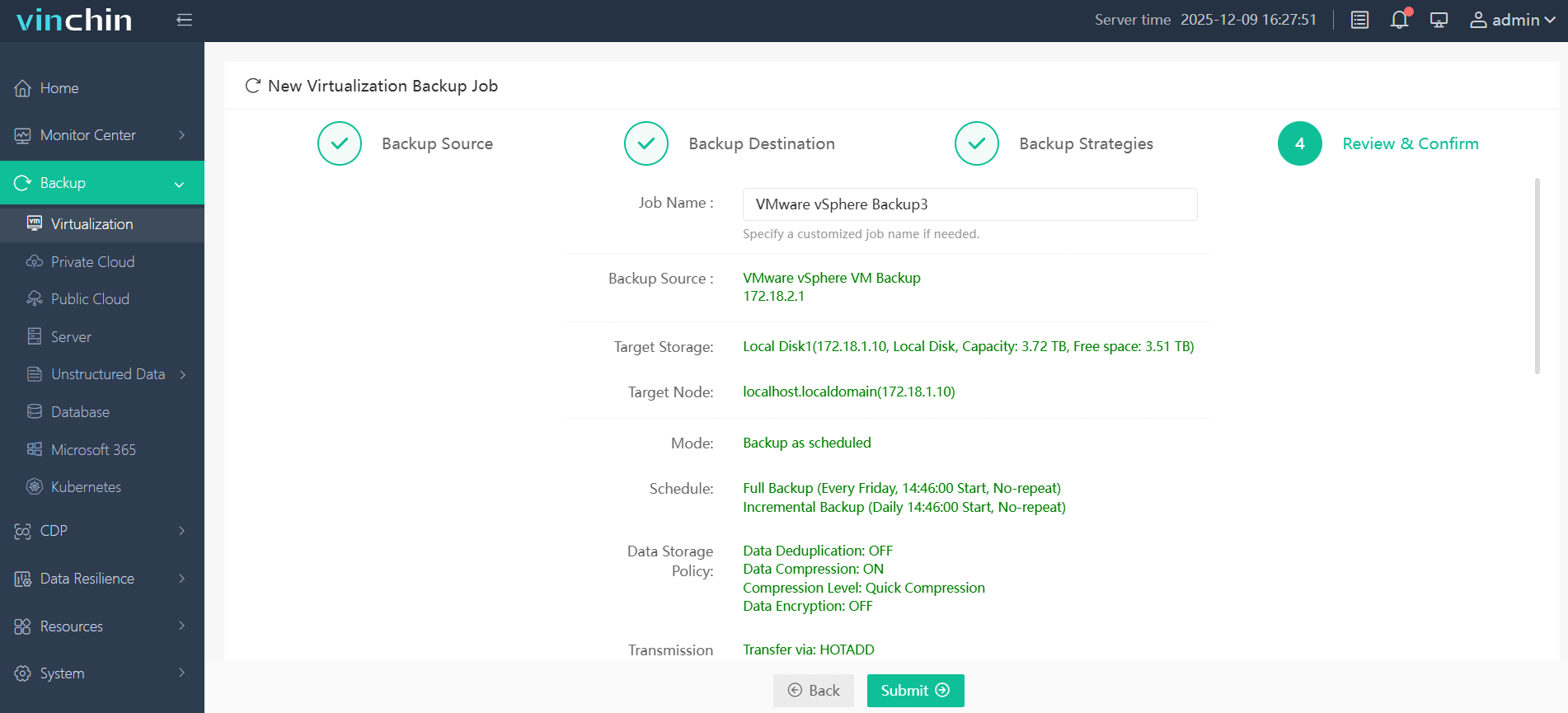
Step 4: Submit the job.
With its global reputation among enterprise users and top industry ratings worldwide, Vinchin Backup & Recovery offers a 60-day full-featured free trial—click below to experience leading-edge data protection firsthand.
Best VMware Backup Software FAQs
Q1: What defines "fastest" in VMware backup recovery?
Recovery speed depends on instant restore capability combined with minimal manual steps plus infrastructure efficiency; top solutions let users boot VMs straight from their latest backups so files/apps become available within minutes rather than hours.
Q2: Does fast recovery compromise data integrity?
No; enterprise-grade platforms ensure both speed plus consistency using application-aware snapshots so databases/applications come back fully usable—not just restored as static files.
Q3: Can fast recovery scale across large VMware clusters?
Yes; leading solutions handle high concurrency efficiently using technologies such as Changed Block Tracking (CBT), supporting simultaneous restores across many VMs—even at enterprise scale.
Q4: How does automation impact fast disaster recovery?
Automation reduces human error risk while speeding up full-environment restoration; orchestrated failover/failback ensures consistent repeatable processes regardless who initiates them.
Q5: How do RTO (Recovery Time Objective) & RPO (Recovery Point Objective) relate to fast recovery?
The fastest solutions aim for near-zero RTO—meaning minimal downtime—and low RPO—meaning little/no lost data; they achieve this through continuous protection plus instant restore features.
Conclusion
Fast VMware recoveries protect revenue streams while meeting compliance demands; selecting tools focused on instant restore capability plus automation ensures resilient business continuity no matter what happens next.










