Enterprises running large VMware environments need backup software that can deliver both reliability and high performance at scale. The right solution must handle rapid data growth, complex compliance needs, and evolving threats without slowing down business operations. Consistent backups and fast recovery are essential to protect critical workloads from downtime or loss.
A scalable backup platform should support seamless expansion as your virtual infrastructure grows. It must automate protection across hundreds or thousands of VMs while maintaining speed and integrity. These capabilities help organizations meet strict service-level agreements (SLAs), pass audits, and keep pace with digital transformation.
Choosing a robust VMware backup solution is not just about ticking boxes—it’s about ensuring your business stays resilient no matter how large or complex your environment becomes. Reliable backups reduce operational risk while supporting long-term growth.
Why VMware Backup Reliability & Performance Matter in Enterprise Environments
Reliable backup solutions form the backbone of enterprise IT resilience. They ensure that data remains safe even during hardware failures, cyberattacks, or human error. High-performance backups minimize disruption by reducing the time needed to protect large volumes of data.
● Business Continuity
Downtime can cost enterprises millions per hour according to Gartner research. Reliable backups allow quick restoration so operations resume with minimal delay.
● Regulatory Compliance
Many industries require strict adherence to data retention policies and audit trails. High-performance backup tools help meet these requirements by automating reporting and ensuring all workloads are protected consistently.
● Data Growth Management
Virtual environments expand rapidly as businesses digitize more processes. Scalable backup platforms adapt to this growth without introducing bottlenecks or requiring constant manual intervention.
● Cybersecurity Defense
Ransomware attacks target virtual machines as well as physical servers. Fast, reliable restores limit damage by enabling quick recovery from clean copies of data.
● Operational Efficiency
Efficient backup processes free up IT resources for strategic projects instead of routine maintenance. Automation reduces errors while ensuring every VM receives timely protection—even as new workloads appear daily.
These factors make robust VMware backup software a non-negotiable investment for any organization operating at scale.
How To Choose The Best VMware Backup Solution for Reliability & Performance at Scale?
Selecting an enterprise-grade VMware backup tool requires careful evaluation beyond basic functionality. Focus on these core criteria to maximize reliability and performance across large deployments:
A strong solution should combine advanced technology with ease of use so teams can manage growing environments confidently. Here’s what sets top-tier platforms apart:
● Proven Scalability
The software must handle expanding workloads without slowdowns or failures. Look for agentless architecture that avoids resource drain on each VM—this approach simplifies deployment while supporting thousands of VMs efficiently.
● Automation Capabilities
Automated scheduling, monitoring, and reporting streamline management tasks so IT staff focus on higher-value work. Features like automatic VM discovery ensure new virtual machines receive immediate protection based on policy-driven rules rather than manual setup.
● High-Speed Recovery Under Load
Fast restore times are crucial when many users depend on uptime. Solutions should offer instant VM recovery along with granular file-level restore options—even during peak usage periods—to meet tight recovery time objectives (RTOs).
● Seamless Integration With Existing Infrastructure
Backup tools need deep compatibility with vSphere APIs such as Changed Block Tracking (CBT) for efficient incremental backups. Support for HotAdd transport mode (which mounts disks directly to proxy servers) further accelerates both backups and restores without impacting production traffic.
● Comprehensive Security And Granular Restore Options
End-to-end encryption protects sensitive information throughout the process—from initial capture through storage to final restore—while role-based access control limits who can view or recover specific datasets. Granular restore lets you retrieve only what you need instead of entire VMs, saving time during incidents or audits.
When evaluating vendors, ask about real-world benchmarks: What is their average throughput per hour? How do they perform in multi-site deployments? Are there published case studies showing successful scaling in similar environments? Independent analyst reports from sources like ESG Research often provide comparative insights into performance claims.
By focusing on these criteria—and insisting on evidence-backed results—you position your organization for success even as demands increase year after year.
Vinchin Backup & Recovery: Enterprise-Level Protection Across Virtualization Platforms
For organizations seeking robust protection in VMware environments, Vinchin Backup & Recovery stands out as a professional enterprise-level virtual machine backup solution supporting over 15 mainstream virtualization platforms—including VMware, Hyper-V, Proxmox, oVirt, OLVM, RHV, XCP-ng, XenServer, OpenStack, ZStack, among others.
Key features most relevant for enterprise VMware users include quiesced snapshot support for consistent application-aware backups; HotAdd transport mode for fast disk access during jobs; CBT-powered incremental backups that minimize transfer size; instant recovery capabilities that reduce downtime dramatically; plus comprehensive deduplication/compression which lowers storage costs while accelerating operations.
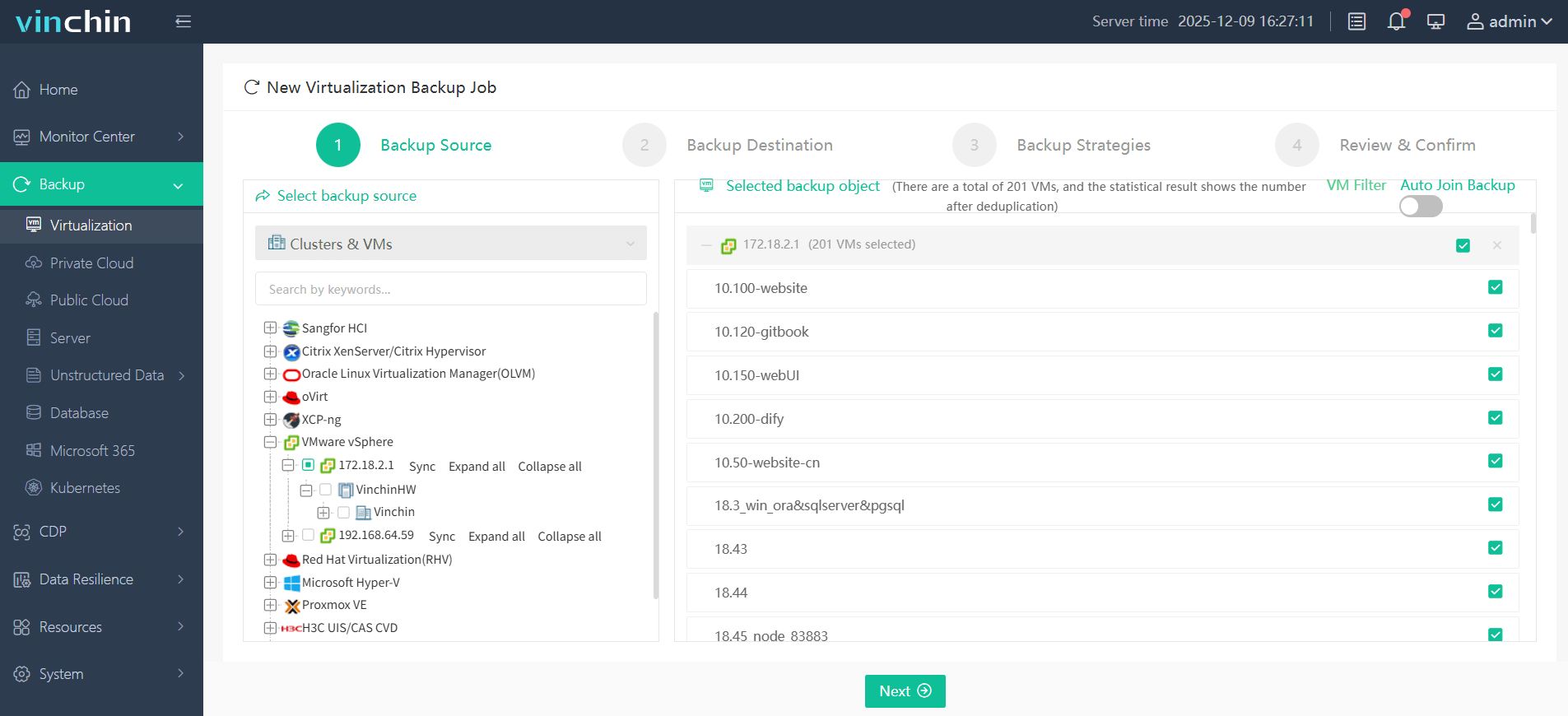
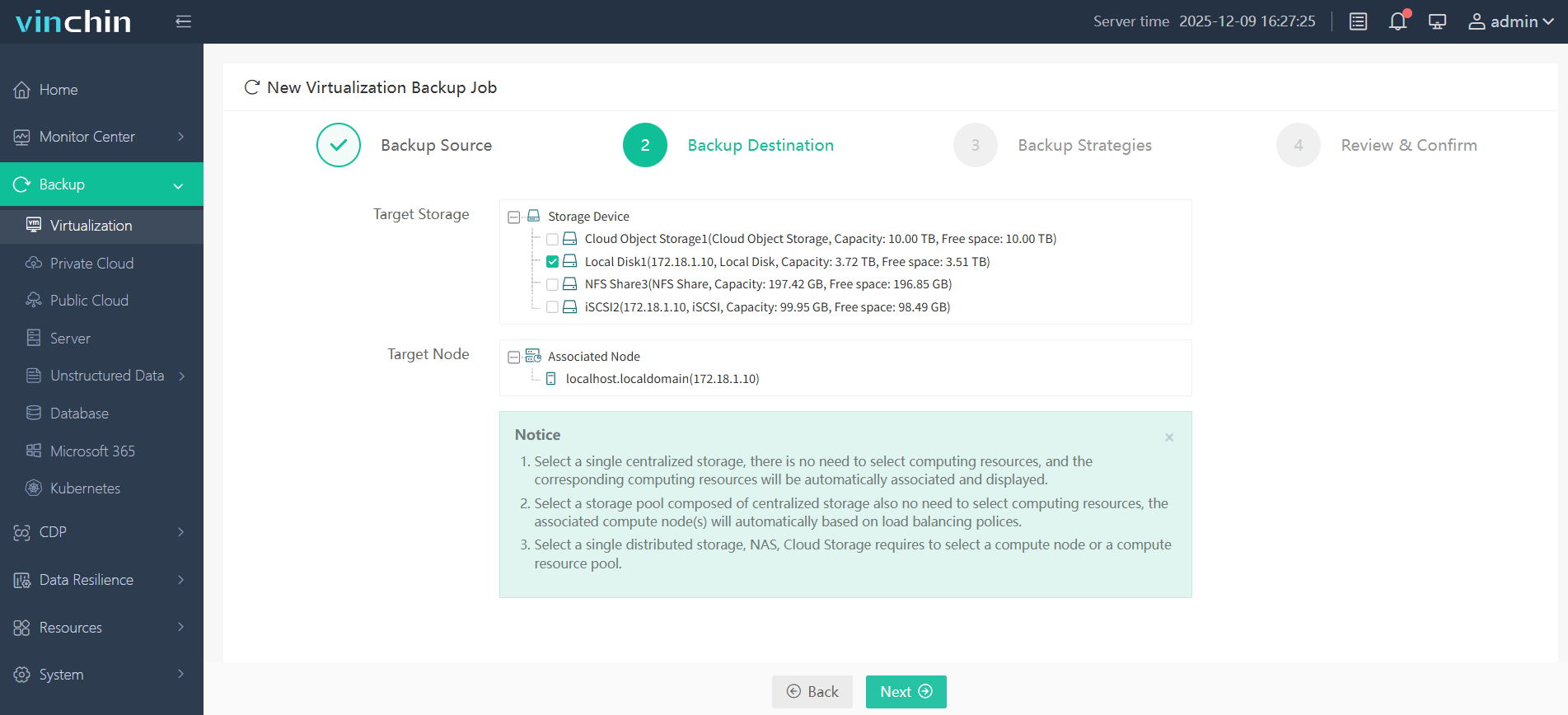
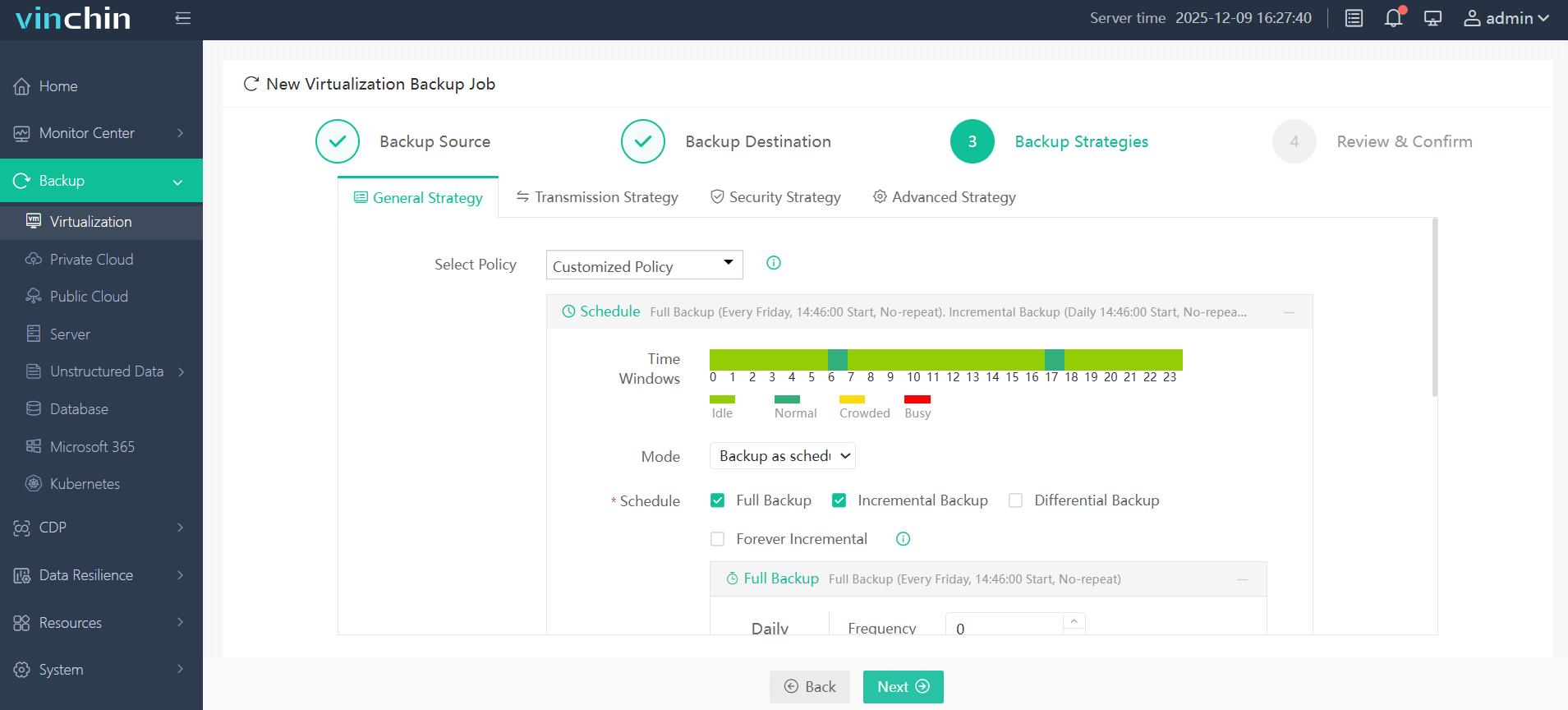
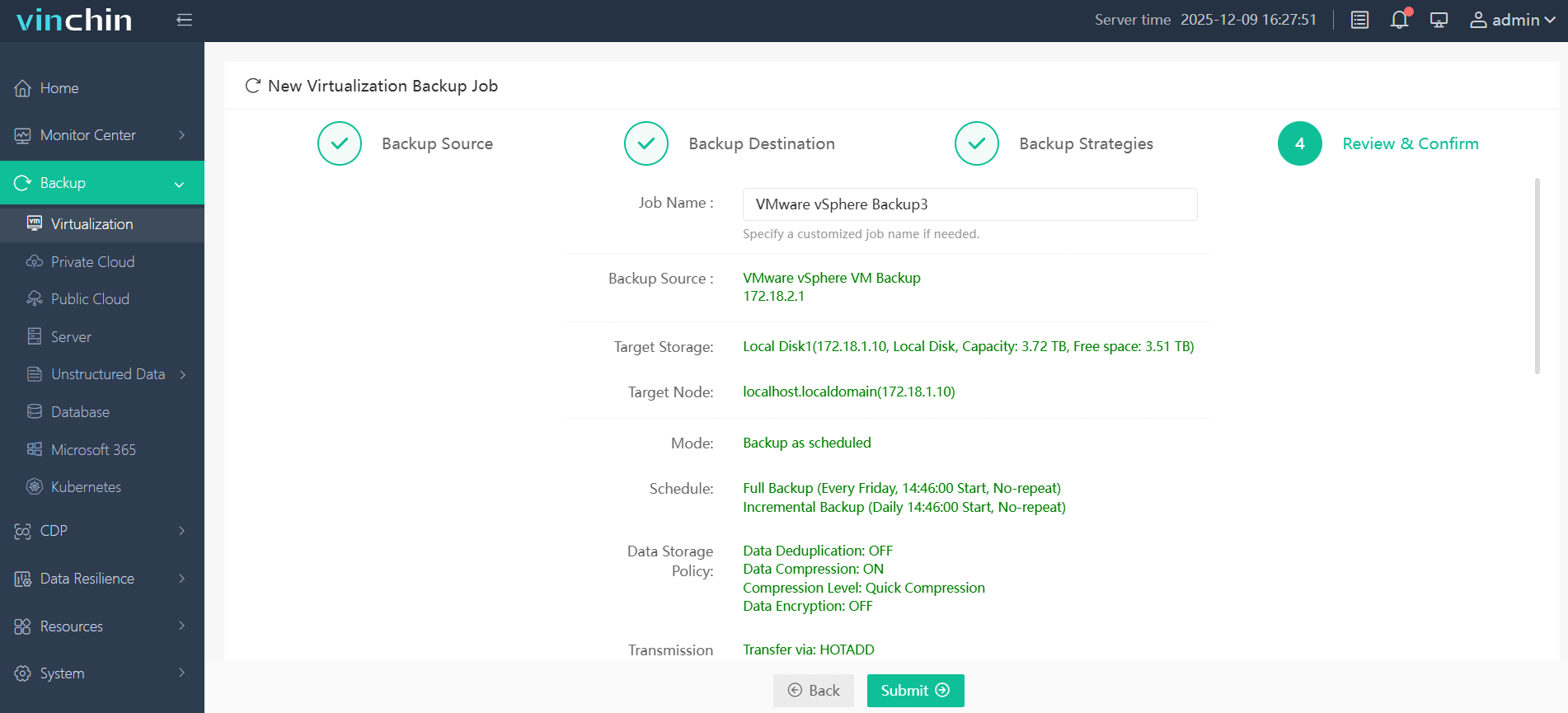
With its intuitive web console interface, backing up a VMware VM using Vinchin Backup & Recovery involves four streamlined steps:
Step 1: Select the VMware VM to back up;
Step 2: Choose the desired backup storage location;
Step 3: Configure your preferred strategy including schedule and retention settings;
Step 4: Submit the job.
Recognized globally with top ratings from thousands of customers across industries—Vinchin Backup & Recovery offers a 60-day full-featured free trial so you can experience its power firsthand—click below to get started.
Best VMware Backup Software FAQs
Q1: How does scalable backup impact long-term reliability?
Scalable solutions maintain consistent performance even as virtual machine counts grow into the thousands; this prevents bottlenecks that could compromise data integrity or slow down critical operations over time.
Q2: What security features are essential in enterprise-grade VMware backups?
End-to-end encryption safeguards data throughout its lifecycle while role-based access control restricts who can initiate restores; together they prevent unauthorized access during routine operations or emergencies.
Q3: Can the solution support compliance audits?
Yes—detailed logging tracks every action taken within the system; immutable storage prevents tampering; customizable retention policies align with regulatory mandates so auditors find clear evidence of ongoing protection efforts.
Q4: How important is automation in large-scale environments?
Automation eliminates manual steps prone to error; it ensures timely coverage across all VMs—even those added recently—and frees IT staff from repetitive tasks so they focus on strategic initiatives instead of daily maintenance chores.
Q5: How does Changed Block Tracking (CBT) improve backup performance at scale?
Changed Block Tracking identifies only modified disk blocks since the last snapshot; this enables much faster incremental backups because less data moves each cycle—a key advantage when protecting hundreds of active virtual machines simultaneously.
Conclusion
Reliable VMware backup keeps businesses running smoothly at any size. Choosing proven solutions ensures uptime meets expectations while simplifying management—even as demands grow year after year.










