Reliable disaster recovery is essential for organizations running Proxmox environments. The right backup software protects against data loss from hardware failure, ransomware attacks, or human error. Enterprises need solutions that restore systems quickly and completely. This ensures business continuity and helps meet compliance requirements. According to ENISA’s Threat Landscape 2023 report, ransomware remains one of the top threats facing businesses today. Downtime costs can reach thousands of dollars per minute. Choosing proven backup software gives IT teams confidence that critical workloads are protected.
Why Disaster Recovery Matters in Enterprise Environments
Disaster recovery forms the backbone of enterprise IT resilience. When unexpected events disrupt operations—whether due to cyberattacks, hardware failures, or accidental deletions—the speed and reliability of recovery determine how fast business resumes.
● Minimizing Downtime keeps revenue flowing and maintains customer trust. Even brief outages can lead to lost sales or damaged reputation.
● Preventing Data Loss ensures that vital information remains available for daily operations and long-term planning.
● Meeting Compliance Requirements avoids regulatory penalties by ensuring data is recoverable within mandated timeframes.
● Protecting Brand Reputation demonstrates responsibility to clients and partners by showing preparedness against disruptions.
Industry standards like NIST SP 800-34 highlight disaster recovery as a core element of organizational security. Enterprises cannot afford inadequate DR strategies; robust solutions are mandatory for modern IT environments.
How To Choose The Best Proxmox Backup Solution for Disaster Recovery?
Selecting effective backup software involves more than basic data copying. Several key factors influence whether your solution delivers reliable disaster recovery at scale.
● Automated Restore Validation provides assurance that backups are usable when needed. For example, some tools perform scheduled test restores or boot VMs automatically to verify integrity without manual intervention.
● Granular Restore Options allow you to recover specific files or folders instead of entire virtual machines. If a user accidentally deletes an important document inside a VM, granular restore saves time compared to full VM restoration.
● Immutable Backups protect against ransomware by preventing unauthorized changes or deletions during retention periods. Immutability integrates with storage options like object storage buckets set as write-once-read-many (WORM).
● Scalability means your backup system grows alongside your infrastructure without added complexity. As you add more VMs or increase storage capacity in Proxmox clusters, scalable solutions maintain performance through distributed architectures or deduplication technologies.
● Compliance Alignment supports audit readiness with features such as detailed reporting logs, encryption at rest/in transit, role-based access controls (RBAC), and customizable retention policies aligned with regulations like GDPR or HIPAA.
● Centralized Management streamlines administration by providing a unified dashboard for all backup tasks across multiple nodes or datacenters. Centralized consoles reduce errors through consistent policy enforcement and real-time alerts on job status.
When evaluating options, consider how each feature addresses real-world scenarios: restoring from ransomware attacks using immutable copies; recovering individual files after accidental deletion; scaling protection as new VMs come online; passing audits with comprehensive logs; managing everything from one interface rather than juggling multiple tools.
Vinchin Backup & Recovery: Enterprise-Level Protection for Proxmox VE
For organizations seeking robust protection in Proxmox VE environments, Vinchin Backup & Recovery offers an advanced enterprise-level virtual machine backup solution supporting over 15 mainstream virtualization platforms—including VMware, Hyper-V, oVirt, OLVM, RHV, XCP-ng, XenServer, OpenStack, ZStack—and notably Proxmox VE itself. It delivers agentless backups tailored for complex infrastructures while minimizing resource overhead and simplifying deployment across diverse systems.
Key features include instant recovery (so you can rapidly restore entire VMs), LAN-free backup (for efficient data transfer within large-scale networks), CBT (enabling fast incremental backups), granular restore (to recover specific files without restoring whole VMs), and flexible scheduling (to automate protection based on business needs). These capabilities ensure rapid RTOs/RPOs while reducing administrative burden.
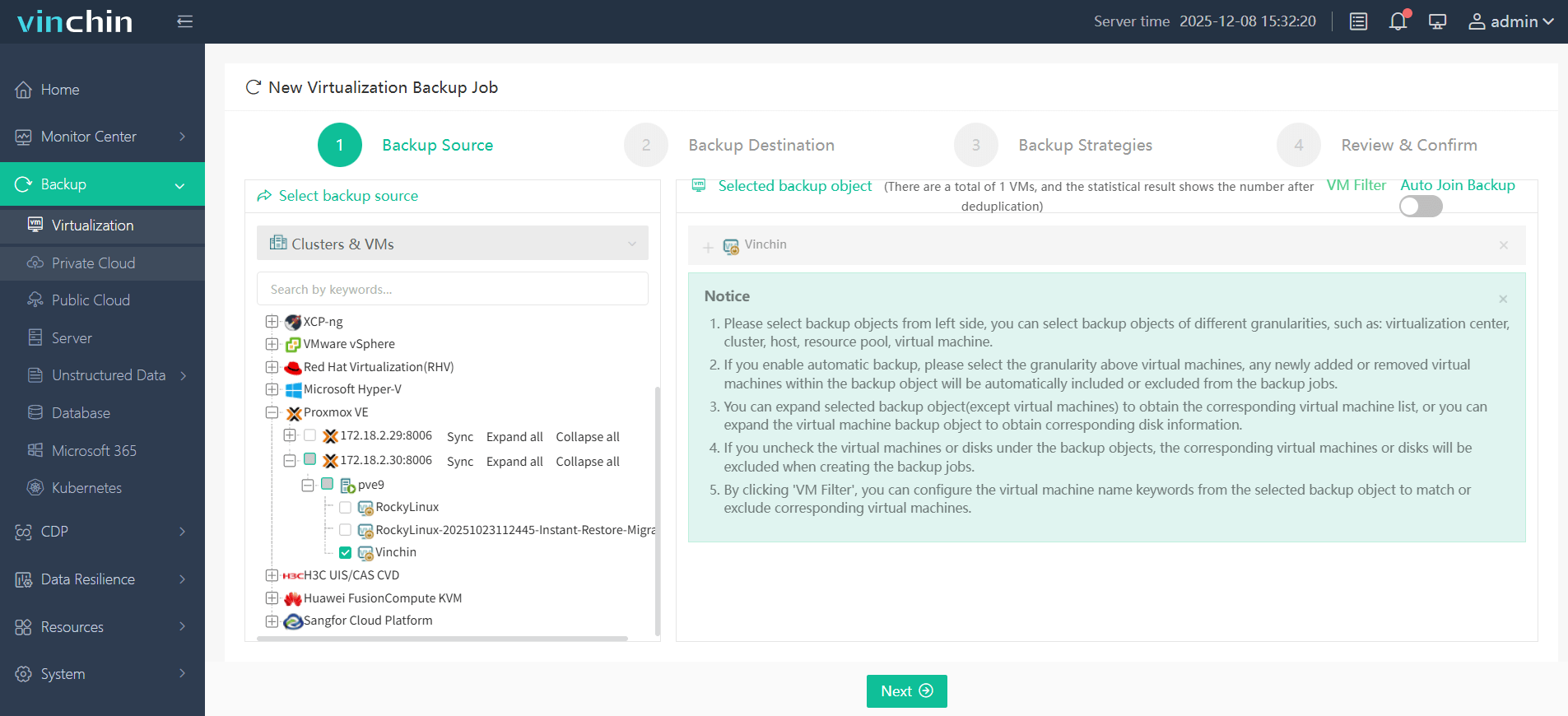
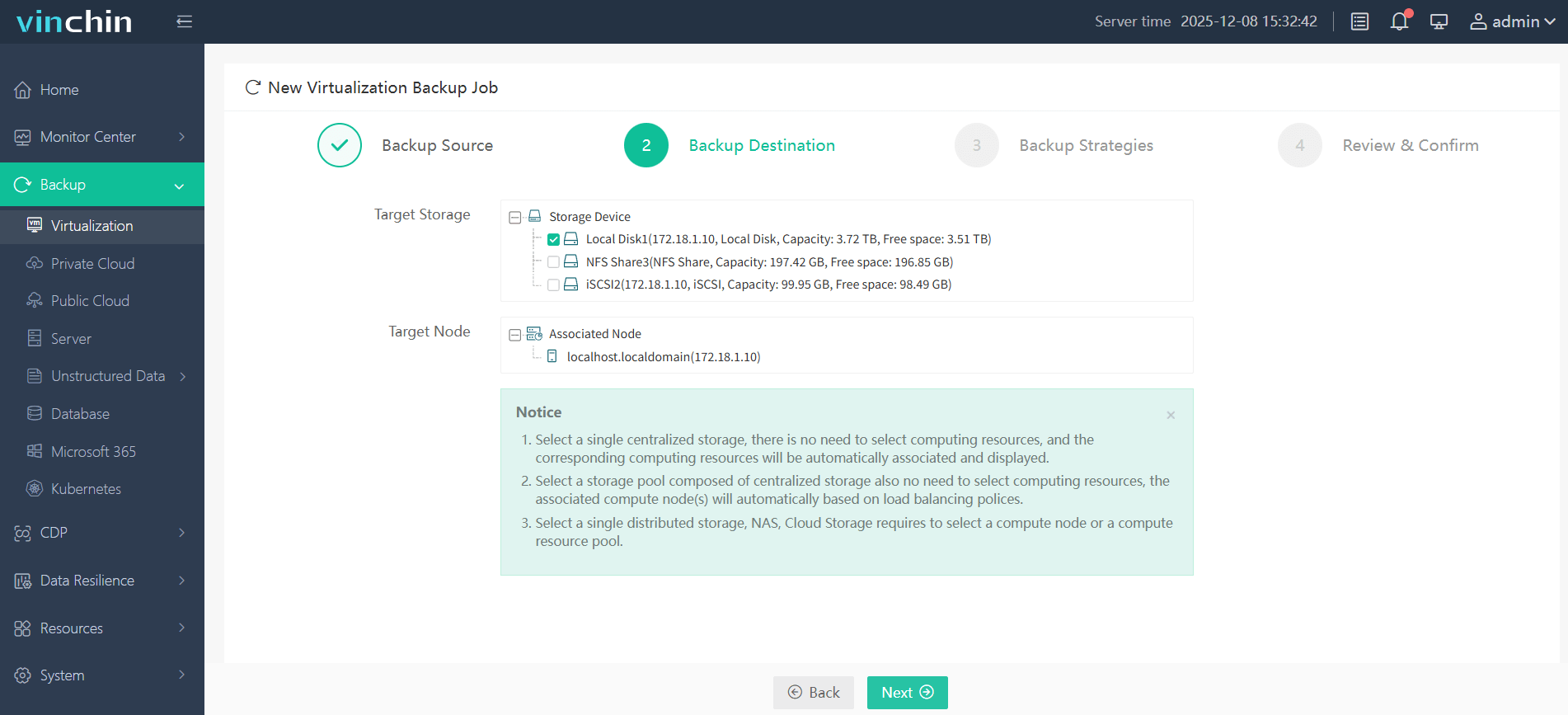
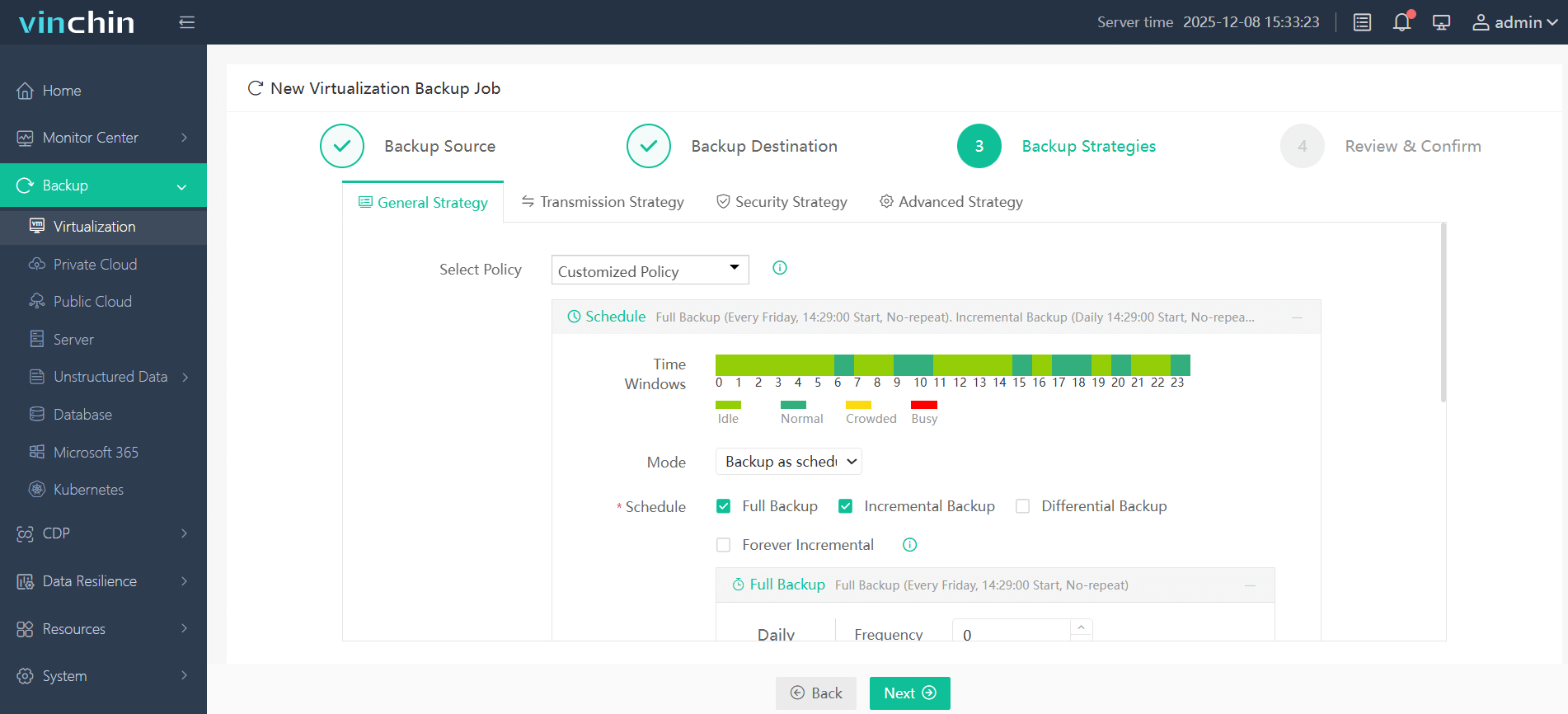
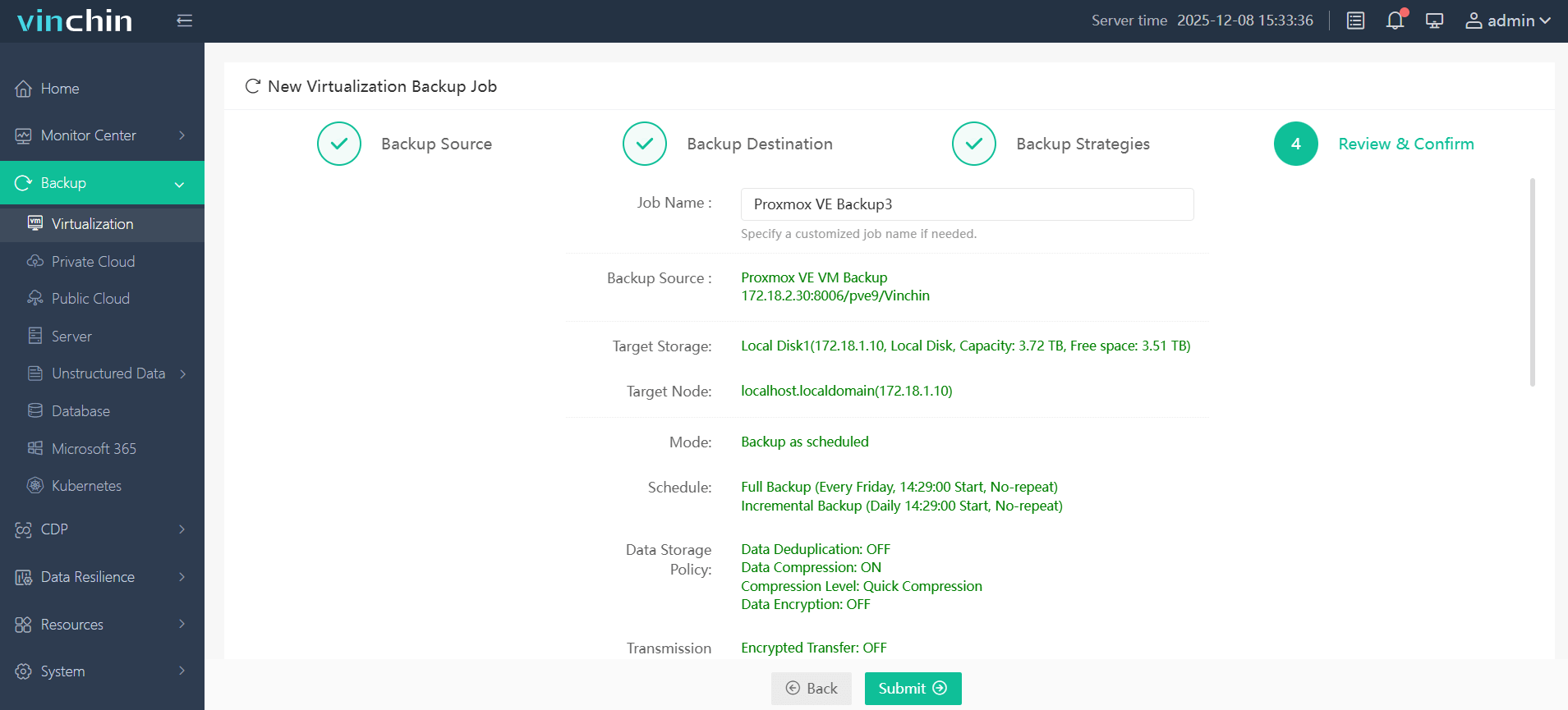
With its intuitive web console, backing up a Proxmox VM using Vinchin Backup & Recovery takes just four steps:
Step 1: Select the Proxmox VM to back up
Step 2: Choose the backup storage
Step 3: Configure the backup strategy
Step 4: Submit the job
Vinchin Backup & Recovery enjoys global recognition among enterprises for its reliability and rich feature set—try it risk-free with a 60-day full-featured free trial by clicking the download button below!
Best Proxmox Backup Software FAQs
Q1: What makes a Proxmox backup solution reliable for disaster recovery?
A1: Reliability comes from features like automated restore testing—which often includes periodic boot checks on backed-up VMs—immutable storage that blocks tampering even during attacks—and centralized management that reduces configuration errors while enabling quick response during incidents.
Q2: How does scalability affect disaster recovery readiness?
A2: Scalable solutions handle growing numbers of virtual machines without slowing down backups or restores—even as storage demands rise across clusters—so protection stays consistent regardless of environment size.
Q3: Can compliance requirements be met with enterprise-grade DR tools?
A3: Yes—leading solutions offer audit trails—encryption—integration with RBAC—and customizable retention policies—to help meet regulations such as SOX—GDPR—or HIPAA while simplifying audits through detailed reporting logs.
Q4: Is agentless backup important for Proxmox environments?
A4: Absolutely—agentless design reduces resource overhead on hosts—simplifies deployment since no agents need updating—and maintains high performance even on busy clusters.
Conclusion
Choosing proven Proxmox backup software ensures fast disaster recovery when every second counts. Vinchin delivers enterprise-grade protection at scale so business stays resilient through any disruption.









