There is no universal interval. The right backup frequency for a production VM is whatever interval makes your actual data loss, if this VM failed right now, less than or equal to its Recovery Point Objective (RPO), a business decision, not a technical default. In practice, this puts most production VMs into one of four bands: 15 minutes to 1 hour for revenue-critical, high-transaction workloads; hourly to every 4 hours for important-but-not-customer-facing systems (ERP, CRM, core database); daily for standard production servers; and daily to weekly for low-impact or reference VMs. The frequency you can actually sustain also depends on the VM’s daily data change rate and your infrastructure’s ingest capacity, which is why “back everything up nightly” and “backup everything up every 15 minutes” are both wrong defaults for a mixed VM estate.
Key Takeaways
Frequency is a downstream output of RPO, not an input you pick first - set the acceptable data-loss window per workload, then drive the interval.
Backup frequency and RTO are different levers. A 15-minute backup interval does not make recovery faster; it only reduces the amount of data you lose.
A VM’s daily change rate (typically 2-5% for general-purpose servers, 5-15%+ for transactional databases) determines what frequency is technically sustainable without overloading storage and network capacity.
Ransomware median dwell time reached 14 days in 2025, per Mandiant's M-Trends 2026 report, meaning retention depth matters as much as interval, since attackers often sit inside the environment across dozens of backup cycles before triggering encryption.
Static frequency assignments decay as VM roles change, a workload's criticality drifts away from its original backup tier unless the tiering is periodically re-certified.
Past a certain point, more frequent backups stop reducing risk and start adding it, through snapshot chain overhead, consolidation lag, and backup-window contention.
Why “How Often” Is the Wrong First Question
Most teams ask “how often should I back up this VM?” as if frequency were the starting variable. It isn’t. Frequency is the answer to a prior question: how much data can this workload afford to lose? That number is the Recovery Point Objective, and per NIST SP 800-34 contingency-planning guidance, RPO is meant to be set during a business impact analysis, a discipline applied to each system individually, not a blanket IT policy. An RPO of 4 hours means backup or replication intervals must run at 4 hours or shorter; an RPO of 15 minutes rules out anything less frequent than every 15 minutes. The mistake most environments make isn't choosing the wrong number — it's skipping the RPO conversation entirely and inheriting whatever interval a template or a previous admin set years ago.
This also means frequency is not a single number for your environment. A payment-processing VM and an internal wiki VM should rarely share a backup schedule. Treating "backup frequency" as one policy for the whole vCenter or cluster is the single most common structural error behind both over-spent backup infrastructure and under-protected critical systems.
The Backup Frequency Tiering Matrix
Two variables decide the frequency band a VM belongs in: business impact (what happens if this VM’s data is stuck at yesterday’s state) and change volatility (how much data actually changes per day, which determines whether a shorter interval is even meaningful or sustainable). A compliance floor can override both.
Tier | Business Impact | Typical Change Rate | Recommended Frequency | RPO Target | Example Workloads |
1 — Mission-critical | Revenue-generating, customer-facing, or safety-relevant; downtime or data loss has immediate financial/legal consequences | Medium-High (5-15%+/day) | 15 min -1 hr (CDP or frequent snapshot + log shipping for DBs) | 15 min - 1 hr | E-commerce order DB, payment gateway VM, real-time inventory system |
2 — Business-important | Core internal operations; outage is costly but not immediately customer-visible | Low-Medium (2-8%/day) | Hourly - every 4 hr | 1-4 hr | ERP, CRM, internal ticketing DB, email server |
3 — Standard production | Supports operations but has workable manual fallback for hours | Low (1-5%/day) | Daily | 24 hr | File servers, internal web apps, print/auth servers |
4 — Low-impact / reference | No immediate operational dependency | Very low (<2%/day) | Daily-Weekly | 24-72 hr | Documentation servers, sandbox/test VMs kept for reference, static content hosts |
Compliance modifier: if a VM holds regulated data (PCI, HIPAA, financial records under local retention law), the frequency floor is whichever is shorter, the business-impact tier or the regulatory minimum, and an additional immutable/offline copy is required regardless of tier, per CISA's #StopRansomware guidance on offline, tested, and where possible immutable backups.
The RPO Debt Curve - why elapsed time since backup isn’t the real risk metric
Standard RPO guidance frames exposure linearly: back up every 4 hours, and you can lose “up to 4 hours” of data. That’s true for the raw data itself, but it understates the actual recovery cost, because most production VMs don’t exist in isolation; they feed and are fed by other systems. The real cost of the gap isn’t just the data inside that window; it’s the reconciliation burden of making every downstream system consistent again after a restore.
Picture an order-processing VM that goes down at 2:00 P.M with a last-good backup from 10:00 AM. It’s not just four hours of orders that are gone; it’s four hours of orders that a warehouse system, a payment processor, a shipping API, and a customer notification service all believe were fulfilled. Reconciling those cross-system records doesn’t scale linearly with the elapsed window; it scales with how many downstream transactions and integrations touched that data during the gap, which tends to accelerate the longer the gap runs (more retries, more duplicate writes, more manual correction tickets stacking up). We call this accumulating reconciliation burden RPO debt: the true cost of a backup gap compounds faster than the clock does, especially for VMs that sit in the middle of an integration chain rather than at the edge of one.
The practical implication: when sizing RPO, don’t just ask “how much data can we lose.” Ask “how many other systems reference this VM’s data in real time,” and weight the target frequency upwards for VMs with more downstream dependents, even if their own transaction volume looks moderate on paper.
Temporal RPO Weighting - frequency should flex with the business clock, not run on a flat interval
Almost every backup schedule we've seen treats frequency as a flat interval: every 15 minutes, 24/7, or every hour, 24/7. But RPO risk isn't actually a function of clock time — it's a function of transaction density during the elapsed window. A 4-hour gap on an order-processing VM at 2 AM on a Tuesday (near-zero order volume) carries a fraction of the risk of the same 4-hour gap during a flash sale at 2 PM.
This suggests a variable-frequency model rather than a flat one: run tight intervals (15–30 min) during known peak business windows, and relax to hourly or even 2-hourly during predictable low-activity periods (overnight, weekends for B2B systems), then tighten again automatically around known peak events (month-end close, seasonal sales, patch nights). The net effect is that you get the same effective risk protection with meaningfully less backup infrastructure load — because you're not paying the storage, network, and snapshot-consolidation cost of 15-minute intervals during the 60% of the day when almost nothing changes. Most backup platforms today make this awkward because scheduling is built around fixed cron-style windows rather than a business-activity curve; treating the schedule as a byproduct of a calendar (business hours vs. off-hours, standard week vs. peak week) rather than a single fixed number is the actual improvement, independent of which tool executes it.
Tiering Drift - why yesterday’s correct frequency is often today’s wrong one
Backup frequency is almost always assigned once, at VM provisioning, based on that VM's role at the time. The problem is that VM roles change constantly and the backup policy usually doesn't follow. A staging VM quietly becomes a production dependency once a team starts routing real traffic through it during a migration. A "marketing microsite" VM becomes part of the checkout path during a campaign. A reporting VM that used to run overnight batch jobs becomes an intraday dashboard once the business starts making decisions off it in real time.
We call this gap tiering drift: the growing distance between a VM's assigned backup tier and its actual current business criticality. It's dangerous specifically because it's invisible in backup monitoring — the backup job succeeds every night, the dashboard is green, and nobody notices that the VM being protected daily is now, functionally, a Tier 1 system. Tiering drift is a governance failure, not a backup-software failure, which is why it needs a governance fix: tie backup-tier re-certification to your existing change-management or CMDB review cadence (quarterly is a reasonable default for most mid-size environments) rather than expecting it to surface on its own from backup software telemetry.
How Change Rate Actually Drives Feasible Frequency
RPO tells you what frequency you need. Change rate tells you what frequency you can sustain. Every incremental backup, whether built on VMware’s Change Block Tracking, Hyper-V’s Resilient Change Tracking, or Proxmox’s QEMU dirty bitmaps, only transfers blocks that changed since the last run, so the real cost driver isn’t the interval itself; it’s how much data changes in that interval multiplied by how many times a day you’re running the job.
General-purpose VMs (file servers, light application servers) typically see a daily change rate in the 2-5% range; transactional database and busy mail servers routinely run 5-15% or higher. That’s the number to actually measure, via your hypervisor’s own change-tracking data, before committing to an interval, rather than assuming it.
Change-Rate-to-Frequency Ratio (CRFR) - a quick sustainability check before you commit to an interval
Before locking in a frequency, run this back-of-envelope check: (VM disk size × daily change rate) ÷ available backup-window throughput = minimum feasible interval. Worked example: a 2 TB order-processing database VM with a 12%/day change rate (typical for a busy transactional workload) generates roughly 240 GB of changed data per day. If that change is spread across a 16-hour active business window, that's about 15 GB per hour of actual new data to move — comfortably inside most repository ingest budgets, which means hourly backups are sustainable. But run the same VM at a 15-minute interval, and you're not meaningfully reducing the daily data volume moved (deduplication still collapses most of it); you're mainly multiplying job-launch, snapshot-creation, and consolidation overhead by roughly 4x relative to hourly, for a marginal RPO gain of 45 minutes. CRFR won't tell you the "right" frequency; that's still an RPO decision, but it tells you where you've crossed from "meaningfully reducing risk" into "mostly adding infrastructure load," which is exactly the point the Frequency Fatigue Threshold above describes in operational terms.
Backup Frequency Is Not RTO - Two Different Levers
It’s worth separating this clearly because vendors and internal stakeholders conflate it constantly: RPO (governed by frequency) answers “how much data can we lose,” while RTO answers “how long can we be down.” Running backups every 5 minutes does nothing to shorten how long it takes to actually restore a 2 TB VM and bring dependent services backup online; that’s a function of restore throughput, orchestration, and testing, not interval. Teams that chase a shorter and shorter backup interval while ignoring restore testing often end up with an excellent RPO on paper and a multi-hour, untested RTO in practice. Both numbers should be set per VM tier, and both should be validated with actual restore drills, not assumed from the backup schedule alone.
Why Ransomware Changes the Frequency Math
Frequency planning built purely around hardware failure or accidental deletion understates a much more common failure mode today. Mandiant's M-Trends 2026 report puts the global median attacker dwell time at 14 days in 2025, up from 11 days the year before, meaning an intruder is often present in the environment for two weeks before encryption or exfiltration is triggered. Sophos's State of Ransomware 2026 survey of over 2,100 organizations found that backup-based recovery was used in 66% of encrypted-data cases (up 12 points year over year), while 56% of attacks still succeeded in encrypting data despite that recovery reliance.
The frequency implication: a 15-minute RPO is worthless if every restore point inside the attacker's 14-day dwell window is sitting on the same, now-compromised, backup repository. Short intervals protect against data loss; they don't protect against compromised recovery infrastructure. That's a retention-depth and isolation problem, not a frequency problem, which is why CISA's #StopRansomware guidance pairs frequent, automatic backups with a separate requirement for offline or immutable copies that an attacker with domain credentials still can't touch. Practically: pick frequency for RPO, then separately make sure your retention window comfortably exceeds current median dwell time, with at least one copy that's air-gapped or immutable regardless of how tight your interval is.
Backup Frequency Decision Workflow
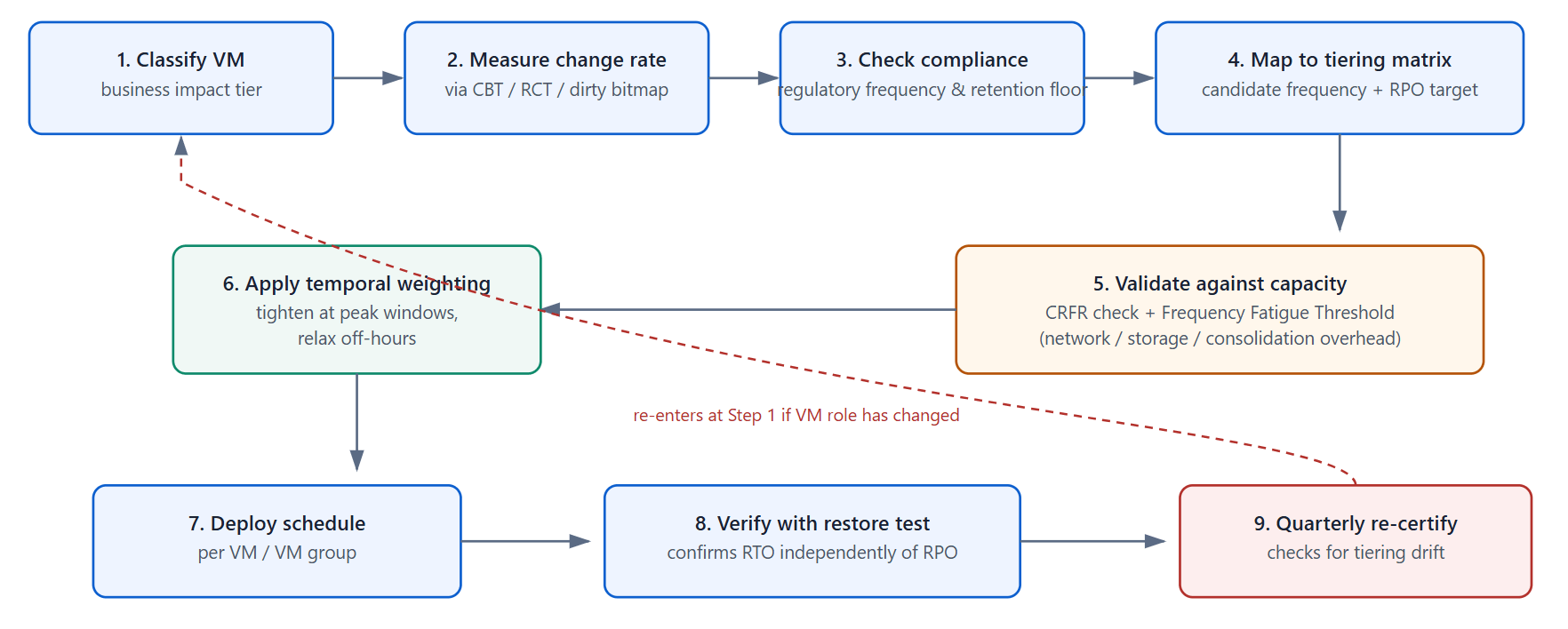 Running this workflow by hand across a mixed vSphere, Hyper-V, and Proxmox estate is exactly where per-VM policy assignment tends to break down in practice, which is why platforms like Vinchin Backup & Recovery are built to let administrators assign and adjust frequency, retention, and immutable-copy policy per VM or per group from one console across seven virtualization platforms, rather than maintaining separate schedules in separate tools.
Platform-by-Platform: What Frequency Is Actually Achievable
VMware vSphere
Changed Block Tracking is the mechanism that makes short-interval incremental backups practical; it’s disabled by default and must be enabled per VM, and VMware’s own CBT documentation notes it should not be enabled while snapshots already exist on the VM, or the change data returned can be inaccurate. Newer CBT versions (tied to virtual hardware version 17+ on vSphere 7+) use a smaller, adaptive block size that improves tracking resolution and reduces backup data volume, which effectively lowers the practical floor for sustainable frequency on updated environments.
Microsoft Hyper-V
Resilient Change Tracking, available for Windows Server 2016 and later with VHDX-format disks, plays the same role as CBT: it tracks changed blocks at the disk level so incremental backups only move new data. Clusters still running earlier Hyper-V versions or legacy VHD-format disks lack this native tracking, which raises the practical minimum interval considerably since every incremental effectively behaves closer to a full scan.
Proxmox VE + Proxmox Backup Server
PBS uses QEMU “dirty bitmaps” to track changed blocks in memory, combined with content-defined chunking on the server side so unchanged chunks are never re-uploaded regardless of how the data moved on disk. The practical caveat for frequency planning: a full VM stop/start, host reboot, or live migration typically clears the in-memory bitmap, forcing the next run to re-read the full disk (though deduplication still limits what’s actually re-uploaded), so environments doing frequent maintenance restarts should expect occasional full-read cycles regardless of the configured interval.
XCP-ng/Citrix Hypervisor (XenServer)
Native changed-block tracking support varies by version and typically requires NBD-based backup transport to get true incremental behavior; on older builds without it, frequent incrementals fall back to slower full-disk comparison, making hourly-or-tighter schedules impractical without upgrading the transport method first.
KVM
Frequency ceilings here are governed by libvirt/QEMU’s own dirty-bitmap and incremental-backup APIs (matured from QEMU 6.x onward); bare-metal KVM without a management layer exposing these APIs generally can’t sustain sub-hourly incrementals without custom tooling.
Red Hat Virtualization (RHV/oVirt) and Oracle OLVM
Both are oVirt-based and expose an incremental backup API built on imageio, which functions similarly to CBT/RCT by tracking changed extents per disk since the last checkpoint. Frequency in practice is bounded less by the API itself and more by the storage domain’s snapshot performance, since each backup still coordinates through a live snapshot at the storage layer.
Common Mistakes in Setting Backup Frequency
Mistake | Why it happens | Better approach |
One schedule for the whole cluster | Simpler to configure and monitor | Tier VMs by business impact and change rate; assign frequency per tier |
Choosing frequency before defining RPO | Frequency is the visible dial; RPO requires a business conversation | Run a short business-impact pass per workload before touching schedules |
Treating frequency as a ransomware fix | Shorter interval feels like “more protection” | Pair frequency with retention depth that exceeds current dwell-time benchmarks and at least one immutable/offline copy |
Never revisiting tiers after go-live | Backup jobs succeed silently, so nothing prompts a review | Tie tier re-certification to existing change-management or VMDB review cycles |
Pushing frequency below the infrastructure’s consolidation capacity | Assuming “more frequent” is always safer | Run a CRFR sustainability check; use CDP/log-shipping instead of ever-shorter snapshot intervals below ~15-30 minutes |
Summary Table - Frequency by Workload Tier
Workload Tier | Recommended Frequency | RPO Target | Minimum Retention Depth | Immutable/Offline Copy |
Mission-critical | 15 min - 1 hr (or CDP/log shipping) | 15 min - 1 hr | ≥ 30 days | Required |
Business-important | Hourly - 4 hr | 1-4 hr | ≥ 30 days | Required |
Standard production | Daily | 24 hr | 14-30 days | Recommended |
Low-impact/reference | Daily-Weekly | 24-72 hr | 14 days | Optional |
Retention depth is set to comfortably exceed the 14-day median ransomware dwell time reported for 2025, not just to satisfy hardware-failure recovery.
FAQs
Q1: Should every VM in a cluster use the same backup frequency?
No. Uniform scheduling is one of the most common causes of both wasted backup capacity and unprotected critical workloads. Group VMs into tiers by business impact and change rate, and assign frequency per tier rather than per cluster or per host.
Q2: Does increasing backup frequency increase storage costs proportionally?
Not proportionally, because incremental backups only capture changed blocks. Doubling frequency roughly doubles the restore-point count and metadata overhead, but the data volume increase tracks closer to the workload's change rate than to the frequency multiplier, especially on deduplicated repositories.
Q3: Is application-consistent backup frequency limited differently than crash-consistent?
Yes. Application-consistent backups quiesce databases and transaction logs (via VSS or a native agent) before the snapshot, which briefly pauses I/O. Running this too often on write-heavy database VMs can measurably affect application latency, so very short intervals typically rely on crash-consistent snapshots combined with native transaction-log shipping rather than repeated full application-consistent quiesce cycles.
Q4: Should backup frequency change during a migration, patch window, or seasonal peak?
Yes. Temporary frequency increases make sense around major changes — migrations, patch cycles, seasonal traffic peaks, known active threat campaigns — because both change rate and business risk spike together. Treat it as a scheduled, time-boxed exception and revert once the event window closes, rather than a permanent policy shift.
Q5: Can backup frequency alone satisfy compliance requirements like HIPAA or PCI DSS?
No. Compliance frameworks generally require documented retention periods, tested restore procedures, and access controls alongside a backup interval. A short frequency without a tested restore process, or without meeting the mandated retention window, does not satisfy audit requirements on its own.
Conclusion
Backup frequency isn't a setting you configure once and forget — it's the output of an RPO decision, bounded by what your infrastructure and change rate can sustain, and it decays over time as workloads change roles. Treat it as a per-tier, periodically re-certified policy paired with adequate retention depth, and the interval question mostly answers itself.