You move backups from disk to disk with minimal downtime by seeding the bulk of the data while production backup jobs keep running, closing the gap with repeated incremental syncs, and only pausing operations for the final, short sync-and-verify pass before cutover. The downtime that matters isn’t the copy time; it’s the cutover window, and copy time and cutover time are two different problems that need two different plans.
Key Takeaways
Minimal downtime comes from separating copy time (can run for days, in the background) from cutover time (must be short, planned, and rehearsed).
A seed-then-sync approach, one bulk copy plus repeated deltas, turns a multi-hour outage into a multi-minute one.
Preserving the existing backup chain (not forcing a new full backup) is what makes the migration low-risk, not just low-downtime.
Two repositories running in parallel during migration can silently fork the backup chain if retention and job pointers aren’t managed carefully.
Throughput estimates based on link speed alone are almost always optimistic; real transfer rate degrades under contention, verification overhead, and file-count density.
A copy that finishes is not the same as a copy that’s verified; skipping verification just moves the risk to your next real disaster.
Most virtualization platforms already ship a live storage-move primitive (Storage vMotion, Storage XenMotion, virsh blockcopy, live storage migration in RHV/OLVM) that can be paired with backup-repository migration for VM-level moves.
What “Disk-to-Disk Backup Migration” Actually Covers
The phrase gets used for a few related but distinct jobs. Before picking a method, it helps to know which one you’re actually doing:
Repository relocation - moving an existing backup repository (the folder/volume holding backup files, chains, and catalogs) from old disk hardware to new disk hardware, same backup software.
Storage consolidation - merging several smaller repositories onto one large target, often during a NAS or SAN refresh.
Backup swap - moving from local disk to a different disk-based backend (iSCSI LUN, NAS share, object-on-disk gateway) without changing backup software.
VM-level disk migration - moving the live virtual disks of a backup proxy or backup server VM itself between datastores, which is a hypervisor-level operation rather than a backup-software operation.
Each of these can be done with “minimal downtime,” but the definition of downtime is different for each: for a repository relocation, downtime means backup and restore jobs being unavailable; for a VM-level disk move, downtime means the VM being unavailable. Whatever the mechanism, the target of the move is the same object industry practice defines as a backup, a collection of data held on separate media specifically so it can be used for recovery if the original copy is lost, and disk-based backup technology exists specifically to let that data move and recover fast enough to shrink or eliminate the backup time window in the first place.
The Migration Downtime Budget (MDB)
Most “minimize downtime” migration failures aren’t caused by a slow copy; they’re caused by solving the wrong downtime problem. Teams spend their planning effort shrinking total transfer time (which can legitimately take days for large repositories). Those are separable. A 40TB repository can take 60 hours to copy and still produce an 8-minute cutover window, if the copy runs incrementally in the background while jobs keep operating against the source. The Migration Downtime Budget is the number that actually matters to the business, the maximum tolerable gap in backup/restore availability, and it should be sized independently from the total data volume. Sizing the wrong number is the single most common planning mistake in disk-to-disk backup migrations.
The Seed-Sync-Cutover Model
A three-phase methodology for any disk-to-disk backup move
Rather than treating migration as one long copy job, split it into three phases with different tolerances for interruption:
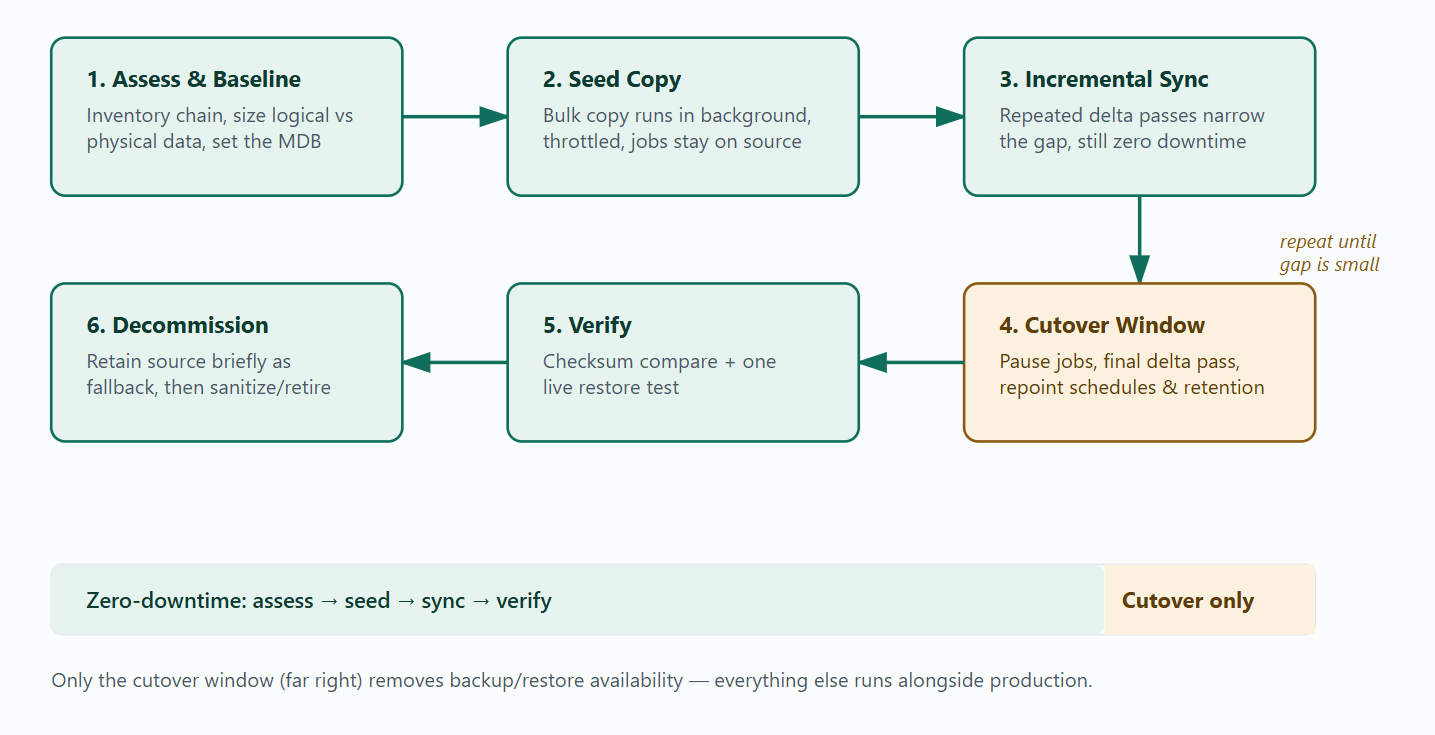
1. Seed - bulk-copy the existing backup chain to the new target while the source keeps taking scheduled backups normally. No downtime here; this phase can run for as long as it needs to, throttled to avoid competing with production traffic.
2. Sync - run repeated delta passes that copy only what changed on the source since the seed (new restore points, updated indexes, new incrementals). Each pass gets shorter as the gap narrows. This is still zero-downtime; jobs on the source keep running between passes.
3. Cutover - pause new backup jobs briefly, run one final delta pass to close the last gap, verify the target is a byte-for-byte match, then repoint jobs, schedules, and retention policies at the new repository. This is the only phase where anything is actually unavailable, and it should be measured in minutes, not hours.
The insight worth acting on: teams that skip the “sync” phase and go straight from one bulk copy to cutover are the ones who end up with multi-hour outages, because the entire delta since the seed started has to be closed in a single pass, under time pressure, with no rehearsal.
Migration Methods Compared
Disk-to-disk backup data can move using several different mechanisms, each with a different relationship between “data moved” and “downtime incurred”:
OS-level file/block copy (rsync, robocopy, similar tools) - copy backup files as opaque objects. Cheap and universal, but has no awareness of the backup chain’s internal structure, so open files being written by an active job can produce a corrupt copy unless timed around job schedules.
Storage-array or SAN-level migration - moves the underlying LUN/volume between arrays or storage tiers below the file-system layer. Fast and application-agnostic, but requires array support and doesn’t help if you’re also changing repository format.
Native repository migration inside the backup platform - the backup software understands its own catalog and chain structure, so it can move data while keeping incrementals, retention, and dedup indexes intact. This is usually the safest option when the source and target run the same platform.
Hypervisor-level live storage migration - moves the virtual disks of a backup server/proxy VM between datastores while it stays powered on (see the platform-specific section below). This solves the VM’s own storage move, not the backup repository’s internal chain integrity, the two are often needed together.
The Repository Parity Gap
Teams routinely under- or over-provision the new repository because they size it against the logical size of the old one, the amount of data the backup software reports as "protected", instead of its physical footprint after deduplication and compression. If the old and new repositories use different dedupe engines, block sizes, or compression algorithms, the same logical dataset ends up on disk at a different physical size. This is the Repository Parity Gap: the mismatch between expected and actual space consumption caused by a change in storage-efficiency technology during migration. It shows up as a migration that runs out of target capacity at 80% complete, almost always because someone sized the target off the source's marketing dedupe ratio rather than measuring the actual rehydrated data volume the copy will need to move.
Chain Fork Risk
During the sync phase, both the old and new repositories can technically accept new restore points if schedules aren't locked down carefully, for example, a manually triggered backup job, or a second schedule someone forgot to disable. When that happens, the backup chain forks: the source repository has restore points the target never received, and vice versa. If the source is decommissioned before this is caught, some restore points become permanently unrecoverable even though the migration "completed successfully." The practical fix is boring but non-negotiable: during the sync phase, the source repository should be the single writable target for all scheduled jobs, and that should be verified, not assumed, immediately before the final sync pass.
The Bandwidth Decay Curve
Migration time estimates built from "data volume ÷ link speed" are close to fiction in production environments. Actual sustained throughput decays across the migration window for reasons that compound rather than average out: production traffic sharing the same link during business hours, per-file overhead multiplying with small-file-heavy backup catalogs, checksum/verification overhead on the receiving side, and array-side garbage collection or dedupe processing competing for the same disks the copy is reading from. The practical implication: estimate migration duration from a measured sample copy of representative data during a representative time window, not from the datasheet number on the network switch — and pad the estimate more for repositories with many small files (databases, granular file-level backups) than for repositories with few large files (VM image-level backups).
Link/path | Theoretical max | Realistic sustained range | Typical bottleneck |
1GbE LAN | ~125 MB/s | Well below max, especially with small files | Per-file overhead, disk IOPS on either end |
10GbE LAN | ~1.25 GB/s | Significantly below max unless source/target disks can sustain it | Source/target disk throughput, not the network |
Direct-attached/local move | Bound by disk interface | Closest to theoretical max | Destination disk write speed |
WAN/inter-site link | Circuit-dependent | Far below LAN figures | Latency and available bandwidth sharing |
Verification Debt
A copy job reporting "completed" only confirms that bytes were written somewhere — it does not confirm those bytes form a restorable backup chain. Verification Debt is the gap between "the copy finished" and "the copy is provably restorable," and it's a debt because it doesn't cost anything until you try to collect on it, during an actual disaster recovery, months after the migration, when the old repository is long gone, and there's no fallback. The two checks that retire this debt are a checksum or hash comparison between source and target files, and at least one live restore test (of a VM, a file set, or an application) performed from the new repository before the old one is decommissioned. Skipping the restore test is the more common shortcut, and it's the more dangerous one; checksums confirm the bytes match, not that the backup platform can actually mount and recover from them. This isn't just internal best practice: CISA's #StopRansomware Guide specifically calls out regularly testing the availability and integrity of backups as a baseline control, not an optional step.
Migration Workflow
Put together, the phases above form a repeatable sequence:
Decision Matrix: Choosing a Migration Method
Scenario | Recommended method | Downtime | Watch out for |
Same backup platform, new NAS/SAN target | Native repository migration inside the backup platform | Minutes (cutover only) | Confirm chain/catalog compatibility before starting |
Small repository, simple file structure | Scripted seed + delta sync (rsync/robocopy style) | Minutes to low hours | Pause jobs for the final pass; watch for open-file locks |
Array-to-array move, same backup software untouched | Storage-array/SAN-level migration | Near-zero, hypervisor/array-dependent | Requires array support; doesn’t fix repository format issues |
Backup server/proxy itself needs a new datastore | Hypervisor live storage migration (see platform notes) | Near-zero for the VM; repository migration is separate | VM moving live ≠ backup chain moving safely |
Cross-vendor or cross-format repository change | Export/rehydrate via backup software, then re-ingest to new format | Longest - plan for a real maintenance window | Dedup/compression rehydration inflates temporary space needs (Repository Parity Gap) |
WAN move between sites | Seed via physical media or local staging, then WAN delta sync | Minutes, if seed is pre-positioned | Bandwidth Decay Curve - never trust the circuit’s rated speed |
Field Patterns
Pattern: the “successful” migration with an unrecoverable gap. A team migrated a 20TB repository over a weekend using a note-shot copy tool, then decommissioned the old storage the following Monday. Three months later, a restore request for a file from the data inside the migration weekend failed; a manually triggered backup job had written to the old repository mid-copy, and that restore point never made it to the new target. This is Chain Fork Risk playing out: the copy “succeeded,” but a fork in the chain during the sync window went uncaught because no one checked for new restore points on the source between the seed and the final cutover.
Pattern: the migration that ran out of space at 80%. A repository showing 12TB “protected data” on the old, heavily-deduplicated array was sized against a 15TB target, assuming similar deduplication headroom. The new target used a different storage-efficiency engine with a lower effective ratio for that dataset, and the physical rehydrated volume needed closer to 22TB in flight. The migration stalled with the target full and the source only partially decommissioned, a textbook Repository Parity Gap, caught late because the sizing exercise used the source’s reported logical size instead of measuring an actual physical transfer sample first.
Platform-Specific Notes
Where the backup repository lives on VM-backed storage, or where the backup server/proxy is itself a VM, hypervisor-native live storage migration primitives can complement the seed-sync-cutover approach at the VM layer:
VMware vSphere
Storage vMotion relocates a running VM's configuration file and virtual disks between datastores without powering it off, and is commonly used to move a backup proxy or backup server VM off storage that needs maintenance or replacement, separately from migrating the backup repository's own file structure.
Microsoft Hyper-V/Windows Server
For file-based repositories on Windows file servers, Storage Migration Service inventories source data and transfers it to a new server, optionally cutting over the source server's identity so paths and shares don't change for dependent jobs. Hyper-V's own live migration handles moving the VM's virtual disks between storage locations independently.
Proxmox VE
Storage migration can move a virtual disk to another storage backend or format on a running VM in most cases, with the source disk kept as an "unused disk" by default as a safety fallback until it's manually removed, useful as a built-in rollback point during a repository VM's own storage move.
XCP-ng/XenServer
Storage XenMotion live-migrates a VM's virtual disks between storage repositories while the VM keeps running, which is the equivalent primitive to Storage vMotion for Xen-based environments hosting a backup proxy.
KVM
Live block-level disk migration is handled through libvirt’s block-copy operation, which mirrors a running VM’s disk to a new destination image and then pivots to it once the copy and destination are in sync, a manual but well-documented equivalent to the vendor-branded live storage migration features.
Red Hat Virtualization (RHV)/Oracle Linux Virtualization Manager (OLVM)
Both platforms, built on the oVirt project, support live storage migration that moves a running VM’s disks between storage domains without downtime, relevant when the backup server VM itself needs to move off an aging storage domain.
Where backup software supports moving its own repository natively, preserving chains, catalogs, and retention without forcing a re-baseline, that native path is almost always safer than a generic file copy; Vinchin Backup & Recovery, for example, includes repository management built to keep chain and retention intact when backup storage is relocated across any of these virtualization platforms.
Decommissioning the Old Storage
Migration isn’t finished when the new repository is live; the old storage still holds a full copy of backup data (including the backups of backups) until it’s properly retired.
Keep the source repository intact and read-only for a defined grace period after cutover, sized to cover at least one full restore-test cycle plus a buffer for edge-case requests.
Before releasing or repurposing the old disks, sanitize them according to the sensitivity of the data they held. NIST SP 800-88 defines the widely used Clear, Purge, and Destroy categories for media sanitization, and specifies that Purge should generally be used over Clear whenever it's feasible, since it offers stronger protection against data recovery.
Document the sanitization method used, especially for regulated data; an auditable decommissioning record closes the loop that the migration project opened.
Summary Table
Phase | Downtime impact | Primary risk if skipped |
Assess & baseline | None | Wrong Migration Downtime Budget; wrong capacity sizing (Parity Gap) |
Seed copy | None (throttled, background) | Production contention if unthrottled |
Incremental sync | None | Chain Fork Risk if source isn’t the sole writable target |
Cutover | Minutes (the only real downtime) | Unrehearsed cutover turning into hours |
Verification | None (can run before or after cutover) | Verification Debt surfacing during a real disaster |
Decommission | None | Data exposure from improperly sanitized old media |
FAQs
Q1: Do I need a new full backup after migrating disk-to-disk?
Not if the migration preserves the backup chain's block references, catalog, and index structures; a proper repository-aware move lets incrementals continue uninterrupted. A fresh full backup becomes necessary only when the target uses an incompatible format, a different dedupe engine, or when post-migration verification can't confirm the chain's integrity.
Q2:Does deduplicated data survive a move to a different repository technology?
Only within the same deduplication domain. Moving between two repositories on the same backup platform generally preserves dedupe ratios. Moving into a different vendor's repository or a storage array with its own inline dedupe engine typically forces rehydration and re-deduplication, which is exactly what drives the Repository Parity Gap described above.
Q3: Can encrypted backups be migrated without decrypting them first?
Usually yes, if encryption is applied at the backup-file level, the files can be copied as opaque encrypted objects and remain usable as long as the encryption keys and catalog metadata move with them. Storage-layer encryption is different: the data typically has to be rehydrated through that layer before it can be re-secured on the new target.
Q4: Should scheduled backup jobs keep running during the migration?
Online, block-aware migration methods (live storage migration, array replication, repository-native migration) generally tolerate jobs continuing to write, since new blocks are picked up on the next sync pass. Simple file-copy tools are safer with jobs paused for the final sync pass only, since a job writing to a file mid-copy can leave a torn, unusable copy on the target.
Q5: How is this different from backup replication?
Replication keeps the source repository operating indefinitely and maintains a second copy elsewhere for redundancy. Migration is a one-time move with the intent to retire the source once the new target is verified. They can share underlying mechanics (both often use delta-sync), but they solve different problems and have different end states.
Conclusion
Minimal-downtime disk-to-disk backup migration is a scheduling problem more than a transfer-speed problem. Separating background copy time from a short, rehearsed cutover window, and treating verification and chain integrity as part of the move, not an afterthought, is what keeps a storage refresh from turning into a recovery gap discovered months later, at the worst possible moment.