Hyper-V is a leading virtualization platform used by enterprises worldwide. As organizations move critical workloads to virtual machines (VMs), ransomware threats have become more sophisticated. Attackers now target backup files directly to maximize damage. According to Microsoft’s security guidance, protecting backups is essential because ransomware often seeks out backup repositories first. The best Hyper-V backup tool must combine immutable storage, strong encryption, and automated anomaly detection. These features ensure your data stays safe and recoverable even if attackers breach your defenses.
Ransomware resilience is vital for business operations. It reduces downtime, prevents data loss, and helps meet regulatory requirements like GDPR or HIPAA. Effective protection supports business continuity and lowers risk exposure in today’s threat landscape.
Why Ransomware Protection Matters in Enterprise Environments
Ransomware attacks on enterprise environments can cause severe disruption. Virtualized platforms like Hyper-V are attractive targets due to their central role in hosting business-critical applications.
● Business Continuity at Risk
When ransomware encrypts or destroys VM data, entire departments may lose access to essential systems. Recovery without reliable backups can take days or weeks. IBM’s Cost of a Data Breach Report 2023 found that average recovery costs from ransomware continue to rise year over year.
● Compliance Requirements
Many industries must follow strict regulations for data protection—such as GDPR in Europe or HIPAA for healthcare in the US. Failing to secure backups against ransomware can result in heavy fines or legal action if sensitive information is lost or exposed.
● Operational Downtime
Downtime from an attack impacts productivity across the organization. Employees cannot access necessary tools or records until systems are restored from clean backups.
● Financial Losses
Beyond ransom payments themselves, businesses face costs from lost revenue, remediation efforts, customer churn, and reputational harm when they cannot quickly recover from an attack.
● Reputation Damage
A publicized breach erodes trust among customers and partners. Enterprises that cannot demonstrate robust backup protection may lose future business opportunities.
According to Cybersecurity Ventures, global ransomware damages are expected to reach $265 billion annually by 2031—a clear sign that proactive defense is not optional but mandatory for modern enterprises.
How To Choose The Best Hyper-V Backup Solution for Ransomware Protection?
Selecting a Hyper-V backup solution requires careful evaluation of security features tailored for modern threats like ransomware. Focus on technologies that prevent tampering while supporting fast recovery at scale.
● Immutable Storage
Immutability ensures no one—including administrators—can modify or delete backups within a set retention period. This protects against both external attackers and insider threats who might try to erase evidence of compromise. Technologies such as object-locking (e.g., S3 Object Lock) or WORM (Write Once Read Many) storage enforce this policy at the hardware or software level so your last line of defense remains intact even during an active attack.
● Advanced Encryption
Encryption shields your backup data both while stored (“at rest”) and during transfer (“in transit”). Look for solutions using industry-standard algorithms such as AES-256—the same standard recommended by NIST SP 800-57. This prevents unauthorized users from reading sensitive information even if they gain physical access to storage devices or intercept network traffic between hosts and repositories.
● Automated Anomaly Detection
Modern backup tools monitor activity patterns automatically—flagging suspicious behaviors like rapid deletions or unexpected changes in file sizes that could signal malware activity. Early alerts allow IT teams to intervene before damage spreads further across production systems or backup sets.
● Scalability Across Large Environments
Enterprise environments grow rapidly; your backup solution must keep pace without sacrificing performance or security controls. Features like parallel processing support large-scale VM deployments while maintaining consistent policies across clusters—critical when managing hundreds of VMs hosted on multiple nodes within a Hyper-V cluster environment.
● Compliance Support & Audit Logging
Regulatory frameworks demand detailed tracking of who accessed what data—and when—for audit purposes. Solutions should offer built-in audit logs, role-based access control (RBAC), multi-factor authentication (MFA), and compliance reporting templates aligned with standards such as ISO/IEC 27001.
By prioritizing these features when evaluating Hyper-V backup tools, you build layered defenses capable of resisting today’s most advanced cyberattacks while meeting operational needs at scale.
Vinchin Backup & Recovery: Enterprise-Level Backup Solution for Hyper-V
For robust protection against ransomware targeting virtualized environments, Vinchin Backup & Recovery stands out as an enterprise-level VM backup solution supporting over 15 mainstream platforms—including full compatibility with Hyper-V alongside VMware, Proxmox VE, oVirt, OLVM, RHV, XCP-ng, XenServer, OpenStack, ZStack and more. With agentless architecture designed specifically for complex infrastructures like Hyper-V clusters, it delivers comprehensive coverage across diverse IT landscapes.
Key features include incremental backup strategies for efficient storage use; LAN-free backup options; granular restore capabilities; instant recovery; and advanced encryption—all working together to enhance reliability while minimizing downtime after incidents.
The intuitive web console streamlines operations:
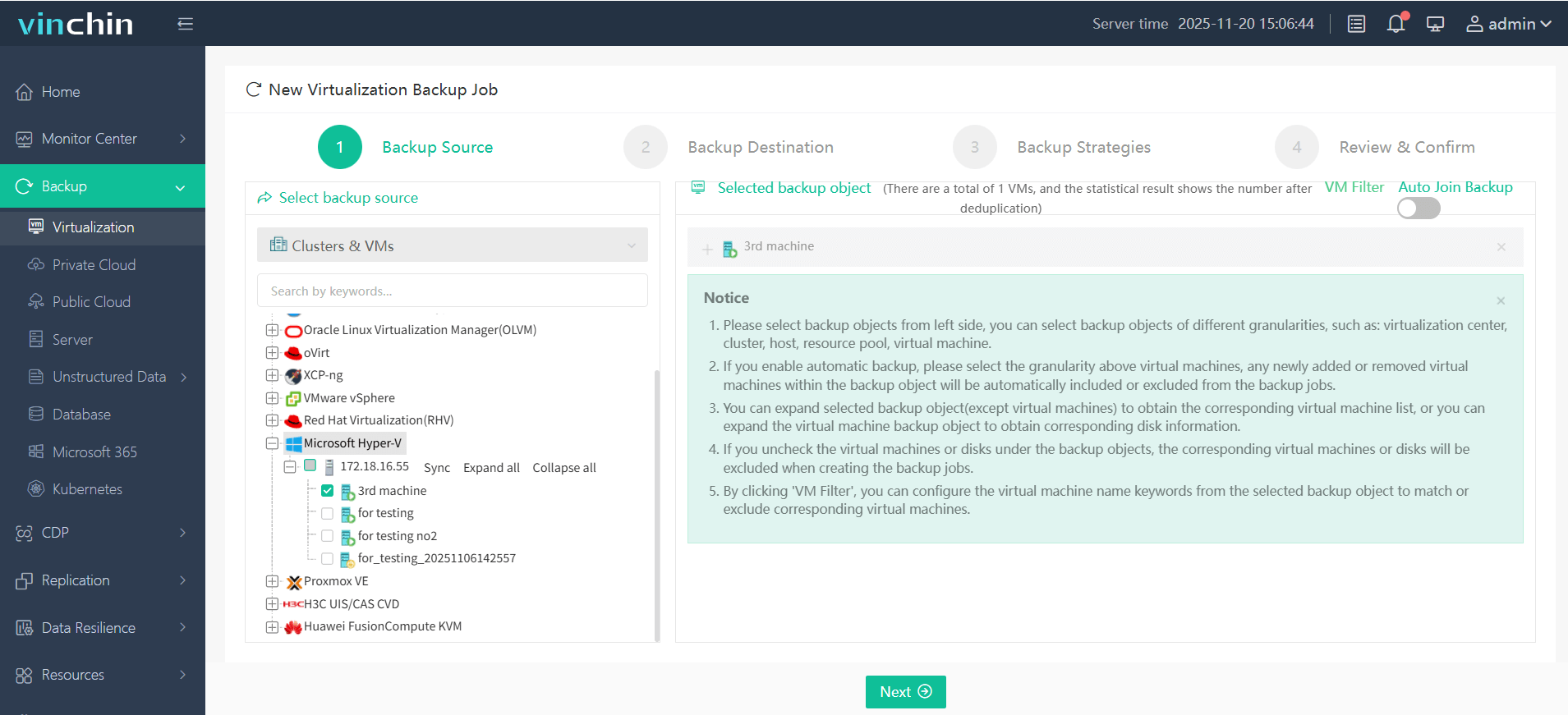
Step 1: Select the Hyper‑V VM you want to back up;
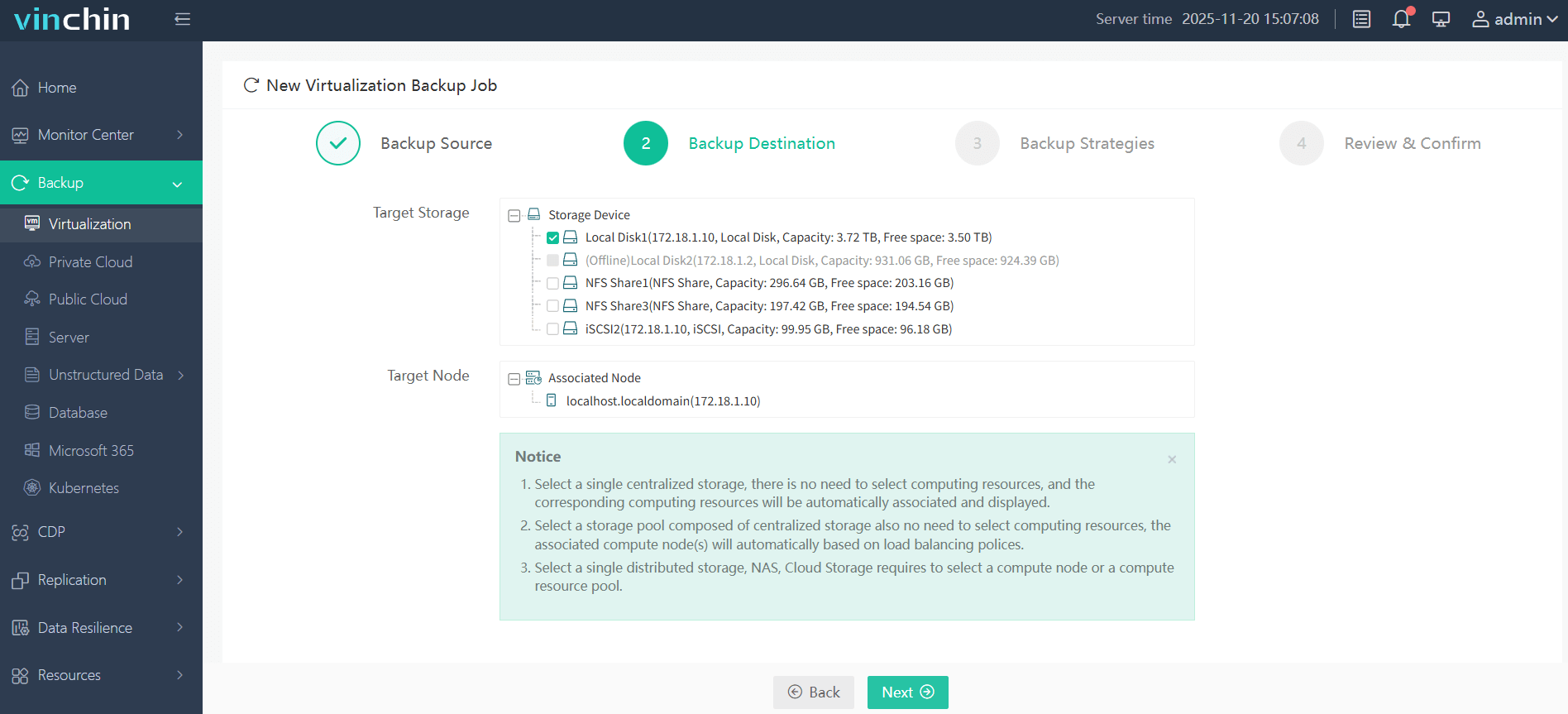
Step 2: Choose the destination storage;
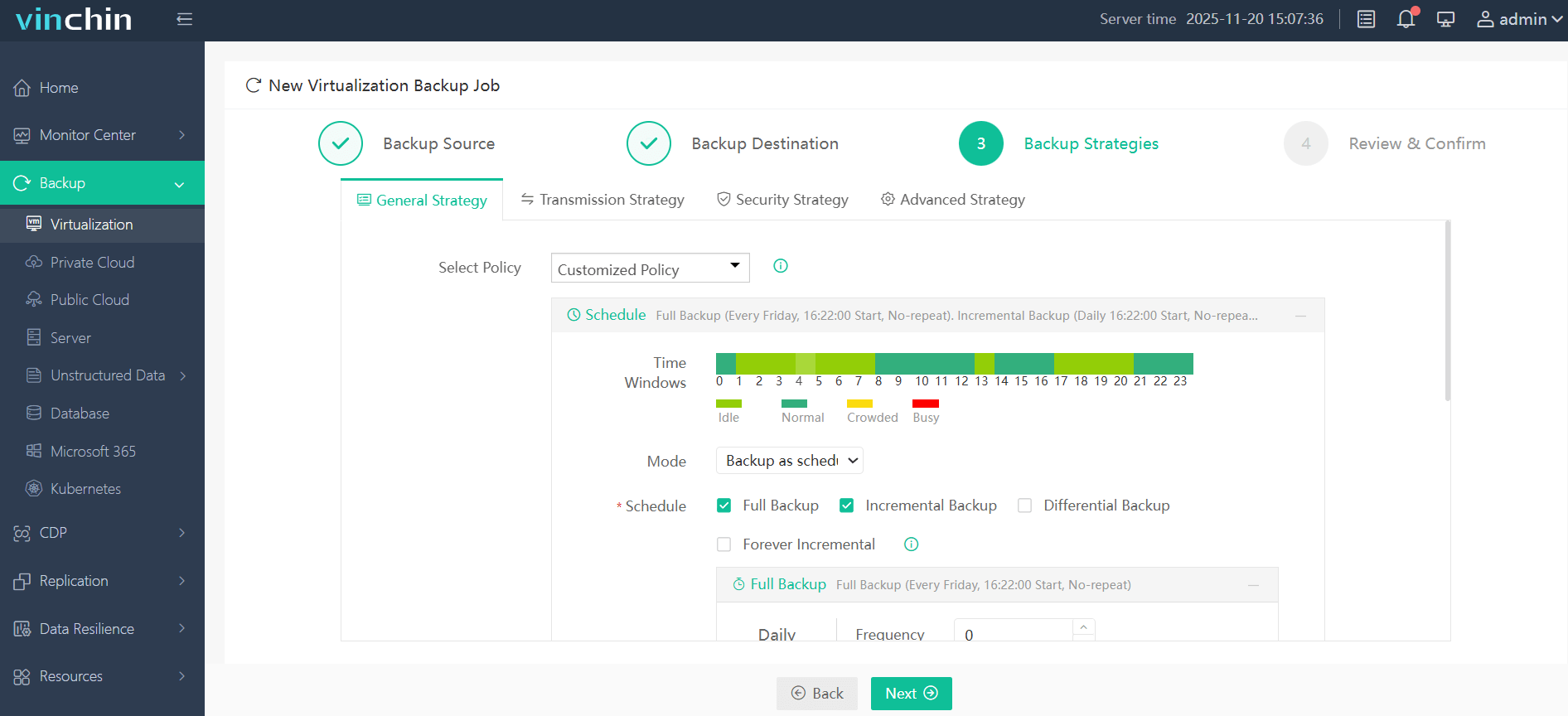
Step 3: Configure scheduling plus retention settings;
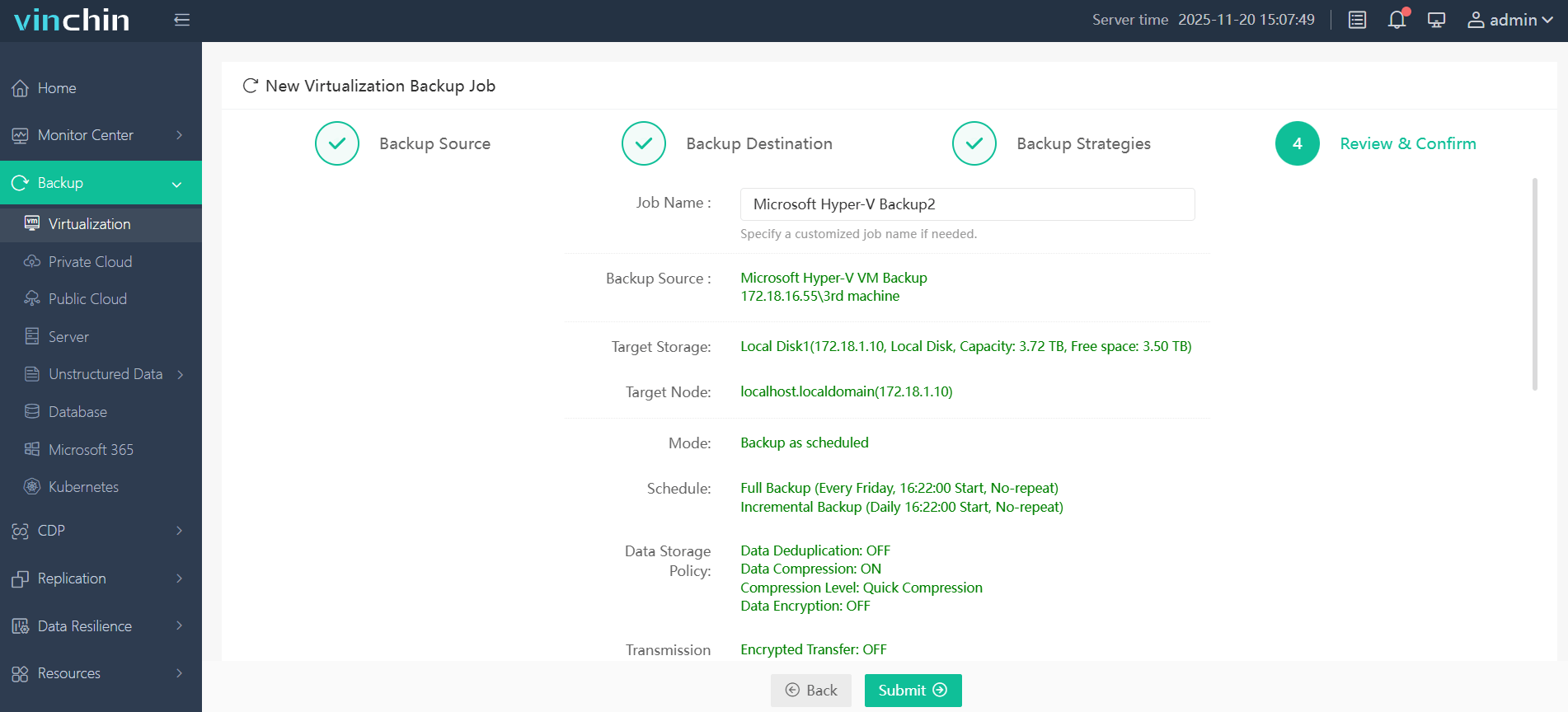
Step 4: Submit the job—making enterprise-grade protection accessible without steep learning curves.
Recognized globally with top ratings and trusted by thousands of organizations worldwide—start your free 60-day trial of Vinchin Backup & Recovery today!
Best Hyper-V Backup Software FAQs
Q1: What makes a backup solution effective against ransomware?
A1: Immutable storage blocks tampering with backups while encryption secures them from unauthorized access—even if attackers breach production systems.
Q2: How does automated anomaly detection help?
A2: Automated monitoring spots unusual patterns—like sudden mass deletions—that may indicate an attack so IT teams can act before widespread damage occurs.
Q3: Is compliance affected by inadequate ransomware protection?
A3: Yes; failing to protect backups risks violating regulations such as GDPR/HIPAA due to potential loss of sensitive information.
Q4: Can I back up Hyper-V VMs without installing agents inside each VM?
A4: Yes; agentless host-level methods capture whole VM images efficiently using native APIs.
Q5: How do I manage storage costs backing up large numbers of VMs?
A5: Use deduplication/compression plus incremental/differential strategies; tier older backups onto cost-effective media; apply strict retention policies.
Q6: Does enterprise-grade software support clustered environments?
A6: Yes; solutions designed for clusters coordinate consistent snapshots/restores across Cluster Shared Volumes using failover-aware processes.
Conclusion
Choose a Hyper-V backup tool offering immutable storage and strong encryption for true resilience against ransomware attacks—minimizing downtime while ensuring compliance every step of the way.










