Hyper-V environments power many modern businesses. When systems go down, every minute of downtime can cost thousands of dollars and damage your reputation. Fast recovery from backup is essential for business continuity. The right Hyper-V backup solution restores data quickly so you can meet strict service level agreements (SLAs) and regulatory requirements. According to Gartner’s IT Key Metrics Data, average downtime costs range from $5,600 to $9,000 per minute for large enterprises. This makes rapid recovery more than a technical goal—it is a business necessity.
Organizations must ensure their Hyper-V backup strategy supports both speed and reliability. Recovery Time Objective (RTO) defines how quickly you need systems restored after an outage. Many industries require RTOs of less than one hour—sometimes just minutes—to comply with regulations like HIPAA or SOX. A slow restore process puts compliance at risk and can lead to financial penalties or lost customer trust.
Backup solutions vary widely in their recovery speeds. Some offer instant VM boot or granular file-level restore; others may take hours to recover even small workloads. Choosing a solution that delivers fast recovery under real-world conditions is critical for IT teams responsible for uptime.
Why Fast Recovery Matters in Enterprise Environments
Fast recovery protects your organization from costly disruptions. In regulated industries such as healthcare or finance, downtime can result in fines or legal action if SLAs are missed. Even outside regulated sectors, customers expect services to be available at all times.
● Minimizing Financial Losses
Downtime leads directly to lost revenue and productivity. For example, IDC reports that unplanned application outages cost Fortune 1000 companies between $1.25 billion and $2.5 billion annually. Rapid restoration limits these losses by bringing critical systems back online before they impact operations.
● Meeting Compliance Requirements
Many regulations set strict RTOs for data availability and disaster recovery planning. Healthcare organizations must comply with HIPAA’s contingency plan standards; financial firms face similar mandates under SOX and FINRA rules. Failure to meet these targets can result in audits or penalties.
● Maintaining Customer Trust
Service interruptions erode confidence among customers and partners. If your website or applications are offline due to slow recovery processes, users may turn to competitors instead of waiting for resolution.
● Reducing Operational Disruption
Quick restores allow employees to resume work without lengthy delays caused by inaccessible files or applications. This keeps projects on track and reduces stress on IT staff during incidents.
A robust Hyper-V backup solution ensures you meet business objectives while protecting against regulatory risks and reputational harm.
How To Choose The Best Hyper-V Backup Solution for Fast Recovery
Selecting the right Hyper-V backup tool requires careful evaluation of its speed under pressure—not just vendor claims but real-world performance metrics matter most here.
Begin by reviewing documented benchmarks that show actual restore times across different scenarios: full VM restores, file-level recoveries, database-specific recoveries (such as SQL Server), etc. Ask vendors for proof-of-concept trials so you can test performance using your own infrastructure before committing long-term resources.
● Instant VM Boot Capability
Solutions offering instant VM boot let you start virtual machines directly from backup storage without waiting for full data transfer back into production hosts. This minimizes downtime dramatically—often restoring access within minutes rather than hours—and allows continued operation while background restoration completes behind the scenes.
● Granular File-Level Restore
The ability to recover individual files or folders saves time when only part of a system needs restoration (for example: accidentally deleted documents). Look for tools supporting item-level search within backups so users get what they need fast without restoring entire VMs unnecessarily.
● Scalability With Data Growth
Your environment will grow over time; make sure chosen solutions maintain high performance even as workload size increases. Linear scaling means adding more VMs does not degrade restore speeds—a key factor if managing hundreds or thousands of virtual machines across multiple clusters.
● Automation And Orchestration Features
Automated workflows reduce manual intervention during disaster response events—critical when seconds count. Features like scheduled testing (“backup verification”) confirm backups are usable before emergencies occur; orchestration tools streamline multi-step recoveries involving several interdependent systems at once.
Compatibility also matters: verify support for core Hyper-V features such as Resilient Change Tracking (RCT), Storage Spaces Direct integration, ReFS volumes support, clustered deployments (Failover Clustering), shielded VMs security settings, etc., based on your specific use case requirements outlined by Microsoft best practices.
Finally, consider infrastructure fit: some solutions require dedicated appliances while others run agentless at hypervisor level—choose what aligns best with existing hardware/software investments so deployment does not introduce new bottlenecks during urgent restores.
Vinchin Backup & Recovery: Enterprise-Grade Protection for Hyper-V
When seeking reliable protection specifically tailored for Microsoft Hyper-V environments, Vinchin Backup & Recovery stands out as an enterprise-level virtual machine backup solution supporting over 15 mainstream virtualization platforms—including VMware, Proxmox, oVirt/OLVM/RHV, XCP-ng, XenServer, OpenStack, ZStack—and prominently featuring comprehensive support for Hyper-V infrastructures used by businesses worldwide.
Vinchin Backup & Recovery offers advanced features such as SpeedKit acceleration technology on Hyper‑V environments, LAN-free backup options where supported platforms allow it (note: LAN-free is not available on Hyper‑V), forever-incremental backups with deduplication/compression capabilities across all platforms including Hyper‑V, granular restore functionality ensuring precise data retrieval from any protected VM instance regardless of scale, plus robust cloud/tape archive integration.
Backing up a virtual machine with Vinchin Backup & Recovery is straightforward thanks to its intuitive web console:
Step 1: Select the Hyper‑V VM to back up.
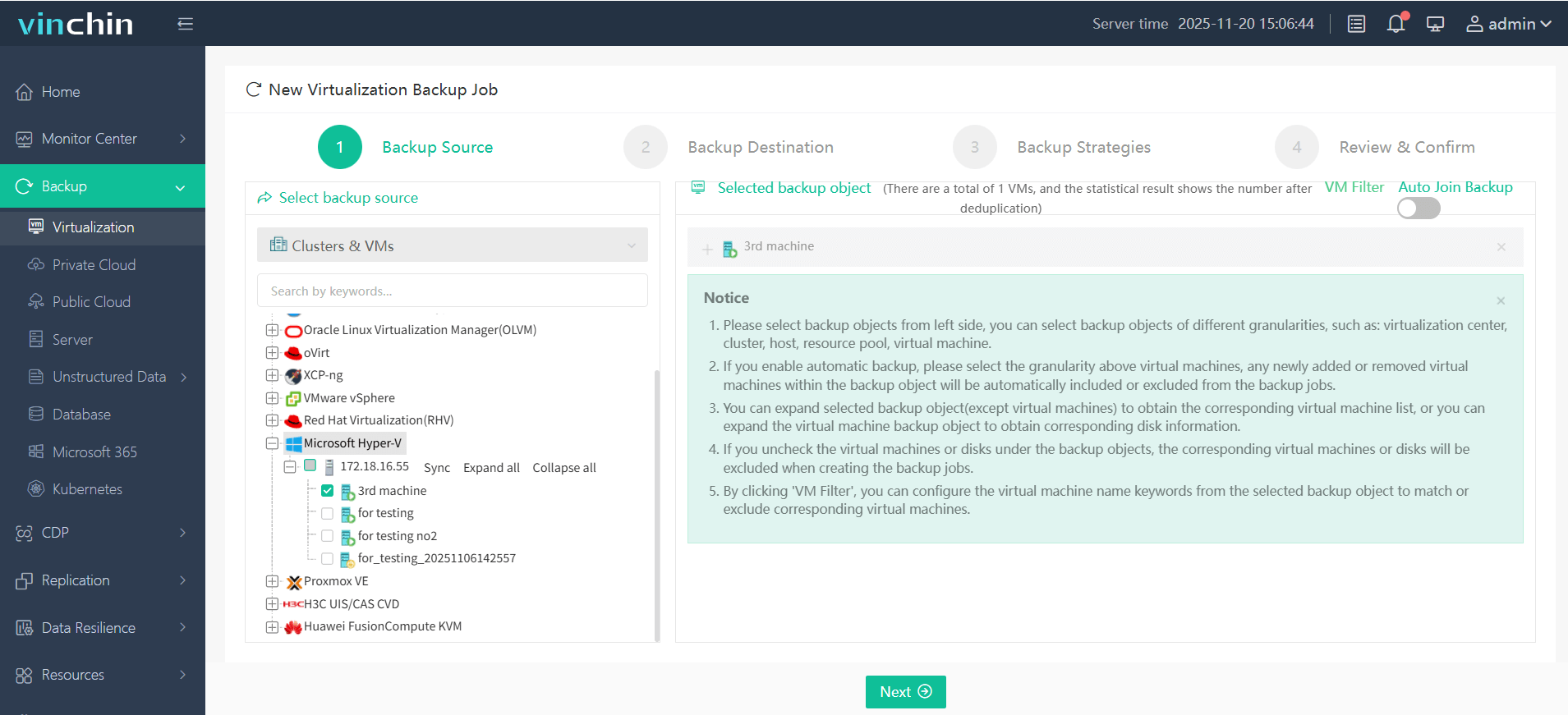
Step 2: Choose the desired backup storage location.
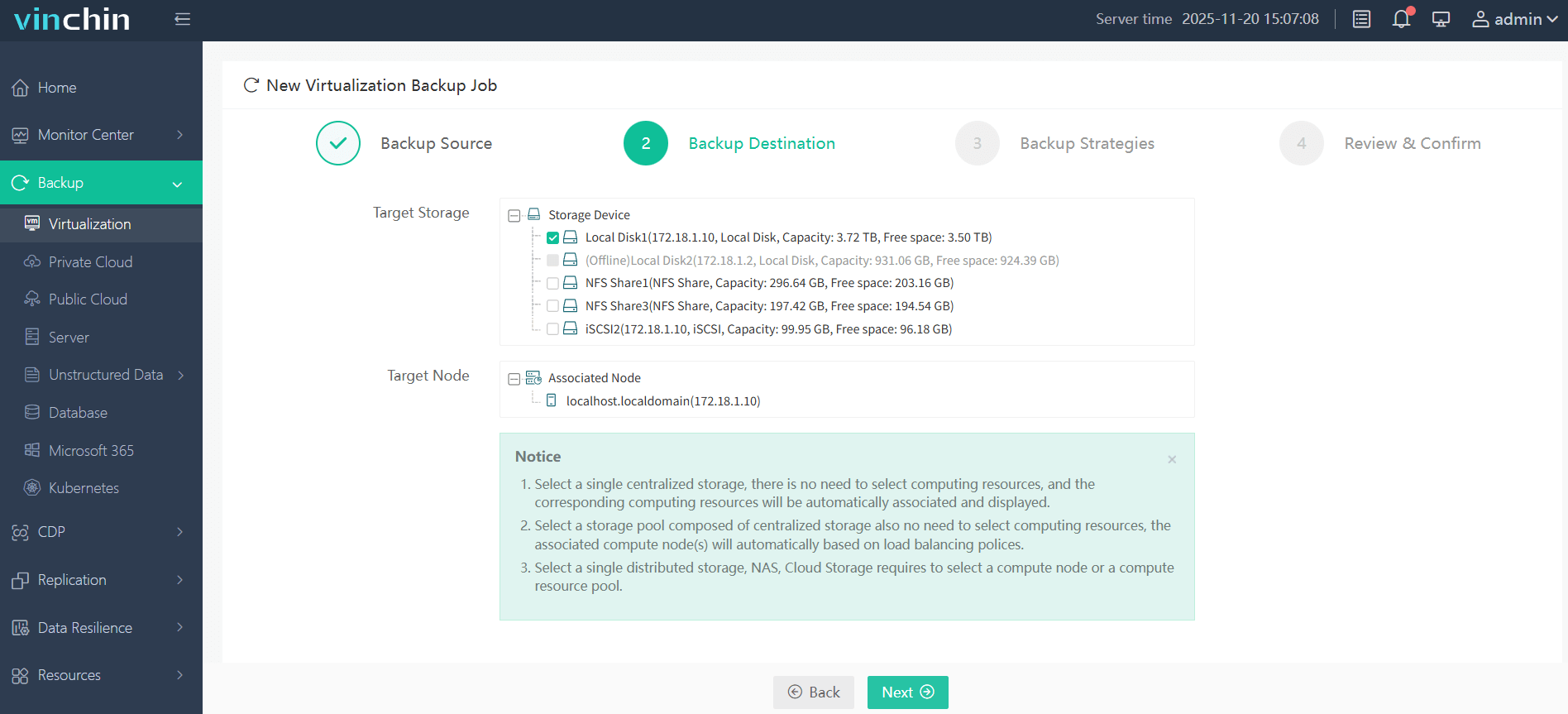
Step 3: Configure the appropriate backup strategy based on organizational needs.
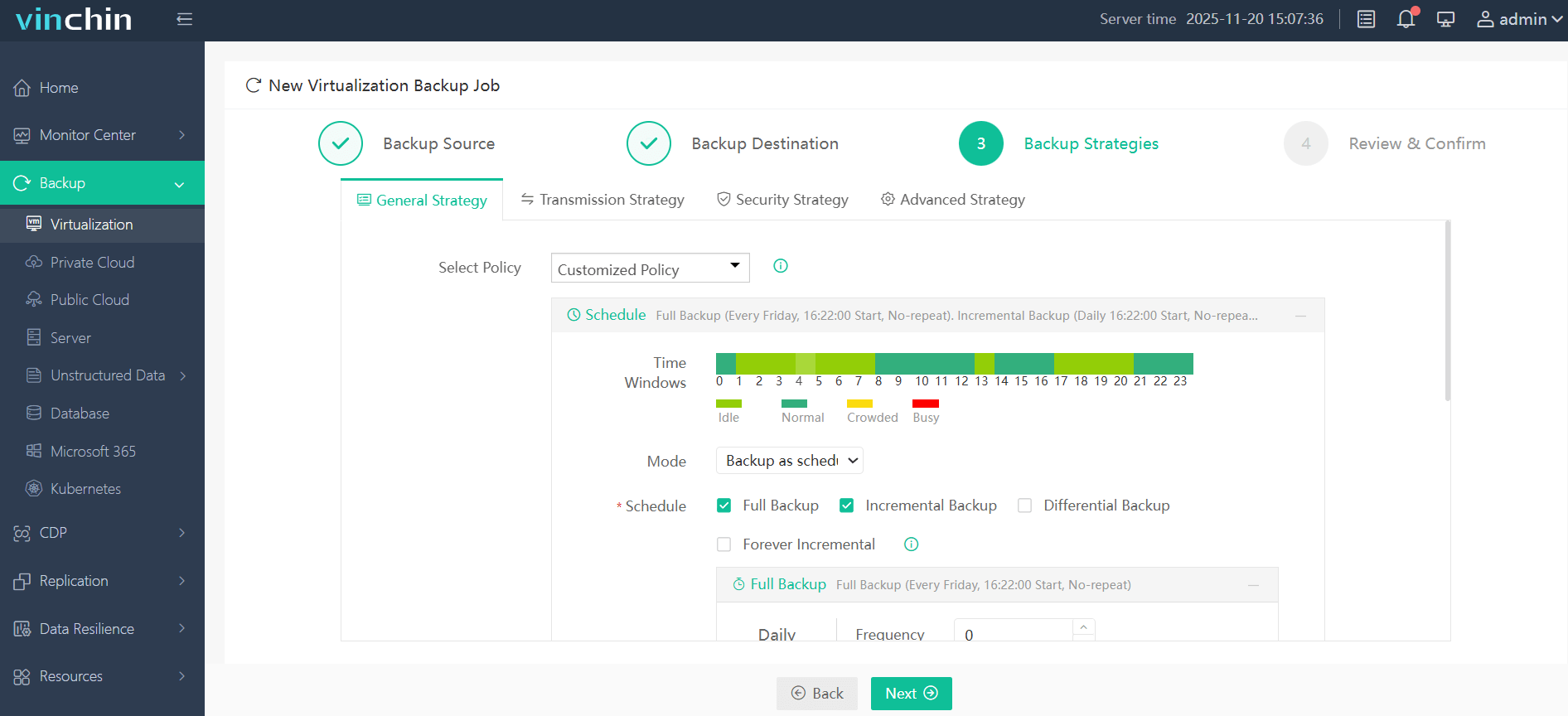
Step 4: Submit the job—your protection begins immediately.
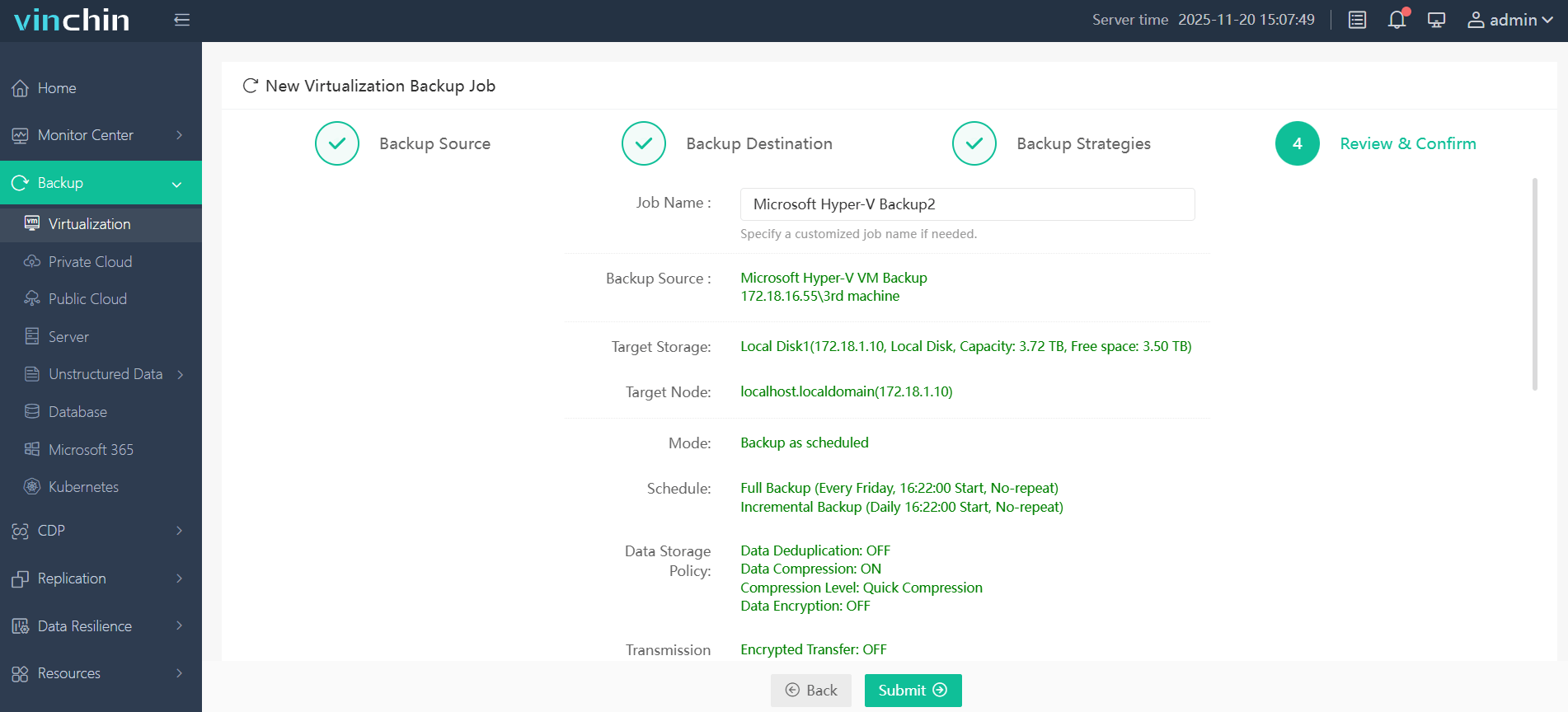
Trusted globally by thousands of enterprises—with top ratings in independent reviews—Vinchin Backup & Recovery offers a fully featured 60-day free trial so you can experience its benefits firsthand; click below to download now!
Best Hyper-V Backup Software FAQs
Q1: How do I verify a solution’s actual recovery speed?
Request documented benchmarks from the vendor showing real-world results under production-like workloads; conduct proof-of-concept testing using standardized methodologies such as those described by Microsoft Learn or independent labs like ESG Technical Validations.
Q2: Does fast recovery compromise data integrity?
No; enterprise solutions use validated processes such as checksums verification during both backup creation and restoration phases ensuring consistency without sacrificing speed.
Q3: Can fast recovery scale with growing virtual environments?
Yes; select platforms engineered for linear scalability proven through independent studies so performance remains high even as protected workloads increase across clusters.
Q4: Is instant VM boot available for all workloads?
Most advanced platforms support broad compatibility but always review vendor documentation regarding supported guest OS versions (e.g., Windows Server 2016/2019/2022), application types (SQL Server/Exchange), cluster configurations—or exceptions such as GPU-passthrough VMs which may have limitations depending on underlying hardware/software stack.
Conclusion
Selecting a Hyper-V backup solution with proven fast recovery minimizes downtime risks while supporting compliance goals—Vinchin Backup & Recovery delivers this reliability so enterprises stay resilient.










