Traditional virtualization operations often require system shutdowns during server updates, patching, or load balancing, impacting business continuity. Proxmox’s Live Migration feature addresses this by enabling seamless migration of virtual machines and containers across nodes, ensuring high availability and smooth operations.
To ensure a running VM can move from one node to another with zero downtime, enterprises need to follow key Proxmox live migration requirements. In this article, we will outline eight key considerations before setting up Proxmox migration, along with common troubleshooting tips. Let’s get started!
Why Proxmox Live Migration Requirements Matter?
Proxmox live migration requires a properly prepared environment where compute resources, storage, network, and VM states are fully compatible and synchronized. If any requirement is not met, migration may fail or result in degraded performance. Ensuring these prerequisites in advance helps achieve stable, efficient, and uninterrupted VM migration.
Key Proxmox Live Migration Requirements
Here we list a comprehensive checklist to help you clear out the prerequisites before migration.
1. Cluster Configuration
All the nodes involved in the migration must join the same Proxmox cluster and be able to communicate with each other. The cluster configuration must have the quorum mechanism set up correctly to ensure the number of nodes meets the majority requirement; otherwise, the migration or high-availability features may not function properly.
2. Storage Access
If using shared storage (like NFS, iSCSI, Ceph, etc), all the nodes must be able to access the same storage resource simultaneously. If you use local storage, you must support storage migration and ensure the target node has enough space. Storage performance also directly affects migration speed.
3. Networking
A stable, high-bandwidth network connection must be established between nodes. Since live migration transmits massive memory data, it’s recommended to use a dedicated migration network to minimize the impact on production traffic. Meanwhile, the lower the network latency, the smoother the migration process will be.
Note: Firewalls between nodes must open core ports: TCP 22 (SSH), 8006 (Proxmox web interface), and dedicated live migration ports to avoid connection interruption.
4. CPU Compatibility
The CPU architectures of the source and target nodes must be compatible. It’s generally recommended to use the same model or enable a unified CPU model (such as x86-64-v2/v3). If the CPU instruction sets are incompatible, the virtual machine may fail to start on the target node.
5. VM Requirements
The virtual machine must be running and should not use special hardware-bound configurations that do not support migration. If PCI passthrough or GPU passthrough is used, live migration is generally not possible.
6. High Availability
If high availability (HA) is enabled, migration behavior may be affected by the HA scheduling mechanism. When designing a cluster, you should carefully plan resource allocation and failover strategies to ensure that migrations do not conflict with the HA automatic recovery mechanism.
7. Memory Considerations
The memory size of virtual machines directly affects migration time. The larger the memory, the more data can be transferred. We recommend ensuring that the target node has sufficient available memory and avoiding frequent migrations during periods of high load to minimize performance fluctuations.
8. Security Concerns
The migration process transfers memory and runtime state data between nodes, so it is essential to ensure that network communication is secure. We recommend using a trusted internal network and enabling encrypted migration (such as configuring TLS) to prevent data from being intercepted during transmission.
Recommended Best Practices for Proxmox Live Migration Setup
For a stable Proxmox live migration setup, make sure you meet these conditions:
Use dedicated migration network (10Gbps preferred)
Align CPU models across nodes
Prefer shared storage for minimal downtime
Avoid peak workload migration windows
Enable encrypted migration for security-sensitive environments
Common Issues and Troubleshooting During Live Migration
Live migration issues often stem from network bottlenecks, storage connectivity, CPU incompatibilities, or authentication failures. Now check them one by one and figure out how to fix each issue.
Issue: Unstable network connection between nodes or ports not open
Fix: Check network connectivity for the migration process and ensure that the firewall allows Proxmox-related ports (such as 8006 and the TCP migration port).
Issue: Insufficient bandwidth or high network latency
Fix: Use a dedicated migration network to avoid sharing links with business traffic, increase link bandwidth, or optimize QoS.
Issue: Differences in CPU instruction sets between the source and target nodes
Fix: Standardize the CPU model (e.g., x86-64-v2/v3), or enable CPU compatibility mode within the VM
Issue: VM memory is too large or write frequency is high (many dirty pages)
Fix: Reduce application write pressure, or migrate during periods of low load.
Issue: Target node lacks permissions or has insufficient space
Fix: Check storage mount status, permissions, and remaining capacity.
Issue: Device or configuration inconsistencies during migration (e.g., passthrough devices)
Fix: Avoid using PCI/GPU passthrough configurations that do not support Live Migration.
Issue: Resource contention or excessive I/O pressure during migration
Fix: Migrate during off-peak hours, limit the number of concurrent migrations, and optimize storage performance.
Issue: HA automatic takeover and manual migration are occurring simultaneously
Fix: Temporarily adjust HA policies or suspend automatic recovery mechanisms for relevant resources before migration.
Enhance Live Migration Flexibility with Vinchin Backup & Recovery
Although Proxmox native live migration enables seamless intra-cluster VM transfer, it relies heavily on unified cluster architecture and shared storage resources, and cannot support cross-cluster, heterogeneous platform migration. For scenarios beyond native live migration’s limits, organizations need a versatile approach to virtual machine migration and protection.
Vinchin Backup & Recovery offers backup-based migration abilities, supporting data backup and fast recovery in Proxmox environments without relying on shared storage or cluster architectures. It enables flexible cross-environment migration, reliable disaster recovery capabilities, reduced infrastructure complexity, and migration within a controlled downtime window.
Enterprises can choose the most suitable migration method based on specific needs. Use live migration for zero-downtime intra-cluster movement, and Vinchin Backup & Recovery for cross-environment migration and disaster recovery scenarios.
With Vinchin, migrating Proxmox to another host is quite simple. Once you’ve backed up the Proxmox VM, following the restore steps here to complete the migration:
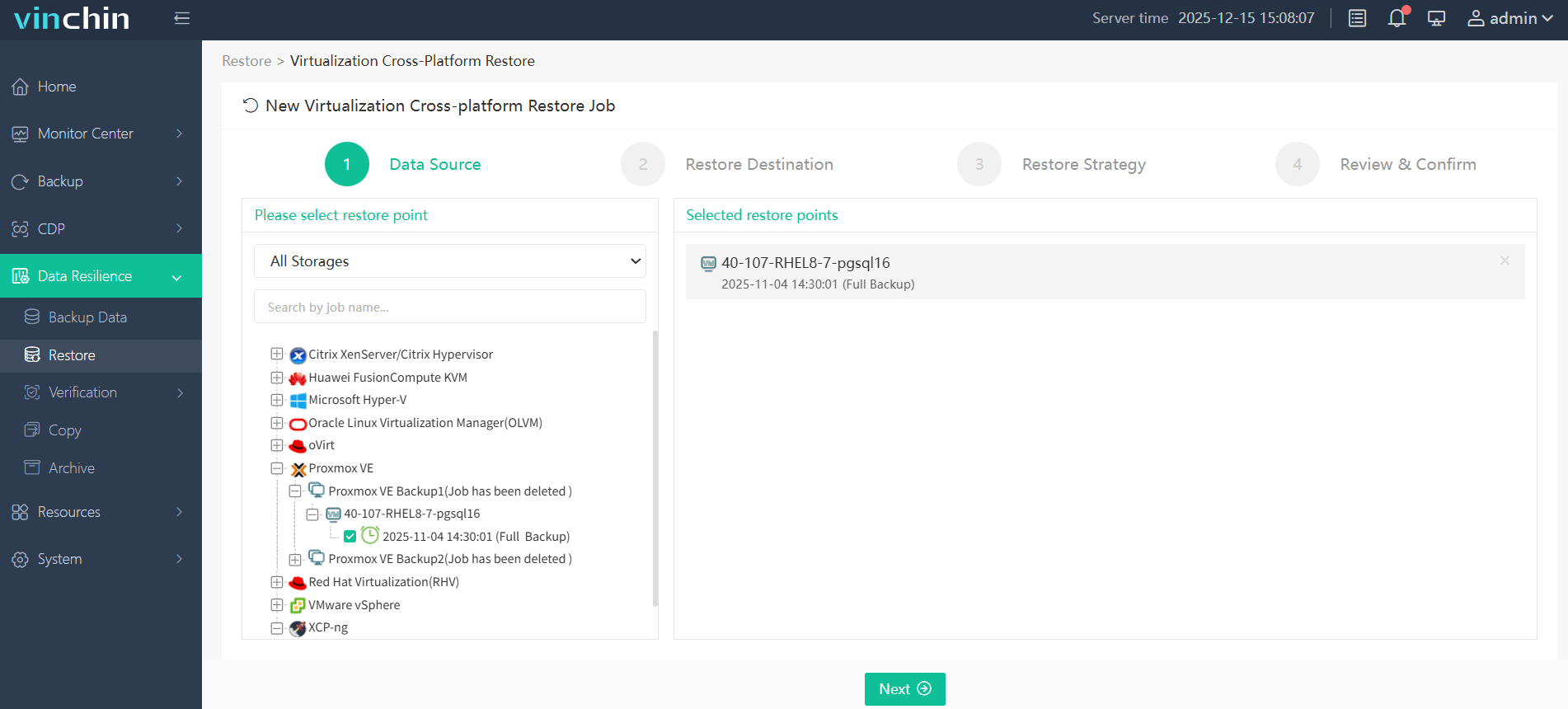
1. Select the backup source
Navigate to Data Resilience>Restore, choose the Proxmox VM restore point from your backup storage. Confirm the backup data and proceed.
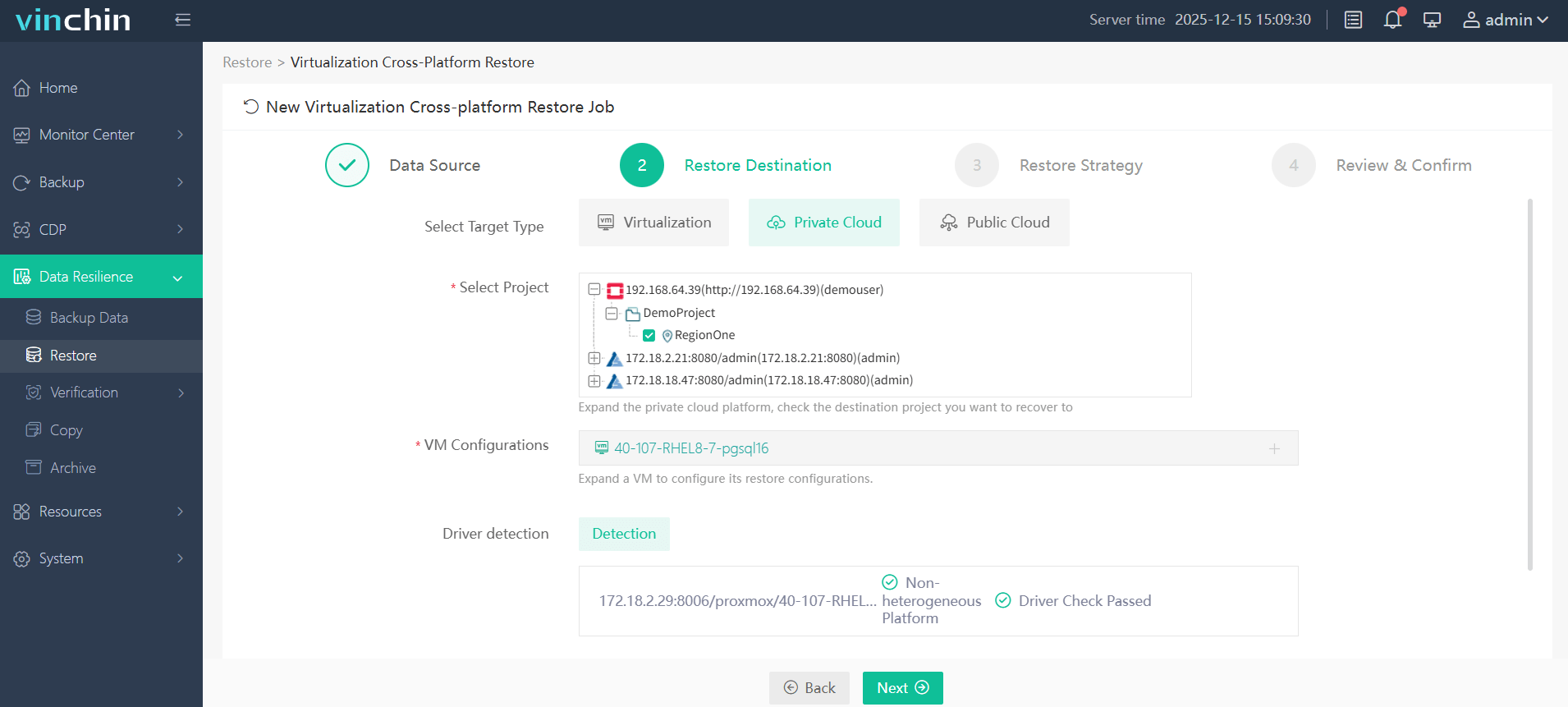
2. Configure the target destination
Select your target restore point (including virtualization/private/public cloud platform), then specify the project, storage, and network settings.
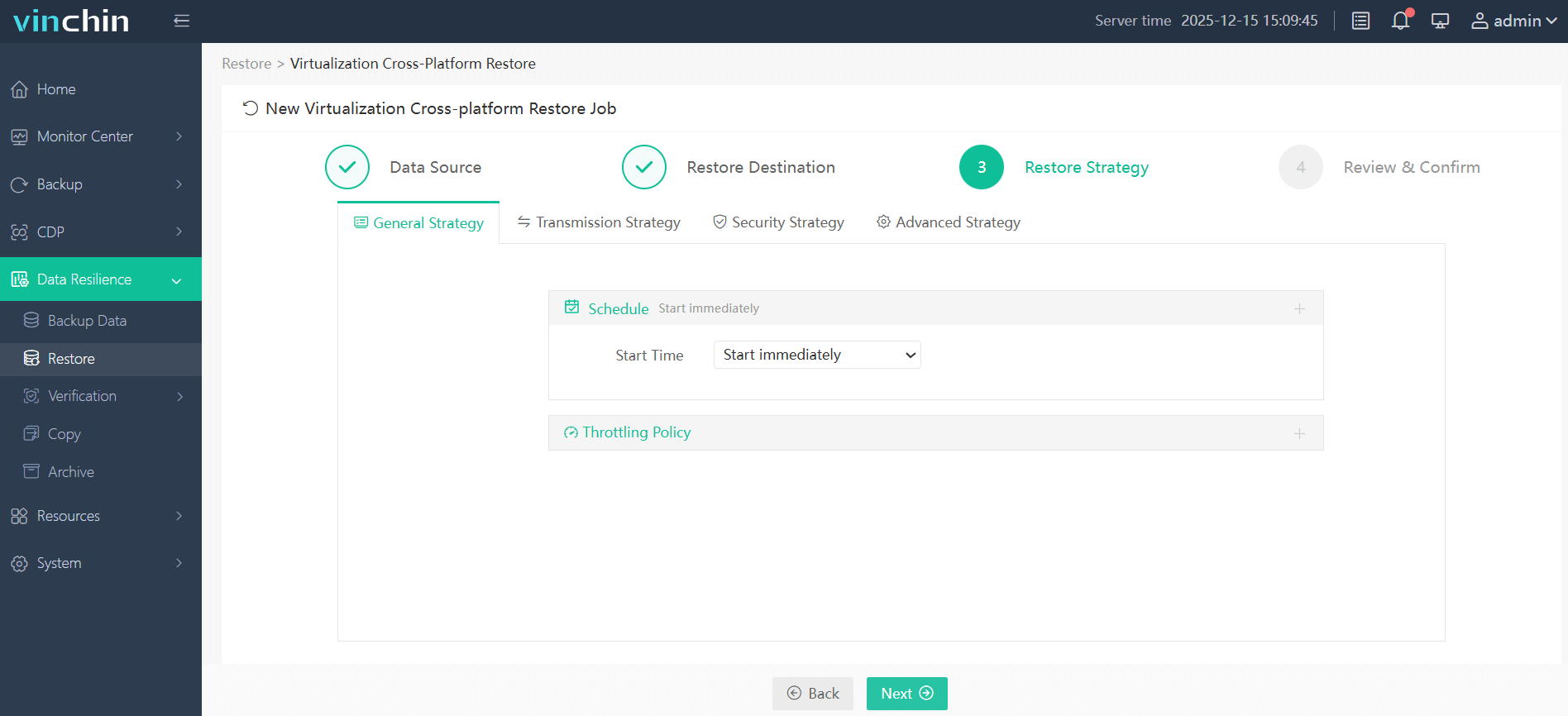
3. Set the restore strategy
Choose to run the task immediately or schedule it, and configure any needed transfer or throttling policies.
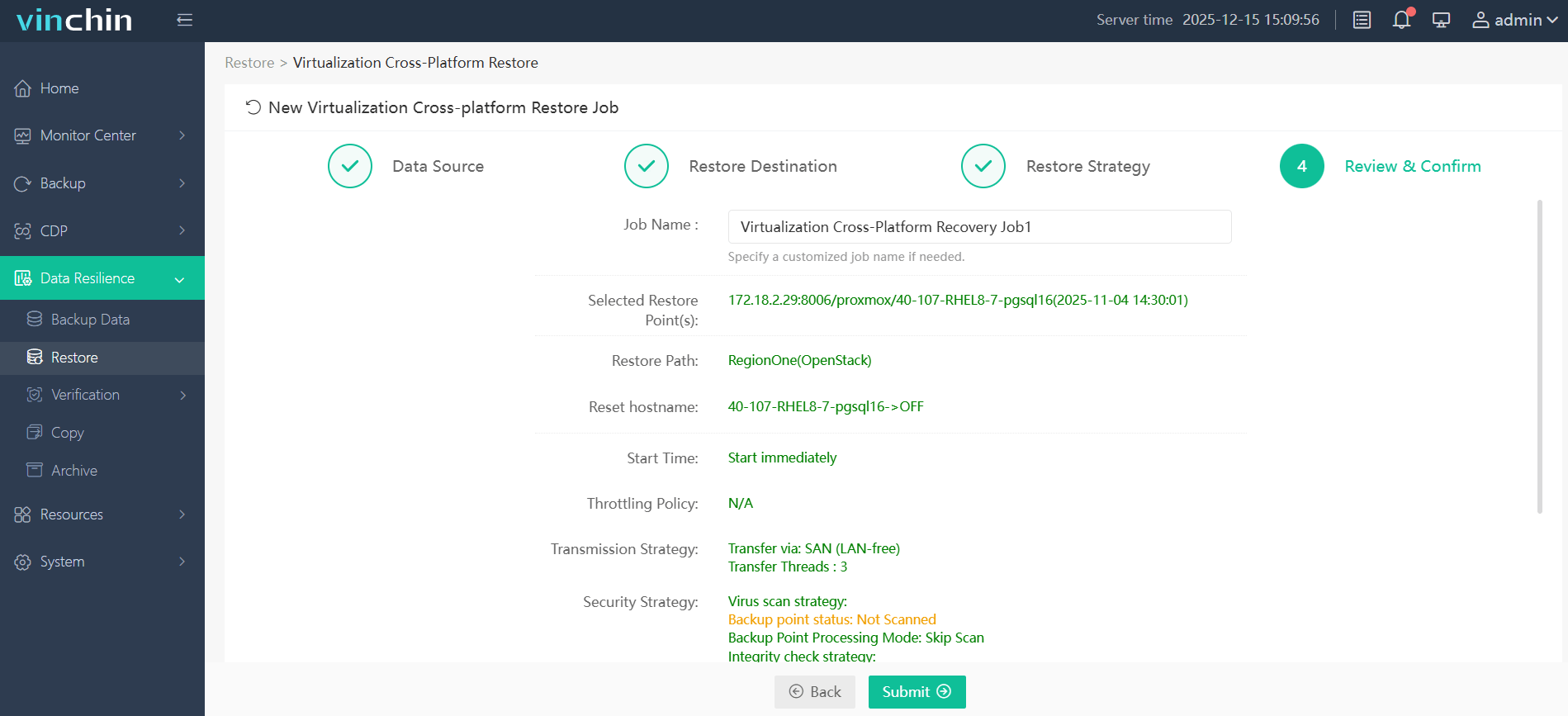
4. Review and submit
Verify all settings on the confirmation page, then click "Submit" to start the cross-platform migration.
Vinchin Backup & Recovery wins trust and good ratings from thousands of enterprises globally. Now it offers a fully-featured 60-day free trial; click the download button below to streamline the migration procedure.
FAQs Related to Proxmox Live Migration Requirements
Q1: Does Proxmox live migration require shared storage?
Yes. Proxmox live migration typically requires shared storage (such as Ceph, NFS, or iSCSI) so that virtual machine disks can be accessed directly during migration without the need for additional data replication, thereby enabling seamless switching.
Q2: Does live migration affect VM performance?
Live migration has minimal impact on performance, but it may temporarily increase resource usage (CPU, memory, and network) during synchronization. In most cases, the VM keeps running smoothly, with only a very brief pause at the final stage.
Q3: How much bandwidth is recommended for live migration?
There’s no fixed minimum, but at least 1 Gbps network bandwidth is generally recommended in small environments. For larger VMs or frequent migrations, 10 Gbps is strongly preferred to reduce migration time and minimize performance impact.
Q4: Can Proxmox live migration work without a cluster?
No. Native Proxmox live migration is a cluster-dependent feature. It requires all migration nodes to join the same cluster for identity authentication, status synchronization and inter-node communication.
Q5: Why does PCI passthrough block live migration?
PCI/GPU passthrough binds the VM directly to physical hardware resources on the source node. These exclusive hardware resources cannot be synchronized or migrated to another node, resulting in live migration failure.
Final Words
Clearing out the Proxmox live migration requirements helps ensure a reliable and seamless VM transfer with minimal downtime, high availability, and optimal resources. For more complex scenarios, such as cross-cluster migration, heterogeneous environments, or disaster recovery, Vinchin Backup & Recovery provides a flexible backup-based approach that supports secure data protection and controlled migration without disrupting production workloads.